Page 89 of 502

Active Workout
The Act. Workout Back programrequ ires your
act ive cooperation. The change between tensing
and releasing helps toimpr ove blood flow to
yo ur muscles. Press against a pressure point as
soon as youfe el it.
Selecting the massage prog ram for the front
seats
Multimedia sy stem:
,Vehicle.a Seats
#Select Driver's Seat orPassenger Seat .
#SelectMassage.
#Select a massage program.
The massage program runs for app roxima tely
8 to 18 minutes, depending on the setting.
#To set the massage intensity: switch High
Intensity onO or off ª.
Resetting the seat and massage settings
Multimedia sy stem:
,Vehicle.a Seats.Reset
#Select YesorNo.
% Only the cur rently selected seat is reset.
Fo lding the front seat backrest forw ards/
back
Wi th th e EASY-ENTRY function, the seat mo ves
fo rw ards if you ha vefolded the seat backrest
fo rw ards. This makes it easier for passengers to
ge t into and out of there ar of theve hicle.
#To fold forw ards: pull seat release handle
1 and fold the seat backrest forw ards as far
as it will go.
The seat mo vesto thefo re most position.
#To fold back: swing back the seat backrest
horizon tally.
If th e seat backrest is not engaged, this will
be shown on the multifunction display of the
Seats and stowing 87
Page 90 of 502

instrument cluster.A wa rning tone also
sounds.
The seat mo vesto the sa ved position.
If th e pr evious seat position can no longer be
set, e.g. because of luggage in there ar foot we ll
or af ter occupants ha veentered there ar of the
ve hicle:
#Pull seat release handle 1again and return
th e seat backrest toan upright position.
The seat loc ksinthe new fore -and-aft posi‐
tion.
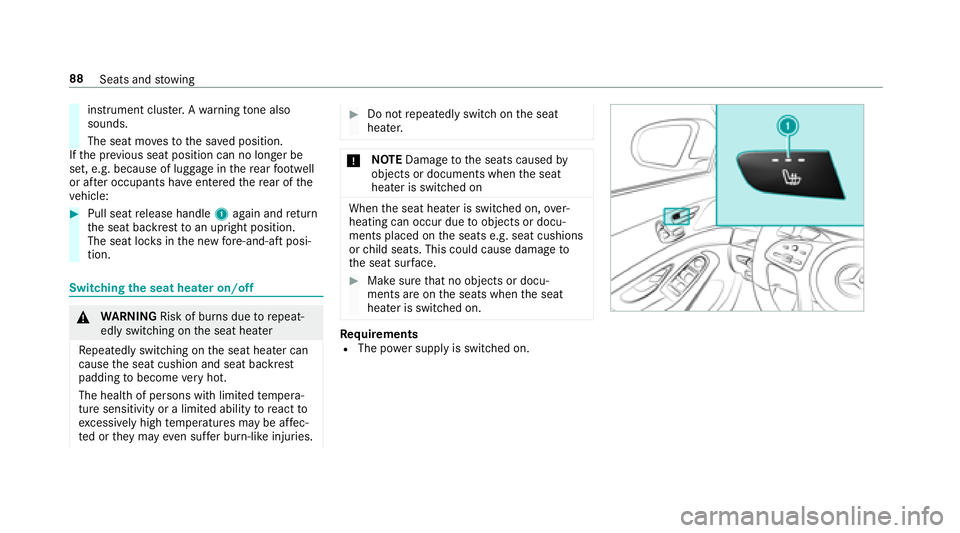
Switching the seat hea ter on/o ff
&
WARNING Risk of burn s duetorepeat‐
edly switching on the seat heater
Re peatedly switching on the seat heater can
cause the seat cushion and seat backrest
padding tobecome very hot.
The health of persons with limited temp era‐
ture sensitivity or a limited ability toreact to
exc essively high temp eratures may be af fec‐
te d or they may even suf fer burn-like injuries.
#Do not repeatedly switch on the seat
heater.
* NO
TEDama getothe seats caused by
objects or documents when the seat
heater is switched on
When the seat heater is switched on, over‐
heating can occur due toobjects or docu‐
ments placed on the seats e.g. seat cushions
or child seats. This could cause damage to
th e seat sur face.
#Make surethat no objects or docu‐
ments are on the seats when the seat
heater is switched on.
Re quirementsRThe po wer supply is switched on.
88
Seats and stowing
Page 91 of 502

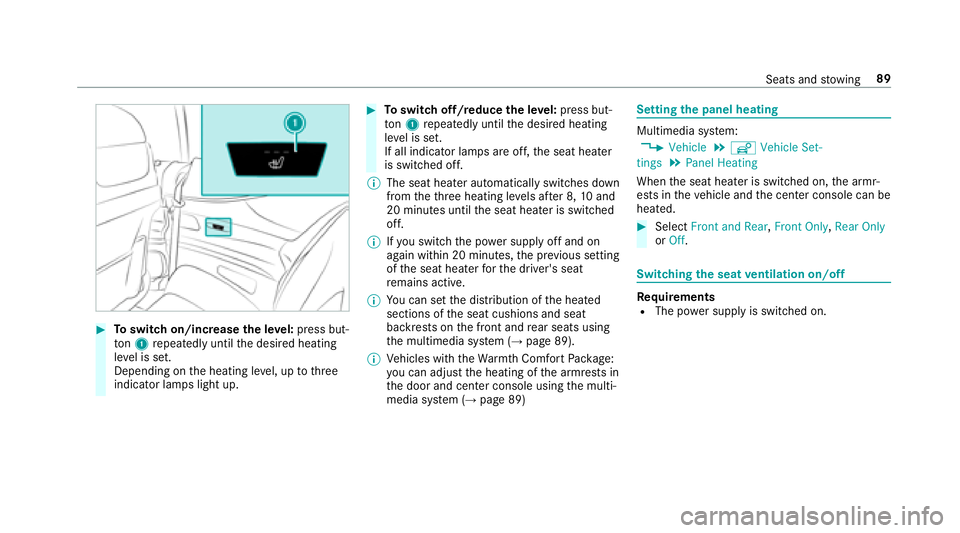
#Toswitch on/increase the le vel:press but‐
to n1 repeatedly until the desired heating
le ve l is set.
Depending on the heating le vel, up tothre e
indicator lamps light up.
#To switch off/reduce the le vel:press but‐
to n1 repeatedly until the desired heating
le ve l is set.
If all indicator lamps are off, the seat heater
is switched off.
% The seat heater automatically switches down
from theth re e heating le vels af ter 8, 10and
20 minutes until the seat heater is switched
off.
% Ifyo u switch th e power supply off and on
again within 20 minutes, the pr evious setting
of the seat heater forth e driver's seat
re mains active.
% You can set the distribution of the heated
sections of the seat cushions and seat
backrests on the front and rear seats using
th e multimedia sy stem (
→page 89).
% Vehicles with theWa rmthComfort Package:
yo u can adjust the heating of the armrests in
th e door and center console using the multi‐
media sy stem (
→page 89)
Setting the panel heating
Multimedia sy stem:
,Vehicle.î Vehicle Set-
tings.Panel Heating
When the seat heater is switched on, the armr‐
ests in theve hicle and the center console can be
heated.
#Select Front and Rear ,Front Only, Rear Only
or Off.
Switching the seat ventilation on/off
Re quirementsRThe po wer supply is switched on.
Seats and stowing 89
Page 92 of 502

#Toswitch on/increase the le vel:press but‐
to n1 repeatedly until the desired ventila‐
tion le vel is set.
Depending on theve ntilation le vel, up to
th re e indicator lamps light up.
#To switch off/reduce the le vel:press but‐
to n1 repeatedly until the desired ventila‐
tion le vel is set.
If all indicator lamps are off, the seat ventila‐
tion is switched off.
% Ifyo uswit ch th e power supply off and on
again within 20 minutes, the pr evious setting
of the seat ventilation forth e driver's seat
re mains active.
Ste ering wheel
Adjusting the steering wheel electrically
&
WARNING Risk of injury from adjusting
th eve hicle settings while theve hicle is in
motion
Yo u could lose cont rol of theve hicle in the
fo llowing situations:
Rifyo u adjust the driver's seat, the head
re stra int, thesteering wheel or the mir ror
while theve hicle is in motion
Rifyo ufa sten your seat belt while theve hi‐
cle is in motion
#Before starting the engine: adjust the
driver's seat, the head restra int, the
st eering wheel or the mir ror and fasten
yo ur seat belt.
&
WARNING Risk of entrapment forch il‐
dren when adjusting thesteering wheel
Children could injure themselves if they
adjust thesteering wheel.
#Ne ver lea vechildren unatte nded inthe
ve hicle.
#When leaving theve hicle, alw aysta ke
th e SmartK eywith you and lock the
ve hicle.
The steering wheel can be adjus ted when the
po we r supp lyis switched off.
90
Seats and stowing
Page 93 of 502

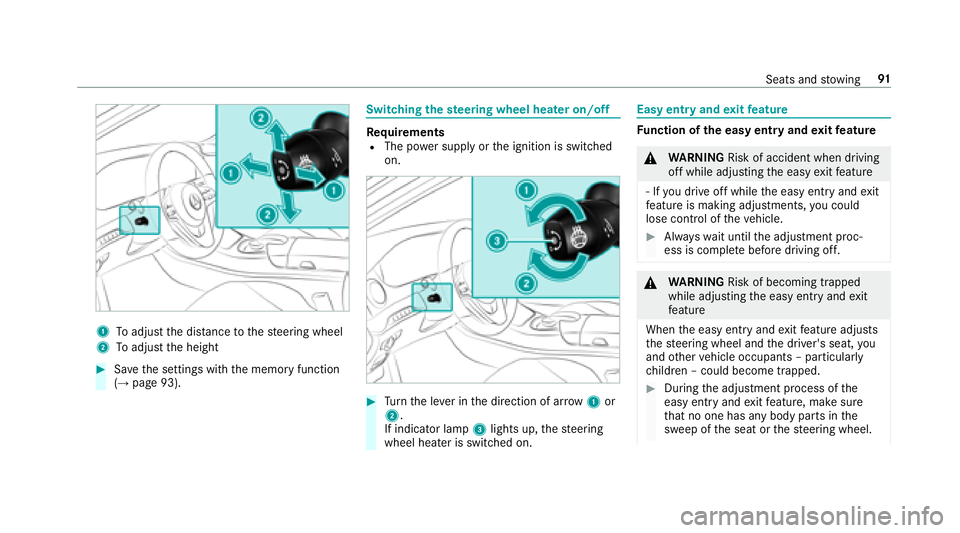
1Toadjust the dis tance tothesteering wheel
2To adjust the height
#Sa ve the settings with the memory function
(→page 93).
Switching thest eering wheel heater on/off
Re quirementsRThe po wer supply or the ignition is switched
on.
#Tu rn the le ver in the direction of ar row1or
2.
If indicator lamp 3lights up, thesteering
wheel heater is switched on.
Easy entry and exitfeature
Fu nction of the easy entry and exitfeature
&
WARNING Risk of accident when driving
off while adjusting the easy exitfeature
‑ If youdr ive off while the easy ent ryand exit
fe ature is making adjustments, you could
lose cont rol of theve hicle.
#Alw ayswa it until the adjustment proc‐
ess is comple tebefore driving off.
&
WARNING Risk of becoming trapped
while adjusting the easy ent ryand exit
fe ature
When the easy ent ryand exitfeature adjusts
th esteering wheel and the driver's seat, you
and other vehicle occupants – particular ly
ch ildren – could become trapped.
#During the adjustment process of the
easy ent ryand exitfeature, make sure
th at no one has any body parts in the
sweep of the seat or thesteering wheel.
Seats and stowing 91
Page 94 of 502

Ifth ere is a risk of becoming trapped bythe
st eering wheel:
#Mo vethe adjustment le ver of thesteer‐
ing wheel.
The adjustment process is stopped.
If th ere is a risk of becoming trapped bythe
driver's seat:
#Press the seat adjustment switch.
The adjustment process is stopped.
Ve hicles with memory function: You can stop
th e adjustment process bypressing one of the
memory position buttons of the memory func‐
tion.
& WARNING Risk of becoming trapped
duri ng acti vation of the easy ent ryand
ex itfeature bychildren
If ch ildren activate the easy ent ryand exit
fe ature, they can become trapped, part icu‐
lar lywhen unat tended.
#Ne ver lea vechildren unatte nded inthe
ve hicle.
#When leaving theve hicle, alw aysta ke
th e SmartK eywith you and lock the
ve hicle.
Ifth e easy ent ryand exitfeature is active, the
st eering wheel will mo veupwar dsand the driv‐
er's seat will mo veback in thefo llowing situa‐
tions:
RYo u switch the ignition off when the driver's
door is open
RYo u open the driver's door when the ignition
is switched off
% The steering wheel mo ves upwards only if it
has not already reached the upper stop. The
driver's seat mo ves backwards only if it is
not already in there armost position.
The steering wheel and the driver's seat mo ve
back tothe last drive position in thefo llowing
cases:
RYo uswit ch th e power supply or the ignition
on when the driver's door is closed
RYo u close the driver's door when the ignition
is switched on
The last drive position is stored in thefo llowing
situations:
RYo u switch the ignition off
RVe hicles with memory function: Call up
th e seat settings via the memory function.
RVe hicles with memory function: Save the
seat settings via the memory function.
Ve hicles with memory function: Press one of
th e memory function sa ved position buttons to
st op the adjustment process.
Setting the easy entry and exitfeature
Multimedia sy stem:
,Vehicle.î Vehicle Set-
tings.Easy Entry/Exit
#Select Steering Wheel & Seat ,Steering
Wheel Only orOff.
92
Seats and stowing
Page 95 of 502

Usingthe memory function
&
WARNING Risk of an accident if the
memory function is used while driving
If yo u use the memory function on the driv‐
er's side while driving, you could lose cont rol
of theve hicle as a result of the adjustments
being made.
#Use the memory function on the driv‐
er's side when theve hicle is stationar y.
&
WARNING Risk of entrapment when set‐
ting the seat with the memory function
When the memory function adjusts the seat
or steering wheel, you and other vehicle
occupants – particularly children – could
become trapped.
#During the setting procedure of the
memory function, ensure that no body
parts are in the sweep of the seat or
th esteering wheel.
#If somebody becomes trapped, immedi‐
ately release the memory function posi‐
tion button.
The adjustment process is stopped.
&
WARNING Risk of entrapment if the
memory function is activated bychildren
Children could become trapped if they acti‐
va te the memory function, particularly when
unattended.
#Ne ver lea vechildren unatte nded inthe
ve hicle.
#When leaving theve hicle, alw aysta ke
th eke ywit hyo u and lock theve hicle.
The memory function can be used when the igni‐
tion is switched off.
St oring
The memory function is only available in vehicles
with the memory pac kage .
Seat adjustments for up tothre e people can be
st ored and called up using the memory function. The
following settings can be stored forth e front
seats:
RSeat, backrest, head restra int position and
con tour of the seat backrest in the lumbar
re gion
RAc tive multicontour seat: side bols ters of the
seat backrest, shoulder of the seat backrest,
conto ur ofthe seat backrest, dynamic func‐
tion le vel
RSeat heate r:distribution of the heated sec‐
tions of the seat cushion and seat backrest
RDriver's side: steering wheel position and
position of the outside mir rors on the driver's
and front passenger sides
RHead-up Display
Seats and stowing 93
Page 96 of 502

#Setthe seat, thesteering wheel, the head-up
display and the outside mir rorto the desired
position.
#Brief lypress memory button M and then
press preset position button 1,2 or 3 within
th re e seconds.
An acoustic signal sounds. The settings are
st ored.
#To call up: press and hold there leva nt pre‐
set position button 1,2 or 3 until the front
seat, thesteering wheel, head-up display and
outside mir ror are in thestored position.
% Ifyo ure lease the preset position button, the
seat, steering wheel and mir ror setting func‐
tions stop immediatel y.
Ve hicles with an Active Multicon tour
Seat Package: The setting of the active mul‐
ticon tour seat or the 4-w aylumbar support
is still car ried out.
Ve hicles without theAc tive Multicon tour
Seat Package: Adjustment of the 4-w ay
lumbar support is still car ried out.
St ow age areas
Note s on loading theve hicle
&
WARNING Risk ofexhaust gas poisoning
Combustion engines emit poisonous exhaust
ga ses such as carbon monoxide. Exhaust
ga ses can enter theve hicle interior if the
trunk lid is open when the engine is running,
especially if theve hicle is in motion.
#Alw ays switch off the engine before
opening the trunk lid.
#Ne ver drive with the trunk lid open.
&
WARNING Risk of injury from unsecured
items in theve hicle
If objects, luggage or loads are not secured
or not secured suf ficientl y,they could slip,
tip ove r or be throw n around and thereby hit
ve hicle occupants.
There is a risk of injur y,particularly in the
ev ent of sudden braking or a sudden change
in direction.
#Alw aysstow objects in such a wayth at
th ey cannot be thro wn around.
#Before the journe y,secure objects, lug‐
ga ge or loads against slipping or tipping
ove r.
94
Seats and stowing