2018 MERCEDES-BENZ G-CLASS garage door opener
[x] Cancel search: garage door openerPage 12 of 294

General notes .................................. 59
Important safety information ...........59
Trailer stabilization ........................... 61
Warning lamp ................................. 196
Exhaust
see Exhaust pipe
Exhaust check ................................... 125
Exhaust pipe
Cleaning ......................................... 240
Exterior lighting
Cleaning ......................................... 239
see Lights
Exterior mirrors
Adjusting ......................................... 82
Dipping (automatic) .........................8 3
Folding in when locking (on-board
computer) ...................................... 170
Folding in/out (automatically) ......... 83
Folding in/out (electrically) ............. 82
Out of position (troubleshooting) ..... 83
Setting ............................................. 82
Storing settings (memory func-
tion) ................................................. 84
Storing the parking position ............. 83
F
Favorites
Overview ........................................ 205
Filler cap
see Refueling
First-aid kit ......................................... 244
Flat tire
Changing a wheel/mounting the
spare wheel ................................... 275
Preparing the vehicle ..................... 246
Folding the seat backrest (rear)
forwards/back .................................. 212
Frequencies
Mobile phone ................................. 281
Two-way radio ................................ 281
Fuel
Additives ........................................ 285
Consumption statistics .................. 163
Displaying the range ...................... 163
Driving tips .................................... 124
Fuel gauge ....................................... 32
Grade (gasoline) ............................ 284 Important safety notes .................. 284
Premium-grade unleaded gaso-
line ................................................. 284
Problem (malfunction) ................... 122
Refueling ........................................ 120
Tank content/reserve fuel ............. 284
Fuel filler flap
Closing ........................................... 121
Emergency release ........................ 121
Opening ......................................... 120
Fuel level
Calling up the range (on-board
computer) ...................................... 163
Fuel tank
Capacity ........................................ 284
Problem (malfunction) ................... 122
Fuse allocation chart ........................ 255
Fuse box
cargo compartment ....................... 256
Dashboard ..................................... 255
Front-passenger footwell ............... 255
Transmission tunnel ....................... 255
Fuses
Allocation chart ............................. 255
Before changing ............................. 254
Dashboard fuse box ....................... 255
Fuse allocation chart ..................... 255
Fuse box in the cargo compart-
ment .............................................. 256
Fuse box in the front-passenger
footwell .......................................... 255
Fuse box in the transmission tun-
nel ................................................. 255
Important safety notes .................. 254
G
Garage door openerClearing the memory ..................... 229
General notes ................................ 226
Important safety notes .................. 227
Opening/closing the garage doo r..2 29
Problems when programming ........2 29
Programming the remote control ... 227
Synchronizing the rolling code ....... 228
Gasoline ............................................. 284
Gear indicator (on-board com-
puter) ..................................................1 71
10Index
Page 17 of 294

R
RACE TIMER (on-board computer,
Mercedes-AMG vehicles).................. 172
RACETIMER
Deleting all laps .............................1 72
Displaying and starting .................. 172
Displaying the intermediate time ... 172
Resetting the current lap ...............1 72
Starting a new lap .......................... 172
Stopping ........................................ 172
Radiator cover ................................... 231
Radio
Selecting a station ......................... 165
Radio mode
see also Digital Operator's Man-
ual ..................................................2 03
Radio-wave reception/transmis-
sion in the vehicle
Declaration of conformity ................ 26
Rear bench seat
Folding forward .............................. 213
Rear compartment
Setting the air vents ......................1 03
Rear door
Display message ............................ 190
Important safety notes .................... 68
Rear fog lamp
Display message ............................ 180
Replacing bulbs ............................... 92
Switching on/off .............................. 87
Rear seat bench
Folding into an upright position ..... 213
Rear view camera
Cleaning instructions ..................... 240
Coupling up a trailer function ........1 48
Display in the multimedia system .. 147
Function/notes .............................1 46
General notes ................................ 146
Switching on/off ........................... 147
Rear window defroster
Problem (malfunction) ................... 101
Switching on/off ........................... 101
Rear window wiper
Replacing the wiper blade ................ 94
Switching on/off .............................. 94
Rear-view mirror
Dipping (automatic) ......................... 83 Reflective safety jacket
.................... 243
Refrigerant (air-conditioning sys-
tem)
Important safety notes .................. 287
Refueling
Fuel gauge ....................................... 32
Important safety notes .................. 120
R
efueling process .......................... 120
see Fuel
Remote control
Programming (garage door
opener) .......................................... 227
Replacing bulbs
Backup lamp .................................... 92
Brake lamp ...................................... 92
Important safety notes .................... 89
Overview of bulb types .................... 90
Rear fog lamp .................................. 92
Tail lamp .......................................... 92
Turn signal (rear) .............................. 92
Turn signals (front) ........................... 91
Reporting safety defects .................... 27
Rescue card ......................................... 28
Reserve (fuel tank)
see Fuel
Reserve fuel
Display message ............................ 183
Warning lamp ................................. 199
Residual heat
Switching on/off ........................... 102
Restraint system
Display message ............................ 177
Introduction ..................................... 38
Warning lamp ................................. 198
Warning lamp (function) ................... 38
Reversing lamps (display mes-
sage) ................................................... 180
Roadside Assistance (breakdown) .... 25
Roof lining and carpets (cleaning
guidelines) ......................................... 242
Route (navigation)
see Route guidance (navigation)
Route guidance
see also Digital Operator's Man-
ual .................................................. 203
Route guidance (navigation) ............ 164
Route guidance active ...................... 164
Index15
Page 38 of 294
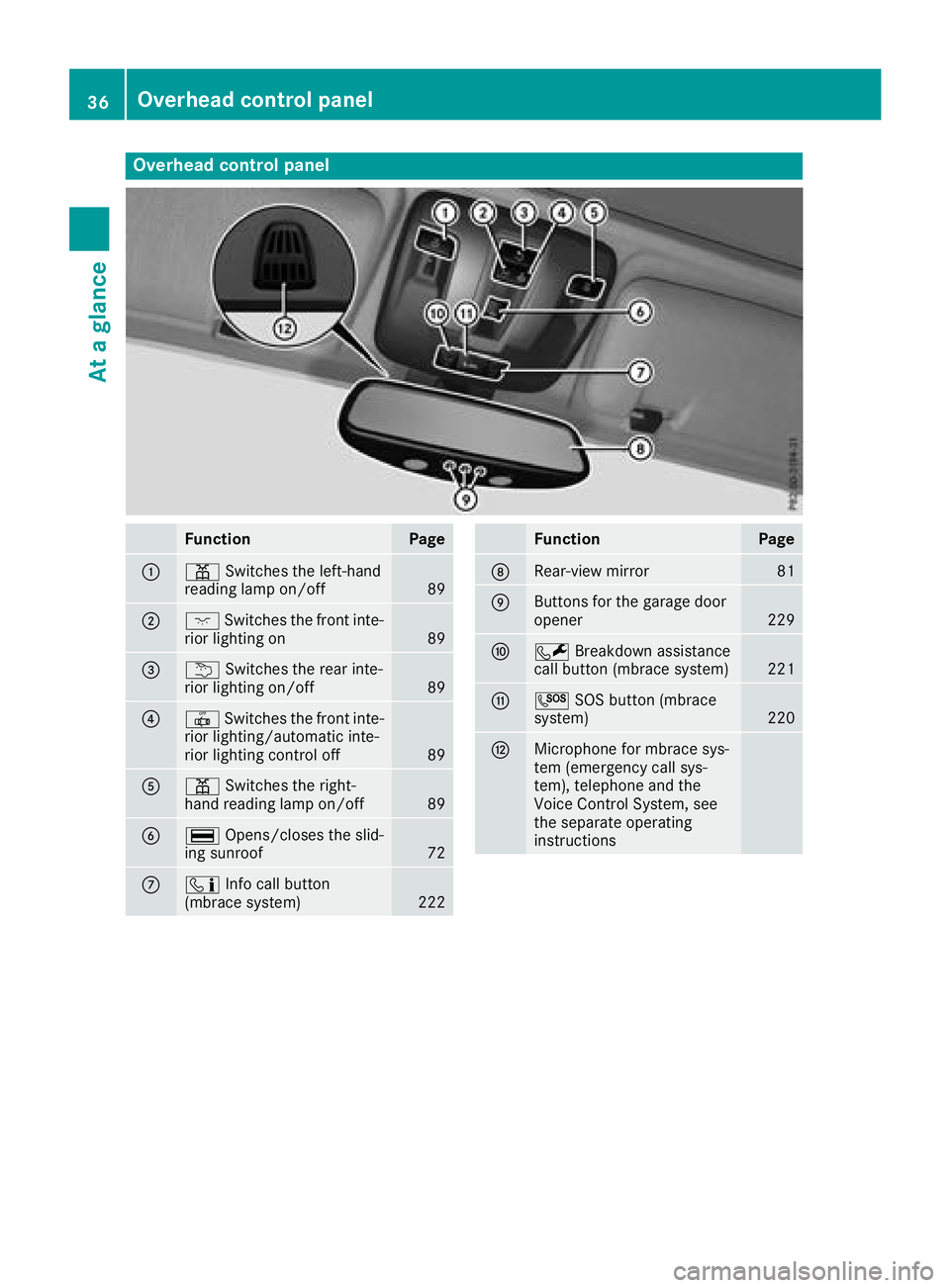
Overhead control panel
FunctionPage
:pSwitches the left-hand
reading lamp on/off89
;c Switches the front inte-
rior lighting on89
=u Switches the rear inte-
rior lighting on/off89
?| Switches the front inte-
rior lighting/automatic inte-
rior lighting control off
89
Ap Switches the right-
hand reading lamp on/off89
B¡ Opens/closes the slid-
ing sunroof72
Cï Info call button
(mbrace system)222
FunctionPage
DRear-view mirror81
EButtons for the garage door
opener229
FF Breakdown assistance
call button (mbrace system)221
GG SOS button (mbrace
system)220
HMicrophone for mbrace sys-
tem (emergency call sys-
tem), telephone and the
Voice Control System, see
the separate operating
instructions
36Overhead control panel
At a glance
Page 228 of 294
Information on Roadside Assistance
(Ypage 25).
Downloading routes
Downloading routes allows you to transfer and
save predefined routes in the navigation sys-
tem.
A route can be prepared and sent by either a
customer service representative or under "Own-
ers Online" at http://www.mbusa.com.
Each route can include up to four way points.
Once a route has been received by the naviga-
tion system, you will see theDo
youwanttostart route guidance? DestinationReceived destination has been savedin "Previous destinations".message on
the multimedia system display.
The route is saved.
XTo start route guidance: selectYes.
An overview of the route is shown in the dis-
play.
If you select No
, the saved route can be called
up later in the navigation menu.
XSelect Start.
Route guidance starts.
Downloaded and saved routes can be called up
again.
Speed alert
You can define the upper speed limit, which
must not be exceeded by the vehicle.
If this selected speed is exceeded by the vehicle,
a message will be sent to the Customer Assis-
tance Center. The Customer Assistance Center
then forwards this information to you.
You can select the way in which you receive this
information beforehand. Possible options
include text message, e-mail or an automated
call.
The data you receive contains the following
information:
Rthe location where the speed limit was excee-
ded
Rthe time at which the speed limit was excee-
ded
Rthe selected speed limit which was exceeded
Geo fencing
Geo fencing allows you to select areas which the
vehicle should not enter or leave. You will be
informed if the vehicle crosses the boundaries
of the selected areas. You can select the way in
which you receive this information beforehand.
Possible options include text message, e-mail or an automated call.
The area can be determined as either a circle or
a polygon with a maximum of ten corners. You
can specify up to ten areas simultaneously. Dif-
ferent settings are possible for each area.
These settings can be called up under "Owners
Online" at http://www.mbusa.com.
Alternatively, you can trigger an Info call and
notify the customer service representative that
you wish to activate geo-fencing.
Currently inactive areas can be activated by text
message.
Triggering the vehicle alarm
With this function, you can trigger the vehicle's
panic alarm via text message. An alarm sounds
and the exterior lighting flashes. Depending on
the setting, the panic alarm lasts five or ten sec-onds. Afterwards, the alarm switches off.
Brush guard (USA only)
If the brush guard has to be removed, contact a
qualified specialist workshop.
Garage door opener
General notes
You can use the HomeLink®garage door opener
integrated into the rear-view mirror to operate
up to three different gate/garage door opener
systems.
Certain garage door drives are incompatible
with the integrated garage door opener. If you
have difficulty programing the integrated garage
door opener, contact a Mercedes-Benz Service
Center.
226Features
Stowage and features
Page 229 of 294
Alternatively, you can call the following tele-
phone assistance services:
RUSA:Mercedes-Benz Customer Assistance
Center at 1-800-FOR-MERCedes
RCanada: Customer Service at
1-800-387-0100
RHomeLink®hotline 1-800-355-3515 (free of
charge)
More information on HomeLink
®and/or com-
patible products is also available online at
http://www.homelink.com.
Notes on the declaration of conformity
(
Ypage 26).
USA: FCC ID: CB2HMIHL4
Canada: IC: 279B-HMIHL4
USA only:
This device complies with Part 15 of the FCC
Rules. Operation is subject to the following two
conditions:
1. This device may not cause harmful interfer-
ence, and
2. this device must accept any interference
received, including interference that may cause
undesired operation.
Any unauthorized modification to this device
could void the user's authority to operate the
equipment.
Canada only:
This device complies with RSS-210 of Industry
Canada. Operation is subject to the following
two conditions:
1. This device may not cause harmful interfer-
ence, and
2. this device must accept any interference
received, including interference that may cause
undesired operation.
Any unauthorized modification to this device
could void the user's authority to operate the
equipment.
Important safety notes
GWARNING
When you operate or program the garage door
with the integrated garage door opener, per-
sons in the range of movement of the garage
door can become trapped or struck by the
garage door. There is a risk of injury.
When using the integrated garage door
opener, always make sure that nobody is
within the range of movement of the garage
door.
GWARNING
Combustion engines emit poisonous exhaust
gases such as carbon monoxide. Inhaling
these exhaust gases leads to poisoning. There
is a risk of fatal injury. Therefore never leave
the engine running in enclosed spaces with-
out sufficient ventilation.
Only operate the following garage doors using
the garage door opener:
Rgarage doors with a safety stop and reversing
function
Rgarage doors which conform to the current
U.S. safety standards
When programming a garage door opener, park
the vehicle outside the garage. Do not run the
engine while programming.
Programming
Programming
Pay attention to the "Important safety notes"
(Ypage 227).
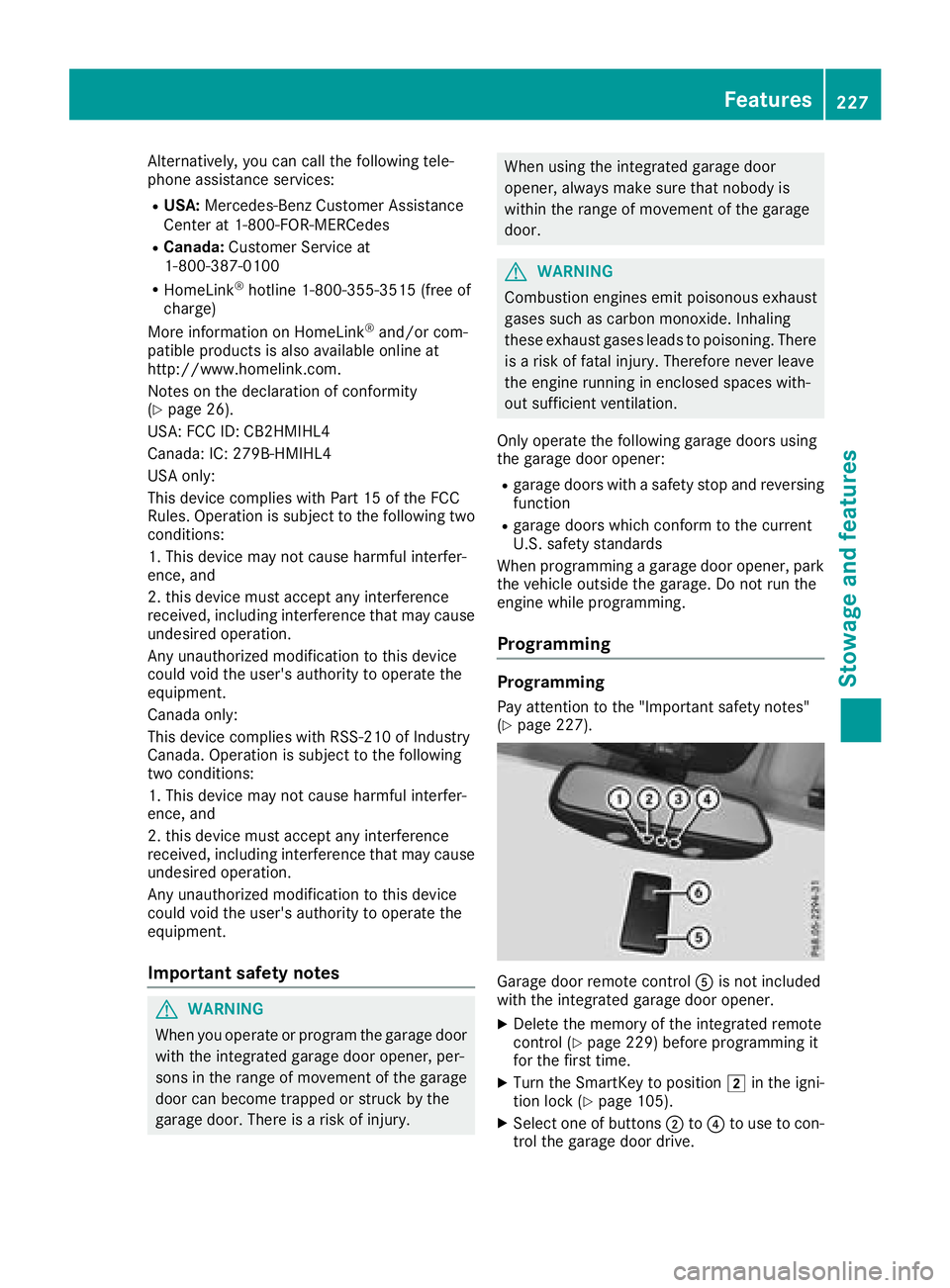
Garage door remote control Ais not included
with the integrated garage door opener.
XDelete the memory of the integrated remote
control (Ypage 229) before programming it
for the first time.
XTurn the SmartKey to position 2in the igni-
tion lock (Ypage 105).
XSelect one of buttons ;to? to use to con-
trol the garage door drive.
Features227
Stowag ean d features
Z
Page 230 of 294
XTo start programming mode:press and
hold one of buttons ;to? on the integrated
garage door opener.
The garage door opener is now in program-
ming mode. After a short time, indicator
lamp :will start flashing. It flashes approx-
imately once per second.
Indicator lamp :flashes immediately the
first time that the transmitter button is pro-
grammed. If this transmitter button has
already been programmed, indicator lamp :
will only start flashing at a rate of once a sec-
ond after 20 seconds have elapsed.
XContinue to hold the transmitter button.
XTo program the remote control: point
transmitter button Bof remote control A
towards the transmitter buttons on the rear-
view mirror at a distance of 2 to 12 in (5 to
30 cm).
XKeep transmitter button Bon remote control
A pressed until indicator lamp :starts to
flash rapidly.
When indicator lamp :flashes rapidly: pro-
gramming is finished.
XRelease transmitter buttons ;,=or? on
the integrated remote control and transmitter
button Bon remote control A.
If indicator lamp :does not flash rapidly and
goes out after approximately 20 second s:
repeat the programming process for the cor-
responding button on the rear-view mirror.
When doing so, vary the distance between
remote control Aand the rear-view mi
rror.
The required distance between remote con-
trol Aand the integrated garage door opener
depends on the garage door drive system.
Several attempts might be necessary. You
should test every position for at least
20 seconds before trying another position.
If the garage door system works with a rolling
code, you must synchronize the remote control
integrated in the rear-view mirror with the
garage door system receiver after program-
ming.
You can find further information on this in the
operating instructions of the garage door sys-
tem.
Synchronizing the rolling code
Pay attention to the "Important safety notes"
(Ypage 227).
If the garage door system uses a rolling code,
you will also have to synchronize the garage door system with the integrated garage door
opener in the rear-view mirror. To do this you will
need to use the programming button on the door
drive control panel. The programming button
may be located in different places depending on
the manufacturer. It is usually located on the
door drive unit on the garage ceiling.
Familiarize yourself with the garage door drive
operating instructions, e.g. under "Program-
ming additional remote controls", before carry-
ing out the following steps.
Your vehicle must be within reach of the garage
door or gate opener drive. Make sure that nei-
ther your vehicle nor any persons/objects are
present within the sweep of the door or gate.
Observe the safety notes when performing the
rolling code synchronization (
Ypage 227).
XTurn the SmartKey to position
2in the igni-
tion lock (Ypage 105).
XGet out of the vehicle.
XPress the programming button on the door
drive unit.
You now have 30 seconds to initiate the next
step.
XGet into the vehicle.
XPress previously programmed button ;,=
or ? on the integrated garage door opener
repeatedly until the door closes.
The rolling code synchronization i
s then com-
plete.
Notes on programming the remote con-
trol
Canadian radio frequency laws require a "break"
(or interruption) of the transmission signals
after broadcasting for a few seconds. Therefore,
these signals may not last long enough for the
integrated remote control to recognize the sig-
nal during programming. Comparable with
Canadian law, American garage door openers
also have a built-in "interruption".
Proceed as follows:
Rif you live in Canada.
Rif you have difficulties programming the
garage door opener (regardless of where you
live) when following the programming steps.
XPress and hold one of buttons ;to? on the
integrated garage door opener until the inte-
grated remote control is successfully set up.
XSimultaneously press transmitter button B
on remote control Aand hold for two sec-
228Features
Stowage and features
Page 231 of 294
onds. Then let go for 2 seconds, press again
and hold for 2 seconds.
XRepeat this sequence on transmitter button
Bon remote control Auntil the frequency
signal is established.
XIf the setup procedure is successful, indicator
lamp :flashes once slowly and goes out
after a few seconds.
If indicator lamp :does not flash slowly and
then go out: repeat the programming process
for the corresponding button on the rear-view
mirror. When doing so, vary the distance
between remote control Aand the rear-view
mirror.
The required distance between remote con-
trol Aand the integrated garage door opener
depends on the garage door drive system.
Several attempts might be necessary. You
should test every position for at least
20 seconds before trying another position.
The required distance between remote control
A and the integrated garage door opener
depends on the garage door drive system. Sev-
eral attempts might be necessary. You should
test every position for at least 25 seconds
before trying another position.
Problems when programming
If you have problems when programming the
integrated remote control, please note the fol-
lowing:
RCheck the transmitter frequency used by
garage door drive remote control Aand
whether it is supported. The transmitter fre-
quency can usually be found on the back of
remote control Afor the garage door drive.
The integrated remote control is compatible
with devices that have units which operate in
the frequency range of 280 to 390 MHz.
RReplace the batteries in remote control A.
This increases the probability of remote con-
trol Asending a strong and precise signal to
the integrated remote control on the rear-
view mirror.
RWhen programming, hold remote control A
at varying distances and angles from the
transmitter button that you are programming.
Try various angles at a distance between 2and
12 inches (5to 30 cm) or at the same angle
but at varying distances.
RIf a further remote control Ais available for
the same garage door drive, repeat the same
programming steps with this remote control A. Before performing these steps, make sure
that new batteries have been installed in
garage door drive remote control A.
RNote that some remote controls only transmit
for a limited amount of time (the indicator
lamp on the remote control goes out). Press
button Bon remote control Aagain before
transmission ends.
RAlign the antenna cable of the garage door
opener unit. This can improve signal trans-
mission.
Opening/closing the garage door
Once programmed, the integrated remote con-
trol will assume the function of the garage door
system's remote control. Please also read the
operating instructions for the garage door sys-
tem.
XTurn the SmartKey to position in the ignition
lock 2(Ypage 105).
XPress one of buttons ;to? on the integra-
ted remote control in the rear-view mirror that
is programmed to operate the garage door.
Garage door system with fixed code: indicator
lamp :lights up continuously.
Garage door system with rolling code: indica-
tor lamp :flashes briefly and then lights up
for approximately two seconds. This is repea-
ted for up to 20 seconds.
The transmitter will transmit a signal for as
long as the transmitter button is being
pressed. The transmission will be halted after a maximum of 20 seconds and indicator
lamp :will flash. Press the transmitter but-
ton again if necessary.
XPress button ;,=or? again if necessary.
Clearing the memory
Make sure that you clear the memory of the
integrated garage door opener before selling the
vehicle.
XTurn the SmartKey to position 2
(Ypage 105) in the ignition lock.
XPress and hold transmitter buttons ;and ?
for approximately 20 seconds until indicator
lamp :flashes rapidly.
The memory of the integrated garage door
opener in the rear-view mirror is cleared.
Features229
Stowage and features
Z