2018 MERCEDES-BENZ E-CLASS WAGON ESP
[x] Cancel search: ESPPage 76 of 506
ProblemPossible causes/consequences and MSolutions
& WARNING Risk of becoming trapped or fata lly injured if reve rsing pr otection is not activated
If yo u close a side windowagain immediately af ter it has been bloc ked or reset, the side window closes
with increased or maximum forc e. The reve rsing feature is then not active.
Pa rts of the body could become trapped in the closing area in the process.
#Make sure that no parts of the body are in the closing area.
#To stop the closing process, release the button or press the button again toreopen the side win‐
do w.
If a side window is obstructed during closing and reopens again slightly:
#Immediately af terth e window is obstructed, pull the cor responding button again until the side window
has closed, and hold the button for an additional second.
The side window is closed with increased forc e.
If a side window is obstructed again during closing and reopens again slightly:
#Re peat the pr evious step.
The side window is closed without the automatic reve rsing function.
74
Opening and closing
Page 78 of 506
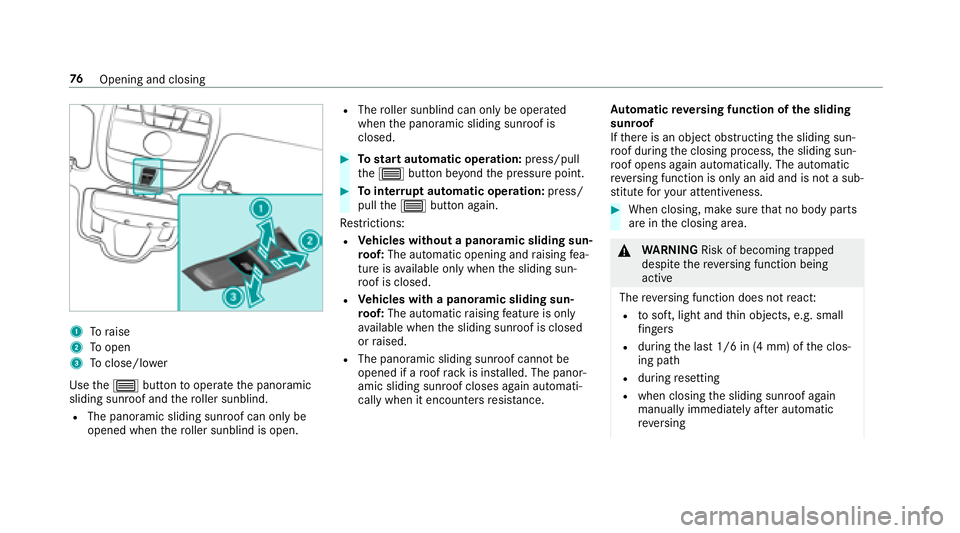
1Toraise
2To open
3Toclose/lowe r
Use the3 button tooperate the panoramic
sliding sunroof and thero ller sunblind.
RThe panoramic sliding sunroof can only be
opened when thero ller sunblind is open.
RThe roller sunblind can only be opera ted
when the panoramic sliding sunroof is
closed.
#To start automatic operation: press/pull
th e3 button be yond the pressure point.
#To inter rupt automatic operation: press/
pull the3 button again.
Re strictions:
RVe hicles without a panoramic sliding sun‐
ro of: The automatic opening and raising fea‐
ture is available only whenthe sliding sun‐
ro of is closed.
RVe hicles with a panoramic sliding sun‐
ro of: The automatic raising feature is only
av ailable when the sliding sunroof is closed
or raised.
RThe panoramic sliding sunroof cannot be
opened if a roof rack is ins talled. The panor‐
amic sliding sunroof closes again automati‐
cally when it encounters resis tance. Au
tomatic reve rsing function of the sliding
sunroof
If th ere is an object obstructing the sliding sun‐
ro of during the closing process, the sliding sun‐
ro of opens again automatically. The automatic
re ve rsing function is only an aid and is not a sub‐
st itute foryo ur attentiveness.
#When closing, make sure that no body parts
are in the closing area.
&
WARNING Risk of becoming trapped
despite there ve rsing function being
active
The reve rsing function does not react:
Rto soft, light and thin objects, e.g. small
fi ngers
Rdu ring the last 1/6 in (4 mm) of the clos‐
ing path
Rduring resetting
Rwhen closing the sliding sunroof again
manually immediately af ter au tomatic
re ve rsing
76
Opening and closing
Page 79 of 506

This meansthat there ve rsing function can‐
not pr event someone being trapped in these
situations.
#When closing, make sure that no body
parts are in the closing area.
#Re lease the button immediately if
somebody becomes trapped.
or
#Press the button in any direction during
th e automatic closing process.
The closing process is stopped.
Au tomatic reve rsing function of thero ller
sunblind
If th ere is an object obstructing thero ller sun‐
blind during the closing process, thero ller sun‐
blind opens again automaticall y.The automatic
re ve rsing function is only an aid and is not a sub‐
st itute foryo ur attentiveness.
#When opening or closing thero ller sunblind,
make sure that no body parts are in the
sweep.
& WARNING Risk of becoming trapped
despite there ve rsing function being
active
In particular, there ve rsing function does not
re act tosoft, light and thin objects, forex am‐
ple small fingers.
This means that there ve rsing function can‐
not pr event entrapment in these situations.
#When opening or closing thero ller sun
blind, make sure that no body parts are
in the sweep.
#Re lease the button immediately if
somebody becomes trapped.
or
#Press the button in any direction during
th e automatic closing process.
The closing process is stopped.
Au tomatic features of the sliding sunroof
%
The term "sliding sunro of" alsorefers to the
panoramic sliding sunroof. By pushing or pulling
the3 button, you can
inter rupt the automatic functions: "Rain closing
function when driving" and "Automatic lo wering
fe ature".
Ra in closing function when driving
Ve hicles with a panoramic sliding sunroof: If
it starts torain, thera ised sliding sunroof is
automatically lo wered while theve hicle is in
motion.
Au tomatic lo weringfeature
Ve hicles with a panoramic sliding sunroof: If
th e sliding sunroof is raised at there ar, the slid‐
ing sunroof is automatically lo wered slightly at
higher speeds. Atlow speeds, it is raised again
automaticall y.
&
WARNING Risk of entrapment byauto‐
matic lo wering of the sliding sunroof
At high speeds thera ised sliding sunroof
automatically lo wersslightly at there ar.
This could trap you or other persons.
Opening and closing 77
Page 103 of 506

&WARNING Risk of entrapment if the
memory function is activated bychildren
Children could become trapped if they acti‐
va te the memory function, particularly when
unattended.
#Ne ver lea vechildren unatte nded inthe
ve hicle.
#When leaving theve hicle, alw aysta ke
th eke ywit hyo u and lock theve hicle.
The memory function can be used when the igni‐
tion is switched off.
Seat adjustments for up tothre e people can be
st ored and called up using the memory function.
The following sy stems can be selected:
RSeat, backrest and head restra int
RSt eering wheel
ROutside mir rors
RHead-up Display
#To save :set the seat, thesteering wheel, the
Head-up Display and the outside mir rorto
th e desired position.
#Press the memory button M toge ther with
one of thestorage position buttons 1,2 or 3.
An acou stic signal sounds. The settings are
st ored.
#To call up: press and hold there leva nt pre‐
set position button 1,2 or 3 until the front
seat is in thestored position.
St ow age areas
Note s on loading theve hicle
&
WARNING Risk ofexhaust gas poisoning
Combustion engines emit poisonous exhaust
ga ses such as carbon monoxide. Exhaust
ga ses can enter theve hicle interior if theta il‐
gate is open when the engine is running,
especially if theve hicle is in motion.
#Alw ays switch off the engine before
opening theta ilgate.
#Ne ver drive with theta ilgate open.
&
WARNING Risk of injury from unsecured
items in theve hicle
If objects, luggage or loads are not secured
or not secured suf ficientl y,they could slip,
Seats and stowing 10
1
Page 107 of 506
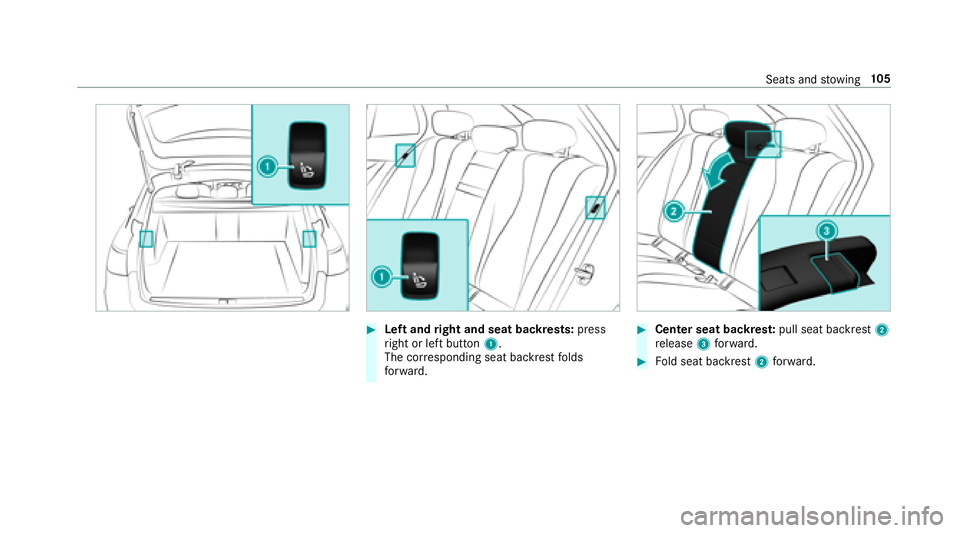
#Left andright and seat backrests: press
ri ght or left button 1.
The cor responding seat backrest folds
fo rw ard.#Center seat backres t:pull seat backrest 2
re lease 3forw ard.
#Fold seat backrest 2forw ard.
Seats and stowing 10
5
Page 108 of 506

Folding there ar seat backrest back
* NO
TEDama getothe seat belt
The seat belt could become trapped and thus
damaged when folding back the seat back‐
re st.
#Make sure that the seat belt is not trap‐
ped when folding back the seat back‐
re st.
If th e seat backrest is not engaged and loc ked,
th is will be shown in the multifunction display in
th e instrument clus ter.
#Mo vethe driver's or front passenger seat for‐
wa rds, if necessar y.
#Fold cor responding seat backrest 1back
until it engages.
Left and right seat backrests: ifth e seat
backrest is not cor rectly engaged, this will be
shown in the multifunction display in the
instrument clus ter.
Center seat backres t:ifth e seat backrest is
not cor rectly engaged, red lock verification
indicator 2will be visible. Lo
cking the center rear seat backrest
Lock the center seat backrest if youwa ntto
secure the cargo compartment from unauthor‐
ized access. The center seat backrest can then
only be folded forw ard toget her with the left seat
backrest.
Bo th seat backrests must be engaged and joined
to ge ther.
10 6
Seats and stowing
Page 123 of 506
#Closethe loc kable stow age spaces
before starting a journe y.
#Alwaysstow and secure heavy, hard,
pointe d, sharp-edged, fragile or bulky
objects in the trunk/load compartment.
Obser vethe no tes on loading theve hicle.
&
WARNING Risk offire from placing
objects in the mobile phone stowage
compartment
If yo uplac e objects inthe mobile phone
stow age compartment, they may heat up
exc essively and even catch fire .
#Do not place additional objects, espe‐
cially those mode of me tal, in the
mobile phone stowage compartment.
* NO
TEDama getoobjects caused by
placing them in the mobile phone stow‐
age compartment
If yo u place objects in the mobile phone
stow age compartment, these may be dam‐
aged byelectromagnetic fields.
#Do not place credit cards, storage
media or other objects sensitive to
electromagnetic fields in the mobile
phone stowage compartment.
* NO
TEDama getothe mobile phone
stow age compartment caused byliquids
If liquids enter the mobile phone stowage
compartment, the compartment may be
damaged.
#Ensure that no liquids enter the mobile
phone stowage compartment.
RDepending on theve hicle equipment, the
mobile phone is connected totheve hicle's
ex terior antenna via thech arging module.
RThe charging function and wireless connec‐
tion of the mobile phone totheve hicle's
ex terior antenna are only available if the igni‐
tion is switched on.
RSmall mobile phones may not be able tobe
ch arge d in every position of the mobile
phone stowage compartment.
RLargemobile phones which do not rest flat in
th e mobile phone stowage compartment may
not be able tobe charge d or connec ted with
th eve hicle's exterior antenna.
RThe mobile phone may heat up during the
ch arging process. The mobile phone can be
cooled in the mobile phone stowage com‐
partment when the air conditioning sy stem is
switched on. The cooling output in the
mobile phone stowage compartment is high‐
est when the controller in theglov e box is
closed.
RTo ensure more ef ficient charging and con‐
nection with theve hicle's exterior antenna,
re mo vethe pr otective co ver from the mobile
phone.
Seats and stowing 12
1
Page 125 of 506
Exterior lighting
Lighting systems and your responsibility
The various lighting sy stems of theve hicle are
only aids. The driver of theve hicle is responsible
fo r cor rect vehicle illumination in accordance
with the pr evailing light and visibility conditions,
legal requirements and traf fic situation.
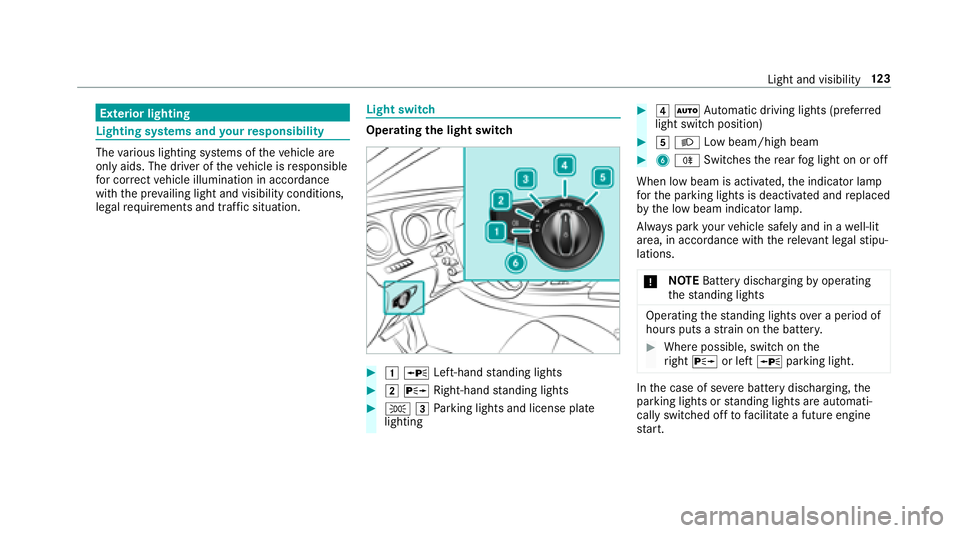
Light switch
Opera ting the light switch
#1W Left-hand standing lights
#2 X Right-hand standing lights
#T 3Parking lights and license plate
lighting
#4 Ã Automatic driving lights (prefer red
light switch position)
#5 L Low beam/high beam
#6R Switches there ar fog light on or off
When low beam is activated, the indicator lamp
fo rth e parking lights is deactivated and replaced
by the low beam indicator lamp.
Alw ays park your vehicle safely and in a well-lit
area, in accordance with there leva nt le galst ipu‐
lations.
* NO
TEBattery discharging byoperating
th est anding lights
Operating thest anding lights over a period of
hours puts a stra in on the batter y.
#Where possible, switch on the
ri ght X or left Wparking light.
Inthe case of se vere battery discharging, the
parking lights or standing lights are automati‐
cally switch ed offtofacilitate a futu reengine
st art.
Light and visibility 12
3