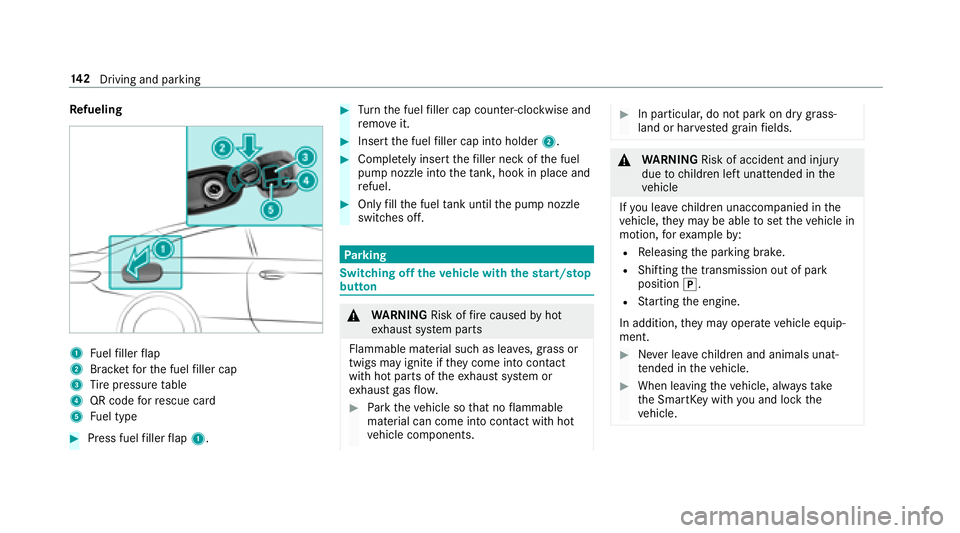
Refueling
1Fuelfiller flap
2Brac ketfo rth e fuel filler cap
3Ti re pressure table
4QR code forre scue card
5Fu el type
#Press fuel filler flap 1.
#Turn the fuel filler cap coun ter-clockwise and
re mo veit.
#Insert the fuel filler cap into holder 2.
#Completely inse rtthefiller neck of the fuel
pump nozzle into theta nk, hook in place and
re fuel.
#Only fill th e fuel tank until the pump nozzle
switches off.
Pa rking
Switching off theve hicle with thest art/s top
button
& WARNING Risk offire caused byhot
ex haust sy stem parts
Flammable material such as lea ves, grass or
twigs may ignite if they come into contact
wi th hot parts of theex haust sy stem or
ex haust gasflow .
#Park theve hicle so that no flammable
material can come into con tact wi thhot
ve hicle components.
#In particular, do not park on dry grass‐
land or har vested grain fields.
&
WARNING Risk of accident and injury
due tochildren left unatte nded inthe
ve hicle
If yo u lea vechildren unaccompanied in the
ve hicle, they may be able toset theve hicle in
motion, forex ample by:
RRe leasing the parking brake.
RShifting the transmission out of park
position j.
RStarting the engine.
In addition, they may operate vehicle equip‐
ment.
#Ne ver lea vechildren and animals unat‐
te nded in theve hicle.
#When leaving theve hicle, alw aysta ke
th e SmartK eywith you and lock the
ve hicle.
14 2
Driving and pa rking
Roof load .................................................. 383
Ro ofrack .................................................. 100
Ro ute ................................................ 249, 25 1
Cal culating .......................................... 249
Displ aying destination information ...... 251
Selecting a type .................................. 250
Selecting an alternative route .............. 251
Selecting notifications ........................ .251
Selecting options ................................. 251
Switching the automatic gasst ation
sear chon/off ...................................... 252
Wi th intermediate destinations ............ 248
Ro ute guidance ....................................... 252
Canceling ............................................ 255
Changing direction .............................. 252
Continuing ...........................................2 55
Destination reached ............................ 253
Fr om an off-road location .................... 255
Lane recommendations ....................... 253
No tes .................................................. 252
Off-road ............................................... 255
To an off- road destination .................. .255
Ro ute guidance
see Navigation announcements Ru
n-flat characteristics
MOExtended tires ................................ 323
S
Saf ety
see Child seat
Saf ety sy stems
see Driving saf etysy stem
Saf etyve st ............................................... 322
Satelli temap ........................................... 263
Satelli te radio
Ac tivating ............................................ 302
Del eting a channel .............................. .304
Display ing EPG information ................ .304
Display ing service information ............ 305
Information .......................................... 301
Moving a channel ................................ 304
Music and sport alerts function .......... 304
Overview ............................................ .303
Re gis tering .......................................... 301
Re strictions ......................................... 301
Saving a channel ................................ .304
Selecting a category ............................ 304
Selecting a channel ............................ .304 Setting
the music and sport alerts ...... 304
Setting the parental control ................. 304
SD card Inserting/removing ............................. 287
Seat ............................................................ 96
4-w aylumbar support .......................... .84
Ad justing (electrically) ........................... 83
Ad justing (manually and electrically) .....
81
Ba
ckrest (rear) folding forw ard .............. 96
Cor rect driver's seat position ................ 80
Fo lding back the backrest (rear
passenger compartment) ..................... .97
Fo lding the backrest forw ards/back .... .88
Locking the backrest (rear passenger
compartment) ....................................... 98
Massage program overview .................. .87
Pa nel heating ......................................... 89
Re setting the settings ........................... .87
Selecting a massage program ...............8 7
Setting options ...................................... 14
Using the memory function .................. .92
Seat see Head restra int
47 2
Index