Page 198 of 486
System limitations
AT TENTION ASSIST is active in the37 mph
(60 km/h) to124mp h(2 00 km/h) speed range.
The functionality of ATTENTION ASSIST is
re stricted, and warnings may be dela yed or not
occur at all in thefo llowing situations:
RIf yo u ha vebeen driving for less than 30
minutes.
RIf th ero ad condition is poor (une venro ad
sur face or po tholes).
RIfth ere is a strong side wind.
RIfyo u adopt a sporty drivingst yle (high cor‐
nering speeds or high rates of acceleration).
RIfth eSt eering Pilot function of Dis tance Pil ot
DISTRONIC is acti ve.
RIfth e time has been set incor rectly.
RIn acti vedriving situations, if youch ange
lanes and vary your speed frequentl y.
The ATTENTION ASSIST tiredness or alertness
assessment is dele ted and restar ted when con‐
tinuing the journey in thefo llowing situations:
RIf yo uswit choff the engine.
RIfyo u unfas tenyo ur seat belt and open the
driver's door (e.g. change drivers or take a
break).
Ac tivating/deactivating ATTENTION ASSIST
Multimedia sy stem:
,9HKLFOH.k $VVLVWDQFH.$77(1�
7,21 $66,67
Selection options
#Select 6WDQGDUG, 6HQVLWLYHor2II.
Traf fic Sign Assist
Fu nction of Traf fic Sign Assist
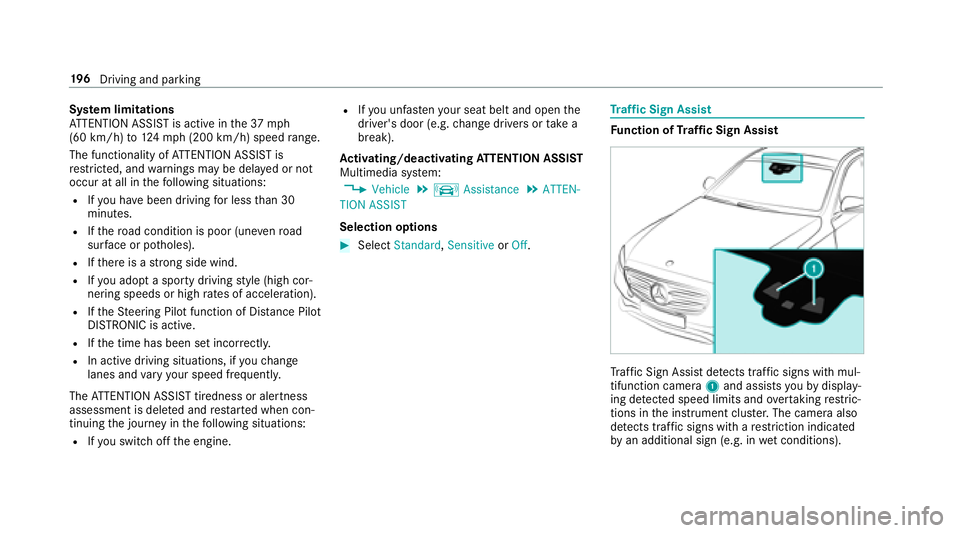
Tr af fic Sign Assist detects traf fic signs wi thmul‐
tifunction camera 1and assist syo uby display‐
ing de tected speed limits and overtaking restric‐
tions in the instrument clus ter.The camera also
de tects traf fic signs wi thare striction indicated
by an additional sign (e.g. in wet conditions).
196
Driving and pa rking
Page 199 of 486
Warning when the maximum permissible
speed is exceeded
The sy stem can warnyouif yo u unin tentional ly
exc eed the maximum permissible speed. Todo
th is, you can specify inthe multimedia sy stem
by how much the maximum permissible speed
can be exceeded before a warning is issued. You
can specify whe ther thewa rning is tobe just a
visual warning or an acoustic one as well.
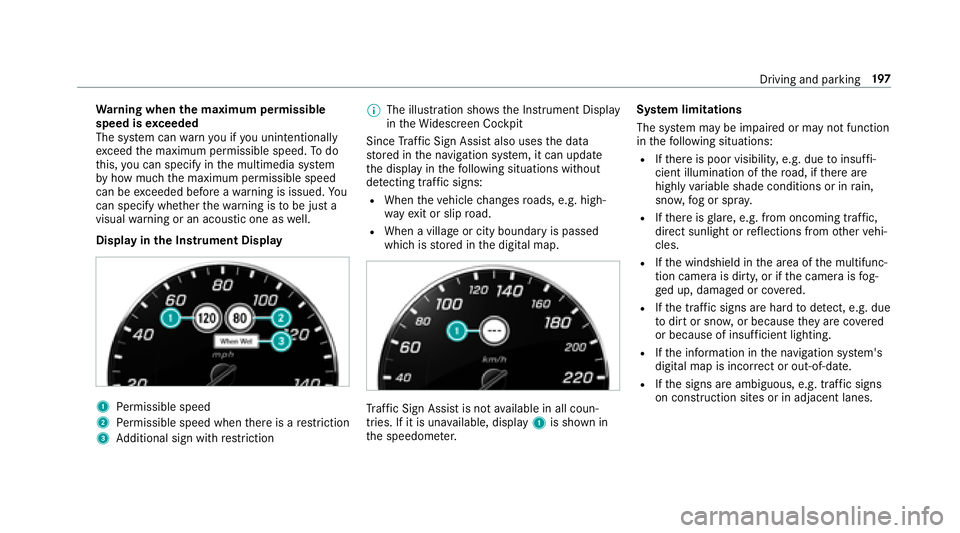
Display in the Instrument Display
1Pe rm issible speed
2Perm issible speed when there is a restriction
3Ad ditional sign with restriction %
The illu stra tion sho wsthe Instrument Display
in theWi descreen Cockpit
Since Traf fic Sign Assist also usesthe data
st ored in the navigation sy stem, it can update
th e display in thefo llowing situations without
de tecting traf fic signs:
RWhen theve hicle changes roads, e.g. high‐
wa yex it or slip road.
RWhen a village or city boundary is passed
which is stored in the digital map.
Traf fic Sign Assist is notavailable in all coun‐
tries. If it is una vailable, display 1is shown in
th e speedome ter. Sy
stem limitations
The sy stem may be impaired or may not function
in thefo llowing situations:
RIf th ere is poor visibility, e.g. due toinsuf fi‐
cient illumination of thero ad, if there are
highly variable shade conditions or in rain,
sno w,fog or spr ay.
RIfth ere is glare, e.g. from oncoming traf fic,
dire ct sunlight or reflections from other vehi‐
cles.
RIf th e windshield in the area of the multifunc‐
tion camera is dirty, or if the camera is fog‐
ge d up, damaged or co vered.
RIfth e tra ffic signs are hard todetect, e.g. due
to dirt or sno w,or because they are co vered
or because of insuf ficient lighting.
RIf th e information in the navigation sy stem's
digital map is incor rect or out-of-date .
RIfth e signs are ambiguous, e.g. traf fic signs
on construction sites or in adjacent lanes.
Driving and park ing19
7
Page 207 of 486
Instrument displayoverview
&
WARNING Risk of accident due toan
instrument display malfunction
If th e instrument display has failed or mal‐
functioned, you cannot recognize function
re strictions applying tosaf etyre leva nt sys‐
te ms.
The operating saf etyof your vehicle may be
impaired.
#Drive on carefull y.
#Have theve hicle checked immediately
at a qualified specialist workshop.
Ifth e operating saf etyof your vehicle is
impaired, park theve hicle safely as soon as pos‐
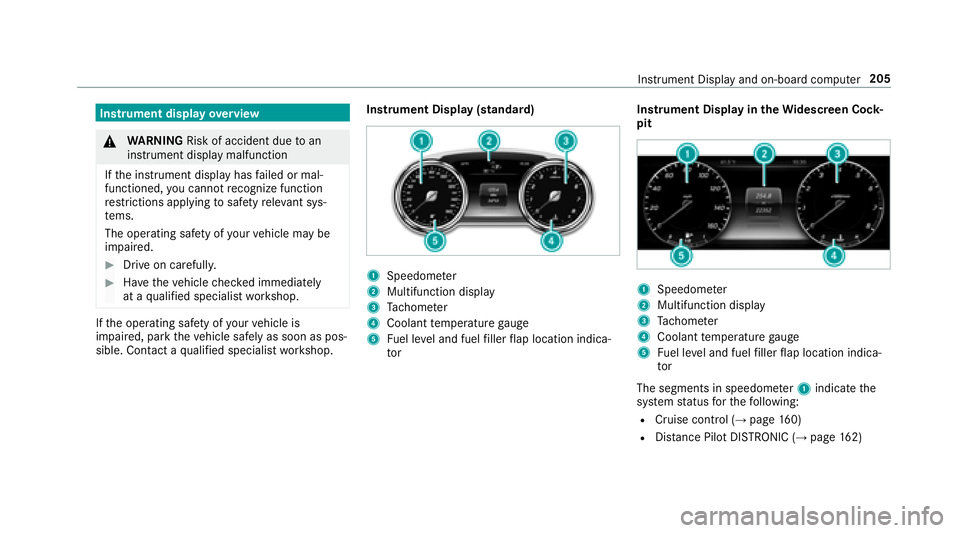
sible. Contact a qualified specialist workshop. Instrument Display (standard)
1Speedome
ter
2Multifunction display
3Ta ch ome ter
4Coolant temp erature gauge
5Fu el le vel and fuel filler flap location indica‐
to r Instrument Display in
theWi descreen Co ck‐
pit
1Speedom eter
2Multifunction display
3Ta ch ome ter
4Coolant temp erature gauge
5Fu el le vel and fuel filler flap location indica‐
to r
The segments in speedome ter1 indica tethe
sy stem status forth efo llowing:
RCruise control (→page 160)
RDis tance Pilot DISTRONIC (→pa ge 162)
Instru ment Display and on-board computer 205
Page 208 of 486
*NO
TEEngine damage duetoexcessively
high engine speeds
The engine will be damaged if youdriv ewit h
th e engine in theov errevving range.
#Do not drive wi th the engine in theove r‐
re vving range.
The fuel supply is inter rupted toprotect the
engine when there d band in tach ome ter3
(o ve rrev ving range) is reached.
During no rmal operating conditions, coolant
te mp erature display 4may rise to248 °F
(120 °C).
& WARNING Danger of burn s when open‐
ing the hood
If yo u open the hood when the engine has
ove rheated or during a fire inthe engine
compartment, you could come into contact
wit h hot gases or other escaping operating
fl uids.
#Before opening the hood, allow the
engine tocool down.
#Intheeve nt of a fire inthe engine com‐
partment, keep the hood closed and
call thefire service.
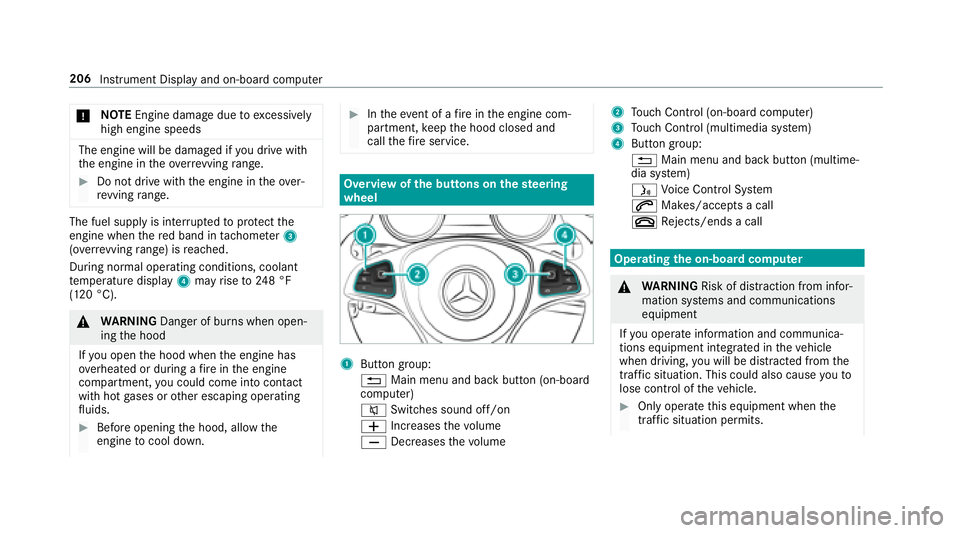
Overview of the butto ns onthest eering
wheel
1But ton group:
% Main menu and ba ckbutton (on-board
computer)
8 Switches sound off/on
W Increases thevo lume
X Decreases thevo lume
2Touch Control (on-board co mputer)
3Touch Control (multimedia sy stem)
4Button group:
% Main menu and back button (multime‐
dia sy stem)
ó Voice Cont rol Sy stem
6 Makes/accepts a call
~ Rejects/ends a call
Ope rating the on-board co mputer
&
WARNING Risk of dist raction from infor‐
mation sy stems and communications
equipment
If yo u operate information and communica‐
tions equipment integ rated in theve hicle
when driving, youwill be distracted from the
traf fic situation. This could also cause youto
lose control of theve hicle.
#Only operate this equipment when the
traf fic situation permits.
206
Instrument Display and on-board compute r
Page 209 of 486
#Ifyo u cannot besure of this, stop the
ve hicle whilst paying attention toroad
and traf fic conditions and ope rate the
equipment with theve hicle stationar y.
You must observ eth e legal requirements forth e
country in whi chyou are cur rently driving when
operating the on-board computer.
% The on-board computer displa ysappear in
th e multifunction display (
→page 208).
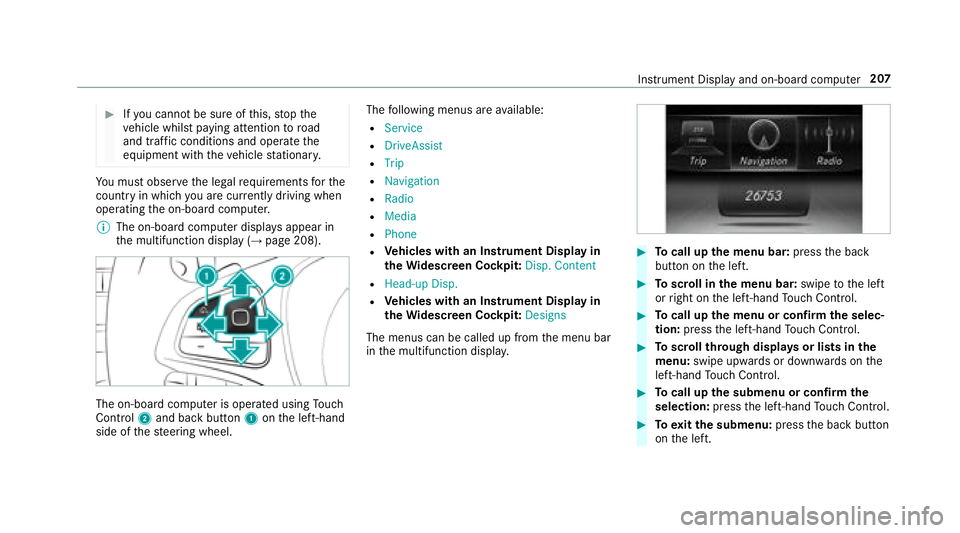
The on-board computer is operated using Touch
Control 2and back butto n1 onthe left-hand
side of thesteering wheel. The
following menus are available:
R6HUYLFH
R'ULYH$VVLVW
R7ULS
R1DYLJDWLRQ
R5DGLR
R0HGLD
R3KRQH
RVe hicles with an Instrument Display in
th eWi descreen Co ckpit: 'LVS� &RQWHQW
R+HDG�XS 'LVS�
RVehicles with an Instrument Display in
th eWi descreen Co ckpit: 'HVLJQV
The menus can be called up from the menu bar
in the multifunction displa y.
#Tocall up the menu bar: pressthe back
button on the left.
#To scroll in the menu bar: swipetothe left
or right on the left-hand Touch Control.
#To call up the menu or confirm the selec‐
tion: press the left-hand Touch Control.
#To scroll through displa ysor lists in the
menu: swipe upwards or down wards on the
left-hand Touch Control.
#To call up the submenu or confirm the
selection: pressthe left-hand Touch Control.
#To exitth e submenu: pressthe back button
on the left.
Instrument Display and on-board computer 207
Page 210 of 486
Ifyo u are brows ing a submenu and youpr ess
and hold the back button on the left, the menu
bar appears.
Displa ysinthe multifunction display
1Outside temp erature
2Drive prog ram
3Transmission position
4Time
5Display section
% Ve
hicles with the Instrument Display in
th eWi descreen Co ckpit: the position of th
e displa ysdeviates from those displa yed
here.
Fu rther displa ysinthe multifunction display:
Z Gearshift
recommendation (
→page 139)
ë Parking Pilot activated
é Parking Assist PARKTRONI Cdeacti vated
¯ Cruise cont
rol (
→page 160)
ç Distance Pilot DISTRONIC (
→pa ge 162)
a St
eering Pilot (
→page 168)
è ECO
start/ stop function
ë HOLD function (
→page
171)
_ Ad
aptive Highbeam Assist (
→page 111)
Adjusting the in stru ment lighting
#Turn brightness control 1up or down.
The lighting of the Instrument Display and in
th e controls in theve hicle interior is adjus‐
te d.
208
Instrument Display and on-board computer
Page 211 of 486
Menus and submenus
Functions in the Service menu of the on-
board compu ter
On-board computer:
,6HUYLFH
#To select the function: swipe upwards or
down wards on the left-hand side of Touch
Control.
#Press the left-hand Touch Control.
Fu nctions in the6HUYLFH menu:
RMessage memory (→page 384)
R7LUH 3UHVVXUH :
-Checkingthe tire pressure with the tire
pressure monitoring sy stem
(
→page 348)
-Re starting the tire pressure monitoring
sy stem (→page 349)
R$66<67 3/86 : call upthe service due date
(→page 308)
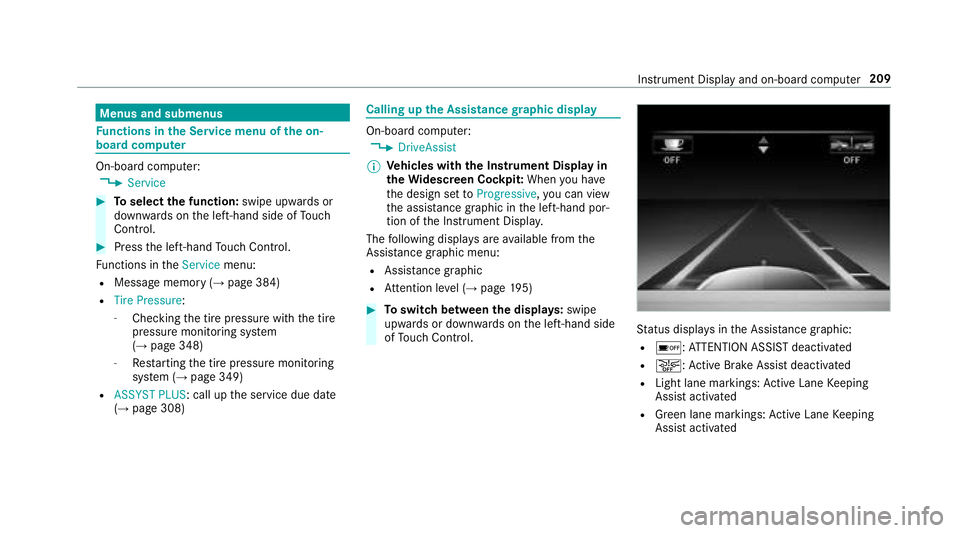
Calling up the Assistance graphic display
On-board computer:
,'ULYH$VVLVW
% Ve
hicles with the Instrument Display in
th eWi descreen Co ckpit: When you ha ve
th e design set to3URJUHVVLYH ,yo u can view
th e assis tance graphic in the left-hand por‐
tion of the Instrument Displa y.
The following displa ysare available from the
Assist ance graphic menu:
RAssistance graphic
RAt tention le vel (→page 195)
#To switch between the displa ys:swipe
up wa rds or down wards on the left-hand side
of Touch Control.
Status displa ysinthe Assis tance graphic:
Ré: ATTENTION ASSIST deactivated
Ræ: Active Brake Assi stdeactivated
RLight lane markings: Active Lane Keeping
Assist activated
RGreen lane markings: Active Lane Keeping
Assist activated
Instrument Display and on-board computer 209
Page 212 of 486
RGray radar waves next tovehicle: Blind Spot
Assist activated
RGreen radar waves next tovehicle: Blind Spot
Assist activated
RDisplay of Dis tance Pilot DISTRONIC
(→pa ge 162)
Calling up displa ysintheTr ip menu
On-board computer:
,7ULS
% Ve
hicles with an instrument display in
th e widescreen cockpit: Whenyou ha ve
th e design set to3URJUHVVLYH ,yo u can view
information on the journey in the left-hand
area of the instrument displa y.
#Toselect a displa y:Swipe up wards or
down wards on the left-hand Touch Control.
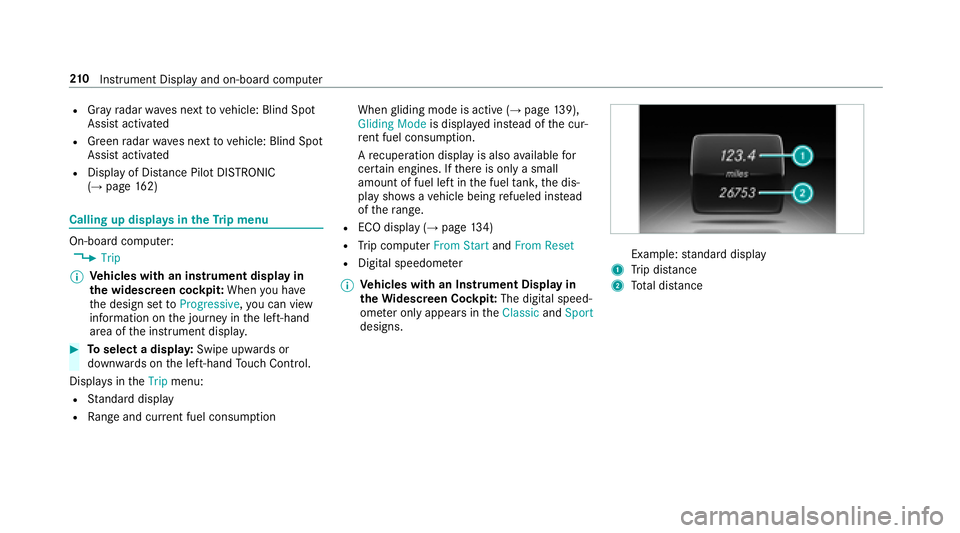
Dis playsinthe7ULS menu:
RStandard display
RRa nge and cur rent fuel consump tion When
gliding mode is active (
→page 139),
*OLGLQ J0RGH is displa yed ins tead of the cur‐
re nt fuel consump tion.
A recuperation displ ayis also available for
cer tain engines. If there is only a small
amount of fuel left in the fuel tank, the dis‐
play sho wsave hicle being refueled ins tead
of thera nge.
RECO displ ay(→page 134)
RTrip computer )URP 6WDUWand)URP 5HVHW
RDigital speedomet er
% Ve
hicles with an Instrument Display in
th eWi descreen Co ckpit: The digital speed‐
ome ter only appears in the&ODVVLF and6SRUW
designs.Example: standard display
1Trip dis tance
2To tal dis tance
21 0
Instrument Display and on-board computer
