2018 MERCEDES-BENZ CLA COUPE stop start
[x] Cancel search: stop startPage 71 of 326

XTo turn the alarm off with the SmartKey:
press the%or& button on the Smart-
Key.
The alarm is stopped.
or
XVehicles with KEYLESS-GO start-function
or KEYLESS-GO: remove the Start/Stop but-
ton from the ignition lock (
Ypage 122).
XInsert the SmartKey into the ignition lock.
The alarm is stopped.
XTo stopt he alarm using KEYLESS-GO:
grasp the outsid edoorh andle. The SmartKey
must be outsid ethe vehicle.
The alarm is stopped.
or
XPress the Start/Stop button on the dash-
board .The SmartKey must be insid ethe vehi-
cle.
The alarm is stopped.
The alarm is not switched off, eve nifyouclose
the open door thatt riggered it, for example.
iIf the alarm continue sfor more than
30 seconds ,the mbrace emergency cal lsys-
tem automaticall ynotifie sthe Customer
Assistance Center. Thi sisdonee ither by text
message or data connection.
The emergency cal lsystem send sthe mes-
sage or data provided that:
Ryo uh aves ubscribed to the mbrace service.
Rthe mbrace service hasb eena ctivated
properly.
Rthe necessary mobil ephone network is
available.
Protectiona gainsttheft69
Safety
Z
Page 72 of 326

SmartKey
Important safety notes
GWARNING
If children are left unsupervised in the vehicle,
they could:
Ropen the doors, thus endangering other
people or road users.
Rget out and disrupt traffic.
Roperate the vehicle's equipment.
Additionally, children could set the vehicle in
motion if, for example, they:
Rrelease the parking brake.
Rshifting the automatic transmission out of
park position P
RStart the engine.
There is arisk of an accident and injury.
When leaving the vehicle, always take the
SmartKey with you and lock the vehicle. Never
leave children or animals unattended in the
vehicle. Always keep the SmartKey out of
reach of children.
GWARNING
If you attach heavy or large object stothe
SmartKey, the SmartKey could be uninten-
tionally turned in the ignition lock. This could
cause the engine to be switched off. There is a risk of an accident.
Do not attach any heavy or large object stothe
SmartKey. Remove any bulky key rings before
insertingt he SmartKey into the ignition lock.
!Keep the SmartKey away from stron gmag-
netic fields. Otherwise, the remote control
function could be affected.
Strong magnetic fields can occur in the vicin-
ity of powerful electrical installations.
Do not keep the SmartKey:
Rwith electronic devices, e.g. amobile phone
or another SmartKey.
Rwith metallic objects, e.g. coins or metal foil.
Rinside metallic objects, e.g. ametal case
Vehicles with KEYLESS-GO startf unction:do
not keep the SmartKey in the trunk.O therwise,the SmartKey may not be detected, e.g. when
startin
gthe engine using the Start/Stop button.
SmartKey functions
:& To lock the vehicle
;FTo open the trunk lid
=%To unlock the vehicle
If you do not open the vehicle within approx-
imately 40 seconds of unlocking:
Rthe vehicle is locked again.
Ranti-theft protection is reactivated.
XTo lock: press the &button.
The SmartKey centrally locks/unlocks:
Rthe doors
Rthe trunk lid
Rthe fuel filler flap
The turn signals flash once when unlocking and
three times when locking.
When the locator lighting is activated via the
multimedia system, it lights up when it is dark
after the vehicle is unlocked with the remote
control (see the separate operating instruc-
tions).
You can also set an audible signal to confirm
that the vehicle has been locked. The audible
signal can be activated and deactivated using
the on-board computer (
Ypage 187).
XTo open the trunk lid automatically: press
and hold the Fbutton until the trunk lid
opens (
Ypage 79).
70SmartKey
Opening and closing
Page 77 of 326
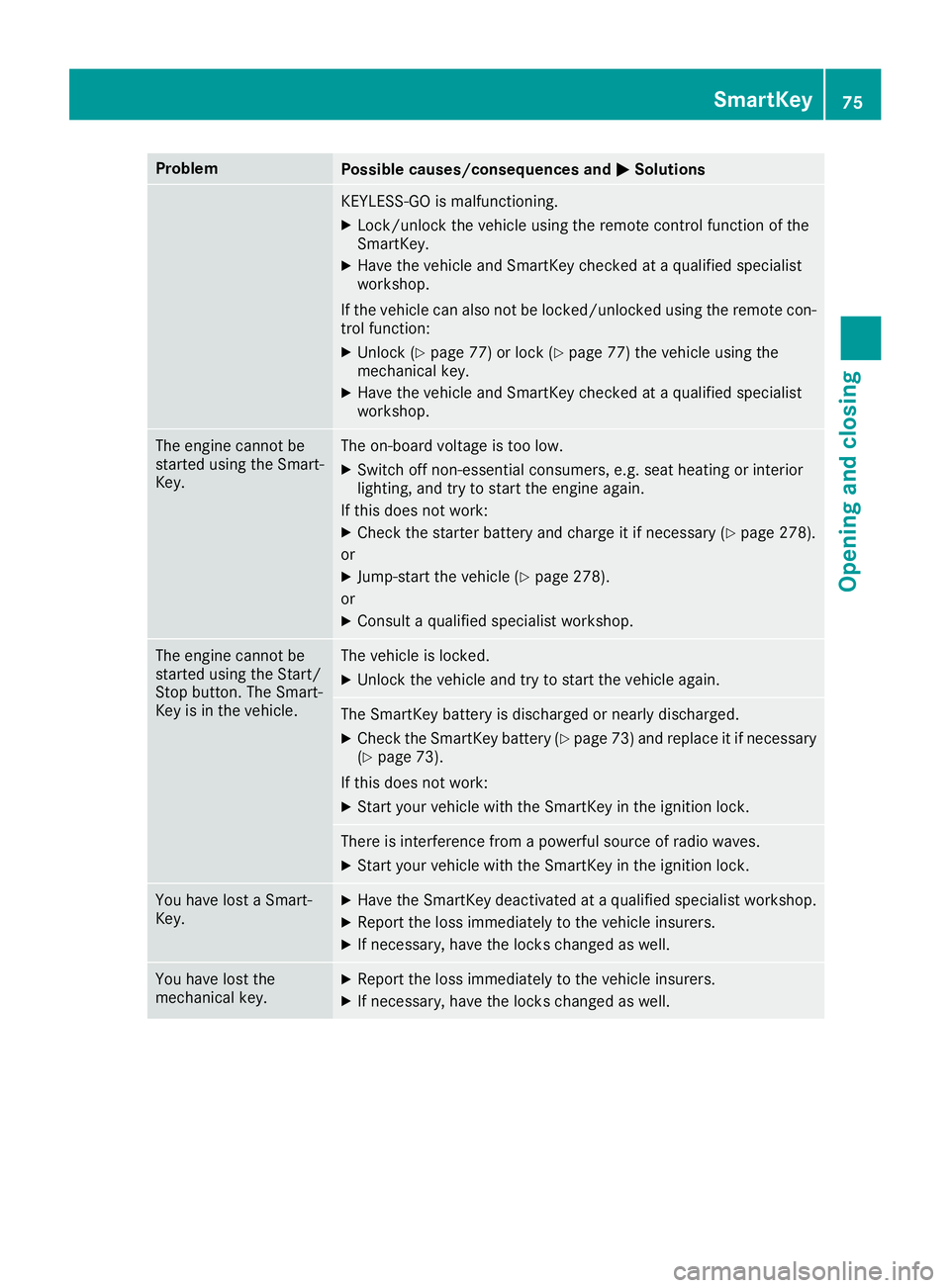
ProblemPossible causes/consequences andMSolutions
KEYLESS-GO is malfunctioning.
XLock/unlock the vehicle using the remote control function of the
SmartKey.
XHave the vehicle and SmartKey checked at aqualified specialist
workshop.
If the vehicle can also not be locked/unlocked using the remote con-
trol function:
XUnlock (Ypage 77) or lock (Ypage 77) the vehicle using the
mechanical key.
XHave the vehicle and SmartKey checked at aqualified specialist
workshop.
The engine cannot be
started using the Smart-
Key.The on-board voltage is too low.
XSwitch off non-essential consumers, e.g. seat heating or interior
lighting, and try to start the engine again.
If this does not work:
XCheck the starter battery and charge it if necessary (Ypage 278).
or
XJump-start the vehicle (Ypage 278).
or
XConsult aqualified specialist workshop.
The engine cannot be
started using the Start/
Stop button. The Smart-
Key is in the vehicle.The vehicle is locked.
XUnlock the vehicle and try to start the vehicle again.
The SmartKey battery is discharged or nearly discharged.
XCheck the SmartKey battery (Ypage 73) and replace it if necessary
(Ypage 73).
If this does not work:
XStart your vehicle with the SmartKey in the ignition lock.
There is interference from apowerful source of radio waves.
XStart your vehicle with the SmartKey in the ignition lock.
You have lost aSmart-
Key.XHave the SmartKey deactivated at aqualified specialist workshop.
XReport the loss immediately to the vehicle insurers.
XIf necessary, have the locks changed as well.
You have lost the
mechanical key.XReport the loss immediately to the vehicle insurers.
XIf necessary, have the locks changed as well.
SmartKey75
Opening and closing
Z
Page 84 of 326
body becomes trapped, release the switch or
pull the switch to close the side window again.
GWARNING
While closingt he side windows, body parts in
the closinga rea could become trapped. There
is ar isk of injury.
When closingm ake sure that no parts of the
body are in the closinga rea. If somebody
becomes trapped, release the switch or press
the switch to open the side window again.
GWARNING
If children operate the side windows they
could become trapped, particularly if they are left unsupervised. There is arisk of injury.
Activat ethe override feature for the rear side
windows. When leaving the vehicle, always
take the SmartKey with you and lock the vehi-
cle. Never leave children unsupervised in the
vehicle.
Side window reversing feature
The side windows are equipped with an auto-
matic reversing feature. If asolid objec tblocks
or restrictsas ide window from traveling
upwards during the automatic closingp rocess,
the side window opens again automatically. Dur-
ing the manual closingp rocess, the side window
only opens again automatically after the corre-
spondin gswitch is released. The automatic
reversing feature is only an aid and is no substi-
tute for your attention when closingas ide win-
dow.
GWARNING
The reversing feature does not react:
Rto soft,l ight and thin objects, e.g. small fin-
gers
Rwhile resetting
This means that the reversing feature cannot
prevents omeoneb eing trapped in these sit-
uations. There is arisk of injury.
Make sure that no body parts are in close
proximity during the closingp rocedure. If
someonebecomes trapped, press the switch
to open the side window again.
Opening and closing the side win-
dows
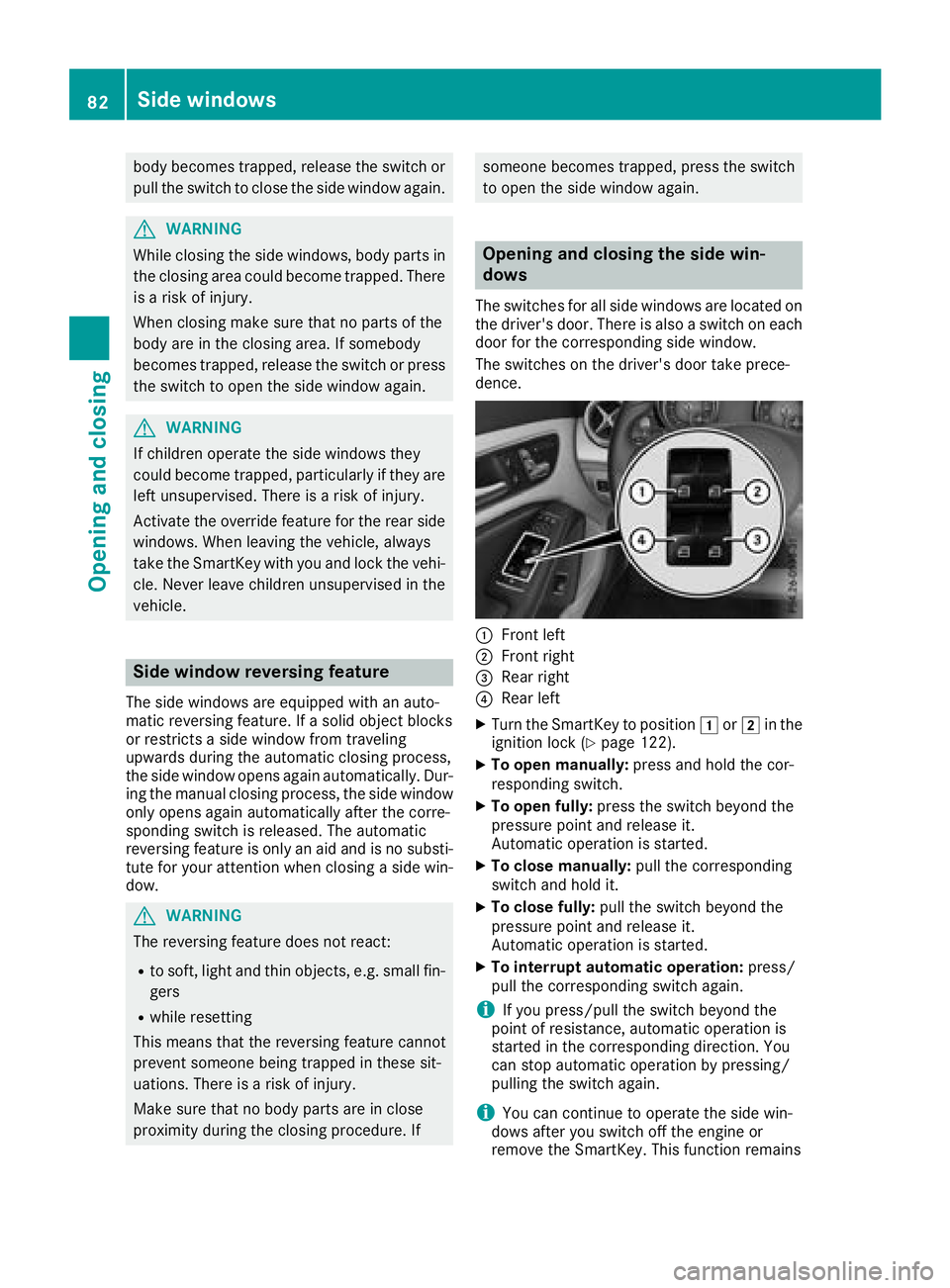
The switches for all side windows are located on the driver'sd oor. There is also aswitch on each
door for the correspondin gside window.
The switches on the driver'sd oor take prece-
dence.
:Frontl eft
;Frontr ight
=Rear right
?Rear left
XTurn the SmartKey to position 1or2 in the
ignition lock (Ypage 122).
XTo open manually: press and hold the cor-
responding switch.
XTo open fully: press the switch beyond the
pressure point and release it.
Automatic operation is started.
XTo close manually: pull the corresponding
switch and hold it.
XTo close fully: pull the switch beyond the
pressure point and release it.
Automatic operation is started.
XTo interrupt automatic operation: press/
pull the correspondin gswitch again.
iIf you press/pull the switch beyond the
point of resistance, automatic operation is
started in the correspondin gdirection. You
can stop automatic operation by pressing/
pulling the switch again.
iYou can continue to operate the side win-
dows after you switch off the engin eor
removet he SmartKey. This function remains
82Side windows
Opening and closing
Page 87 of 326
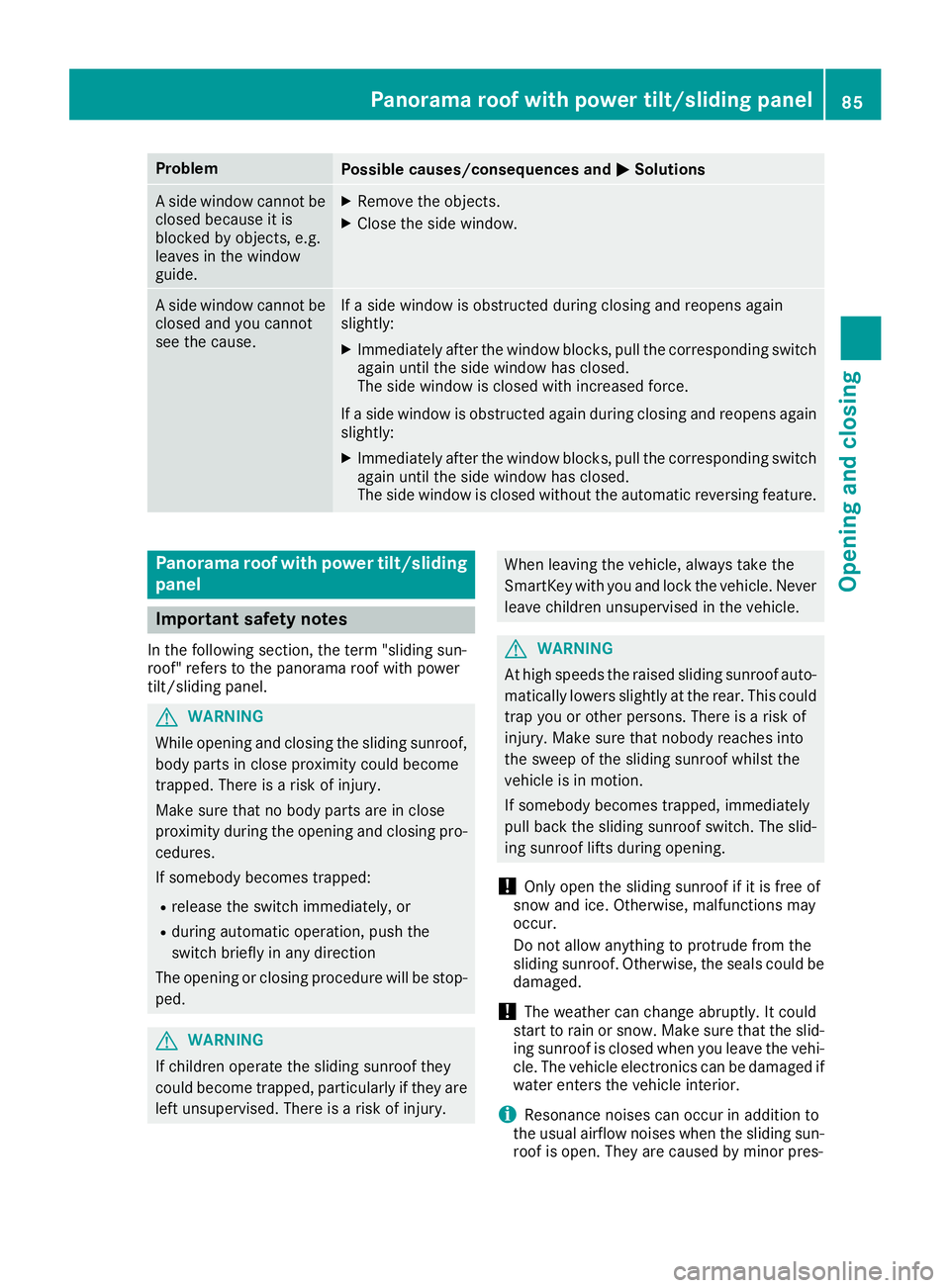
ProblemPossible causes/consequences andMSolutions
Aside window cannot be
closed because it is
blocked by objects, e.g.
leaves in the window
guide.XRemove the objects.
XClose the side window.
As ide window cannot be
closed and you cannot
see the cause.If as ide window is obstructed during closing and reopens again
slightly:
XImmediately after the window blocks, pull the correspondings witch
again until the side window has closed.
The side window is closed with increased force.
If as ide window is obstructed again during closing and reopens again
slightly:
XImmediately after the window blocks, pull the correspondings witch
again until the side window has closed.
The side window is closed without the automatic reversing feature.
Panoramar oof with power tilt/sliding
panel
Important safety notes
In the following section, the term "sliding sun-
roof" refers to the panorama roof with power
tilt/sliding panel.
GWARNING
While opening and closing the sliding sunroof, body parts in close proximity could become
trapped. There is arisk of injury.
Make sure that no body parts are in close
proximity during the opening and closing pro-
cedures.
If somebody becomes trapped:
Rrelease the switch immediately, or
Rduring automatic operation, push the
switch briefly in any direction
The opening or closing procedure will be stop- ped.
GWARNING
If children operate the sliding sunroof they
could become trapped, particularly if they are left unsupervised. There is arisk of injury.
When leaving the vehicle, always take the
SmartKey with you and lock the vehicle. Never
leave children unsupervised in the vehicle.
GWARNING
At high speeds the raised sliding sunroof auto-
matically lowers slightly at the rear. This could
trap you or other persons. There is arisk of
injury. Make sure that nobody reaches into
the sweep of the sliding sunroof whilst the
vehicle is in motion.
If somebody becomes trapped, immediately
pull back the sliding sunroof switch. The slid-
ing sunroof lifts during opening.
!Only open the sliding sunroof if it is free of
snow and ice. Otherwise, malfunctions may
occur.
Do not allow anything to protrude from the
sliding sunroof. Otherwise, the seals could be
damaged.
!The weather can change abruptly. It could
start to rain or snow. Make sure that the slid- ing sunroof is closed when you leave the vehi-
cle. The vehicle electronics can be damaged if
water enters the vehicle interior.
iResonance noises can occur in addition to
the usual airflow noises when the sliding sun- roof is open. They are caused by minor pres-
Panoramar oof with power tilt/sliding panel85
Opening and closing
Z
Page 89 of 326
If contact is made witharoof carrier approved
by Mercedes-Benz, the sliding sunroof lowers
slightly but remains raise datthe rear.
Rain-closing feature
The rain-closing feature is only available for vehi-
cles with arain sensor.
When the SmartKey is in position gin the igni-
tion lock or is removed, the sliding sunroof
closes automatically:
Rif it starts to rain.
Rat extreme outsidet emperatures.
Rafter six hours.
Rif there isamalfunction in the powers upply.
The panorama roof with powert ilt/sliding panel
remains raisedatt he rear in order to allow ven-
tilation of the vehicle interior.
If the panorama roof with powert ilt/sliding
panel is obstructed whileb eing closed by the
rain-closing feature, it opens again slightly. The
rain-closing feature is then deactivated.
The panorama roof with powert ilt/sliding panel
does not close if:
Rit is raise datthe rear.
Rit is blocked.
Rno rain is falling on the area of the windshield
being monitored by the rain sensor. If the
vehicle,f or example,isu nderabridge or in a
carport, the field of the sensor may be cov-
ered.
Operating the rollers unblind for the
panorama roof with powe rtilt/sliding
panel
Important safety notes
GWARNING
Parts of the body could become trapped
betweent he rollersunblind and frame or slid-
ing sunroof during automatic opening or clos-
ing. There is arisk of injury.
When opening or closing, make sure that no
body parts are in the sweep of the rollers un-
blind.
If somebodyb ecomes trapped:
Rrelease the switch immediately,o r
Rduring automatic operation, push the
switch brieflyinany direction
The opening or closing procedure willbes top-
ped.
The rollers unblind shields the vehicle interior
from sunlight. The rollers unblind can only be
opened and closed when the panorama roof
with powert ilt/sliding panel is closed.
Rollersunblind reversingf eature
The rollersunblind is equipped with an auto-
matic reversing feature. If asolid object blocks
or restricts the rollers unblind during the closing
process, the rollers unblind opens again auto-
matically. The automatic reversing feature is
only an aid and is not asubstitute for you ratten-
tiveness when closing the rollers unblind.
GWARNING
The reversing feature does not react:
Rto soft, lighta nd thin objects, e.g. small fin-
gers
Rwhen closing the rollers unblind again man-
ually immediately after automatic reversal
This means that the reversing feature cannot
prevent someone being trapped in these sit-
uations. There is arisk of injury.
When closing the rollers unblind, make sure
that no body parts are in the sweep area.
If somebodyb ecomes trapped:
Rrelease the switch immediately,o r
Rpress the switch in any direction during the
automatic closing process
The closing process is stopped.
Panorama roof with powe rtilt/sliding panel87
Opening and closing
Z
Page 114 of 326

BSwitches cooling with airdehumidification on/off (Ypage 115)
CSwitches the rearw indow defrostero n/off (Ypage 118)
Notesonusing the air-conditioning
system
Air-conditioning system
Below,y oucan find anumber of notes and rec-
ommendations to helpy ouuset he air-condi-
tioning system optimally.
RSwitch on the air-conditioning system by turn- ing control knob Aclockwise to the desired
position (except position 0).
RSet the temperature to 72 ‡(22 †).
RRecommendation for avoiding misted
windows at lo wexteriort emperatures or
in rain: switch on the ¿cooling with dehu-
midification function (
Ypage 115).
Set ai rdistribution to ¯and if possible
switch off PandO (
Ypage 116).
Deactivate air-recirculation mode e
(
Ypage 119).
Set airflo wcontrol Atoas etting between 3
and 6(
Ypage 117).
RRecommendation for rapid coolin gor
heating of the vehicle interior: brieflyset
airflo wcontrol Atoas etting between 3and
6 (
Ypage 117).
RRecommendation for aconstan tvehicle
interior temperature: set airflowcontrol A
to as etting between 1and 3(
Ypage 117).
RRecommendation for air distributio nin
winter: select the Oand¯ settings
(
Ypage 116).
Recommendation for air distributio nin
summer: select the PorP and¯
settings (
Ypage 116).
ROnly us ethe "Windshieldd efrosting" function
brieflyu ntilthe windshield is clear again.
ROnly us eair-recirculation modeb riefly, e.g. if
there are unpleasant outsid eodors or when in
at unnel .The w
indow
scould otherwise fog up,
since no fresha iris drawn into the vehicl ein
air-recirculation mode.
RIf yo uchange the settings of the climate con-
trol system, the climate statu sdisplay
appears for approximately three seconds at
the botto mofthe screen in the multimedia
system display ;see separate operating
instructions .You will see the current settings
of the various climate control functions.
DYNAMI CSELECT button( except
Mercedes-AMG vehicles)
You can choose between various drive programs
with the DYNAMIC SELECT button
(
Ypage 128).
If yo uhaves elected drive program E:
Rwhen heating, the electrical heater booster is
deactivated and in the warming-up phase
heato utputi sreduced
Rthe rearw indow defrosterr unning time is
reduced
Depending on the configuration, climate set-
tings may also be influenced in the drive pro-
gram I.
If yo uhaves elected drive program Cor S,c li-
mate settings are not influenced.
EC Os tart/stop function
During automatic engine switch-off, the climate
control system only operate satareducedcapa-
city .Ify ourequire the ful lclimate control output,
yo uc an switch off the ECO start/stop function
by pressing the ECO button (
Ypage 127).
112Overviewofc limate control systems
Climate control
Page 117 of 326

instructions.You will see the current settings
of the various climat econtrol functions.
DYNAMIC SELECT button (except
Mercedes-AM Gvehicles)
You can choose betwee nvarious drive programs
with the DYNAMI CSELEC Tbutton
(
Ypage 128).
If you have selected drive program E:
Rwhen heating, the electrical heaterbooster is
deactivate dand in the warming-up phase
heat output is reduced
Rthe rear window defroster running tim eis
reduced
Dependin gonthe configuration, climat eset-
tings may also be influenced in the drive pro-
gram I.
If you have selected drive program Cor S,c li-
mate settings are not influenced.
ECO start/stop function
Durin gautomatic engin eswitch-off, the climate
control system only operates at areduced capa-
city. If you require the full climat econtrol output,
you can switc hoff the ECO start/sto pfunction
by pressing the ECO button (
Ypage 127).
Operating th eclimate control sys-
tems
Activating/deactivating climate con-
trol
General notes
When the climat econtrol is switched off,t he air
supply and air circulation are also switched off.
The windows could fog up. Therefore, switc hoff
climat econtrol only briefly
Air-conditioning system
XTurn the SmartKey to position 2in the igni-
tion lock (Ypage 122).
XTo switch on: turn controlAclockwise to
the desiredp osition (except position 0)
(
Ypage 111).
XTo switch off: turn controlAcounter-clock-
wise to position 0(Ypage 111).
Dual-zone automatic climate control
XTurn the SmartKey to position 2in the igni-
tion lock (Ypage 122).
XTo activate: press theÃbutton.
The indicator lamp in the Ãbutton lights
up. Airflow and air distribution are set to auto-
matic mode.
or
XPress the ^button.
The indicator lamp in the ^button goes
out. The previously selected settings are
restored.
XTo deactivate: press the^button.
The indicator lamp in the ^button lights
up.
iDual-zon eautomatic climat econtrol: switch
on climat econtrol primarily using the Ã
button.
Switchin gcooling with air dehumidi-
fication on/off
General notes
If you deactivatet he "Cooling with air-dehumid-
ification" function ,the air insid ethe vehicle will
not be cooled. The air insid ethe vehicle will also
not be dehumidified. The windows can fog up
more quickly. Therefore, only deactivatet he
"Cooling with air-dehumidification" function
briefly.
The "Cooling with air dehumidification" function is only available when the engin eisrunning. The
air insid ethe vehicle is coole dand dehumidified
accordingtot he temperature selected.
Condensatio nmay drip fromt he underside of
the vehicle when it is in coolin gmode. This is
normal and not asign that there is amalfunc-
tion.
Activating/deactivating
XPress the ¿button.
The indicator lamp in the ¿button lights
up or goes out.
The indicator lamp in the button indicates that
the respective function is activated. The
"Cooling with air dehumidification" function
has adelayed switch-off feature.
Operating th eclimate control systems115
Climate control