2018 LINCOLN CONTINENTAL steering
[x] Cancel search: steeringPage 51 of 615

The airbags inflate and deflate rapidly uponactivation. After airbag deployment, it isnormal to notice a smoke-like, powderyresidue or smell the burnt propellant. Thismay consist of cornstarch, talcum powder (tolubricate the bag) or sodium compounds (forexample, baking soda) that result from thecombustion process that inflates the airbag. Small amounts of sodium hydroxide may bepresent which may irritate the skin and eyes,but none of the residue is toxic.
While the system is designed to help reduceserious injuries, contact with a deployingairbag may also cause abrasions or swelling.Temporary hearing loss is also a possibilityas a result of the noise associated with adeploying airbag. Because airbags mustinflate rapidly and with considerable force,there is the risk of death or serious injuriessuch as fractures, facial and eye injuries orinternal injuries, particularly to occupantswho are not properly restrained or areotherwise out of position at the time of airbagdeployment. Thus, it is extremely importantthat occupants be properly restrained as faraway from the airbag module as possiblewhile maintaining vehicle control.
Routine maintenance of the airbags is notrequired.
DRIVER AND PASSENGER
AIRBAGS
WARNING: Do not place your arms onthe airbag cover or through the steeringwheel. Failure to follow this instruction couldresult in personal injury.
WARNING: Keep the areas in front ofthe airbags free from obstruction. Do not affixanything to or over the airbag covers.Objects could become projectiles duringairbag deployment or in a sudden stop.Failure to follow this instruction could resultin personal injury or death.
WARNING: Airbags can kill or injure achild in a child restraint. Never place arear-facing child restraint in front of an activeairbag. If you must use a forward-facing childrestraint in the front seat, move the seat uponwhich the child restraint is installed all theway back.
The driver and front passenger airbags willdeploy during significant frontal and nearfrontal crashes.
48
Continental (CPL) Canada/United States of America, enUSA, Edition date: 201706, Second-Printing
Supplementary Restraints SystemE151127
Page 58 of 615

· Crash sensors and monitoringsystem with a readiness indicator.See Crash Sensors and AirbagIndicator (page 55).
Properly restrain children 12 years old andunder in the rear seats. The Safety Canopywill not interfere with children restrainedusing a properly installed child or boosterseat because it is designed to inflatedownward from the headliner above thedoors along the side window opening.
The design and development of the SafetyCanopy included recommended testingprocedures that were developed by a groupof automotive safety experts known as theSide Airbag Technical Working Group. Theserecommended testing procedures helpreduce the risk of injuries related to thedeployment of side airbags (including theSafety Canopy).
CRASH SENSORS AND AIRBAG
INDICATOR
WARNING: Modifying or addingequipment to the front end of the vehicle(including frame, bumper, front end bodystructure and tow hooks) may affect theperformance of the airbag system, increasingthe risk of injury. Do not modify the front endof the vehicle.
Your vehicle has a collection of crash andoccupant sensors which provide informationto the restraints control module. Therestraints control module deploys (activates)the front seatbelt system, the adaptivecollapsible steering column, driver airbag,passenger airbag, knee airbag(s), seatmounted side airbags, Safety Canopy andoptional rear inflatable seatbelts. Based onthe type of crash, the restraints controlmodule will deploy the appropriate safetydevices.
The restraints control module also monitorsthe readiness of the above safety devicesplus the crash and occupant sensors. Thereadiness of the safety system is indicatedby a warning indicator light in the instrumentcluster or a backup tone (if equipped).Routine maintenance of the airbag is notrequired.
A difficulty with the system is indicated byone or more of the following:
The readiness light will notilluminate immediately after theignition is turned on.
•The readiness light will either flash orstay lit.
•A series of five beeps will be heard (Ifequipped). The tone pattern will repeatperiodically until the problem, the lightor both are repaired.
If any of these things happen, evenintermittently, have the supplementalrestraint system serviced at an authorizeddealer immediately. Unless serviced, thesystem may not function properly in theevent of a crash.
55
Continental (CPL) Canada/United States of America, enUSA, Edition date: 201706, Second-Printing
Supplementary Restraints SystemE67017 E67017
Page 88 of 615

ADJUSTING THE STEERING WHEEL
WARNING: Do not adjust the steeringwheel when your vehicle is moving.
Note: Make sure that you are sitting in thecorrect position. See Sitting in the CorrectPosition (page 153).
Use the control on the side of the steeringcolumn to adjust the position.
To adjust:
•Tilt: Press the top or bottom of thecontrol.
•Telescope: Press the front or rear of thecontrol.
End of Travel Position
The steering column sets a stopping positionjust short of the end of the column positionto prevent damage to the steering column. A new stopping position sets if the steeringcolumn encounters an object when tilting ortelescoping.
To reset the steering column to its normalstopping position:
1. Confirm there is nothing obstructing themotion of the steering column.
2. Press and hold the steering columncontrol until the steering column stopsmoving.
3.Press the steering column control again.
Note:The steering column may begin tomove again.
4. When the steering column stops,continue holding the control for a fewseconds.
5. Repeat for each direction as necessary.
A new stopping position sets. The next timeyou tilt or telescope the steering column, itstops just short of the end of the columnposition.
Memory Feature (If Equipped)
You can save and recall the steering columnposition with the memory function. SeeMemory Function (page 163).
Pressing the adjustment control during amemory recall cancels the operation.
Easy Entry and Exit Feature
The column moves up when you switch theignition off. Switch the ignition on to returnthe system to its previous settings. You canswitch this feature on or off in the informationdisplay. See Information Displays (page115).
85
Continental (CPL) Canada/United States of America, enUSA, Edition date: 201706, Second-Printing
Steering WheelE261582
Page 89 of 615
Note: If you press any adjustment ormemory button when in easy exit mode, thesystem cancels the operation.
Note:Depending on your vehicle, the columnmay move up and in.
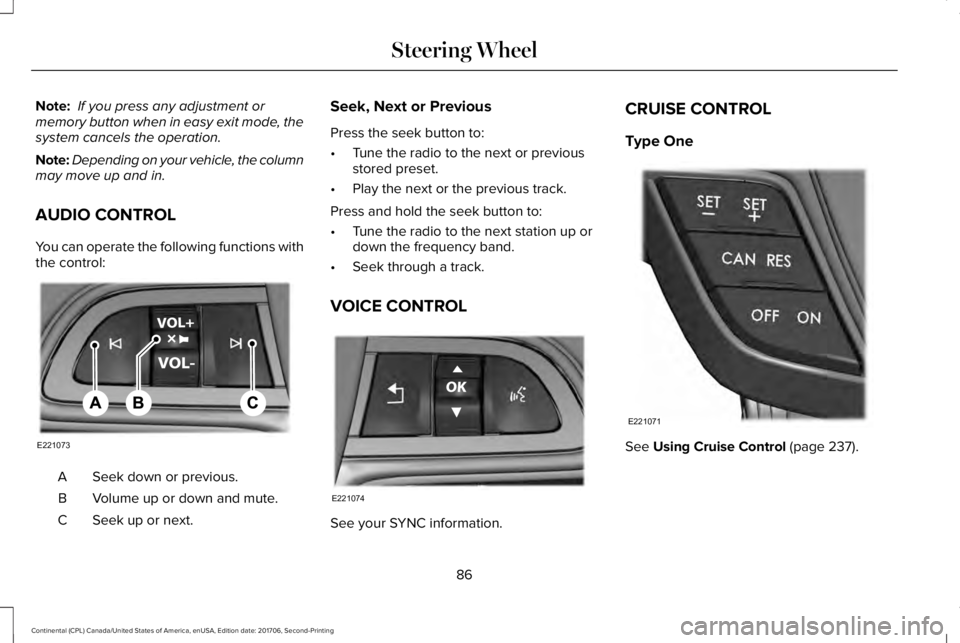
AUDIO CONTROL
You can operate the following functions withthe control:
Seek down or previous.A
Volume up or down and mute.B
Seek up or next.C
Seek, Next or Previous
Press the seek button to:
•Tune the radio to the next or previousstored preset.
•Play the next or the previous track.
Press and hold the seek button to:
•Tune the radio to the next station up ordown the frequency band.
•Seek through a track.
VOICE CONTROL
See your SYNC information.
CRUISE CONTROL
Type One
See Using Cruise Control (page 237).
86
Continental (CPL) Canada/United States of America, enUSA, Edition date: 201706, Second-Printing
Steering WheelE221073 E221074 E221071
Page 90 of 615
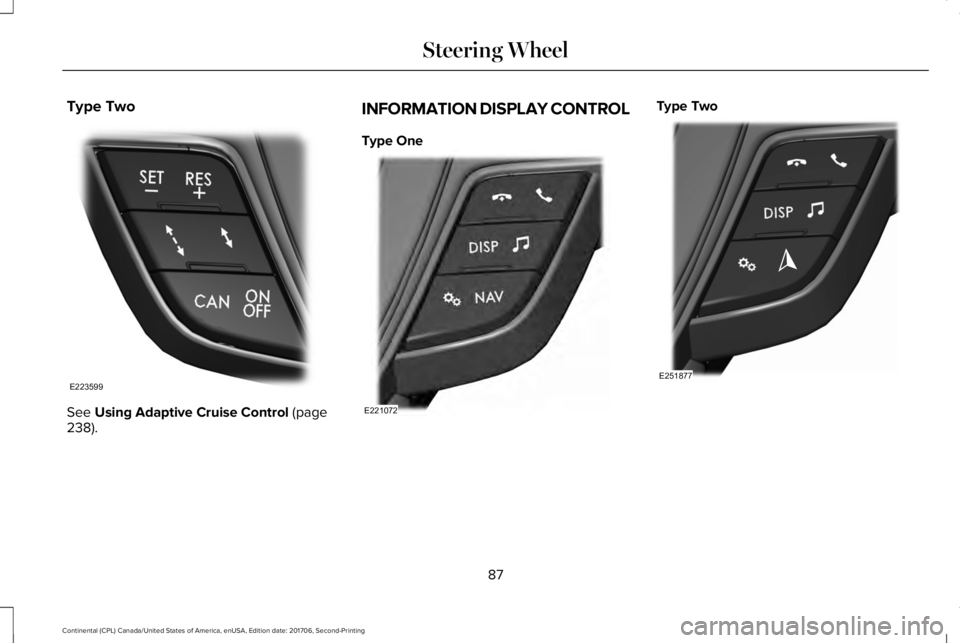
Type Two
See Using Adaptive Cruise Control (page238).
INFORMATION DISPLAY CONTROL
Type One
Type Two
87
Continental (CPL) Canada/United States of America, enUSA, Edition date: 201706, Second-Printing
Steering WheelE223599 E221072 E251877
Page 91 of 615

Type ThreeType Four
See Information Displays (page 115).
HEATED STEERING WHEEL (If Equipped)
Switch the heated steering wheel on and offusing the touchscreen.
Touch the button to switch theheated steering wheel on and off.
Note:You can use the heated steeringwheel only when the engine is running.
Note:The system uses a sensor and isdesigned to control the temperature of thesteering wheel and to prevent it fromoverheating.
Note:In warm temperatures, the steeringwheel quickly reaches its maximumtemperature and the system reduces thecurrent to the heating element. This couldcause you to think that the system hasstopped working but it has not. This isnormal.
88
Continental (CPL) Canada/United States of America, enUSA, Edition date: 201706, Second-Printing
Steering WheelE223601 E251878
Page 99 of 615

A camera sensor, centrally mounted behindthe windshield of your vehicle, continuouslymonitors conditions to turn the high beamson and off.
Once the system is active, the high beamsturn on if:
•The ambient light level is low enough.
•There is no traffic in front of your vehicle.
•The vehicle speed is greater thanapproximately 32 mph (51 km/h).
The high beams turn off if:
•The ambient light level is high enoughthat high beams are not required.
•The system detects an approachingvehicle's headlamps or tail lamps.
•The vehicle speed falls belowapproximately 27 mph (44 km/h).
•The system detects severe rain, snow orfog.
•The camera is blocked.
Switching the System On and Off
Switch the system on using the informationdisplay. See Information Displays (page115).
Switch the lighting control to the autolampsposition. See Autolamps (page 93).
Overriding the System
When you switch on the high beams, pushingor pulling the stalk provides a temporaryoverride to low beam.
Automatic High Beam Indicator (If Equipped)
The indicator lamp illuminates toconfirm when the system is readyto assist.
ADAPTIVE HEADLAMPS (If Equipped)
The headlamp beams move in the samedirection as the steering wheel. This providesmore visibility when driving around curves.
A. Without adaptive headlamps.
B. With adaptive headlamps.
96
Continental (CPL) Canada/United States of America, enUSA, Edition date: 201706, Second-Printing
LightingE142451
Page 113 of 615
Left/Right Information Group
Information that appears in the left and rightinformation group varies depending oncurrent gauge, on-demand and HUD (ifequipped) settings. See GeneralInformation (page 115).
Fuel Gauge
The fuel gauge indicates about how muchfuel is in the fuel tank.
The arrow adjacent to the fuel pump symbolindicates on which side of your vehicle thefuel filler door is located.
Note:The fuel gauge may vary slightly whenyour vehicle is moving or on a slope.
Low Fuel Reminder
A low fuel level reminder displays andsounds when the distance to empty reaches75 mi (120 km) for MyKey, and at 50 mi(80 km), 25 mi (40 km), 10 mi (20 km) and0 mi (0 km) for all vehicle keys.
Note:The low fuel reminder can appear atdifferent fuel gauge positions depending onfuel economy conditions. This variation isnormal.
WARNING LAMPS AND
INDICATORS
The following warning lamps and indicatorsalert you to a vehicle condition that maybecome serious. Some lamps illuminatewhen you start your vehicle to make surethey work. If any lamps remain on afterstarting your vehicle, refer to the respectivesystem warning lamp for further information.
Note:Some warning indicators appear inthe information display and function thesame as a warning lamp, but do not displaywhen you start your vehicle.
Adaptive Cruise Control (If Equipped)
The speed control system indicatorlight changes color to indicatewhat mode the system is in: SeeUsing Adaptive Cruise Control (page 238).
On (white light): Illuminates when theadaptive cruise control system is turned on.Turns off when the speed control system isturned off.
Engaged (green light): Illuminates when theadaptive cruise control system is engaged.Turns off when the speed control system isdisengaged.
Adaptive Steering (If Equipped)
The adaptive steering systemindicator illuminates if the systemdetects a fault during thecontinuous diagnostic checks.
Adaptive Steering Initialization (yellow,flashing): The adaptive steering systemdetects a difference between steering wheelangle and the desired road wheel angle. Thesteering wheel adjusts itself to correct thisdifference. This adjustment is part of normalsystem operation.
110
Continental (CPL) Canada/United States of America, enUSA, Edition date: 201706, Second-Printing
Instrument ClusterE144524 E223375