2018 LINCOLN CONTINENTAL steering
[x] Cancel search: steeringPage 114 of 615

Adaptive Steering Off (yellow, solid): Theadaptive steering system is off. It is possiblethat the steering wheel may not be straightwhen you drive straight ahead. If thismessage persists, see an authorized dealer.
Adaptive Steering Loss (red, solid): Theadaptive steering system integrity cannot beverified. Do not drive the vehicle and contactan authorized dealer immediately. SeeSteering (page 259).
Anti-Lock Braking System
If it illuminates when you aredriving, this indicates amalfunction. You continue to havethe normal braking system (without ABS)unless the brake system warning lamp is alsoilluminated. Have the system checked byyour authorized dealer.
Autohold Active
Illuminates when the system holdsyour vehicle stationary.
Autohold Unavailable
Illuminates when the system is on,but unavailable to hold yourvehicle stationary.
Battery
It illuminates when you switch theignition on.
If it illuminates when the engine isrunning this indicates a malfunction. Haveyour vehicle checked as soon as possible.
Blind Spot Monitor (If Equipped)
It illuminates when you switch thisfeature off or in conjunction with amessage. See Blind SpotInformation System (page 253).
Brake System
It illuminates when you engage theparking brake with the ignition on.
If it illuminates when you are driving, checkthat the parking brake is not engaged. If theparking brake is not engaged, this indicateslow brake fluid level or a brake systemmalfunction. Have the system checkedimmediately by your authorized dealer.
WARNING: Driving your vehicle withthe warning lamp on is dangerous. Asignificant decrease in braking performancemay occur. It may take you longer to stopyour vehicle. Have your vehicle checked assoon as possible. Driving extended distanceswith the parking brake engaged can causebrake failure and the risk of personal injury.
Cruise Control (If Equipped)
Illuminates when you switch thisfeature on.
111
Continental (CPL) Canada/United States of America, enUSA, Edition date: 201706, Second-Printing
Instrument Cluster E197933 E197934 E151262 E144522 E71340
Page 118 of 615
GENERAL INFORMATION
WARNING: Driving while distractedcan result in loss of vehicle control, crashand injury. We strongly recommend that youuse extreme caution when using any devicethat may take your focus off the road. Yourprimary responsibility is the safe operationof your vehicle. We recommend against theuse of any hand-held device while drivingand encourage the use of voice-operatedsystems when possible. Make sure you areaware of all applicable local laws that mayaffect the use of electronic devices whiledriving.
You can control various systems on yourvehicle using the quick action menu (QAM)buttons on the right-hand side of the steeringwheel. The information display provides thecorresponding information.
Note:Some options may appear slightlydifferent or not at all if the items are optional.
Note:Some MyKey menu options onlyappear if MyKey is enabled and at least oneMyKey is programmed.
Note:Speedometer, driving aid information,and distance to empty information (ifenabled) moves to the left information groupwhen a menu is opened.
This icon gives you the ability toswitch a feature on or off. A checkin the box indicates the feature isenabled, and unchecked indicates thefeature is disabled.
115
Continental (CPL) Canada/United States of America, enUSA, Edition date: 201706, Second-Printing
Information DisplaysE204495
Page 128 of 615

Adaptive Headlamps
ActionMessage
Displays when a fault with the system has occurred. Contact an authorized dealer as soon aspossible.Check Headlamp System See Manual
Adaptive Steering
ActionMessage
The adaptive steering system detects a difference between steering wheel angle and the desiredroad wheel angle. The steering wheel adjusts itself to correct this difference. This adjustment ispart of normal system operation.
Adaptive Steering Initialization
The adaptive steering system is off. It is possible that the steering wheel may not be straightwhen you drive the vehicle straight ahead. If this message persists, see an authorized dealer.Adaptive Steering Fault Service Required
The adaptive steering system integrity cannot be verified. Do not drive the vehicle and contactan authorized dealer immediately.Adaptive Steering Loss Do Not Drive
Airbag
ActionMessage
Objects are by the passenger seat. After the objects are moved away from the seat, if the warningstays on or continues to come on contact an authorized dealer as soon as possible.Occupant Sensor BLOCKED RemoveObjects Near Passenger Seat
125
Continental (CPL) Canada/United States of America, enUSA, Edition date: 201706, Second-Printing
Information Displays
Page 129 of 615
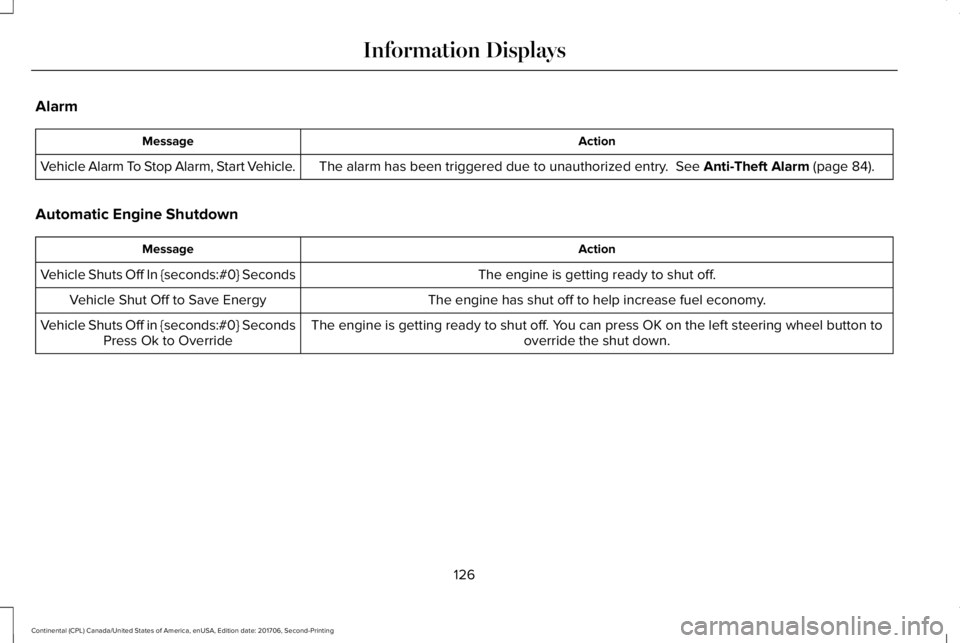
Alarm
ActionMessage
The alarm has been triggered due to unauthorized entry. See Anti-Theft Alarm (page 84).Vehicle Alarm To Stop Alarm, Start Vehicle.
Automatic Engine Shutdown
ActionMessage
The engine is getting ready to shut off.Vehicle Shuts Off In {seconds:#0} Seconds
The engine has shut off to help increase fuel economy.Vehicle Shut Off to Save Energy
The engine is getting ready to shut off. You can press OK on the left steering wheel button tooverride the shut down.Vehicle Shuts Off in {seconds:#0} SecondsPress Ok to Override
126
Continental (CPL) Canada/United States of America, enUSA, Edition date: 201706, Second-Printing
Information Displays
Page 136 of 615

Lane Keeping System
ActionMessage
The system has malfunctioned. Contact an authorized dealer as soon as possible.Lane Keeping Sys. Malfunction ServiceRequired
The system has detected a condition that has caused the system to be temporarily unavailable.Front Camera Temporarily Not Available
The system has detected a condition that requires the windshield to be cleaned to operateproperly.Front Camera Low Visibility Clean Screen
The system has malfunctioned. Contact an authorized dealer as soon as possible.Front Camera Malfunction ServiceRequired
The system requests the driver to keep their hands on the steering wheel.Keep Hands on Steering Wheel
Maintenance
ActionMessage
Stop your vehicle as soon as safely possible, turn off the engine. Check the oil level. If the warningstays on or continues to come on with your engine running, contact an authorized dealer assoon as possible.
Low Engine Oil Pressure
The engine oil life remaining is 10% or less.Change Engine Oil Soon
The oil life left reaches 0%.Oil Change Required
133
Continental (CPL) Canada/United States of America, enUSA, Edition date: 201706, Second-Printing
Information Displays
Page 140 of 615
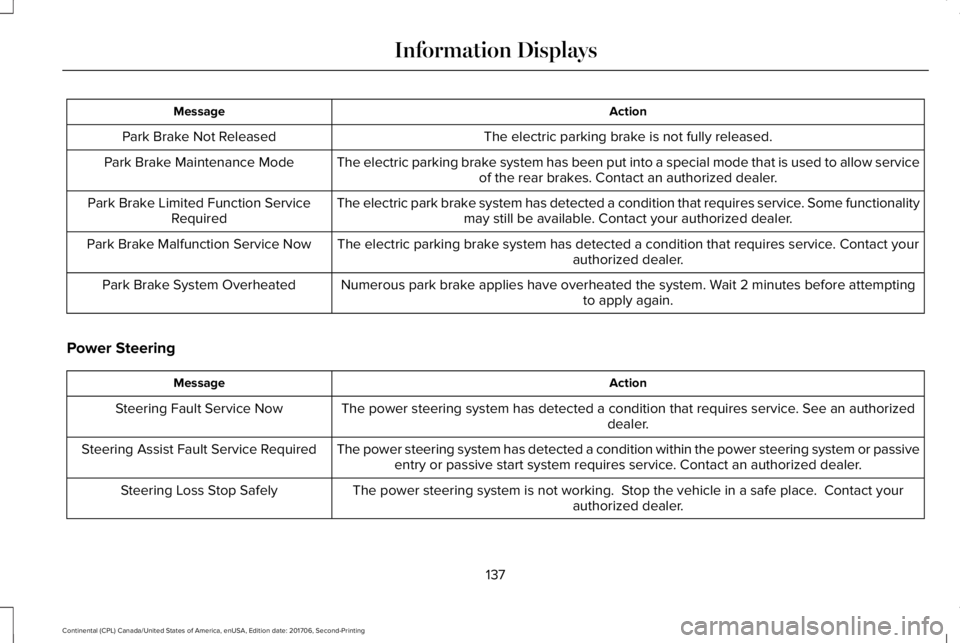
ActionMessage
The electric parking brake is not fully released.Park Brake Not Released
The electric parking brake system has been put into a special mode that is used to allow serviceof the rear brakes. Contact an authorized dealer.Park Brake Maintenance Mode
The electric park brake system has detected a condition that requires service. Some functionalitymay still be available. Contact your authorized dealer.Park Brake Limited Function ServiceRequired
The electric parking brake system has detected a condition that requires service. Contact yourauthorized dealer.Park Brake Malfunction Service Now
Numerous park brake applies have overheated the system. Wait 2 minutes before attemptingto apply again.Park Brake System Overheated
Power Steering
ActionMessage
The power steering system has detected a condition that requires service. See an authorizeddealer.Steering Fault Service Now
The power steering system has detected a condition within the power steering system or passiveentry or passive start system requires service. Contact an authorized dealer.Steering Assist Fault Service Required
The power steering system is not working. Stop the vehicle in a safe place. Contact yourauthorized dealer.Steering Loss Stop Safely
137
Continental (CPL) Canada/United States of America, enUSA, Edition date: 201706, Second-Printing
Information Displays
Page 146 of 615

Navigation Display Area.D
Status Bar.E
Speedometer Display Area.F
Signaling and Traffic Indication
Displays direction indicators, blind spotinformation (if direction indicators are active)and cross traffic alert.
Left Information Group
Displays incoming call information.
ADAS Display Area
Displays ACC and lane keeping systemstatus and warnings.
Navigation Display Area
Displays navigation next turn instructions.
Status Bar
Displays distance to empty (DTE), time andoutside air temperature. Next to DTE, thefuel gauge fill color changes to yellow in lowfuel conditions. You can switch off the statusbar in the HUD settings menu.
Speedometer Display Area
Displays current vehicle speed, speed limit(if available in the map database) and yourtransmission gear selection.
Configuring The Head Up Display
You can control the system's options throughthe information display by using the HUD,OK and arrow buttons on the right-hand sideof your steering wheel. See GeneralInformation (page 115). You can adjust thedisplay according to your height to makeviewing the content easier. You can alsoadjust what content displays and thebrightness of the content. The system'soptions appear in the instrument clusterwhile the updates happen in the HUD.
Note:If HUD On is unchecked, other optionsof the system are hidden.
Note:The HUD menu automatically closesafter a certain period of inactivity.
Note:The HUD image brightnessautomatically adjusts to the brightness ofthe ambient environment. You have theability to adjust the brightness furtheraccording to your preference.
Note:In some instances, sunlight can causesome reflections in and around the HUDimage.
143
Continental (CPL) Canada/United States of America, enUSA, Edition date: 201706, Second-Printing
Information Displays
Page 150 of 615

Power.A
Driver temperature control.B
MAX DefrostC
Air distribution control.D
MAX A/C.E
Passenger temperature control.F
A/C.G
Heated seats.H
Recirculated air.I
AUTO.J
Ventilated seats.K
Fan speed control.L
Heated rear window.M
Heated steering wheel or DUAL.N
Power
Press to switch the system on and off. Whenthe system is off, it prevents outside air fromentering the vehicle.
Driver Temperature Control
Adjusts the temperature setting on the driverside. This control also adjusts the passengerside temperature when you switch off dualzone mode.
MAX Defrost
Press to switch on defrost. The driver andpassenger settings set to HI, air flowsthrough the windshield vents, and the fanadjusts to the highest speed. You can alsouse this setting to defog and clear thewindshield of a thin covering of ice. Theheated rear window also turns on when youselect maximum defrost.
Note:To prevent window fogging, youcannot select recirculated air whenmaximum defrost is on.
Air Distribution Control
Press to switch air flow from the windshield,instrument panel, or footwell vents on or off.You can distribute air through anycombination of these vents.
Note:At least one of these buttons remainon when the system is on.
MAX A/C
Press for maximum cooling. The driver andpassenger settings set to LO, recirculatedair flows through the instrument panel vents,air conditioning turns on and the fan adjuststo the highest speed.
Passenger Temperature Control
Adjusts the temperature setting on thepassenger side.
A/C
Press to switch the air conditioning on or off.Use A/C with recirculated air to improvecooling performance and efficiency.
Note:In certain conditions, for example,maximum defrost, the air conditioningcompressor may continue to operate eventhough you switch off the air conditioning.
147
Continental (CPL) Canada/United States of America, enUSA, Edition date: 201706, Second-Printing
Climate Control