2018 LINCOLN CONTINENTAL display
[x] Cancel search: displayPage 70 of 615

LOCKING AND UNLOCKING
Your vehicle has an intelligent electronicallycontrolled door system that is in constantcommunication with overall vehicle systems.
When you lock your vehicle using the lockswitch on each door interior trim panel, orby using the keyless entry keypad or the locksensor on each door exterior trim panel, theexterior door handle switches do not releasethe doors. This helps to secure your vehicleand prevent unauthorized entry. Also, whenyour vehicle reaches a speed greater than12 mph (20 km/h) the exterior door handleswitches do not release the doors.
If the airbags deploy or the fuel pump shutoffswitch activates, all interior and exteriorunlock switches do not unlock your door forsix seconds. This helps to secure the doorsin the event of a crash. After six seconds, allswitches reset and you can open the doorsusing the interior and exterior unlatchswitches.
Door Lock Indicator
An LED on each front door window trimilluminates when you lock the doors. Itremains on for 2 to 5 seconds after youswitch the ignition off.
Door Lock Switch Inhibitor
When you electronically lock your vehicle,the door lock switches and the interiorluggage compartment release switch do notoperate after 20 seconds. You must unlockyour vehicle with the remote control orkeyless entry keypad, or switch the ignitionon, to restore function to these switches. You can switch this feature on or off in theinformation display. See GeneralInformation (page 115).
Activating Intelligent Access
The intelligent access key must be within 3 ft(1 m) of the door or luggage compartmentyou intend to lock or unlock.
At a Door
67
Continental (CPL) Canada/United States of America, enUSA, Edition date: 201706, Second-Printing
Doors and LocksE222428
Page 71 of 615

Electronic door handles are on each door.Gently depress the switch inside the exteriordoor handle to unlock and open the door.An unlock symbol illuminates on the doorwindow trim indicating your vehicle isunlocked.
Locking sensors are on both front doors.When the intelligent access key is within 3 ft(1 m) of your vehicle you can lock yourvehicle by touching the locking sensor belowthe keyless entry keypad. Doing so causesa lock symbol to illuminate on the doorwindow trim indicating your vehicle is lockedand you can no longer release the door usingthe exterior door handle switches. Touchingthe locking sensor when the intelligentaccess key is not within 3 ft (1 m) causes thelock status to display, but does not lock thedoors.
Swipe across the locking sensor to displaythe current lock status of your vehicle. Thelock status also displays when you open adoor or when the lock status changes.
Note: You cannot use the locking sensorsto unlock your vehicle.
68
Continental (CPL) Canada/United States of America, enUSA, Edition date: 201706, Second-Printing
Doors and LocksE222429
Page 72 of 615

At the Luggage Compartment
Press the exterior release button.
Remote Control
You can use the remote control at any time.When you press the lock button on theremote control, all exterior door handleswitches do not release the doors. When youpress the unlock button, all exterior doorhandle switches release the doors.
Unlocking the Doors
Press the button. The directionindicators flash. You can then usethe exterior door handle switch tounlock the door.
Press and hold both the lock and unlockbuttons on the remote control for threeseconds to change between driver door orall doors unlock mode. The directionindicators flash twice to confirm the change. Driver door mode only unlocks the driverdoor when you press the unlock buttononce. All door mode unlocks all doors when
you press the unlock button once. Theunlocking mode applies to the remotecontrol, keyless entry keypad and intelligentaccess. You can also change between theunlocking modes using the informationdisplay. See General Information (page 115).
Locking the Doors
Press the button. The directionindicators flash. You can no longeruse the exterior door handle switchto release the door.
Press the button again within three secondsto confirm that all the doors are closed. Atone sounds and the direction indicatorsflash if all the doors and the luggagecompartment are closed.
Mislock
If any door is open, or if the luggagecompartment or hood is open, a tone soundsand the direction indicators do not flash. Theexterior lock status display also flashes if anydoor does not lock. You can switch thisfeature on or off in the information display. See General Information (page 115).
69
Continental (CPL) Canada/United States of America, enUSA, Edition date: 201706, Second-Printing
Doors and LocksE222426 E138629 E138623
Page 75 of 615
When you open one of the front doors andlock your vehicle using the power door lockcontrol, all doors will lock then unlock if:
•The ignition is on.
•The ignition is off and the transmissionis not in park (P).
Autolock (If Equipped)
Autolock locks all the doors when:
•All doors are closed.
•The ignition is on.
•You shift into any gear putting yourvehicle in motion.
•Your vehicle reaches a speed greaterthan 12 mph (20 km/h).
Autolock repeats when:
•You open then close any door while theignition is on and your vehicle speed is9 mph (15 km/h) or lower.
•Your vehicle reaches a speed greaterthan 12 mph (20 km/h).
Autounlock
Autounlock unlocks all the doors when:
•The ignition is on, all the doors areclosed, and your vehicle has beenmoving at a speed greater than 12 mph(20 km/h).
•Your vehicle comes to a stop and youswitch the ignition off or to the accessoryposition.
•You open the driver door within 10minutes of switching the ignition off or toaccessory.
Note:The doors do not autounlock if youelectronically lock your vehicle after youswitch the ignition off and before you openthe driver door.
Enabling or Disabling Autounlock
You can enable or disable the autounlockfeature in the information display or anauthorized dealer can do it for you. SeeGeneral Information (page 115).
Illuminated Entry
The interior lamps and some exterior lampsilluminate when you unlock the doors withthe remote control.
The illuminated entry system turns off thelights if:
•The ignition is on.
•You press the remote control lock button.
•After 25 seconds of illumination.
The lights do not turn off if:
•You turn them on with the lamp control.
•Any door is open.
Illuminated Exit
The interior lamps and some exterior lampsilluminate when all doors are closed and youswitch the ignition off.
The lamps turn off if all the doors remainclosed and:
•25 seconds have elapsed.
•You press the push button ignitionswitch.
72
Continental (CPL) Canada/United States of America, enUSA, Edition date: 201706, Second-Printing
Doors and Locks
Page 78 of 615
WARNING: Keep keys out of the reachof children. Do not allow children to operateor play near an open or moving powerdecklid. You should supervise the operationof the power decklid at all times.
Note:Do not drive with the decklid openunless you switch off the power feature.Make sure you fully close the decklid beforeyou drive your vehicle.
You can switch the power decklid feature onor off in the information display. See GeneralInformation (page 115). The remote controland instrument panel button still operatesthe decklid regardless of the setting.
Opening and Closing the PowerDecklid
WARNING: Make sure all persons areclear of the power decklid area before usingthe power decklid control.
Note:You can reverse the decklidmovement. Press the instrument panel ordecklid button again, or press the remotecontrol button twice.
Note:Do not push or pull on the powerdecklid while it is under operation, as thismay cause damage to your vehicle.
The decklid only operates with thetransmission in park (P).
If the decklid starts to close after it has fullyopened, this indicates there may beexcessive weight on the decklid or a possiblestrut failure. A repetitive tone sounds andthe decklid closes under control. Removeany excessive weight from the decklid. If thedecklid continues to close after opening,have the system checked by an authorizeddealer.
From Inside Your Vehicle
Press the button on the instrumentpanel.
With the Remote Control
Press the button twice within threeseconds.
75
Continental (CPL) Canada/United States of America, enUSA, Edition date: 201706, Second-Printing
Doors and LocksE159323 E138630
Page 85 of 615
PASSIVE ANTI-THEFT SYSTEM
Note: The system is not compatible withnon-Lincoln aftermarket remote startsystems. Use of these systems may result inengine starting problems and a loss ofsecurity protection.
Note: Metallic objects, electronic devicesor a second coded key on the same keychain may result in vehicle starting problems,especially if they are too close to the keywhen starting your vehicle. Prevent theseobjects from touching the coded key whenstarting your vehicle. Switch the ignition off,move all objects on the key chain away fromthe coded key and restart your vehicle if aproblem occurs.
Note: Do not leave a duplicate coded keyin your vehicle. Always take your keys andlock all doors when leaving your vehicle.
SecuriLock®
The system helps prevent the engine fromstarting unless you use a coded keyprogrammed to your vehicle. Using thewrong key may prevent your vehicle fromstarting. A message may appear in theinformation display.
If you are unable to start your vehicle with acoded key, it is not operating correctly. Amessage may appear in the informationdisplay.
Automatic Arming
The system arms when you switch theignition off.
Automatic Disarming
The system disarms when you switch theignition on with a coded key.
Replacement Keys
Note: Your vehicle comes with two keys.
The intelligent access key functions as aprogrammed key that operates the driverdoor lock and turns on the intelligent accesswith push button start system, as well as aremote control.
If your programmed transmitters are lost orstolen and you do not have an extra codedkey, you will need to have your vehicletowed to an authorized dealer. You need toerase the key codes from your vehicle andprogram new coded keys.
Store a spare intelligent access key awayfrom your vehicle in a safe place. You canpurchase replacement keys or remotecontrols from an authorized dealer.
Programming a Spare Intelligent AccessKey
Note:You can program a maximum of fourkeys to your vehicle.
You must have two previously programmedintelligent access keys inside your vehicleand the new unprogrammed intelligentaccess key readily accessible. You canpurchase replacement keys or remotecontrols from an authorized dealer.
82
Continental (CPL) Canada/United States of America, enUSA, Edition date: 201706, Second-Printing
Security
Page 88 of 615

ADJUSTING THE STEERING WHEEL
WARNING: Do not adjust the steeringwheel when your vehicle is moving.
Note: Make sure that you are sitting in thecorrect position. See Sitting in the CorrectPosition (page 153).
Use the control on the side of the steeringcolumn to adjust the position.
To adjust:
•Tilt: Press the top or bottom of thecontrol.
•Telescope: Press the front or rear of thecontrol.
End of Travel Position
The steering column sets a stopping positionjust short of the end of the column positionto prevent damage to the steering column. A new stopping position sets if the steeringcolumn encounters an object when tilting ortelescoping.
To reset the steering column to its normalstopping position:
1. Confirm there is nothing obstructing themotion of the steering column.
2. Press and hold the steering columncontrol until the steering column stopsmoving.
3.Press the steering column control again.
Note:The steering column may begin tomove again.
4. When the steering column stops,continue holding the control for a fewseconds.
5. Repeat for each direction as necessary.
A new stopping position sets. The next timeyou tilt or telescope the steering column, itstops just short of the end of the columnposition.
Memory Feature (If Equipped)
You can save and recall the steering columnposition with the memory function. SeeMemory Function (page 163).
Pressing the adjustment control during amemory recall cancels the operation.
Easy Entry and Exit Feature
The column moves up when you switch theignition off. Switch the ignition on to returnthe system to its previous settings. You canswitch this feature on or off in the informationdisplay. See Information Displays (page115).
85
Continental (CPL) Canada/United States of America, enUSA, Edition date: 201706, Second-Printing
Steering WheelE261582
Page 90 of 615
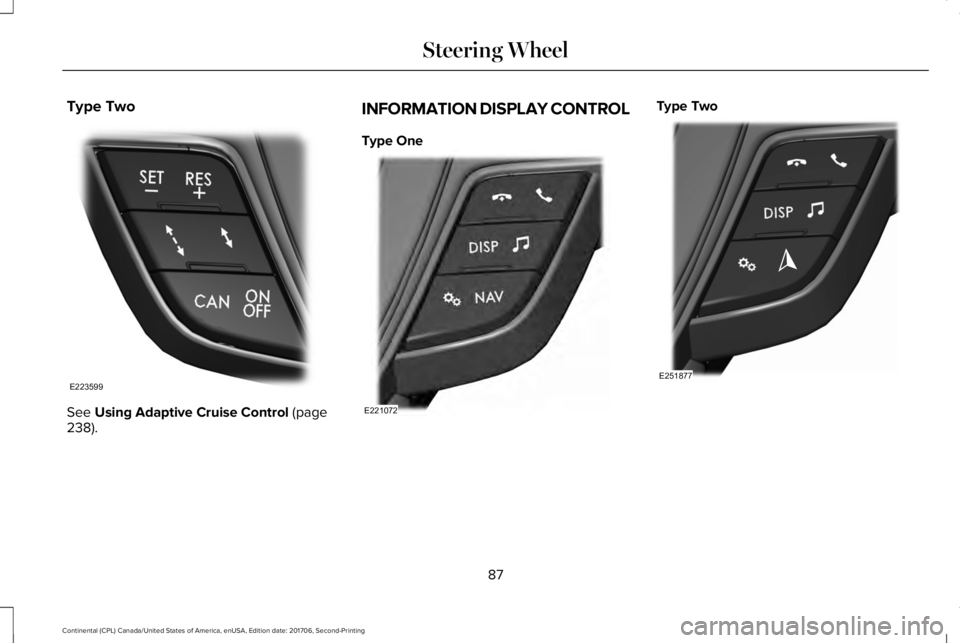
Type Two
See Using Adaptive Cruise Control (page238).
INFORMATION DISPLAY CONTROL
Type One
Type Two
87
Continental (CPL) Canada/United States of America, enUSA, Edition date: 201706, Second-Printing
Steering WheelE223599 E221072 E251877