2018 LINCOLN CONTINENTAL display
[x] Cancel search: displayPage 91 of 615

Type ThreeType Four
See Information Displays (page 115).
HEATED STEERING WHEEL (If Equipped)
Switch the heated steering wheel on and offusing the touchscreen.
Touch the button to switch theheated steering wheel on and off.
Note:You can use the heated steeringwheel only when the engine is running.
Note:The system uses a sensor and isdesigned to control the temperature of thesteering wheel and to prevent it fromoverheating.
Note:In warm temperatures, the steeringwheel quickly reaches its maximumtemperature and the system reduces thecurrent to the heating element. This couldcause you to think that the system hasstopped working but it has not. This isnormal.
88
Continental (CPL) Canada/United States of America, enUSA, Edition date: 201706, Second-Printing
Steering WheelE223601 E251878
Page 93 of 615

Autowipers On.A
High sensitivity.B
Low sensitivity.C
Use the rotary control to adjust thesensitivity of the autowipers.
When you select low sensitivity, the wipersoperate when the sensor detects a largeamount of water on the windshield. Whenyou select high sensitivity, the wipersoperate when the sensor detects a smallamount of water on the windshield.
Keep the outside of the windshield clean. The rain sensor is very sensitive and thewipers may operate if dirt, mist or insects hitthe windshield.
In these conditions, you can do the following:
•Lower the sensitivity of the autowipersto reduce the amount of smearing on thewindshield.
•Switch to normal or high-speed wipe.
•Switch autowipers off.
Note:Fully defrost the windshield before youswitch the windshield wipers on.
Note:Make sure that you switch thewindshield wipers off before entering a carwash.
Note: If streaks or smears appear on thewindshield, clean the windshield and thewiper blades. If that does not resolve theissue, install new wiper blades.
Note:If you switch autolamps andautowipers on, the headlamps turn on whenthe windshield wipers continuously operate.
Autowipers Settings
This setting defaults to on and remains onuntil you switch it off in the informationdisplay.
When you switch off autowipers, the wipersoperate in intermittent mode.
Low Temperature Wipe Inhibit (If Equipped)
The rain sensing feature will not operateimmediately after starting your vehicle whenit is in park (P) and the outside temperatureis below 32°F (0°C). You can switch on thewipers by adjusting the rain sensor sensitivityor adjusting the wiper speed.
This prevents damage to the wiper bladesfrom ice and snow on the windshield.
WINDSHIELD WASHERS
Note: Do not operate the washers when thewasher reservoir is empty. This may causethe washer pump to overheat.
90
Continental (CPL) Canada/United States of America, enUSA, Edition date: 201706, Second-Printing
Wipers and WashersE269411 E270969
Page 96 of 615

Headlamp High Beam
Push the lever away from you toswitch the high beam on.
Push the lever away from you again or pullthe lever toward you to switch the high beamoff.
Flashing the Headlamp High Beam
Slightly pull the lever toward you and releaseit to flash the headlamps.
AUTOLAMPS
WARNING: The system does notrelieve you of your responsibility to drive withdue care and attention. You may need tooverride the system if it does not turn theheadlamps on in low visibility conditions, forexample daytime fog.
When the lighting control is in the autolampsposition, the headlamps turn on in low lightsituations, or when the wipers turn on.
The headlamps remain on for a period oftime after you switch the ignition off. Usethe information display controls to adjust theperiod of time that the headlamps remainon.
Note: If you switch the autolamps on, youcannot switch the high beams on until thesystem turns the low beams on.
93
Continental (CPL) Canada/United States of America, enUSA, Edition date: 201706, Second-Printing
LightingE273182 E273181 E142451
Page 98 of 615

Type One - Conventional (Non-Configurable)
The daytime running lamps turn on when:
1. Switching the ignition on.
2. The transmission is not in park (P) forvehicles with automatic transmissions, orreleasing the parking brake for vehicleswith manual transmissions.
3. The lighting control is in the off, parkinglamp or autolamps positions.
4. The headlamps are off.
Type Two - Configurable
Switch the daytime running lamps on or offusing the information display. SeeInformation Displays (page 115).
The daytime running lamps turn on when:
1. The lamps are on in the informationdisplay.
2. Switching the ignition on.
3. The transmission is not in park (P) forvehicles with automatic transmissions, orreleasing the parking brake for vehicleswith manual transmissions.
4. The lighting control is in the autolampsposition.
5. The headlamps are off.
The other lighting control switch positionsdo not turn on the daytime running lamps.
If the daytime running lamps are off in theinformation display, the lamps stay off in allswitch positions.
AUTOMATIC HIGH BEAM
CONTROL (If Equipped)
WARNING: The system does notrelieve you of your responsibility to drive withdue care and attention. You may need tooverride the system if it does not turn thehigh beams on or off.
The system turns on high beams if it is darkenough and no other traffic is present. If itdetects an approaching vehicle’s headlampsor tail lamps, or street lighting ahead, thesystem turns off high beams before they candistract other road users. Low beams remainon.
Note:The system may not operate properlyif the sensor is blocked. Keep the windshieldfree from obstruction or damage.
Note:The system may not operate properlyin cold or inclement conditions. You canswitch on the high beams by overriding thesystem.
Note:If the system detects a blockage, forexample bird droppings, bug splatter, snowor ice, the system goes into low beam modeuntil you clear the blockage. A message mayappear in the information display if thecamera is blocked.
Note:Using much larger tires or equippingvehicle accessories such as snowplows canmodify your vehicle's ride height anddegrade automatic high beam controlperformance.
95
Continental (CPL) Canada/United States of America, enUSA, Edition date: 201706, Second-Printing
Lighting
Page 99 of 615

A camera sensor, centrally mounted behindthe windshield of your vehicle, continuouslymonitors conditions to turn the high beamson and off.
Once the system is active, the high beamsturn on if:
•The ambient light level is low enough.
•There is no traffic in front of your vehicle.
•The vehicle speed is greater thanapproximately 32 mph (51 km/h).
The high beams turn off if:
•The ambient light level is high enoughthat high beams are not required.
•The system detects an approachingvehicle's headlamps or tail lamps.
•The vehicle speed falls belowapproximately 27 mph (44 km/h).
•The system detects severe rain, snow orfog.
•The camera is blocked.
Switching the System On and Off
Switch the system on using the informationdisplay. See Information Displays (page115).
Switch the lighting control to the autolampsposition. See Autolamps (page 93).
Overriding the System
When you switch on the high beams, pushingor pulling the stalk provides a temporaryoverride to low beam.
Automatic High Beam Indicator (If Equipped)
The indicator lamp illuminates toconfirm when the system is readyto assist.
ADAPTIVE HEADLAMPS (If Equipped)
The headlamp beams move in the samedirection as the steering wheel. This providesmore visibility when driving around curves.
A. Without adaptive headlamps.
B. With adaptive headlamps.
96
Continental (CPL) Canada/United States of America, enUSA, Edition date: 201706, Second-Printing
LightingE142451
Page 100 of 615
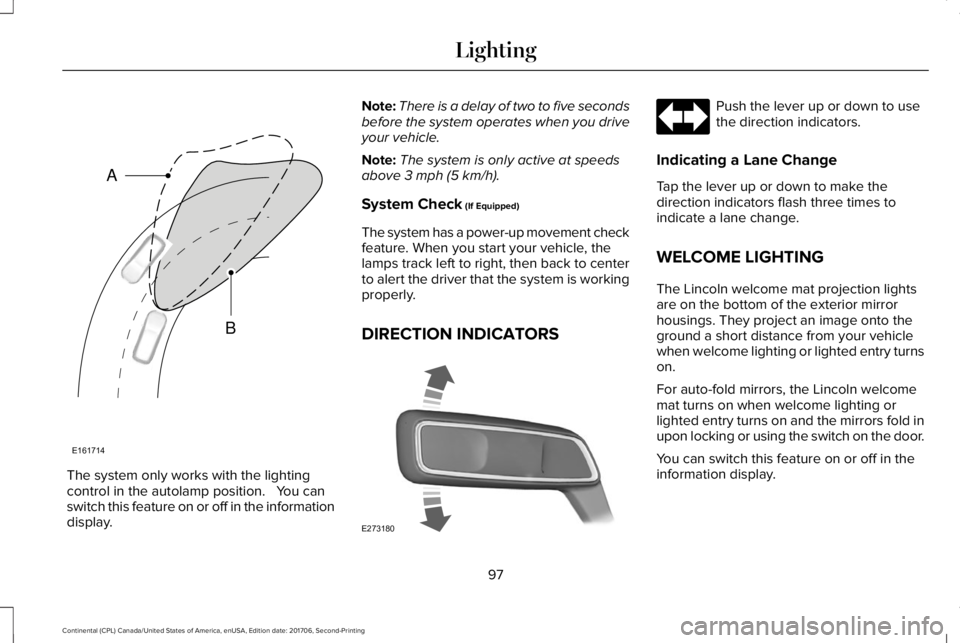
The system only works with the lightingcontrol in the autolamp position. You canswitch this feature on or off in the informationdisplay.
Note:There is a delay of two to five secondsbefore the system operates when you driveyour vehicle.
Note:The system is only active at speedsabove 3 mph (5 km/h).
System Check (If Equipped)
The system has a power-up movement checkfeature. When you start your vehicle, thelamps track left to right, then back to centerto alert the driver that the system is workingproperly.
DIRECTION INDICATORS
Push the lever up or down to usethe direction indicators.
Indicating a Lane Change
Tap the lever up or down to make thedirection indicators flash three times toindicate a lane change.
WELCOME LIGHTING
The Lincoln welcome mat projection lightsare on the bottom of the exterior mirrorhousings. They project an image onto theground a short distance from your vehiclewhen welcome lighting or lighted entry turnson.
For auto-fold mirrors, the Lincoln welcomemat turns on when welcome lighting orlighted entry turns on and the mirrors fold inupon locking or using the switch on the door.
You can switch this feature on or off in theinformation display.
97
Continental (CPL) Canada/United States of America, enUSA, Edition date: 201706, Second-Printing
LightingE161714
B
A E273180
Page 105 of 615

Window Lock
Press the control to lock or unlock the rearwindow controls. It illuminates when youlock the rear window controls.
Accessory Delay
You can use the window switches for severalminutes after you switch the ignition off oruntil you open either front door.
GLOBAL OPENING AND CLOSING
You can use the remote control to operatethe windows with the ignition off.
Note:You can enable or disable this featurein the information display or see anauthorized dealer. See General Information(page 115).
Note:To operate this feature, accessorydelay must not be active.
Opening the Windows
You can only open the windows for a shorttime after you unlock your vehicle with theremote control. After you unlock your vehicle,press and hold the remote control unlockbutton to open the windows. Release thebutton once movement starts. Press the lockor unlock button to stop movement.
Closing the Windows
WARNING: When closing the powerwindows, you should verify they are free ofobstructions and make sure that children andpets are not in the proximity of the windowopenings.
To close the windows, press and hold theremote control lock button. Release thebutton once movement starts. Press the lockor unlock button to stop movement.
EXTERIOR MIRRORS
Power Exterior Mirrors
WARNING: Do not adjust the mirrorswhen your vehicle is moving. This couldresult in the loss of control of your vehicle,serious personal injury or death.
Note:Do not use an ice scraper on the mirrorglass or housing.
102
Continental (CPL) Canada/United States of America, enUSA, Edition date: 201706, Second-Printing
Windows and MirrorsE259237
Page 106 of 615
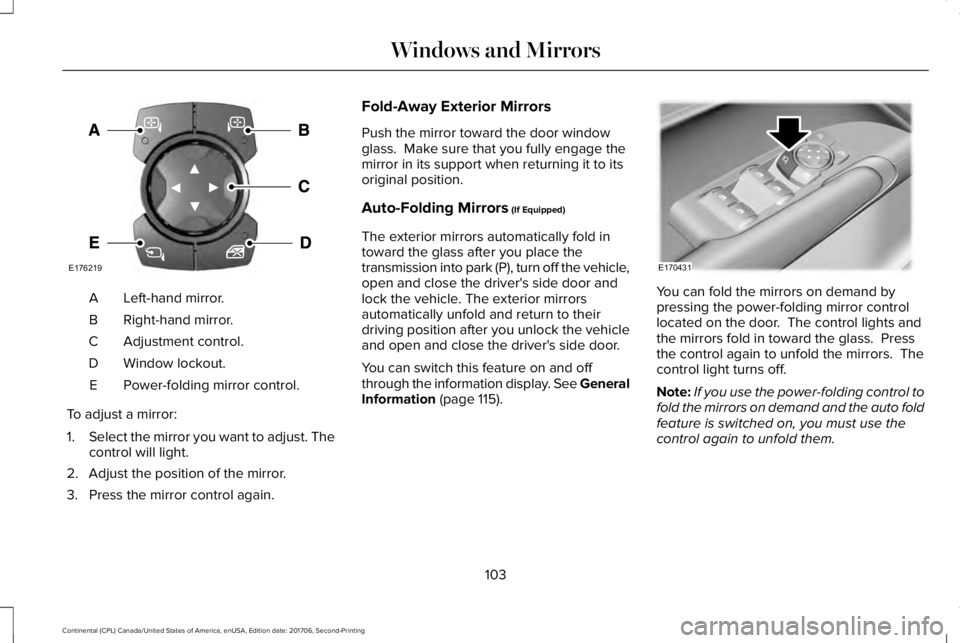
Left-hand mirror.A
Right-hand mirror.B
Adjustment control.C
Window lockout.D
Power-folding mirror control.E
To adjust a mirror:
1.Select the mirror you want to adjust. Thecontrol will light.
2. Adjust the position of the mirror.
3. Press the mirror control again.
Fold-Away Exterior Mirrors
Push the mirror toward the door windowglass. Make sure that you fully engage themirror in its support when returning it to itsoriginal position.
Auto-Folding Mirrors (If Equipped)
The exterior mirrors automatically fold intoward the glass after you place thetransmission into park (P), turn off the vehicle,open and close the driver's side door andlock the vehicle. The exterior mirrorsautomatically unfold and return to theirdriving position after you unlock the vehicleand open and close the driver's side door.
You can switch this feature on and offthrough the information display. See GeneralInformation (page 115).
You can fold the mirrors on demand bypressing the power-folding mirror controllocated on the door. The control lights andthe mirrors fold in toward the glass. Pressthe control again to unfold the mirrors. Thecontrol light turns off.
Note:If you use the power-folding control tofold the mirrors on demand and the auto foldfeature is switched on, you must use thecontrol again to unfold them.
103
Continental (CPL) Canada/United States of America, enUSA, Edition date: 201706, Second-Printing
Windows and MirrorsE176219 E170431