2018 LEXUS LS500 change time
[x] Cancel search: change timePage 394 of 514

394 6-3. Do-it-yourself maintenance
LS500_OM_OM50F54U_(U) dure again.
• If, when attempting to start initialization,
the tire pressure warning light does not
blink 3 times.
• If, when the vehicle has been driven for
about 20 minutes after performing ini-
tialization, the tire pressure warning light
blinks for approximately 1 minute and
then illuminates.●
If initialization cannot be completed after
performing the above procedure, con-
tact your Lexus dealer.
Every tire pressure warning valve and
transmitter has a unique ID code.
When replacing a tire pressure warn-
ing valve and transmitter, it is necessary
to register the ID codes.
The ID codes can be registered on
of the multi-information display.
1 Press or of the meter con-
trol switch to select .
2 Press or to select “Vehicle
Settings” and then press .
3 Press or to select “TPWS”
and then press . 4 Press or to select “Change
Wheel Set”. Then press and hold
until the tire pressure warning
light blinks slowly 3 times. Then a message will be displayed on the
multi-information display.
When registration is being performed, the
tire pressure warning light will blink for
approximately 1 minute then illuminate and
“--” will be displayed for the inflation pres-
sure of each tire on the multi-information
display.
5 Drive straight (with occasional left
and right turns) at approximately
25 mph (40 km/h) or more for
approximately 10 to 30 minutes. Registration is complete when the tire
pressure warning light turns off and the
inflation pressure of ea ch tire is displayed
on the multiinformation display.
Registration may take longer than approxi-
mately 1 hour in certain situations, such as
when the vehicle is stopped for a long time
at traffic lights, etc. ( → P.395)
After registering the ID codes, make sure
to initialize the tire pressure warning sys-
tem. ( → P.392)
■
When registering ID codes
●
Before performing ID code registration,
make sure that no wheels with tire pres-
sure warning valve and transmitters
installed are near the vehicle.
●
Make sure to initializ e the tire pressure
warning system after registering the ID WARNING■
When initializing the tire pressure
warning system
Do not initialize the tire pressure warning
system without first adjusting the tire
inflation pressure to the specified level.
Otherwise, the tire pressure warning
light may not come on even if the tire
inflation pressure is low, or it may come
on when the tire inflation pressure is
actually normal.
Registering ID codes
Page 437 of 514

4377-2. Steps to take in an emergency
LS500_OM_OM50F54U_(U) 7
When trouble arises ■
Key linked functions
1 Closes the windows and the moon
roof *
or panoramic moon roof *
(turn and hold)
2 Opens the windows and the moon
roof *
or panoramic moon roof *
(turn and hold)These settings must be customized at your
Lexus dealer. *
:If equipped 1 Depress the brake pedal.
2 Touch the Lexus emblem side of the
electronic key to the engine switch. When the electronic key is detected, a
buzzer sounds and the engine switch will
turn to IGNITION ON mode.
When the smart access system with
push-button start is deactivated in custom-
ization setting, the engine switch will turn
to ACCESSORY mode.
3 Firmly depress the brake pedal and
check that is shown on the
multi-information display.
4 Press the engine switch.
In the event that the engine still cannot
be started, contact your Lexus dealer. ■
Stopping the engine
Set the parking brake, shift the shift position
to P and press the engine switch as you nor-
mally do when stop ping the engine.
■
Electronic key battery
As the above procedure is a temporary
measure, it is recommended that the elec-
tronic key battery be replaced immediately
when the battery is depleted. ( → P.403)
■
Changing engine switch modes
Release the brake pe dal and press the
engine switch in step 3 above. The engine
does not start and modes will be changed
each time the switch is pressed. ( → P.162)WARNING
■
When using the mechanical key and
operating the power windows or the
moon roof or panoramic moon roof
Operate the power window or the moon
roof or panoramic moon roof after
checking to make sure that there is no
possibility of any passe nger having any of
their body parts caught in the window or
the moon roof or panoramic moon roof.
Also, do not allow ch ildren to operate the
mechanical key. It is possible for children
and other passengers to get caught in
the power window or the moon roof or
panoramic moon roof. Starting the engine
Page 483 of 514

4818-2. Customization
LS500_OM_OM50F54U_(U) 8
Vehicle specifications
■
Vehicle customization●
When the smart access system with
push-button start is off, the entry unlock
function cannot be customized.●
When the doors remain closed after
unlocking the doors and the timer acti-
vated automatic door lock function acti-
vates, signals will be generated in
accordance with the operation buzzer
volume and operational signal (Emer-
gency flashers) function settings.
●
Some settings can be changed using a
switch or the audio system screen. If a
setting is changed using a switch, the
changed setting will not be reflected on
the audio system screen until the engine
switch is turned of f and then to IGNI- TION ON mode. ■
Clock settings screen
If the clock adjustment screen is displayed
continuously when attempting to change
the clock settings, the system may be mal-
functioning. Have the vehicle inspected by
your Lexus dealer.Operation when you
approach the vehicle with the
electronic key on your person On Off — — — O
Footwell lights On Off — — — O
Instrument panel ornament
light and door trim ornament
lights On Off — — — O
Time elapsed before the outer
foot lights turn off 15 seconds Off
O — — O7.5 seconds
30 seconds
Operation of the outer foot
lights when you approach the
vehicle with the electronic
key on your person On Off — — — O
Operation of the outer foot
lights when the doors are
unlocked On Off — — — O
Operation of the outer foot
lights when a door is opened On Off — — — O
Fading out of the outer foot
lights when they turn off Long Short — — — OFunction Default setting Customized set-
ting A B C D
Page 484 of 514
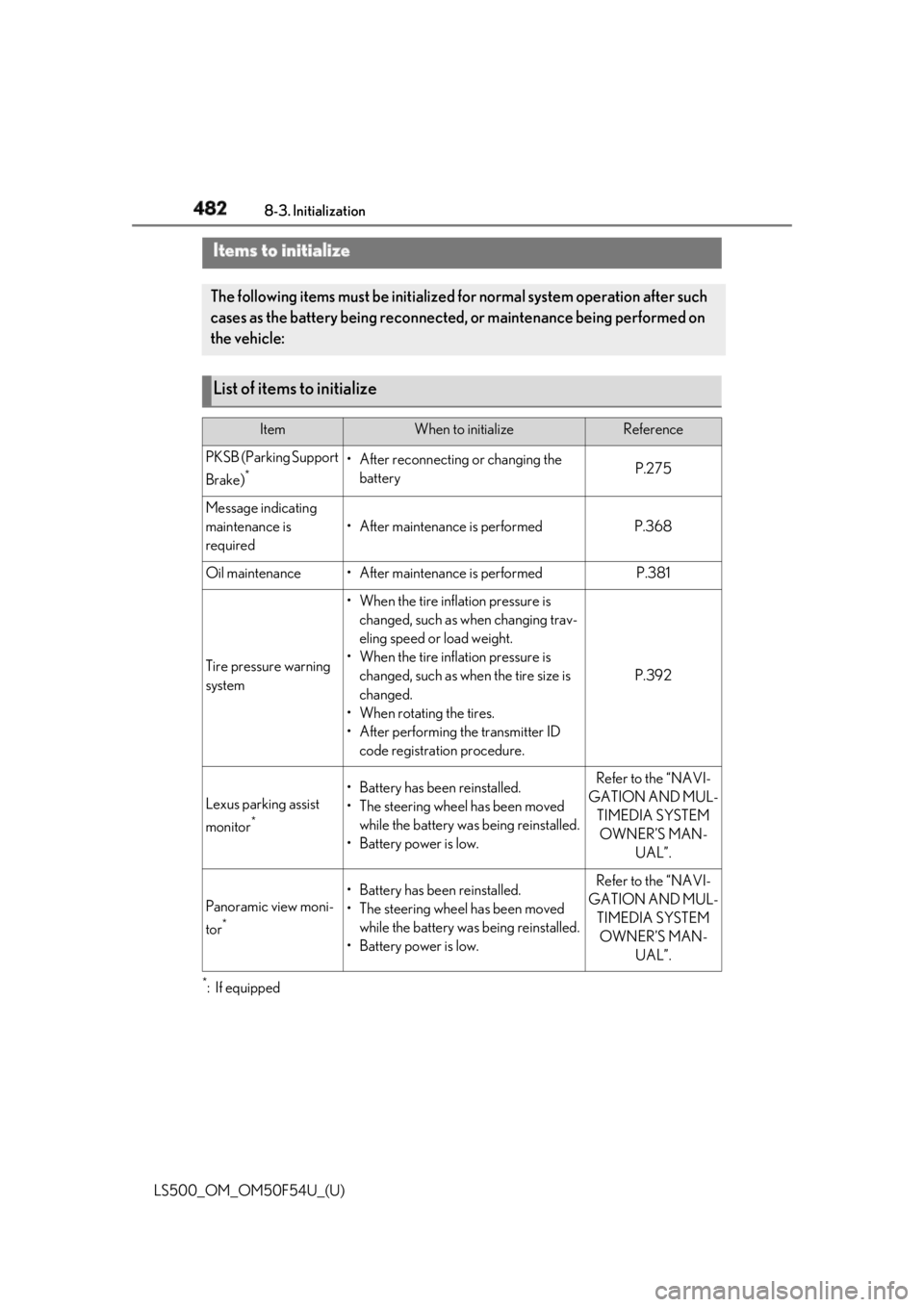
482 8-3. Initialization
LS500_OM_OM50F54U_(U) 8-3.Initialization
*
:If equippedItems to initialize The following items must be initialized for normal system operation after such
cases as the battery being reconnected, or maintenance being performed on
the vehicle:
List of items to initialize Item When to initialize Reference
PKSB (Parking Support
Brake) *
• After reconnecting or changing the
battery P.275
Message indicating
maintenance is
required • After maintenance is performed P.368
Oil maintenance • After maintenance is performed P.381
Tire pressure warning
system • When the tire inflation pressure is
changed, such as when changing trav-
eling speed or load weight.
• When the tire inflation pressure is
changed, such as when the tire size is
changed.
• When rotating the tires.
• After performing the transmitter ID
code registration procedure. P.392
Lexus parking assist
monitor *
• Battery has been reinstalled.
• The steering wheel has been moved
while the battery was being reinstalled.
• Battery power is low. Refer to the “NAVI-
GATION AND MUL-
TIMEDIA SYSTEM
OWNER’S MAN-
UAL”.
Panoramic view moni-
tor *
• Battery has been reinstalled.
• The steering wheel has been moved
while the battery was being reinstalled.
• Battery power is low. Refer to the “NAVI-
GATION AND MUL-
TIMEDIA SYSTEM
OWNER’S MAN-
UAL”.
Page 501 of 514

4991-1. What to do if... (Troubleshooting)
LS500_OM_OM50F54U_(U) 499Alphabetical Index
Intuitive parking assist.............................. 257
LKA (Lane-Keeping Assist)................. 234
LTA (Lane-Tracing Assist) ................... 225
Multi-information display .......................... 76
Parking Support Brake function (rear
pedestrians) ..............................................286
RCD (Rear Camera Detection) ........268
RCTA .............................................................. 264
Warning message..................................... 428
Distance until next engine oil
change ..................................................... 70, 75
Do-it-yourself maintenance .................... 369
Door courtesy lights ................................... 330
Door lock
Doors.................................................................. 96
Smart access system with push-button
start ..................................................................107
Wireless remote control........................... 94
Doors
Automatic door lock ing and unlocking
system ........................................................... 100
Door closer ..................................................... 99
Door glasses ..................................................139
Door lock.......................................................... 96
Open door warning bu zzer .......... 97, 99
Outside rear view mirrors ...................... 137
Rear door child-protectors ..................... 99
Drive distance .................................................. 78
Drive info 1/Drive info 2 .............................. 78
Driver’s seat position memory
Driving position memory......................... 127
Memory recall function ........................... 130
Power easy access system ..................... 127
Drive-start control ......................................... 151
Driving
Break-in tips .................................................... 151
Correct driving posture .............................23
Driving mode select switch ..................289
Procedures .................................................... 150
Winter drive tips......................................... 299
Driving information display ........................ 78 Driving position memory............................ 127
Memory recall function............................ 130
Power easy access system ..................... 127
Driving range ................................................... 78
Driving support system information display
...............................................................................81
DRS (Dynamic Rear Steering) .............. 294
Dynamic radar cruise control with
full-speed range .............................. 238, 241
Warning message .................................... 250
Dynamic Rear Steering (DRS) .............. 294 E
ECB (Electronically Controlled Brake Sys-
tem) ................................................................ 294
Eco Driving Indicator............................ 79, 87
Eco Driving Indicator Light .........................79
EDR (Event data recorder) ............................7
Elapsed time ..................................................... 78
Electric Power Steering (EPS) .............. 294
Warning light .................................................421
Electronic key .................................................. 92
Battery-saving function............................108
If the electronic key does not operate
properly .......................................................436
Replacing the battery .............................. 403
Electronic roof sunshade
Jam protection function ........................... 146
Operation ........................................................144
Electronically Controlled Brake System
(ECB) ............................................................ 294
Electronically modulated air suspension
............................................................................291
Emergency flashers ..................................... 410
Emergency, in case of
If a warning buzzer sounds.................... 418
If a warning light turns on........................ 418
If a warning message is displayed .....428
If the battery is discharged ................... 438
If the electronic key does not operate
properly .......................................................436