2018 LEXUS LS500 change time
[x] Cancel search: change timePage 304 of 514

304 5-1. Remote Touch/Display
LS500_OM_OM50F54U_(U) 5-1.Remote Touch/Display
■
Switches
“MAP” buttonVehicles with navigation function:
Press this button to display the vehicle’s
current position.
Vehicles without navigation function:
Press this button to display the compass
mode screen.
“MENU” buttonPress this button to display the menu
screen.
Back buttonPress this button to display the previous
screen.
TouchpadSlide your finger on the touchpad and
move the pointer to select a function, letter
and screen button.
Press the touchpad to enter the selected function, letter or screen button. Certain
finger movements on the touchpad can
perform functions, su ch as changing map
scalings and scrolling list screens.
Sub function button When is displayed on the screen, a
function screen assigned to the screen can
be displayed. ■
Using the touchpad
1 Select: Touch the touchpad to
select the desired button on the
screen.
2 Enter: Buttons on the screen can be
selected by either depressing or
double tapping the touchpad.
Once a button has been selected,
the screen will change. ■
Touch operation
Operations are performed by touching
the touchpad with your finger.
Trace Trace the pad surface while maintaining
contact with the touchpad. Moving the
cursor and the pointer.Remote Touch The Remote Touch can be used to
operate the Center Display.
For details on the Remote touch,
refer to “NAVIGATION AND
MULTIMEDIA SYSTEM
OWNER’S MANUAL”.
Remote Touch operation
A
B
C
D E
Page 308 of 514

308 5-1. Remote Touch/Display
LS500_OM_OM50F54U_(U) *
:If equipped
■
Home screen
Touch to display the audio control
screen.
Refer to “NAVIGATION AND
MULTIMEDIA SYSTEM
OWNER’S MANUAL”.
Touch to display the rear air condi-
tioning control screen. ( → P.324)
Touch to display the rear seat
adjustment screen. ( → P.124)
Touch to display the relaxation seat
(if equipped) control screen.
( → P.126)
Touch to display the rear sunshade (if equipped)/rear interior light con-
trol screen. ( → P.346)
Touch to display the Rear Multi
Operation Panel settings screen.
( → P.308)
Show the progress of unlocking the
Rear Multi Operation Panel.
Touch and hold to unlock the Rear
Multi Operation Panel.
Shortcut button Shortcut screen is displayed. Touch to dis-
play/hide commonly used buttons for a
selected mode on the bottom portion of
the screen.
buttonPress to display the home screen. ■
Rear Multi Operation Panel set-
tings screen
Screen operation settings and the
brightness of the screen can be
changed.Rear Multi Operation Panel *
The Rear Multi Operation Panel
built-into the rear armrest can be
used to operate the rear audio sys-
tem, air conditioning system, etc.
Rear Multi Operation Panel
overview
A
B
C
D
E F
G
H
I
J
Page 309 of 514
3095-1. Remote Touch/Display
LS500_OM_OM50F54U_(U) 5
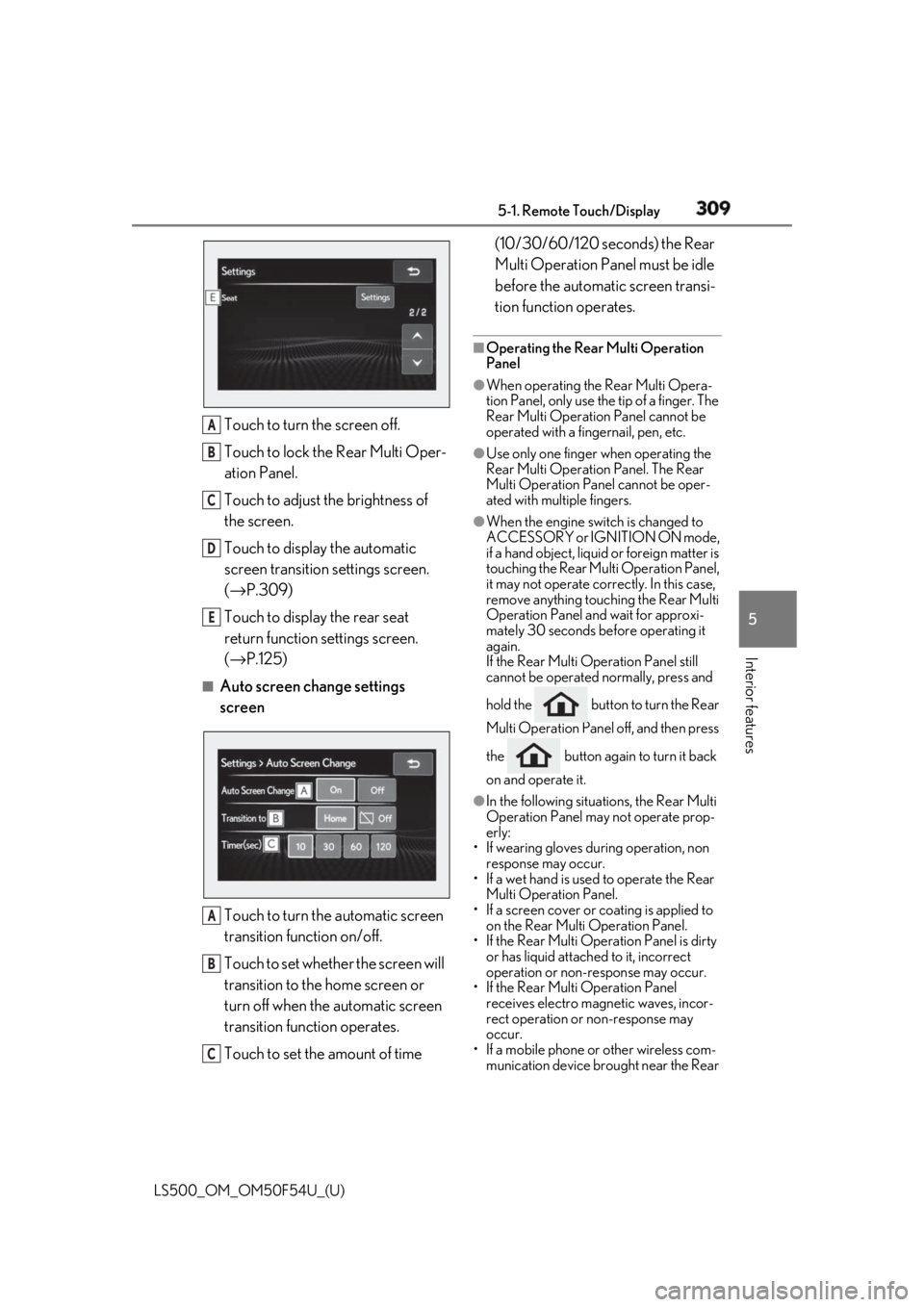
Interior features Touch to turn the screen off.
Touch to lock the Rear Multi Oper-
ation Panel.
Touch to adjust the brightness of
the screen.
Touch to display the automatic
screen transition settings screen.
( → P.309)
Touch to display the rear seat
return function settings screen.
( → P.125)■
Auto screen change settings
screen
Touch to turn the automatic screen
transition function on/off.
Touch to set whether the screen will
transition to the home screen or
turn off when the automatic screen
transition function operates.
Touch to set the amount of time (10/30/60/120 seconds) the Rear
Multi Operation Panel must be idle
before the automatic screen transi-
tion function operates. ■
Operating the Rear Multi Operation
Panel ●
When operating the Rear Multi Opera-
tion Panel, only use the tip of a finger. The
Rear Multi Operation Panel cannot be
operated with a fingernail, pen, etc. ●
Use only one finger when operating the
Rear Multi Operation Panel. The Rear
Multi Operation Panel cannot be oper-
ated with multiple fingers. ●
When the engine swit ch is changed to
ACCESSORY or IGNITION ON mode,
if a hand object, liquid or foreign matter is
touching the Rear Multi Operation Panel,
it may not operate correctly. In this case,
remove anything touching the Rear Multi
Operation Panel and wait for approxi-
mately 30 seconds be fore operating it
again.
If the Rear Multi Operation Panel still
cannot be operated normally, press and
hold the button to turn the Rear
Multi Operation Panel off, and then press
the button again to turn it back
on and operate it. ●
In the following situations, the Rear Multi
Operation Panel may not operate prop-
erly:
• If wearing gloves during operation, non
response may occur.
• If a wet hand is used to operate the Rear
Multi Operation Panel.
• If a screen cover or coating is applied to
on the Rear Multi Operation Panel.
• If the Rear Multi Operation Panel is dirty
or has liquid attached to it, incorrect
operation or non-response may occur.
• If the Rear Multi Operation Panel
receives electro magnetic waves, incor-
rect operation or non-response may
occur.
• If a mobile phone or other wireless com-
munication device br ought near the Rear A
B
C
D
E
A
B
C
Page 314 of 514
314 5-3. Using the air conditioning system and defogger
LS500_OM_OM50F54U_(U) ■
Changing the air flow mode
→ P.316 ■
Switching between outside air and
recirculated air modes
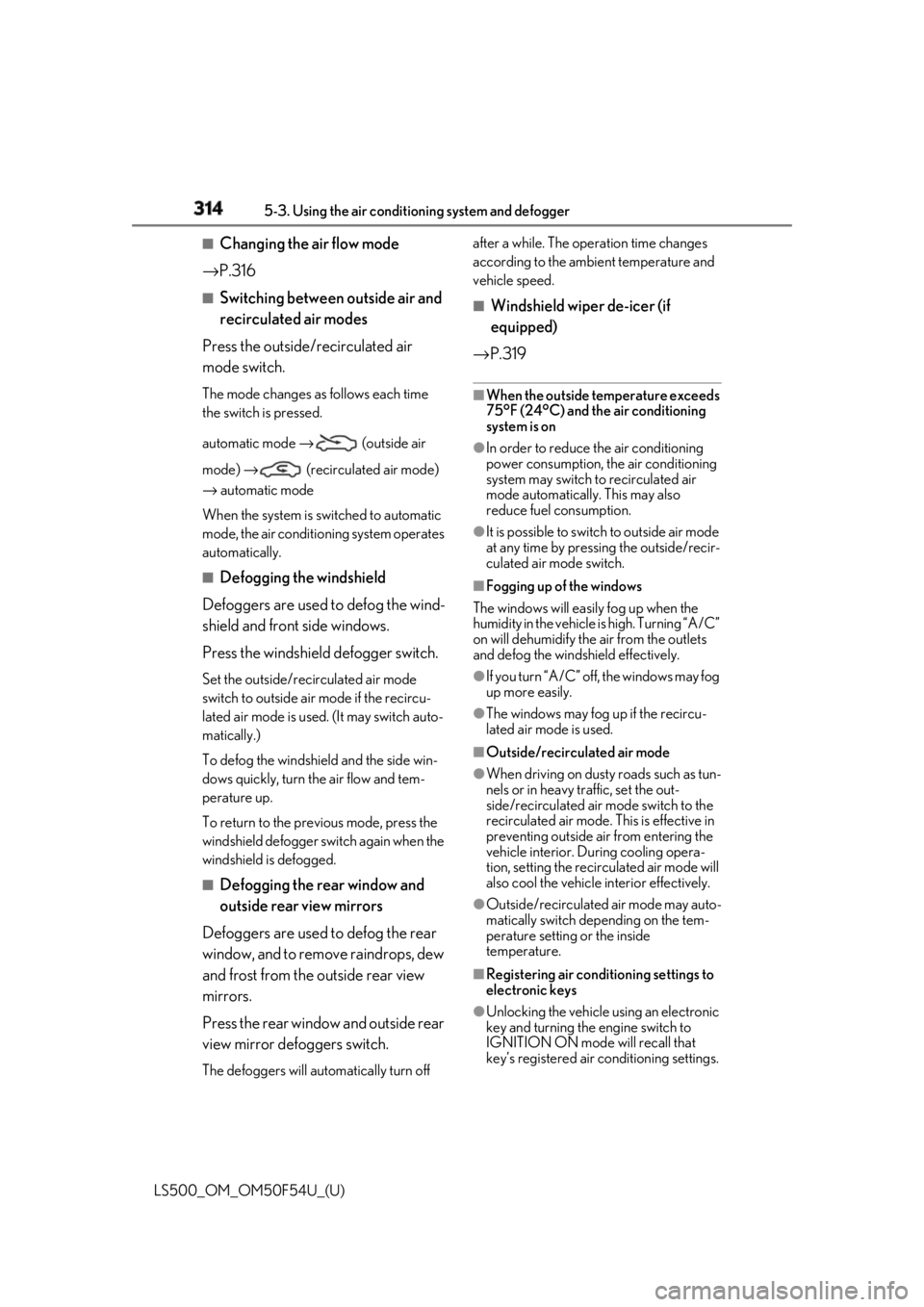
Press the outside/recirculated air
mode switch. The mode changes as follows each time
the switch is pressed.
automatic mode → (outside air
mode) → (recirculated air mode)
→ automatic mode
When the system is switched to automatic
mode, the air conditioning system operates
automatically. ■
Defogging the windshield
Defoggers are used to defog the wind-
shield and front side windows.
Press the windshield defogger switch. Set the outside/reci rculated air mode
switch to outside air mode if the recircu-
lated air mode is used. (It may switch auto-
matically.)
To defog the windshield and the side win-
dows quickly, turn the air flow and tem-
perature up.
To return to the previous mode, press the
windshield defogger switch again when the
windshield is defogged.
■
Defogging the rear window and
outside rear view mirrors
Defoggers are used to defog the rear
window, and to remove raindrops, dew
and frost from the outside rear view
mirrors.
Press the rear window and outside rear
view mirror defoggers switch.
The defoggers will automatically turn off after a while. The operation time changes
according to the ambient temperature and
vehicle speed. ■
Windshield wiper de-icer (if
equipped)
→ P.319 ■
When the outside temperature exceeds
75°F (24°C) and the air conditioning
system is on ●
In order to reduce the air conditioning
power consumption, the air conditioning
system may switch to recirculated air
mode automatically. This may also
reduce fuel consumption. ●
It is possible to switch to outside air mode
at any time by pressing the outside/recir-
culated air mode switch. ■
Fogging up of the windows
The windows will easily fog up when the
humidity in the vehicle is high. Turning “A/C”
on will dehumidify the air from the outlets
and defog the windshield effectively. ●
If you turn “A/C” off, the windows may fog
up more easily. ●
The windows may fog up if the recircu-
lated air mode is used. ■
Outside/recirculated air mode ●
When driving on dusty roads such as tun-
nels or in heavy traffic, set the out-
side/recirculated air mode switch to the
recirculated air mode. This is effective in
preventing outside air from entering the
vehicle interior. During cooling opera-
tion, setting the recirc ulated air mode will
also cool the vehicle interior effectively.
●
Outside/recirculated air mode may auto-
matically switch depending on the tem-
perature setting or the inside
temperature.
■
Registering air conditioning settings to
electronic keys
●
Unlocking the vehicle using an electronic
key and turning the engine switch to
IGNITION ON mode will recall that
key’s registered air conditioning settings.
Page 315 of 514

3155-3. Using the air conditio ning system and defogger
LS500_OM_OM50F54U_(U) 5
Interior features ●
When the engine switch is turned off, the
current air conditioning settings will auto-
matically be registered to the electronic
key that was used to unlock the vehicle.●
The system may not operate correctly if
more than one electr onic key is in the
vicinity or if the smart access system with
push-button start is used to unlock a pas-
senger door.●
The doors that can recall the air condi-
tioning setting *
when unlocked using the
smart access system with push-button
start can be changed. For details, contact
your Lexus dealer. *
: The doors that can recall the driving
position memory are changed at the
same time.■
Operation of the air conditioning sys-
tem in Eco drive mode
In Eco drive mode, the air conditioning sys-
tem is controlled as follows to prioritize fuel
efficiency: ●
Engine speed and compressor operation
controlled to restri ct heating/cooling
capacity●
Fan speed restricted when automatic
mode is selected
To improve air condit ioning performance,
perform the following operations: ●
Turn off eco air conditioning mode
( → P.316) ●
Adjust the fan speed●
Turn off Eco drive mode ( → P.289)
■
When the outside temperature falls to
nearly 32°F (0°C)
The dehumidification function may not
operate even when “A/C” is selected.
■
Ventilation and air conditioning odors
●
To let fresh air in, set the air conditioning
system to the outside air mode.
●
During use, various odors from inside and
outside the vehicle may enter into and
accumulate in the air conditioning sys-
tem. This may then cause odor to be
emitted from the vents.
●
To reduce potential odors from occur- ring:
• It is recommended that the air condition-
ing system be set to outside air mode
prior to turning the vehicle off.
• The start timing of the blower may be
delayed for a short pe riod of time imme-
diately after the air conditioning system is
started in automatic mode or with the
micro dust and pollen filter on. ●
When parking, the system automatically
switches to outside air mode to encour-
age better air circulation throughout the
vehicle, helping to reduce odors that
occur when starting the vehicle. ■
Using the voice command system
Air conditioning system can be operated
using voice commands. For details, refer to
the “NAVIGATION AND MULTIMEDIA
SYSTEM OWNER’S MANUAL”. ■
Air conditioning filter
→ P.402 ■
Customization
Some functions can be customized.
( → P.468)
WARNING■
To prevent the windshield from fog-
ging up
Do not use the windshield defogger
switch during cool air operation in
extremely humid weather. The difference
between the temperature of the outside
air and that of the windshield can cause
the outer surface of the windshield to fog
up, blocking your vision.
■
When the outside rear view mirror
defoggers are operating
Do not touch the outside rear view mir-
ror surfaces, as they can become very
hot and burn you.
Page 321 of 514
3215-3. Using the air conditio ning system and defogger
LS500_OM_OM50F54U_(U) 5
Interior features To enable/disable S-FLOW mode and
enter manual S-FLOW mode, select the
S-FLOW mode switch.
Manual S-FLOW mode
When the S-FLOW mode switch is
selected, S-FLOW mode will be manu-
ally enabled/ disabled. The indicator will illuminate on the air con-
ditioning control screen when S-FLOW
mode is enabled. ■
Operation of the air conditioning sys-
tem in S-FLOW mode
If the front passenger’s door or a rear door
is opened then closed, the air conditioning
system determines that a passenger is in the
vehicle. In this case, priority for the airflow
will be changed from th e driver’s seat only
to the front seats only or all seats, respec-
tively.
(Depending on the set temperature or
ambient temperature, priority for the air-
flow may not be given to the driver’s seat
only.)
If a passenger is judged to be in the vehicle,
the system will retain the judgement for a
certain amount of time after the engine
switch is turned off. ■
Operation of automatic S-FLOW mode
When the system is operating in automatic
S-FLOW mode, if a rear door is opened
and then closed, S-FLOW mode will be dis-
abled. To enable S-FL OW mode, select the
S-FLOW mode switch.
■
Changing from manual S-FLOW mode
to automatic S-FLOW mode
1 Select the S-FLOW mode switch to dis-
able S-FLOW mode.
2 Turn the engine switch off.
3 After 60 minutes have elapsed, change
the engine switch to ON mode.
Vehicles with DUAL-ZONE climate
control
To turn on the “DUAL” mode, perform
any of the following procedures:
Select “DUAL” on the sub function
menu. ( → P.316)
Select “DUAL” on the option con-
trol screen.
Adjust the passenger’s side tem-
perature setting. The indicator on the main control screen
comes on when the “DUAL” mode is on.
Vehicles with 4-ZONE climate con-
trol
To turn on the “4-ZONE” mode, per-
form any of the following procedures:
Select “4-ZONE” on the sub func-
tion menu. ( → P.316)
Select “4-ZONE” on the option
control screen.
Adjust a passenger seat tempera-
ture setting. The indicator on the main control screen
comes on when the “4-ZONE” mode is on.
■
Location of air outlets
The air outlets and air volume changes
according to the selected air flow
mode.Adjusting the temperature for
the driver and passenger seats
separately
Air outlet layout and operations
Page 328 of 514
328 5-3. Using the air conditioning system and defogger
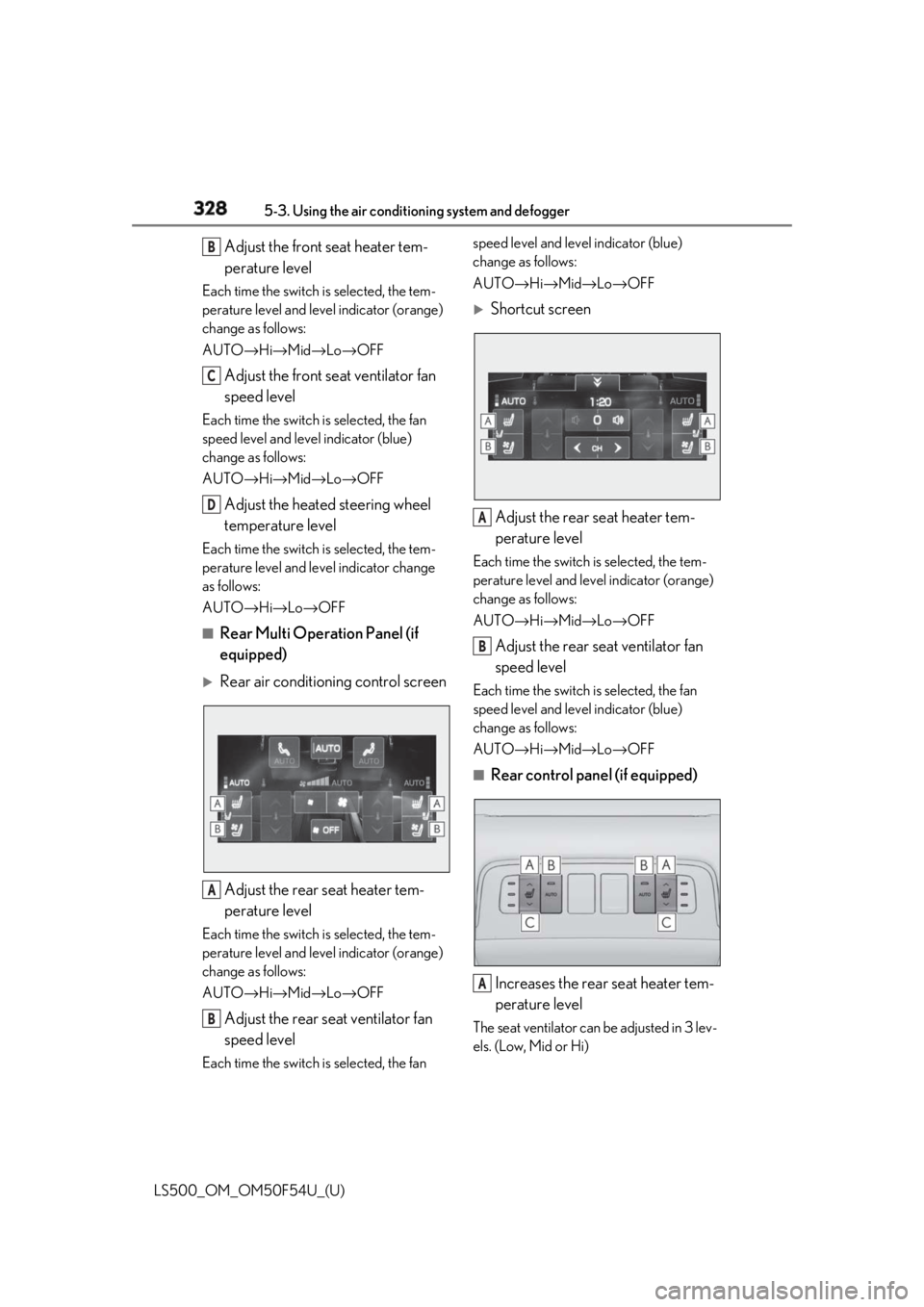
LS500_OM_OM50F54U_(U) Adjust the front seat heater tem-
perature levelEach time the switch is selected, the tem-
perature level and leve l indicator (orange)
change as follows:
AUTO → Hi → Mid → Lo → OFF
Adjust the front seat ventilator fan
speed levelEach time the switch is selected, the fan
speed level and leve l indicator (blue)
change as follows:
AUTO → Hi → Mid → Lo → OFF
Adjust the heated steering wheel
temperature levelEach time the switch is selected, the tem-
perature level and le vel indicator change
as follows:
AUTO → Hi → Lo → OFF■
Rear Multi Operation Panel (if
equipped)
Rear air conditioning control screen
Adjust the rear seat heater tem-
perature levelEach time the switch is selected, the tem-
perature level and leve l indicator (orange)
change as follows:
AUTO → Hi → Mid → Lo → OFF
Adjust the rear seat ventilator fan
speed levelEach time the switch is selected, the fan speed level and level indicator (blue)
change as follows:
AUTO → Hi → Mid → Lo → OFF
Shortcut screen
Adjust the rear seat heater tem-
perature level Each time the switch is selected, the tem-
perature level and level indicator (orange)
change as follows:
AUTO → Hi → Mid → Lo → OFF
Adjust the rear seat ventilator fan
speed level Each time the switch is selected, the fan
speed level and level indicator (blue)
change as follows:
AUTO → Hi → Mid → Lo → OFF■
Rear control panel (if equipped)
Increases the rear seat heater tem-
perature level The seat ventilator can be adjusted in 3 lev-
els. (Low, Mid or Hi)B
C
D
A
B A
B
A
Page 389 of 514

3896-3. Do-it-yourself maintenance
LS500_OM_OM50F54U_(U) 6
Maintenance and care before serious problems arise.
The tire pressure detected by the
tire pressure warning system can be
displayed on the multi-information
display. ( → P.76)
If the tire pressure drops below a
predetermined level, the driver is
warned by a screen display and a
warning light. ( → P.422)
■
Routine tire inflation pressure checks
The tire pressure warning system does not
replace routine tire inflation pressure
checks. Make sure to check tire inflation
pressure as part of your routine of daily
vehicle checks.
■
Tire inflation pressure
●
It may take a few minutes to display the
tire inflation pressure after the engine
switch is turned to IGNITION ON mode.
It may also take a few minutes to display
the tire inflation pres sure after inflation
pressure has been adjusted.
●
Tire inflation pressu re changes with tem-
perature. The displayed values may also be different from the values measured
using a tire pressure gauge. ■
Situations in which the tire pressure
warning system may not operate prop-
erly ●
In the following cases, the tire pressure
warning system may not operate prop-
erly.
• If non-genuine Lexus wheels are used.
• If a tire has been replaced with a tire that
is not an OE (Original Equipment) tire.
• If a tire has been replaced with a tire that
is not of the specified size.
• If tire chains, etc. are installed.
• An auxiliary-supported run-flat tire is
equipped.
• If a window tint that affects the radio wave
signals is installed.
• If there is a lot of snow or ice on the vehi-
cle, particularly around the wheels or
wheel housings.
• If the tire inflation pressure is much higher
than the specified level.
• If wheels not equipped with tire pressure
warning valves and transmitter are used.
• If the ID code on the tire pressure warn-
ing valves and transmitters is not regis-
tered in the tire pressure warning
computer. ●
Performance may be af fected in the fol-
lowing situations.
• When driving near a TV tower, electric
power plant, gas stat ion, radio station,
large display, airport or other facility that
generates strong radi o waves or electri-
cal noise
• When carrying a portable radio, cellular
phone, cordless phone or other wireless
communication device
If tire position information is not correctly
displayed due to the radio wave conditions,
the display may be corrected by changing
the location of the vehicle as the radio wave
conditions may change.
●
When the vehicle is stopped, the time
taken for the warning to start or turn off
may be longer.
●
When the inflation pressure of a tire
drops rapidly, for example when a tire has
burst, the warning may not operate.