2018 LEXUS LS500 change time
[x] Cancel search: change timePage 216 of 514

216 4-5. Using the driving support systems
LS500_OM_OM50F54U_(U) road or a wall that may be mistaken for a
vehicle or pedestrian
• When driving near an object that reflects
radio waves, such as a large truck or
guardrail
• When driving near a TV tower, broad-
casting station, electric power plant, or
other location where strong radio waves
or electrical noise may be present■
Situations in which the system may not
operate properly●
In some situations such as the following, a
vehicle may not be detected by the radar
sensor and camera sensor, preventing
the system from operating properly:
• If an oncoming vehicle is approaching
your vehicle
• If a vehicle ahead is a motorcycle or bicy-
cle
• When approaching the side or front of a
vehicle
• If a preceding vehicle has a small rear
end, such as an unloaded truck
• If a preceding vehicle has a low rear end,
such as a low bed trailer
• If a vehicle ahead is carrying a load which
protrudes past its rear bumper
• If a vehicle ahead has extremely high
ground clearance
• If a vehicle ahead is irregularly shaped,
such as a tractor or side car
• If the sun or other light is shining directly
on a vehicle ahead
• If a vehicle cuts in front of your vehicle or emerges from beside a vehicle
• If a vehicle ahead makes an abrupt
maneuver (such as sudden swerving,
acceleration or deceleration)
• When suddenly cutting behind a preced-
ing vehicle
• When a vehicle ahead is not directly in
front of your vehicle
• When driving in incl ement weather such
as heavy rain, fog, snow or a sandstorm
• When the vehicle is hit by water, snow,
dust, etc. from a vehicle ahead
• When driving through steam or smoke
• When driving in a place where the sur-
rounding brightness changes suddenly,
such as at the entrance or exit of a tunnel
• When a very bright light, such as the sun
or the headlights of oncoming traffic,
shines directly into the camera sensor
• When the surrounding area is dim, such
as at dawn or dusk, or while at night or in
a tunnel
• After the engine has started the vehicle
has not been driven for a certain amount
of time
• While making a left/r ight turn and for a
few seconds after making a left/right turn
• While driving on a curve and for a few
seconds after driving on a curve
• If your vehicle is skidding
• If the front of the vehicle is raised or low-
ered
• If the wheels are misaligned
• If a wiper blade is blocking the camera
sensor
Page 220 of 514

220 4-5. Using the driving support systems
LS500_OM_OM50F54U_(U) ●
If the front end of an approaching vehicle
is low (low-slung sports cars, etc.)●
If the ground clearance of an approach-
ing vehicle is extremely high●
If the shape of an approaching vehicle is
unusual (tractors, motorcycles with side-
cars, etc.)●
If a vehicle suddenly enters the detection
area on the left or ri ght in front of your
vehicle from a parking lot, etc.
●
If an approaching vehicle moves sud-
denly (sudden steering, acceleration,
deceleration, etc.)●
When driving in incl ement weather such
as heavy rain, fog, snow or a sandstorm●
After the engine has been started and the
vehicle has not been driven for a certain
amount of time●
When driving on a road with a grade that
changes sharply (sharp incline/decline)●
When driving around a sharp curve or on
an undulating road●
If a vehicle is approaching from the left or
right of the front of your vehicle diago-
nally●
When a vehicle is approaching from the
left or right in front of your vehicle from
far away
●
When there is an object between your
vehicle and an approaching vehicle
●
When driving in a lo cation where there
are objects which reflect radar, such as
guardrails, walls, vehicles, etc.
●
When a group of vehicles which are close
together approach
●
Immediately after the FCTA system has
been enabled ■
When the PCS warning light is flashing
and a message is displayed on the
multi-information display
The system may be te mporarily unavailable
or may be malfunctioning.
Page 223 of 514

2234-5. Using the driving support systems
LS500_OM_OM50F54U_(U) 4
Driving ■
Lane centering function
This function is linked with radar cruise
control and provides the required
assistance by operating the steering
wheel to keep the vehicle in its current
lane.
When radar cruise control is not oper-
ating, the lane centering function does
not operate.
In situations where the white (yellow)
lane lines are difficult to see or are not
visible, such as when in a traffic jam,
this function will op erate to help follow
a preceding vehicle by monitoring the
position of the preceding vehicle.
If the system detects that the steering
wheel has not been operated for a
fixed amount of time or the steering
wheel is not being firmly gripped, a
warning is displayed on the multi-infor-
mation display and the warning buzzer
sounds. Make sure to grip the steering wheel firmly.
WARNING■
Situations unsuitable for LTA system
Do not use the LTA system in the follow-
ing situations, as doing so may lead to an
accident, resulting in death or serious
injury. ●
When the follow-up cruising display is
displayed ( → P.225) and the preced-
ing vehicle changes lanes. (Your vehi-
cle may follow the preceding vehicle
and also change lanes.)
●
When the follow-up cruising display is
displayed ( → P.225) and the preced-
ing vehicle is swaying. (Your vehicle
may sway accordingly and depart from
the lane.)
Page 230 of 514

230 4-5. Using the driving support systems
LS500_OM_OM50F54U_(U) If a different warning message is displayed,
follow the instructions displayed on the
screen.
■
Customization
The following settings can be changed. For how to change settings, refer to
→ P.468“Front Camera
Unavailable” The operation condi-
tions of the camera
sensor (temperature,
etc.) are not met.
→ When the opera-
tion conditions of the
camera sensor (tem-
perature, etc.) are met,
the LTA system will
become available. Turn
the LTA system off, wait
for a little while, and
then turn the LTA sys-
tem back on.
“LTA Unavailable” The LTA system is tem-
porarily canceled due
to a malfunction in a
sensor other than the
camera sensor.
→ Turn the LTA system
off and follow the
appropriate trouble-
shooting procedures
for the warning mes-
sage. Afterward, drive
the vehicle for a short
time, and then turn the
LTA system back on.
“LTA Unavailable
at Current
Speed” The LTA system cannot
be used as the vehicle
speed is too high.
→ Slow down.Warning message Details/Actions Function Setting details
Lane departure
alert function Adjust alert sensitivity
Adjust alert type
Steering assist
function Turn steering wheel
assistance on and off
Vehicle sway
warning function Turn function on and
off
Adjust alert sensitivity
Lane centering
function Turn function on and
off
Page 237 of 514

2374-5. Using the driving support systems
LS500_OM_OM50F54U_(U) 4
Driving ■
Warning message
If the following warning message is dis-
played on the multi-information display and
the LKA indicator illumi nates in orange, fol-
low the appropriate troubleshooting proce-
dure.
If a different warning message is displayed,
follow the instructio ns displayed on the
screen.
■
Customization
The following settings can be changed.Warning message Details/Actions
“Lane Keeping
Assist Malfunc-
tion Visit Your
Dealer” The system may not be
operating properly.
→ Have the vehicle
inspected at your
Lexus dealer.
“Front Camera
Unavailable
Remove Debris
On Windshield” Dirt, rain, condensa-
tion, ice, snow, etc., are
present on the wind-
shield in front of the
camera sensor.
→ Turn the LKA sys-
tem off, remove any
dirt, rain, condensa-
tion, ice, snow, etc.,
from the windshield,
and then turn the LKA
system back on. “Front Camera
Unavailable” The operation condi-
tions of the camera
sensor (temperature,
etc.) are not met.
→ When the opera-
tion conditions of the
camera sensor (tem-
perature, etc.) are met,
the LKA system will
become available. Turn
the LKA system off,
wait for a little while,
and then turn the LKA
system back on.
“Lane Keeping
Assist Unavail-
able” The LKA system is
temporarily canceled
due to a malfunction in
a sensor other than the
camera sensor.
→ Turn the LKA sys-
tem off and follow the
appropriate trouble-
shooting procedures
for the warning mes-
sage. Afterward, drive
the vehicle for a short
time, and then turn the
LKA system back on.
Function Setting details
Lane departure
alert function Adjust alert sensitivity
Adjust alert type
Steering assist
function Turn steering wheel
assistance on and offWarning message Details/Actions
Page 240 of 514

240 4-5. Using the driving support systems
LS500_OM_OM50F54U_(U) *
: Displayed when speed limit information for th e road is available from the navigation sys-
tem
In the following situations, the RSA sys-
tem will alert the driver.
When the vehicle speed exceeds
the speed warning threshold of the
speed limit sign displayed, the sign
display will be emphasized and a
buzzer will sound.
When the RSA system recognizes a
do not enter sign and determines
that your vehicle has entered a
no-entry area, the displayed sign will
flash and a buzzer will sound.
Depending on the situation, traffic
environment (traffic direction, speed,
unit) may be detected incorrectly and a
warning display may not operate prop-
erly. ■
Turning the system on/off
1 Select on of the
multi-information display ( → P.76)
2 Press on the steering wheel.
■
Automatic turn-off of RSA sign display
In the following situations, a displayed
speed limit sign will stop being displayed
automatically:
●
A new sign is not recognized for a certain
distance. (When speed limit information
is not available from the navigation sys-
tem)
In the following situations, do not enter, stop
and yield signs will st op being displayed
automatically:
●
The system determines that your vehicle
has passed the sign.
●
The road changes due to a left or right turn, etc. ■
Conditions in which the function may
not operate or detect correctly
In the following situations, RSA does not
operate normally and may not recognize
signs, display the incorrect sign, etc. How-
ever, this does not indicate a malfunction. ●
The camera sensor is misaligned due to a
strong impact being applied to the sen-
sor, etc. ●
Dirt, snow, stickers, etc. are on the wind-
shield near the camera sensor. ●
In inclement weather such as heavy rain,
fog, snow or sand storms ●
Light from an oncoming vehicle, the sun,
etc. enters the camera sensor. ●
The sign is dirty, faded, tilted or bent. ●
All or part of the sign is hidden by the
leaves of a tree, a pole, etc. ●
The sign is only visible to the camera sen-
sor for a short amount of time. ●
The driving scene (turning, lane change,
etc.) is judged incorrectly. ●
Even if it is a sign not appropriate for the
currently traveled lane, such a sign exists
directly after a freeway branches, or in an
adjacent lane just before merging. ●
Stickers are attached to the rear of the
preceding vehicle. ●
A sign resembling a system compatible
sign is recognized. ●
The front of the vehicle is raised or low-
ered due to the carried load.
●
The surrounding brightness is not suffi-
cient or changes suddenly.
●
When a sign intended for trucks, etc. is
recognized.
●
The navigation system map data is old.
●
The navigation system is not operating.
●
Side road speed signs may be detected
and displayed (if positioned in sight of the
camera sensor) while the vehicle is trav-
eling on the main road.Warning indication
Page 244 of 514

244 4-5. Using the driving support systems
LS500_OM_OM50F54U_(U) This mode employs a radar sensor to detect the presence of vehicles up to approx-
imately 328 ft. (100 m) ahead, determines the current vehicle-to-vehicle following
distance, and operates to maintain a suit able following distance from the vehicle
ahead. Note that vehicle-to-vehicle di stance will close in when trav eling on long downhill slopes.
Example of constant speed cruising
When there are no vehicles aheadThe vehicle travels at the speed set by the driver. The desired vehicle-to-vehicle distance
can also be set by operating the ve hicle-to-vehicle distance switch.
Example of deceleration cruising and follow-up cruising
When a preceding vehicle driving slower than the set speed appearsWhen a vehicle is detected running ahead of you, the system automatically decelerates
your vehicle. When a greater reduction in vehicle speed is necessary, the system applies
the brakes (the stop lights will come on at this time). The sy stem will respond to changes in
the speed of the vehicle ahead in order to maintain the vehicle-to-vehicle distance set by
the driver. Approach warning warns you when th e system cannot decelera te sufficiently to
prevent your vehicle from closing in on the vehicle ahead.
When the vehicle ahead of you stops, your vehi cle will also stop (vehicle is stopped by sys-
tem control). After the vehicle ahead starts off, pressing the “+RES” switch or depressing
the accelerator pedal will resume follow-up cruising.
Vehicles with Lexus Safety System+A: If your vehicle is being driven at approximately 43
mph (70 km/h) or more, when the turn signal is operated and a lane change is made to
pass the vehicle ahead, the system will start acce lerating your vehicle up to the set speed to
assist smooth overtaking.
Example of acceleration
When there are no longer any preceding vehicles driving slower than the set Driving in vehicle-to-vehicle distance control mode
A
B
C
Page 246 of 514
246 4-5. Using the driving support systems
LS500_OM_OM50F54U_(U) increased or decreased as follows:
For the U.S. mainland, Hawaii Fine adjustment: By 1 mph (1.6 km/h) *1
or 1
km/h (0.6mph) *2
each time the switch is
pressed
Large adjustment: Increases or decreases
in 1mph (1.6 km/h) *1
or 1 km/h (0.6 mph) *2
increments for as long as the switch is held
For Canada, Guam and Puerto Rico Fine adjustment: By 1 mph (1.6 km/h) *1
or 1
km/h (0.6mph) *2
each time the switch is
pressed
Large adjustment: Increases or decreases
in 5 mph (8 km/h) *1
or 5 km/h (3.1 mph) *2
increments for as long as the switch is held
In the constant speed control mode
( → P.248), the set speed will be
increased or decreased as follows: Fine adjustment: By 1 mph (1.6 km/h) *1
or 1
km/h (0.6 mph) *2
each time the switch is
pressed
Large adjustment: The speed will continue
to change while the switch is held. *1
: When the set speed is shown in “MPH” *2
: When the set speed is shown in “km/h”
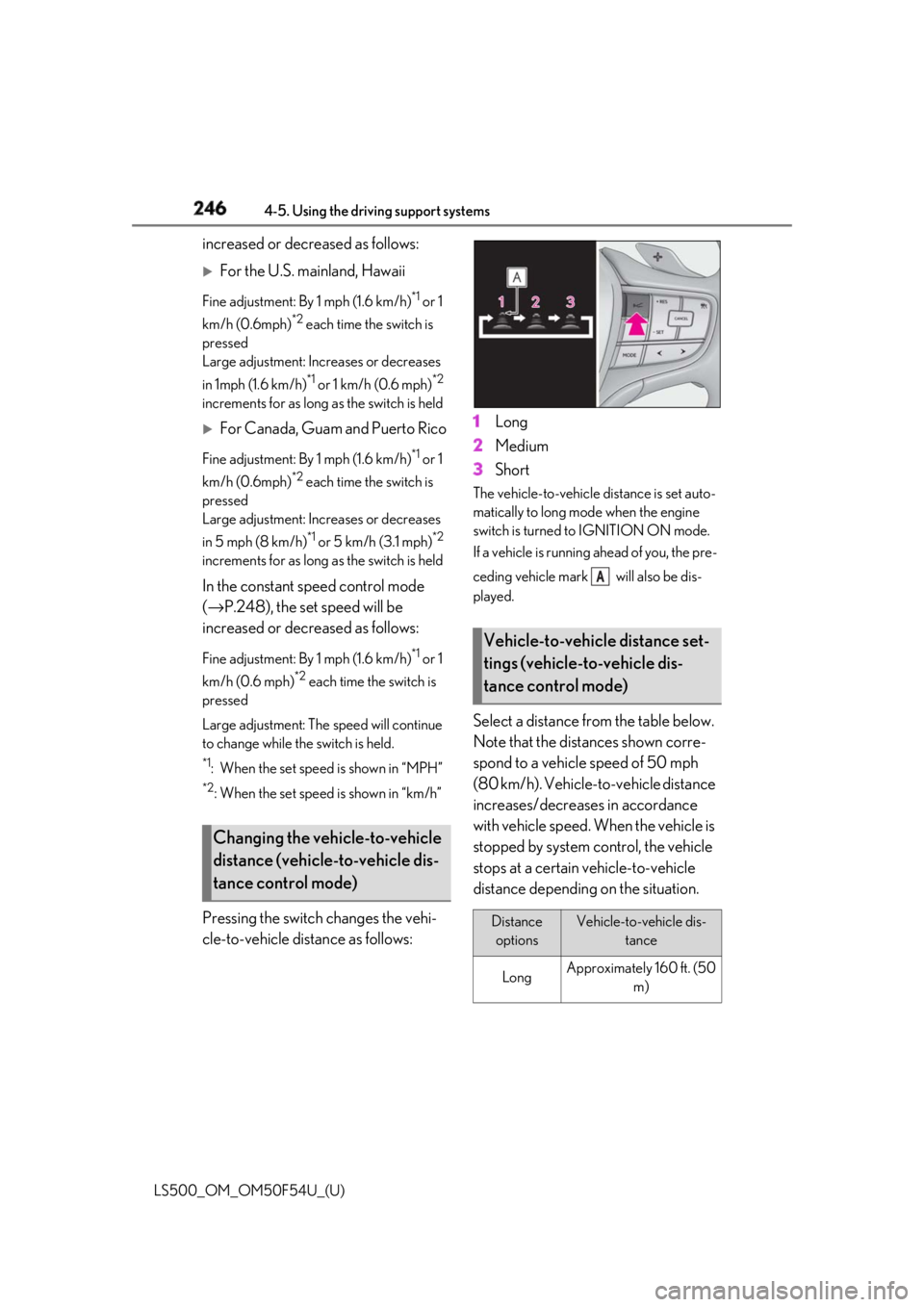
Pressing the switch changes the vehi-
cle-to-vehicle distance as follows: 1 Long
2 Medium
3 Short The vehicle-to-vehicle distance is set auto-
matically to long mode when the engine
switch is turned to IGNITION ON mode.
If a vehicle is running ahead of you, the pre-
ceding vehicle mark will also be dis-
played.
Select a distance from the table below.
Note that the distances shown corre-
spond to a vehicle speed of 50 mph
(80 km/h). Vehicle-to-vehicle distance
increases/decreases in accordance
with vehicle speed. When the vehicle is
stopped by system control, the vehicle
stops at a certain vehicle-to-vehicle
distance depending on the situation.Changing the vehicle-to-vehicle
distance (vehicle-to-vehicle dis-
tance control mode) Vehicle-to-vehicle distance set-
tings (vehicle-to-vehicle dis-
tance control mode)
Distance
options Vehicle-to-vehicle dis-
tance
Long Approximately 160 ft. (50
m) A