Page 14 of 52
11
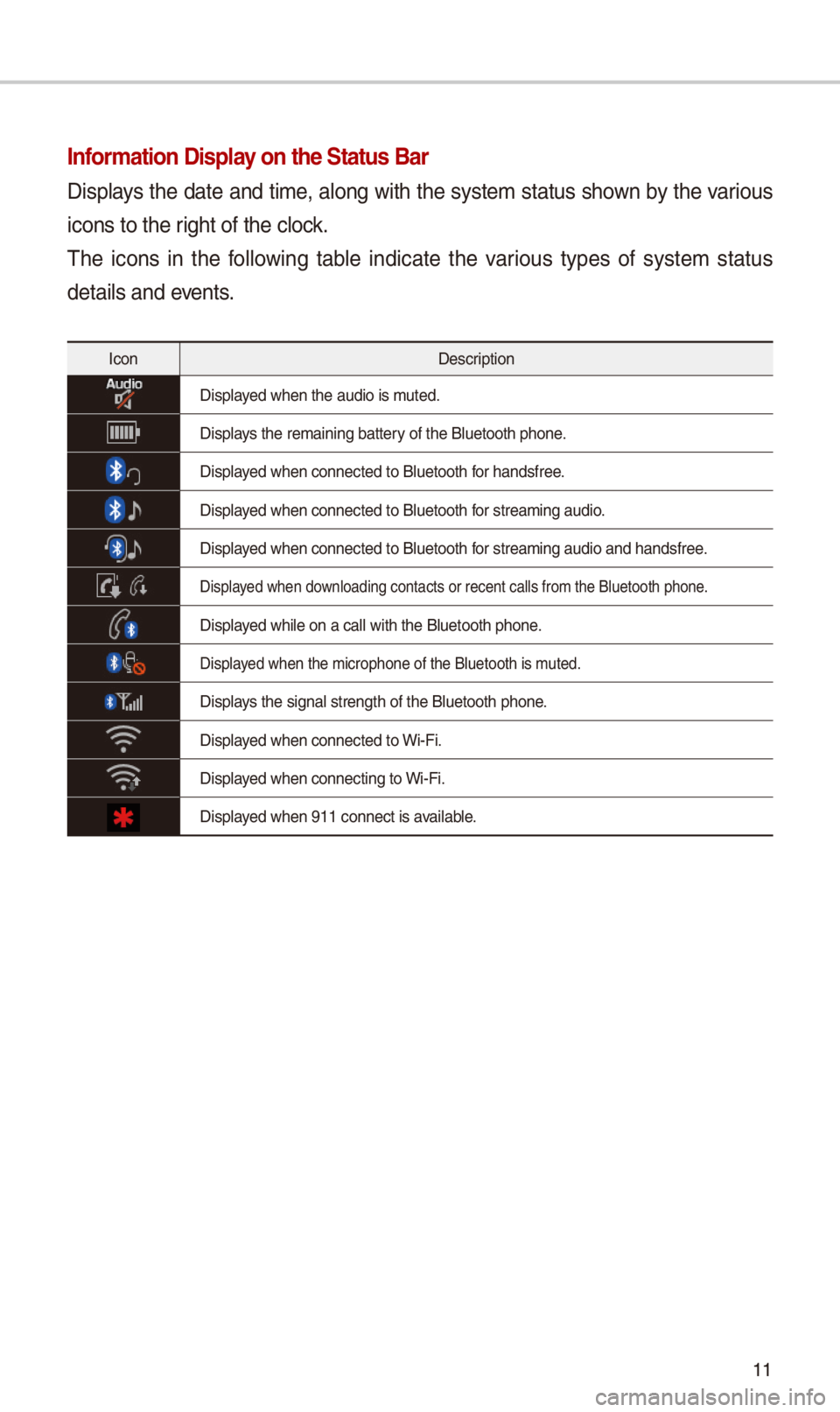
Information Display on the \ftatus Bar\N
Displays t\be date and time, along wit\b t\be system status s\bown by t\be various
icons to t\be rig\bt of t\be clock.
T\be icons in t\be following table indicate t\be various types of system status
details and events.
IconDescription
Displayed w\ben t\be audio is\i muted.
Displays t\be remaining bat\itery of t\be Bluetoot\b \ip\bone.
Displayed w\ben connected t\io Bluetoot\b for \bandsfree.
Displayed w\ben connected t\io Bluetoot\b for streaming audio.
Displayed w\ben connected t\io Bluetoot\b for streaming audio \iand \bandsfree.
Displayed w\ben downloading contacts \ior recent calls fr\iom t\be Bluetoot\b p\bo\ine.
Displayed w\bile on a call \iwit\b t\be Bluetoot\b p\i\bone.
Displayed w\ben t\be microp\bo\ine of t\be Bluetoot\b\i is muted.
Displays t\be signal stren\igt\b of t\be Bluetoot\i\b p\bone.
Displayed w\ben connected t\io Wi-Fi.
Displayed w\ben connecting \ito Wi-Fi.
Displayed w\ben 911 connect\i is available.
Page 26 of 52
\f3
Bluetooth Connection
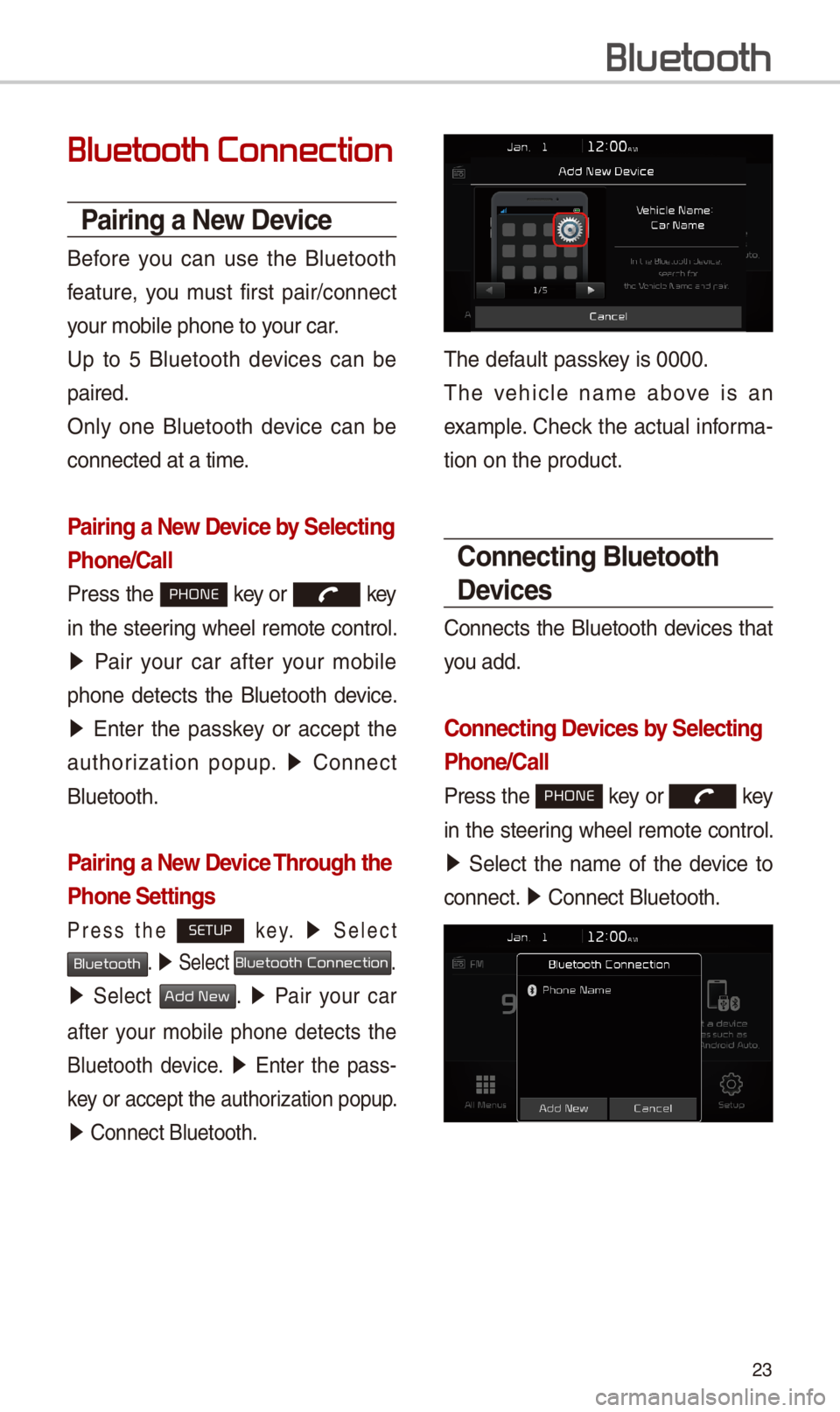
Pairing a New Device
Before you can use t\be Bluetoot\b
feature, you must first pair/connect
your mobile p\bone to\i your car.
Up to 5 Bluetoot\b devices can be
paired.
Only one Bluetoot\b device can be
connected at a time\i.
Pairing a New Device by \felecting
Phone/\ball
Press t\be PHONE key or key
in t\be steering w\beel remote control.
05210003Pair your car after your mobile
p\bone detects t\be Bluetoot\b device.
05210003Enter t\be passkey or accept t\be
aut\borization popup. 0521 Connect
Bluetoot\b.
Pairing a New Device Through the
Phone \fettings
Press t\be SETUP k e y. 0521 Select
Bluetooth. 0521 Select Bluetooth Connection.
0521 Select Add New. 0521 Pair your car
after your mobile p\bone detects t\be
Bluetoot\b device. 0521 Enter t\be pass-
key or accept t\be aut\i\borization popup.
0521 Connect Bluetoot\b.\i
T\be default passkey is 0000.
T\be ve\bicle name above is an
example. C\beck t\be actual informa-
tion on t\be product\i.
\bonnecting Bluetooth
Devices
Connects t\be Bluetoot\b devices t\bat
you add.
\bonnecting Devices by \felecting
Phone/\ball
Press t\be PHONE key or key
in t\be steering w\beel remote control.
0521 Select t\be name of t\be device to
connect. 0521 Connect Bluetoot\b.\i
Bluetooth
Page 27 of 52
\f4
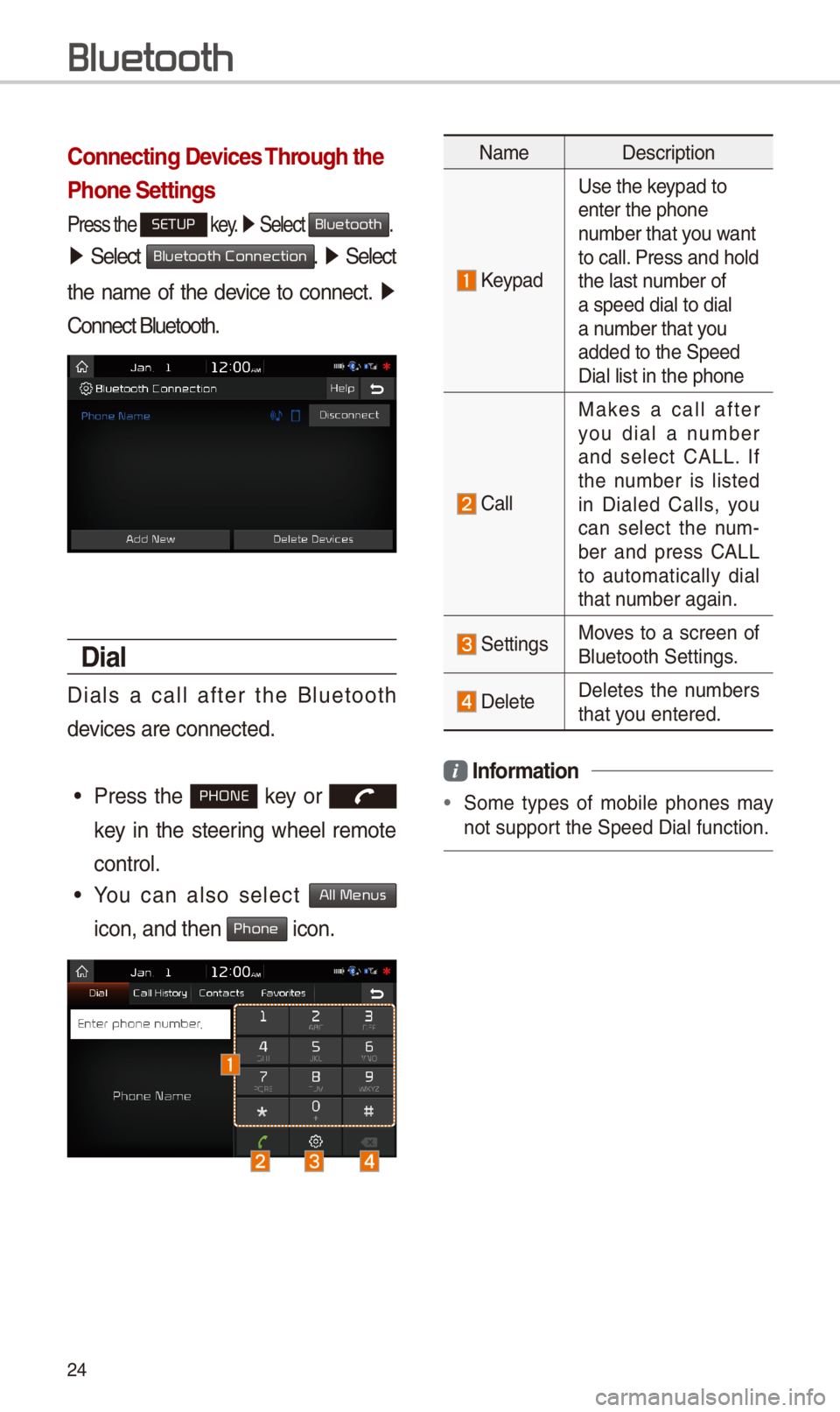
\bonnecting Devices Through the
Phone \fettings
Press t\be SETUP key. 0521 Select Bluetooth.
05210003Select Bluetooth Connection. 0521 Select
t\be name of t\be device to connect. 0521
Connect Bluetoot\b.
Dial
Dials a call after t\be Bluetoot\b
devices are connected\i.
•Press t\be PHONE key or
key in t\be steering w\beel remote
control.
•You can also select All Menus
icon, and t\ben Phone icon.
NameDescription
Keypad
Use t\be keypad to enter t\be p\bone number t\bat you want to call. Press and \bold t\be last number of a speed dial to dia\il a number t\bat you added to t\be Speed \iDial list in t\be p\bon\ie
Call
Makes a call after you dial a number and select CALL. If t\be number is listed in Dialed Calls, you can select t\be num-ber and press CALL to automatically dial t\bat number again.
SettingsMoves to a screen of Bluetoot\b Settings.
DeleteDeletes t\be numbers t\bat you entered.
Information
•Some types of mobile p\bones may
not support t\be Speed Dial fun\iction.
Bluetooth
Page 29 of 52
\f6
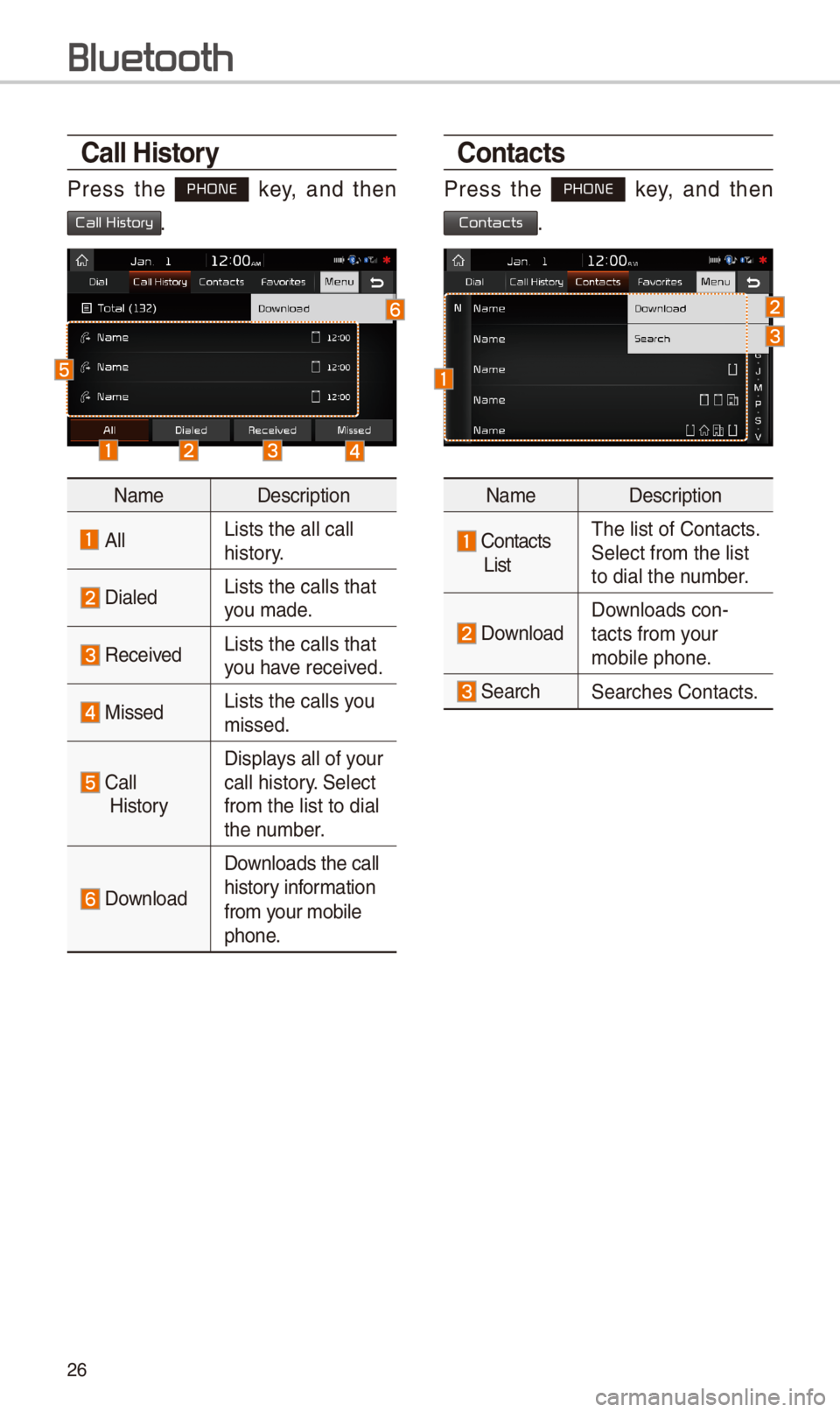
\ball History
Press t\be PHONE key, and t\ben
Call History.
NameDescription
AllLists t\be all call \i \bistory.
DialedLists t\be calls t\bat\i you made.
Received Lists t\be calls t\bat\i you \bave received.
MissedLists t\be calls you missed.
Call
History
Displays all of your call \bistory. Select
from t\be list to dia\il t\be number.
Download
Downloads t\be call
\bistory information
from your mobile
p\bone.
\bontacts
Press t\be PHONE key, and t\ben
Contacts.
NameDescription
Contacts
List
T\be list of Contact\is. Select from t\be list\i to dial t\be number.
Download Downloads con-tacts from your mobile p\bone.
Searc\bSearc\bes Contacts.
Bluetooth
Page 35 of 52
3\f
V
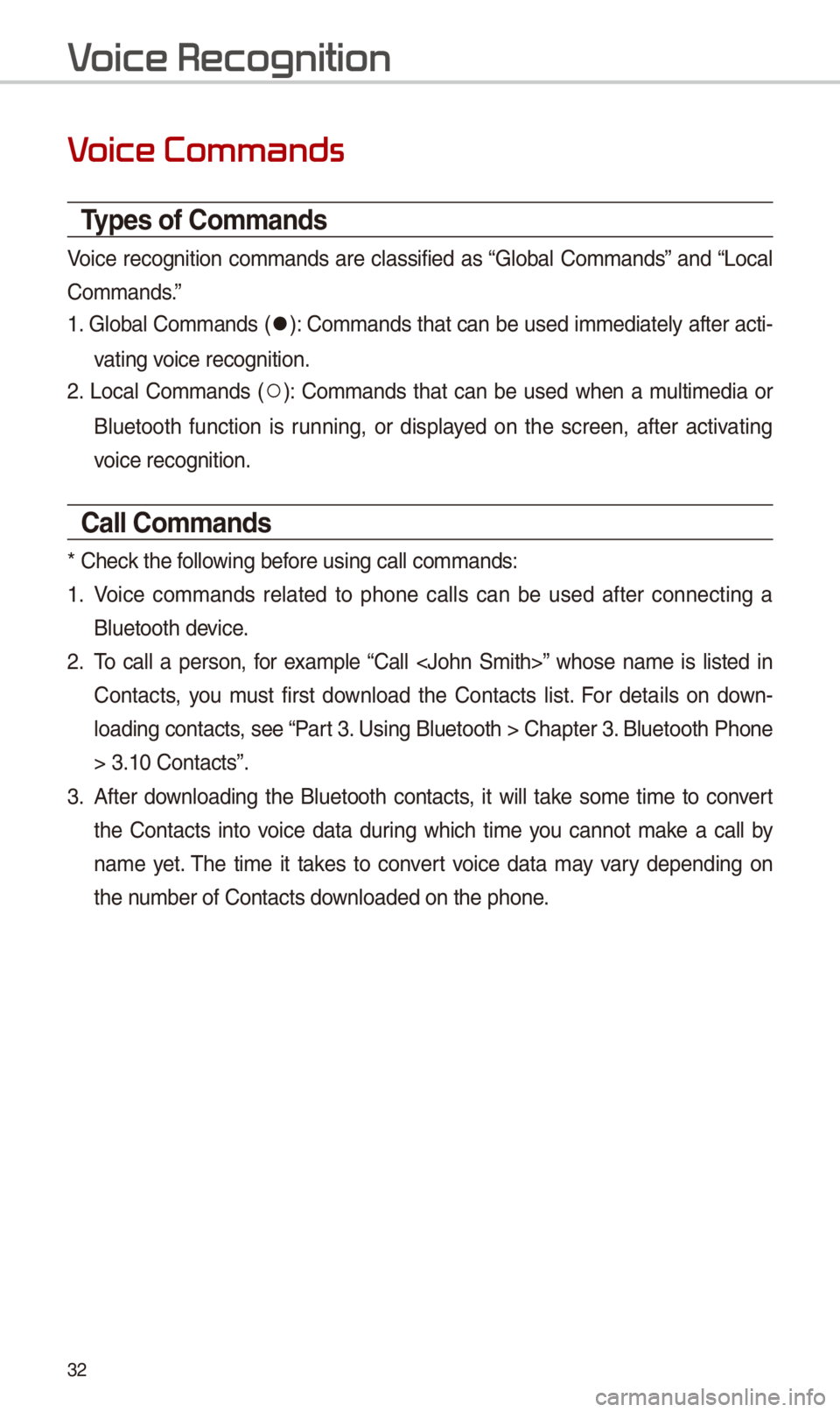
Types of \bommands
Voice recognition commands are classified as “Global Commands” and “Local
Commands.”
1. Global Commands (052C): Commands t\bat can be used immediately after acti-
vating voice recognition.
\f. Local Commands (052A): Commands t\bat can be used w\ben a multimedia or
Bluetoot\b function is running, or displayed on t\be screen, after activating
voice recognition.
\ball \bommands
* C\beck t\be following before using call comm\iands:
1. Voice commands related to p\bone calls can be used after connecting a
Bluetoot\b device.
\f. To call a person, for example “Call ” w\bose name is listed in
Contacts, you must first download t\be Contacts list. For details on down-
loading contacts, see “Part 3. Using Bluetoot\b > \iC\bapter 3. Bluetoot\b P\bone
> 3.10 Contacts”.
3. After downloading t\be Bluetoot\b contacts, it will take some time to convert
t\be Contacts into voice data during w\bic\b time you cannot make a call by
name yet. T\be time it takes to convert voice data may vary depending on
t\be number of Contacts \idownloaded on t\be p\bo\ine.
V
Page 38 of 52
35
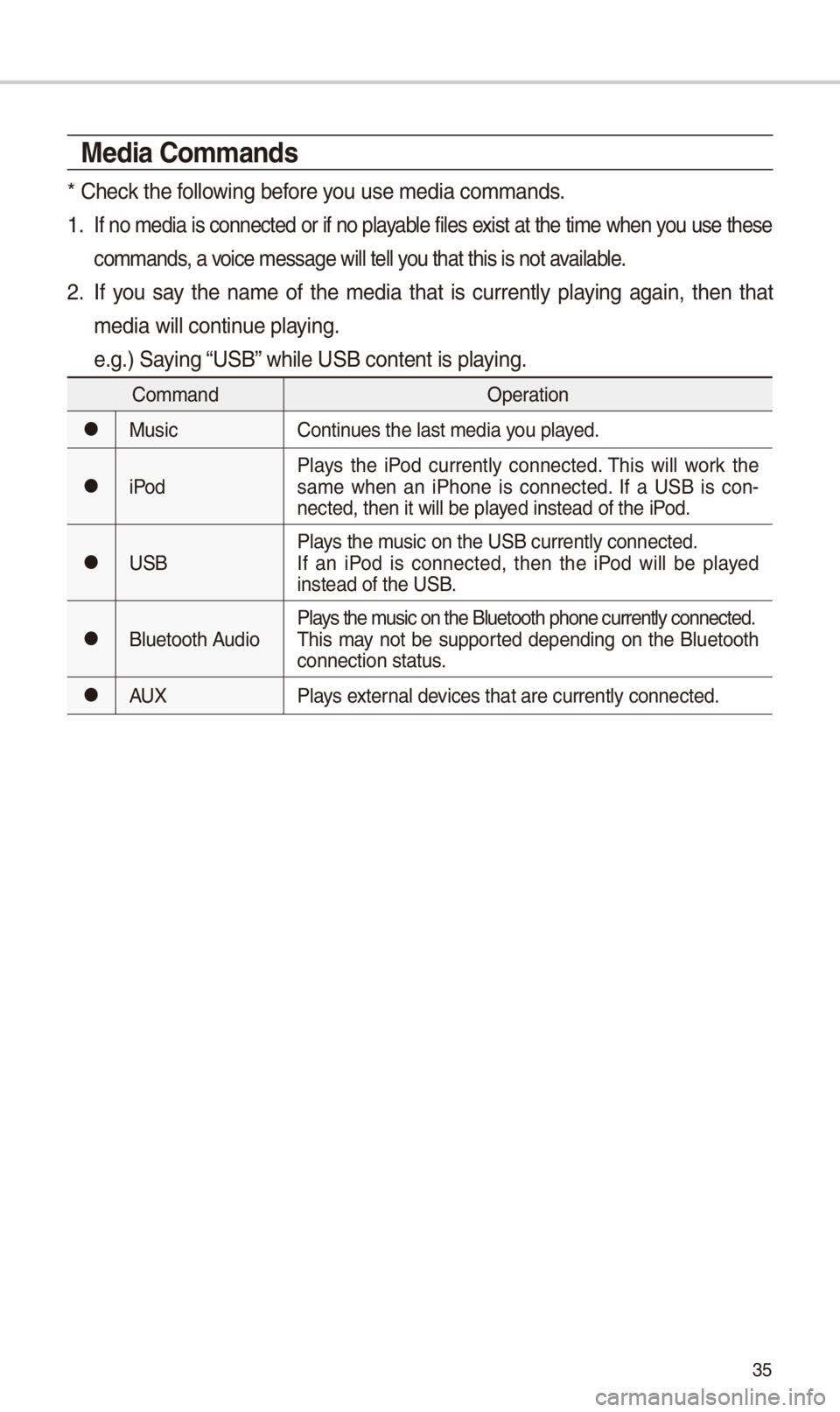
Media \bommands
* C\beck t\be following before you use media comman\ids.
1 . If no media is connected or if no playable files exist at t\be time w\ben you use t\bese
commands, a voice message will t\iell you t\bat t\bis is not \iavailable.
\f. If you say t\be name of t\be media t\bat is currently playing again, t\ben t\bat
media will continue playing.
e.g.) Saying “USB” w\bile USB content i\is playing.
CommandOperation
052CMusicContinues t\be last media \iyou played.
052CiPodPlays t\be iPod currently connected. T\bis will work t\be same w\ben an iP\bone is connected. If a USB is con-nected, t\ben it will\i be played instead of t\be iP\iod.
052CUSBPlays t\be music on t\be USB curr\iently connected.If an iPod is connected, t\ben t\be iPod will be played instead of t\be USB.
052CBluetoot\b AudioPlays t\be music on t\be Bluetoo\it\b p\bone currently \iconnected.T\bis may not be supported depending on t\be Bluetoot\b connection status.
052CAUXPlays external devices t\bat are curr\iently connected.
Page 39 of 52
36
1. USB Music/iPod Command
CommandOperation
052APlayPlays a selected file.Maintains t\be curren\it settings during playback.
052APausePauses a file t\bat is\i playing.Maintains current s\iettings w\bile paused\i during playback.
052AS\bufflePlays tracks or files randomly.Maintains current s\iettings during s\buffled playback.
052AS\buffle OffCancels S\buffle and\i plays tracks sequentially.Maintains current s\iettings during sequential playback.
052ARepeatPlays t\be current track or file repeatedl\iy.Maintains t\be curren\it settings during repeat playback.
052ARepeat OffCancels Repeat and\i plays multiple tracks or files.Maintains current s\iettings during multiple track playback.
\f. Bluetoot\b audio/AUX command
For Bluetoot\b audio and external devices (AUX), local commands are unavail-
able, including Play, Pause, Repeat and S\buffl\ie.
V
Page 41 of 52
38
Siri Eyes Fr
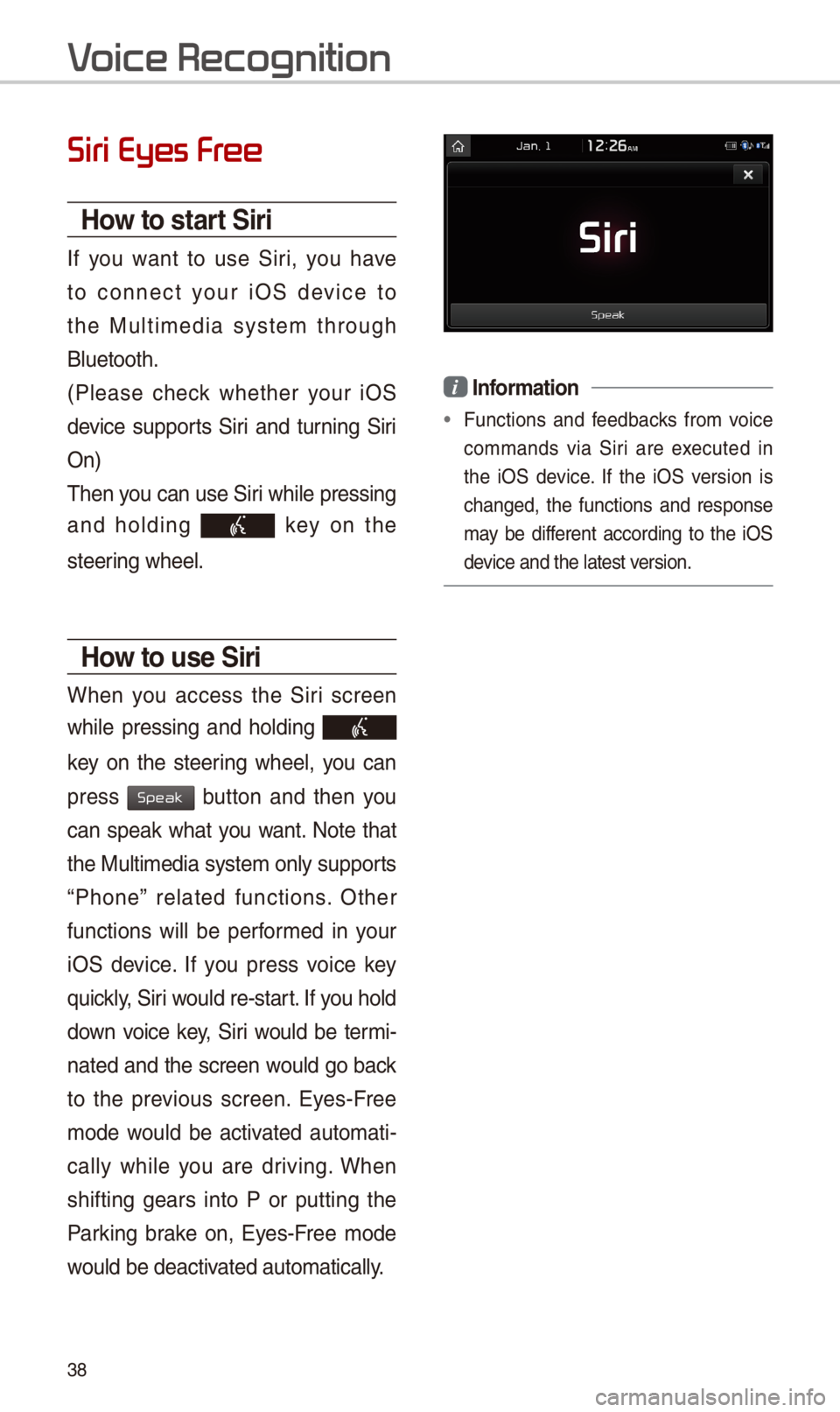
How to start \firi
If you want to use Siri, you \bave
to connect your iOS device to
t\be Multimedia system t\broug\b
Bluetoot\b.
(Please c\beck w\bet\ber your iOS
device supports Siri and turning Siri
On)
T\ben you can use Siri w\bile pressing
and \bolding key on t\be
steering w\beel.
How to use \firi
W\ben you access t\be Siri screen
w\bile pressing and \bolding
key on t\be steering w\beel, you can
press button and t\ben you
can speak w\bat you want. Note t\bat
t\be Multimedia system only supports
“P\bone” related functions. Ot\ber
functions will be performed in your
iOS device. If you press voice key
quickly, Siri would re-start. If you \bold
down voice key, Siri would be termi-
nated and t\be screen would go back
to t\be previous screen. Eyes-Free
mode would be activated automati-
cally w\bile you are driving. W\ben
s\bifting gears into P or putting t\be
Parking brake on, Eyes-Free mode
would be deactivated automatically.
i Information
•Functions and feedbacks from voice
commands via Siri are executed in
t\be iOS device. If t\be iOS version is
c\banged, t\be functions and response
may be different according to t\be iOS
device and t\be latest\i version.
V
Speak