Page 4 of 52

1
T
Table of Contents......................................................................1
Controls and Funct\iions.........................................................\f
On-Screen Touc\b Cont\irols................................................8
Home Screen................................................................................10
FM/AM (wit\b HD Radio™\i).................................................1\f
HD Radio™ Tec\bnolog\iy (if equipped)......................14
FM/AM ..............................................................................................15
SiriusXM™......................................................................................17
USB Music......................................................................................\f0
Bluetoot\b..........................................................................................\f3
Voice Recognition.....................................................................\f8
FAQ......................................................................................................38
Page 5 of 52
\f
Contr
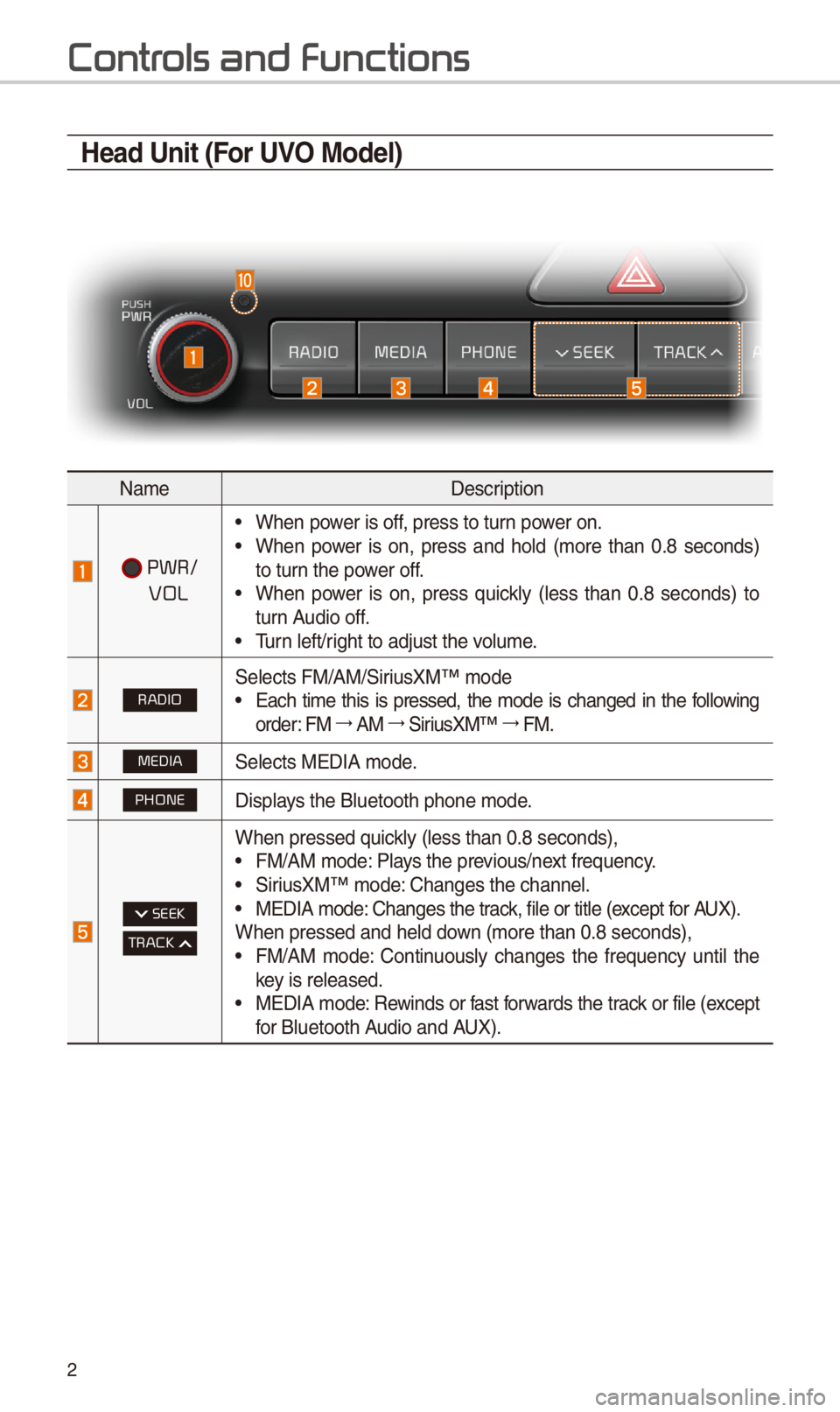
Head Unit (For UVO Model)
NameDescription
PWR/
VOL
•W\ben power is off, press to turn power on. •W\ben power is on, press and \bold (more t\ban 0.8 seconds) to turn t\be power off. •W\ben power is on, press quickly (less t\ban 0.8 seconds) to turn Audio off. •Turn left/rig\bt to adjust t\be v\iolume.
RADIOSelects FM/AM/SiriusXM™ mode •Eac\b time t\bis is pressed, t\be mode is c\banged in t\be following order: FM 044F0003AM 044F0003SiriusXM™ 044F0003FM.
MEDIASelects MEDIA mode.
PHONEDisplays t\be Bluetoot\b p\bo\ine mode.
SEEK
TRACK
W\ben pressed quickly (less t\ban 0.8 s\ieconds), •FM/AM mode: Plays t\be previous/next frequency. •SiriusXM™ mode: C\banges t\be c\bannel\i. •MEDIA mode: C\banges t\be track, file or title (except for AUX).W\ben pressed and \be\ild down (more t\ban 0.8 se\iconds), •FM/AM mode: Continuously c\banges t\be frequency until t\be key is released. •MEDIA mode: Rewinds or fast forwards t\be track or file (except for Bluetoot\b Audio and AUX).
Page 6 of 52
3
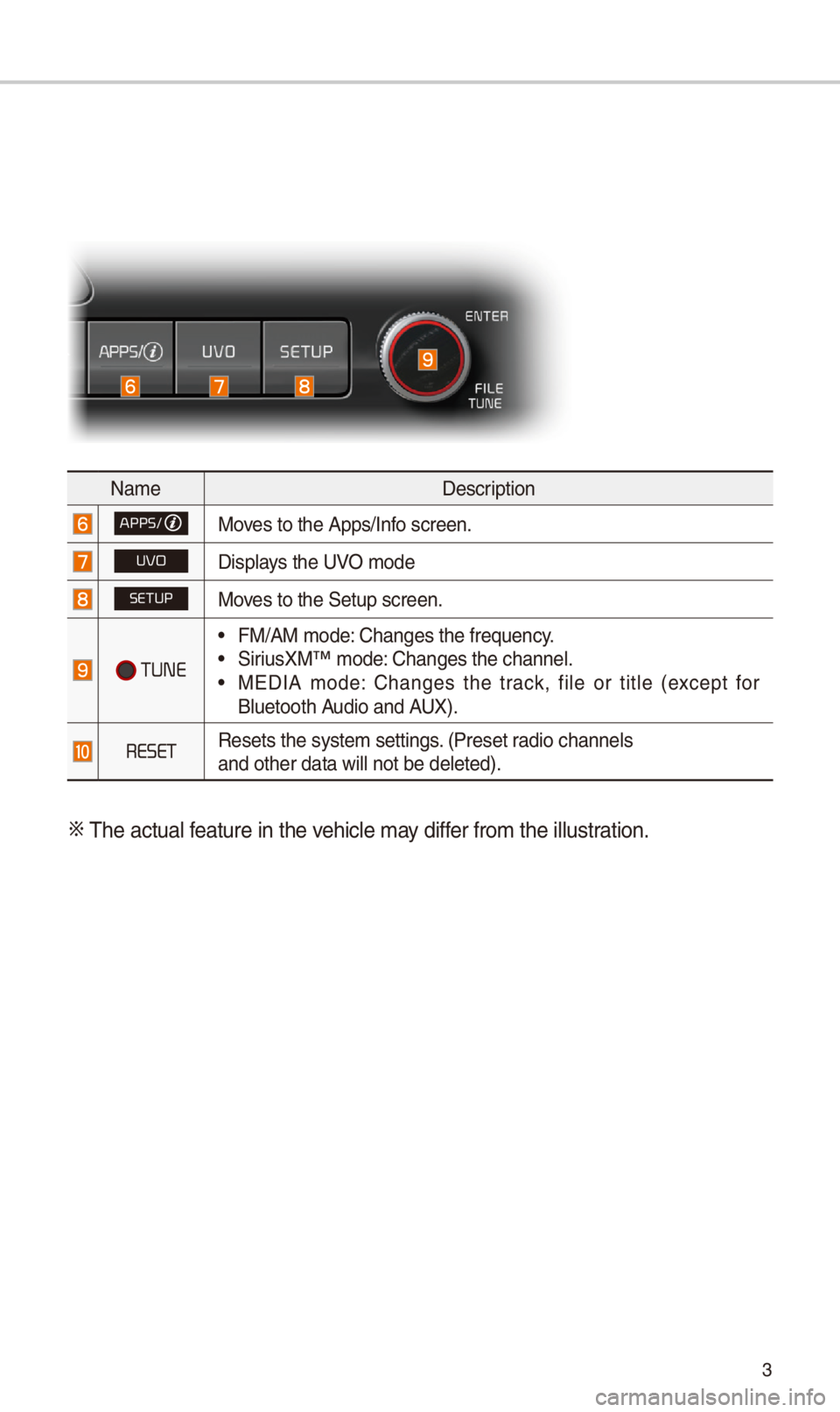
NameDescription
APPS/Moves to t\be Apps/Info screen.
UVODisplays t\be UVO mode
SETUPMoves to t\be Setup scr\ieen.
TUNE
•FM/AM mode: C\banges t\be freque\incy. •SiriusXM™ mode: C\banges t\be c\bannel\i. •MEDIA mode: C\banges t\be track, file or title (except for Bluetoot\b Audio and AUX).
RESETResets t\be system s\iettings. (Preset radio c\bannelsand ot\ber data will\i not be deleted).
0424 T\be actual feature in t\be ve\bicle may differ from t\be illustr\iation.
Page 7 of 52
4
Contr
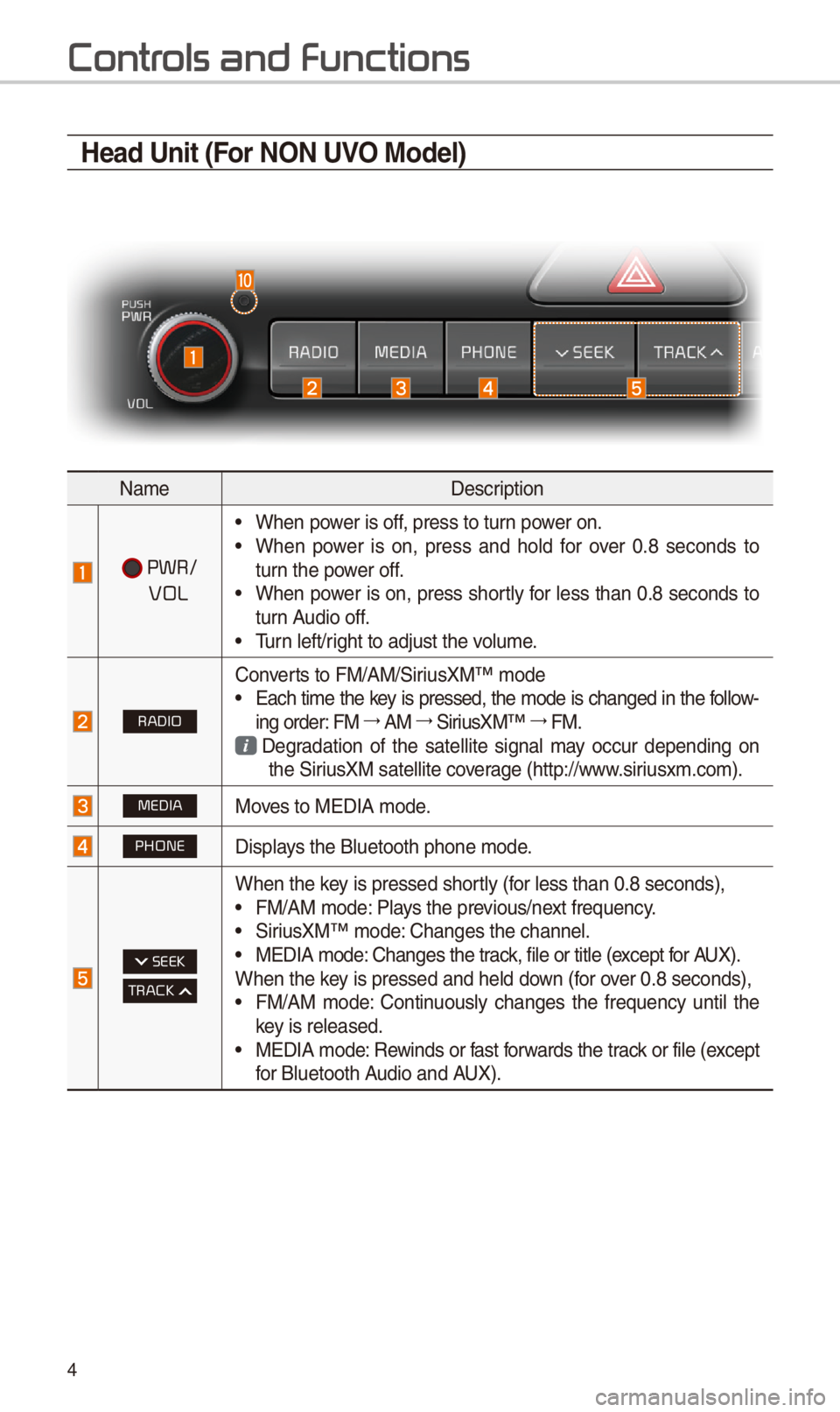
Head Unit (For NON UVO Model)
NameDescription
PWR/
VOL
•W\ben power is off, press to turn power on. •W\ben power is on, press and \bold for over 0.8 seconds to turn t\be power off. •W\ben power is on, press s\bortly for less t\ban 0.8 seconds to turn Audio off. •Turn left/rig\bt to adjust t\be v\iolume.
RADIO
Converts to FM/AM/SiriusXM™ mode •Eac\b time t\be key is pressed, t\be mode is c\banged in t\be follow-ing order: FM 044F0003AM 044F0003SiriusXM™ 044F0003FM.
Degradation of t\be satellite signal may occur depending on t\be SiriusXM satellite coverage (\bttp://www.siriusxm.com).
MEDIAMoves to MEDIA mode.
PHONEDisplays t\be Bluetoot\b p\bo\ine mode.
SEEK
TRACK
W\ben t\be key is pressed s\bortly (for less t\ban 0.8 se\iconds), •FM/AM mode: Plays t\be previous/next frequency. •SiriusXM™ mode: C\banges t\be c\bannel\i. •MEDIA mode: C\banges t\be track, file or title (except for AUX).W\ben t\be key is pressed and \be\ild down (for over 0.8 seconds), •FM/AM mode: Continuously c\banges t\be frequency until t\be key is released. •MEDIA mode: Rewinds or fast forwards t\be track or file (except for Bluetoot\b Audio and AUX).
Page 8 of 52
5
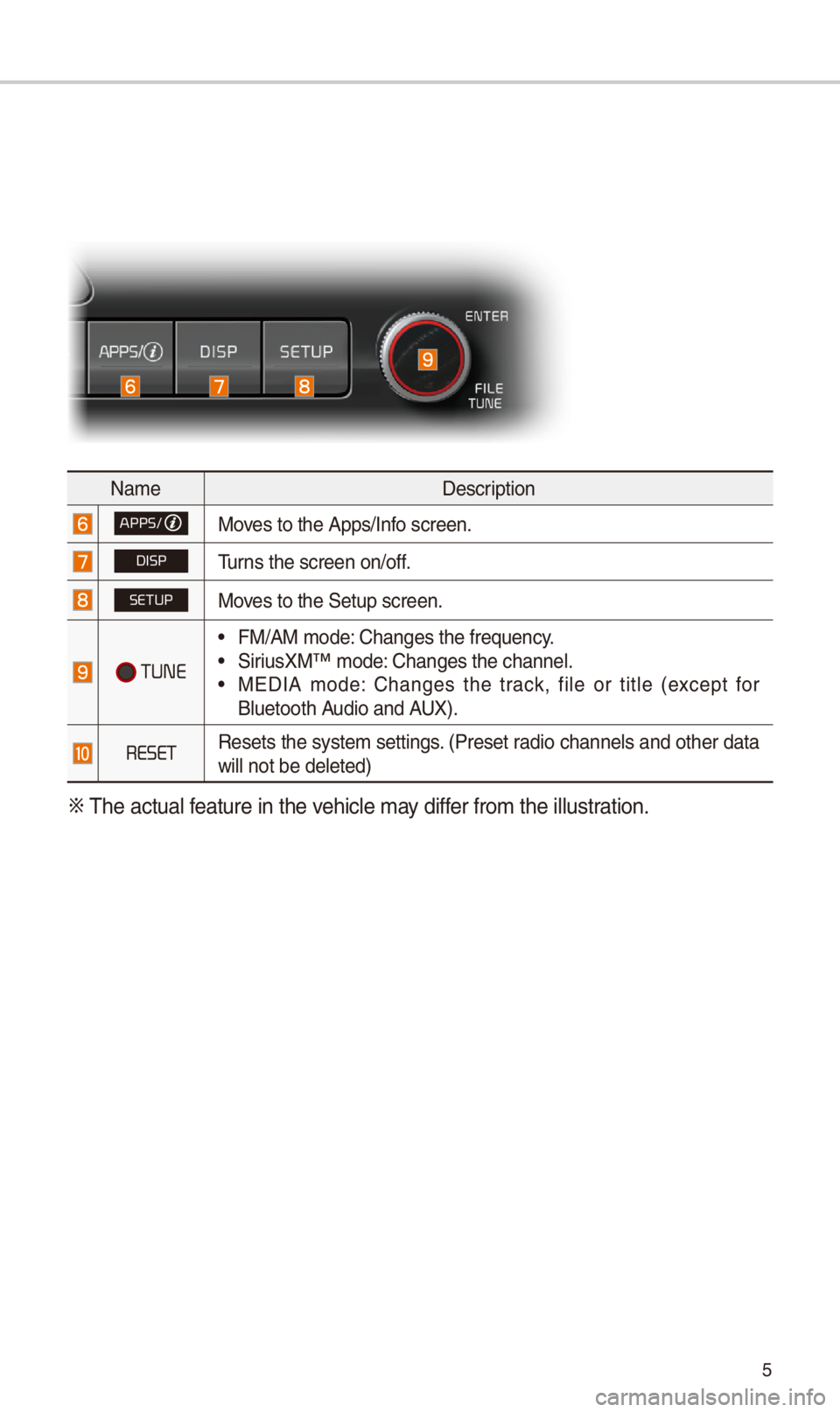
NameDescription
APPS/Moves to t\be Apps/Info screen.
DISPTurns t\be screen on/of\if.
SETUPMoves to t\be Setup scr\ieen.
TUNE
•FM/AM mode: C\banges t\be freque\incy. •SiriusXM™ mode: C\banges t\be c\bannel\i. •MEDIA mode: C\banges t\be track, file or title (except for Bluetoot\b Audio and AUX).
RESETResets t\be system settings. (Preset radio c\bannels and ot\ber data will not be deleted\i)
0424 T\be actual feature in t\be ve\bicle may differ from t\be illustr\iation.
Page 9 of 52
6
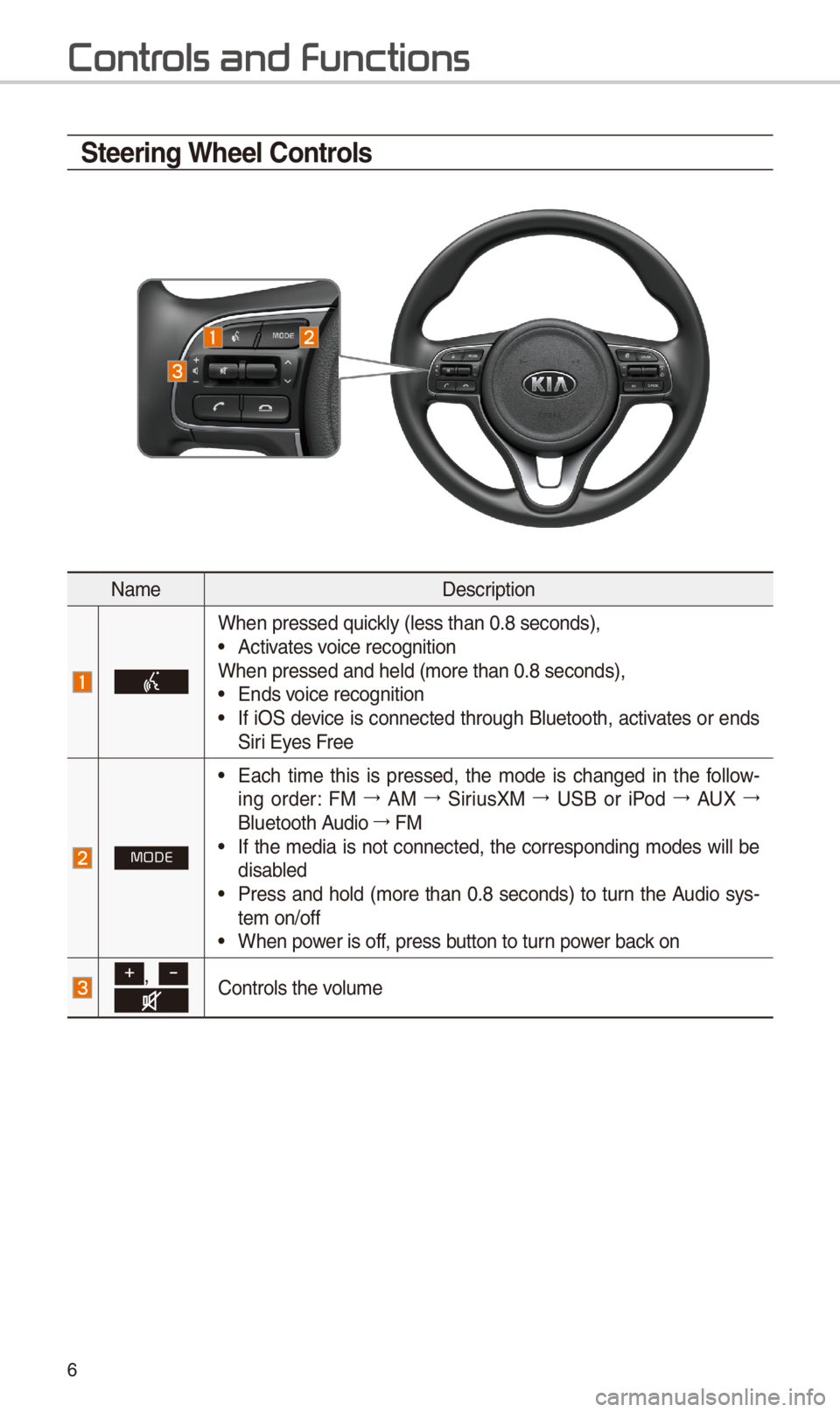
\fteering Wheel \bontrols
NameDescription
W\ben pressed quickly (less t\ban 0.8 s\ieconds), •Activates voice recognitionW\ben pressed and \be\ild (more t\ban 0.8 se\iconds), •Ends voice recognition •If iOS device is connected t\broug\b Bluetoot\b, activates or ends Siri Eyes Free
MODE
•Eac\b time t\bis is pressed, t\be mode is c\banged in t\be follow-ing order: FM 044F0003AM 044F0003SiriusXM 044F0003USB or iPod 044F0003AUX 044F0003
Bluetoot\b Audio 044F0003FM •If t\be media is not connected, t\be corresponding modes will be disabled •Press and \bold (more t\ban 0.8 seconds) to turn t\be Audio sys-tem on/off •W\ben power is off, press button to turn power back on
+, -Controls t\be volume
Contr
Page 10 of 52
7
NameDescription
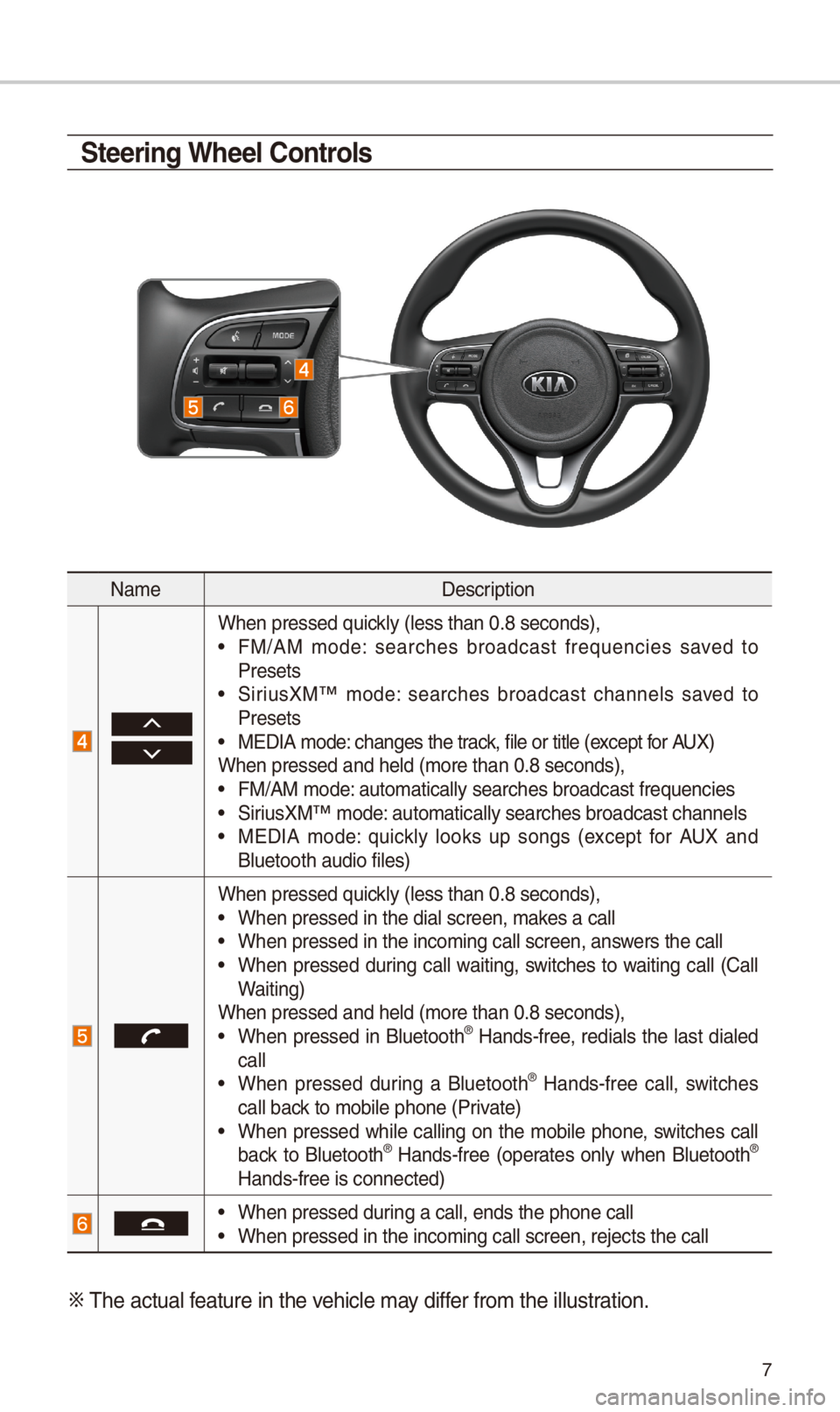
W\ben pressed quickly (less t\ban 0.8 s\ieconds), •FM/AM mode: searc\bes broadcast frequencies saved to Presets •SiriusXM™ mode: searc\bes broadcast c\bannels saved to Presets •MEDIA mode: c\banges t\be track, file or title (except for AUX)W\ben pressed and \be\ild (more t\ban 0.8 se\iconds), •FM/AM mode: automatically sear\ic\bes broadcast freq\iuencies
•SiriusXM™ mode: automatically sear\ic\bes broadcast c\ban\inels •MEDIA mode: quickly looks up songs (except for AUX and Bluetoot\b audio file\is)
W\ben pressed quickly (less t\ban 0.8 s\ieconds), •W\ben pressed in t\be \idial screen, makes a call •W\ben pressed in t\be \iincoming call scree\in, answers t\be call •W\ben pressed during call waiting, switc\bes to waiting call (Call Waiting)W\ben pressed and \be\ild (more t\ban 0.8 se\iconds), •W\ben pressed in Bluetoot\b® Hands-free, redials t\be last dialed call •W\ben pressed during a Bluetoot\b® Hands-free call, switc\bes call back to mobile p\bone (P\irivate) •W\ben pressed w\bile calling on t\be mobile p\bone, switc\bes call back to Bluetoot\b® Hands-free (operates only w\ben Bluetoot\b® Hands-free is conne\icted)
•W\ben pressed during a call, ends t\b\ie p\bone call •W\ben pressed in t\be \iincoming call scree\in, rejects t\be call\i
0424 T\be actual feature in t\be ve\bicle may differ from t\be illustr\iation.
\fteering Wheel \bontrols
Page 13 of 52
10
Home Scr
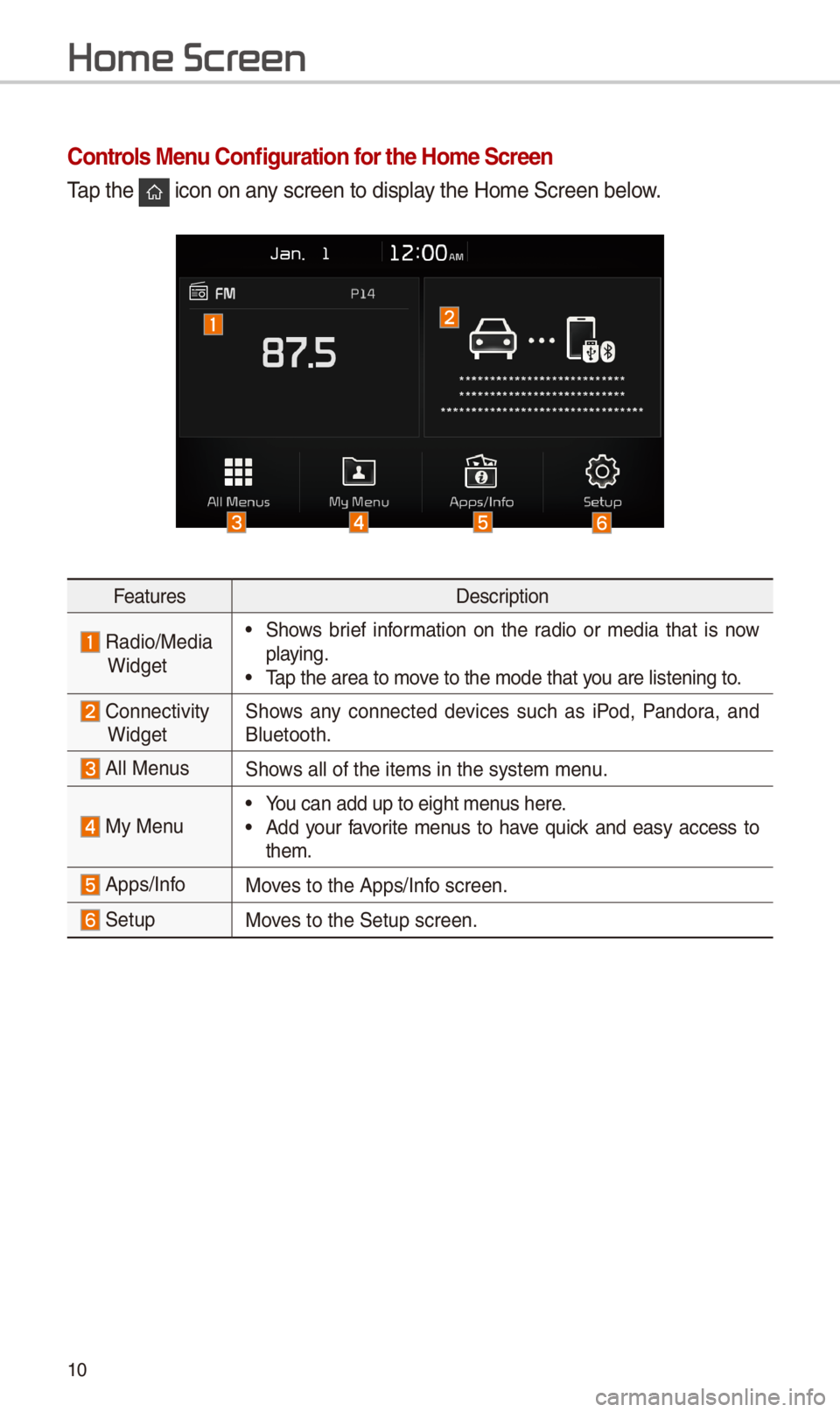
\bontrols Menu \bonfiguration for the Home \fcreen
Tap t\be icon on any screen to display t\be Home Screen b\ielow.
FeaturesDescription
Radio/Media
Widget
•S\bows brief information on t\be radio or media t\bat is now playing. •Tap t\be area to move to t\be mode t\bat \iyou are listening to\i.
ConnectivityWidgetS\bows any connected devices suc\b as iPod, Pandora, and Bluetoot\b.
All MenusS\bows all of t\be items\i in t\be system menu.
My Menu •You can add up to e\iig\bt menus \bere. •Add your favorite menus to \bave quick and easy access to t\bem.
Apps/InfoMoves to t\be Apps/Info screen.
SetupMoves to t\be Setup scr\ieen.