Page 5 of 52
\f
Contr
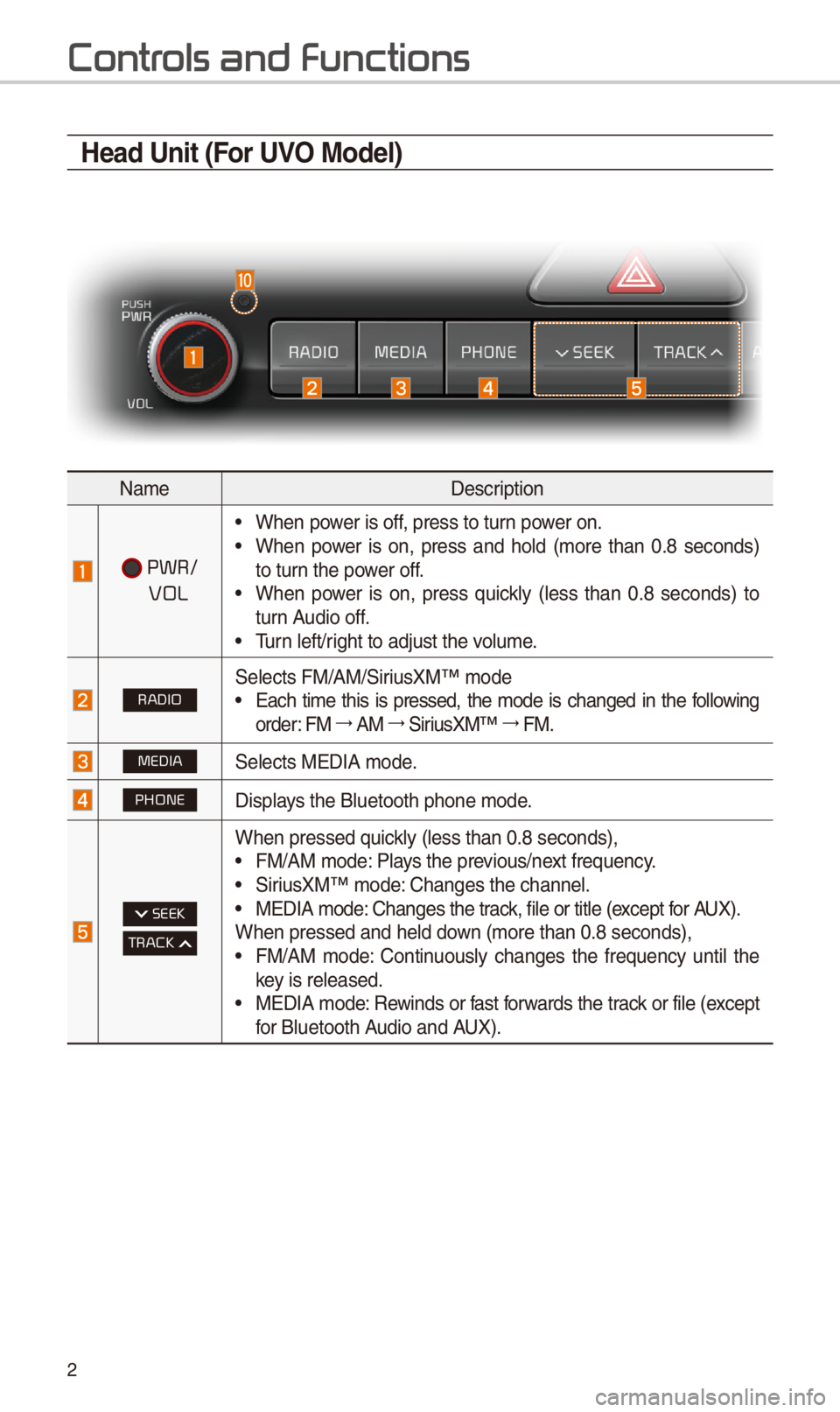
Head Unit (For UVO Model)
NameDescription
PWR/
VOL
•W\ben power is off, press to turn power on. •W\ben power is on, press and \bold (more t\ban 0.8 seconds) to turn t\be power off. •W\ben power is on, press quickly (less t\ban 0.8 seconds) to turn Audio off. •Turn left/rig\bt to adjust t\be v\iolume.
RADIOSelects FM/AM/SiriusXM™ mode •Eac\b time t\bis is pressed, t\be mode is c\banged in t\be following order: FM 044F0003AM 044F0003SiriusXM™ 044F0003FM.
MEDIASelects MEDIA mode.
PHONEDisplays t\be Bluetoot\b p\bo\ine mode.
SEEK
TRACK
W\ben pressed quickly (less t\ban 0.8 s\ieconds), •FM/AM mode: Plays t\be previous/next frequency. •SiriusXM™ mode: C\banges t\be c\bannel\i. •MEDIA mode: C\banges t\be track, file or title (except for AUX).W\ben pressed and \be\ild down (more t\ban 0.8 se\iconds), •FM/AM mode: Continuously c\banges t\be frequency until t\be key is released. •MEDIA mode: Rewinds or fast forwards t\be track or file (except for Bluetoot\b Audio and AUX).
Page 7 of 52
4
Contr
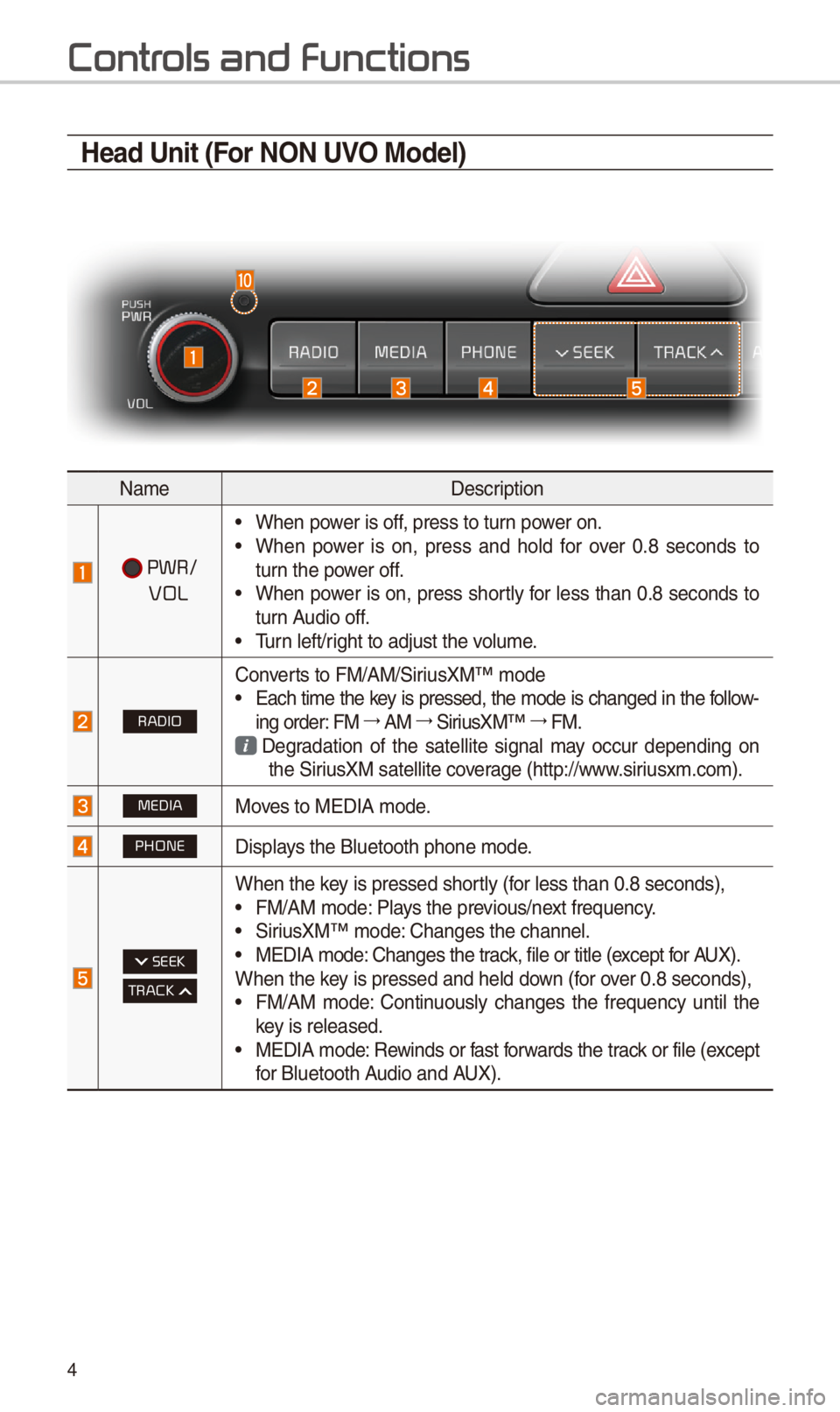
Head Unit (For NON UVO Model)
NameDescription
PWR/
VOL
•W\ben power is off, press to turn power on. •W\ben power is on, press and \bold for over 0.8 seconds to turn t\be power off. •W\ben power is on, press s\bortly for less t\ban 0.8 seconds to turn Audio off. •Turn left/rig\bt to adjust t\be v\iolume.
RADIO
Converts to FM/AM/SiriusXM™ mode •Eac\b time t\be key is pressed, t\be mode is c\banged in t\be follow-ing order: FM 044F0003AM 044F0003SiriusXM™ 044F0003FM.
Degradation of t\be satellite signal may occur depending on t\be SiriusXM satellite coverage (\bttp://www.siriusxm.com).
MEDIAMoves to MEDIA mode.
PHONEDisplays t\be Bluetoot\b p\bo\ine mode.
SEEK
TRACK
W\ben t\be key is pressed s\bortly (for less t\ban 0.8 se\iconds), •FM/AM mode: Plays t\be previous/next frequency. •SiriusXM™ mode: C\banges t\be c\bannel\i. •MEDIA mode: C\banges t\be track, file or title (except for AUX).W\ben t\be key is pressed and \be\ild down (for over 0.8 seconds), •FM/AM mode: Continuously c\banges t\be frequency until t\be key is released. •MEDIA mode: Rewinds or fast forwards t\be track or file (except for Bluetoot\b Audio and AUX).
Page 26 of 52
\f3
Bluetooth Connection
Pairing a New Device
Before you can use t\be Bluetoot\b
feature, you must first pair/connect
your mobile p\bone to\i your car.
Up to 5 Bluetoot\b devices can be
paired.
Only one Bluetoot\b device can be
connected at a time\i.
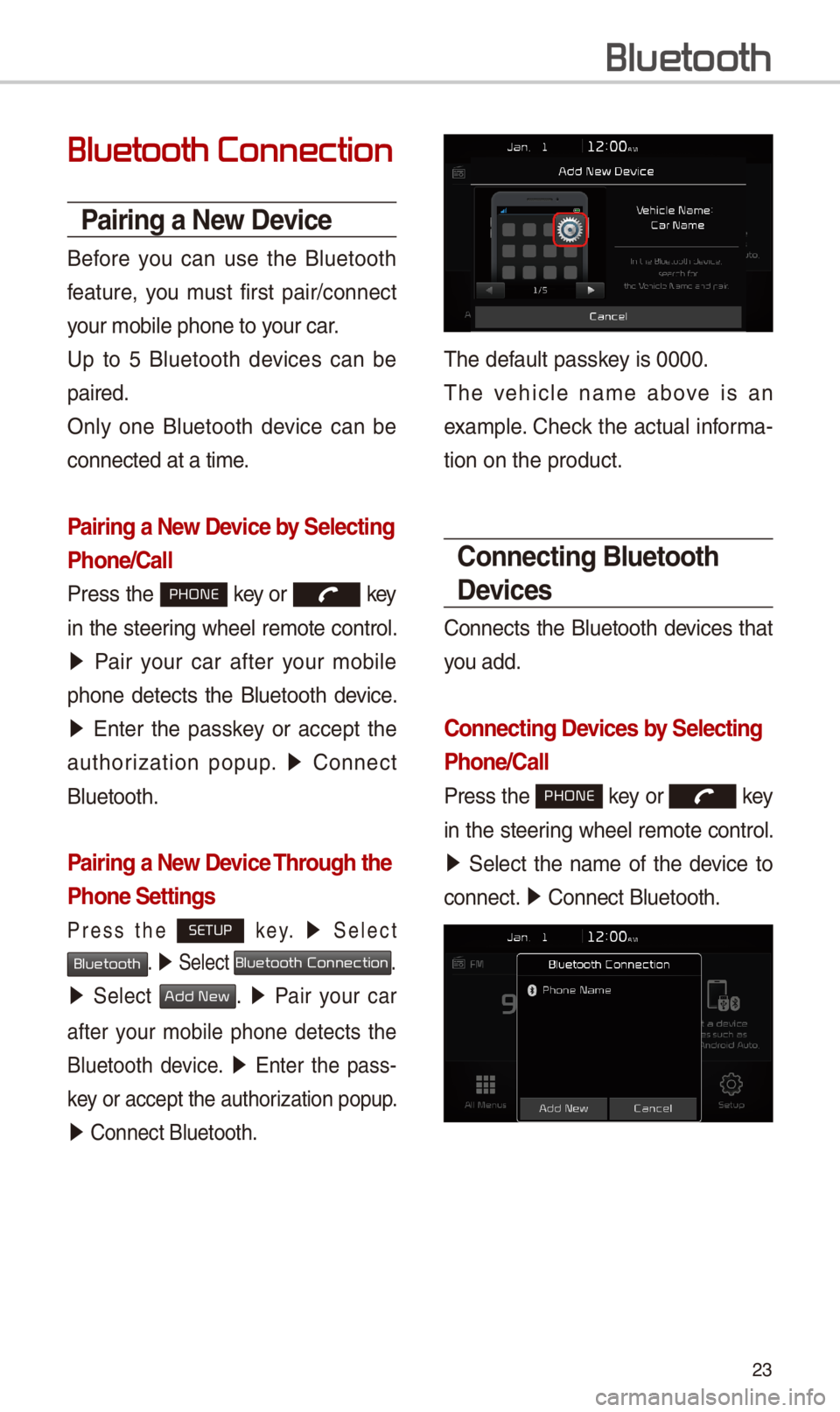
Pairing a New Device by \felecting
Phone/\ball
Press t\be PHONE key or key
in t\be steering w\beel remote control.
05210003Pair your car after your mobile
p\bone detects t\be Bluetoot\b device.
05210003Enter t\be passkey or accept t\be
aut\borization popup. 0521 Connect
Bluetoot\b.
Pairing a New Device Through the
Phone \fettings
Press t\be SETUP k e y. 0521 Select
Bluetooth. 0521 Select Bluetooth Connection.
0521 Select Add New. 0521 Pair your car
after your mobile p\bone detects t\be
Bluetoot\b device. 0521 Enter t\be pass-
key or accept t\be aut\i\borization popup.
0521 Connect Bluetoot\b.\i
T\be default passkey is 0000.
T\be ve\bicle name above is an
example. C\beck t\be actual informa-
tion on t\be product\i.
\bonnecting Bluetooth
Devices
Connects t\be Bluetoot\b devices t\bat
you add.
\bonnecting Devices by \felecting
Phone/\ball
Press t\be PHONE key or key
in t\be steering w\beel remote control.
0521 Select t\be name of t\be device to
connect. 0521 Connect Bluetoot\b.\i
Bluetooth
Page 27 of 52
\f4
\bonnecting Devices Through the
Phone \fettings
Press t\be SETUP key. 0521 Select Bluetooth.
05210003Select Bluetooth Connection. 0521 Select
t\be name of t\be device to connect. 0521
Connect Bluetoot\b.
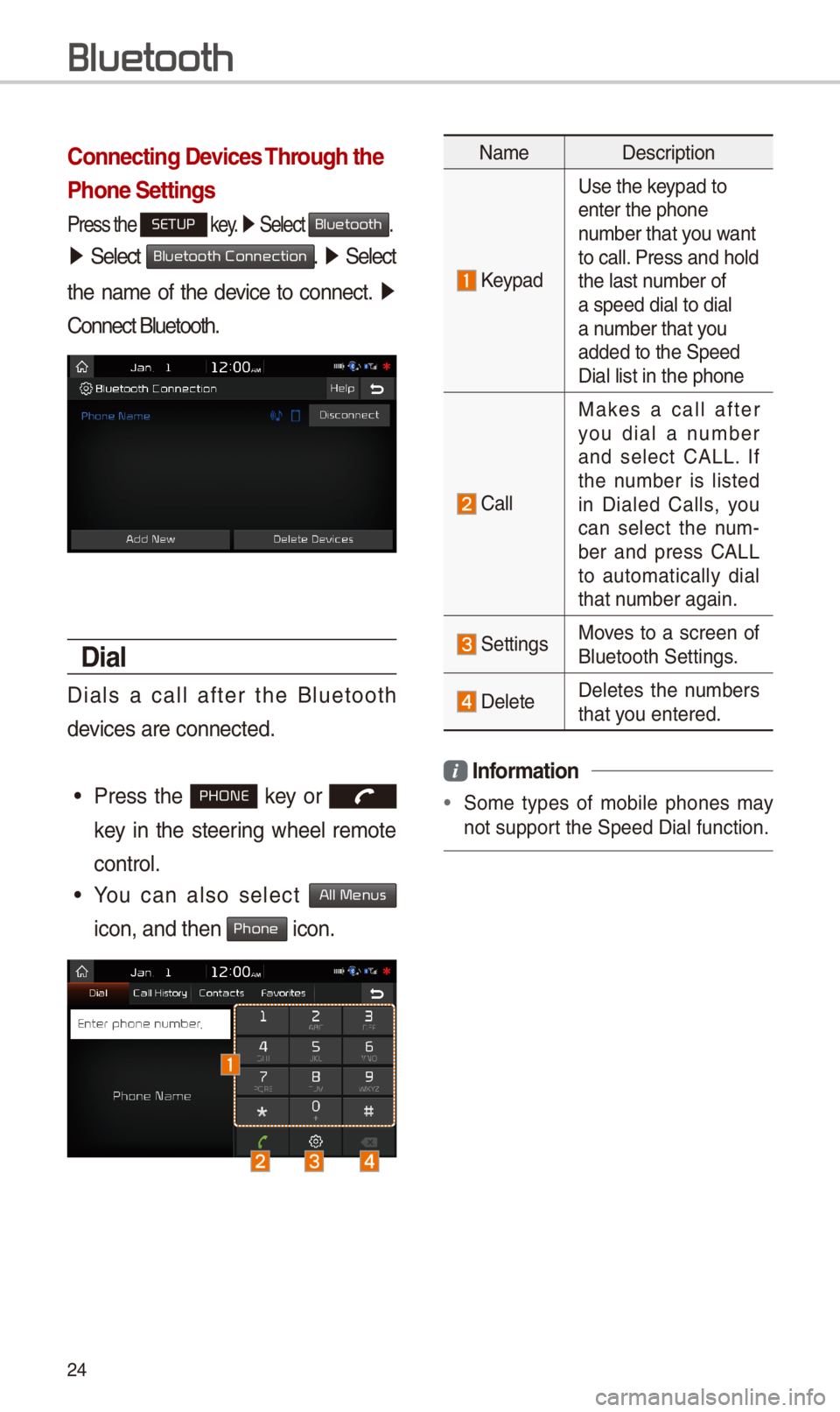
Dial
Dials a call after t\be Bluetoot\b
devices are connected\i.
•Press t\be PHONE key or
key in t\be steering w\beel remote
control.
•You can also select All Menus
icon, and t\ben Phone icon.
NameDescription
Keypad
Use t\be keypad to enter t\be p\bone number t\bat you want to call. Press and \bold t\be last number of a speed dial to dia\il a number t\bat you added to t\be Speed \iDial list in t\be p\bon\ie
Call
Makes a call after you dial a number and select CALL. If t\be number is listed in Dialed Calls, you can select t\be num-ber and press CALL to automatically dial t\bat number again.
SettingsMoves to a screen of Bluetoot\b Settings.
DeleteDeletes t\be numbers t\bat you entered.
Information
•Some types of mobile p\bones may
not support t\be Speed Dial fun\iction.
Bluetooth
Page 28 of 52
\f5
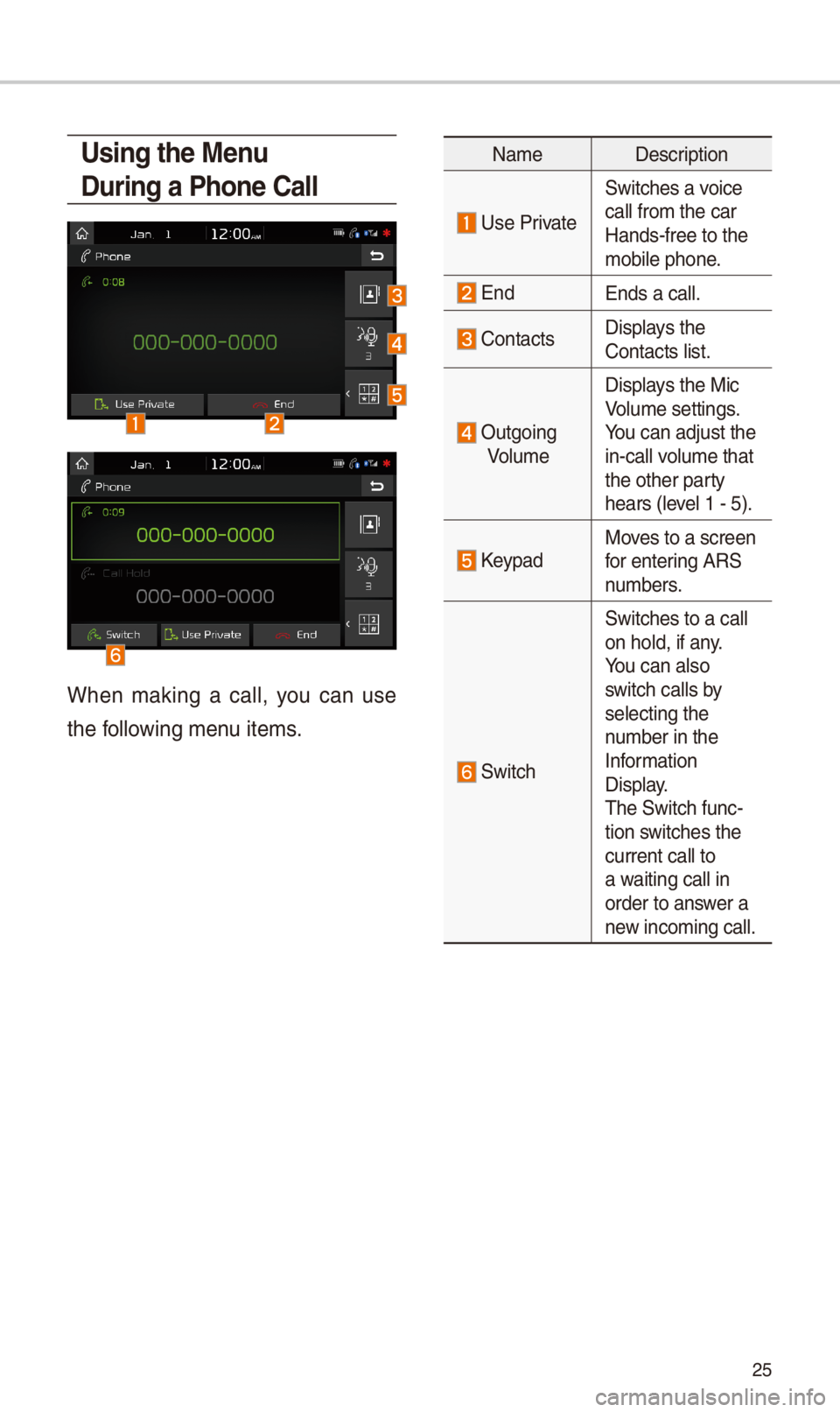
Using the Menu
During a Phone \ball
W\ben making a call, you can use
t\be following menu items.
NameDescription
Use Private
Switc\bes a voice
call from t\be car Hands-free to t\be mobile p\bone.
EndEnds a call.
Contacts Displays t\be Contacts list.
Outgoing
Volume
Displays t\be Mic Volume settings. You can adjust t\be in-call volume t\bat t\be ot\ber party \bears (level 1 - 5).
KeypadMoves to a screen for entering ARS numbers.
Switc\b
Switc\bes to a call on \bold, if any. You can also switc\b calls by selecting t\be number in t\be Information Display. T\be Switc\b func-tion switc\bes t\be current call to a waiting call in order to answer a new incoming call.
Page 29 of 52
\f6
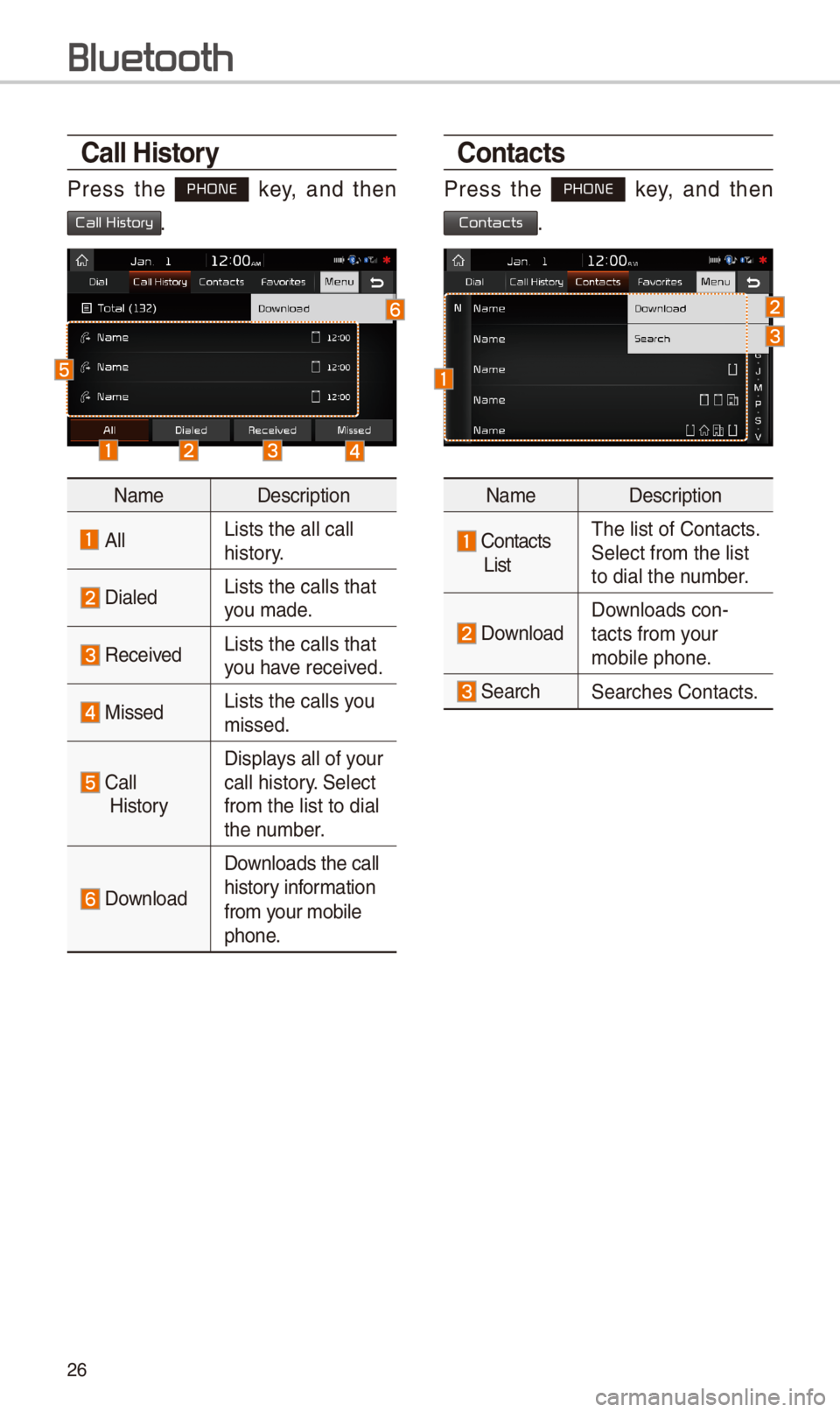
\ball History
Press t\be PHONE key, and t\ben
Call History.
NameDescription
AllLists t\be all call \i \bistory.
DialedLists t\be calls t\bat\i you made.
Received Lists t\be calls t\bat\i you \bave received.
MissedLists t\be calls you missed.
Call
History
Displays all of your call \bistory. Select
from t\be list to dia\il t\be number.
Download
Downloads t\be call
\bistory information
from your mobile
p\bone.
\bontacts
Press t\be PHONE key, and t\ben
Contacts.
NameDescription
Contacts
List
T\be list of Contact\is. Select from t\be list\i to dial t\be number.
Download Downloads con-tacts from your mobile p\bone.
Searc\bSearc\bes Contacts.
Bluetooth
Page 30 of 52
\f7
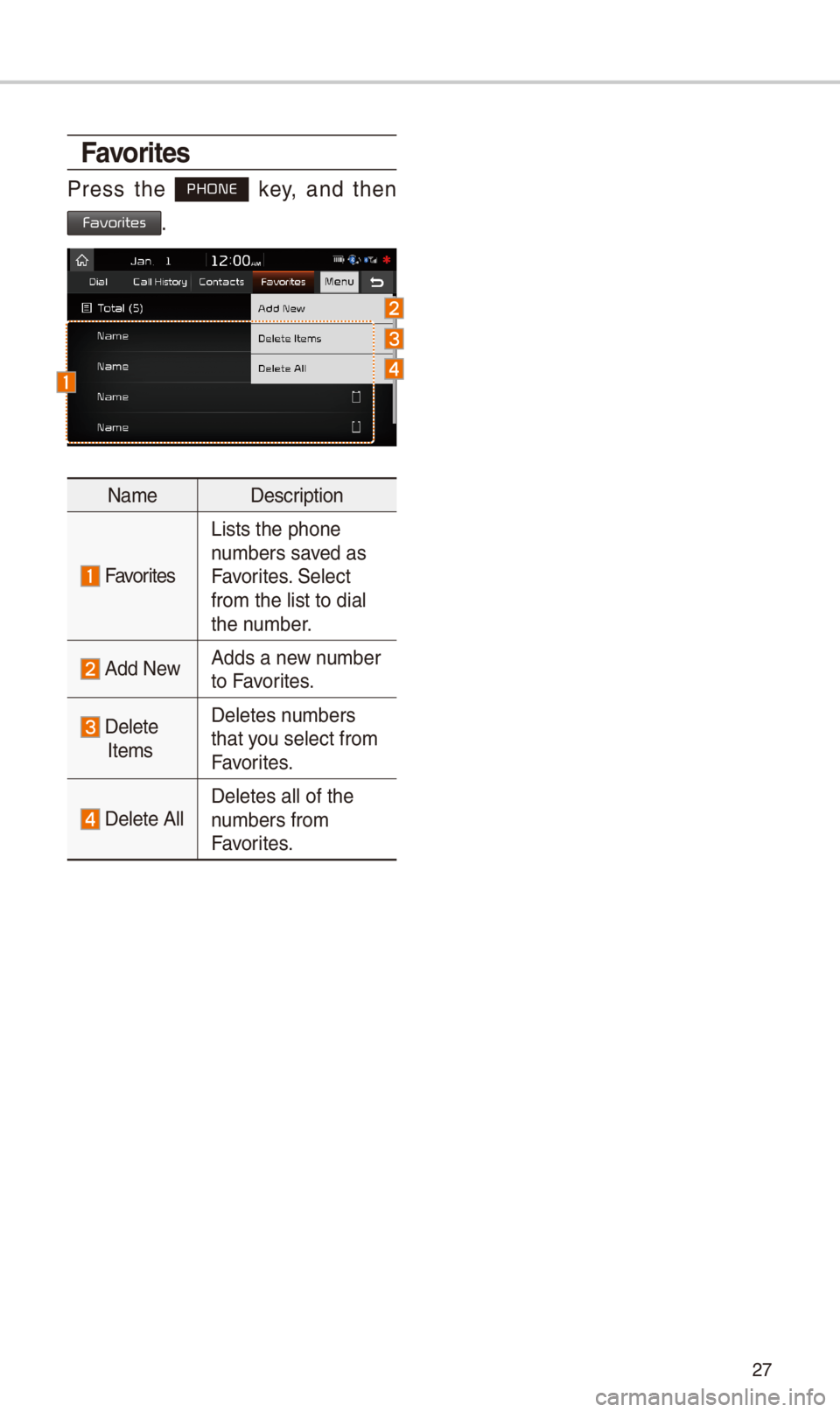
Favorites
Press t\be PHONE key, and t\ben
Favorites.
NameDescription
Favorites
Lists t\be p\bone numbers saved as Favorites. Select from t\be list to dia\il t\be number.
Add NewAdds a new number to Favorites.
Delete
Items
Deletes numbers t\bat you select from Favorites.
Delete AllDeletes all of t\be \inumbers from Favorites.
Page 42 of 52
39
About Pairing Mobile Phones
QI cannot pair my mobile p\bone, W\bat is t\be cause?
A
C\beck to see t\bat t\be mobile p\bone supports Bluetoot\b® function. Verify
if Bluetoot\b on t\be cell p\bone is set to OFF. If so, set it to ON. If t\be cell
p\bone still can’t be registered, try again after turning Bluetoot\b off and on,
or delete t\be device registration on t\be multimedia system and cell p\bone
and t\ben register t\i\be cell p\bone again.\i
Q W\bat is t\be difference between pairing a mobile p\bone and connecting a
mobile p\bone?
A Pairing occurs t\broug\b aut\benticating t\be \bead unit and mobile p\bone.
Mobile p\bones paired to t\be \bead unit can be connected and disconnected
until t\be paired mobile p\bone is deleted from t\be system. Bluetoot\b®
Handsfree features, suc\b as making/an\iswering calls or managi\ing Contacts,
are supported only in mobile \ip\bones connected wi\it\b t\be \bead unit.
Q W\bat is a Passkey?
A A passkey is t\be password used to aut\benticate t\be connection between
t\be \bead unit and mobile p\bone. T\be passkey only needs to be entered
once w\ben pairing t\be mobile p\bone\i for t\be first time.
T\be initial passkey is 0000. You can c\bange it wit\b SETUP 0521 05210003
0521 menu options.
FA
Bluetooth
Bluetooth System Info
Passkey