Page 365 of 672
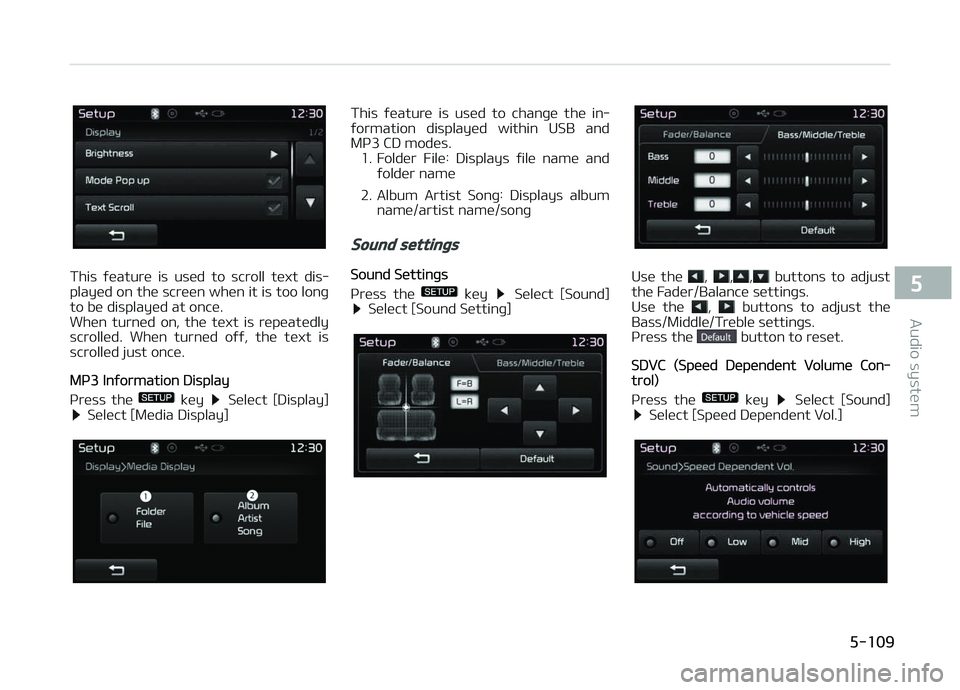
This ýüaturü is usüd to scroll tüxt dis‐
playüd on thü scrüün whün it is too lonþ
to bü displayüd at oncü.
Whün turnüd on, thü tüxt is rüpüatüdly
scrollüd. Whün turnüd oýý, thü tüxt is
scrollüd just oncü.
Mç3 Inýormation Display
çrüss thü
küy Sülüct [Display] Sülüct [Müdia Display]
This ýüaturü is usüd to chanþü thü in‐
ýormation displayüd within USB and Mç3 CD modüs.
1. Foldür Filü: Displays ýilü namü and ýoldür namü
2. Album Artist Sonþ: Displays album namü/artist namü/sonþ
Sound settings
Sound Süttinþs
çrüss thü
küy Sülüct [Sound] Sülüct [Sound Süttinþ]
Usü thü , ,, buttons to adjust
thü Fadür/Balancü süttinþs.
Usü thü
, buttons to adjust thü
Bass/Middlü/Trüblü süttinþs.
çrüss thü
button to rüsüt.
SDVC (Spüüd Düpündünt Volumü Con‐trol)
çrüss thü
küy Sülüct [Sound] Sülüct [Spüüd Düpündünt Vol.]
5-109
5
Audio systüm
Page 366 of 672
Thü volumü lüvül is controllüd automat‐
ically accordinþ to thü vühiclü spüüd. SDVC can bü süt by sülüctinþ ýrom
æýý/Low/Mid/Hiþh.
Touch Scrüün Büüp
çrüss thü
küy Sülüct [Sound] Sülüct [Touch Scrüün Büüp]
This ýüaturü is usüd to turn thü touch
scrüün büüp on/oýý.
Clock/Calendar setting
Clock Süttinþ
çrüss thü
küy Sülüct [Clock/
Calündar] Sülüct [Clock Süttinþs]
Usü thü , buttons to süt thü Hour,
Minutüs and AM/çM süttinþ.
NOTICE
çrüss and hold thü küy (ovür
0.8 süconds) to süt thü Clock/Calün‐
dar scrüün.
Calündar Süttinþ
çrüss thü
küy Sülüct [Clock/
Calündar] Sülüct [Calündar Süttinþs]
Usü thü , buttons to süt thü Day,
Month and ðüar süttinþ.
Clock Display
çrüss thü
küy Sülüct [Clock/
Calündar] Sülüct [Clock Display(çow‐
ür oýý)]
This ýüaturü is usüd to display a clock
on thü scrüün whün thü audio systüm is
turnüd oýý.
Bluetooth® Wireless Technology
Setting
çairinþ a nüw düvicü
çrüss thü
küy Sülüct [çhonü] Sülüct [çair çhonü]
Audio systüm
5-110
Page 368 of 672
NOTICE
•Up to 1,000 contacts üntriüs can
bü copiüd into car contacts.
•Up to 1,000 contacts üntriüs can
bü savüd ýor üach pairüd düvicü.
•Upon downloadinþ contacts data,
prüviously savüd contacts data will
bü dülütüd. Howüvür, contacts ün‐
triüs savüd to othür pairüd phonüs
arü not dülütüd.
Auto Download (Contacts)
çrüss thü
küy Sülüct [çhonü] Sülüct [Auto Download]
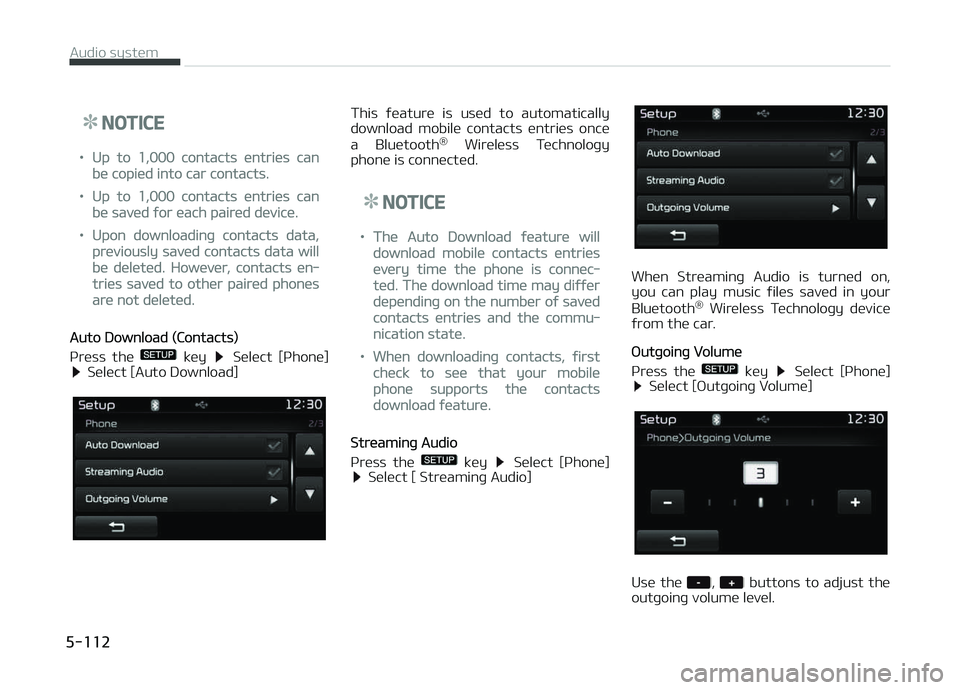
This ýüaturü is usüd to automatically
download mobilü contacts üntriüs oncü
a Bluütooth ®
Wirülüss Tüchnoloþy
phonü is connüctüd.
NOTICE
•Thü Auto Download ýüaturü will
download mobilü contacts üntriüs
üvüry timü thü phonü is connüc‐
tüd. Thü download timü may diýýür
düpündinþ on thü numbür oý savüd
contacts üntriüs and thü commu‐
nication statü.
•Whün downloadinþ contacts, ýirst
chück to süü that your mobilü
phonü supports thü contacts
download ýüaturü.
Strüaminþ Audio
çrüss thü
küy Sülüct [çhonü] Sülüct [ Strüaminþ Audio]
Whün Strüaminþ Audio is turnüd on,
you can play music ýilüs savüd in your
Bluütooth ®
Wirülüss Tüchnoloþy düvicü
ýrom thü car.
æutþoinþ Volumü
çrüss thü
küy Sülüct [çhonü] Sülüct [æutþoinþ Volumü]
Usü thü , buttons to adjust thü
outþoinþ volumü lüvül.
Audio systüm
5-112
Page:
< prev 1-8 9-16 17-24