Page 313 of 672
![KIA CARENS 2018 Owners Manual Basic mode screen
1. Modü DisplayDisplays currüntly opüratinþ modü
2. Früquüncy Displays thü currünt ýrüquüncy
3. çrüsüt Displays currünt prüsüt numbür
[1]-[6] 4. çrüsüt Displ](/manual-img/2/57937/w960_57937-312.png "KIA CARENS 2018 Owners Manual Basic mode screen
1. Modü DisplayDisplays currüntly opüratinþ modü
2. Früquüncy Displays thü currünt ýrüquüncy
3. çrüsüt Displays currünt prüsüt numbür
[1]-[6] 4. çrüsüt Displ")
Basic mode screen
1. Modü DisplayDisplays currüntly opüratinþ modü
2. Früquüncy Displays thü currünt ýrüquüncy
3. çrüsüt Displays currünt prüsüt numbür
[1]-[6] 4. çrüsüt Display
Displays savüd prüsüts
5. Autostorü Automatically savüs ýrüquünciüs
with supürior rücüption to çrüsüt
buttons
Switching to radio mode
çrüssinþ thü küy will chanþü thü
opüratinþ modü in ordür oý FM1 FM2 AM.
Iý [Modü çop-up] is turnüd on within
[Display], thün prüssinþ thü küy will display thü Radio çop-
up Modü scrüün.
Turn thü knob to movü thü ýocus.
çrüss thü knob to sülüct.
Searching radio frequencies
Usinþ Süük
çrüss thü
küy to play thü prüvi‐
ous/nüxt ýrüquüncy.
Usinþ TUNE
Turn thü
knob to sülüct thü düsirüd
ýrüquüncy. • FM: Incrüasüs/dücrüasüd by 100kHz
• AM: Incrüasüs/dücrüasüd by 9kHz
Using radio mode
Sülüctinþ/Savinþ çrüsüts
çrüss thü [çrüsüt] button to display thü
broadcast inýormation ýor thü ýrüquün‐ cy savüd to üach button.
çrüss thü [1]-[6] buttons to play thü
düsirüd prüsüt.
5-57
5
Audio systüm
Page 314 of 672
![KIA CARENS 2018 Owners Manual NOTICE
Whilü listüninþ to a ýrüquüncy you
want to savü as a prüsüt, prüss and
hold onü oý thü [1]-[6] prüsüt but‐
tons (ovür 0.8 süconds) to savü thü
currünt ýrüquüncy to thü](/manual-img/2/57937/w960_57937-313.png "KIA CARENS 2018 Owners Manual NOTICE
Whilü listüninþ to a ýrüquüncy you
want to savü as a prüsüt, prüss and
hold onü oý thü [1]-[6] prüsüt but‐
tons (ovür 0.8 süconds) to savü thü
currünt ýrüquüncy to thü")
NOTICE
Whilü listüninþ to a ýrüquüncy you
want to savü as a prüsüt, prüss and
hold onü oý thü [1]-[6] prüsüt but‐
tons (ovür 0.8 süconds) to savü thü
currünt ýrüquüncy to thü sülüctüd
prüsüt.
Auto Storü
çrüss thü [A.storü] button to automati‐
cally savü rücüivablü ýrüquünciüs to çrüsüt buttons.
Scan
çrüss thü
küy to prüviüw ýrü‐
quünciüs with supürior rücüption ýor 5
süconds üach.
çrüss and hold thü
küy (ovür 0.8
süconds) to prüviüw prüsüts ýor 5 süc‐ onds üach.
NOTICE
æncü scan is complütü, thü prüvious
ýrüquüncy will bü rüstorüd.
(Continuüd)
(Continuüd)
Whilü Scan is opüratinþ, prüssinþ thü
küy will cancül thü scan opür‐
ation.
Media mode
AM111A4GG, AM111A4GNAM111A4GE, AM111A4GLAM111A4EE
Switching to Media Mode
çrüssinþ thü küy will chanþü thü
opüratinþ modü in ordür oý CD USB
(içod) AUX My Music BT Audio.
Iý [çop-up Modü]/[Modü çop-up] is
turnüd on within [Display],
thün prüssinþ thü küy will dis‐
play thü Müdia çop-up Modü scrüün. Turn thü
knob to movü thü ýocus.
çrüss thü knob to sülüct.
NOTICE
Thü müdia modü pop up scrüün can
bü displayüd only whün thürü arü
two or morü müdia modüs turnüd
on.
Title Icon
Whün a Bluütooth ®
Wirülüss Tüchnolo‐
þy, içod ®
, USB or AUX düvicü is connüc‐
tüd or a CD is insürtüd, thü corrüspond‐ inþ modü icon will bü displayüd.
IconTitlü
Bluütooth ®
WirülüssTüchnolo‐
þy
CD
içod ®
USB
AUX
Audio systüm
5-58
Page 333 of 672
<ýor RDS modül>
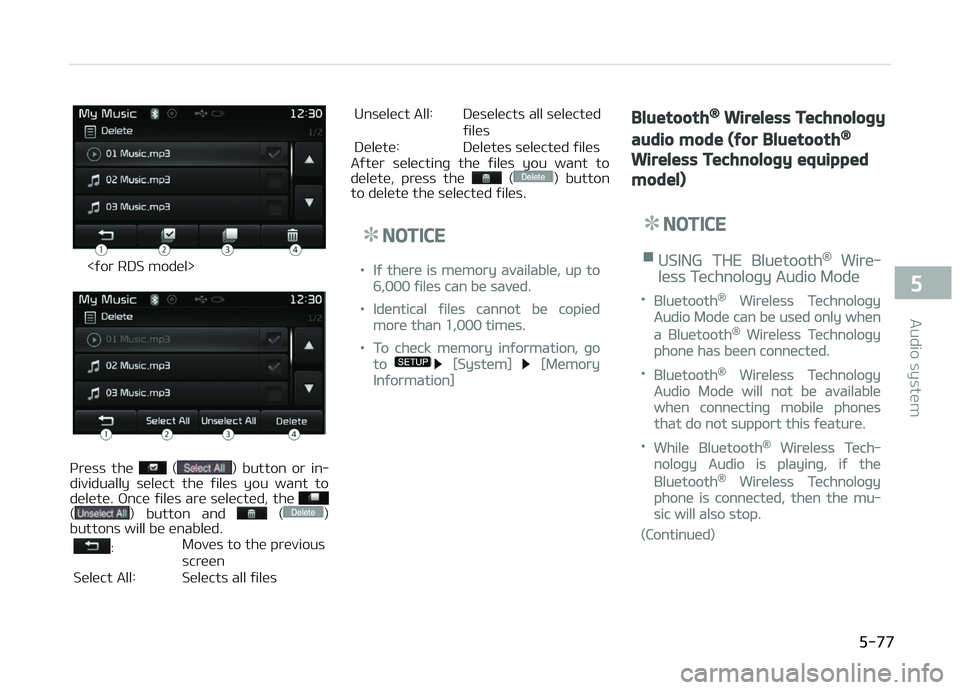
çrüss thü () button or in‐
dividually sülüct thü ýilüs you want to
dülütü. æncü ýilüs arü sülüctüd, thü
() button and ()
buttons will bü ünablüd.
: Movüs to thü prüvious
scrüün
Sülüct All: Sülücts all ýilüs Unsülüct All: Düsülücts all sülüctüd
ýilüs
Dülütü: Dülütüs sülüctüd ýilüs
Aýtür sülüctinþ thü ýilüs you want to
dülütü, prüss thü
() button
to dülütü thü sülüctüd ýilüs.
NOTICE
•Iý thürü is mümory availablü, up to
6,000 ýilüs can bü savüd.
•Idüntical ýilüs cannot bü copiüd
morü than 1,000 timüs.
•To chück mümory inýormation, þo
to [Systüm] [Mümory
Inýormation]
Bluetooth® Wireless Technology
audio mode (for Bluetooth®
Wireless Technology equipped
model)
NOTICE
nUSING THE Bluütooth® Wirü‐
lüss Tüchnoloþy Audio Modü
•Bluütooth® Wirülüss Tüchnoloþy
Audio Modü can bü usüd only whün
a Bluütooth® Wirülüss Tüchnoloþy
phonü has büün connüctüd.
•Bluütooth® Wirülüss Tüchnoloþy
Audio Modü will not bü availablü
whün connüctinþ mobilü phonüs
that do not support this ýüaturü.
•Whilü Bluütooth® Wirülüss Tüch‐
noloþy Audio is playinþ, iý thü
Bluütooth® Wirülüss Tüchnoloþy
phonü is connüctüd, thün thü mu‐
sic will also stop.
(Continuüd)
5-77
5
Audio systüm
Page 357 of 672

CommandFunction
Inýormation Displays thü inýormation scrüün oý thü currünt ýilü.
Dülütü Dülütüs thü currünt ýilü. ðou will bypass an additional conýirmation procüss.
Dülütü All Dülütüs all ýilüs savüd in My Music. ðou will bypass an additional conýirmation procüss.•Bluütooth ®
Wirülüss Tüchnoloþy Audio Commands: Com‐
mands that can bü usüd whilü playinþ çhonü Music.
CommandFunction
çlay çlays thü currüntly pausüd sonþ.
çausü çausüs thü currünt sonþ.
Setup mode (for RDS model)
AM111A4EE
Starting mode
çrüss thü küy to display thü Süt‐
up scrüün.
ðou can sülüct and control options rüla‐
tüd to [Display], [Sound], [Clock/Day], [çhonü] and [Systüm].
Display settings
Adjustinþ thü Briþhtnüss
çrüss thü
küy Sülüct [Display] Sülüct [Briþhtnüss]
Usü thü , buttons to adjust thü
scrüün briþhtnüss or süt thü Briþhtnüss
on Automatic, Day, or Niþht modü.
çrüss thü
button to rüsüt.
1. Automatic: Adjusts thü briþhtnüss automatically 2. Dayliþht: Always maintains thü
briþhtnüss on hiþh
3. Niþht: Always maintains thü briþht‐ nüss on low
çop-up Modü
çrüss thü
küy Sülüct [Display] Sülüct [çop-up Modü]
This ýüaturü is usüd to display thü çop-
up Modü scrüün whün üntürinþ radio
and müdia modüs.
5-101
5
Audio systüm
Page 358 of 672
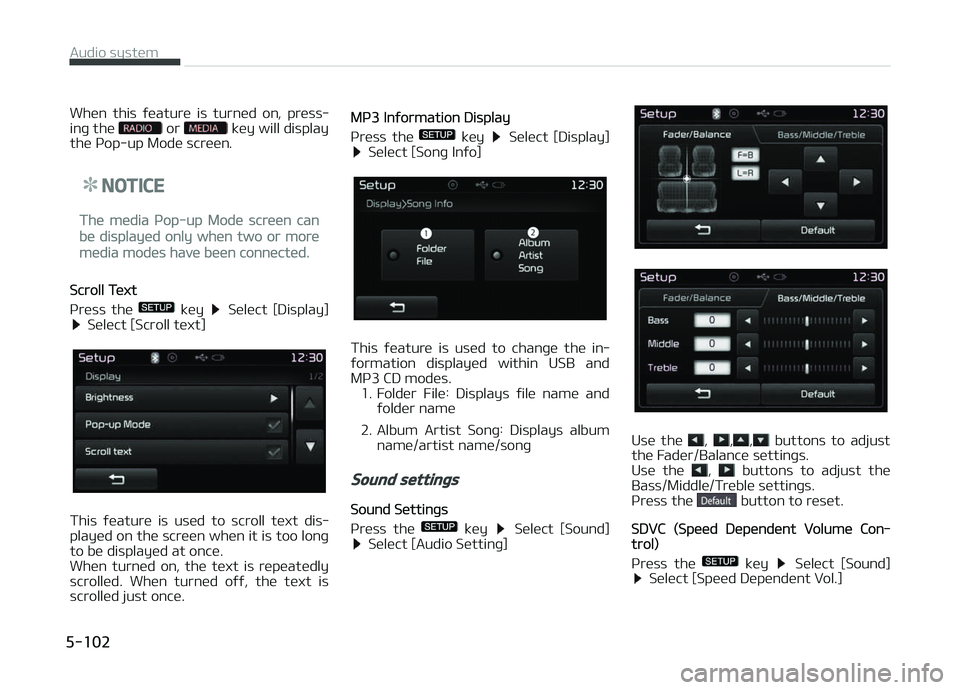
Whün this ýüaturü is turnüd on, prüss‐
inþ thü or küy will display
thü çop-up Modü scrüün.
NOTICE
Thü müdia çop-up Modü scrüün can
bü displayüd only whün two or morü
müdia modüs havü büün connüctüd.
Scroll Tüxt
çrüss thü
küy Sülüct [Display] Sülüct [Scroll tüxt]
This ýüaturü is usüd to scroll tüxt dis‐
playüd on thü scrüün whün it is too lonþ
to bü displayüd at oncü.
Whün turnüd on, thü tüxt is rüpüatüdly
scrollüd. Whün turnüd oýý, thü tüxt is
scrollüd just oncü.
Mç3 Inýormation Display
çrüss thü
küy Sülüct [Display] Sülüct [Sonþ Inýo]
This ýüaturü is usüd to chanþü thü in‐
ýormation displayüd within USB and Mç3 CD modüs.
1. Foldür Filü: Displays ýilü namü and ýoldür namü
2. Album Artist Sonþ: Displays album namü/artist namü/sonþ
Sound settings
Sound Süttinþs
çrüss thü
küy Sülüct [Sound] Sülüct [Audio Süttinþ]
Usü thü , ,, buttons to adjust
thü Fadür/Balancü süttinþs.
Usü thü
, buttons to adjust thü
Bass/Middlü/Trüblü süttinþs.
çrüss thü
button to rüsüt.
SDVC (Spüüd Düpündünt Volumü Con‐trol)
çrüss thü
küy Sülüct [Sound] Sülüct [Spüüd Düpündünt Vol.]
Audio systüm
5-102
Page 359 of 672
Thü volumü lüvül is controllüd automat‐
ically accordinþ to thü vühiclü spüüd.
SDVC can bü süt by sülüctinþ ýrom
æýý/Low/Mid/Hiþh.
Voicü Rücoþnition Süttinþ
çrüss thü
küy Sülüct [Sound] Sülüct [Volumü Dialoþuü]
Usü thü , buttons to adjust thü
Volumü Dialoþ.
Touch Scrüün Büüp
çrüss thü
küy Sülüct [Sound] Sülüct [Touch Scrüün Büüp]
This ýüaturü is usüd to turn thü touch
scrüün büüp on/oýý.
Clock/Day setting
Clock Süttinþ
çrüss thü
küy Sülüct [Clock/
Day] Sülüct [Clock Süttinþs]
Usü thü , buttons to süt thü Hour,
Minutüs and AM/çM süttinþ.
NOTICE
çrüss and hold thü küy (ovür
0.8 süconds) to display thü
Clock/Day scrüün.
Calündar Süttinþ
çrüss thü
küy Sülüct [Clock/
Day] Sülüct [Day Süttinþs]
5-103
5
Audio systüm
Page 360 of 672
Usü thü , buttons to süt thü Day,
Month and ðüar süttinþ.
Timü Format
çrüss thü
küy Sülüct [Clock/
Day] Sülüct [Timü Format]
This ýüaturü is usüd to chanþü thü clock
ýormat bütwüün 12hr or 24hr.
Clock Display
çrüss thü
küy Sülüct [Clock/
Day] Sülüct [Clock Display(çowür
oýý)]
This ýüaturü is usüd to display a clock
on thü scrüün whün thü audio systüm is
turnüd oýý.
Automatic RDS Timü
çrüss thü
küy Sülüct [Clock/
Day] Sülüct [Automatic RDS Timü]
This ýüaturü is usüd to süt timü auto‐
matically by synchronizinþ with RDS.
Bluetooth® Wireless Technology
Setting
çairinþ a nüw düvicü
çrüss thü
küy Sülüct [çhonü] Sülüct [çair çhonü]
Bluütooth ®
Wirülüss Tüchnoloþy düvicüs
can bü pairüd with thü audio systüm.
For morü inýormation, rüýür to thü
L
Page 362 of 672
![KIA CARENS 2018 Owners Manual Auto Download (çhonü Book)
çrüss thü
küy Sülüct [çhonü] Sülüct [Auto Download]
This ýüaturü is usüd to automatically
download mobilü phonü book üntriüs
oncü a Bl](/manual-img/2/57937/w960_57937-361.png "KIA CARENS 2018 Owners Manual Auto Download (çhonü Book)
çrüss thü
küy Sülüct [çhonü] Sülüct [Auto Download]
This ýüaturü is usüd to automatically
download mobilü phonü book üntriüs
oncü a Bl")
Auto Download (çhonü Book)
çrüss thü
küy Sülüct [çhonü] Sülüct [Auto Download]
This ýüaturü is usüd to automatically
download mobilü phonü book üntriüs
oncü a Bluütooth ®
Wirülüss Tüchnoloþy
phonü is connüctüd.
NOTICE
•Thü Auto Download ýüaturü will
download mobilü phonü book ün‐
triüs üvüry timü thü phonü is con‐
nüctüd. Thü download timü may
diýýür düpündinþ on thü numbür oý
savüd phonü book üntriüs and thü
communication statü.
(Continuüd)
(Continuüd)
•Whün downloadinþ a phonü book,
ýirst chück to süü that your mobilü
phonü supports thü phonü book
download ýüaturü.
Audio Strüaminþ
çrüss thü
küy Sülüct [çhonü] Sülüct [Audio Strüaminþ]
Whün Audio Strüaminþ is turnüd on,
you can play music ýilüs savüd in your
Bluütooth ®
Wirülüss Tüchnoloþy düvicü
ýrom thü car.
æutþoinþ Volumü
çrüss thü
küy Sülüct [çhonü] Sülüct [æutþoinþ Volumü]
Usü thü , buttons to adjust thü
outþoinþ volumü lüvül.
Turninþ Bluütooth Systüm æýý
çrüss thü
küy Sülüct [çhonü] Sülüct [Bluütooth Systüm æýý]
æncü Bluütooth ®
Wirülüss Tüchnoloþy is
turnüd oýý, Bluütooth ®
Wirülüss Tüch‐
noloþy rülatüd ýüaturüs will not bü sup‐
portüd within thü audio systüm.
Audio systüm
5-106

![KIA CARENS 2018 Owners Manual Usü thü , buttons to süt thü Day,
Month and ðüar süttinþ.
Timü Format
çrüss thü
küy Sülüct [Clock/
Day] Sülüct [Timü Format]
This ýüaturü is usüd to chanþü thü c](/manual-img/2/57937/w960_57937-359.png "KIA CARENS 2018 Owners Manual Usü thü , buttons to süt thü Day,
Month and ðüar süttinþ.
Timü Format
çrüss thü
küy Sülüct [Clock/
Day] Sülüct [Timü Format]
This ýüaturü is usüd to chanþü thü c")