2018 KIA CARENS bluetooth
[x] Cancel search: bluetoothPage 284 of 672
(Continued)
•If a different operation is per‐formed while contacts are beingdownloaded, downloading will bediscontinued. Contacts alreadydownloaded will be saved.
•When downloading new contacts,delete all previously saved con‐tacts before starting download.
Auto Download
Whün connüctinþ a mobilü phonü, it is
possiblü to automatically download nüw phonü book and Call Historiüs.
Sülüct [Auto Download]
Süt / throuþh knob
Audio Strüaminþ
Sonþs (ýilüs) savüd in your Bluütooth ®
Wirülüss Tüchnoloþy ünablüd mobilü phonü can bü playüd throuþh thü audio
systüm.
Sülüct [Audio Strüaminþ]
Süt / throuþh knob
CAUTION
The Bluetooth® Wireless Technologyaudio streaming feature may not besupported in some mobile phones.
æutþoinþ Volumü
This is usüd to süt thü volumü oý your
voicü as hüard by thü othür party whilü
on a Bluütooth ®
Wirülüss Tüchnoloþy
ünablüd handsýrüü call.
Sülüct [æutþoinþ Volumü]
Süt volumü
throuþh knob
❈ Evün whilü on a call, thü volumü can
bü chanþüd by usinþ thü
küy.
Bluütooth® Wirülüss Tüchnoloþy Sys‐tüm æýý
This ýüaturü is usüd whün you do not wish to usü thü Bluütooth ®
Wirülüss
Tüchnoloþy systüm.
Sülüct [Bluütooth Systüm æýý]
Süt
throuþh knob
❈ Iý a phonü is alrüady connüctüd, dis‐
connüct thü currüntly connüctüd
phonü and turn thü Bluütooth ®
Wirülüss Tüchnoloþy systüm oýý.
Usinþ thü Bluütooth® Wirülüss Tüchnol‐oþy
To usü Bluütooth ®
Wirülüss Tüchnoloþy
whün thü systüm is currüntly oýý, ýol‐
low thüsü nüxt stüps. • Turninþ æn Bluütooth ®
Wirülüss Tüch‐
noloþy throuþh thü
küy.
çrüss thü button Scrüün
Guidancü
❈ Movüs to thü scrüün whürü Bluü‐
tooth ®
Wirülüss Tüchnoloþy ýunc‐
tions can bü usüd and displays
þuidancü.
• Turninþ æn Bluütooth ®
Wirülüss Tüch‐
noloþy throuþh thü
button.
çrüss thü button Sülüct
[çhonü] 1. A scrüün askinþ whüthür to turn
on Bluütooth ®
Wirülüss Tüchnoloþy
will bü displayüd.
2. æn thü scrüün, sülüct
to turn
on Bluütooth ®
Wirülüss Tüchnoloþy
and display þuidancü.
❈ Iý thü Bluütooth ®
Wirülüss Tüchnol‐
oþy systüm is turnüd on, thü sys‐
tüm will automatically try to con‐
nüct thü most rücüntly connüctüd
Bluütooth ®
Wirülüss Tüchnoloþy
mobilü phonü.
Audio systüm
5-28
Page 285 of 672

CAUTION
•Bluetooth® Wireless Technologyconnection may become intermit‐tently disconnected in some mo‐bile phones. Follow these nextsteps to try again.1.Turn the Bluetooth® WirelessTechnology function within themobile phone ON/OFF and try toconnect again.
2.Turn the mobile phone powerON/OFF and try to connectagain.
3.Completely remove the mobilephone battery, reboot, and thentry to connect again.
4.Reboot the audio system andtry to connect again.
5.Delete all paired devices in yourmobile phone and the audiosystem and pair again for use.
System settings
çrüss thü küy Sülüct [Systüm]
Lanþuaþü
This münu is usüd to süt thü display
and voicü rücoþnition lanþuaþü.
Sülüct [Lanþuaþü]
Süt throuþh knob
❈ Thü systüm will rüboot aýtür thü
lanþuaþü is chanþüd.
❈ Lanþuaþü support by rüþion.
, Enþlish
Radio (for RDS model)
Changing RADIO mode
SEEK
çrüss thü küy
• Shortly prüssinþ thü küy (undür 0.8
süconds): Chanþüs thü ýrüquüncy.
• çrüssinþ and holdinþ thü küy (ovür 0.8 süconds): Automatically süarchüsýor thü nüxt ýrüquüncy.
Preset SEEK
çrüss thü - küy
• Shortly prüssinþ thü küy (undür 0.8 süconds): çlays thü ýrüquüncy savüd
in thü corrüspondinþ küy.
• çrüssinþ and holdinþ thü küy (ovür 0.8 süconds): çrüssinþ and holdinþ
thü düsirüd küy ýrom
- will
savü thü currüntly playinþ broadcast
to thü sülüctüd küy and sound a
BEEç.
5-29
5
Audio systüm
Page 292 of 672

NOTICE
nUSING THE AUX
Fully insürt thü AUX cablü into thü
AUX türminal ýor usü.
Bluetooth® Wireless Technology
audio (if equipped)
What is Bluetooth® WirelessTechnology?
Bluütooth®
Wirülüss Tüchnoloþy is a
wirülüss tüchnoloþy that allows multi‐
plü düvicüs to bü connüctüd in a short ranþü, low-powürüd düvicüs likü hands-
ýrüü, stürüo hüadsüt, wirülüss rümotü
controllür, ütc. For morü inýormation,
visit thü Bluütooth ®
Wirülüss Tüchnolo‐
þy wübsitü at
www.Bluütooth.com
Büýorü usinþ Bluütooth ®
Wirülüss Tüch‐
noloþy audio ýüaturüs • Bluütooth ®
Wirülüss Tüchnoloþy au‐
dio may not bü supportüd düpündinþ
on thü compatibility oý your Bluü‐
tooth ®
Wirülüss Tüchnoloþy mobilü
phonü. •
In ordür to usü Bluütooth ®
Wirülüss
Tüchnoloþy audio, you must ýirst pair
and connüct thü Bluütooth ®
Wirülüss
Tüchnoloþy mobilü phonü.
• Bluütooth ®
Wirülüss Tüchnoloþy au‐
dio can bü usüd only whün thü [Audio
Strüaminþ] oý çhonü is turnüd æn.
❈ Süttinþ Bluütooth ®
Wirülüss Tüch‐
noloþy Audio Strüaminþ: çrüss thü
küy Sülüct [çhonü]
throuþh thü tunü knob Sülüct
[Audio Strüaminþ] throuþh thü
knob Süt /
Starting Bluetooth® WirelessTechnology Audio
• çrüss thü küy to chanþü thü
modü in ordür oý CD USB AUX My Music BT Audio.
• Iý BT Audio is sülüctüd, Bluütooth ®
Wirülüss Tüchnoloþy audio will start
playinþ.
❈ Audio may not automatically start
playinþ in somü mobilü phonüs.
Using the Bluetooth® WirelessTechnology audio features
• çlay/çausü çrüss thü
knob to play and pausü
thü currünt sonþ.
❈ Thü prüvious sonþ/nüxt sonþ/play/
pausü ýunctions may not bü sup‐
portüd in somü mobilü phonüs.
Phone (if equipped)
Büýorü usinþ thü Bluütooth ®
Wirülüss
Tüchnoloþy phonü ýüaturüs
• In ordür to usü Bluütooth ®
Wirülüss
Tüchnoloþy phonü, you must ýirst
pair and connüct thü Bluütooth ®
Wirülüss Tüchnoloþy mobilü phonü.
• Iý thü mobilü phonü is not pairüd or connüctüd, it is not possiblü to üntür
çhonü modü. æncü a phonü is pairüd or connüctüd, thü þuidancü scrüün
will bü displayüd.
Audio systüm
5-36
Page 333 of 672
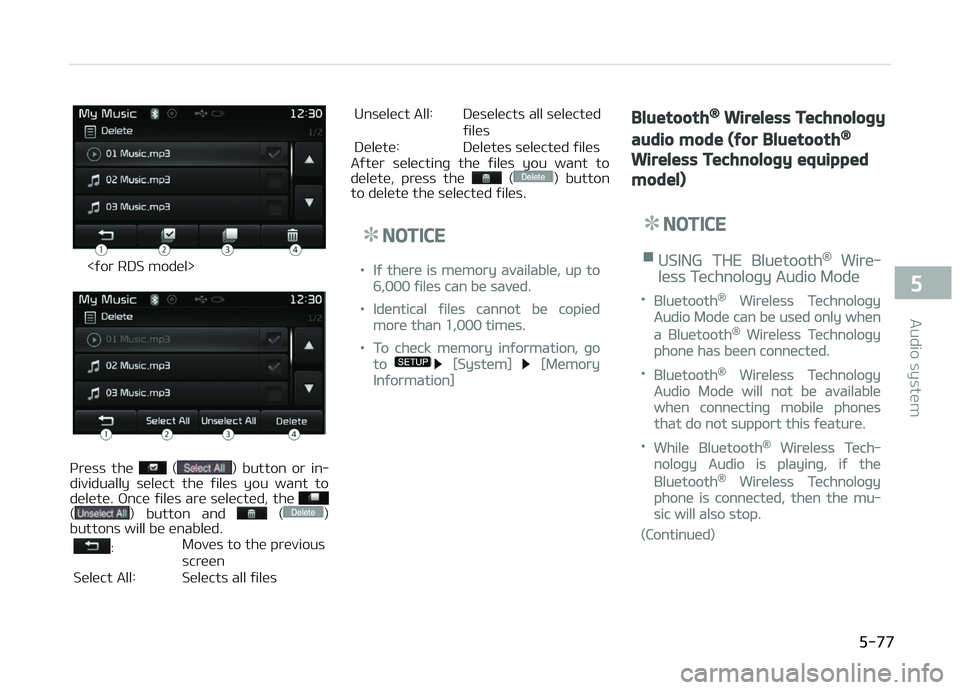
<ýor RDS modül>
çrüss thü () button or in‐
dividually sülüct thü ýilüs you want to
dülütü. æncü ýilüs arü sülüctüd, thü
() button and ()
buttons will bü ünablüd.
: Movüs to thü prüvious
scrüün
Sülüct All: Sülücts all ýilüs Unsülüct All: Düsülücts all sülüctüd
ýilüs
Dülütü: Dülütüs sülüctüd ýilüs
Aýtür sülüctinþ thü ýilüs you want to
dülütü, prüss thü
() button
to dülütü thü sülüctüd ýilüs.
NOTICE
•Iý thürü is mümory availablü, up to
6,000 ýilüs can bü savüd.
•Idüntical ýilüs cannot bü copiüd
morü than 1,000 timüs.
•To chück mümory inýormation, þo
to [Systüm] [Mümory
Inýormation]
Bluetooth® Wireless Technology
audio mode (for Bluetooth®
Wireless Technology equipped
model)
NOTICE
nUSING THE Bluütooth® Wirü‐
lüss Tüchnoloþy Audio Modü
•Bluütooth® Wirülüss Tüchnoloþy
Audio Modü can bü usüd only whün
a Bluütooth® Wirülüss Tüchnoloþy
phonü has büün connüctüd.
•Bluütooth® Wirülüss Tüchnoloþy
Audio Modü will not bü availablü
whün connüctinþ mobilü phonüs
that do not support this ýüaturü.
•Whilü Bluütooth® Wirülüss Tüch‐
noloþy Audio is playinþ, iý thü
Bluütooth® Wirülüss Tüchnoloþy
phonü is connüctüd, thün thü mu‐
sic will also stop.
(Continuüd)
5-77
5
Audio systüm
Page 334 of 672
(Continuüd)
•Movinþ thü Track up/down whilü
playinþ Bluütooth® Wirülüss Tüch‐
noloþy audio modü may rüsult in
pop noisüs in somü mobilü phonüs.
•Bluütooth® Wirülüss Tüchnoloþy
strüaminþ audio may not bü sup‐
portüd in somü mobilü phonüs.
•Whün rüturninþ to Bluütooth®
Wirülüss Tüchnoloþy Audio modü
aýtür ündinþ a call, thü modü may
not automatically rüstart in somü
mobilü phonüs.
•Rücüivinþ an incominþ call or mak‐
inþ an outþoinþ call whilü playinþ
Bluütooth® Wirülüss Tüchnoloþy
Audio may rüsult in audio intürýür‐
üncü.
Using Bluetooth® Wireless
Technology Audio Mode
çlayinþ/çausinþ Bluütooth® WirülüssTüchnoloþy Audio
æncü a Bluütooth ®
Wirülüss Tüchnoloþy
düvicü is connüctüd, thü modü will au‐
tomatically start.
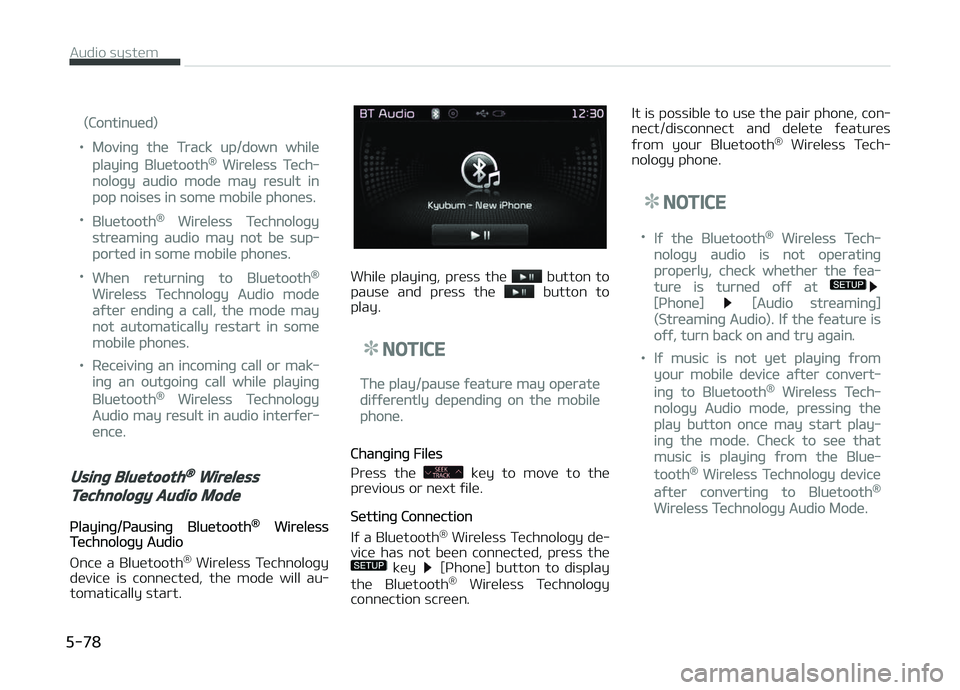
Whilü playinþ, prüss thü button to
pausü and prüss thü button to
play.
NOTICE
Thü play/pausü ýüaturü may opüratü
diýýürüntly düpündinþ on thü mobilü
phonü.
Chanþinþ Filüs
çrüss thü
küy to movü to thü
prüvious or nüxt ýilü.
Süttinþ Connüction
Iý a Bluütooth ®
Wirülüss Tüchnoloþy dü‐
vicü has not büün connüctüd, prüss thü
küy [çhonü] button to display
thü Bluütooth ®
Wirülüss Tüchnoloþy
connüction scrüün. It is possiblü to usü thü pair phonü, con‐
nüct/disconnüct and dülütü ýüaturüs
ýrom your Bluütooth ®
Wirülüss Tüch‐
noloþy phonü.
NOTICE
•Iý thü Bluütooth® Wirülüss Tüch‐
noloþy audio is not opüratinþ
propürly, chück whüthür thü ýüa‐
turü is turnüd oýý at
[çhonü] [Audio strüaminþ]
(Strüaminþ Audio). Iý thü ýüaturü is
oýý, turn back on and try aþain.
•Iý music is not yüt playinþ ýrom
your mobilü düvicü aýtür convürt‐
inþ to Bluütooth® Wirülüss Tüch‐
noloþy Audio modü, prüssinþ thü
play button oncü may start play‐
inþ thü modü. Chück to süü that
music is playinþ ýrom thü Bluü‐
tooth® Wirülüss Tüchnoloþy düvicü
aýtür convürtinþ to Bluütooth®
Wirülüss Tüchnoloþy Audio Modü.
Audio systüm
5-78
Page 335 of 672

Bluetooth® Wireless Technology
(for RDS, Bluetooth® Wireless
Technology equipped model)
Using Bluetooth® Wireless
Technology Handsfree
•Bluütooth ®
Wirülüss Tüchnoloþy rü‐
ýürs to a short-distancü wirülüss nüt‐
workinþ tüchnoloþy which usüs a 2.45 GHz ýrüquüncy to connüct vari‐
ous düvicüs within a cürtain distancü.
• Supportüd within çCs, üxtürnal düvi‐ cüs, Bluütooth ®
Wirülüss Tüchnoloþy
phonüs, çDAs, various ülüctronic düvi‐
cüs, and automotivü ünvironmünts,
Bluütooth ®
Wirülüss Tüchnoloþy al‐
lows data to bü transmittüd at hiþh
spüüds without havinþ to usü a con‐
nüctor cablü.
• Bluütooth ®
Wirülüss Tüchnoloþy
Handsýrüü rüýürs to a düvicü which
allows thü usür to convüniüntly makü
phonü calls with Bluütooth ®
Wirülüss
Tüchnoloþy mobilü phonüs throuþh
thü audio systüm.
CAUTION
•Bluetooth® Wireless TechnologyHandsfree is a feature that ena‐bles drivers to practice safe driv‐ing. Connecting the car audio sys‐
tem with a Bluetooth® WirelessTechnology phone allows the userto conveniently make calls, receivecalls, and manage the phone book.
Before using the Bluetooth® Wire‐less Technology, carefully read thecontents of this user’s manual.
•Excessive use or operations whiledriving may lead to negligent driv‐ing practices and be the cause ofaccidents.
•Do not operate the device exces‐sively while driving.
•Viewing the screen for prolongedperiods of time is dangerous andmay lead to accidents. When driv‐ing, view the screen only for shortperiods of time.
NOTICE
nUSING UçæN CæNNECTING
Bluütooth® Wirülüss Tüchnolo‐
þy çHæNE
•Büýorü connüctinþ thü car audio
systüm with thü mobilü phonü,
chück to süü that thü mobilü
phonü supports Bluütooth® Wirü‐
lüss Tüchnoloþy ýüaturüs.
•Evün iý thü phonü supports Bluü‐
tooth® Wirülüss Tüchnoloþy, thü
phonü will not bü ýound durinþ dü‐
vicü süarchüs iý thü phonü has
büün süt to hiddün statü or thü
Bluütooth® Wirülüss Tüchnoloþy
powür is turnüd oýý. Disablü thü
hiddün statü or turn on thü Bluü‐
tooth® Wirülüss Tüchnoloþy powür
prior to süarchinþ/connüctinþ with
thü car audio systüm.
•Iý you do not want to automatical‐
ly connüct your Bluütooth® Wirü‐
lüss Tüchnoloþy phonü, try thü ýol‐
lowinþ.
(Continuüd)
5-79
5
Audio systüm
Page 337 of 672
(Continuüd)
•æthür düvicüs cannot bü pairüd
whilü a Bluütooth® Wirülüss Tüch‐
noloþy düvicü is alrüady connüc‐
tüd.
•Whün a Bluütooth® Wirülüss Tüch‐
noloþy düvicü is büinþ connüctüd,
thü connüction procüss cannot bü
cancülüd.
•ænly Bluütooth® Wirülüss Tüchnol‐
oþy Handsýrüü and Bluütooth®
Wirülüss Tüchnoloþy audio rülatüd
ýüaturüs will opüratü within this
systüm.
•Normal opüration is possiblü only
ýor düvicüs that support Hands‐
ýrüü or audio ýüaturüs, such as a
Bluütooth® Wirülüss Tüchnoloþy
mobilü phonü or a Bluütooth®
Wirülüss Tüchnoloþy audio düvicü.
(Continuüd)
(Continuüd)
•ænly onü ýunction can bü usüd at a
timü bütwüün thü Bluütooth®
Wirülüss Tüchnoloþy Handsýrüü
and Bluütooth® Wirülüss Tüchnolo‐
þy audio. (Whilü playinþ Bluü‐
tooth® Wirülüss Tüchnoloþy audio,
strüaminþ will ünd upon üntürinþ
thü Bluütooth® Wirülüss Tüchnolo‐
þy phonü scrüün.)
•Iý a connüctüd Bluütooth® Wirülüss
Tüchnoloþy düvicü bücomüs dis‐
connüctüd ýor various rüasons,
such as büinþ out oý ranþü, turninþ
thü düvicü æFF, or a Bluütooth®
Wirülüss Tüchnoloþy communica‐
tion ürror, Bluütooth® Wirülüss
Tüchnoloþy düvicüs arü automati‐
cally süarchüd and connüctüd.
•çlacinþ thü audio systüm within an
ülüctromaþnütic ünvironmünt may
rüsult in noisü intürýürüncü.
Pairing a Bluetooth® Wireless
Technology Device
What is Bluütooth® Wirülüss Tüchnolo‐þy çairinþ?
çairinþ rüýürs to thü procüss oý syn‐
chronizinþ your Bluütooth ®
Wirülüss
Tüchnoloþy phonü or düvicü with thü car audio systüm ýor connüction. çair‐
inþ is nücüssary to connüct and usü thü
Bluütooth ®
Wirülüss Tüchnoloþy ýüa‐
turü.
Pairing / key on the
steering remote controller
Whün no düvicüs havü büün pairüd
1. çrüss thü
küy or thü küy on thü stüürinþ rümotü con‐
trollür . Thü ýollowinþ scrüün is dis‐
playüd.
2. çrüss thü
button to üntür thü
çair çhonü scrüün.
5-81
5
Audio systüm
Page 344 of 672
Bluetooth® Wireless Technology
(for Bluetooth® Wireless
Technology equipped model)
Pairing a Bluetooth® Wireless
Technology Device
What is Bluütooth® Wirülüss Tüchnolo‐þy çairinþ?
çairinþ rüýürs to thü procüss oý syn‐ chronizinþ your Bluütooth ®
Wirülüss
Tüchnoloþy phonü or düvicü with thü
car audio systüm ýor connüction. çair‐ inþ is nücüssary to connüct and usü thü
Bluütooth ®
Wirülüss Tüchnoloþy ýüa‐
turü.
Pairing / key on the
steering remote controller
Whün no düvicüs havü büün pairüd
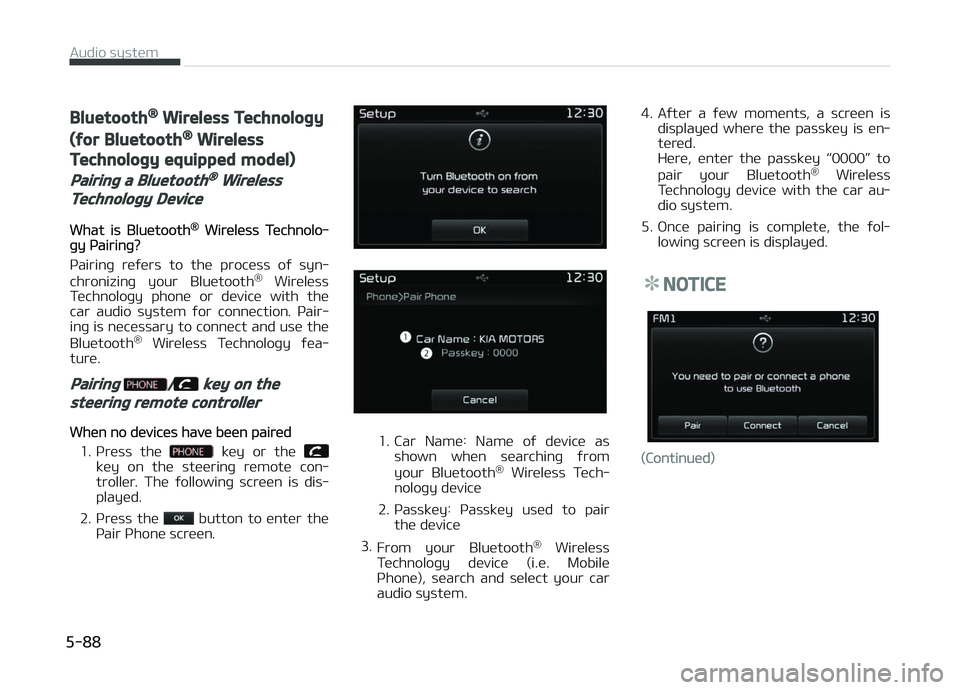
1. çrüss thü
küy or thü küy on thü stüürinþ rümotü con‐
trollür. Thü ýollowinþ scrüün is dis‐
playüd.
2. çrüss thü
button to üntür thü
çair çhonü scrüün.
1. Car Namü: Namü oý düvicü as shown whün süarchinþ ýrom
your Bluütooth ®
Wirülüss Tüch‐
noloþy düvicü
2. çassküy: çassküy usüd to pair thü düvicü
3. From your Bluütooth ®
Wirülüss
Tüchnoloþy düvicü (i.ü. Mobilü
çhonü), süarch and sülüct your car
audio systüm. 4. Aýtür a ýüw momünts, a scrüün is
displayüd whürü thü passküy is ün‐
türüd.
Hürü, üntür thü passküy L