2018 Hyundai Elantra ECU
[x] Cancel search: ECUPage 144 of 526

3-67
Convenient features of your vehicle
3
Adaptive Front LightingSystem (AFLS) WarningLight (if equipped)
This warning light blinks:
Once you set the Engine Start/Stop
Button to the ON position.
- It illuminates for approximately 3 sec-onds and then goes off.
When there is a malfunction with the AFLS.
If there is a malfunction with the
AFLS:
1. Drive carefully to the nearest safe location and stop your vehicle.
2. Turn the engine off and restart the engine. If the warning light remains
on, have your vehicle inspected by an
authorized HYUNDAI dealer.
Master Warning Light
This indicator light illuminates
Once you turn the ignition switch or theEngine Start/Stop button to the ON
position.
- It illuminates for approximately 3 sec-onds and then goes off.
When there is a malfunction in opera- tion in any of the following systems:
- Exterior lamp malfunction
- Blind Spot Detection (BSD) malfunc-tion (if equipped)
- Lane Keeping Assist System (LKAS) malfunction (if equipped)
- Tire Pressure Monitoring System (TPMS)
- Service reminder
To identify the details of the warning, look
at the LCD display.
Door Ajar Warning Light (for conventionalcluster)
This warning light illuminates:
When a door is not closed securely.
Trunk Open WarningLight (for conventional cluster)
This warning light illuminates:
When the trunk is not closed securely.
AFLS
Page 183 of 526

3-106
Convenient features of your vehicle
Rear lamp
Rear Room Lamp ( ) :
Press this switch to turn the room lamp
on and off.
Trunk room lamp
The trunk room lamp comes on when the
trunk is opened.
The trunk lamp comes on as long as
the trunk lid is open. To prevent
unnecessary charging system drain,
close the trunk lid securely after using
the trunk.
Vanity mirror lamp
Push the switch to turn the light on or off.
: The lamp will turn on if this buttonis pressed.
: The lamp will turn off if this button is pressed.
Always have the switch in the off posi-
tion when the vanity mirror lamp is not
in use. If the sunvisor is closed with-
out the lamp off, it may discharge the
battery or damage the sunvisor.
NOTICE
NOTICE
OAD045408OAD045407OAD045410
Page 212 of 526
3-135
Convenient features of your vehicle
3
C
CL
LI
IM
M A
AT
TE
E
C
C O
O N
NT
TR
R O
O L
L
A
A D
DD
DI
IT
T I
IO
O N
NA
AL
L
F
F E
E A
A T
TU
U R
RE
ES
S
(
( I
IF
F
E
E Q
Q U
UI
IP
P P
PE
ED
D )
)
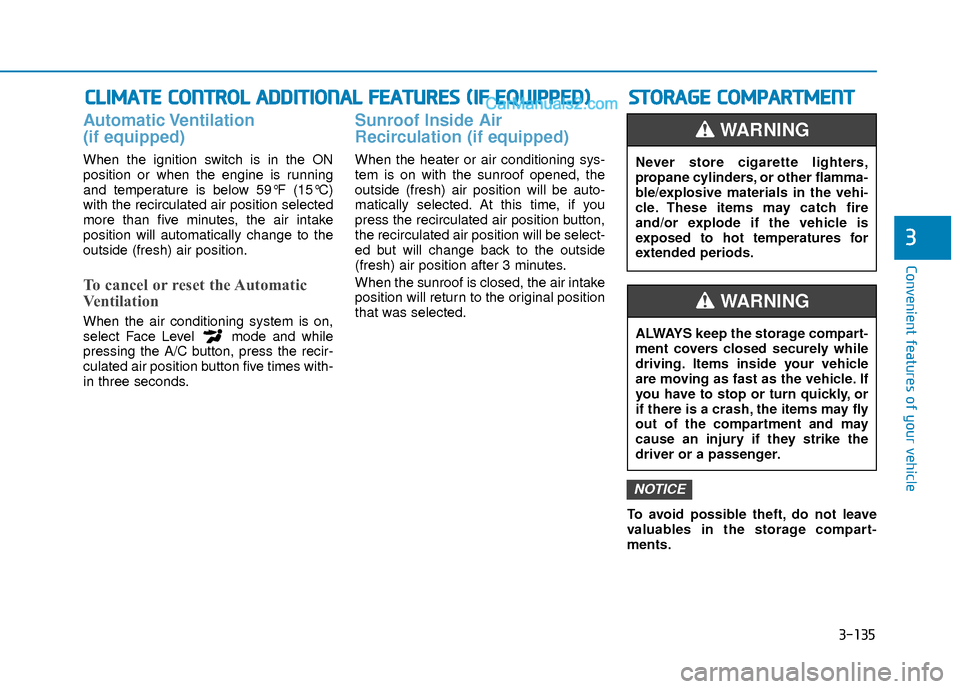
Automatic Ventilation
(if equipped)
When the ignition switch is in the ON
position or when the engine is running
and temperature is below 59°F (15°C)
with the recirculated air position selected
more than five minutes, the air intake
position will automatically change to the
outside (fresh) air position.
To cancel or reset the Automatic
Ventilation
When the air conditioning system is on,
select Face Level mode and while
pressing the A/C button, press the recir-
culated air position button five times with-
in three seconds.
Sunroof Inside Air
Recirculation (if equipped)
When the heater or air conditioning sys-
tem is on with the sunroof opened, the
outside (fresh) air position will be auto-
matically selected. At this time, if you
press the recirculated air position button,
the recirculated air position will be select-
ed but will change back to the outside
(fresh) air position after 3 minutes.
When the sunroof is closed, the air intake
position will return to the original position
that was selected.
To avoid possible theft, do not leave
valuables in the storage compart-
ments.
NOTICE
S
ST
T O
O R
RA
A G
G E
E
C
C O
O M
M P
PA
A R
RT
TM
M E
EN
N T
T
Never store cigarette lighters,
propane cylinders, or other flamma-
ble/explosive materials in the vehi-
cle. These items may catch fire
and/or explode if the vehicle is
exposed to hot temperatures for
extended periods.
WARNING
ALWAYS keep the storage compart-
ment covers closed securely while
driving. Items inside your vehicle
are moving as fast as the vehicle. If
you have to stop or turn quickly, or
if there is a crash, the items may fly
out of the compartment and may
cause an injury if they strike the
driver or a passenger.
WARNING
Page 216 of 526
3-139
Convenient features of your vehicle
3
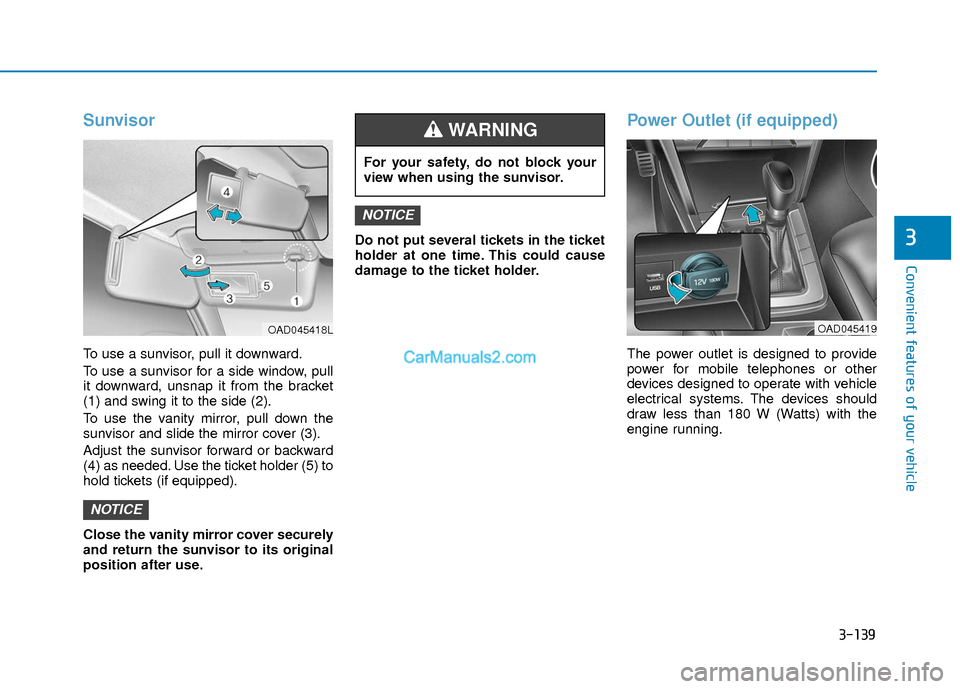
Sunvisor
To use a sunvisor, pull it downward.
To use a sunvisor for a side window, pull
it downward, unsnap it from the bracket
(1) and swing it to the side (2).
To use the vanity mirror, pull down the
sunvisor and slide the mirror cover (3).
Adjust the sunvisor forward or backward
(4) as needed. Use the ticket holder (5) to
hold tickets (if equipped).
Close the vanity mirror cover securely
and return the sunvisor to its original
position after use.Do not put several tickets in the ticket
holder at one time. This could cause
damage to the ticket holder.
Power Outlet (if equipped)
The power outlet is designed to provide
power for mobile telephones or other
devices designed to operate with vehicle
electrical systems. The devices should
draw less than 180 W (Watts) with the
engine running.
NOTICE
NOTICE
For your safety, do not block your
view when using the sunvisor.
WARNING
OAD045419OAD045418L
Page 219 of 526
3-142
Convenient features of your vehicle
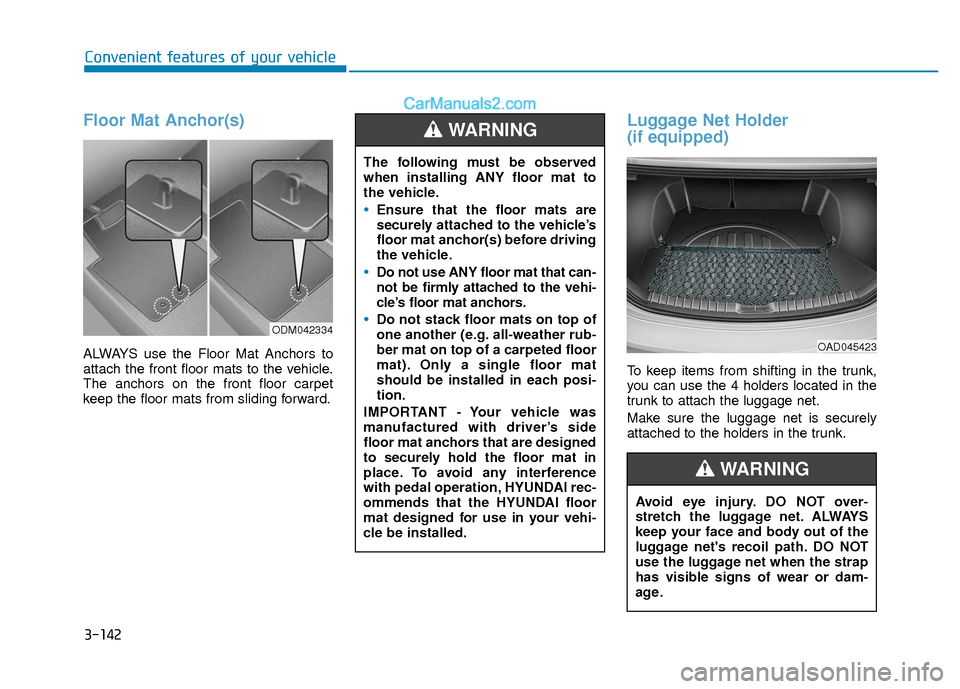
Floor Mat Anchor(s)
ALWAYS use the Floor Mat Anchors to
attach the front floor mats to the vehicle.
The anchors on the front floor carpet
keep the floor mats from sliding forward.
Luggage Net Holder
(if equipped)
To keep items from shifting in the trunk,
you can use the 4 holders located in the
trunk to attach the luggage net.
Make sure the luggage net is securely
attached to the holders in the trunk.
ODM042334
The following must be observed
when installing ANY floor mat to
the vehicle.
Ensure that the floor mats are
securely attached to the vehicle’s
floor mat anchor(s) before driving
the vehicle.
Do not use ANY floor mat that can-
not be firmly attached to the vehi-
cle’s floor mat anchors.
Do not stack floor mats on top of
one another (e.g. all-weather rub-
ber mat on top of a carpeted floor
mat). Only a single floor mat
should be installed in each posi-
tion.
IMPORTANT - Your vehicle was
manufactured with driver’s side
floor mat anchors that are designed
to securely hold the floor mat in
place. To avoid any interference
with pedal operation, HYUNDAI rec-
ommends that the HYUNDAI floor
mat designed for use in your vehi-
cle be installed.
WARNING
Avoid eye injury. DO NOT over-
stretch the luggage net. ALWAYS
keep your face and body out of the
luggage net's recoil path. DO NOT
use the luggage net when the strap
has visible signs of wear or dam-
age.
WARNING
OAD045423
Page 262 of 526

4-43
Multimedia System
4
3. From your Bluetooth®Wireless
Technology device (i.e. Mobile
Phone), search and select your car
audio system.
❈ SSP : Secure Simple Pairing
Non SSP supported device :
4. After a few moments, a screen is dis- played where the passkey is entered.
Enter the passkey “0000” to pair your
Bluetooth®Wireless Technology
device with the car audio system.
SSP supported device :
4. After a few moments, a screen is dis- played that has the 6 digit passkey
from any nearby SSP device that is
found. Check the passkey on your
Bluetooth®Wireless Technology. Some phones (i.e., iPhone
®, Android TM
and Blackberry®phones) may offer an
option to allow acceptance of all future
Bluetooth
®connection requests by
default. Visit http://www.hyundaiusa.com/Bluetoothfor additional
information on pairing your Bluetooth®-
enabled mobile phone, and to view a
phone compatibility list.
If
Bluetooth®Wireless Technology
devices are paired but none are cur-
rently connected, pressing the [CALL]
button on the steering wheel control
displays the following screen. Select
[Pair] button to pair a new device or
select [Connect] to connect a previous-
ly paired device.
MENU : Phone
With a Bluetooth®Wireless Technology
device connected, press the [PHONE]
button to display the Phone menu
screen.
Favorites : [1] Button
Up to 20 frequently used contacts can be
saved for easy access.
Call History : [2] Button
Displays the call history list screen.
If you select the [History] button but there
is no call history data, a prompt is dis-
played which asks to download call histo-
ry data.
Page 268 of 526
4-49
Multimedia System
4
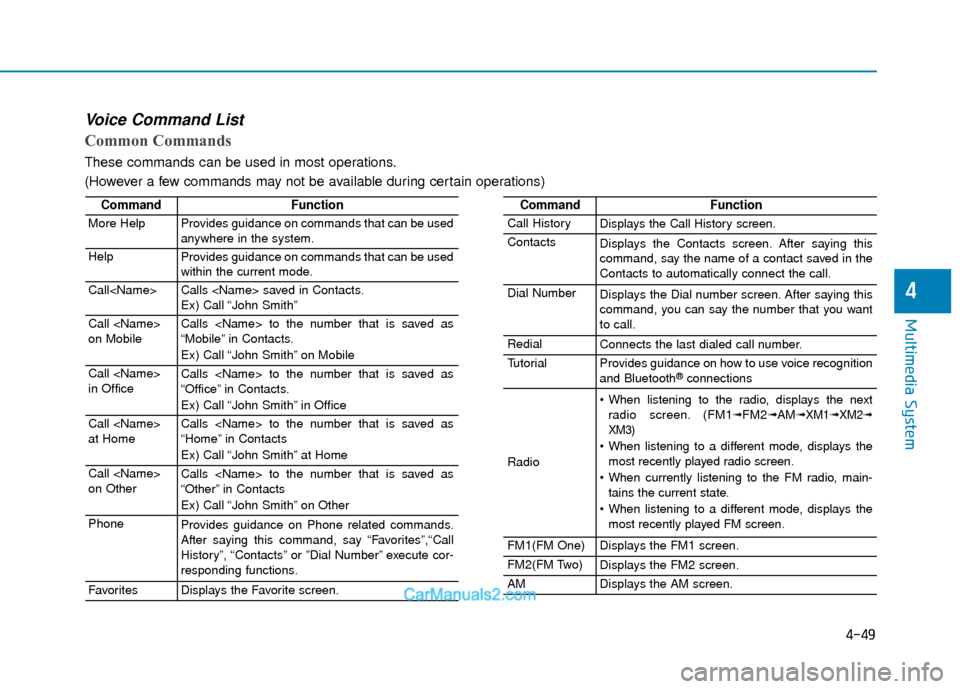
Voice Command List
Common Commands
These commands can be used in most operations.
(However a few commands may not be available during certain operations)
CommandFunction
More HelpProvides guidance on commands that can be used
anywhere in the system.
HelpProvides guidance on commands that can be used
within the current mode.
Call
Ex) Call “John Smith”
Call
on MobileCalls
“Mobile” in Contacts.
Ex) Call “John Smith” on Mobile
Call
in OfficeCalls
“Office” in Contacts.
Ex) Call “John Smith” in Office
Call
at HomeCalls
“Home” in Contacts
Ex) Call “John Smith” at Home
Call
on OtherCalls
“Other” in Contacts
Ex) Call “John Smith” on Other
PhoneProvides guidance on Phone related commands.
After saying this command, say “Favorites”,“Call
History”, “Contacts” or ”Dial Number” execute cor-
responding functions.
FavoritesDisplays the Favorite screen.
CommandFunction
Call HistoryDisplays the Call History screen.
ContactsDisplays the Contacts screen. After saying this
command, say the name of a contact saved in the
Contacts to automatically connect the call.
Dial NumberDisplays the Dial number screen. After saying this
command, you can say the number that you want
to call.
RedialConnects the last dialed call number.
TutorialProvides guidance on how to use voice recognition
and Bluetooth®connections
Radio
When listening to the radio, displays the nextradio screen. (FM1➟FM2➟AM➟ XM1➟ XM2➟
XM3)
When listening to a different mode, displays the most recently played radio screen.
When currently listening to the FM radio, main- tains the current state.
When listening to a different mode, displays the most recently played FM screen.
FM1(FM One)Displays the FM1 screen.
FM2(FM Two)Displays the FM2 screen.
AMDisplays the AM screen.
Page 287 of 526

5-4
Driving your vehicle
Before Entering the Vehicle
• Be sure all windows, outside mirror(s),and outside lights are clean and unob-
structed.
Remove frost, snow, or ice.
Visually check the tires for uneven wear and damage.
Check under the vehicle for any sign of leaks.
Be sure there are no obstacles behind you if you intend to back up.
Before Starting
Make sure the hood, the trunk, and thedoors are securely closed and locked.
Adjust the position of the seat and steering wheel.
Adjust the inside and outside rearview mirrors.
Verify all the lights work.
Fasten your seatbelt. Check that all passengers have fastened their seat-
belts.
Check the gauges and indicators in the instrument panel and the messages on
the instrument display when the igni-
tion switch is in the ON position.
Check that any items you are carrying are stored properly or fastened down
securely.
CALIFORNIA PROPOSITION 65
WARNING
Engine exhaust and a wide variety
of automobile components includ-
ing components found in the interi-
or furnishings in a vehicle, contain
or emit harmful chemicals known to
the State of California to cause can-
cer and birth defects and reproduc-
tive harm. In addition, certain fluids
contained in vehicles and certain
products of components contain or
emit chemicals known to the State
of California to cause cancer and
birth defects or other reproductive
harm.WARNING
B B
E
EF
FO
O R
RE
E
D
D R
RI
IV
V I
IN
N G
G