2018 HONDA PILOT fuel
[x] Cancel search: fuelPage 633 of 695

631
uuCleaning uExterior Care
Continued
Maintenance
Exterior Care
Dust off the vehicle body after you drive.
Regularly inspect your vehi cle for scratches on painted surfaces. A scratch on a
painted surface can result in body rust. If you find a scratch, promptly repair it.
Wash the vehicle regularly. Wash more frequently when driving in the following
conditions:
• If driving on roads with road salt.
• If driving in coastal areas.
• If tar, soot, bird droppings, insects, or tree sap are stuck to painted surfaces.
• Fold in the door mirrors.
• Turn off the automatic intermittent wipers
*.
Make sure to follow the instructions indicated on the automated car wash.
If you use a conveyor type automati c car wash, keep the transmission in
(N position.
2If you want to keep the transmission in (N position [car wash mode] P. 501
•Keep sufficient distance between the cleaning nozzle and the vehicle body.
• Take particular care around the windows. Standing too close may cause water to
enter the vehicle interior.
• Do not spray high pressure water directly into the engine compartment. Instead,
use low pressure water and a mild detergent.
■Washing the Vehicle
■Using an Automated Car Wash
■Using High Pressure Cleaners
1Washing the Vehicle
Do not spray water into the air intake vents. It can
cause a malfunction.
Do not spray water onto the capless unit when the
fuel fill door is open. It ca n cause damage to the fuel
system or engine.
Air Intake Vents
Automatic transmission models with electronic gear selector
* Not available on all models
18 PILOT-31TG76200.book 631 ページ 2018年3月30日 金曜日 午前11時51分
Page 637 of 695

635
Handling the Unexpected
This chapter explains how to handle unexpected troubles.
ToolsTypes of Tools .................................. 636
If a Tire Goes Flat Changing a Flat Tire ......................... 637
Engine Does Not Start Checking the Engine ........................ 645
If the Smart Entry Remote Battery is Weak .......................................... 646
Emergency Engine Stop ................... 647
Shift Lever Does Not Move*............ 648
Jump Starting .................................... 649 Overheating
How to Handle Overheating............. 652
Indicator, Coming On/Blinking
If the Low Oil Pressure Indicator Comes On ............................................. 654
If the Charging System Indicator Comes
On ................................................. 654
If the Malfunction Indicator Lamp Comes On or Blinks ................................... 655
If the Brake System Indicator (Red) Comes On .................................................... 656
If the Electric Power Steering (EPS) System
Indicator Comes On ............................... 656
If the Low Tire Pressure/Tire Pressure Monitoring System (TPMS) Indicator Comes
On or Blinks........................................ 657
If the Transmission I ndicator Blinks along
with the Warning Message*.......... 657
Fuses
Fuse Locations ................................. 658
Inspecting and Changing Fuses ........ 662
Emergency Towing ........................... 663
When You Cannot Unlock the Fuel Fill Door.. 664
RefuelingRefueling From a Portable Fuel Container .... 665
When You Cannot Open the Tailgate.. 666
* Not available on all models
18 PILOT-31TG76200.book 635 ページ 2018年3月30日 金曜日 午前11時51分
Page 647 of 695

645
Handling the Unexpected
Engine Does Not Start
Checking the Engine
If the engine does not start, check the starter.
Starter conditionChecklist
Starter doesn’t turn or turns
over slowly.
The battery may be dead. Check
each of the items on the right and
respond accordingly.Check for a message on the MID.
●If the To Start, Hold Remote Near Start Button message appears
2If the Smart Entry Remote Battery is Weak P. 646
uMake sure the smart entry remote is in its operating range.
2 ENGINE START/STOP Button Operating Range P. 155
Check the brightness of the interior lights.
Turn on the interior lights and check the brightness.
●If the interior lights are dim or do not come on at all
2 Battery P. 622●If the interior lights come on normally 2 Fuses P. 658
The starter turns over normally
but the engine doesn’t start.
There may be a problem with a
fuse. Check each of the items on
the right and respond accordingly. Review the engine start procedure.
Follow its instructions, and try
to start the engine again.
2 Starting the Engine P. 487
Check the immobilizer system indicator.
When the immobilizer system indicator is blinking, the engine cannot be started.
2Immobilizer System P. 146
Check the fuel level.
There should be enough fuel in the tank.
2 Fuel Gauge P. 113
Check the fuses.
Check all fuses, or have the vehicle checked by a dealer.
2Inspecting and Changing Fuses P. 662
If the problem continues:
2Emergency Towing P. 663
1Checking the Engine
If you must start the vehi cle immediately, use an
assisting vehicle to jump start it.
2 Jump Starting P. 649
18 PILOT-31TG76200.book 645 ページ 2018年3月30日 金曜日 午前11時51分
Page 662 of 695

660
uuFuses uFuse Locations
Handling the Unexpected
Located under the dashboard.
Fuse locations are shown on the label on
the outer side of the side panel cover.
Locate the fuse in question by the fuse
number and label number.
■Interior Fuse Box Type A
Fuse Box
Fuse Label
■Circuit protected and fuse rating
Circuit ProtectedAmps
1DR P/W20 A
2DOOR LOCK20 A
3SMART7.5 A
4AS P/W20 A
5FR ACC SOCKET20 A
6FUEL PUMP20 A
7ACG15 A
8FRONT WIPER7.5 A
9IG1 SMART*17.5 A
ABS/VSA*27.5 A
10SRS10 A
11REAR LEFT P/W20 A
12−−
13REAR RIGHT P/W20 A
14FUEL LID20 A
15DR P/SEAT (REC)(20 A)
16REAR FOG(7.5 A)
17FR SEAT HEATER(20 A)
18INTR LT7.5 A
19DR REAR DOOR UNLOCK10 A
20AS SIDE DOOR UNLOCK10 A
21DRL7.5 A
22KEY LOCK7.5 A
23A/C7.5 A
24IG1a FEED BACK7.5 A
*1:Models with Auto idle-stop system
*2:Models without Auto idle-stop system
25INST PANEL LIGHTS7.5 A
26LUMBAR SUPPORT(10 A)
27PARKING LIGHTS7.5 A
28OPTION10 A
29BACK LT*17.5 A
METER*27.5 A
30REAR WIPER10 A
31ST MOTOR*17.5 A
MISS SOL*27.5 A
32SRS7.5 A
33AS SIDE DOOR LOCK10 A
34DR DOOR LOCK10 A
35DR DOOR UNLOCK10 A
36DR P/SEAT (SLIDE)(20 A)
37RIGHT H/L HI10 A
38LEFT H/L HI10 A
39IG1b FEED BACK7.5 A
40ACC7.5 A
41DR REAR DOOR LOCK10 A
42−−
Circuit ProtectedAmps
18 PILOT-31TG76200.book 660 ページ 2018年3月30日 金曜日 午前11時51分
Page 666 of 695
664
Handling the Unexpected
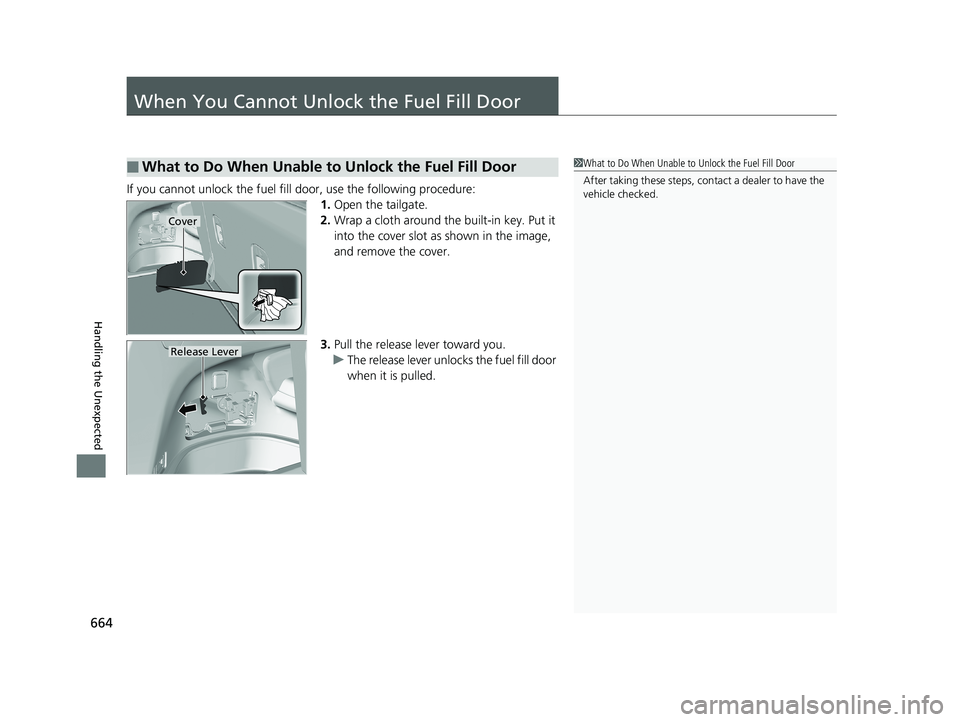
When You Cannot Unlock the Fuel Fill Door
If you cannot unlock the fuel fill door, use the following procedure:1.Open the tailgate.
2. Wrap a cloth around the built-in key. Put it
into the cover slot as shown in the image,
and remove the cover.
3. Pull the release lever toward you.
u The release lever unlocks the fuel fill door
when it is pulled.
■What to Do When Unable to Unlock the Fuel Fill Door1What to Do When Unable to Unlock the Fuel Fill Door
After taking these steps, cont act a dealer to have the
vehicle checked.
Cover
Release Lever
18 PILOT-31TG76200.book 664 ページ 2018年3月30日 金曜日 午前11時51分
Page 667 of 695

665
Handling the Unexpected
Refueling
Refueling From a Portable Fuel Container
If you have run out of fuel and need to refuel your vehicle from a portable fuel
container, use the funnel provided with your vehicle.
1.Turn off the engine.
2. Press the fuel fill door release button.
u The fuel fill door opens.
3. Wrap a cloth around the built-in key. Put it
into the cover slot as shown in the image,
and remove the cover.
4. Remove the funnel from the cover.
5. Place the end of the funnel on the lower
part of filler opening, then insert it slowly
and fully.
u Make sure that the end of the funnel
goes down along with the filler pipe.
6. Fill the tank with fuel from the portable fuel
container.
u Pour fuel carefully so you do not spill any.
7. Remove the funnel from the filler neck.
u Wipe up any fuel from the funnel before
storing it.
8. Shut the fuel fill door by hand.1Refueling From a Portable Fuel Container
NOTICE
Do not insert the nozzle of a portable fuel container
or any funnel other than the one provided with your
vehicle. Doing so can damage the fuel system.
Do not try to pry open or push open the sealed fuel
tank with foreign objects. This can damage the fuel
system and its seal.
Make sure the fuel in the portable fuel container is
gasoline before you refuel.
3WARNING
Gasoline is highly flammable and explosive.
You can be burned or seriously injured
when handling fuel.
• Stop the engine, and keep heat, sparks,
and flame away.
• Handle fuel only outdoors.
• Wipe up spills immediately.Funnel
Cover
Funnel
18 PILOT-31TG76200.book 665 ページ 2018年3月30日 金曜日 午前11時51分
Page 670 of 695

668
Information
Specifications
■Vehicle Specifications
*1: Models with second row captain seat
*2: Models with second row bench seat
*3: 2WD models
*4: AWD models
ModelHonda Pilot
No. of Passengers:
Front 2
Rear 2nd Row 2
*1
3*2
3rd Row 3
Total7*1
8*2
Weights:Gross Vehicle
Weight RatingU.S.:5,545 lbs (2,515 kg)*3
5,842 lbs (2,650 kg)*4
Canada:2,515 kg*3
2,650 kg*4
Gross Axle Weight
Rating (Front)U.S.:2,734 lbs (1,240 kg)*3
2,855 lbs (1,295 kg)*4
Canada:1,240 kg*3
1,295 kg*4
Gross Axle Weight
Rating (Rear)U.S.:2,921 lbs (1,325 kg)*3
3,097 lbs (1,405 kg)*4
Canada:1,325 kg*3
1,405 kg*4
Gross Combined Weight
RatingU.S.:8,025 lbs (3,640 kg)*3
9,755 lbs (4,425 kg)*4
Canada:3,640 kg*3
4,425 kg*4
■ Air Conditioning
■ Engine Specifications
■ Fuel
■ Washer Fluid
Refrigerant TypeHFO-1234yf (R-1234yf)
Charge Quantity 23.8 – 25.6 oz (675 – 725 g)
Lubricant TypeRL85HM (POE)
Quantity 7.5 – 8.72 cu-in (123 – 143 cm3)
Displacement211.8 cu-in (3,471 cm3)
Spark Plugs NGK DILZKR7B11G
TypeUnleaded gasoline, Pump octane number
of 87 or higher
Fuel Tank Capacity 19.5 US gal (73.8 L)
Tank CapacityU.S.: 4 US qt (3.8 L)Canada: 5.6 US qt (5.3 L)
■ Light Bulbs
Headlights (Low Beam)LED*
55 W* (H11)Headlights (High Beam)60 W (HB3)Fog Lights*35 W (H8)Parking lights*LEDFront Turn Signal/Parking* Lights28/8 W (Amber)Front Side Marker LightsLED
Daytime Running Lights60 W*
LED*
Side Turn Signal Lights (on Door Mirrors)*LEDBrake LightsLED
Rear Side Marker Lights LED
TaillightsLED
Back-Up Lights 21 W
Rear Turn Signal Lights21 W
High-Mount Brake Light LED
Rear License Plate LightsLEDInterior Lights
Map LightsLED*
5 W*
Ceiling LightsLED*
5 W*
Front and Rear Ambient LightsLEDVanity Mirror Lights *1.4 WDoor Courtesy Lights*3.8 WDoor Inner Handle Lights*LEDDoor Pocket Lights*LEDConsole Compartment Light1.4 WGlove Box Light1.4 WCargo Area Lights8 W
* Not available on all models
18 PILOT-31TG76200.book 668 ページ 2018年3月30日 金曜日 午前11時51分
Page 684 of 695

682
Index
USB Flash Drives ...................... 240, 294, 321
USB Port .................................................. 223
Voice Operation....................................... 267
Wallpaper Setup .............................. 231, 252
Wi-Fi Connection ..................................... 304
Audio/Information Screen ................ 229, 247
Authorized Manuals ................................. 677
Auto Door Locking/Unlocking ................. 134
Customize ............................................... 392
Auto High-Beam System .......................... 163
Auto high-beam system Indicator ............. 87
Auto Idle-stop ........................................... 505
OFF Button .............................................. 506
Auto Idle-stop Indicator (Green) ............... 90
Auto Idle-stop System Indicator (Amber) .. 90
Automatic Intermittent Wipers ............... 168
Automatic Lighting .................................. 160
Automatic Transmission ........................... 494
Creeping ................................................. 494
Fluid ........................................................ 601
Kickdown ................................................ 494
Operating the Shift Button....................... 499
Shift Lever Does Not Move....................... 648
Shift Lever Operation ............................... 496
Shifting............................................ 495, 497
Auxiliary Input Jack .................................. 224
Average Fuel Economy ............................. 116B
Back-Up Light........................................... 608
Battery ...................................................... 622
Charging System Indicator................. 79, 654
Jump Starting .......................................... 649
Maintenance (Checking the Battery) ........ 622
Belts (Seat) .................................................. 37
Beverage Holders ..................................... 198
Blind spot information (BSI) System ........ 546
Indicator.................................................... 94
Bluetooth® Audio............................. 243, 297
Bluetooth® HandsFreeLink ®............. 406, 431
Blu-ray/DVD Rear Entertainment System ..................................................... 338
Audio Sources for Front and Rear Seats ... 359
Auxiliary Console Panel ........................... 339
DVD or Blu-ray
TM Player Error Messages ... 366
Front Control Panel Operation ................. 352
HDMI
TM Port ............................................ 340
Initial Settings.......................................... 350
Operating the Blu-ray/DVD rear entertainment system ............................ 352
Operating the System .............................. 341
Overhead Screen ..................................... 341
Playable Disc Region Codes ..................... 364
Playable Disc Types .................................. 364
Playable Discs .......................................... 360
Playing a Disc in the Rear......................... 358
Playing a DVD/Blu-ray
TM........................... 342
Playing AM/FM Radio in the Rear............. 357 Playing an iPod and a USB Flash Drive in
the Rear ................................................ 358
Playing Audio.......................................... 356
Playing SiriusXM ® Radio in the Rear ........ 357
Rear DVD or Blu-ray
TM Menu ................... 343
Rear System Setup .................................. 353
Recommended Discs ............................... 365
Screen and Surround Settings ................. 346
Selecting the Audio S ource using Front
Control Panel ........................................ 352
Setting the DVD or Blu-ray
TM Menu ......... 354
System Controls .............................. 342, 356
USB Ports ................................................ 340
Wireless Headphones .............................. 338
Booster Seats (For Children) ...................... 73
Brake System ............................................ 555
Anti-lock Brake System (ABS) .................. 557
Brake Assist System................................. 558
Brake System Indicator .............................. 78
Fluid ....................................................... 602
Foot Brake .............................................. 556
Indicator ........................................... 78, 656
Parking Brake.......................................... 555
Brake System (Amber) Indicator ................................................... 78
Brake System (Red) Indicator ........................................... 78, 656
Brightness Control (Instrument Panel) ... 170
Bulb Replacement .................................... 603
Back-Up Light ......................................... 608
Brake Light and Turn Signal Lights .......... 607
18 PILOT-31TG76200.book 682 ページ 2018年3月30日 金曜日 午前11時51分