Page 461 of 763
459
uuCustomized Features u
Continued
Features
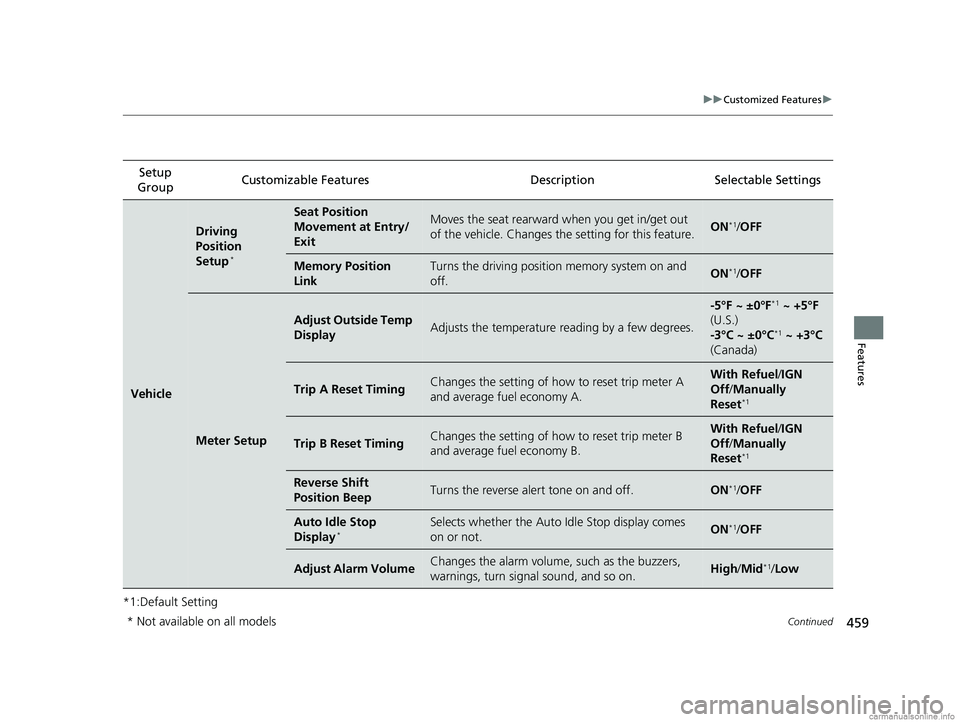
*1:Default SettingSetup
Group Customizable Features
DescriptionSelectable Settings
Vehicle
Driving
Position
Setup
*
Seat Position
Movement at Entry/
ExitMoves the seat rearward when you get in/get out
of the vehicle. Changes th e setting for this feature.ON*1/OFF
Memory Position
LinkTurns the driving position memory system on and
off.ON*1/OFF
Meter Setup
Adjust Outside Temp
DisplayAdjusts the temperature reading by a few degrees.
-5°F ~ ±0°F*1 ~ +5°F
(U.S.)
-3°C ~ ±0°C
*1 ~ +3°C
(Canada)
Trip A Reset TimingChanges the setting of how to reset trip meter A
and average fuel economy A.With Refuel /IGN
Off /Manually
Reset
*1
Trip B Reset TimingChanges the setting of how to reset trip meter B
and average fuel economy B.With Refuel /IGN
Off /Manually
Reset
*1
Reverse Shift
Position BeepTurns the reverse alert tone on and off.ON*1/ OFF
Auto Idle Stop
Display*Selects whether the Auto Idle Stop display comes
on or not.ON*1/OFF
Adjust Alarm VolumeChanges the alarm volume, such as the buzzers,
warnings, turn signal sound, and so on.High /Mid*1/Low
* Not available on all models
18 US ODYSSEY-31THR6010.book 459 ページ 2018年12月6日 木曜日 午後4時18分
Page 465 of 763
463
uuCustomized Features u
Continued
Features
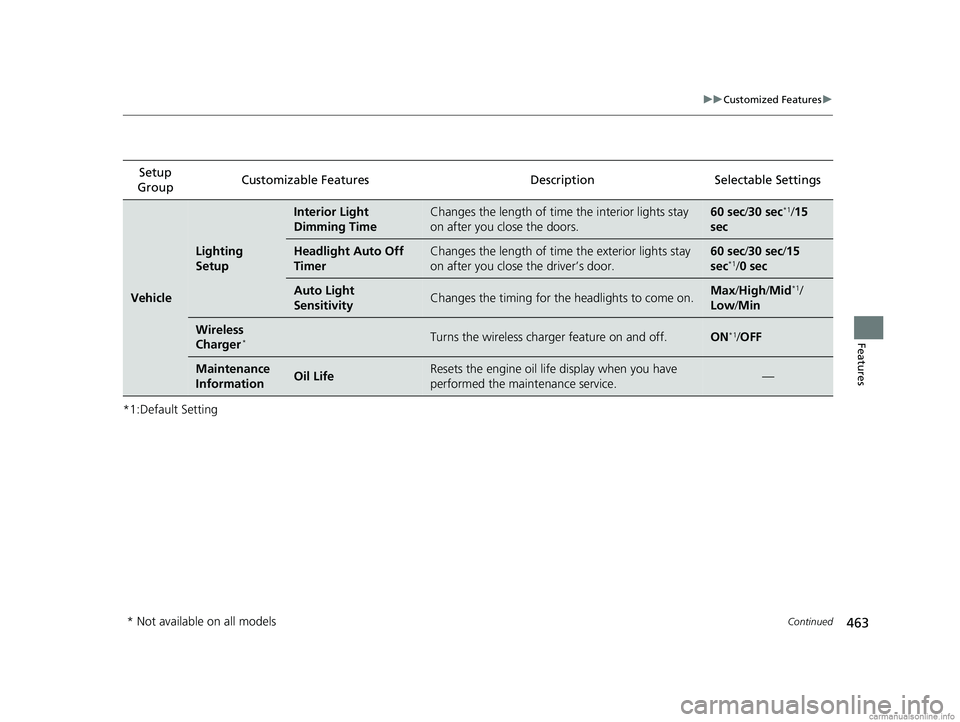
*1:Default SettingSetup
Group Customizable Features
DescriptionSelectable Settings
Vehicle
Lighting
Setup
Interior Light
Dimming TimeChanges the length of time the interior lights stay
on after you close the doors.60 sec/30 sec*1/15
sec
Headlight Auto Off
TimerChanges the length of time the exterior lights stay
on after you close the driver’s door.60 sec /30 sec/ 15
sec*1/ 0 sec
Auto Light
SensitivityChanges the timing for the headlights to come on.Max /High /Mid*1/
Low /Min
Wireless
Charger*Turns the wireless charger feature on and off.ON*1/OFF
Maintenance
InformationOil LifeResets the engine oil life display when you have
performed the maintenance service.—
* Not available on all models
18 US ODYSSEY-31THR6010.book 463 ページ 2018年12月6日 木曜日 午後4時18分
Page 468 of 763
466
uuCustomized Features uDefaulting All the Settings
Features
Defaulting All the Settings
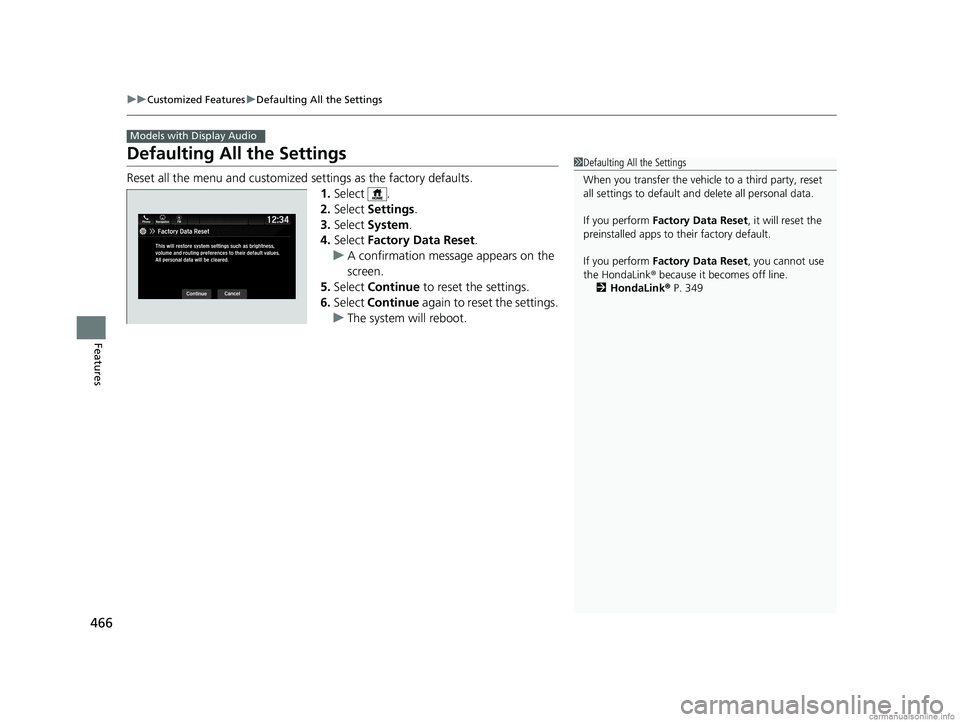
Reset all the menu and customized settings as the factory defaults.
1. Select .
2. Select Settings .
3. Select System .
4. Select Factory Data Reset .
u A confirmation message appears on the
screen.
5. Select Continue to reset the settings.
6. Select Continue again to reset the settings.
u The system will reboot.
Models with Display Audio
1Defaulting All the Settings
When you transfer the vehicle to a third party, reset
all settings to default a nd delete all personal data.
If you perform Factory Data Reset , it will reset the
preinstalled apps to their factory default.
If you perform Factory Data Reset , you cannot use
the HondaLink ® because it becomes off line.
2 HondaLink ® P. 349
18 US ODYSSEY-31THR6010.book 466 ページ 2018年12月6日 木曜日 午後4時18分
Page 485 of 763
483
uuBluetooth ® HandsFreeLink ®u HFL Menus
Continued
Features
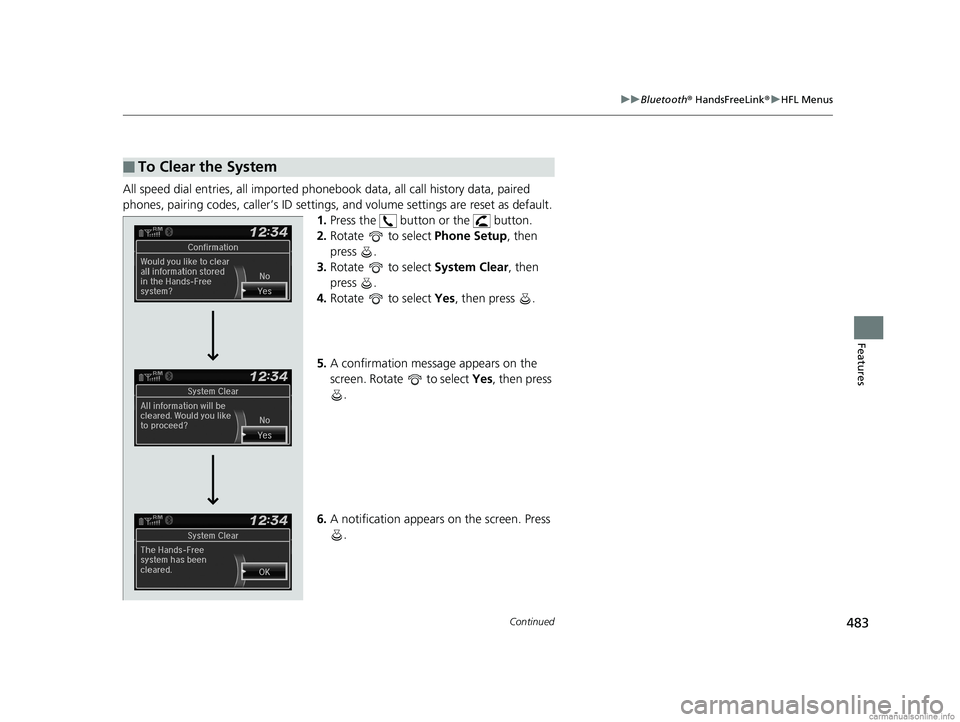
All speed dial entries, all imported phone book data, all call history data, paired
phones, pairing codes, caller’s ID settings , and volume settings are reset as default.
1. Press the button or the button.
2. Rotate to select Phone Setup, then
press .
3. Rotate to select System Clear, then
press .
4. Rotate to select Yes, then press .
5. A confirmation message appears on the
screen. Rotate to select Yes, then press
.
6. A notification appears on the screen. Press
.
■To Clear the System
18 US ODYSSEY-31THR6010.book 483 ページ 2018年12月6日 木曜日 午後4時18分
Page 487 of 763
Continued485
uuBluetooth ® HandsFreeLink ®u HFL Menus
Features
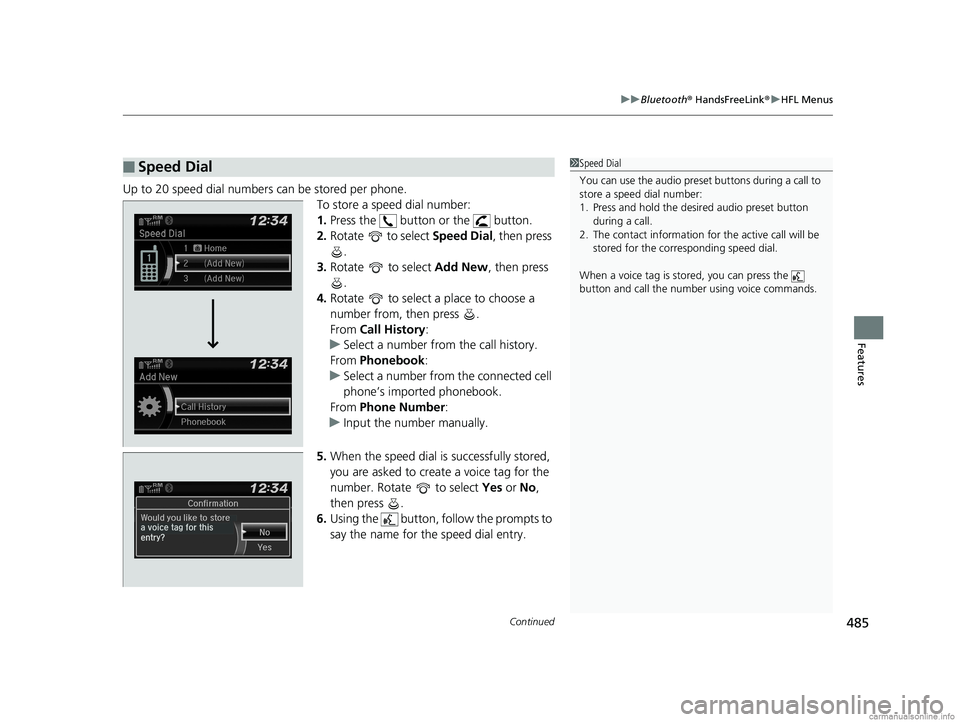
Up to 20 speed dial numbers can be stored per phone.
To store a speed dial number:
1.Press the button or the button.
2. Rotate to select Speed Dial, then press
.
3. Rotate to select Add New, then press
.
4. Rotate to select a place to choose a
number from, then press .
From Call History :
u Select a number from the call history.
From Phonebook:
u Select a number from the connected cell
phone’s imported phonebook.
From Phone Number :
u Input the number manually.
5. When the speed dial is successfully stored,
you are asked to create a voice tag for the
number. Rotate to select Yes or No,
then press .
6. Using the button, follow the prompts to
say the name for the speed dial entry.
■Speed Dial1Speed Dial
You can use the audio preset buttons during a call to
store a speed dial number:
1. Press and hold the desired audio preset button
during a call.
2. The contact information for the active call will be
stored for the corresponding speed dial.
When a voice tag is stored, you can press the
button and call the numbe r using voice commands.
18 US ODYSSEY-31THR6010.book 485 ページ 2018年12月6日 木曜日 午後4時18分
Page 494 of 763
uuBluetooth ® HandsFreeLink ®u HFL Menus
492
Features
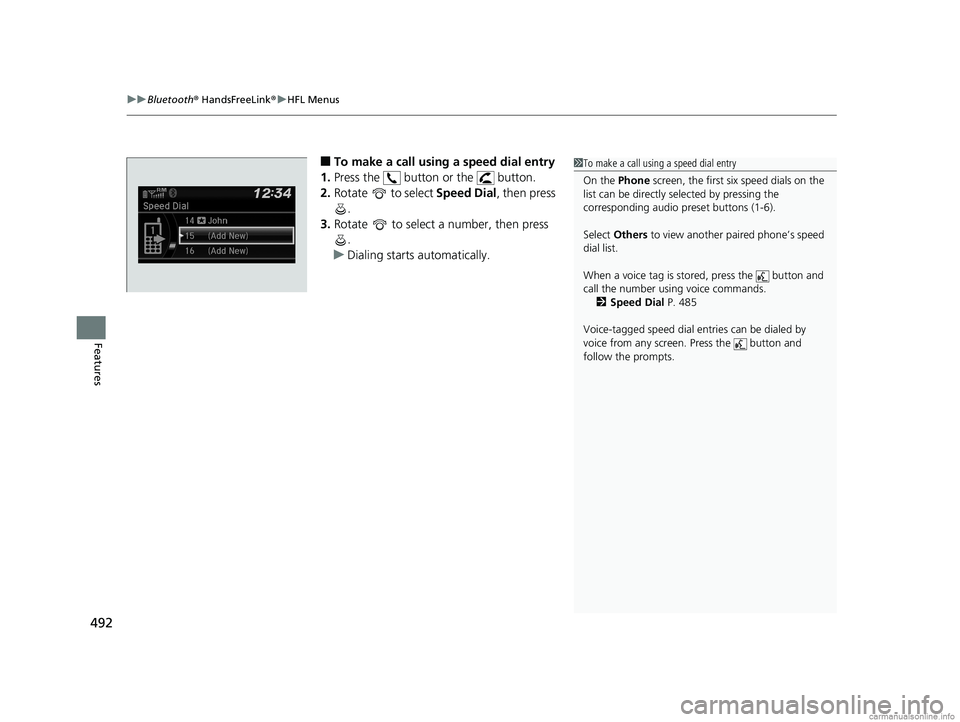
■To make a call using a speed dial entry
1. Press the button or the button.
2. Rotate to select Speed Dial, then press
.
3. Rotate to select a number, then press
.
u Dialing starts automatically.1To make a call using a speed dial entry
On the Phone screen, the first six speed dials on the
list can be directly se lected by pressing the
corresponding audio preset buttons (1-6).
Select Others to view another paired phone’s speed
dial list.
When a voice tag is stored, press the button and
call the number using voice commands. 2 Speed Dial P. 485
Voice-tagged speed dial en tries can be dialed by
voice from any screen. Press the button and
follow the prompts.
18 US ODYSSEY-31THR6010.book 492 ページ 2018年12月6日 木曜日 午後4時18分
Page 644 of 763

642
uuMaintenance MinderTMuTo Use Maintenance MinderTM
Maintenance
■Maintenance Service Items1Maintenance Service Items
•Adjust the valves during services A, B, 1, 2, or 3 if
they are noisy.
Maintenance Minder Message
System Message
Indicator
Sub Items
Main Item
U.S. models
*1: If the message Maintenance Due Now does not appear more than 12 months after the display
is reset, change the engine oil every year.
# : See information on maintenance and emissions warranty in the first column on page 746.
*2: If you drive in dusty conditions, replace the air cleaner element every 15,000 miles (24,000 km).
*3: If you drive primarily in urban areas that have high concentrations of soot in the air from industry and from diesel-powered vehicles, replace the dust and pollen filter every 15,000 miles (24,000 km).
CODEMaintenance Main Items
A
●Replace engine oil*1
B●Replace engine oil*1 and oil filter●Inspect front and rear brakes●Inspect tie rod ends, steering gearbox, and boots●Inspect suspension components●Inspect driveshaft boots●Inspect brake hoses and li nes (Including ABS/VSA)●Inspect all fluid levels and condition of fluids●Inspect exhaust system#
●Inspect fuel lines and connections#
*4:Driving in mountainous areas at very low vehicle speeds or trailer towing results in higher transmission
temperatures. This requires transmission fluid changes more frequently than recommended by the
Maintenance Minder. If you regularly drive your vehicle under these conditions, have the transmission fluid
changed at 60,000 miles (100,000 km) or 3 years, thereafter every 30,000 miles (50,000 km) or 2 years.
*5:If you drive regularly in very high temperatures (over 110ºF, 43 ºC), in very low temperatures (under -20ºF, -29ºC), replace eve ry 60,000 miles(100,000 km).*6:If a Maintenance Minder message does not appear more than 36 mont hs after the display for item 7 is reset, change the brake fluid every 3 years.
CODEMaintenance Sub Items
1
●Rotate tires
2●Replace air cleaner element*2
●Replace dust and pollen filter*3
●Inspect drive belt
3
●Replace transmission fluid*4
4●Replace spark plugs●Replace timing belt and inspect water pump*5
●Inspect valve clearance
5
●Replace engine coolant
7●Replace brake fluid*6
Except ELITE and TOURING grade models
18 US ODYSSEY-31THR6010.book 642 ページ 2018年12月6日 木曜日 午後4時18分
Page 645 of 763

643
uuMaintenance MinderTMuTo Use Maintenance MinderTM
Continued
Maintenance
1Maintenance Service Items
•Adjust the valves during services A, 0, 9, 1, 2, or 3
if they are noisy.
Canadian models
*1: If the message Maintenance Due Now does not appear more than 12 months after the display is
reset, change the engine oil every year.
*2: If you drive in dusty conditions, replace the air cleaner element every 24,000 km (15,000 miles).
*3: If you drive primarily in urban areas that have high concentrations of soot in the air from industry and from diesel-powered vehicles, replace the dust and pollen filter every 24,000 km (15,000 miles).
*4: Driving in mountainous areas at very low vehicle speeds or trailer towing results in higher transmission
temperatures. This requires transmission fluid changes more frequently than recommended by the
Maintenance Minder. If you regularly drive your vehicle under these conditions, have the transmission
fluid changed at 100,000 km (60,000 miles) or 3 years, thereafter every 50,000 km (30,000 miles) or
2 years.
*5: If you drive regularly in very high temperatures (over 43ºC, 110ºF), in very low temperatures (under -29ºC, -20ºF), replace every 100,000 km (60,000 miles).
*6: If a Maintenance Minder message does not appear more than 36 months after the display for item 7 is reset, change the brake fluid every 3 years.
# : See information on maintenance and emissions warranty in the first column on page 747.
CODEMaintenance Main Items
A
●Replace engine oil*1
0●Replace engine oil*1 and oil filter
Except TOURING grade model
CODEMaintenance Sub Items
1
●Rotate tires
2●Replace air cleaner element*2
●Replace dust and pollen filter*3
●Inspect drive belt
3
●Replace transmission fluid*4
4●Replace spark plugs●Replace timing belt and inspect water pump*5
●Inspect valve clearance
5
●Replace engine coolant
7●Replace brake fluid*6
9●Service front and rear brakes●Inspect tie rod ends, st eering gearbox, and boots●Inspect suspension components●Inspect driveshaft boots●Inspect brake hoses and lines (including ABS/VSA)●Inspect all fluid levels and condition of fluids●Inspect exhaust system#
●Inspect fuel lines and connections#
18 US ODYSSEY-31THR6010.book 643 ページ 2018年12月6日 木曜日 午後4時18分