Page 99 of 591

97
uuIndicators u
Continued
Instrument Panel
*1:Canadian models only: Apply and hold the brake pedal before selecting the ON mode.
IndicatorNameOn/BlinkingExplanationMessage
Turn Signal and
Hazard Warning
Indicators
●Blinks when you operate the turn
signal lever.
●Blinks along with all turn signals
when you press the hazard
warning button.
●Does not blink or blinks rapidly -
Have your vehicle checked by an
authorized Honda Clarity Plug-In Hybrid
dealer immediately.
—
High Beam
Indicator●Comes on when the high beam
headlights are on.——
Lights On
Indicator
●Comes on when the light switch in
a position other than OFF or when
the switch is set to AUTO and the
exterior lights come on.●If you set the power mode to
ACCESSORY or VEHICLE OFF while the
exterior lights are on, a chime sounds
when the driver’s door is opened.
—
Immobilizer
System Indicator
●Blinks if the immobilizer system
cannot recognize the key
information.●Blinks - You cannot start the power
system. Set the power mode to VEHICLE
OFF
*1, then select the ON mode again.●Repeatedly blinks - The system may be
malfunctioning. Have your vehicle
checked by an authorized Honda Clarity
Plug-In Hybrid dealer.
●Do not attempt to alter this system or add
other devices to it. Electrical problems can
occur.
Indicator
Canadian models
18 CLARITY PHEV CSS-31TRW6000.book 97 ページ 2017年12月25日 月曜日 午後2時22分
Page 108 of 591
106
uuIndicators uDriver Information Interface Wa rning and Information Messages
Instrument Panel
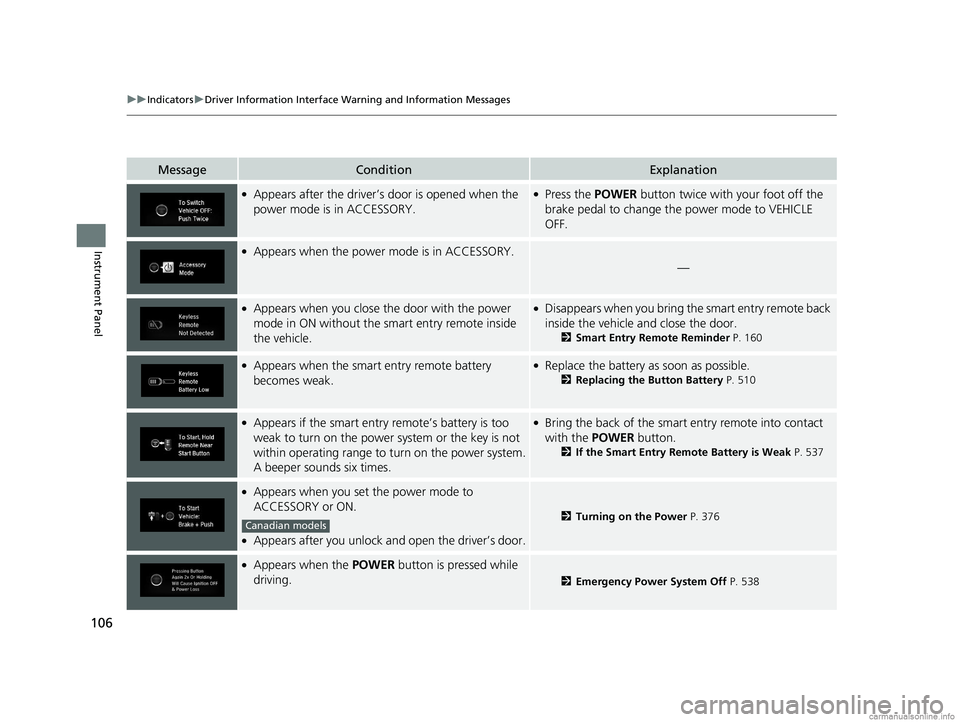
MessageConditionExplanation
●Appears after the driver’s door is opened when the
power mode is in ACCESSORY.●Press the POWER button twice with your foot off the
brake pedal to change the power mode to VEHICLE
OFF.
●Appears when the power mode is in ACCESSORY.
—
●Appears when you close the door with the power
mode in ON without the smart entry remote inside
the vehicle.●Disappears when you bring the smart entry remote back
inside the vehicle and close the door.
2Smart Entry Remote Reminder P. 160
●Appears when the smart entry remote battery
becomes weak.●Replace the battery as soon as possible.
2Replacing the Button Battery P. 510
●Appears if the smart entry remote’s battery is too
weak to turn on the power system or the key is not
within operating range to turn on the power system.
A beeper sounds six times.●Bring the back of the smart entry remote into contact
with the POWER button.
2If the Smart Entry Remote Battery is Weak P. 537
●Appears when you set the power mode to
ACCESSORY or ON.
●Appears after you unlock and open the driver’s door.
2Turning on the Power P. 376
●Appears when the POWER button is pressed while
driving.
2 Emergency Power System Off P. 538
Canadian models
18 CLARITY PHEV CSS-31TRW6000.book 106 ページ 2017年12月25日 月曜日 午後2時22分
Page 113 of 591
111
uuIndicators uDriver Information Interface Wa rning and Information Messages
Continued
Instrument Panel
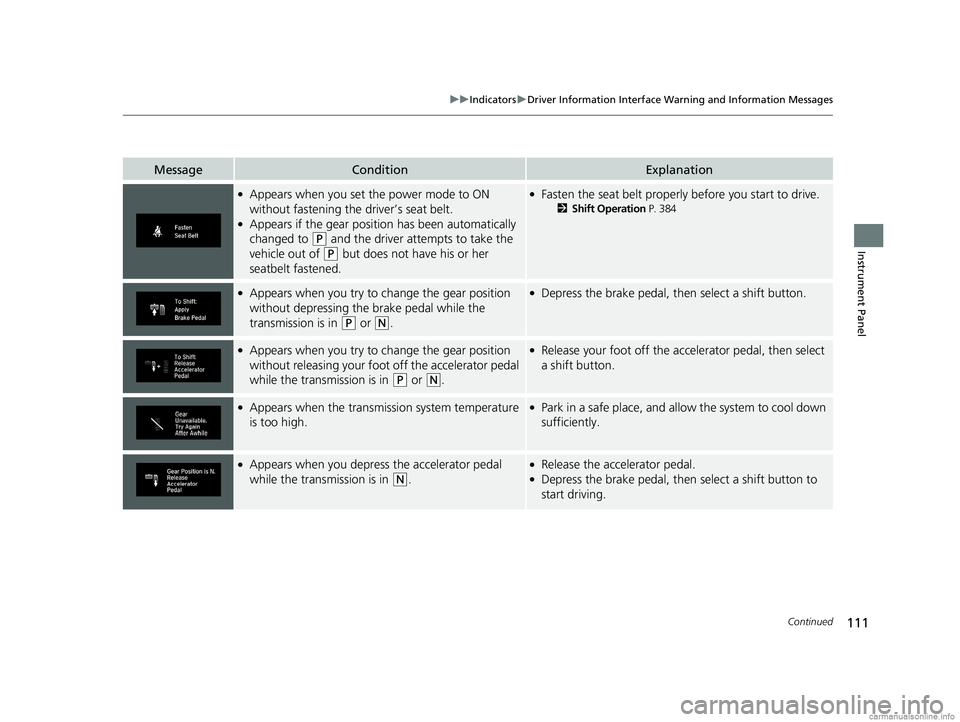
MessageConditionExplanation
●Appears when you set the power mode to ON
without fastening the driver’s seat belt.
●Appears if the gear position has been automatically
changed to
(P and the driver attempts to take the
vehicle out of
(P but does not have his or her
seatbelt fastened.
●Fasten the seat belt properly before you start to drive.
2 Shift Operation P. 384
●Appears when you try to change the gear position
without depressing the brake pedal while the
transmission is in
(P or (N.
●Depress the brake pedal, then select a shift button.
●Appears when you try to change the gear position
without releasing your foot off the accelerator pedal
while the transmission is in
(P or (N.
●Release your foot off the acce lerator pedal, then select
a shift button.
●Appears when the transmission system temperature
is too high.●Park in a safe place, and a llow the system to cool down
sufficiently.
●Appears when you depress the accelerator pedal
while the transmission is in
(N.
●Release the accelerator pedal.●Depress the brake pedal, then select a shift button to
start driving.
18 CLARITY PHEV CSS-31TRW6000.book 111 ページ 2017年12月25日 月曜日 午後2時22分
Page 114 of 591
112
uuIndicators uDriver Information Interface Wa rning and Information Messages
Instrument Panel
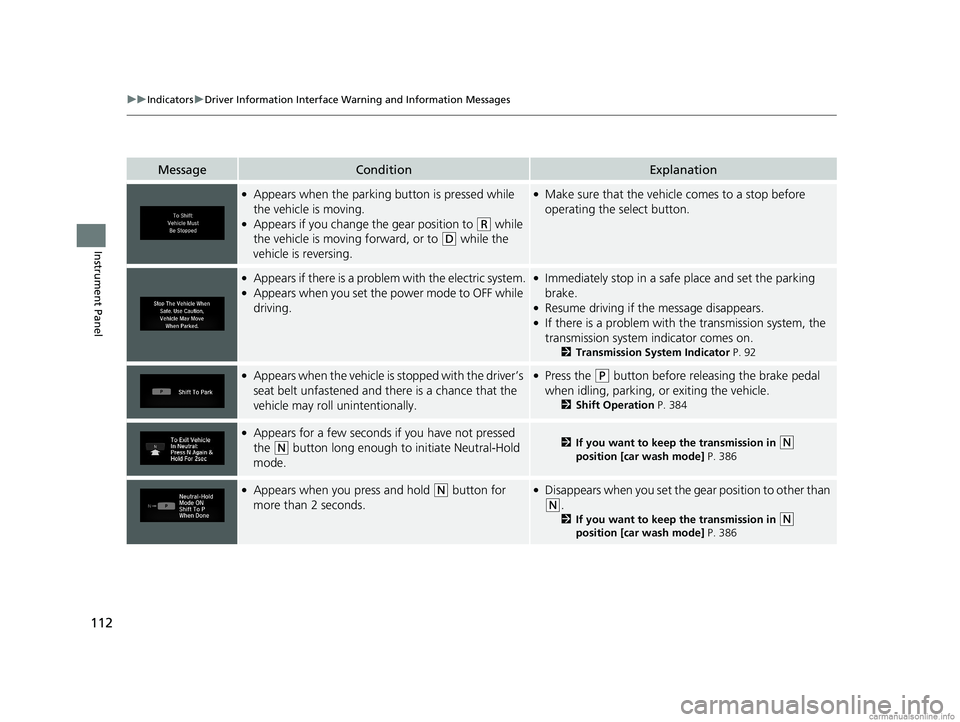
MessageConditionExplanation
●Appears when the parking button is pressed while
the vehicle is moving.
●Appears if you change the gear position to (R while
the vehicle is moving forward, or to
(D while the
vehicle is reversing.
●Make sure that the vehicle comes to a stop before
operating the select button.
●Appears if there is a proble m with the electric system.●Appears when you set the power mode to OFF while
driving.
●Immediately stop in a safe place and set the parking
brake.
●Resume driving if the message disappears.●If there is a problem with the transmission system, the
transmission system indicator comes on.
2Transmission System Indicator P. 92
●Appears when the vehicle is stopped with the driver’s
seat belt unfastened and th ere is a chance that the
vehicle may roll unintentionally.●Press the (P button before releasing the brake pedal
when idling, parking, or exiting the vehicle.
2 Shift Operation P. 384
●Appears for a few seconds if you have not pressed
the
(N button long enough to initiate Neutral-Hold
mode.2 If you want to keep the transmission in (N
position [car wash mode] P. 386
●Appears when you press and hold (N button for
more than 2 seconds.●Disappears when you set the g ear position to other than
(N.
2If you want to keep the transmission in (N
position [car wash mode] P. 386
18 CLARITY PHEV CSS-31TRW6000.book 112 ページ 2017年12月25日 月曜日 午後2時22分
Page 116 of 591
114
uuIndicators uDriver Information Interface Wa rning and Information Messages
Instrument Panel
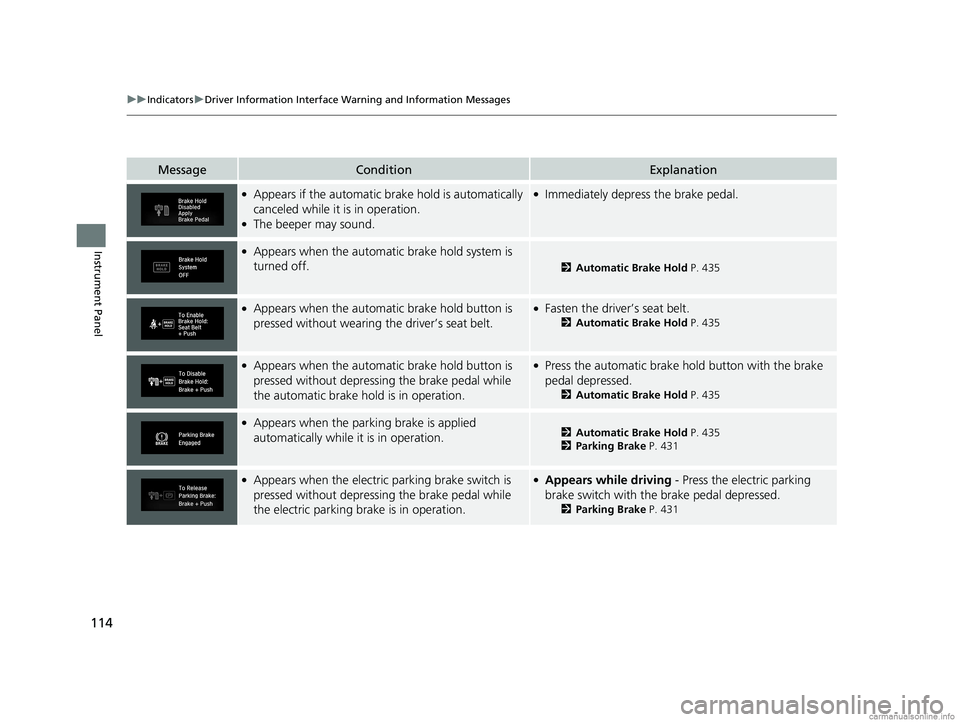
MessageConditionExplanation
●Appears if the automatic brake hold is automatically
canceled while it is in operation.
●The beeper may sound.
●Immediately depress the brake pedal.
●Appears when the automatic brake hold system is
turned off.
2 Automatic Brake Hold P. 435
●Appears when the automa tic brake hold button is
pressed without wearing the driver’s seat belt.●Fasten the driver’s seat belt.
2 Automatic Brake Hold P. 435
●Appears when the automa tic brake hold button is
pressed without depressing the brake pedal while
the automatic brake hold is in operation.●Press the automatic brake hold button with the brake
pedal depressed.
2 Automatic Brake Hold P. 435
●Appears when the parking brake is applied
automatically while it is in operation.2Automatic Brake Hold P. 435
2 Parking Brake P. 431
●Appears when the electric parking brake switch is
pressed without depressing the brake pedal while
the electric parking brake is in operation.●Appears while driving - Press the electric parking
brake switch with the brake pedal depressed.
2 Parking Brake P. 431
18 CLARITY PHEV CSS-31TRW6000.book 114 ページ 2017年12月25日 月曜日 午後2時22分
Page 117 of 591
115
uuIndicators uDriver Information Interface Wa rning and Information Messages
Continued
Instrument Panel
MessageConditionExplanation
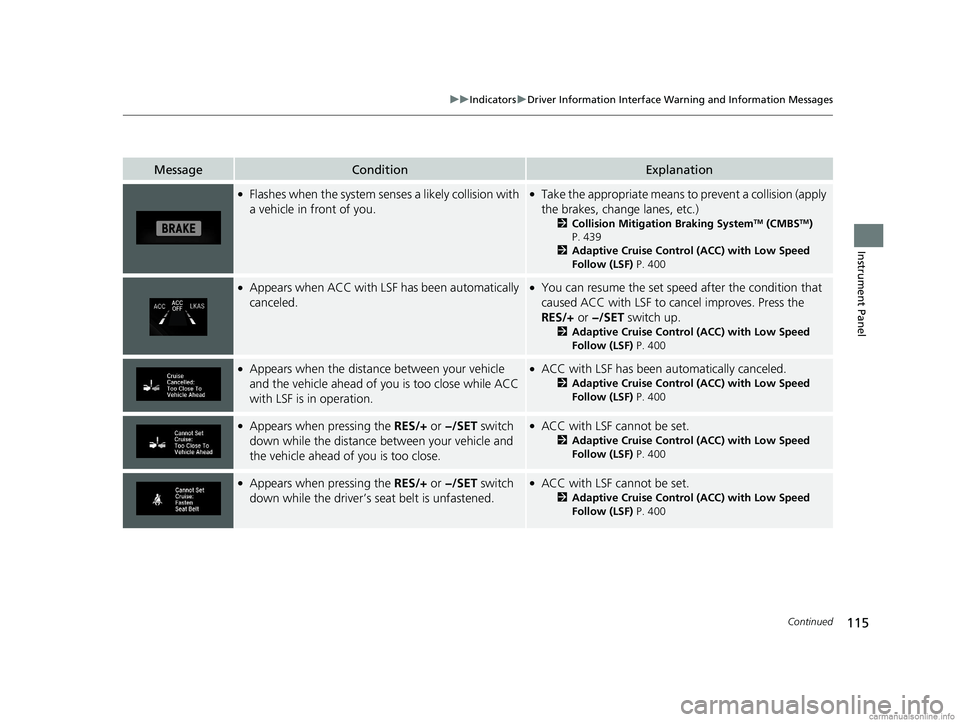
●Flashes when the system senses a likely collision with
a vehicle in front of you.●Take the appropriate means to prevent a collision (apply
the brakes, change lanes, etc.)
2Collision Mitigation Braking SystemTM (CMBSTM)
P. 439
2 Adaptive Cruise Control (ACC) with Low Speed
Follow (LSF) P. 400
●Appears when ACC with LSF has been automatically
canceled.●You can resume the set speed after the condition that
caused ACC with LSF to cancel improves. Press the
RES/+ or −/SET switch up.
2Adaptive Cruise Control (ACC) with Low Speed
Follow (LSF) P. 400
●Appears when the distance between your vehicle
and the vehicle ahead of you is too close while ACC
with LSF is in operation.●ACC with LSF has been automatically canceled.
2 Adaptive Cruise Control (ACC) with Low Speed
Follow (LSF) P. 400
●Appears when pressing the RES/+ or −/SET switch
down while the distance between your vehicle and
the vehicle ahead of you is too close.●ACC with LSF cannot be set.
2 Adaptive Cruise Control (ACC) with Low Speed
Follow (LSF) P. 400
●Appears when pressing the RES/+ or −/SET switch
down while the driver’s seat belt is unfastened.●ACC with LSF cannot be set.
2 Adaptive Cruise Control (ACC) with Low Speed
Follow (LSF) P. 400
18 CLARITY PHEV CSS-31TRW6000.book 115 ページ 2017年12月25日 月曜日 午後2時22分
Page 120 of 591
118
uuIndicators uDriver Information Interface Wa rning and Information Messages
Instrument Panel
MessageConditionExplanation
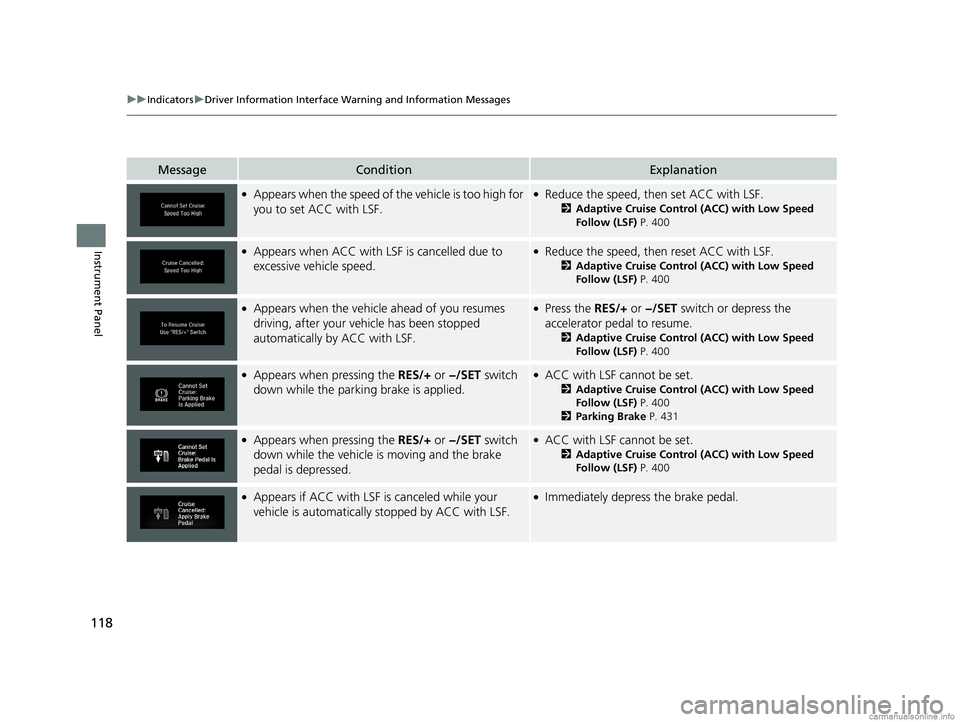
●Appears when the speed of the vehicle is too high for
you to set ACC with LSF.●Reduce the speed, then set ACC with LSF.
2 Adaptive Cruise Control (ACC) with Low Speed
Follow (LSF) P. 400
●Appears when ACC with LSF is cancelled due to
excessive vehicle speed.●Reduce the speed, then reset ACC with LSF.
2Adaptive Cruise Control (ACC) with Low Speed
Follow (LSF) P. 400
●Appears when the vehicle ahead of you resumes
driving, after your vehicle has been stopped
automatically by ACC with LSF.●Press the RES/+ or −/SET switch or depress the
accelerator pedal to resume.
2 Adaptive Cruise Control (ACC) with Low Speed
Follow (LSF) P. 400
●Appears when pressing the RES/+ or −/SET switch
down while the parking brake is applied.●ACC with LSF cannot be set.
2 Adaptive Cruise Control (ACC) with Low Speed
Follow (LSF) P. 400
2 Parking Brake P. 431
●Appears when pressing the RES/+ or −/SET switch
down while the vehicle is moving and the brake
pedal is depressed.●ACC with LSF cannot be set.
2 Adaptive Cruise Control (ACC) with Low Speed
Follow (LSF) P. 400
●Appears if ACC with LSF is canceled while your
vehicle is automatically stopped by ACC with LSF.●Immediately depress the brake pedal.
18 CLARITY PHEV CSS-31TRW6000.book 118 ページ 2017年12月25日 月曜日 午後2時22分
Page 122 of 591

120
uuIndicators uDriver Information Interface Wa rning and Information Messages
Instrument Panel
MessageConditionExplanation
●Appears when the LKAS is in operation, or the LKAS
button is pressed, but there is a problem with a
system related to the LKAS. The LKAS cancels
automatically. The beeper sounds simultaneously.●If the VSA®, ABS, or brake system indicator or another
indicator comes on, take appropriate action.
2 Indicators P. 86
●Appears when the temperature inside the camera is
too high.●Use the climate control system to cool down the
camera.
●Goes off - The camera has been cooled down. Pressing
the LKAS button can resume the system.
2 Adaptive Cruise Control (ACC) with Low Speed
Follow (LSF) P. 400
2 Lane Keeping Assist System (LKAS) P. 415
2 Front Sensor Camera P. 394
●Appears when the area around the camera is
blocked by dirt, mud, etc. Stop your vehicle in a safe
place, and wipe it off with a soft cloth.
●May appear when driving in bad weather (rain,
snow, fog, etc.).
●Have your vehicle checked by an authorized Honda
Clarity Plug-In Hybrid dealer if the message does not
disappear, even after you clean the area around the
camera.
2 Adaptive Cruise Control (ACC) with Low Speed
Follow (LSF) P. 400
2 Lane Keeping Assist System (LKAS) P. 415
2 Front Sensor Camera P. 394
18 CLARITY PHEV CSS-31TRW6000.book 120 ページ 2017年12月25日 月曜日 午後2時22分