2018 FORD FUSION ENERGI steering wheel adjustment
[x] Cancel search: steering wheel adjustmentPage 4 of 538

Introduction
About This Manual..........................................7
Symbols Glossary............................................7
Data Recording.................................................9
California Proposition 65.............................11
Perchlorate........................................................11
Ford Credit.........................................................11
Replacement Parts Recommendation............................................................................12
Special Notices...............................................12
Mobile Communications Equipment............................................................................13
Export Unique Options.................................13
Environment
Protecting the Environment.......................15
At a Glance
Instrument Panel Overview.......................16
Child Safety
General Information......................................18
Installing Child Restraints...........................19
Booster Seats..................................................27
Child Restraint Positioning........................29
Child Safety Locks........................................30
Seatbelts
Principle of Operation..................................32
Fastening the Seatbelts..............................33
Seatbelt Height Adjustment.....................36
Seatbelt Warning Lamp and IndicatorChime............................................................36
Seatbelt Reminder........................................37
Child Restraint and SeatbeltMaintenance...............................................39
Seatbelt Extension.......................................39
Personal Safety System™
Personal Safety System™........................40
Supplementary RestraintsSystem
Principle of Operation..................................41
Driver and Passenger Airbags...................42
Front Passenger Sensing System...........43
Side Airbags....................................................45
Driver and Passenger Knee Airbags.......46
Safety Canopy™............................................47
Crash Sensors and Airbag Indicator......48
Airbag Disposal.............................................49
Keys and Remote Controls
General Information on RadioFrequencies................................................50
Remote Control.............................................50
Replacing a Lost Key or Remote Control..........................................................................55
MyKey™
Principle of Operation.................................56
Creating a MyKey...........................................57
Clearing All MyKeys......................................58
Checking MyKey System Status..............58
Using MyKey With Remote StartSystems........................................................59
MyKey Troubleshooting..............................59
Doors and Locks
Locking and Unlocking.................................61
Keyless Entry..................................................64
Interior Luggage Compartment Release..........................................................................66
Security
Passive Anti-Theft System.......................68
Anti-Theft Alarm...........................................69
Steering Wheel
Adjusting the Steering Wheel - VehiclesWith: Power Adjustable SteeringColumn..........................................................70
1
Fusion Energi / Fusion Hybrid (CC7) Hybrid Electric Vehicle (HEV)/Plug-In Hybrid Electric Vehicle (PHEV), Canada/United States of America, enUSA, Edition date: 201705, Second Printing
Table of Contents
Page 20 of 538
Driver knee airbag. See Driverand Passenger Knee Airbags(page 46).
N
Steering wheel adjustment. SeeAdjusting the Steering Wheel(page 70).
O
Horn.P
Cruise control. See CruiseControl (page 72).Q
Lighting control. See LightingControl (page 76).R
17
Fusion Energi / Fusion Hybrid (CC7) Hybrid Electric Vehicle (HEV)/Plug-In Hybrid Electric Vehicle (PHEV), Canada/United States of America, enUSA, Edition date: 201705, Second Printing
At a Glance
Page 45 of 538
particularly to occupants who are notproperly restrained or are otherwise out ofposition at the time of airbag deployment.Thus, it is extremely important thatoccupants be properly restrained as faraway from the airbag module as possiblewhile maintaining vehicle control.
Routine maintenance of the airbags is notrequired.
DRIVER AND PASSENGER
AIRBAGS
WARNINGS
Do not place your arms on the airbagcover or through the steering wheel.Failure to follow this instructioncould result in personal injury.
Keep the areas in front of the airbagsfree from obstruction. Do not affixanything to or over the airbag covers.Objects could become projectiles duringairbag deployment or in a sudden stop.Failure to follow this instruction couldresult in personal injury or death.
Airbags can kill or injure a child in achild restraint. Never place arear-facing child restraint in front ofan active airbag. If you must use aforward-facing child restraint in the frontseat, move the seat upon which the childrestraint is installed all the way back.
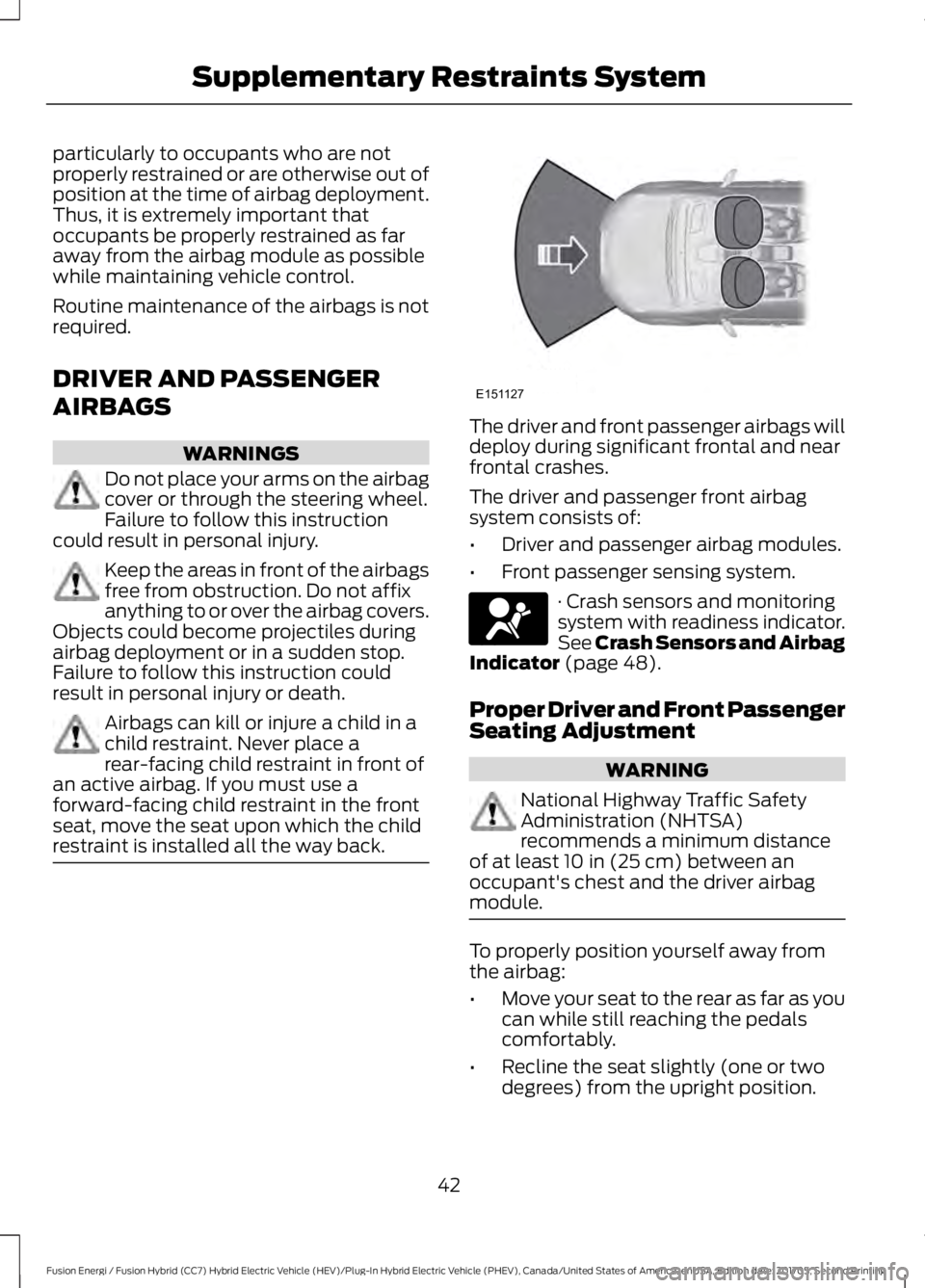
The driver and front passenger airbags willdeploy during significant frontal and nearfrontal crashes.
The driver and passenger front airbagsystem consists of:
•Driver and passenger airbag modules.
•Front passenger sensing system.
· Crash sensors and monitoringsystem with readiness indicator.See Crash Sensors and AirbagIndicator (page 48).
Proper Driver and Front PassengerSeating Adjustment
WARNING
National Highway Traffic SafetyAdministration (NHTSA)recommends a minimum distanceof at least 10 in (25 cm) between anoccupant's chest and the driver airbagmodule.
To properly position yourself away fromthe airbag:
•Move your seat to the rear as far as youcan while still reaching the pedalscomfortably.
•Recline the seat slightly (one or twodegrees) from the upright position.
42
Fusion Energi / Fusion Hybrid (CC7) Hybrid Electric Vehicle (HEV)/Plug-In Hybrid Electric Vehicle (PHEV), Canada/United States of America, enUSA, Edition date: 201705, Second Printing
Supplementary Restraints SystemE151127 E67017
Page 73 of 538

ADJUSTING THE STEERING
WHEEL - VEHICLES WITH:
POWER ADJUSTABLE
STEERING COLUMN
WARNING
Do not adjust the steering wheelwhen your vehicle is moving.
Note: Make sure that you are sitting in thecorrect position. See Sitting in the CorrectPosition (page 128).
Use the control on the side of the steeringcolumn to adjust the position.
To adjust:
•Tilt: Press the top or bottom of thecontrol.
•Telescope: Press the front or rear ofthe control.
End of Travel Position
The steering column sets a stoppingposition just short of the end of the columnposition to prevent damage to the steeringcolumn. A new stopping position sets if thesteering column encounters an objectwhen tilting or telescoping.
To reset the steering column to its normalstopping position:
1. Confirm there is nothing obstructingthe motion of the steering column.
2. Press and hold the steering columncontrol until the steering column stopsmoving.
3. Press the steering column controlagain.
Note:The steering column may begin tomove again.
4. When the steering column stops,continue holding the control for a fewseconds.
5.Repeat for each direction as necessary.
A new stopping position sets. The nexttime you tilt or telescope the steeringcolumn, it stops just short of the end of thecolumn position.
Memory Feature
You can save and recall the steeringcolumn position with the memory function.See Memory Function (page 132).
Pressing the adjustment control during amemory recall cancels the operation.
Easy Entry and Exit Feature
The column moves up when you switchthe ignition off. Switch the ignition on toreturn the system to its previous settings.You can switch this feature on or off in theinformation display. See InformationDisplays (page 97).
70
Fusion Energi / Fusion Hybrid (CC7) Hybrid Electric Vehicle (HEV)/Plug-In Hybrid Electric Vehicle (PHEV), Canada/United States of America, enUSA, Edition date: 201705, Second Printing
Steering WheelE261582
Page 130 of 538

Replace the filter at regular intervals. SeeScheduled Maintenance (page 473).
For additional cabin air filter information,or to replace the filter, see an authorizeddealer.
REMOTE START (If Equipped)
You can switch this feature on or off andadjust the settings using the informationdisplay.
The system adjusts the interiortemperature depending on your chosensettings during remote start.
You cannot adjust the climate controlsetting during remote start operation.When you switch the ignition on, theclimate control system returns to theprevious settings. You can now makeadjustments.
You need to switch on certainvehicle-dependent features, such as:
•Heated seats.
•Cooled seats.
•Heated steering wheel.
•Heated mirrors.
•Heated rear window.
Automatic Settings
In hot weather, the system sets to 72°F(22°C). The cooled seats are set to high(if available, and AUTO is on in theinformation display).
In moderate weather, the system eitherheats or cools (based on previoussettings). The rear defroster, heatedmirrors and heated or cooled seats do notturn on.
In cold weather, the system sets to 72°F(22°C). The heated seats are set to high(if available, and AUTO is on in theinformation display). The heated rearwindow and heated mirrors turn on.
127
Fusion Energi / Fusion Hybrid (CC7) Hybrid Electric Vehicle (HEV)/Plug-In Hybrid Electric Vehicle (PHEV), Canada/United States of America, enUSA, Edition date: 201705, Second Printing
Climate Control
Page 379 of 538

InformationOption
Missed callsOutgoing callsIncoming callsAll callsQuickdial
If you are on a call, the call information is displayed on the information display.
If you are receiving a call, you can accept it by selecting OK on the right-handsteering wheel controls.
* Depending on your vehicle options, all of these choices may not display.
Use the OK and arrow buttons on the rightside of your steering wheel to scrollthrough the available modes.
The selection menu expands and differentoptions appear.
•Press the up and down arrows to scrollthrough the modes.
•Press the right arrow to enter the mode,use the left arrow to exit the mode.
•Press the up and down arrows to makeadjustments within the chosen mode.
•Press OK to confirm your selection.
Note:If your vehicle is not equipped withnavigation, compass appears in the displayinstead of navigation. If you press the rightarrow to go into the compass menu, you cansee the compass graphic. The compassdisplays the direction in which the vehicleis traveling, not true direction (for example,if the vehicle is traveling west, the middleof the compass graphic displays west; northdisplays to the left of west though its truedirection is to the right of west).
Using the Steering Wheel Controls
Depending on your vehicle and optionpackage, you can use different controls onyour steering wheel to interact with thetouchscreen system in different ways.
VOL: Control the volume of audio output.
Mute: Mute the audio output.
Voice: Press to start a voice session. Pressagain to stop the voice prompt andimmediately begin speaking. Press andhold to end a voice session.
SEEK NEXT:
•While in radio mode, press to seekbetween memory presets.
•While in USB, Bluetooth Audio or CDmode, press to seek between songs orpress and hold to fast seek.
SEEK PREVIOUS:
•While in radio mode, press to seekbetween memory presets.
•While in USB, Bluetooth Audio or CDmode, press to seek between songs orpress and hold to fast seek.
PHONE ACCEPT: Press to answer a callor switch between calls.
PHONE REJECT: Press to end a call orreject an incoming call.
Note:On some models,SEEK NEXT maybe combined with PHONE REJECT andSEEK PREVIOUS may be combined withPHONE ACCEPT.
M:Touch the control repeatedly to switchbetween media sources (modes).
See Steering Wheel (page 70).
Using Your Bezel Controls
Depending on your vehicle and optionpackage, you may also have these controlson your instrument panel:
376
Fusion Energi / Fusion Hybrid (CC7) Hybrid Electric Vehicle (HEV)/Plug-In Hybrid Electric Vehicle (PHEV), Canada/United States of America, enUSA, Edition date: 201705, Second Printing
SYNC™ 3
Page 528 of 538

A
A/CSee: Climate Control..........................................119About This Manual...........................................7ABSSee: Brakes............................................................179ABS driving hintsSee: Hints on Driving With Anti-LockBrakes.................................................................179Accessories...................................................469Exterior Style.......................................................469Interior Style........................................................469Lifestyle.................................................................469Peace of Mind.....................................................469AccessoriesSee: Replacement PartsRecommendation............................................12ACCSee: Using Adaptive Cruise Control.............201Active Park Assist..........................................191Deactivating the Active Park AssistFeature..............................................................195Parallel Parking, Perpendicular Parking,Parallel Park Out Assist................................191Troubleshooting the System.........................196Adjusting the Headlamps........................269Horizontal Aim Adjustment...........................270Vertical Aim Adjustment................................269Adjusting the Steering Wheel - VehiclesWith: Manual Adjustable SteeringColumn.............................................................71Adjusting the Steering Wheel - VehiclesWith: Power Adjustable SteeringColumn............................................................70End of Travel Position.........................................70Airbag Disposal...............................................49Air ConditioningSee: Climate Control..........................................119Air FilterSee: Changing the Engine Air Filter.............272AlarmSee: Anti-Theft Alarm........................................69Ambient Lighting............................................82Anti-Theft Alarm............................................69Arming the Alarm................................................69Disarming the Alarm...........................................69Appendices....................................................493
Apps.................................................................439..................................................................................439SiriusXM Traffic and Travel Link....................441At a Glance........................................................16Audible Warnings and Indicators.............96Headlamps On Warning Chime.....................96Keyless Warning Alert........................................96Parking Brake On Warning Chime.................96Audio Control....................................................71MODE........................................................................72Seek, Next or Previous........................................72Audio System.................................................317General Information...........................................317Audio Unit - Vehicles With: SYNC,Vehicles Without: TouchscreenDisplay..........................................................320Menu Structure...................................................322Audio Unit - Vehicles With: SYNC 3,Vehicles Without: Sony AudioSystem..........................................................325Audio Unit - Vehicles With: SYNC 3/SonyAudio System..............................................318Autolamps.........................................................77Windshield Wiper ActivatedHeadlamps.........................................................77Automatic Climate Control - VehiclesWith: SYNC, Vehicles Without:Touchscreen Display.................................123Automatic Climate Control - VehiclesWith: SYNC 3, Vehicles Without: SonyAudio System...............................................121A/C............................................................................122AUTO.......................................................................122Climate Controlled Seats.................................122Defrost....................................................................122Fan Speed Control..............................................122Heated Rear Window........................................122Heated Seats........................................................122Left-hand Temperature Control....................123Max A/C..................................................................122Max Defrost...........................................................123Power.......................................................................122Recirculated Air....................................................122Right-hand Temperature Control.................122Automatic Climate Control - VehiclesWith: SYNC 3/Sony AudioSystem............................................................119A/C............................................................................119
525
Fusion Energi / Fusion Hybrid (CC7) Hybrid Electric Vehicle (HEV)/Plug-In Hybrid Electric Vehicle (PHEV), Canada/United States of America, enUSA, Edition date: 201705, Second Printing
Index