2018 FORD FUSION ENERGI mirror
[x] Cancel search: mirrorPage 123 of 538
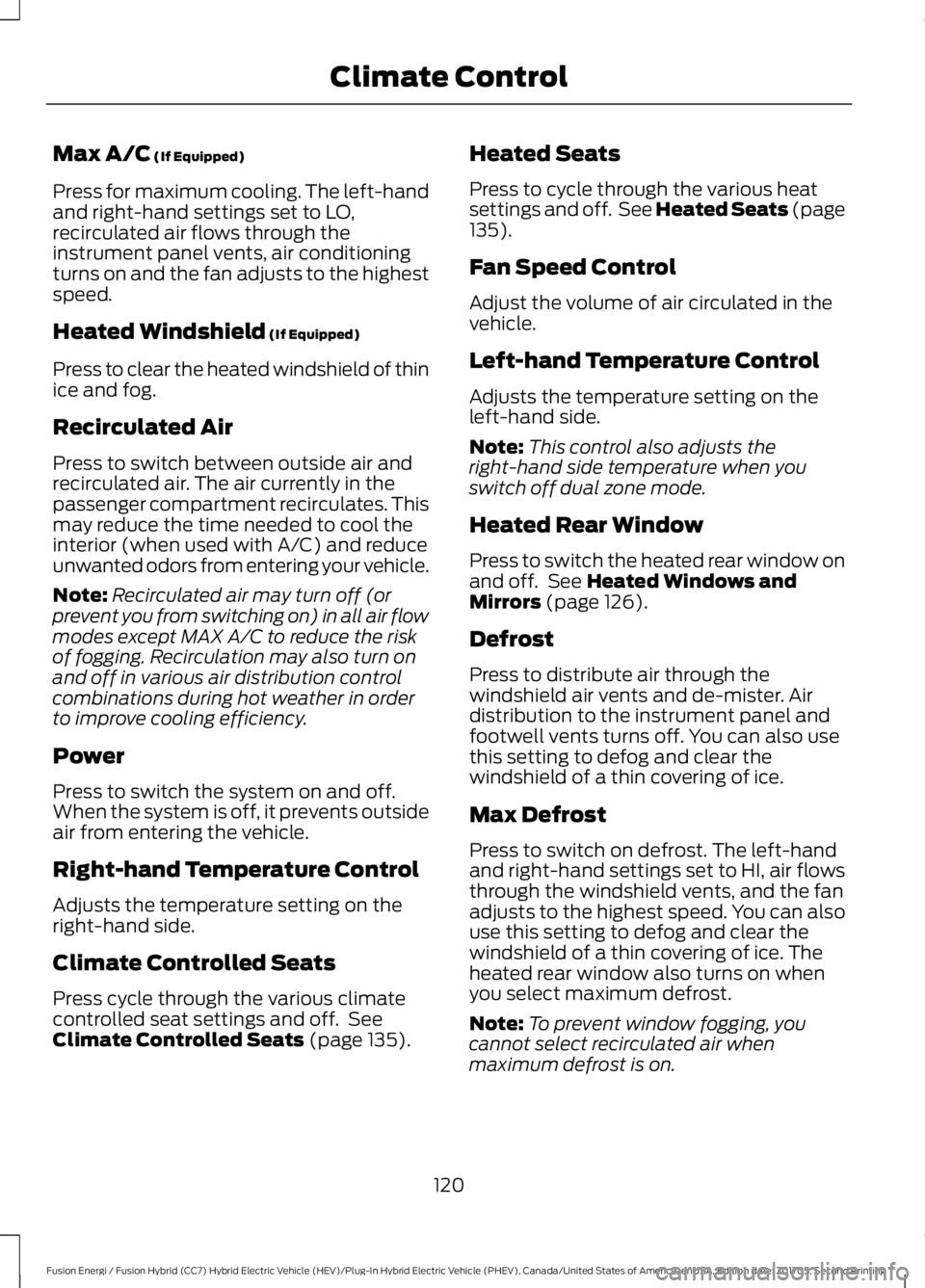
Max A/C (If Equipped)
Press for maximum cooling. The left-handand right-hand settings set to LO,recirculated air flows through theinstrument panel vents, air conditioningturns on and the fan adjusts to the highestspeed.
Heated Windshield (If Equipped)
Press to clear the heated windshield of thinice and fog.
Recirculated Air
Press to switch between outside air andrecirculated air. The air currently in thepassenger compartment recirculates. Thismay reduce the time needed to cool theinterior (when used with A/C) and reduceunwanted odors from entering your vehicle.
Note:Recirculated air may turn off (orprevent you from switching on) in all air flowmodes except MAX A/C to reduce the riskof fogging. Recirculation may also turn onand off in various air distribution controlcombinations during hot weather in orderto improve cooling efficiency.
Power
Press to switch the system on and off.When the system is off, it prevents outsideair from entering the vehicle.
Right-hand Temperature Control
Adjusts the temperature setting on theright-hand side.
Climate Controlled Seats
Press cycle through the various climatecontrolled seat settings and off. SeeClimate Controlled Seats (page 135).
Heated Seats
Press to cycle through the various heatsettings and off. See Heated Seats (page135).
Fan Speed Control
Adjust the volume of air circulated in thevehicle.
Left-hand Temperature Control
Adjusts the temperature setting on theleft-hand side.
Note:This control also adjusts theright-hand side temperature when youswitch off dual zone mode.
Heated Rear Window
Press to switch the heated rear window onand off. See Heated Windows andMirrors (page 126).
Defrost
Press to distribute air through thewindshield air vents and de-mister. Airdistribution to the instrument panel andfootwell vents turns off. You can also usethis setting to defog and clear thewindshield of a thin covering of ice.
Max Defrost
Press to switch on defrost. The left-handand right-hand settings set to HI, air flowsthrough the windshield vents, and the fanadjusts to the highest speed. You can alsouse this setting to defog and clear thewindshield of a thin covering of ice. Theheated rear window also turns on whenyou select maximum defrost.
Note:To prevent window fogging, youcannot select recirculated air whenmaximum defrost is on.
120
Fusion Energi / Fusion Hybrid (CC7) Hybrid Electric Vehicle (HEV)/Plug-In Hybrid Electric Vehicle (PHEV), Canada/United States of America, enUSA, Edition date: 201705, Second Printing
Climate Control
Page 125 of 538
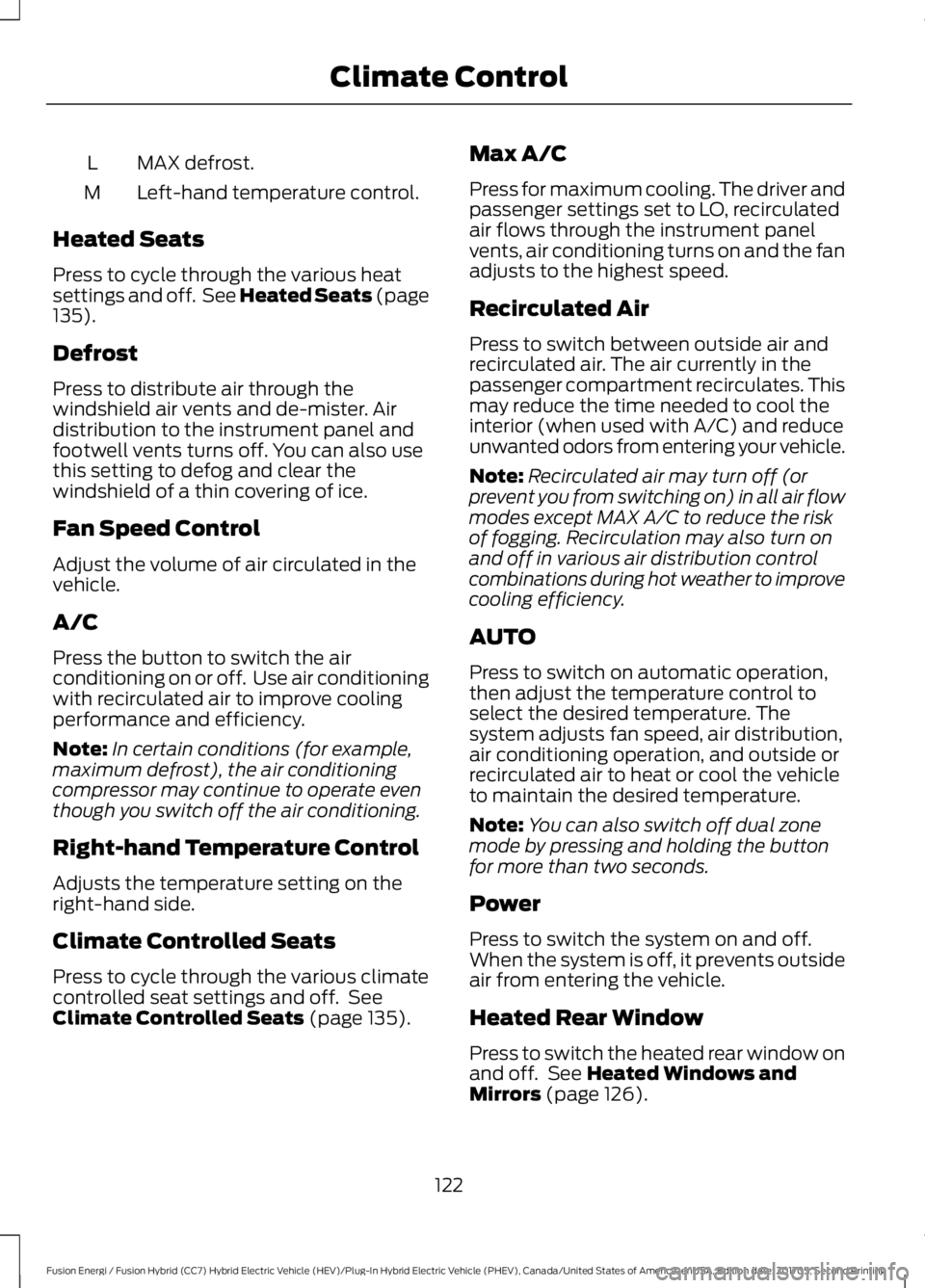
MAX defrost.L
Left-hand temperature control.M
Heated Seats
Press to cycle through the various heatsettings and off. See Heated Seats (page135).
Defrost
Press to distribute air through thewindshield air vents and de-mister. Airdistribution to the instrument panel andfootwell vents turns off. You can also usethis setting to defog and clear thewindshield of a thin covering of ice.
Fan Speed Control
Adjust the volume of air circulated in thevehicle.
A/C
Press the button to switch the airconditioning on or off. Use air conditioningwith recirculated air to improve coolingperformance and efficiency.
Note:In certain conditions (for example,maximum defrost), the air conditioningcompressor may continue to operate eventhough you switch off the air conditioning.
Right-hand Temperature Control
Adjusts the temperature setting on theright-hand side.
Climate Controlled Seats
Press to cycle through the various climatecontrolled seat settings and off. SeeClimate Controlled Seats (page 135).
Max A/C
Press for maximum cooling. The driver andpassenger settings set to LO, recirculatedair flows through the instrument panelvents, air conditioning turns on and the fanadjusts to the highest speed.
Recirculated Air
Press to switch between outside air andrecirculated air. The air currently in thepassenger compartment recirculates. Thismay reduce the time needed to cool theinterior (when used with A/C) and reduceunwanted odors from entering your vehicle.
Note:Recirculated air may turn off (orprevent you from switching on) in all air flowmodes except MAX A/C to reduce the riskof fogging. Recirculation may also turn onand off in various air distribution controlcombinations during hot weather to improvecooling efficiency.
AUTO
Press to switch on automatic operation,then adjust the temperature control toselect the desired temperature. Thesystem adjusts fan speed, air distribution,air conditioning operation, and outside orrecirculated air to heat or cool the vehicleto maintain the desired temperature.
Note:You can also switch off dual zonemode by pressing and holding the buttonfor more than two seconds.
Power
Press to switch the system on and off.When the system is off, it prevents outsideair from entering the vehicle.
Heated Rear Window
Press to switch the heated rear window onand off. See Heated Windows andMirrors (page 126).
122
Fusion Energi / Fusion Hybrid (CC7) Hybrid Electric Vehicle (HEV)/Plug-In Hybrid Electric Vehicle (PHEV), Canada/United States of America, enUSA, Edition date: 201705, Second Printing
Climate Control
Page 127 of 538

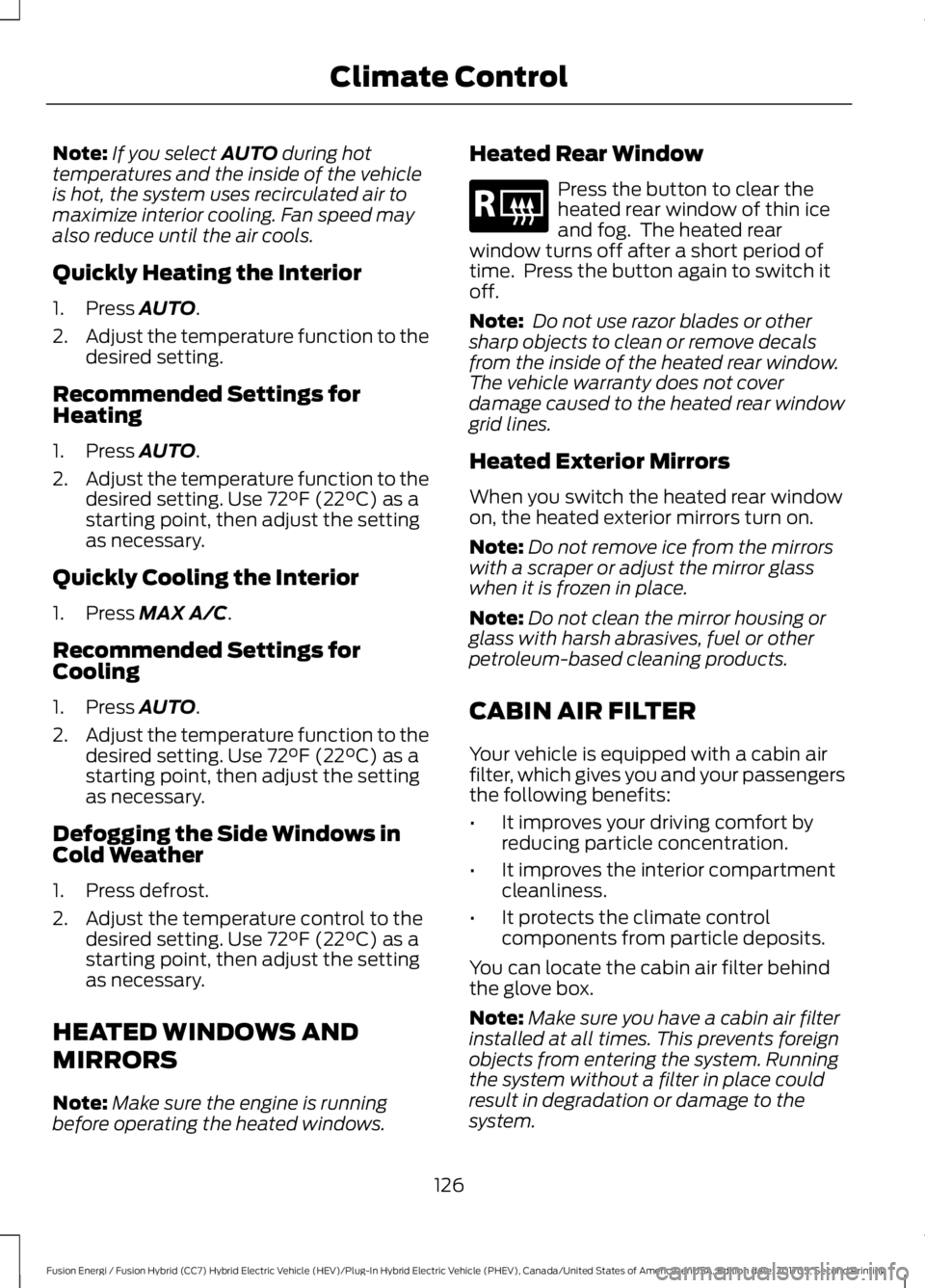
Driver temperature control:Turn to increase or decrease theair temperature for the driverside of the vehicle. This controlalso adjusts the passenger sidetemperature when not in dualzone mode.
A
Recirculated air: Press thebutton to switch betweenoutside air and recirculated air.When you select recirculated air,the air currently in the passengercompartment recirculates. Thismay reduce the time needed tocool the interior (when used withA/C) and may reduce unwantedodors from entering your vehicle.
B
Note: Recirculated air may turnoff automatically (or beprevented from turning on) in allairflow modes except MAX A/Cto reduce risk of fogging.Recirculated air may also turn onand off automatically in Panelor Panel and Floor airflowmodes during hot weather inorder to improve coolingefficiency.
Fan speed control -: Press todecrease the volume of aircirculated in your vehicle.
C
Fan speed indicator:Illuminates to indicate fanspeed. When the system iscontrolling the fanautomatically, all of the fanspeed indicators turn off.
D
Note: When the system iscontrolling the fan speedautomatically, all of the fanspeed indicators turn off.
Air distribution control: Pressthese buttons to turn airflowfrom the windshield, instrumentpanel, or footwell vents on or off.The system can distribute airthrough any combination ofthese vents.
E
Note: At least one of thesebuttons remains on while thesystem is on.
Fan speed control +: Press toincrease the volume of aircirculated in your vehicle.
F
AUTO: Press the button to turnon automatic operation. Selectthe desired temperature usingthe temperature control. Thesystem adjusts fan speed, airdistribution, air conditioning
G
operation, and selects outsideair or recirculated air to heat orcool the vehicle in order tomaintain the desiredtemperature. You can also usethe AUTO button to turn off dualzone operation by pressing andholding the button for more thantwo seconds.
Passenger temperaturecontrol: Turn to increase ordecrease the air temperature onthe passenger side of the vehicle.This turns on dual zone mode.
H
Heated rear window: Turns theheated rear window on and off.See Heated Windows andMirrors (page 126).
I
124
Fusion Energi / Fusion Hybrid (CC7) Hybrid Electric Vehicle (HEV)/Plug-In Hybrid Electric Vehicle (PHEV), Canada/United States of America, enUSA, Edition date: 201705, Second Printing
Climate Control
Page 129 of 538
Note:If you select AUTO during hottemperatures and the inside of the vehicleis hot, the system uses recirculated air tomaximize interior cooling. Fan speed mayalso reduce until the air cools.
Quickly Heating the Interior
1. Press AUTO.
2.Adjust the temperature function to thedesired setting.
Recommended Settings forHeating
1. Press AUTO.
2.Adjust the temperature function to thedesired setting. Use 72°F (22°C) as astarting point, then adjust the settingas necessary.
Quickly Cooling the Interior
1. Press MAX A/C.
Recommended Settings forCooling
1. Press AUTO.
2.Adjust the temperature function to thedesired setting. Use 72°F (22°C) as astarting point, then adjust the settingas necessary.
Defogging the Side Windows inCold Weather
1. Press defrost.
2. Adjust the temperature control to thedesired setting. Use 72°F (22°C) as astarting point, then adjust the settingas necessary.
HEATED WINDOWS AND
MIRRORS
Note:Make sure the engine is runningbefore operating the heated windows.
Heated Rear Window
Press the button to clear theheated rear window of thin iceand fog. The heated rearwindow turns off after a short period oftime. Press the button again to switch itoff.
Note: Do not use razor blades or othersharp objects to clean or remove decalsfrom the inside of the heated rear window.The vehicle warranty does not coverdamage caused to the heated rear windowgrid lines.
Heated Exterior Mirrors
When you switch the heated rear windowon, the heated exterior mirrors turn on.
Note:Do not remove ice from the mirrorswith a scraper or adjust the mirror glasswhen it is frozen in place.
Note:Do not clean the mirror housing orglass with harsh abrasives, fuel or otherpetroleum-based cleaning products.
CABIN AIR FILTER
Your vehicle is equipped with a cabin airfilter, which gives you and your passengersthe following benefits:
•It improves your driving comfort byreducing particle concentration.
•It improves the interior compartmentcleanliness.
•It protects the climate controlcomponents from particle deposits.
You can locate the cabin air filter behindthe glove box.
Note:Make sure you have a cabin air filterinstalled at all times. This prevents foreignobjects from entering the system. Runningthe system without a filter in place couldresult in degradation or damage to thesystem.
126
Fusion Energi / Fusion Hybrid (CC7) Hybrid Electric Vehicle (HEV)/Plug-In Hybrid Electric Vehicle (PHEV), Canada/United States of America, enUSA, Edition date: 201705, Second Printing
Climate ControlE184884
Page 130 of 538

Replace the filter at regular intervals. SeeScheduled Maintenance (page 473).
For additional cabin air filter information,or to replace the filter, see an authorizeddealer.
REMOTE START (If Equipped)
You can switch this feature on or off andadjust the settings using the informationdisplay.
The system adjusts the interiortemperature depending on your chosensettings during remote start.
You cannot adjust the climate controlsetting during remote start operation.When you switch the ignition on, theclimate control system returns to theprevious settings. You can now makeadjustments.
You need to switch on certainvehicle-dependent features, such as:
•Heated seats.
•Cooled seats.
•Heated steering wheel.
•Heated mirrors.
•Heated rear window.
Automatic Settings
In hot weather, the system sets to 72°F(22°C). The cooled seats are set to high(if available, and AUTO is on in theinformation display).
In moderate weather, the system eitherheats or cools (based on previoussettings). The rear defroster, heatedmirrors and heated or cooled seats do notturn on.
In cold weather, the system sets to 72°F(22°C). The heated seats are set to high(if available, and AUTO is on in theinformation display). The heated rearwindow and heated mirrors turn on.
127
Fusion Energi / Fusion Hybrid (CC7) Hybrid Electric Vehicle (HEV)/Plug-In Hybrid Electric Vehicle (PHEV), Canada/United States of America, enUSA, Edition date: 201705, Second Printing
Climate Control
Page 136 of 538

•Driver seat.
•Power mirrors.
•Power steering column.
The memory control is on the driver door.
Saving a PreSet Position
1. Adjust the memory features to yourdesired position.
2. Press the SET button until you hear asingle tone.
3. Press the desired preset button untilyou hear a single tone.
You can save up to two preset memorypositions. You can save a memory presetat any time.
Recalling a PreSet Position
Press and release the preset buttonassociated with your desired drivingposition. The memory features move tothe position stored for that preset.
Note:You can only recall a preset memoryposition when you switch the ignition off, orwhen the transmission is in park (P) orneutral (N) if the ignition is on and thevehicle is not moving.
You can also recall a preset memoryposition by:
•Pressing the unlock button on yourintelligent access key fob if it is linkedto a preset position.
•Unlocking the intelligent driver doorhandle if a linked key fob is present.
Note:Using a linked key fob to recall yourmemory position when the ignition is offmoves the seat to the Easy Entry position.
Note:Pressing any active memory featurecontrol - power seat, mirror, or steeringcolumn (or any memory button) during amemory recall cancels the operation.
Linking a PreSet Position to yourRemote Control or IntelligentAccess Key Fob
Your vehicle can save the preset memorypositions for up to two remote controls orintelligent access (IA) keys.
After you have saved your desired memorypreset positions:
1. Press and hold the desired presetbutton for about three seconds untilyou hear a single tone.
2. Within three seconds, press the lockbutton on the remote control you arelinking.
To unlink a remote control, follow thesame procedure – except in step 2, pressthe unlock button on the remote control.
Note:If more than one linked remotecontrol or intelligent access key is in range,the memory function moves to the settingsof the first key to initiate a memory recall.
Easy Entry and Exit Feature
If you enable the easy entry and exitfeature, it automatically moves the driverseat position rearward up to 2 in (5 cm)when you switch the ignition off.
The driver seat returns to the previousposition when you switch the ignition on.
You can enable or disable this feature inthe information display. See GeneralInformation (page 97).
133
Fusion Energi / Fusion Hybrid (CC7) Hybrid Electric Vehicle (HEV)/Plug-In Hybrid Electric Vehicle (PHEV), Canada/United States of America, enUSA, Edition date: 201705, Second Printing
SeatsE223340
Page 200 of 538

Possible CauseSymptom
A parked vehicle has a high attachment. For example,a salt sprayer, snowplow or moving truck bed.
The parking space length or position of parked objectschanges after your vehicle passes the space.
The temperature around your vehicle quickly changes.For example, driving from a heated garage into the cold,or after leaving a car wash.
REAR VIEW CAMERA
WARNINGS
The rear view camera system is areverse aid supplement device thatstill requires the driver to use it inconjunction with the interior and exteriormirrors for maximum coverage.
Objects that are close to eithercorner of the bumper or under thebumper, might not be seen on thescreen due to the limited coverage of thecamera system.
Reverse your vehicle as slow aspossible, higher speeds may limityour reaction time to stop yourvehicle.
Use caution when the rear cargo dooris ajar. If the rear cargo door is ajar,the camera will be out of positionand the video image may be incorrect. Allguidelines disappear when the rear cargodoor is ajar. Some vehicles may not comeequipped with guidelines.
Use caution when turning camerafeatures on or off when thetransmission is not in park (P). Makesure your vehicle is not moving.
The rear view camera system provides avideo image of the area behind yourvehicle.
During operation, lines appear in thedisplay which represent your vehicle’s pathand proximity to objects behind yourvehicle.
The camera is located on the rear cargodoor.
Using the Rear View CameraSystem
The rear view camera system displayswhat is behind your vehicle when you placethe transmission in reverse (R).
Note:The reverse sensing system is noteffective at speeds above 3 mph (5 km/h)and may not detect certain angular ormoving objects.
197
Fusion Energi / Fusion Hybrid (CC7) Hybrid Electric Vehicle (HEV)/Plug-In Hybrid Electric Vehicle (PHEV), Canada/United States of America, enUSA, Edition date: 201705, Second Printing
Parking AidsE142435
Page 202 of 538

The fixed and active guidelines fade in andout depending on the steering wheelposition. The active guidelines do notdisplay when the steering wheel positionis straight.
Always use caution while reversing.Objects in the red zone are closest to yourvehicle and objects in the green zone arefarther away. Objects are getting closer toyour vehicle as they move from the greenzone to the yellow or red zones. Use theside view mirrors and rear view mirror toget better coverage on both sides and rearof the vehicle.
Obstacle Distance Indicator (If
Equipped)
The system will provide an image of yourvehicle and the sensor zones. The zoneswill highlight green, yellow and red whenthe parking aid sensors detect an object inthe coverage area.
Manual Zoom
WARNING
When manual zoom is on, the fullarea behind your vehicle may notshow. Be aware of your surroundingswhen using the manual zoom feature.
Note:Manual zoom is only available whenthe transmission is in reverse (R).
Note:When you enable manual zoom, onlythe centerline is shown.
Selectable settings for this feature areZoom in (+) and Zoom out (-). Press thesymbol in the camera screen to change theview. The default setting is Zoom OFF.
This allows you to get a closer view of anobject behind your vehicle. The zoomedimage keeps the bumper in the image toprovide a reference. The zoom is onlyactive while the transmission is in reverse(R).
Rear Camera Delay
Selectable settings for this feature are ONand OFF. The default setting for the rearcamera delay is OFF.
When shifting the transmission out ofreverse (R) and into any gear other thanpark (P), the camera image remains in thedisplay until:
•Your vehicle speed sufficientlyincreases.
•You shift your vehicle into park (P)(automatic transmission).
•You apply the parking brake (manualtransmission).
199
Fusion Energi / Fusion Hybrid (CC7) Hybrid Electric Vehicle (HEV)/Plug-In Hybrid Electric Vehicle (PHEV), Canada/United States of America, enUSA, Edition date: 201705, Second Printing
Parking AidsE190459