2018 FORD FOCUS page 39
[x] Cancel search: page 39Page 237 of 473
CHANGING THE ENGINE AIR
FILTER
WARNING
To reduce the risk of vehicle damageand personal burn injuries, do notstart your engine with the air cleanerremoved and do not remove it while theengine is running.
When changing the air filter element, useonly the air filter element listed in theMotorcraft Parts table. See MotorcraftParts (page 271).
When servicing the air cleaner on vehicleswith a turbocharger, it is important that noforeign material enter the air inductionsystem. The engine and turbocharger aresusceptible to damage from even smallparticles.
Change the air filter element at the properinterval. See Scheduled Maintenance(page 409).
Note: Failure to use the correct air filterelement may result in severe enginedamage. The customer warranty may bevoid for any damage to the engine if thecorrect air filter element is not used.
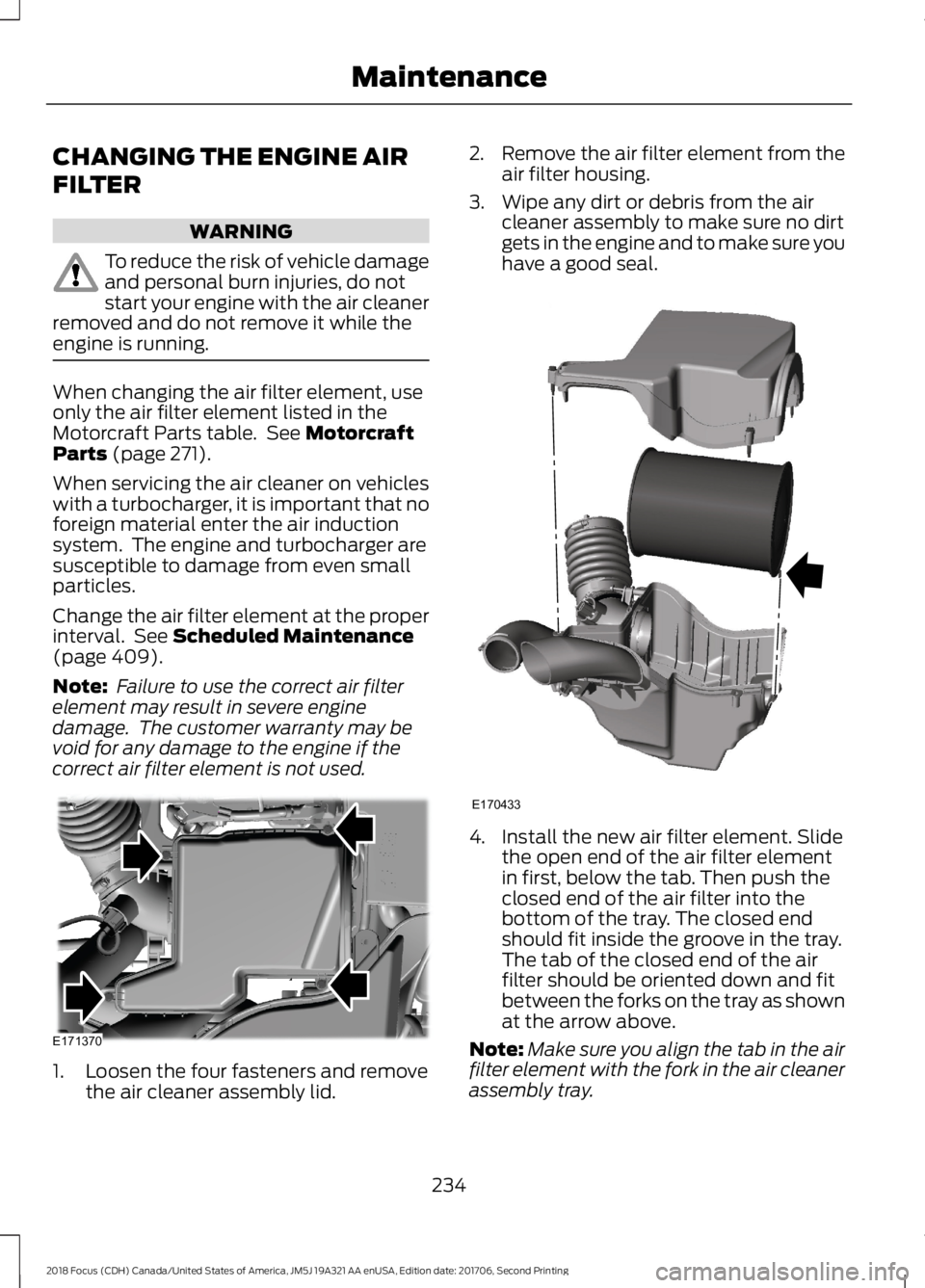
1.Loosen the four fasteners and removethe air cleaner assembly lid.
2.Remove the air filter element from theair filter housing.
3.Wipe any dirt or debris from the aircleaner assembly to make sure no dirtgets in the engine and to make sure youhave a good seal.
4.Install the new air filter element. Slidethe open end of the air filter elementin first, below the tab. Then push theclosed end of the air filter into thebottom of the tray. The closed endshould fit inside the groove in the tray.The tab of the closed end of the airfilter should be oriented down and fitbetween the forks on the tray as shownat the arrow above.
Note:Make sure you align the tab in the airfilter element with the fork in the air cleanerassembly tray.
2342018 Focus (CDH) Canada/United States of America, JM5J 19A321 AA enUSA, Edition date: 201706, Second PrintingMaintenanceE171370 E170433
Page 243 of 473
CLEANING THE INSTRUMENT
PANEL AND INSTRUMENT
CLUSTER LENS
WARNING
Do not use chemical solvents orstrong detergents when cleaning thesteering wheel or instrument panelto avoid contamination of the airbagsystem.
Note:Follow the same procedure ascleaning leather seats for cleaning leatherinstrument panels and leather interior trimsurfaces. See Cleaning Leather Seats(page 240).
Clean the instrument panel and clusterlens with a clean, damp and soft cloth,then use a clean, dry and soft cloth to drythese areas.
•Avoid cleaners or polishes that increasethe gloss of the upper portion of theinstrument panel. The dull finish in thisarea helps protect you fromundesirable windshield reflection.
•Do not use any household cleaningproducts or glass cleaners as thesemay damage the finish of theinstrument panel, interior trim andcluster lens.
•Wash or wipe your hands clean if youhave been in contact with certainproducts such as insect repellent andsuntan lotion to avoid possible damageto the interior painted surfaces.
•Do not allow air fresheners and handsanitizers to spill onto interior surfaces.If a spill occurs, wipe off immediately.Your warranty may not cover thesedamages.
If a staining liquid like coffee or juice hasbeen spilled on the instrument panel or oninterior trim surfaces:
1.Wipe up spilled liquid using a clean,soft cloth as quickly as possible.
2.Use Motorcraft Premium Leather andVinyl Cleaner or a commerciallyavailable leather cleaning product forautomotive interiors. Test any cleaneror stain remover on an inconspicuousarea.
3.Alternatively, wipe the surface with aclean, soft cloth and a mild soap andwater solution. Dry the area with aclean, soft cloth.
4.If necessary, apply more soap andwater solution or cleaning product toa clean, soft cloth and press it onto thesoiled area. Allow this to set at roomtemperature for 30 minutes.
5.Remove the soaked cloth, then with aclean, damp cloth, use a rubbingmotion for 60 seconds on the soiledarea.
6.Dry the area with a clean, soft cloth.
CLEANING LEATHER SEATS (If
Equipped)
Note:Follow the same procedure ascleaning leather seats for cleaning leatherinstrument panels and leather interior trimsurfaces.
For routine cleaning, wipe the surface witha soft, damp cloth and a mild soap andwater solution. Dry the area with a clean,soft cloth.
For cleaning and removing stains such asdye transfer, use Motorcraft PremiumLeather and Vinyl Cleaner or acommercially available leather cleaningproduct for automotive interiors.
Note:Test any cleaner or stain remover onan inconspicuous area.
2402018 Focus (CDH) Canada/United States of America, JM5J 19A321 AA enUSA, Edition date: 201706, Second PrintingVehicle Care
Page 266 of 473
How Temperature Affects Your TirePressure
The tire pressure monitoring systemmonitors tire pressure in each pneumatictire. While driving in a normal manner, atypical passenger tire inflation pressuremay increase about 2–4 psi (14–28 kPa)from a cold start situation. If the vehicle isstationary overnight with the outsidetemperature significantly lower than thedaytime temperature, the tire pressure maydecrease about 3 psi (21 kPa) for a drop of30°F (17°C) in ambient temperature. Thislower pressure value may be detected bythe tire pressure monitoring system asbeing significantly lower than therecommended inflation pressure andactivate the system warning light for lowtire pressure. If the low tire pressurewarning light is on, visually check each tireto verify that no tire is flat. If one or moretires are flat, repair as necessary. Checkthe air pressure in the road tires. If any tireis under-inflated, carefully drive the vehicleto the nearest location where air can beadded to the tires. Inflate all the tires tothe recommended inflation pressure.
CHANGING A ROAD WHEEL
WARNINGS
Do not use tire sealants as they maydamage the tire pressure monitoringsystem.
If the tire pressure monitor sensorbecomes damaged it may notfunction.
Note:The tire pressure monitoring systemindicator light will illuminate when the sparetire is in use. To restore the full function ofthe monitoring system, all road wheelsequipped with tire pressure monitoringsensors must be mounted on this vehicle.
If you get a flat tire while driving, do notapply the brake heavily. Instead, graduallydecrease your speed. Hold the steeringwheel firmly and slowly move to a safeplace on the side of the road.
Have a flat serviced by an authorizeddealer in order to prevent damage to thesystem sensors See Tire PressureMonitoring System (page 260). Replacethe spare tire with a road tire as soon aspossible. During repairing or replacing ofthe flat tire, have the authorized dealerinspect the system sensor for damage.
Dissimilar Spare Wheel and TireAssembly Information
WARNING
Failure to follow these guidelinescould result in an increased risk ofloss of vehicle control, injury or death.
If you have a dissimilar spare wheel andtire, then it is intended for temporary useonly. This means that if you need to use it,you should replace it as soon as possiblewith a road wheel and tire assembly thatis the same size and type as the road tiresand wheels that were originally providedby Ford. If the dissimilar spare tire or wheelis damaged, it should be replaced ratherthan repaired.
A dissimilar spare wheel and tire assemblyis defined as a spare wheel and tireassembly that is different in brand, size orappearance from the road tires and wheelsand can be one of three types:
1.T-type mini-spare: This spare tirebegins with the letter T for tire size andmay have Temporary Use Only molded inthe sidewall.
2.Full-size dissimilar spare with labelon wheel: This spare tire has a label onthe wheel that states: THIS WHEEL ANDTIRE ASSEMBLY FOR TEMPORARY USEONLY
2632018 Focus (CDH) Canada/United States of America, JM5J 19A321 AA enUSA, Edition date: 201706, Second PrintingWheels and Tires
Page 269 of 473
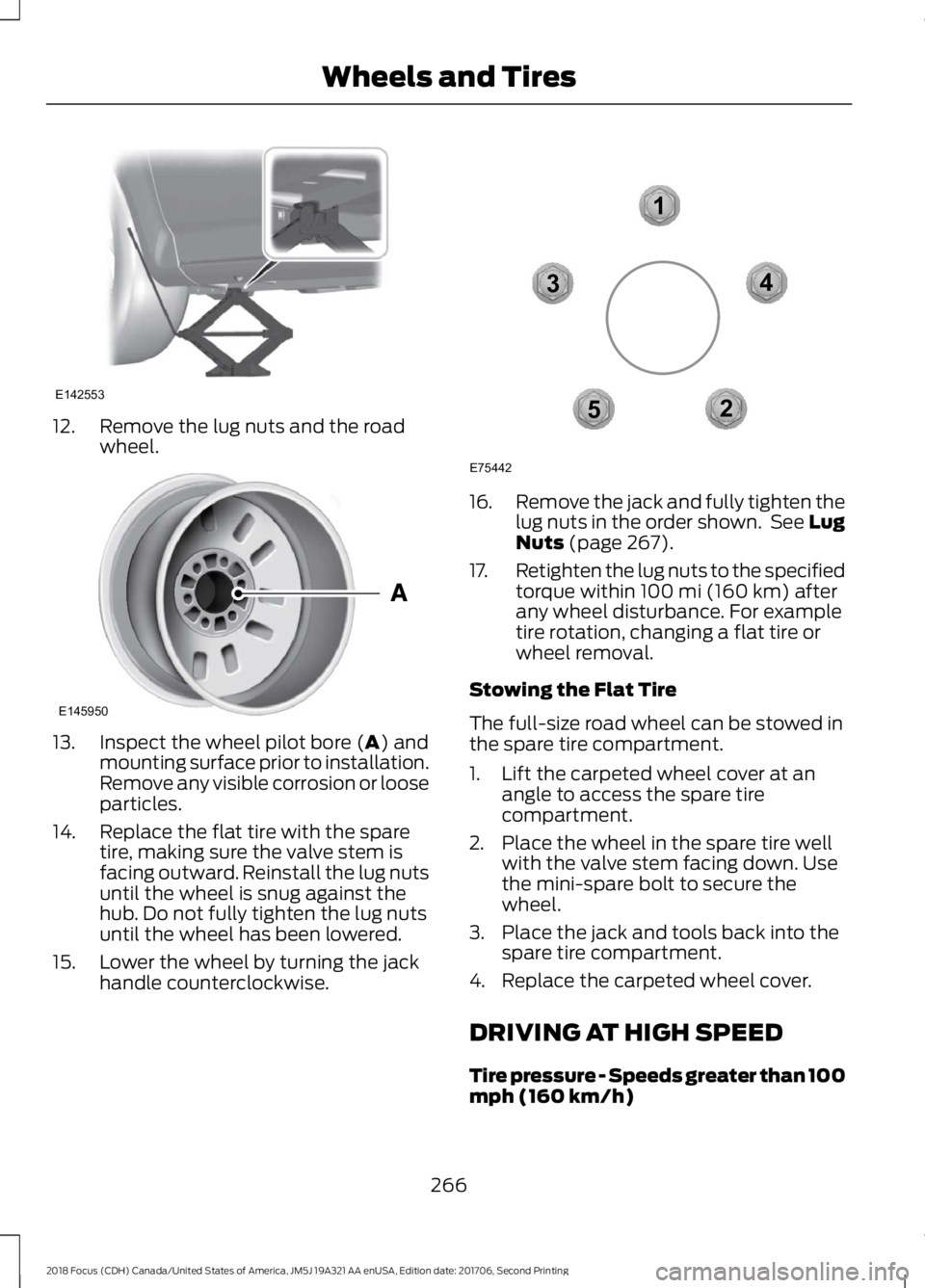
12.Remove the lug nuts and the roadwheel.
13.Inspect the wheel pilot bore (A) andmounting surface prior to installation.Remove any visible corrosion or looseparticles.
14.Replace the flat tire with the sparetire, making sure the valve stem isfacing outward. Reinstall the lug nutsuntil the wheel is snug against thehub. Do not fully tighten the lug nutsuntil the wheel has been lowered.
15.Lower the wheel by turning the jackhandle counterclockwise.
16.Remove the jack and fully tighten thelug nuts in the order shown. See LugNuts (page 267).
17.Retighten the lug nuts to the specifiedtorque within 100 mi (160 km) afterany wheel disturbance. For exampletire rotation, changing a flat tire orwheel removal.
Stowing the Flat Tire
The full-size road wheel can be stowed inthe spare tire compartment.
1.Lift the carpeted wheel cover at anangle to access the spare tirecompartment.
2.Place the wheel in the spare tire wellwith the valve stem facing down. Usethe mini-spare bolt to secure thewheel.
3.Place the jack and tools back into thespare tire compartment.
4.Replace the carpeted wheel cover.
DRIVING AT HIGH SPEED
Tire pressure - Speeds greater than 100mph (160 km/h)
2662018 Focus (CDH) Canada/United States of America, JM5J 19A321 AA enUSA, Edition date: 201706, Second PrintingWheels and TiresE142553 E145950 12345E75442
Page 273 of 473
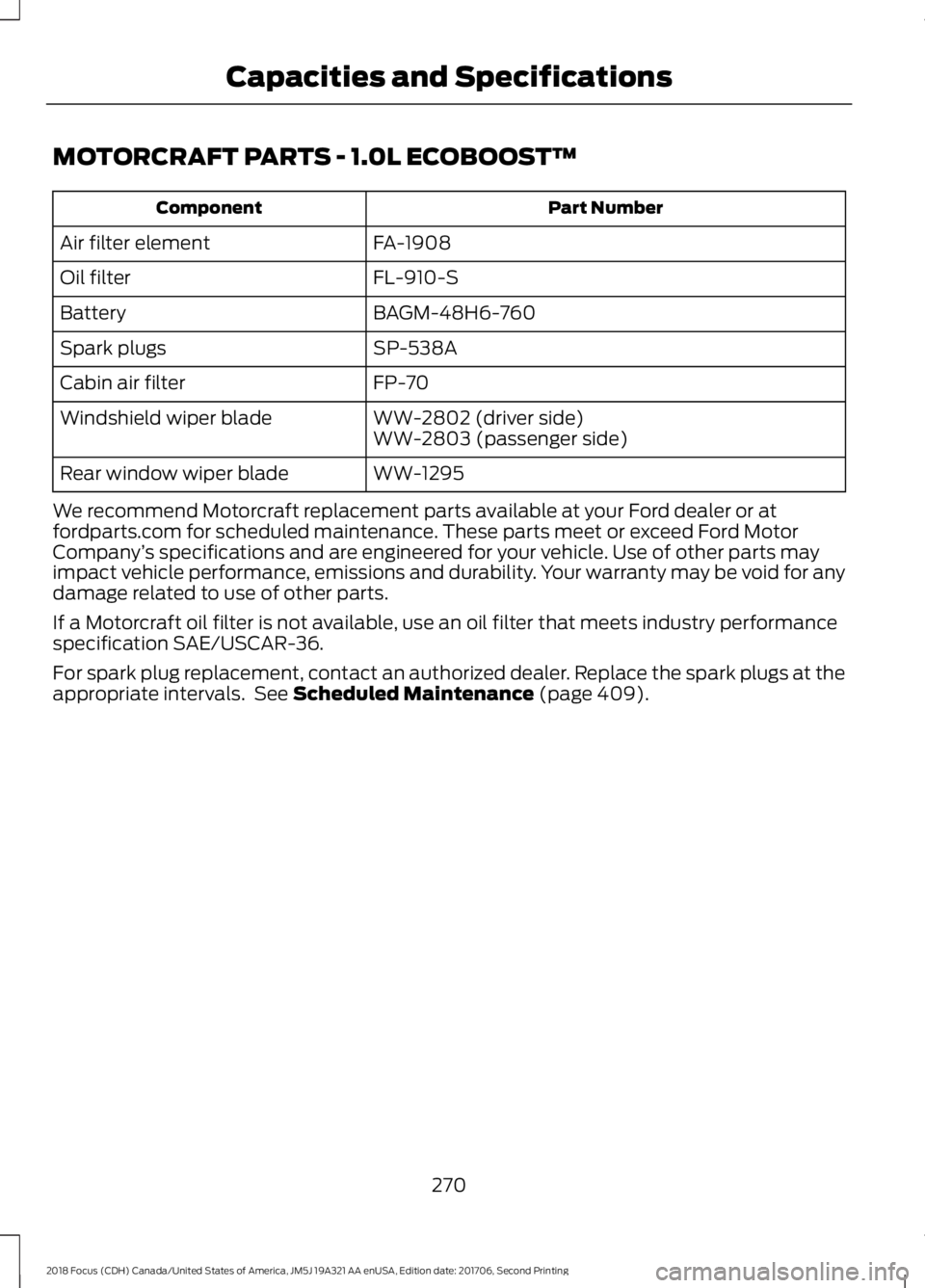
MOTORCRAFT PARTS - 1.0L ECOBOOST™
Part NumberComponent
FA-1908Air filter element
FL-910-SOil filter
BAGM-48H6-760Battery
SP-538ASpark plugs
FP-70Cabin air filter
WW-2802 (driver side)Windshield wiper bladeWW-2803 (passenger side)
WW-1295Rear window wiper blade
We recommend Motorcraft replacement parts available at your Ford dealer or atfordparts.com for scheduled maintenance. These parts meet or exceed Ford MotorCompany’s specifications and are engineered for your vehicle. Use of other parts mayimpact vehicle performance, emissions and durability. Your warranty may be void for anydamage related to use of other parts.
If a Motorcraft oil filter is not available, use an oil filter that meets industry performancespecification SAE/USCAR-36.
For spark plug replacement, contact an authorized dealer. Replace the spark plugs at theappropriate intervals. See Scheduled Maintenance (page 409).
2702018 Focus (CDH) Canada/United States of America, JM5J 19A321 AA enUSA, Edition date: 201706, Second PrintingCapacities and Specifications
Page 274 of 473
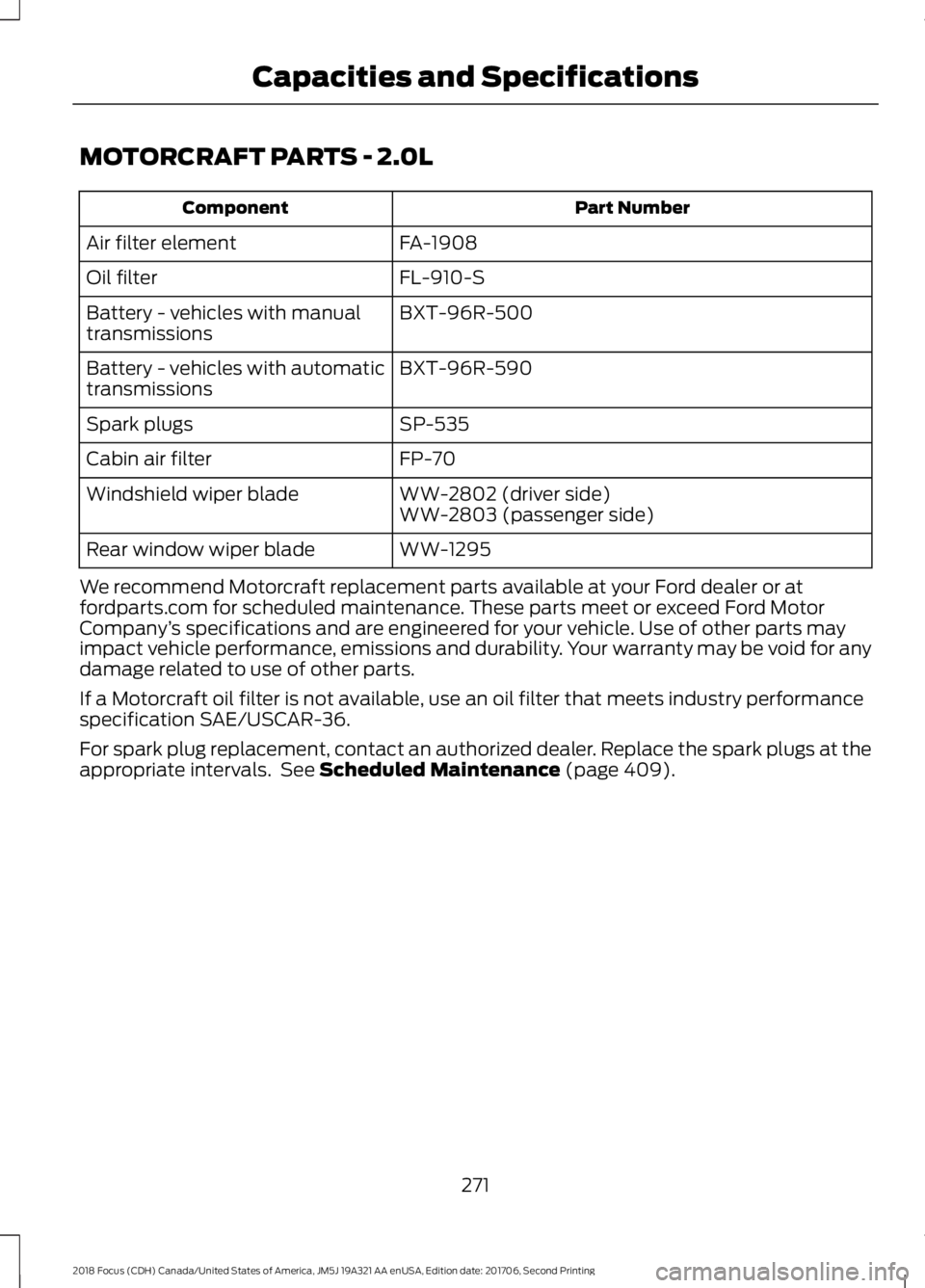
MOTORCRAFT PARTS - 2.0L
Part NumberComponent
FA-1908Air filter element
FL-910-SOil filter
BXT-96R-500Battery - vehicles with manualtransmissions
BXT-96R-590Battery - vehicles with automatictransmissions
SP-535Spark plugs
FP-70Cabin air filter
WW-2802 (driver side)Windshield wiper bladeWW-2803 (passenger side)
WW-1295Rear window wiper blade
We recommend Motorcraft replacement parts available at your Ford dealer or atfordparts.com for scheduled maintenance. These parts meet or exceed Ford MotorCompany’s specifications and are engineered for your vehicle. Use of other parts mayimpact vehicle performance, emissions and durability. Your warranty may be void for anydamage related to use of other parts.
If a Motorcraft oil filter is not available, use an oil filter that meets industry performancespecification SAE/USCAR-36.
For spark plug replacement, contact an authorized dealer. Replace the spark plugs at theappropriate intervals. See Scheduled Maintenance (page 409).
2712018 Focus (CDH) Canada/United States of America, JM5J 19A321 AA enUSA, Edition date: 201706, Second PrintingCapacities and Specifications
Page 299 of 473

ActionConditionMessage
Contact SIRIUS at 1-888-539-7474 to resolvesubscription issues.
Your satellite service is nolonger available.Questions? Call
1-888-539-7474
Use the channel guide toturn off the Lock or Skipfunction on that station.
All the channels in theselected category are eitherskipped or locked.
None found
Check Channel Guide
No action required.SIRIUS has updated thechannels available for yourvehicle.
Subscription Updated
USB PORT
The USB port is located in the centerconsole.
The USB port allows you to plug in mediaplaying devices, memory sticks and chargedevices (if supported). See SYNC™ (page297).
MEDIA HUB (If Equipped)
You can locate the media hub inside thecenter console or on the instrument panel.
See your SYNC information.
2962018 Focus (CDH) Canada/United States of America, JM5J 19A321 AA enUSA, Edition date: 201706, Second PrintingAudio SystemE176344 E211463
Page 302 of 473
System data cannot be accessed withoutspecial equipment and access to thevehicle's SYNC module. Ford MotorCompany and Ford of Canada will notaccess the system data for any purposeother than as described absent consent, acourt order, or where required by lawenforcement, other governmentauthorities, or other third parties actingwith lawful authority. Other parties mayseek to access the informationindependently of Ford Motor Company andFord of Canada. For further privacyinformation, see the section on 911 Assist.See SYNC™ Applications and Services(page 313).
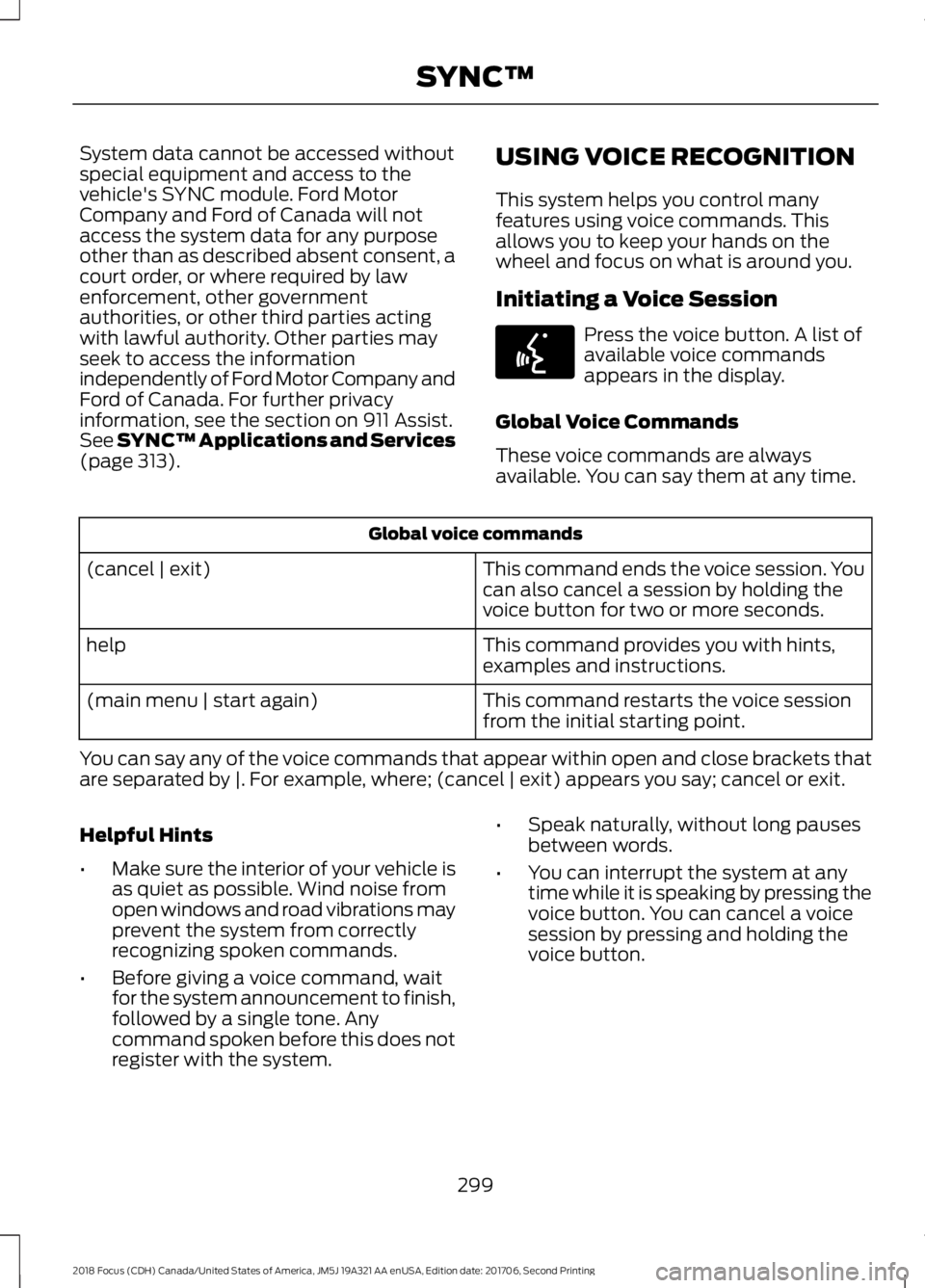
USING VOICE RECOGNITION
This system helps you control manyfeatures using voice commands. Thisallows you to keep your hands on thewheel and focus on what is around you.
Initiating a Voice Session
Press the voice button. A list ofavailable voice commandsappears in the display.
Global Voice Commands
These voice commands are alwaysavailable. You can say them at any time.
Global voice commands
This command ends the voice session. Youcan also cancel a session by holding thevoice button for two or more seconds.
(cancel | exit)
This command provides you with hints,examples and instructions.help
This command restarts the voice sessionfrom the initial starting point.(main menu | start again)
You can say any of the voice commands that appear within open and close brackets thatare separated by |. For example, where; (cancel | exit) appears you say; cancel or exit.
Helpful Hints
•Make sure the interior of your vehicle isas quiet as possible. Wind noise fromopen windows and road vibrations mayprevent the system from correctlyrecognizing spoken commands.
•Before giving a voice command, waitfor the system announcement to finish,followed by a single tone. Anycommand spoken before this does notregister with the system.
•Speak naturally, without long pausesbetween words.
•You can interrupt the system at anytime while it is speaking by pressing thevoice button. You can cancel a voicesession by pressing and holding thevoice button.
2992018 Focus (CDH) Canada/United States of America, JM5J 19A321 AA enUSA, Edition date: 201706, Second PrintingSYNC™E142599