2018 FORD EXPEDITION AUX
[x] Cancel search: AUXPage 394 of 571
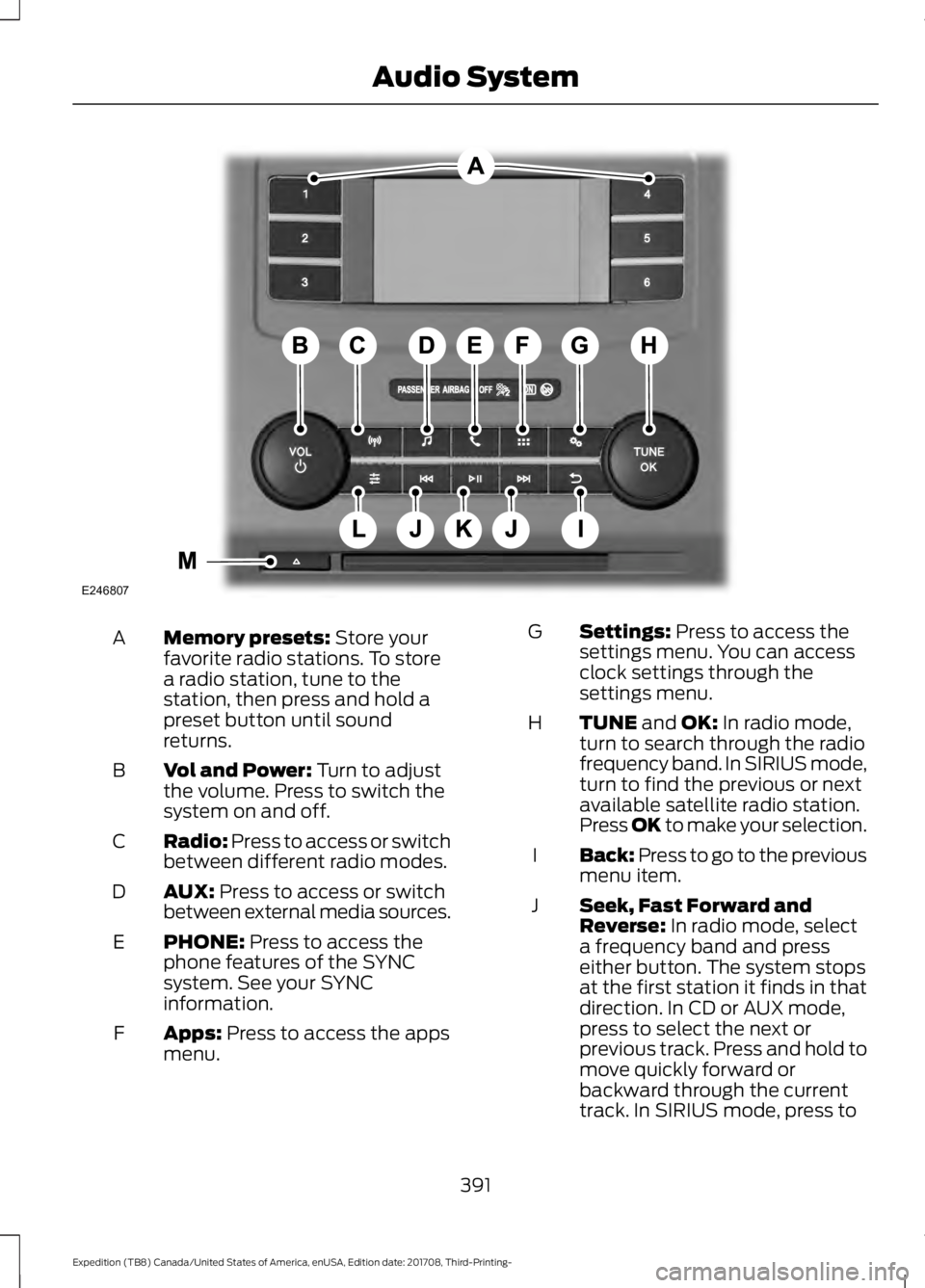
Memory presets: Store your
favorite radio stations. To store
a radio station, tune to the
station, then press and hold a
preset button until sound
returns.
A
Vol and Power:
Turn to adjust
the volume. Press to switch the
system on and off.
B
Radio:
Press to access or switch
between different radio modes.
C
AUX:
Press to access or switch
between external media sources.
D
PHONE:
Press to access the
phone features of the SYNC
system. See your SYNC
information.
E
Apps:
Press to access the apps
menu.
F Settings:
Press to access the
settings menu. You can access
clock settings through the
settings menu.
G
TUNE
and OK: In radio mode,
turn to search through the radio
frequency band. In SIRIUS mode,
turn to find the previous or next
available satellite radio station.
Press OK to make your selection.
H
Back: Press to go to the previous
menu item.
I
Seek, Fast Forward and
Reverse:
In radio mode, select
a frequency band and press
either button. The system stops
at the first station it finds in that
direction. In CD or AUX mode,
J
press to select the next or
previous track. Press and hold to
move quickly forward or
backward through the current
track. In SIRIUS mode, press to
391
Expedition (TB8) Canada/United States of America, enUSA, Edition date: 201708, Third-Printing- Audio SystemE246807
Page 396 of 571
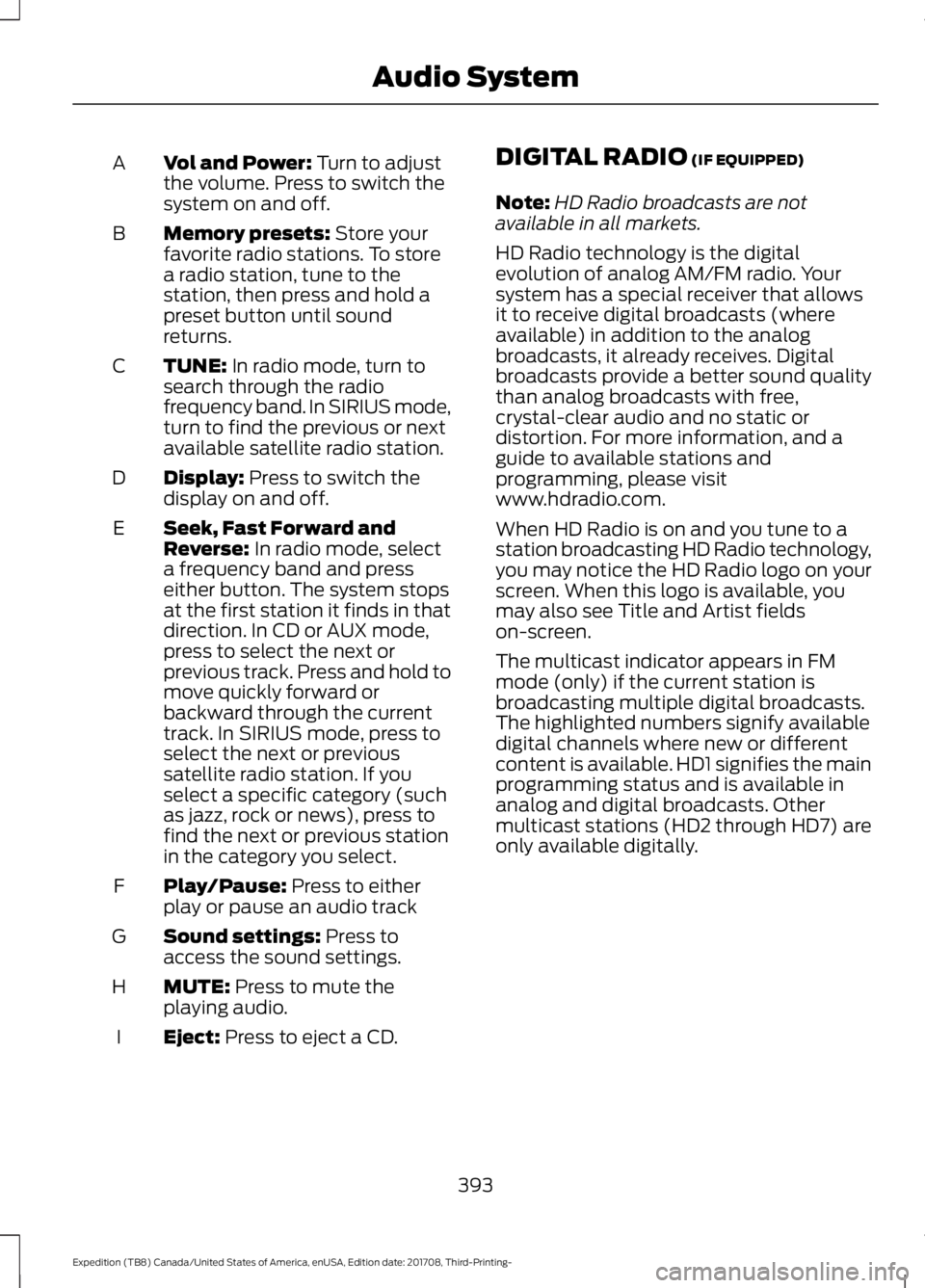
Vol and Power: Turn to adjust
the volume. Press to switch the
system on and off.
A
Memory presets:
Store your
favorite radio stations. To store
a radio station, tune to the
station, then press and hold a
preset button until sound
returns.
B
TUNE:
In radio mode, turn to
search through the radio
frequency band. In SIRIUS mode,
turn to find the previous or next
available satellite radio station.
C
Display:
Press to switch the
display on and off.
D
Seek, Fast Forward and
Reverse:
In radio mode, select
a frequency band and press
either button. The system stops
at the first station it finds in that
direction. In CD or AUX mode,
E
press to select the next or
previous track. Press and hold to
move quickly forward or
backward through the current
track. In SIRIUS mode, press to
select the next or previous
satellite radio station. If you
select a specific category (such
as jazz, rock or news), press to
find the next or previous station
in the category you select.
Play/Pause:
Press to either
play or pause an audio track
F
Sound settings:
Press to
access the sound settings.
G
MUTE:
Press to mute the
playing audio.
H
Eject:
Press to eject a CD.
I DIGITAL RADIO
(IF EQUIPPED)
Note: HD Radio broadcasts are not
available in all markets.
HD Radio technology is the digital
evolution of analog AM/FM radio. Your
system has a special receiver that allows
it to receive digital broadcasts (where
available) in addition to the analog
broadcasts, it already receives. Digital
broadcasts provide a better sound quality
than analog broadcasts with free,
crystal-clear audio and no static or
distortion. For more information, and a
guide to available stations and
programming, please visit
www.hdradio.com.
When HD Radio is on and you tune to a
station broadcasting HD Radio technology,
you may notice the HD Radio logo on your
screen. When this logo is available, you
may also see Title and Artist fields
on-screen.
The multicast indicator appears in FM
mode (only) if the current station is
broadcasting multiple digital broadcasts.
The highlighted numbers signify available
digital channels where new or different
content is available. HD1 signifies the main
programming status and is available in
analog and digital broadcasts. Other
multicast stations (HD2 through HD7) are
only available digitally.
393
Expedition (TB8) Canada/United States of America, enUSA, Edition date: 201708, Third-Printing- Audio System
Page 410 of 571
•
To allow your vehicle to provide
location information, including: GPS
and speed.
• To allow the app to send push
notifications using the vehicle display
and voice capabilities while running in
a background state. Push notifications
may be particularly useful for news or
location based apps.
Note: You only need to grant permissions
the first time you use an app with SYNC.
Note: Ford is not responsible or liable for
any damages or loss of privacy relating to
usage of an app, or dissemination of any
vehicle data that you approve Ford to
provide to an app.
Enabling SYNC Mobile Apps
In order to enable mobile apps, SYNC
requires user consent to send and receive
app authorization information and updates
using the data plan associated with the
connected device.
Data is sent to Ford in the United States
through the connected device. The
information is encrypted and includes your
VIN, SYNC module number, anonymous
usage statistics and debugging
information. Updates may take place.
Note: You must enable mobile apps for
each connected device the first time you
select a mobile app using the system.
Note: Standard data rates apply. Ford is
not responsible for any additional charges
you may receive from your service provider,
when your vehicle sends or receives data
through the connected device. This includes
any additional charges incurred due to
driving in areas when roaming out of a home
network. USING SYNC™ WITH YOUR
MEDIA PLAYER
SYNC supports digital media sources
including: iPod, Bluetooth devices, and
most USB drives. SYNC also supports
audio formats, such as MP3, WMA, WAV
and ACC.
Media Sources
The AUX or MEDIA button allows you to
view and select available media sources.
Press the
AUX or MEDIA button to view
your sources. Use the directional arrows
and OK button to select your source. You
can also use the steering wheel audio
controls.
Audio Voice Commands Press the voice button. You can
do things like play a specific song
or album, skip to the next song,
or tune to a radio station. When prompted,
say a command. See the following table
for example commands. Not all
commands may be available on your
vehicle. Command
___ List of Commands Help
Pause Play
Next Track
Previous Track AM ___FM ___
CD Player
407
Expedition (TB8) Canada/United States of America, enUSA, Edition date: 201708, Third-Printing- SYNC™E142599
Page 561 of 571

SelectShift™ Automatic
Transmission................................................... 199
Understanding the Shift Positions of your Automatic Transmission............................. 195
Automatic Transmission Fluid Check.............................................................333
Auto-Start-Stop............................................181 Disabling Auto-Start-Stop.............................. 182
Enabling Auto-Start-Stop................................ 181
Autowipers........................................................87 Autowipers Settings........................................... 88
Auxiliary Power Points................................170 110 Volt AC Power Point................................... 170
12 Volt DC Power Point..................................... 170
USB Port and Power Point Locations.........170
B
Battery See: Changing the 12V Battery..................... 335
Blind Spot Information System.............250 ........................................................................\
.......... 250
Blind Spot Information System with Trailer Tow...................................................................... 251
Switching the System On and Off...............253
System Errors...................................................... 253
Using the Blind Spot Information System.............................................................. 250
BLIS See: Blind Spot Information System.........250
Bonnet Lock See: Opening and Closing the Hood..........325
Booster Seats..................................................28 Types of Booster Seats...................................... 29
Brake Fluid Check........................................334
Brakes.................................................................211 General Information............................................ 211
Breaking-In.....................................................297
Bulb Specification Chart............................341
C
Cabin Air Filter...............................................148
Capacities and Specifications...............384 Alternative Engine Oil for Extremely Cold
Climates........................................................... 388
Specifications..................................................... 385
Cargo Nets
.....................................................266 Car Wash
See: Cleaning the Exterior.............................. 344
Catalytic Converter......................................192 On-Board Diagnostics (OBD-II)...................193
Readiness for Inspection and Maintenance
(I/M) Testing................................................... 193
Center Console
...............................................174
Changing a Bulb...........................................339 Fog Lamp Bulb................................................... 340
Front Direction Indicator Bulb......................340
Headlamp Bulb.................................................. 339
LED Bulbs.............................................................. 341
LED Direction Indicator and Side Marker Bulbs................................................................. 340
LED Headlamp Bulb......................................... 339
Rear Lamp, Brake Lamp, Rear Direction Indicator and Reverse Lamp
Bulbs................................................................. 340
Changing a Fuse
...........................................323
Fuses....................................................................... 323
Changing a Road Wheel............................373 Dissimilar Spare Wheel and Tire Assembly
Information...................................................... 373
Location of the Spare Tire and Tools.........374
Tire Change Procedure.................................... 374
Changing the 12V Battery
.........................335
Battery Management System....................... 336
Changing the Engine Air Filter................343
Changing the Wiper Blades.....................337
Checking MyKey System Status...............63 MyKey Distance.................................................... 63
Number of Admin Keys...................................... 63
Number of MyKeys.............................................. 63
Checking the Wiper Blades......................337
Childminder Mirror........................................101
Child Restraint and Seatbelt Maintenance.................................................42
Child Restraint Positioning
.........................30
Child Safety........................................................17
General Information............................................. 17
Child Safety Locks..........................................32 Left-Hand Side...................................................... 33
Right-Hand Side................................................... 33
Cleaning Leather Seats.............................348
Cleaning Products
.......................................344
Materials............................................................... 344
Cleaning the Engine
...................................346
558
Expedition (TB8) Canada/United States of America, enUSA, Edition date: 201708, Third-Printing- Index