2018 FORD ECOSPORT display
[x] Cancel search: displayPage 363 of 452

Action and DescriptionMenu Item
Activation of this feature allows you to listen to HD radio broadcasts.FM HD Radio
AM HD Radio
(Dependent oncurrent radiosource, If Avail-able)
This feature is available when FM Radio is your active media source.Activate this feature to have the system display radio text.Radio Text
RefreshAutoset Presets(AST)Selecting this option stores the six strongest stations in your currentlocation to the last preset bank of the currently tuned source.
Sirius XM (If equipped)
Action and DescriptionMenu Item
After selecting a category, seek function only stops on channels whichare inside that selected category.Set Category forSeek
Select to create a personal identification number (PIN). This allowsyou to lock or unlock channels. Your initial PIN is 1234.ParentalLockout
Select to switch on, off or delete alerts.Edit Alerts
The Electronic Serial Number can also be found on this screen. This number is necessaryto activate, modify or track your account through Sirius XM.
Navigation
You can adjust many of the Navigationpreferences by selecting the followingmenus.
359EcoSport (CBW) Canada/United States of America, Vehicles Built From: 14-08-2017, GN15-19G219-ZFB enUSA, First PrintingSYNC™ 3
Page 364 of 452

Map Preferences
Action and DescriptionMenu Item
Map Preferences
Then select any of the following:
When this option is active, the system shows 3D renderings of build-ings.3D City Model
When enabled, your vehicle’s previously traveled route displays withwhite dots.Breadcrumbs
Enable this feature to display up to 3 POI icons on the navigation map.POI IconsA rest area POI icon may display on the map regardless of this setting.
Select POIsOnce this feature is activated you can selectthe icons you want displayed by selecting:
This menu allows you to choose which incident icons you would liketo have displayed on the navigation map.Incident MapIcons
Route Preferences
Second Level Messages, Actions and DescriptionsMenu Item
Route Preferences
Then select any of the following:
Choose to have the system display your chosen route type.Preferred Route
EcoFastestShortest
Bypass route selection in destination programming. The system onlycalculates one route based on your preferred route setting.Always Use ___RouteWhen activated, the system uses your selected route type to calculateonly one route to the desired destination.
The system selects High Occupancy Vehicle or car pool lanes whenproviding route guidance.Use HOV Lanes
The system searches for and displays available parking locations asyou approach your destination.AutomaticallyFind Parking
Select a level of cost for the calculated Eco Route. The higher thesetting, the longer the time allotment is for the route.Eco TimePenalty
360EcoSport (CBW) Canada/United States of America, Vehicles Built From: 14-08-2017, GN15-19G219-ZFB enUSA, First PrintingSYNC™ 3
Page 367 of 452

Action and DescriptionMenu Item
Request Update
Grant or deny permissions to all apps at once.All Apps
Grant or deny an individual app particular permissions. App permis-sions are organized into groups. By pressing the info book icon, youcan see which signals are included in each group.
There may alsobe SYNC 3enabled appslisted underthese options.
Note:Ford is not responsible or liable forany damages or loss of privacy relating tousage of an app, or dissemination of anyvehicle data that you approve Ford toprovide to an app.
General
Access and adjust the system settings,voice features, as well as phone, navigationand wireless settings.
Menu Item
Select to have the touchscreen display in English,Spanish or French.Language
Select to display units in kilometers or miles.Distance
Select to display units in Celsius or Fahrenheit.Temperature
Select to have the system beep to confirm choicesmade through the touchscreen.Touch Panel Beep
When you activate this option, the system automatic-ally updates when you have an available Internetconnection through a Wi-Fi network or mobileconnection.
Automatic System Updates
Information pertaining to the system and its software.About SYNC
Documentation of the software license for the system.Software Licenses
Select to restore factory defaults. This erases allpersonal settings and personal data.Master Reset
Wi-Fi & Hotspot
Access SYNC Wi-Fi and Vehicle Hotspotsettings and information.
System Wi-Fi
You can access the following:
363EcoSport (CBW) Canada/United States of America, Vehicles Built From: 14-08-2017, GN15-19G219-ZFB enUSA, First PrintingSYNC™ 3
Page 368 of 452

Action and DescriptionMenu Item
Enable this option to connect to Wi-Fi for SYNC 3 vehicle softwareupdates.Wi-Fi
This provides you with a list of available Wi-Fi networks within range.AvailableNetworksClicking on a network from the list allows you to connect or disconnectfrom that network. The system may require a security code toconnect.
When you click the information button next to a network, moreinformation about the network displays such as the signal strength,connection status and security type.
The system alerts you when your vehicle is parked and a Wi-Finetwork is within range if SYNC is not already connected.Wi-Fi AvailableNotifications
Vehicle Hotspot (If Equipped)
You can access the following:
Action and DescriptionMenu Item
Allows you to turn the hotspot on and off.Wi-Fi HotspotOn/Off
Allows you to view and edit hotspot settings such as the SSID andpassword.Settings
Allows you to view your vehicle's hotspot plan and data usage.Data Usage
Allows you to manage devices connected to your hotspot.Manage Devices
Note:The Vehicle Wi-Fi Hotspot (VehicleHotspot) may be operational while ignitionis On and may remain operational while theignition is Off.
Note:Vehicle Hotspot services are providedby the vehicle network carrier, subject toyour vehicle network carrier agreement,coverage and availability.
Note:It is the account owner’sresponsibility to remove the vehicle fromthe vehicle network carrier account whenownership of the vehicle is transferred. If theowner would like to remove the vehicle fromthe account for any reason, please contactyour vehicle network carrier for moreinformation.
364EcoSport (CBW) Canada/United States of America, Vehicles Built From: 14-08-2017, GN15-19G219-ZFB enUSA, First PrintingSYNC™ 3
Page 369 of 452

Note:: Data, e.g. the Vehicle IdentificationNumber (VIN), SIM Card ID, and data planusage, is shared between Ford and thevehicle network carrier to provide theVehicle Hotspot service in accordance withyour vehicle network carrier agreement,coverage and availability, and may be usedto enable a seamless transition from an oldto new embedded modem and to confirmany updates are successfully delivered.
Note:: For your convenience data usagemay be available for monitoring underSettings but may not reflect actual orcurrent usage. The vehicle network carrieris responsible for providing informationabout your account. Please contact thevehicle network carrier for more information.
Note:: Ford may need to update operatingsystem software on your vehicle, includingsecurity updates and bug fixes, to keepconnected services current, like VehicleHotspot, without prior notice to you.
Note:If you do not have an active vehiclehotspot data plan, open your web browserand go to a website using the HTTP protocolto be automatically redirected to the vehiclenetwork carrier landing page where you canpurchase data. Websites using HTTPS willnot automatically redirect.
Ambient Lighting (If Equipped)
Tap a color once to active ambient lighting.This sets the color to the highest intensity.
You can drag the colors up and down toincrease or decrease the intensity.
To switch ambient lighting off, press theactive color once or drag the active colorall the way down to zero intensity.
Vehicle
Note:Your vehicle may not have all ofthese features.
You can select the following features toupdate their settings.
Door Keypad Code (If equipped)
Select this button to add or erase apersonal door keypad code. To add orerase a personal code, you first need toenter the five-digit factory set code. Youcan find this code on the owner's walletcard in the glove box or from yourauthorized dealer.
Camera Settings
To make adjustments using the touchscreen, select:
Action and DescriptionMessage
Camera Settings
Then select from the following:
When the reverse sensing system detects an object, it displays red,yellow and green highlights at the top of the image.Enhanced ParkAids
You can enable or disable this option using the slider.Rear CameraDelay
You can find more information on the rear-view camera system in the parking aids chapterof your owner manual.
365EcoSport (CBW) Canada/United States of America, Vehicles Built From: 14-08-2017, GN15-19G219-ZFB enUSA, First PrintingSYNC™ 3
Page 370 of 452

Onboard Modem Serial Number (ESN)
Selecting this button on the settings menu
shows you the ESN number for yoursystem. You need this number for certainregistrations such as Satellite Radio.
Display
To make adjustments using the touchscreen, select:
Action and DescriptionMenu Item
Make the screen display brighter or dimmer.Brightness
You can select:Mode
The screen automatically switches between day andnight modes based on the outside light level.Auto
The screen displays with a light background to enhancedaytime viewing.Day
The screen displays with a darker background to makenighttime viewing easier.Night
The screen goes black and does not display anything.To switch the screen back on, simply tap the screen.Off
Enable this option to automatically dim the display brightness basedon ambient lighting conditions.Auto Dim
Voice Control
You can adjust the voice control settingsby selecting the following options.
Menu Item
Enable this option to remove additional voice promptsand confirmations.Advanced Mode
Enable this option to have the system confirm a contactsname with you before making a call.Phone Confirmation
Enable this option to have the system display a list ofavailable voice commands when the voice button ispressed.
Voice Command List
366EcoSport (CBW) Canada/United States of America, Vehicles Built From: 14-08-2017, GN15-19G219-ZFB enUSA, First PrintingSYNC™ 3
Page 379 of 452

AppLink issues
Possible solution(s)Possible cause(s)Issue
Unplug the USB cable fromthe phone, wait a moment,and plug the USB cableback in to the phone. After afew seconds, the app shouldappear in SYNC 3's MobileApps Menu. If not, "ForceClose" the application andrestart it.
You may need to reset theUSB connection to SYNC 3.
My iPhone is connected, myapp is running, I restartedthe app but I still cannot findit on SYNC 3.
Increase the Bluetoothvolume of the device byusing the device's volumecontrol buttons which aremost often found on theside of the device.
The Bluetooth volume onthe phone may be low.
I have an Android phone. Ifound and started my mediaapp on SYNC 3, but there isno sound or the sound isvery low.
Force close or uninstall theapps you do not want SYNC3 to find. If the app has a"Ford SYNC" setting, disablethat setting in the app'ssettings menu on the phone.
Some Android devices havea limited number ofBluetooth ports that appscan use to connect. If youhave more AppLink apps onyour phone than the numberof available Bluetooth ports,you will not see all of yourapps listed in the SYNC 3mobile apps menu.
I can only see some of theAppLink apps running on myphone listed in the SYNC 3Mobile Apps Menu.
Voice command issues
Possible solutionPossible causeIssue
Review the cell phone voice commandsand the media voice commands at thebeginning of their respective sections.You may be using thewrong voice commands.SYNC 3 doesnot understandwhat I amsaying.
Refer to the audio display during an activevoice session to find a list of voicecommands there.
Wait for the system to prompt you beforeyou state your command.You may be speaking toosoon or at the wrongtime.
375EcoSport (CBW) Canada/United States of America, Vehicles Built From: 14-08-2017, GN15-19G219-ZFB enUSA, First PrintingSYNC™ 3
Page 380 of 452
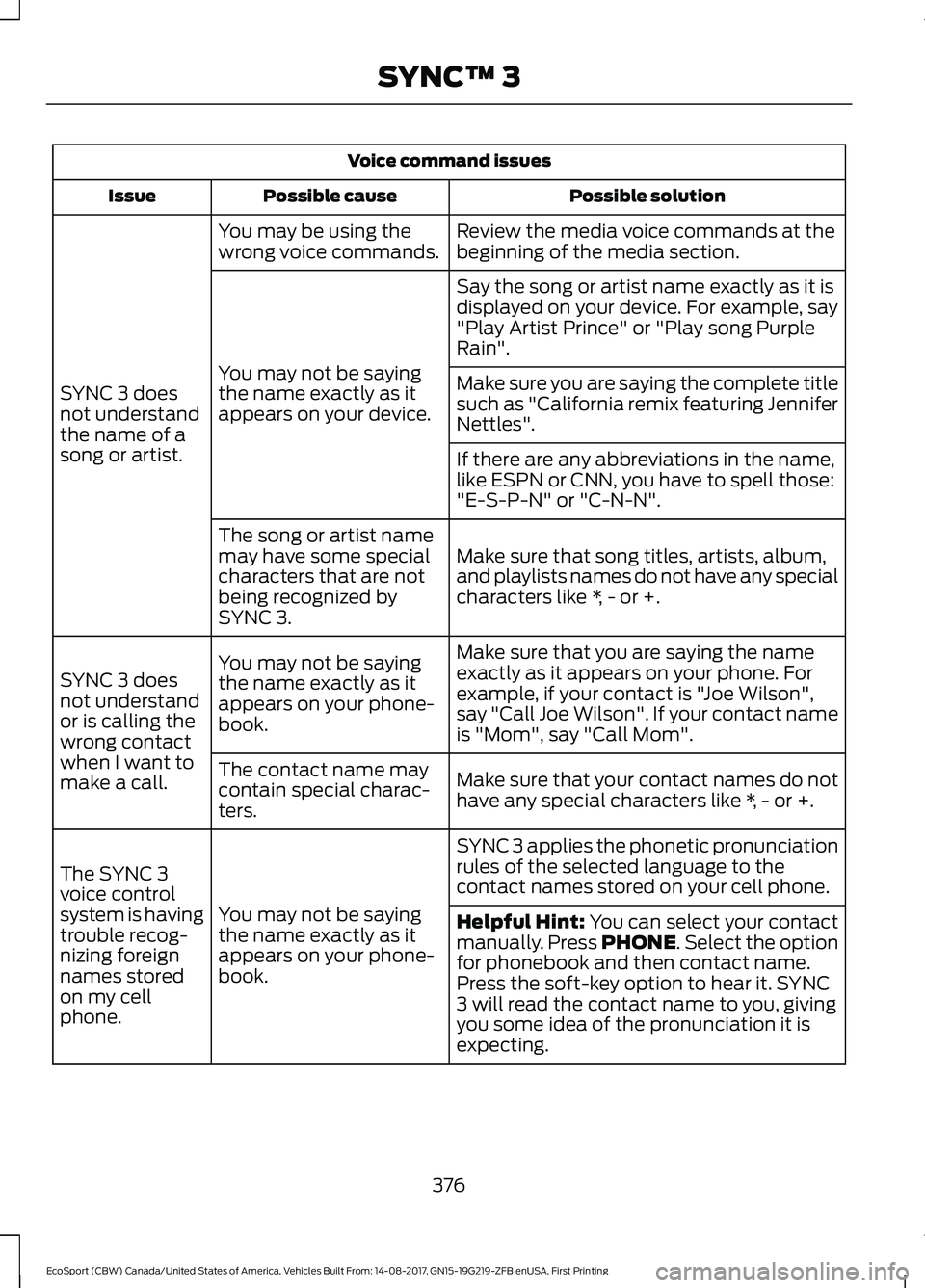
Voice command issues
Possible solutionPossible causeIssue
Review the media voice commands at thebeginning of the media section.You may be using thewrong voice commands.
SYNC 3 doesnot understandthe name of asong or artist.
Say the song or artist name exactly as it isdisplayed on your device. For example, say"Play Artist Prince" or "Play song PurpleRain".
You may not be sayingthe name exactly as itappears on your device.
Make sure you are saying the complete titlesuch as "California remix featuring JenniferNettles".
If there are any abbreviations in the name,like ESPN or CNN, you have to spell those:"E-S-P-N" or "C-N-N".
Make sure that song titles, artists, album,and playlists names do not have any specialcharacters like *, - or +.
The song or artist namemay have some specialcharacters that are notbeing recognized bySYNC 3.
Make sure that you are saying the nameexactly as it appears on your phone. Forexample, if your contact is "Joe Wilson",say "Call Joe Wilson". If your contact nameis "Mom", say "Call Mom".
You may not be sayingthe name exactly as itappears on your phone-book.
SYNC 3 doesnot understandor is calling thewrong contactwhen I want tomake a call.Make sure that your contact names do nothave any special characters like *, - or +.
The contact name maycontain special charac-ters.
SYNC 3 applies the phonetic pronunciationrules of the selected language to thecontact names stored on your cell phone.
You may not be sayingthe name exactly as itappears on your phone-book.
The SYNC 3voice controlsystem is havingtrouble recog-nizing foreignnames storedon my cellphone.
Helpful Hint: You can select your contactmanually. Press PHONE. Select the optionfor phonebook and then contact name.Press the soft-key option to hear it. SYNC3 will read the contact name to you, givingyou some idea of the pronunciation it isexpecting.
376EcoSport (CBW) Canada/United States of America, Vehicles Built From: 14-08-2017, GN15-19G219-ZFB enUSA, First PrintingSYNC™ 3