2018 FORD C-MAY HYBRID pairing phone
[x] Cancel search: pairing phonePage 388 of 475
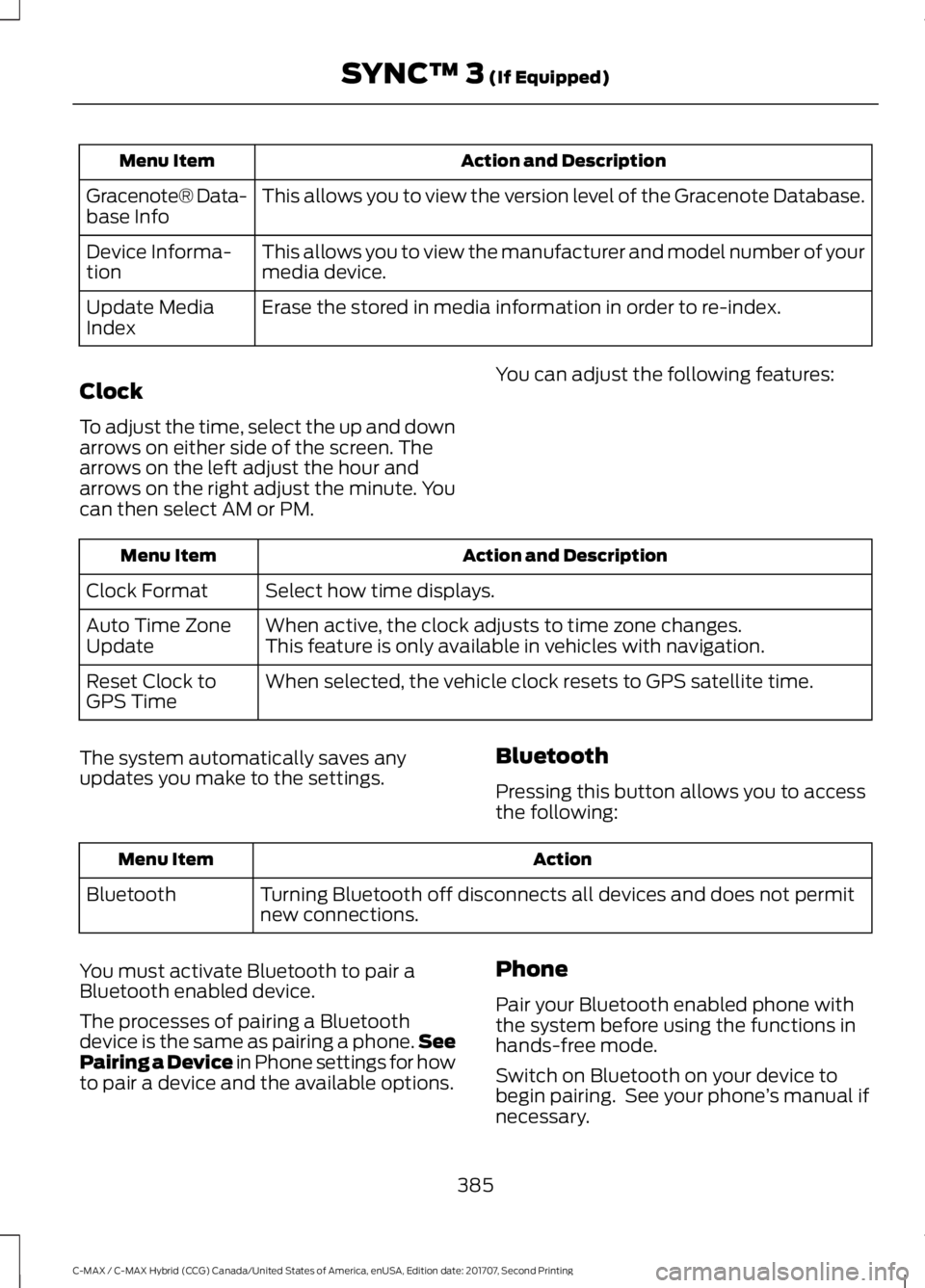
Action and Description
Menu Item
This allows you to view the version level of the Gracenote Database.
Gracenote® Data-
base Info
This allows you to view the manufacturer and model number of your
media device.
Device Informa-
tion
Erase the stored in media information in order to re-index.
Update Media
Index
Clock
To adjust the time, select the up and down
arrows on either side of the screen. The
arrows on the left adjust the hour and
arrows on the right adjust the minute. You
can then select AM or PM. You can adjust the following features: Action and Description
Menu Item
Select how time displays.
Clock Format
When active, the clock adjusts to time zone changes.
Auto Time Zone
Update This feature is only available in vehicles with navigation.
When selected, the vehicle clock resets to GPS satellite time.
Reset Clock to
GPS Time
The system automatically saves any
updates you make to the settings. Bluetooth
Pressing this button allows you to access
the following: Action
Menu Item
Turning Bluetooth off disconnects all devices and does not permit
new connections.
Bluetooth
You must activate Bluetooth to pair a
Bluetooth enabled device.
The processes of pairing a Bluetooth
device is the same as pairing a phone. See
Pairing a Device in Phone settings for how
to pair a device and the available options. Phone
Pair your Bluetooth enabled phone with
the system before using the functions in
hands-free mode.
Switch on Bluetooth on your device to
begin pairing. See your phone
’s manual if
necessary.
385
C-MAX / C-MAX Hybrid (CCG) Canada/United States of America, enUSA, Edition date: 201707, Second Printing SYNC™ 3 (If Equipped)
Page 389 of 475

To add a phone, select:
Menu Item
Add Phone
1. Follow the on-screen instructions.
2. A prompt alerts you to search for the system on your phone.
3. Select your vehicle's make and model as it displays on your phone.
4. Confirm that the six-digit number appearing on your phone matches the
six-digit number on the touchscreen.
5. The touchscreen indicates when the pairing is successful.
6. Your phone may prompt you to give the system permission to access
information. To check your phone ’s
compatibility, see your phone ’s manual
or visit the website.
Alternatively, to add a phone, select: Menu Item
Add Phone
Then select:
Discover Other Bluetooth Devices 1. Follow the on-screen instructions.
2. Select your phone's name when it
appears on the touchscreen.
3. Confirm that the six-digit number appearing on your phone matches the
six-digit number on the touchscreen.
4. The touchscreen indicates when the pairing is successful.
5. Your phone may prompt you to give the system permission to access
information. To check your phone ’s
compatibility, see your phone ’s manual
or visit the website.
Other features, such as text messaging
using Bluetooth and automatic phonebook
download, are phone-dependent features.
To check your phone ’s compatibility,
see your phone ’s manual or visit the
website: Website
owner.ford.com
www.syncmyride.ca
www.syncmaroute.ca
Once you have paired a device you can
adjust the following options. Action and Description
Menu Item
View Devices
You can then select: You can add a Bluetooth enabled device by following the steps in
the previous table.
Add a Bluetooth
Device
You can select a phone by touching the name of the phone on the screen. You then
have the following options:
Depending on the status of the device, you can select either of these
options to interact with the selected device.
Connect
386
C-MAX / C-MAX Hybrid (CCG) Canada/United States of America, enUSA, Edition date: 201707, Second Printing SYNC™ 3 (If Equipped)
Page 402 of 475

Cell phone issues
Possible solution
Possible cause
Issue
•Press the blue circle to the right of the
device named with your vehicle make
and model to enter the next menu.
• Turn Show Notifications on.
• Disconnect then reconnect your iPhone
from the SYNC 3 system to activate this
settings update.
Your iPhone is now set up to forward
incoming text messages to SYNC 3.
Repeat these steps for every other SYNC 3
vehicle that you connect. Your iPhone will
only forward incoming text messages to
SYNC 3 if the iPhone is not unlocked in the
messaging application.
Replying to text messages using SYNC 3 is
not supported by iPhone.
Text messages from WhatsApp and Face-
book Messenger are not supported.
Your cell phone must support downloading
text messages through Bluetooth to receive
incoming text messages.
This is a cell phone-
dependent feature.
Audible text
messages do
not work on my
cell phone. Because each cell phone is different, refer
to your device's manual for the specific cell
phone you are pairing. In fact, there can be
differences between cell phones due to
brand, model, service provider and software
version.
This is a cell phone limita-
tion.
399
C-MAX / C-MAX Hybrid (CCG) Canada/United States of America, enUSA, Edition date: 201707, Second Printing SYNC™ 3 (If Equipped)
Page 472 of 475

Perchlorate.........................................................11
Personal Safety System
™..........................37
How Does the Personal Safety System
Work?................................................................... 37
Phone...............................................................363 During a Phone Call.......................................... 366
Making Calls........................................................ 365
Pairing Your Cell Phone for the First Time................................................................... 363
Phone Menu........................................................ 364
Receiving Calls................................................... 366
Smartphone Connectivity.............................. 367
Text Messaging................................................... 367
Post-Crash Alert System...........................192
Power Door Locks See: Locking and Unlocking.............................. 57
Power Liftgate
.................................................63
Obstacle Detection............................................. 65
Opening and Closing the Liftgate.................. 63
Setting the Liftgate Open Height.................. 64
Stopping the Liftgate Movement.................. 64
Power Seats
.....................................................114
Power Lumbar...................................................... 116
Power Steering Fluid Check......................221
Power Windows
..............................................79
Accessory Delay................................................... 80
Bounce-Back......................................................... 79
One-Touch Down................................................. 79
One-Touch Up....................................................... 79
Window Lock......................................................... 79
Protecting the Environment........................15
R
Rear Parking Aid
............................................159
Obstacle Distance Indicator.......................... 160
Rear Seat Armrest
.........................................117
Rear Seats........................................................116 Folding the Seat Backrest ............................... 116
Unfolding the Seat Backrest........................... 116
Rear Under Floor Storage..........................175
Rear View Camera.......................................165 Using the Rear View Camera System.........165
Rear View Camera See: Rear View Camera.................................... 165
Rear Window Wiper and Washers...........72 Rear Window Washer......................................... 73Refueling..........................................................138
Capless System................................................... 139
Remote Control...............................................47 Car Finder................................................................ 49
Integrated Keyhead Transmitters .................. 47
Intelligent Access Key........................................ 48
Remote Start......................................................... 50
Replacing the Battery......................................... 48
Sounding a Panic Alarm.................................... 50
Remote Start.................................................109 Automatic Settings........................................... 109
Heated and Cooled Devices............................ 110
Last Settings......................................................... 110
Removing a Headlamp..............................226
Repairing Minor Paint Damage..............240
Replacement Parts Recommendation........................................12
Collision Repairs.................................................... 12
Scheduled Maintenance and Mechanical Repairs.................................................................. 12
Warranty on Replacement Parts..................... 12
Replacing a Lost Key or Remote Control..............................................................51
Reporting Safety Defects (Canada Only)
..............................................................199
Reporting Safety Defects (U.S. Only)
..............................................................199
Roadside Assistance..................................186 Vehicles Sold in Canada: Getting Roadside
Assistance........................................................ 187
Vehicles Sold in Canada: Roadside Assistance Program Coverage.................. 187
Vehicles Sold in Canada: Using Roadside Assistance........................................................ 187
Vehicles Sold in the United States: Getting Roadside Assistance.................................... 186
Vehicles Sold in the United States: Using Roadside Assistance.................................... 186
Roadside Emergencies
..............................186
Running-In See: Breaking-In.................................................. 183
Running Out of Fuel.....................................137 Adding Fuel From a Portable Fuel
Container.......................................................... 138
Filling a Portable Fuel Container................... 137
469
C-MAX / C-MAX Hybrid (CCG) Canada/United States of America, enUSA, Edition date: 201707, Second Printing Index
Page 474 of 475

T
Technical Specifications
See: Capacities and Specifications............270
The Better Business Bureau (BBB) Auto Line Program (U.S. Only).......................196
Tire Care..........................................................250 Glossary of Tire Terminology......................... 252
Information About Uniform Tire Quality Grading............................................................. 250
Information Contained on the Tire Sidewall............................................................ 253
Temperature A B C............................................. 251
Traction AA A B C................................................ 251
Treadwear.............................................................. 251
Tire Inflation When Punctured See: Tire Sealant and Inflator Kit.................244
Tire Pressure Monitoring System...........265 Changing Tires With a Tire Pressure
Monitoring System....................................... 266
Understanding Your Tire Pressure Monitoring System ...................................... 266
Tire Repair Kit See: Tire Sealant and Inflator Kit.................244
Tire Sealant and Inflator Kit....................244 First Stage: Inflating the Tire with Sealing
Compound and Air....................................... 246
General Information......................................... 245
Second Stage: Checking Tire Pressure........................................................... 248
Tips for Use of the Kit....................................... 245
What to Do After the Tire has Been Sealed............................................................... 248
What to Do When a Tire Is Punctured........................................................ 246
Tires See: Wheels and Tires..................................... 244
Towing a Trailer..............................................181
Towing the Vehicle on Four Wheels............................................................181
Emergency Towing.............................................. 181
Recreational Towing........................................... 181
Towing...............................................................181
Traction Control............................................156
Principle of Operation....................................... 156
Transmission Code Designation
.............273
Transmission..................................................150
Transporting the Vehicle............................192 U
Under Hood Overview
.................................213
Unique Driving Characteristics.................131
Universal Garage Door Opener
................118
HomeLink Wireless Control System............118
USB Port
.........................................................293
Using Cruise Control...................................168 Switching Cruise Control Off......................... 168
Switching Cruise Control On.......................... 168
Switching to ECO Cruise.................................. 169
Using MyKey With Remote Start Systems..........................................................55
Using Snow Chains
.....................................264
Using Stability Control...............................158
Using SYNC™ With Your Media Player
..............................................................315
Accessing Your USB Song Library................319
Bluetooth Devices and System
Settings.............................................................. 321
Connecting Your Digital Media Player to the USB Port............................................................ 315
Media Menu Features....................................... 318
Media Voice Commands................................. 316
USB 2....................................................................... 321
Voice Commands for Audio Sources..........322
Using SYNC™ With Your Phone
............298
Accessing Features through the Phone
Menu.................................................................. 303
Accessing Your Phone Settings................... 306
Bluetooth Devices............................................. 307
Making Calls........................................................ 302
Pairing a Phone for the First Time..............299
Pairing Subsequent Phones......................... 300
Phone Options during an Active Call.........302
Phone Voice Commands............................... 300
Receiving Calls................................................... 302
System Settings................................................ 308
Text Messaging.................................................. 304
Using Traction Control................................156 Switching the System Off............................... 156
System Indicator Lights and Messages.......................................................... 156
Using a Switch..................................................... 156
Using the Information Display Controls............................................................. 156
Using Voice Recognition
...........................296
Audio Voice Commands................................. 346
471
C-MAX / C-MAX Hybrid (CCG) Canada/United States of America, enUSA, Edition date: 201707, Second Printing Index