Page 373 of 614
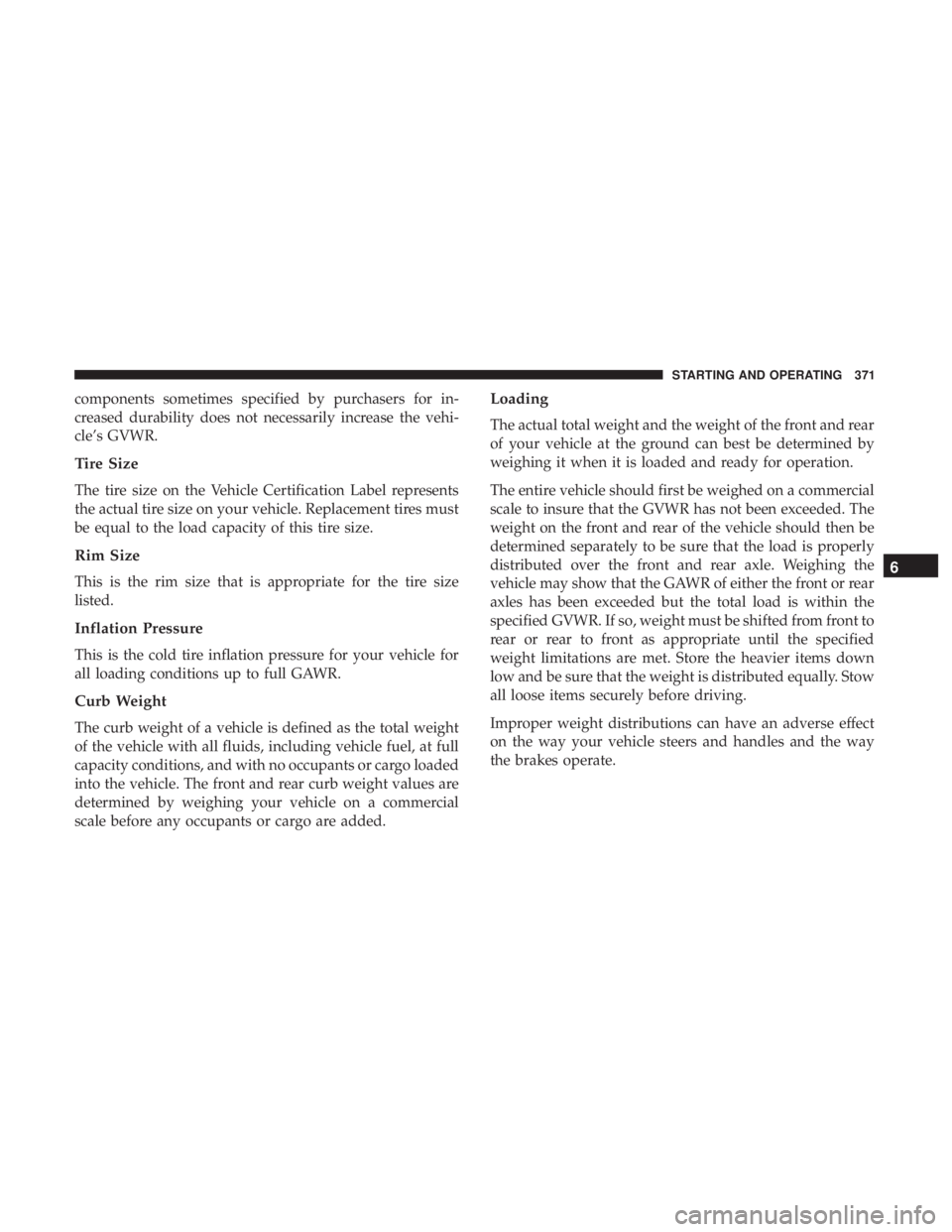
components sometimes specified by purchasers for in-
creased durability does not necessarily increase the vehi-
cle’s GVWR.
Tire Size
The tire size on the Vehicle Certification Label represents
the actual tire size on your vehicle. Replacement tires must
be equal to the load capacity of this tire size.
Rim Size
This is the rim size that is appropriate for the tire size
listed.
Inflation Pressure
This is the cold tire inflation pressure for your vehicle for
all loading conditions up to full GAWR.
Curb Weight
The curb weight of a vehicle is defined as the total weight
of the vehicle with all fluids, including vehicle fuel, at full
capacity conditions, and with no occupants or cargo loaded
into the vehicle. The front and rear curb weight values are
determined by weighing your vehicle on a commercial
scale before any occupants or cargo are added.
Loading
The actual total weight and the weight of the front and rear
of your vehicle at the ground can best be determined by
weighing it when it is loaded and ready for operation.
The entire vehicle should first be weighed on a commercial
scale to insure that the GVWR has not been exceeded. The
weight on the front and rear of the vehicle should then be
determined separately to be sure that the load is properly
distributed over the front and rear axle. Weighing the
vehicle may show that the GAWR of either the front or rear
axles has been exceeded but the total load is within the
specified GVWR. If so, weight must be shifted from front to
rear or rear to front as appropriate until the specified
weight limitations are met. Store the heavier items down
low and be sure that the weight is distributed equally. Stow
all loose items securely before driving.
Improper weight distributions can have an adverse effect
on the way your vehicle steers and handles and the way
the brakes operate.
6
STARTING AND OPERATING 371
Page 374 of 614
CAUTION!
Do not load your vehicle any heavier than the GVWR
or the maximum front and rear GAWR. If you do, parts
on your vehicle can break, or it can change the way
your vehicle handles. This could cause you to lose
control. Also overloading can shorten the life of your
vehicle.
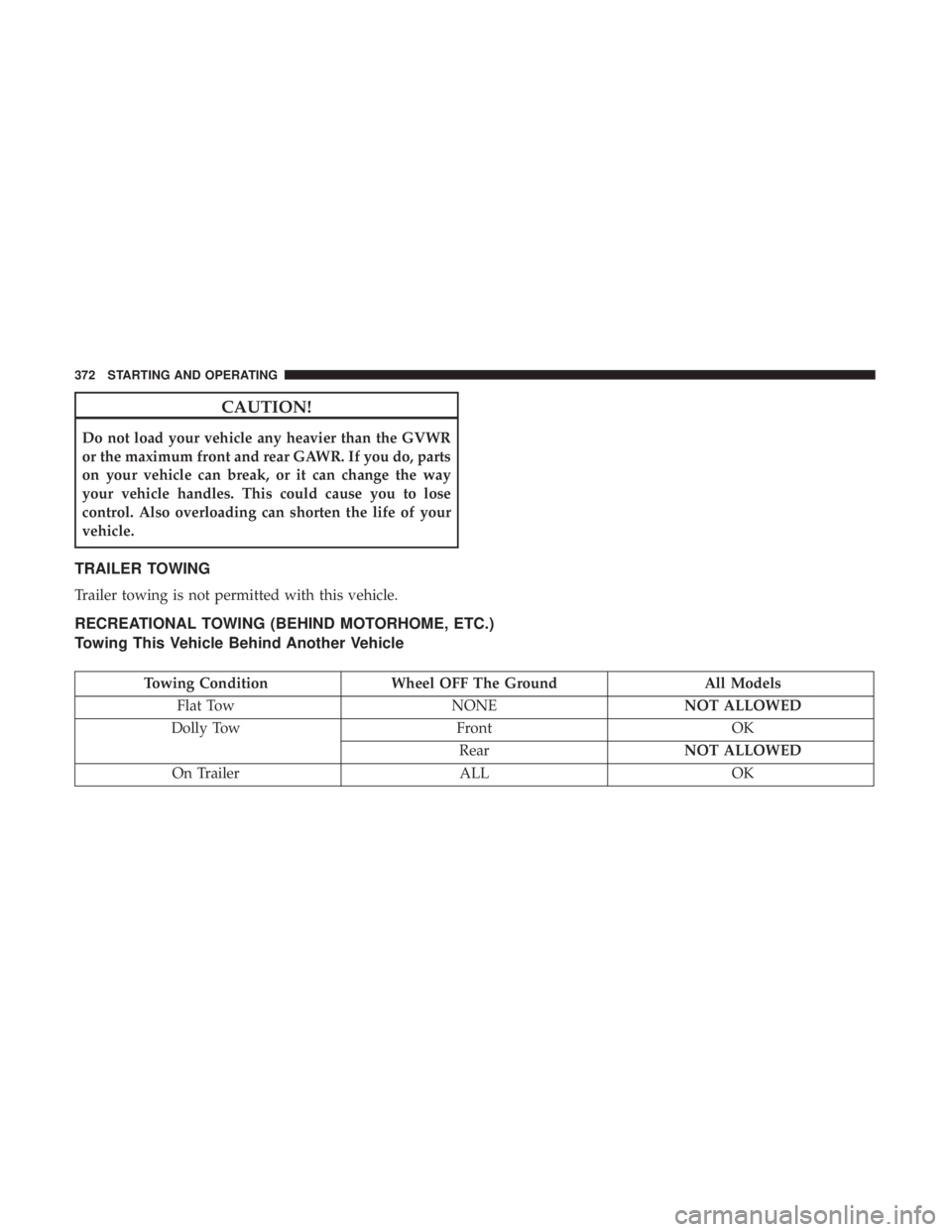
TRAILER TOWING
Trailer towing is not permitted with this vehicle.
RECREATIONAL TOWING (BEHIND MOTORHOME, ETC.)
Towing This Vehicle Behind Another Vehicle
Towing ConditionWheel OFF The Ground All Models
Flat Tow NONENOT ALLOWED
Dolly Tow FrontOK
Rear NOT ALLOWED
On Trailer ALLOK
372 STARTING AND OPERATING
Page 375 of 614
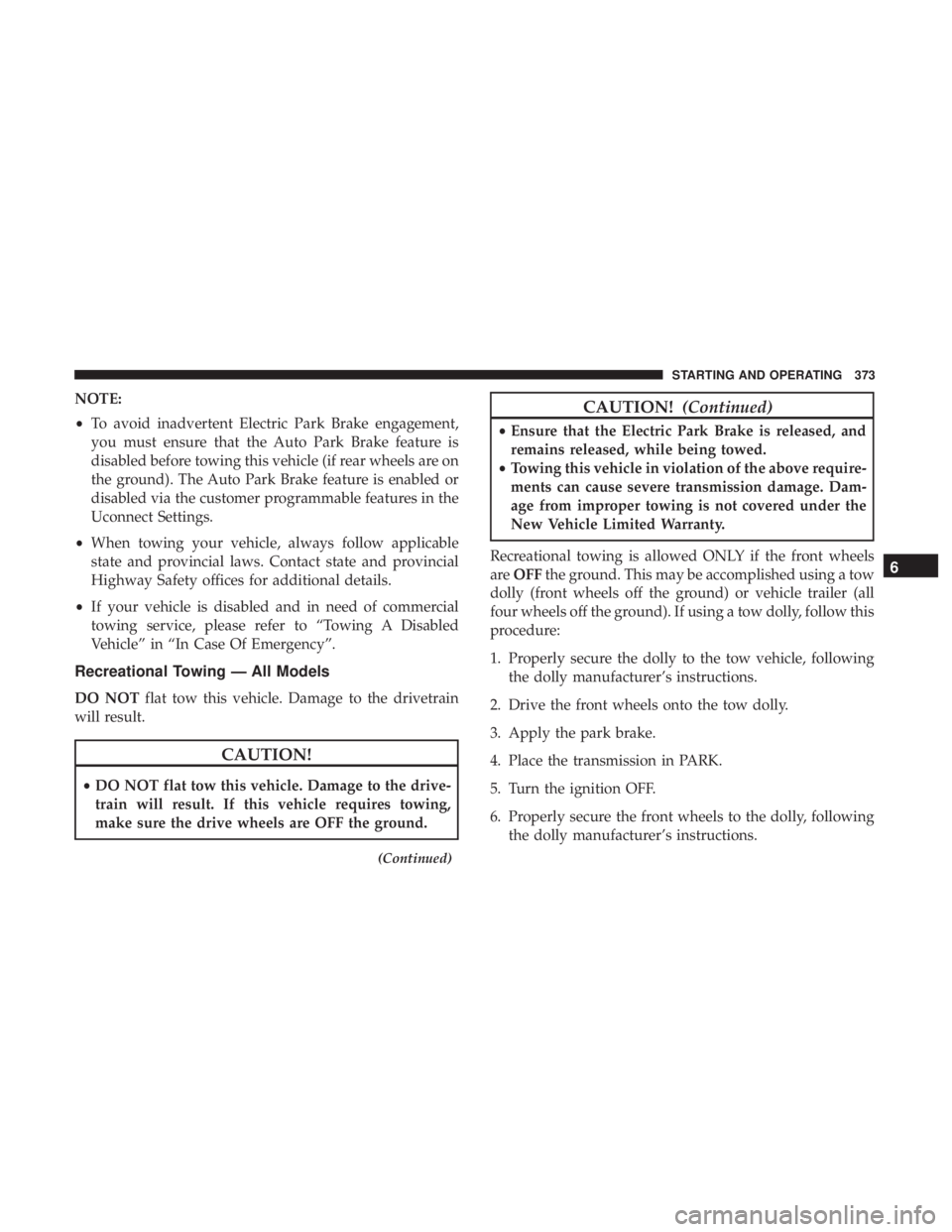
NOTE:
•To avoid inadvertent Electric Park Brake engagement,
you must ensure that the Auto Park Brake feature is
disabled before towing this vehicle (if rear wheels are on
the ground). The Auto Park Brake feature is enabled or
disabled via the customer programmable features in the
Uconnect Settings.
• When towing your vehicle, always follow applicable
state and provincial laws. Contact state and provincial
Highway Safety offices for additional details.
• If your vehicle is disabled and in need of commercial
towing service, please refer to “Towing A Disabled
Vehicle” in “In Case Of Emergency”.
Recreational Towing — All Models
DO NOT flat tow this vehicle. Damage to the drivetrain
will result.
CAUTION!
• DO NOT flat tow this vehicle. Damage to the drive-
train will result. If this vehicle requires towing,
make sure the drive wheels are OFF the ground.
(Continued)
CAUTION! (Continued)
•Ensure that the Electric Park Brake is released, and
remains released, while being towed.
• Towing this vehicle in violation of the above require-
ments can cause severe transmission damage. Dam-
age from improper towing is not covered under the
New Vehicle Limited Warranty.
Recreational towing is allowed ONLY if the front wheels
are OFF the ground. This may be accomplished using a tow
dolly (front wheels off the ground) or vehicle trailer (all
four wheels off the ground). If using a tow dolly, follow this
procedure:
1. Properly secure the dolly to the tow vehicle, following the dolly manufacturer’s instructions.
2. Drive the front wheels onto the tow dolly.
3. Apply the park brake.
4. Place the transmission in PARK.
5. Turn the ignition OFF.
6. Properly secure the front wheels to the dolly, following the dolly manufacturer’s instructions.
6
STARTING AND OPERATING 373
Page 379 of 614

IN CASE OF EMERGENCY
CONTENTS
�HAZARD WARNING FLASHERS ............378
� ASSIST AND SOS MIRROR — IF EQUIPPED . . . .378
� BULB REPLACEMENT ....................384
▫ Replacement Bulbs ..................... .384
▫ Replacing Exterior Bulbs ..................386
� FUSES ............................... .390
▫ General Information .....................391
▫ Fuse Location ........................ .391
▫ Underhood Fuses ...................... .392
� JACKING AND TIRE CHANGING ...........400
▫ Preparations For Jacking .................401
▫ Jacking Instructions .....................401
▫ Road Tire Installation ....................405 �
TIRE SERVICE KIT — IF EQUIPPED ..........407
� JUMP STARTING ....................... .418
▫ Preparations For Jump Start ...............420
▫ Jump Starting Procedure ..................421
� REFUELING IN EMERGENCY ..............422
� IF YOUR ENGINE OVERHEATS .............423
� FREEING A STUCK VEHICLE ..............424
� TOWING A DISABLED VEHICLE ............425
� ENHANCED ACCIDENT RESPONSE SYSTEM
(EARS) .............................. .428
� EVENT DATA RECORDER (EDR) ............428
7
Page 381 of 614
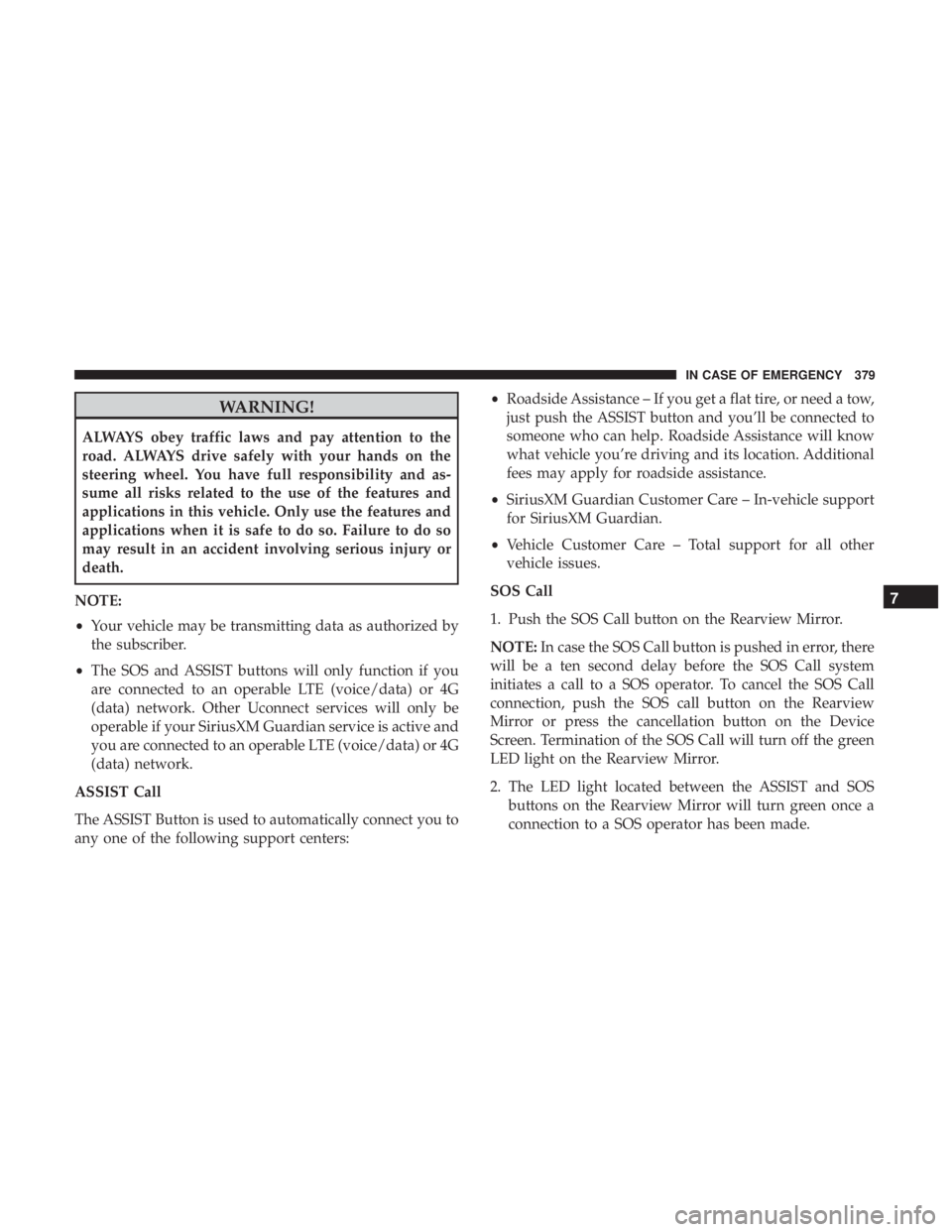
WARNING!
ALWAYS obey traffic laws and pay attention to the
road. ALWAYS drive safely with your hands on the
steering wheel. You have full responsibility and as-
sume all risks related to the use of the features and
applications in this vehicle. Only use the features and
applications when it is safe to do so. Failure to do so
may result in an accident involving serious injury or
death.
NOTE:
• Your vehicle may be transmitting data as authorized by
the subscriber.
• The SOS and ASSIST buttons will only function if you
are connected to an operable LTE (voice/data) or 4G
(data) network. Other Uconnect services will only be
operable if your SiriusXM Guardian service is active and
you are connected to an operable LTE (voice/data) or 4G
(data) network.
ASSIST Call
The ASSIST Button is used to automatically connect you to
any one of the following support centers: •
Roadside Assistance – If you get a flat tire, or need a tow,
just push the ASSIST button and you’ll be connected to
someone who can help. Roadside Assistance will know
what vehicle you’re driving and its location. Additional
fees may apply for roadside assistance.
• SiriusXM Guardian Customer Care – In-vehicle support
for SiriusXM Guardian.
• Vehicle Customer Care – Total support for all other
vehicle issues.
SOS Call
1. Push the SOS Call button on the Rearview Mirror.
NOTE: In case the SOS Call button is pushed in error, there
will be a ten second delay before the SOS Call system
initiates a call to a SOS operator. To cancel the SOS Call
connection, push the SOS call button on the Rearview
Mirror or press the cancellation button on the Device
Screen. Termination of the SOS Call will turn off the green
LED light on the Rearview Mirror.
2. The LED light located between the ASSIST and SOS buttons on the Rearview Mirror will turn green once a
connection to a SOS operator has been made.
7
IN CASE OF EMERGENCY 379
Page 400 of 614
CavityCartridge Fuse Blade FuseDescription
F77A –10 Amp Red Rear Entertainment / Me-
dia HUB / 3RD & 2ND
Row USB CHRG / Vacuum Cleaner SW Backlight /3RD Row Recliner SW
Backlight / 2ND Row Stow N Go SW Backlight /
LT&RT Sliding Door Back- light
F77B – B. Sunroof / Rain sensor /
Rear View Mirror / PIM
F78A –15 Amp Blue Transmission control Mod-
ule (TCM) / E-Shifter /ESM
F78B – Instrument Cluster
F79A –10 Amp Red ICS / Frt & Rr HVAC /
EPB Sw / SCCM
F79B – Not Used
F80 –5 Amp Tan OBCM
F81 –5 Amp Tan APM
F82 ––Not Used
F83 30 Amp Pink –Trans Oil Pump 1
398 IN CASE OF EMERGENCY
Page 407 of 614
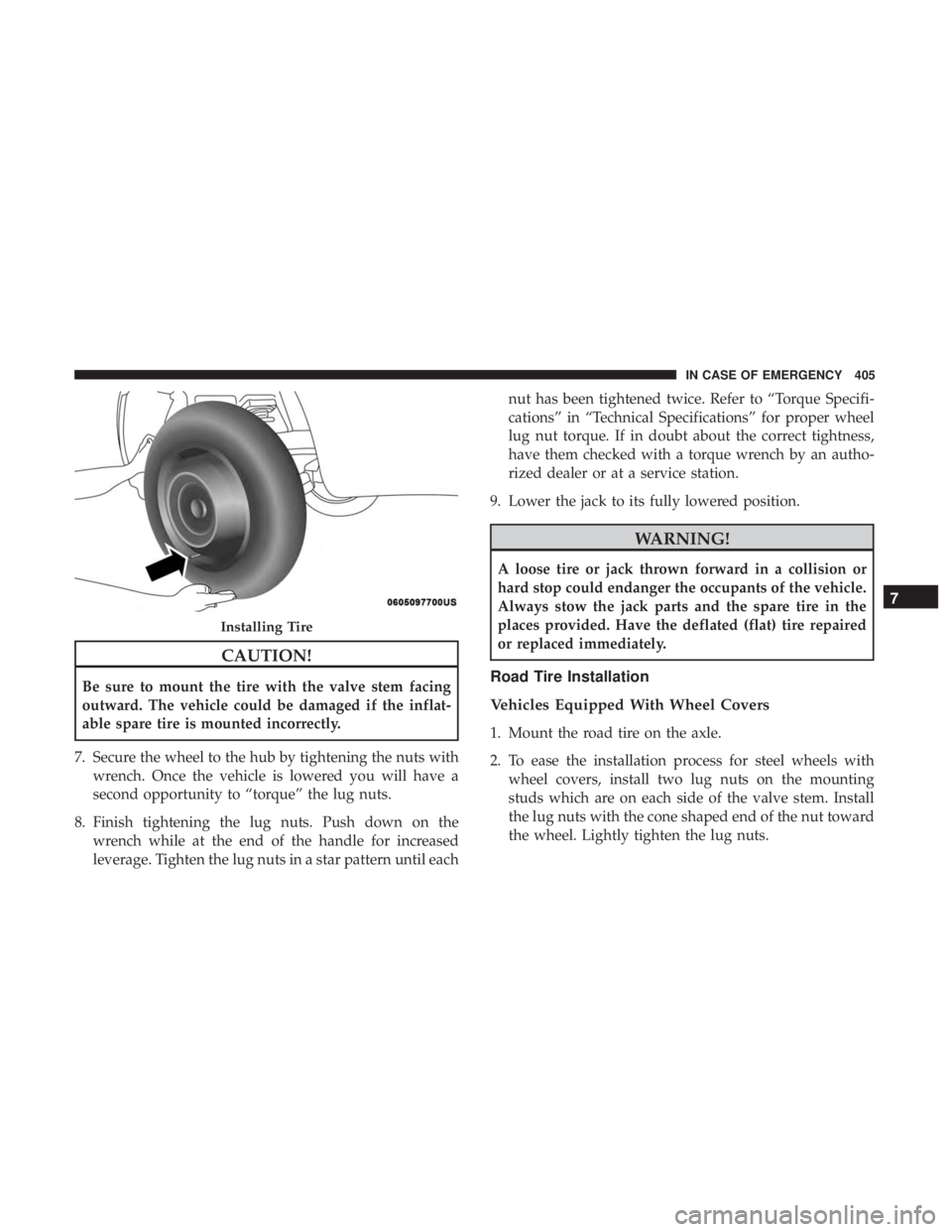
CAUTION!
Be sure to mount the tire with the valve stem facing
outward. The vehicle could be damaged if the inflat-
able spare tire is mounted incorrectly.
7. Secure the wheel to the hub by tightening the nuts with wrench. Once the vehicle is lowered you will have a
second opportunity to “torque” the lug nuts.
8. Finish tightening the lug nuts. Push down on the wrench while at the end of the handle for increased
leverage. Tighten the lug nuts in a star pattern until each nut has been tightened twice. Refer to “Torque Specifi-
cations” in “Technical Specifications” for proper wheel
lug nut torque. If in doubt about the correct tightness,
have them checked with a torque wrench by an autho-
rized dealer or at a service station.
9. Lower the jack to its fully lowered position.
WARNING!
A loose tire or jack thrown forward in a collision or
hard stop could endanger the occupants of the vehicle.
Always stow the jack parts and the spare tire in the
places provided. Have the deflated (flat) tire repaired
or replaced immediately.
Road Tire Installation
Vehicles Equipped With Wheel Covers
1. Mount the road tire on the axle.
2. To ease the installation process for steel wheels with wheel covers, install two lug nuts on the mounting
studs which are on each side of the valve stem. Install
the lug nuts with the cone shaped end of the nut toward
the wheel. Lightly tighten the lug nuts.
Installing Tire
7
IN CASE OF EMERGENCY 405
Page 408 of 614

3. Align the valve notch in the wheel cover with the valvestem on the wheel. Install the cover by hand, snapping
the cover over the two lug nuts. Do not use a hammer or
excessive force to install the cover.
4. Install the remaining lug nuts with the cone shaped end of the nut toward the wheel. Lightly tighten the lug
nuts.
WARNING!
To avoid the risk of forcing the vehicle off the jack, do
not tighten the wheel nuts fully until the vehicle has
been lowered. Failure to follow this warning may
result in serious injury.
5. Lower the vehicle to the ground by turning the jack handle counterclockwise.
6. Finish tightening the lug nuts. Push down on the wrench while at the end of the handle for increased
leverage. Tighten the lug nuts in a star pattern until each
nut has been tightened twice. Refer to “Torque Specifi-
cations” in “Technical Specifications” for proper wheel
lug nut torque. If in doubt about the correct tightness,
have them checked with a torque wrench by an autho-
rized dealer or at a service station.
7. After 25 miles (40 km) check the lug nut torque with a torque wrench to ensure that all lug nuts are properly
seated against the wheel.
Tire And Wheel Cover Or Center Cap
1 — Valve Stem 4 — Wheel Cover
2 — Valve Notch 5 — Mounting Stud
3 — Wheel Lug Nut 406 IN CASE OF EMERGENCY