2018 AUDI S3 SEDAN led
[x] Cancel search: ledPage 113 of 404

u. 00 .-< N l' N .-< 0 N > 00
A./ appears in the box. This activation is sepa
rate from the Infotainment system settings in
the climate control menu
¢ page 116.
~ Press the I BACKI button.
~ To activate the desired timer, confirm the set
ting with the control knob.
A,/ appears in the
box .
Power save mode
Power save mode is automatically switched on
when the control unit has not been operated for
more than one minute. The
LEO @¢ page 109,
fig. 115 stays on. All other displays turn off.
~ To switch power save mode on or off, press the
~ button @¢page 109, fig. 115.
Power save mode ends automatically when the
vehicle charging connector is plugged into the ve
hicle.
The high-voltage battery is charging when the
LED@ blinks.
(D Tips
-Auxiliary climate control is powered electri
cally if you select climate control using the
charging timer. This may also be used in
confined spaces such as garages.
- Using the auxiliary air conditioning while
charging can also reduce the charge level of
the high-voltage battery.
- The high-voltage battery also charges in
power save mode.
- If the charging process is in progress, it will
not be interrupted when power save mode
switches on.
- The charging process can be interrupted at
any time. Press the active button on the ve
hicle to do this
¢page 109, fig. 116.
-The climate control output while charging
depends on the capacity of the electrical
connection. Additional information on cli
mate control can be found under
¢page 116.
e-tron
Setting the charging power level
App lies to : veh icles w it h pl ug-in hybr id drive
The control unit automatically recognizes the
voltage and the available current strength. You
can set whether you would like to charge with the
full or half of the charging power.
~ Press the I OKI@ ¢ page 109, fig. 115 button
on the control unit.
~ Enter the PIN if necessary.
~ POWER and SET PIN appear in the display
field.
~ Select POWER with the arrow button @.
~ Press the I OK I button @.
~ The charging power display appears. The cur
rent set value (50% or 100%) is marked with a
frame.
~ If necessary, change the setting using the ar
row button © to move downward or upward.
~ Press the I OK I button @.
(D Tips
- If a household socket is used for the charg
ing process, the charging power level is au
tomatically set to 100%. If multiple electri
cal consumers are connected to a circuit
'
the charging power may be limited to 50%
when charging with a household socket in
order to relieve the load on the electrical in
stallation.
- If an industrial socket is used for the charg
ing process, the charging power level is au
tomatically set to 50%. To receive the maxi
mum charging power, the value must be set
to 100% .
- A selected value remains set until the power
cable is connected again.
111
Page 114 of 404

e-tron
After charging
A pplies to: ve hicles w ith p lug -in hybrid drive
Unlocking the vehicle charging connector
.,. Press the rele ase (i) ¢fig.119 .
.,. Remove the veh icle charg ing conne ctor @.
Closing the charging unit
.,. Put the cap back on the charg ing port
¢ page 110, fig. 118 .
.,. Carefully slide the cove r bac k in i ts or igina l po
si tion .
.,. Tu rn the lock to the hor izonta l position
¢ page 110, fig . 117.
Fig . 119 Rad iator g rille : unl ocking a nd re mov ing the ve hi
cle c harg ing connector
(D Note
Af ter com pleti ng the ch arging or climat e control
p rocess, t he vehicle enters a sleep mode . No d is
p lays are visib le on t he cha rging unit dur ing this
pe riod . I
f yo u drive with an o pen charg ing unit, both
the cover and the electronics installed behi nd
i t co uld be damaged .
(D Tips
Deactivating sleep mode
.,. Unl ock the ve hicle ¢ page 31 . Or
.,. Open the driver's door. Or
.,. Press t he button @¢ page 109, fig. 116 .
Status displays
App lies to: ve hicles w ith p lug- in hybrid drive
The ins trumen t clu ster will show if the charg
ing unit is open. However, please check if the
cover is locked befo re every trip after cha rg
i ng .
You can check the va rious ope rating statuses us
ing the LED @, the disp lay fie ld on the control unit
@
¢ page 109, fig. 115 and the status LE D
@¢ page 109, fig. 116 .
Charging system: control unit
Symbol Error code LED on the control
unit@
Blue Flashes
On
Green Flashes
Whi te On
330, 340 Red On
112
Mean ing
Self test
Cable inse rted correctly
Cable inserted and charg ing
Self test comple ted s uc
cessfully, cab le is not con-
Solution
nected or is connected in- Insert the cable cor rect ly .
correct ly to the vehicle
charging port.
Cable inse rted incorrectly
or fau lty. Check the
cable and insert
i t co rrectly o r rep lace t he
cab le.
1)1,,
Page 115 of 404

u. 00 .-< N l' N .-< 0 N > 00
e-tron
LED on the control
S y mbol Error code
unit
@
Meaning
Solution
Disconnect the control
200,210, unit from the power sup-
ply and have the ma lfunc-
260, 410,
Red On Er ror in the con trol unit. t ion co rrected at an a u-450, 460, thorized Audi dea ler or au-
490,500 thorized Audi Service Fa -
cility
The control unit is over-Allow the control unit to
cool down o r ope rate it in
180,190 Red On heat ing or not cooled
the specified temperatu re
enough.
range.
Have the malfunction cor-
1 30, 140,
Red On Communication to the ve- rected by an authorized 470 h
ide is malfunctioning. Audi dealer or authorized
Audi Service Fac il ity.
300,310, E rror in the househo ld in- Have the
electrical instal-
Red On lation checked by a quali-
370,390 sta llat i on .
fied electrician.
Have the electrica l instal-
480 Red Flashes F
au lt in the househo ld in-
lation up to the contro l
sta llation. unit checked
by a qualified
electric ian.
Reset the ground fa ult in-
terrupter with the
IOKI @
Ground fa ult inter rup ter
button ¢page 109,
110 Red Flashes (G
FI) triggered in the con-fig. 115. Have the electr i-
tro l unit .
cal installation checked by
a qua lified electrician if
the same display appears .
Vehicl e: charging unit
LED on the vehicle @ Meaning Solution
High-voltage battery charging Remove
the charger, put the cap
On on and close the cover on the
process is completed .
charging unit .
The high -voltage battery is charg-
Pulsating light ing or the vehicle is being air con -
Green ditioned/heated.
Blinks for approx i- Cha
rgi ng time r was prog rammed
but the charging process has not
mately one minute
started yet. The LED in the button
after leaving the veh i-
CD ¢page 109, fig. 116 a lso
cle turns on .
113
Page 116 of 404

e-tron
LED on the vehicle@ Meaning Solution
Have the power supply or power
supply system inspected. Check
No power supply was recognized the status display on the control
On even though the charging cable is unit
c> table on page 112. See an
Yellow plugged
in. authorized Audi dealer or author-
ized Audi Service Facility for ass is-
tance if necessary.
Flashes The se
lector lever in not in the P Move the selector lever into the P
position. position.
C heck if the charging connector is
inserted correct ly
c> page 110. Re-
Th e charging connector cou ld not move the charging connector and
On be correctly
locked in the vehicle insert it into the charging port
charging port . again. See an authorized Audi
dealer or author ized Audi Service
Red Facility for assistance
if necessary.
Fault in the charging system. The
high -vo ltage battery cannot be
See an author ized Audi dealer or
charged.
Flashes authorized Audi Service Fac ility for
Or: the outside temperature is too
assistance if necessary.
low. The high-voltage battery
could not be fully cha rged .
(D Tips -Current capacity of the charging connector.
The operation statuses indicated by the LED
@ on the vehicle are also displayed in the in
strument cluster display/Infotainment sys
tem.
Charging time
A pp lies to: ve hicles w ith plug -in hybr id drive
The length of the charging process using the Audi
e- tron charging system can vary based on the fol
lowing factors:
- Sockets be ing used (household or industr ial
sockets).
- System voltage and current strength specific to
a country.
- The value set for the charg ing power leve l on
the control unit (50% o r 100%).
- Fluctuations in the system voltage .
- Temperature outside the vehicle.
- Temperature of the high-voltage battery .
- Adjustments to the climate control inside the
vehicle.
114
- Ignition is on/off .
Example charging times
Connection Charging time at
100% charge
Household socket approximately 10
(100 V, 10 A) hours
H ouseho ld socket approximately 8.2
(110 V, 10 A)
hours
H ousehold socket approx imately 5.2
(220 V, 8 A) hours
Household socket approximately 3
.8
(230 V, 10 A) hours
I ndustria l socket (200 V, approximately 2.3
16 A) hours
Industrial socket (220 V, approximately 2.3 16 A) hours
I ndustria l socket (230 V, approximately 2.3
16 A) hours
I ndustria l socket (240 V, approximately 2.3
16 A) hours
Page 120 of 404

Trail er to wing
Trailer towing
Driving with a trailer
General information
Your veh icle is primari ly intended for transport
ing peop le and luggage. Howeve r, if you dr ive
with a tra iler , follow the techn ica l requirements ,
the operation and driving tips, and the lega l reg
ulations.
Dr iving w ith a trailer affects the vehicle 's fuel
consumpt ion, performance and wear. It a lso re
quires higher concentration from the driver .
A WARNING
Do not transport any people in a trailer due to
the risk of fatal injury .
Technical requirements
Certain requirements must be met when towing
a trailer.
Trailer hitch
Only use a trailer hitch with a removab le ball
h itch mount and ball h itch. The tra ile r hitc h must
be pe rm it t ed for the vehicle, the tra iler and the
permitted tota l weight of the trailer being
pu lled . Above all, it must be secure ly and safe ly
attached to the vehicle trailer.
Never mo unt a t rai ler hitch on the bumper. The
trai ler hitc h must be mounted in a way that does
not impair the function of the bumper. Do not
make any changes to the exhaust system and the
brake system.
Check regu larly if the trai ler hitc h is securely
mounted . A lways follow the instructions given by
the trai ler hitch manufacturer .
Trailer brakes
If t he tra ile r has its own bra ke system, then fol
low the manufacturer specifica tions. Howeve r,
the brake system on the trai ler must never be
connected to the vehicle brake system.
118
Engine cooling system
D riving w ith a tra ile r means a higher load on t he
engine and the cooling sys tem. The coo ling sys
tem must be designed for additiona l load and
contain enoug h
coolant ¢@ .
@ Note
Longer incl ines cannot be driven wi tho ut a
suitab le cooling system, especia lly if the out
side temperatures are high . ot herwise, this
i ncreases the risk of eng ine damage.
Operating instructions
Several things must be noted when towing a
trailer.
Towing capacity
Yo ur vehicle can only be ope ra ted with class 1 or
class 2 trai le rs.
Load distribution
Poor cargo load and distr ib ution can negatively
i mpact vehicle handling . T o have the lowest im
pact as poss ible, load the tra ile r according to
t h ese cr ite ria :
- Store objects preferably in the vehicle luggage
compartment . The vehicle should a lways carry
the heaviest poss ib le load and the trailer
should have t he lig htest poss ible load .
- Dist ribute the load in the t railer so that the
heavy objects a re as close to the axle as poss i
ble.
- Secu re objects from s lid ing o ut of place.
- Ut il ize the maximum permitted tongue we ight
if poss ible .
Tire s
Set the tire pressure on your vehicle for a "full
load"; see the tire pressure
st icker ¢ page 341.
If necessary, also adjust the t ire pressure on the
trailer acco rding to the manufactu rer's recom
mendat ion.
Winter tires should be mounted on the vehicle and on the trailer during w inter temperatures .
Page 125 of 404

u. 00 .-< N l' N .-< 0 N > 00
Lap statistics
Applies to: vehicles with lap timer
Displaying lap statistics
You can d isplay the number of laps d riven, the
fastest
l ap "+ ", the s lowest lap "- ", and the ave r
age time
" 0 " in the inst rument cluste r.
.,. Applies to: vehicles with analog instrument
cluster: select
Statistic s in the menu using the
mult ifunction steering w heel.
.,. Applies to: vehicles with Audi virtual cockpit: on
the m ult if u nct io n steer ing whee l, select: left
contro l bu tton
> Lap sta ti stic s o r Stati stics.
.. T urn the thumbwhee l down or up to disp lay the
individ ua l lap times.
.. To return to the lap timing that was begun,
press the left thumbwheel.
Res etting lap statistics
Applies to: vehicles with Audi virtual cockpit
.. On the multifunction steering whee l, select:
the right contro l button
> Re set stati stic s.
(D Tips
-The lap statistics lis t the lap times for t he
l ast 30 laps.
- Applies to: vehicles with Audi virtual cock
pit: the fastest and slowest lap times from
u p to 99 timed laps will be disp layed .
Audi adaptive cruise
control
Description
Applies to: vehicles with Audi adaptive cruise control
)
F ig . 122 De tect ion range
A ss istance systems
T he adaptive cruise cont rol system is a combina
tion of speed and distance regu lation.
It assists
the driver by both regu lating the speed and
maintain ing a d istance to the vehicle driv ing
ahead, w ith in the limits of the system. If the sys
tem detects a vehicle driving ahead, the adaptive cruise control can brake and accelerate your vehi
cle . T his increases d riving comfort during long
trips o n highways and in stop-and-go traffic.
What can adap tiv e crui se con trol do ?
The adaptive cru ise control sys tem uses radar .
The radar is subject to designated system limits
¢ page 124 .
On open roads with no traffic, it functions like a
cruise contro l system . The stored speed is main
ta ined . When approaching a vehicle ahead and
the system detects it, the adapt ive cruise control
system automat ically brakes to match that ob
ject's speed and t hen maintains the stored d is
t a nce. As soon as t he sys tem does not de tec t a
vehicle driving ahead, adaptive cruise cont ro l ac
ce lerates up to the stored speed .
Within the lim its of t he sys tem, adapt ive cru ise
contro l can brake in stop -and-go t raff ic until t he
vehicle is s tat iona ry and then begin driving again
under certain conditions ¢
page 12 7, Driving in
stop-ond-go traffic .
Which functions can be controlled?
When you switc h adap tive cr uise control o n, you
can set the cur rent speed as the "contro l speed"
¢ page 12 5, Switching on/off .
When driving, yo u can stop cru ise cont rol
¢ page 127 or change the speed ¢page 126 at
any t ime .
You can also set the distance to the vehicle ahead and set the adaptive c ruise cont rol d riving pro
gr am
~ page 128.
123
Page 127 of 404
LL co .... N
" N .... 0 N > co
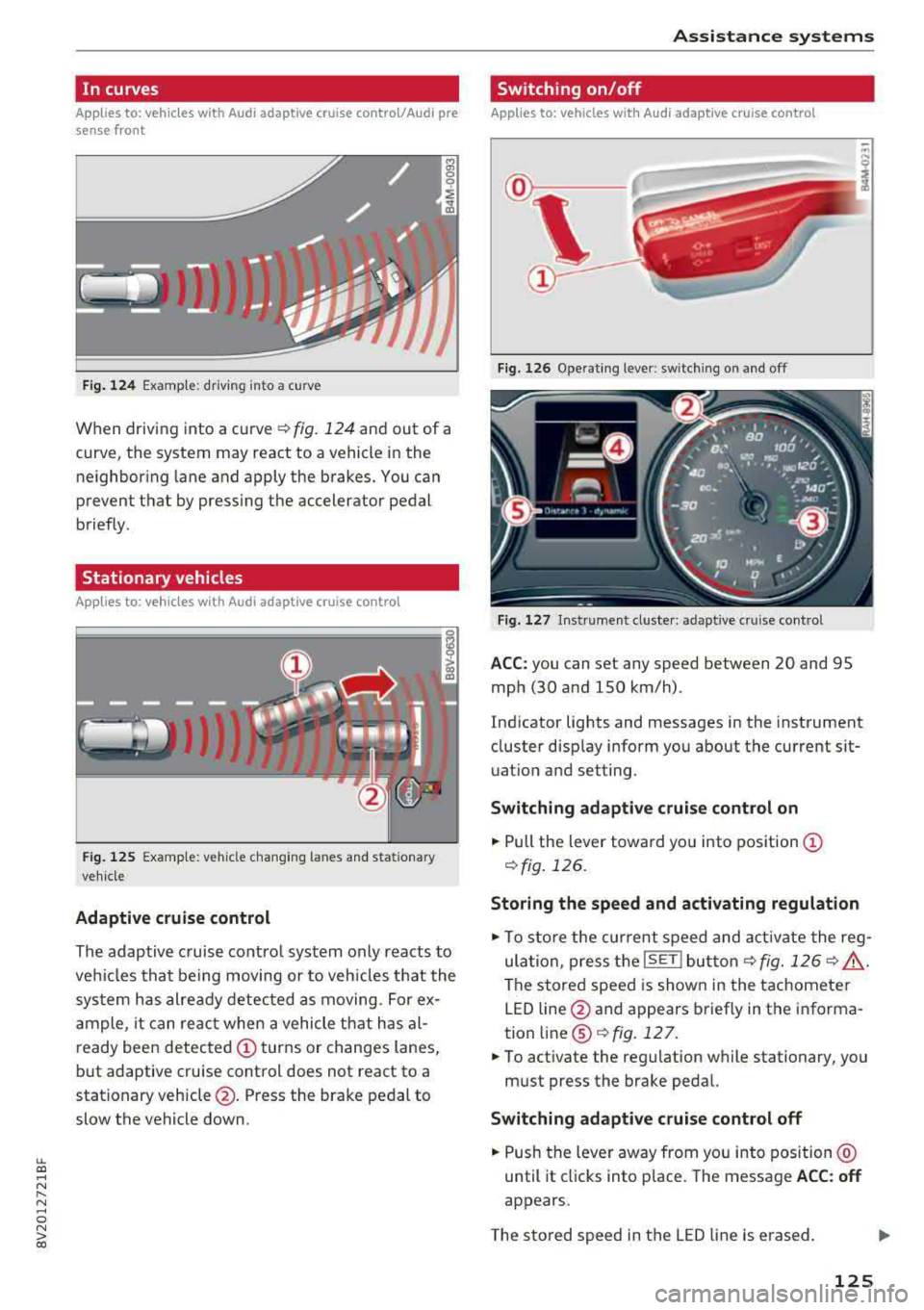
In curves
Applies to: vehicles with Audi adaptive cruise control/Audi pre sense front
Fig. 124 Examp le: driving into a curve
When driving into a curve ¢ fig. 124 and out of a
curve, the system may react to a vehicle in the ne ighboring lane and apply the brakes. You can
prevent that by pressing the accelerator pedal
briefly .
Stationary vehicles
Applies to: vehicles with Audi adaptive cruise control
J))
Fig . 12 5 Example: vehicle c hang ing lanes a nd statio nary
ve hicle
Adaptive cruise control
The adaptive c ruise contro l system only reacts to
ve hicles that be ing moving or to veh icles that the
sys tem has alre ady detected as moving. For ex
a mple, it can reac t when a vehicle that has al
ready been detected
CD turns or changes lanes,
but adaptive cruise control does not react to a
stationary vehicle @. Press the brake pedal to
slow the vehicle down.
A ssi st a nce systems
Switching on/off
Applies to: vehicles with Audi adaptive cruise control
Fig. 126 Ope rat ing lever: switch ing on and off
Fig . 1 27 In strume nt clus te r: adaptive cruise control
A CC: you can set any speed between 20 and 95
mph (30 and 150 km/h) .
Ind icator lights and messages in the instrument
cluster disp lay inform you about the current sit
uatio n and setting.
Switching adaptive crui se control on
"' Pull the lever towa rd yo u into pos ition CD
¢fig . 126.
Storing the speed and activating regulation
"'To store the cur rent speed and act ivate the reg
ula tion, press the
ISE TI but ton¢ fig. 126 ¢ .&_ .
The stored speed is show n in the tachometer
LED line @and appears briefly in the informa
tion
line @¢ fig. 127 .
"'To act ivate the reg ulation while stationary, you
must press the brake pedal.
Swi tching adaptive cruise control off
"' Push the lever away from you into position @
until it cl icks into place. The message
ACC : off
appears.
T he s tored speed in the LED line is erased.
125
Page 128 of 404

Ass is tance sy stem s
@Indicator lights
Ill-Adaptive cruise control is switched on . No
veh icles are detected ahead . The stored speed is
maintained.
• -A vehicle driving ahead was detected. The
adapt ive cruise control system regulates the
speed and d istance to the vehicle ahead and
brakes/accelerates automatically.
(-) -Adaptive cruise control is switched on. Ave
h icle was detected ahead . Yo ur vehicle remains
stopped and w ill not start driv ing automat ica lly .
• -The automatic braking is not enough to
maintain a sufficient distance to a vehicle dr iv ing
ahead . You must intervene
r:::;, page 129, Driver
intervention request .
© Instrument clu ster di splay
If adaptive cruise contro l is not shown in the in
strument cluster display, you can call i t up using
the multifunction steering wheel buttons
r:::;, page 13 .
Based on the graphics in the d isp lay, you can de
termine if the system is mainta ining a distance to
a vehicle ahead and what that distance to this ve
h icle is:
No vehicle -no vehicle was detected driving
ahead.
Sil ver vehicle -a vehicle was detected driving
ahead.
Red vehicle -request for driver intervention
r:::;, page 129.
The five distance bar s on the gauge@ represent
the set d istance (refer
to r:::;, page 128 for infor
mat io n on how to change the distance). If yo u
fa ll below the se lected distance, the distance
bars become red from the bottom upward.
A WARNING
If you press the ISE TI b utton when driving at
speeds below 20 mph (30 km/h), the vehicle
accelerates automat ica lly up to 20 mph (30
km/h), which is the m inimum speed that can
be set.
126
@ Tips
- If you switch the ignition or the adaptive
cruise control system off, the set speed is
erased for safety reasons.
- The electronic stabilization control (ESC)
and the anti-slip-regulation (ASR) are auto
matically switc hed on when the adaptive
cruise control is switched on.
Changing the speed
Applies to: vehicles with Audi adaptive cruise control
0
f
I
0
Fig . 12 8 Ope rat ing leve r: chang ing the speed
.. To increase or decrease the speed in incre
ments,
tap the lever in the 0 10 direction.
,... ... ,...
i
.. To increase or decrease the speed qu ick ly, hold
the lever toward 0 10 until the red LED @
r:::;,page 125, fig . 127 reaches the desired
speed.
You can also preselect the speed when adapt ive
c ruise control is not active by moving the lever in
the des ired direction
0 10 . Act ivate the prev i
ous ly selected speed by pulling the lever into po
s ition
(D r:::;, page 125, fig. 126.
After each change, the new stored speed appea rs
br iefly in the status l ine
r:::;, page 125, fig . 127@.
When adaptive cru ise cont rol is act ive , the flJ or
• ind icator light turns o n, and when adaptive
c ruise contro l is not a ctive, the
IIJ ind icator light
turns on . In the Audi virtua l cockpit*, the
II indi
cator light turns o n instead .