2018 AUDI Q7 rear
[x] Cancel search: rearPage 54 of 398

Lights and Vision
A WARNING
For safety reasons, the windshield wiper
blades should be replaced once or twice each
year.
@ Note
- Only fold the windshield wipers away when they are in the service position. Otherwise,
you risk damaging the paint on the hood or
the windshield w iper motor .
- You should not move your vehicle or operate
the w indshield wiper lever when the wiper
arms are folded away from the windshield.
The windshield wipe rs would move back in
to their original position and could damage
the hood and windshield.
- To reduce the risk of damage to the wiper
system, always loosen blades which are fro
zen to the windshield before operating the
wipers.
- To reduce the risk of damage to the wiper
blades, do not use gasoline, kerosene, paint
thinner, or other so lvents on or near the
wiper blades.
- To reduce the risk of damage to the wiper
arms or other components, do not attempt
to move the wipers by hand.
(D Tips
- You can also use the service position, for ex
ample, if you want to protect the windshield
from icing by using a cover.
- You cannot activate the service position
when the hood is open.
Replacing rear wiper blade
F ig. 47 Rear window w iper : install ing t he wiper blad e
52
Removing the wiper blade
.,. Fold the wiper arm away from the rear window.
.,. Remove the wiper blade from its holder .
Installing the wiper blade
.,. Press the wiper blade mount into the retainer .
.,. Fold the window w iper arm back onto the rear
w indow.
6 WARNING
For safety reasons , the windshield wiper
blades should be replaced once or twice each
year.
Digital compass
Switching the compass on and off
App lies to: vehicles with digital compass
Fig. 48 Rearview mirror: d ig ital compass is sw itched on
.,. To turn the compass on or off, press the button
@ until the compass in the mirror appears or
disappears.
The digital compass only works when the ignition is turned on. The directions are indicated with ab
breviations:
N (north), NE (northeast), E (east),
SE (southeast), S (south), SW (southwest), W
(west), NW (northwest) .
(0 Tips
To prevent inaccurate compass readings, do
not bring any remote controls, electrical devi
ces or metallic objects near the mirror .
Page 55 of 398

a co ...... N r--. N ...... 0
0
:E '
Adjusting the magnetic zone
A pplies to: ve hicles with d ig ital compass
The magnetic zone must be adjusted correctly for the compass to read accurately.
Fig . 49 Magnetic zone map
• Press and hold the button @ Q page 52, fig. 48
unt il the number of the selected magnetic zone
appea rs in the rearview mir ror .
• Press t he b utton @repeatedly to sele ct the
correc t magnetic zone . The sele ct ion mode
tu rns off after a few seconds .
Calibrating the compass
Appl ies to: ve hicles w ith d ig ital compass
I f the display is in corre ct or inaccurate, the com
pass mus t be recalibrated .
• Press and hold the button @ until a C appears
in the rearv iew mirror.
• Drive in a c ircle at about 6 mph ( 10 km/h) unti l
a d irec tion is disp laye d in the in ter ior rearview
mir ror.
A WARNING
To reduce the risk to yourse lf a nd o ther driv
ers, calib ra te the compass in an area where
the re is no t raffic .
.
53
Page 56 of 398

Seats and stor age
Seats and storage
General information
A WARNING
See c> page 252, Driving safety for important
information, tips, suggestions and warnings
that you should read and follow for your own
safety and the safety of yo ur passengers .
Front seats
Power seat adjustment
Fig. SO Front seat : adjust ing the seat (vers ion 8)
@ -Moving the seat fo rward/back: press the but
ton fo rward/back.
@ -Moving the seat up/down: press the button
up/down. To adjust the front seat cush ion, press
the front button up/down. To adjust the rear seat
cushion, press the rear button up/down .
@ -Adjusting the backrest angle: press the but
ton fo rwa rd/back.
© - Switching the massage function* on/off
¢ fig. 50. Select the type of massage w ith the
m ultifunction button*
c> page 54 .
CD-lumbar support or mult ifunction button*
¢ page 54. To adjust the lumbar support, press
the button in the applicable location .
A WARNING
-The power front seats can also be adjusted
when the ign ition is switched off. To reduce
the risk of injury, chi ld ren should never be
le ft unattended in the vehicle for this rea
son .
54
-To reduce the risk of an accident, only adjust
the dr iver's seat when the vehicle is station
ary.
- Exercise caution when adjusting the seat
he ight. Unsupervised or careless seat ad
justment can pinch fingers or hands, which
increases the risk of injury.
- The front seat backrests must not be re
clined too far back when driving, because
this impa irs the effect iveness of the safety
be lts and airbag system, which increases
the risk of inj ury.
Multifunction button
App lies to : vehicles wi th mu lt ifunct ion b utto n
You can adjust the massage function, lumbar
support, side bolsters and upper thigh support
using the multifunction button.
Fig. 51 Infotainment syste m: seat settings
Ope rating
.,. If you turn the mult ifunct ion b utton CD
¢ page 54, fig. 50 to the left or to the r ight,
the poss ible seat settings @are shown in the
Infota inment system
c> fig . 51 .
.,. To select a seat sett ing, turn the multifunction
button
CD in the cor respondi ng d irection unti l
the desired seat setting is outlined in red .
.,. The arrows @ rep resent the possib le adjust
ments. For example, to lower the lumba r sup
port, press the multifunction button
CD down .
The corresponding arrow © lights up.
The following seat settings @are poss ible:
Ma ssa ge fun ction * -se lect the Wave , Pul se ,
Stretch , Lumbar , Shoulder
massage type or Off.
You can adjus t the intensity of each massage
Page 57 of 398

a co ...... N r--. N ...... 0
0
:E '
fig. 51 .
Lumbar support -yo u can adjust the lumbar sup
port up/down and to be stronger/weaker.
Side bol ster s* -you can increase/decrease the
lateral support in the seat using the s ide bo lsters
on the seat surface and the backrest.
Upp er thigh support * -you can increase/de
crease the upper th igh support.
(D Tips
-The massage function switches off auto
matically after approximately 10 minutes.
- The air in the side bolsters* is released as
soon as the driver's door opens. This makes
i s possible to enter and exit the vehicle
more comfortab ly. As soon as you start driv
ing the veh icle, the s ide bo lsters fill.
Center armrest
There is a storage compartment under the arm
rest.
F ig . 52 Comfort center armrest between the driver 's sea t
and front passenge r's seat
'" To adjust the angle, raise the armrest from the
sta rt ing pos ition notch by notch.
'"T o bri ng the armrest back into the starting po
s it ion, ra ise it out of the top notch and fold it
back down.
The armrest can be moved forwa rd/back sepa
rately for the dr iver/front passenge r.
S eats and storag e
Rear seats
Adjusting the seats (second row seats)
The forward/back position" of the seat surface
and the angle of the backrest can be adjusted .
Fig . 53 Second row seats: adjusting the backrest ang le
...... _ .. _ __ ---::.._ ..
·-·-----
~ M 0
0
~ ., m
Fig . 54 Second row seats: adjusting the forward/back pos i
tion
Ad ju sting the angle of th e outer back rest
'" Pull the lever upward and push the backrest
back to the desired position ¢
fig. 53. Release
the lever .
'" Pull the handle upward so that the backrest will
tilt forward. Re lease the lever and push the
backrest back to p ut the back rest in its basic
position.
Ad justin g the angle of the cent er bac krest
'" Pull the release strap and push the backrest
back to the des ired position
¢ page 63,
fig. 70.
Release the st rap.
Ad ju sting fo rward and backward*
'" Pull the handle up and slide the seat forward or
back ¢
fig. 54 .
'" Release the handle and cont inue slid ing the
seat unt il it locks in place.
55
Page 58 of 398

Seats and storage
A WARNING
-To reduce the risk of an accident, the seat
can only be adjusted when the vehicle is sta
tionary.
- Be careful when adjusting the seat. Adjust
ing the seat without paying attention can
pinch fingers or limbs, which increases the
risk of injury.
- Always pull forward on the backrest to make
sure it is check if it is correctly locked in
place.
Entry/exit assistance (second row seats)
Applies to: ve hicles with entry ass istance
Entry/exit assistance creates easier access to the
third-row seating*.
•
Fig. 55 Second-row seating: folding th e seat down
Fig. 56 Second-row seating: folding th e seat upright
To be able to enter and exit, you must fold the
backrest on the second row seat down, and then
fold the seat upward.
Folding the second row seat backrest down
.,. Pull the lever upward ~ page 55, fig. 53. Or
.,. From the third row seat*, pull the release strap
on the seat in front -arrow-
r:=;, fig. 55 .
.,. The backrest folds down by itself.
56
Folding the second row seat upward
.,. Pull the seat up by the lever (I) until it is folded
upward
~ fig. 56.
If the second row seats are not folded down and
locked into the floor when you begin to drive,
then thE'
d indicator light turns on in the instru
ment cluster display as well as the message
Sec
ond row seat unlocked. Risk of injury for rear
passengers.
A warning tone will also sound.
A WARNING
- When the second row seats are folded
down, they must not be used as a footrest
or have objects placed on them as this in
creases the risk of an accident .
- To reduce the risk of an accident, never al
low people to ride in the third row* if the
second row seats are folded upward.
- To reduce the risk of an accident, never drive w ith objects on the folded th ird row* backr
ests if the second row seats are folded up
rig ht.
- Be mindful of persons in the third row*
when folding down the second row seats.
Not paying attention when folding down
seats can cause pinching injuries.
- Always pull forward on the backrest to make
sure it is check if it is correctly locked in
place.
- If you are unlocking the second row seat
backrest from the third row seat*
r:=;, fig. 55,
be careful of any passengers in the second
row seats or within the backrest's range of
motion. Not paying attention when folding
down seats can cause injuries.
(D Note
To reduce the risk of damage, move the rear
head restraints down before folding the rear
backrests forward
r:=;, page 58.
Page 59 of 398
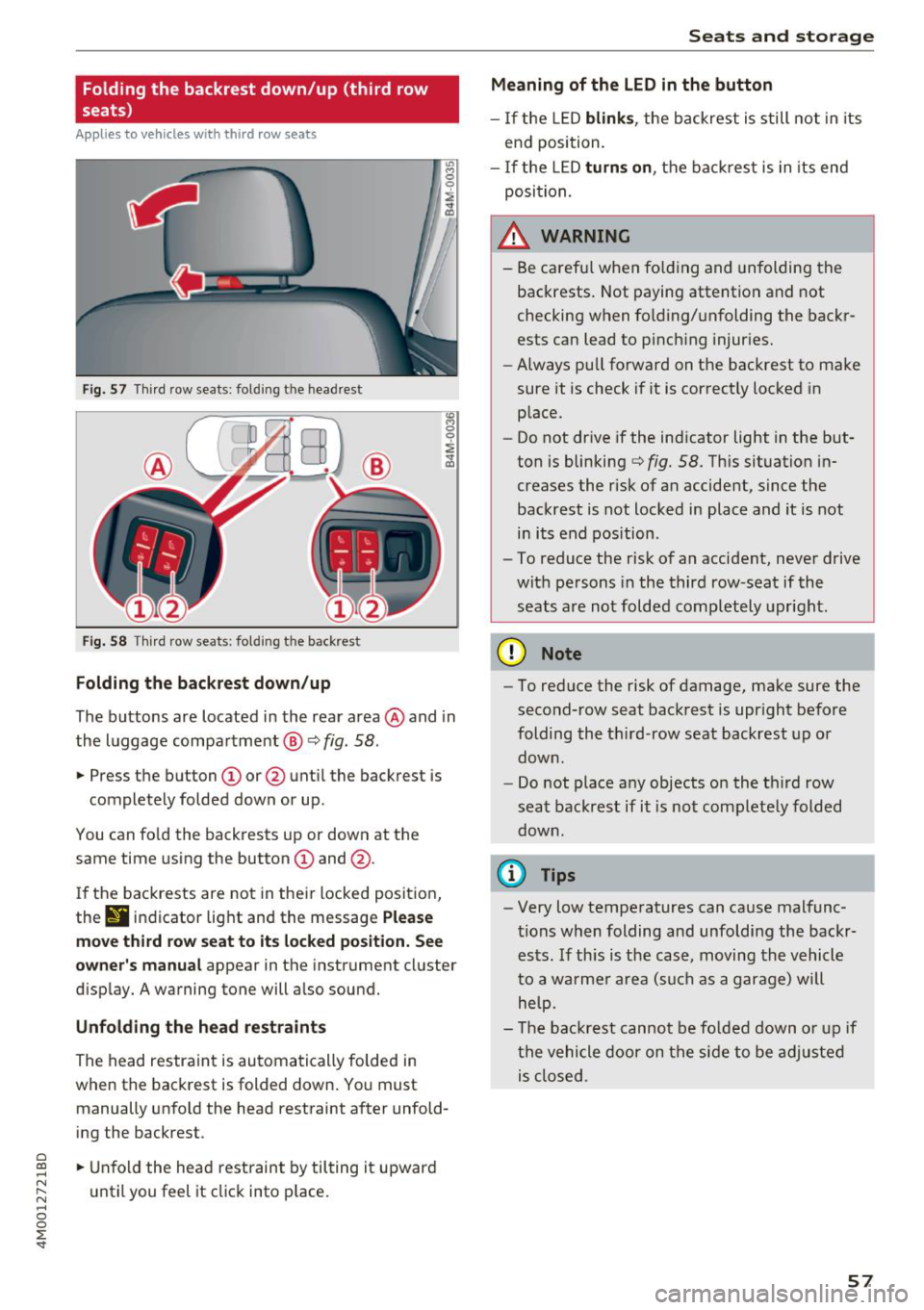
Folding the backrest down/up (third row
seats)
Ap plies to vehicles w it h th ird row seats
F ig . 57 Thir d row seats : fol ding the headrest
Fig. 58 Th ird row seat s: fol ding t he backrest
Folding the backrest down /up
The buttons are located in the rear area @and in
the luggage compa rtment @
c::> fig. 58.
... Press the button CD or @ unt il the backrest is
completely folded down or up .
You can fo ld the backrests up or down at th e
same time using the button
CD and @.
I f the backrests are not in their locked position,
the
9 indicator light and the message Ple ase
mo ve third ro w s eat to it s locked po siti on . See
owner 's manual
appear in the instrument cluster
d isplay. A warning tone will a lso sound.
Unfold ing the head r estraints
The head restraint is automatically folded in
when the backrest is folded down. You must manually unfold the head restraint after unfold
ing the backrest .
a
~ ... Unfold the head rest raint by tilting it upward
N ~ u ntil you feel it click into p lace.
~ 0
0
:E '
Meaning of the LED in the button
- If the LED blink s, the backrest is still not in its
end position.
- I f the L ED
turn s on , the bac krest is in its end
posi tion.
A WARNING
- Be carefu l when fo lding and unfolding the
backrests. Not paying attention and not
checking when fo lding/unfolding the backr
ests can lead to pinch ing injur ies.
- Always pull forward on the backrest to make
sure it is check if it is correctly locked in place.
- Do not drive if the indicator light in the but
ton is blinking
c::> fig. 58. Th is situation in
creases the risk of an accident, since the
backrest is not locked in place and it is not
in its end position .
- To reduce the r isk of an accident, never drive
with pe rsons in the third row -seat if the
seats are not folded completely upright .
(D Note
-To reduce the risk of damage, make sure the
second-row seat backrest is upr ight before
folding the th ird -row seat backrest up or
down .
- Do not place any objects on the third row
seat backrest if it is not comp letely folded
down .
(D Tips
-Very low temperatures can cause malfunc
tions when folding and unfoldi ng the backr
ests. If th is is the case, moving the vehicle
to a warmer a rea (s uch as a garage) will
help.
- The backrest canno t be fo lded down o r up if
the vehicle door on the side to be adjusted is closed .
57
Page 60 of 398

Seats and storage
Head restraints
Front head restraints
Applies to: vehicles with adjustable head restraints
Fig. 59 Front seat: adjust in g the head restrain t
Adjust the head restraints so the upper edge is as
even as possible with the top of your head . If that
is not possible, try to adjust as close to this posi
tion as possible .
Adjusting the head rest raints
.. To move the head restraint upward/forward,
hold it at the s ides with both hands and slide it
upward/forward until you feel it click into
place .
.. To move the head restraint downward/back
ward , press the side button and slide the head
restraint downward/bac kward. Release the but
ton and slide the head restraint farther until it
locks into place.
_& WARNING
Always read and fo llow the applicable warn
ings
¢ page 2 55, Proper adjustment of head
restraints.
58
Rear head restraints
Applies to: vehicles with adjustable head restraints
Fig. 60 Second row sea ts : adjus ting the head restr ain t
Fig. 61 Rear seat : rem ovin g the head re str ain t
If passengers will be sitting in the rear seats,
move the head restraints in the second row all
the way up or fold up the head restraints on the
occupied third row seats¢_&.
Moving the head restraints
.. To move the head restraint upward, hold it at
the sides with both hands and slide it upward
until it clicks into place
¢ fig . 60.
.. To move the head restraint down, press the
button -arrow-
c> fig . 60 and slide the head re
straint downward .
Folding the head restraints for the third row
seats* down and up
.. Fold the head restraint down by pulling on the
tab
¢ page 57, fig. 57 .
., Unfold the head restrai nt by t ilting it upward
until you feel it click into place.
Removing the head restraints
.. Move the head restraint upward as far as it can
go . ..,
Page 63 of 398

a co ...... N r--. N ...... 0
0
:E '
sole*, in the rear* and on the luggage compart
ment side tr im panel* .
USB ports @
You can cha rge mobi le devices and/or connect to
the Audi music interface* us ing t he USB ports*.
F or additional information about the USB ports,
see
¢ page 2 31, Multimedia connections.
.8, WARNING
Incorrect usage ca n lead to serio us injuries or
burns . To reduce the risk of injuries, never
leave children unattended in the vehicle with
the vehicle key.
CD Note
- D isconnect the connectors from the power
sources carefully to reduce the risk of dam
aging them .
- To reduce the risk of damage to the vehicle
electrical system, never attempt to charge
the vehicle battery by connecting accesso
ries that prov ide power, such as solar panels
or battery chargers, to the power sources.
- To reduce t he risk of damage to the power
sources, only use plugs and connectors that
fit correctly.
Storage
Cup holde rs
F ig . 66 Rear center armrest: cup holde rs
Your vehicle has c up holders in the front center
console, in the door pockets, in the center arm
rest in the second row seat and on the left and
right s ide in the third row seat*.
S eats and storag e
Cup holde r in the cent er ar mrest in th e
s e co nd row seat
.,. Fold the center armrest downward by pressing
the button in the second row middle seat.
.,. Press the button to open the cup holder
¢ fig. 66.
"'Set your beverage in the holder.
"' To close the cup holder, fold the cover back un
til it clicks into place .
.8, WARNING
-
-Do not put any hot beverages in the cup
holder while the vehicle is moving . Hot bev
erages cou ld spill, which increases the risk
of injury .
- Do not use any breakab le beverage contain
ers (for example, made out of g lass or por
celain). You could be injured by them in the
event of an accident.
CD Note
Beverage containers in the cup holders should
a lways have a lid . If not, beverages could spill
and cause damage to vehicle equipment, such
electron ics or seat covers.
Cooled glove compartment
Applies to : vehicles wi th coo led g love co mpartment
The cooled glove comportment only functions
when the AIC system is switched on.
Fig . 67 G love compartment: sw itch ing cool ing mode on/
off
.,. Turn the knob @counter-clockwise to switch
the cooling on.
.,. Turn the knob@clockwise to switch the cool
ing off. The symbols on the knob must appear
as they do in
¢ fig. 67. ..,.
61