2018 AUDI Q7 brakes
[x] Cancel search: brakesPage 109 of 398

a co .... N r--. N .... 0
0
:E '
If the message ACC: autom atic go1
) appears,
your veh icle will start driving even if there is
an obstacle between your vehicle and the ve
hicle driv ing ahead . This increases the risk of
an ac cident.
@ Tips
- For safety reasons, your veh icle w ill only
start to drive automatical ly if:
- t he driver's safety belt is fastened
- all doors and the hood a re cl osed
- your vehicle is not stopped for a long per i-
od.
Interrupting cruise control
Applies to: vehicles with Audi adaptive cruise contro l
Fig . 102 Selecto r lever
Requirement: adaptive cruise contro l must be
sw itched on .
Overriding crui se control
"' To accelerate manually, pull the lever toward
you into position @and hold it there or press
the accelerator pedal. The message
ACC: over
ride
appears .
... To resume cr uise cont rol, release the leve r or
ta ke your foot off the acce le rato r peda l.
Canceling cruise control while driving
"'Move the lever into position @. The message
ACC: standby appears . Or
"' Press the brake peda l.
l) This is no t available in some countries.
Assi st a nce systems
"' To resume the stored speed, move the lever to
ward you into position @.
Canceling cruise control when stopped
"' Push the lever away from you into position @.
The message
ACC: standby appears .
"' To resume c ruise contro l, press the brake peda l
and pull the lever toward you i nto position @.
A WARNING
It is dangerous to activate cruise contro l an d
resume the stored speed when the current
road, traffic or weather conditions do not per
mit this . This increases the risk of an accident .
Setting the distance
Applies to: vehicles with A udi ada ptive c ruise control
,
0
Fig. 1 03 Opera tin g lever: setting the distance
... Tap the switch to display the current set dis
tance
¢ fig. 103.
"'To increase or reduce the distance in incre
ments, tap the switch upward/downward
aga in . The distance between the two veh icles
w ill change in the inst rument cluste r display .
When approaching a vehicle driving ahead, the
adaptive cruise control system brakes to match
that vehicle's speed a nd then adj usts to the set
distance. If the veh icle d riving ahead accelerates,
t h en the adapt ive cr uise con trol will also acce ler
ate up to the speed th at you h ave set.
T he higher the speed, t he g reater the distance
¢ .&, .The
Distance 3 sett ing is recommended .
T hat is eq ual to the ge ne ral recommendation of
" ha lf the speed shown on t he speedometer ". ..,.
107
Page 113 of 398

Cl a:, ...... N
" N ...... 0
0
::r '
for safe operation. The systems cannot be switch
ed on.
Ill AC C with traffic jam a ssis t: only availabl e in
D, Sor M
Select the "D/S " or " M" selector leve r pos it ion.
Ill A CC w ith tr affic j am ass is t: currentl y un
available . Parking brake applied
The systems sw itch off if you set the parking
brake . The systems are available again after you
release the parking brake .
llJ ACC with traffic jam a ssist: currentl y un·
av ailable. Stabili zation cont rol (E SC) input
This message appears if the electronic stab iliza
tion contro l (ESC) is taking action to stabilize the
ve hicle . The systems switch off in this scenario .
Ill ACC with traffic jam a ssis t: manu al control!
This message appea rs if the veh icle rolls back
when sta rting on a slight incl ine, even t hough the
systems are active . P ress t he b rake peda l to pre
ve nt the vehicle from rolling or sta rting to move.
IIJ ACC w ith tr affic jam a ssis t: curr entl y un
availabl e. Downhill a ssis t activated
You cannot activate the system when hill hold as
sist is act ive .
II!! ACC with traffic jam assist: manual control!
This message appears if the driver does not take
over steering after mu ltip le driver intervention
requests and the system switches off . The vehicle
brakes unt il it is stationary .
ii Traffic jam a ssis t : una vailable. S ee o wner' s
manual
The system can no longer ensure that t he ve hicle
w ill stay in the lane and sw itches off. Have yo ur
vehicle checked by an a uth orized Audi dea ler or
authorized Audi Service Facility if the ma lfunc
tion is continuous .
14§ Traffic jam assis t : Plea se take over steering!
This message appea rs as soon as the system
stops detecting steer ing activ ity when the system
limits are rea ched. Always keep yo ur hands on
Ass istance systems
the steering whee l so you can be ready to steer at
any time.
14§ Traffic jam a ssis t : currentl y unavailable .
Pl ea se f asten se at belt
T he system switches off when the drive r's safety
belt is unfastened.
Ill AC C: eff iciency assist not available in thi s
countr y
The adaptation to speed lim its and routes ahead
is not available in this country .
IIJ ACC: predictive control currentl y una vaila
ble . See owne r's m anual
T he ad aptation to speed lim its and routes ahead
swi tches off at speed limits under 20 mph
(30 km/h) .
T he message ca n also appear if the adaptation to
speed limi ts and routes a head has a temporary
f ailure . Have your vehicle checked by an autho r
ized Audi dea ler or authorized Audi Service Facili
ty if the malfunction is continuous .
Distance warning : malfunction! Please contact
S erv ice
T he system cannot gua rantee that it will detect
vehicles correct ly and it has switc hed off. The ra
dar sensors have shifted or are fa ulty . Drive to an
authorized Aud i dea ler o r authorized Audi Serv ice
Facility immediate ly to have the ma lfunction cor
rected .
Distance warning : currentl y unavailable . Sen sor
view re stricted due to surrounding s. See own
e r' s manual
T his message appears if the rada r senso r view is
obstructed, for examp le by leaves, snow, heavy
spray or dirt. Clean the sensors
¢ page 103,
fig . 95 .
Distance warning : curr entl y unavailable . See
owner' s manual
This message appears if the system has a tempo
r a ry fa il ur e. If this occurs m ultip le t imes, drive to
an a uth orized Aud i dea le r o r auth orized Aud i
Se rvice Facility immed iate ly to have the ma lfunc -
t ion corrected .
liJ,,
111
Page 114 of 398

Ass is tanc e system s
ACC: Please fa sten seat belt
The system is not comp letely available if t he d riv
er 's seat be lt is unfas tened .
Station ary obje ct ahead
This message appears if you would like to switch
the system on and there is a stationary object di
rectly in front of your veh icle .
Doo r open
The system is not ava ilable when the door is
open .
Audi pre sense
Introduction
Applies to: ve hicles w ith Audi p re se nse
W ith in the limits of the system, the pre sense
functions can in it iate measures in particularly
dangerous s ituat ions to protect the ve hicle pas
sengers and ot her r oad users.
- Due to the interl ink ing of various vehicle sys
tems , crit ica l dr iv ing s ituat ions can be detected
by
pr e s ense basic and measu res fo r preventa
t ive occ upan t protect ion are can be initiated.
- T he
pre sen se front system uses the data from
t h e adapt ive cr uise control* radar sensors and
t h e camera to calc ulate the probab ility of a col
lision . Within the limits of the system, an im
pending collision with vehicles can be detected
in both urban and rural speed ranges. In this
case, the system warns the driver visually,
acoustically and with a jerk on the brakes if nec
essary . If needed, it can initiate a partial or fu ll
deceleration to reduce the collision speed or to
avo id the co llision unde r ce rtain c ircumstances .
In conjunct ion with p re sense basi c/rear, the
front safety belts are also revers ibly tensioned
whe n needed. The pre sense front is also act ive
when adaptive cruise control* is switched o ff.
- Pr e se nse rear con tains pre sense basic func
tions. It uses the data from the side assist* ra
dar sensors and calc ulates within the limits of
the system the probability of a rear end colli
sion with the vehicle behind you . Pre sense rear
is also active when s ide assist* is switched off .
112
-Within the limits of the system, pre sen se cit y
uses the camera data and can detect an im
pending collision with vehicles and pedestrians .
In this case, the system warns the driver visual ly, acoustical ly and w it h a jerk on the brakes if
necessary . If needed, it ca n initiate a full dece l
erat ion to reduce t he coll is ion speed or to avoid
the collision under certa in circumstances . In
conjunction with p re sense basi c/rear, the front
safety belts are a lso reve rsibly te nsioned whe n
needed.
& WARNING
Read the genera l information inc::>.&. in Gen
eral information on page 103,
~ .&. in Gener
al information on page 121.
(D Tips
- C erta in p re sense funct io ns sw itch off when
driving in reve rse.
- Th e pre sense f unct io ns m ay no t be ava ila
ble i f th ere is a ma lfunct ion in the ESC sys
tem or t he airbag control module .
-Note that the reve rsib le belt tens ione r o n
the front passenger 's side deactivates when
the front passenger's airbag is deactivated.
- Switch the pre sense off when yo u are not
using public streets or when loading the ve
hicle onto a vehicle carrier, train, ship or
other type of transportat ion. This can pre
vent an undesired intervention from the pre
sense system.
Audi pre sense basic
App lies to: vehicles wit h Audi pre sense basic
The pre se nse bas ic functions are activated at a
speed of approx imately 20 mp h (30 km/h) o r
highe r.
The following functions ca n be triggered u nder
certain co nd it io ns w it hi n the lim its of the sys
tem:
- Tensioning of the safety belts (for examp le,
during heavy brak ing) : the front safety belts
have reversible belt te nsioners . If a collision
does not occur , the safety belts loosen slig htly
and are ready to tr igger aga in.
...
Page 115 of 398

Cl a:, ...... N
" N ...... 0
0
::r '
- Activ ati ng the eme rgency fl ashe rs
l ).
The message Audi pre sen se. ¢ page 113,
fig . 108 will warn you about the dange r.
Aud i drive select*: the trigger t imes are adjusted
depend ing on the mode selected .
Audi pre sense front
Applies to: vehicles with Audi pre sense front
Fig . 108 In strumen t clu ste r: approac h warn ing
Descr iption
Within the limits of the system, pre sense front
can warn yo u of impending coll is ions and in itiate
the corresponding brak ing maneuvers or the sup
port ing measures when avoiding a co llision .
If detected in time, the system can rank the dan
gerous situation as cr itica l if a vehicle driving
ahead brakes sudden ly, if you r own vehicle is ap
proaching a s ignificantly s lower vehicle at h igh
speed or when there is an oncom ing vehicle dur
i ng a tur ning maneuve r.
If detection is not poss ible, then pre sense front
does not react.
Warnings
The system recognizes various dange rous situa
tions. The
early warning occurs if:
- a vehicle d riving ahe ad brakes s udden ly,
- yo ur own vehicle approaches a s ignificant ly
s lower veh icle o r st ation ary veh icle in the dire c
t ion of t ravel.
ll This is not availa ble in so m e co untrie s.
A ss istance systems
When this warning occurs, it may on ly be possi
ble to avoid a co llision by swerving o r braking
strongly . The message
Audi pre sense.
¢ fig . 108 and a wa rning tone will warn you
about the danger .
If you do not react enough or not at all to a dan
gerous sit uat ion that was detected by the sys
tem, p re sense front provides assistance by ap
ply ing the b rakes .
If a collision is imminent, the system will first
provide a n
acute warning by braking sharply . You
will a lso warned by an indicato r in the instr ument
cluster display¢
fig. 108 . If you do not react to
the acute warning, pre sense front can brake w ith
i ncreas ing fo rce wi thin the limits of the
system
1> . Thi s reduces the veh icle speed in the
even t of a co llision . At low vehicle speeds, p re
sense fron t can ini tia te a complete dece le ra tion
shor tly be fore a collision wi th a ve hicle dr iving
ahead
l)_ If pre sense front determi nes that you
are not braking strong ly enough when a co llision
is imminent, it can increase t he b raking force.
T he following fu nctions t rigge r in conjunction
with pre sense basic/rea r at co rresponding vehi
cle speeds:
- Reve rsible tens ion ing of the front safety bel ts.
- Clos ing the windows and sun roof* .
- Infla ting the s ide bo lsters* in the sea t backrest
and seat s urface .
Audi drive select*: the revers ible belt tensioner,
the clos ing of the w indows and s unroof * as we ll
as the inflating of the s ide bols ters* on the seat
back res t and seat surface are not act ive depen d
i ng on the mode selected .
Evasive steering support
Evasive s teer ing s upport helps you to steer the
vehicle a round an obstacle in a cr it ica l sit uat io n.
If you avo id an obs tacle afte r th e acute warning,
t h en the evasive steer ing s uppo rt ass ists you by
applying slight stee ring adjust men t t o correct ..,
113
Page 117 of 398

Cl a:, ...... N
" N ...... 0
0
::r '
The radar sensors can be displaced by impacts
or damage to the bumper, wheel housing and
underbody. Pre sense rear can be impaired by
this. Have an authorized Audi dealer or au
thorized Audi Service Facility check their func
tion.
(D Tips
- The pre sense rear functions switch off
when towing a trailer.
- The pre sense rear functions may also
switch off if there is a malfunction in the
side assist* system.
Audi pre sense city
Applies to: vehicles with Audi pre sense city
Description
Within the limits of the system, pre sense city
can warn you of impending collisions with
vehicles and pedestrians and initiate the applica
ble braking maneuver if needed. Pre sense city is
active at speeds of approximately 6 mph (10 km/
h) and higher.
A pedestrian warning can occur at speeds up to
SO mph (85 km/h), and vehicle warnings can oc
cur at speeds up to 155 mph (250 km/h). A pre
sense city braking maneuver is possible at speeds up to SO mph (85 km/h).
Warnings
The system recognizes various dangerous situa
tions. The
early warning occurs if:
- a vehicle driving ahead brakes suddenly,
- your own vehicle approaches a significantly
slower vehicle or stationary vehicle in the direc
tion of travel.
- a pedestrian is standing in the lane or is moving
into the lane .
When this warning occurs, it may only be possi ble to avoid a collision by swerving or braking
strongly. The message
Audi pre sense.
r:=;, page 113, fig. 108 and a warning tone will
warn you about the danger .
Assistance systems
Additionally, a jerk on the brakes may occur as an
acute warning when there is an impending colli
sion. If you do not react to the acute warning, pre
sense city can brake to the point of complete de
celeration within the limits of the system. This
reduces the vehicle speed in the event of a colli
sion. The message
Audi pre sense. also ap
pears.
The following functions are triggered in conjunc
tion with pre sense basic/rear:
- Reversible tensioning of the front safety belts.
- Closing the windows and sunroof*.
- Inflating the side bolsters* in the seat backrest
and seat surface.
Audi drive select*: the function is not active de pending on the mode selected.
_&. WARNING
- Pre sense city cannot overcome the laws of
physics.
It is a system designed to assist and
it cannot prevent a collision in every circum
stance. The driver must always intervene.
The driver is always responsible for braking
at the correct time. Do not let the increased
safety provided tempt you into taking risks .
This could increase your risk of a collision.
- The system can deploy incorrectly due to
system-specific limits .
- To reduce the risk of an accident, please
note that the camera does not always detect
every object.
- Pre sense city does not react to animals,
crossing or oncoming vehicles, objects such
as bars, railings or railcars, and objects that
are difficult to detect
r:=;, _& in General infor
mation on page 103.
- In trailer mode, the braking behavior of the
trailer can be different than usual during au
tomatic braking.
_&. WARNING
Pre sense city may be restricted or not availa
ble in the following example situations:
- in heavy fog, rain, spray or snow
- when there are visual obstructions, such as
glare, reflections or variations in light
115
Page 126 of 398
Ass is tance sy stem s
Rear cross-traffic assist
Applies to: ve hicles w ith rear cross -traff ic ass ist
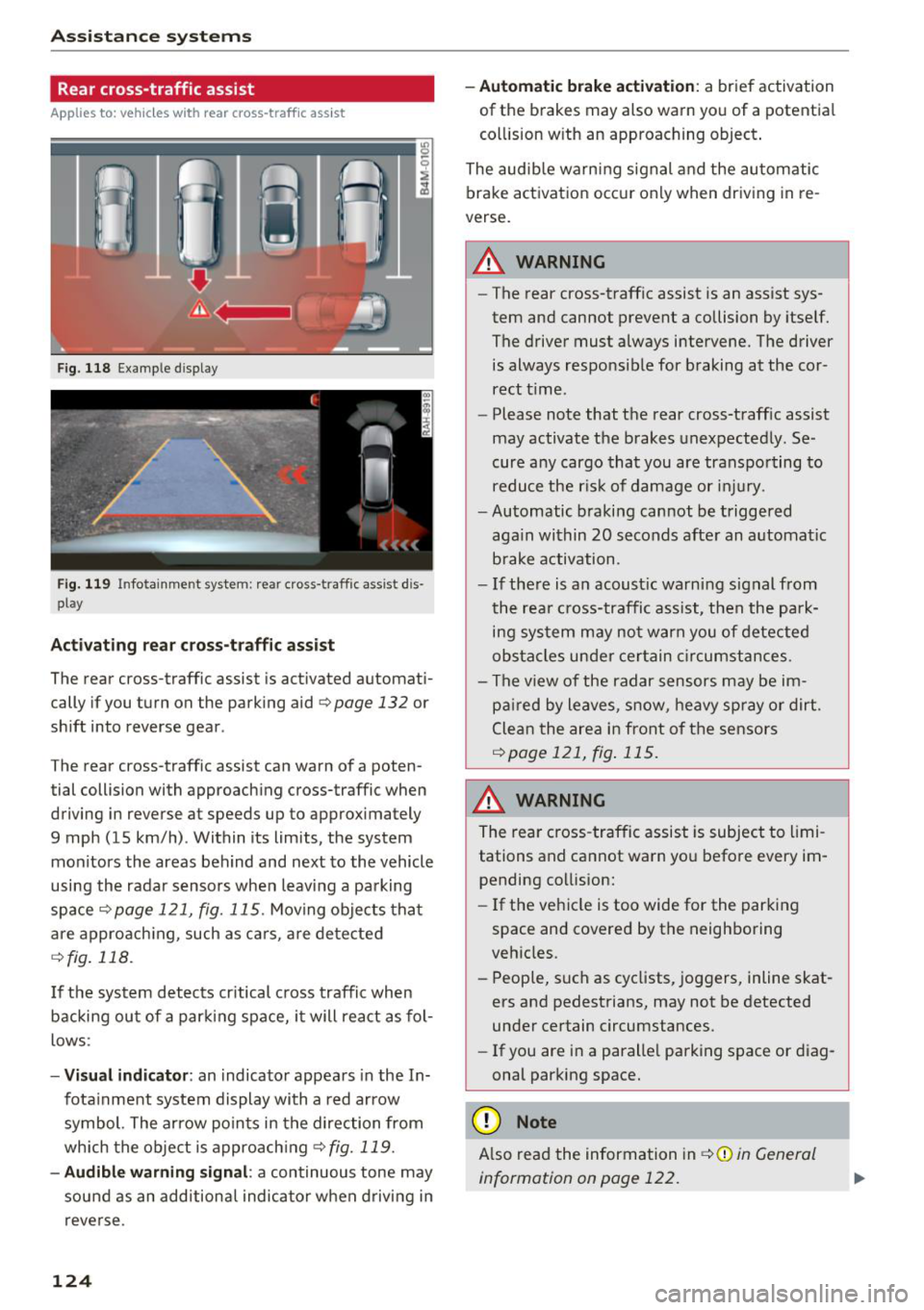
F ig. 118 Example display
Fig . 119 Infotainment system: rear cross-traffic assist dis
play
Acti vating re ar c ro ss -tr affic assist
The rear cross-traffic assist is act ivated automat i
cally if you turn on the parking aid
Qpage 132 or
shift into reverse gear .
The rear cross-traffic assist can warn of a poten
tial collision with approaching cross-traffic when
driving in reverse at speeds up to approximately
9 mph (15 km/h) . Within its limits, the system
monitors the areas behind and next to the vehicle
using the radar sensors when leav ing a parking
space
Qpage 121, fig. 115. Moving objects tha t
are appro ach ing, such as ca rs, a re detected
Q fig . 118.
If the sys tem detects cr itical cross traffic when
backing ou t of a par king space, i t will react as fol
lows:
- Vi sua l indicator : an indicator appea rs in the In
fota inment system display with a red arrow
symbol. The ar row points in the direction from
which the object is approach ing
Q fig. 119.
- Audib le warning signal :
a continuous tone may
sound as an additional indicator when driving i n
reve rse .
124 -
Automat ic brake act ivation :
a brief activation
of the brakes may also warn you of a potentia l
co llision w ith an approaching object .
The audib le warn ing signal and the automatic
brake activation occ ur only when driving in re
verse.
A WARNING
- The rear cross-traffic assist is an assist sys
tem and cannot prevent a collision by itself.
The driver must always intervene. The driver
is always responsible for braking at the cor rect t ime.
- Please note that the rear cross-traff ic assist
may activate the brakes unexpectedly. Se
cure a ny cargo that you are transpo rting to
reduce the r is k of damage or inju ry.
- Automatic braking cannot be triggered
aga in within 20 seconds afte r an a utomat ic
brake activation.
- If the re is a n acoust ic warning signal from
the rea r cross-traffic assist, then the park
ing system may no t w arn you of detected
obstacles under ce rtain c ircumstances.
- The v iew of the radar sensors may be im
pa ired by leaves, snow, heavy spray or dirt.
Clea n the area i n front of t he sensors
Qpage 121, fig . 115.
,&. WARNING
The rear cross-traffic assist is subject to limi
tations and cannot warn you befo re every im
pending collision:
- If the vehicle is too wide for the parking
space and covered by the neighboring
veh icles.
- People, s uch as cyclists, joggers, inline skat
ers and pedestrians, may not be detected
under certain circumstances.
- If you are in a paralle l parking space or diag
onal parking space.
(D Note
A lso read the information in Q (D in General
information on page 122.
-
Page 127 of 398

(D Tips
-You can cance l the automatic brake activa
t ion w ith increas ing bra king fo rce if you ap
p ly the brakes yourse lf or accelerate cons id
erab ly.
- In some situations, rear cross-traffic assist may warn you even if there is no cross traffic
in a cr itical area, for examp le when back ing
i nto a parking space or maneuver ing .
- The rea r cross-traffic ass ist also switches off
when you switch off the ESC.
- The system is not available when towing a
trailer.
Messages
Applies to: vehicles with Audi side assist
A message appears in the inst rument cluste r dis
p lay if the s ide ass ist switches off automatically .
@j Audi side assist: malfunction! Please contact
Service
@j Audi side assi st and e xit warning: malfunc
tion! Please contact Service
The system cannot guarantee that it will detec t
ve hicles correctly and it has switched off. The
sensors have been mov ed or a re faulty. Have t he
system checked by an a uthori zed Audi dea ler or
author ized Audi Service Facility soon.
@j Audi side assi st: cu rrently unavailable. Sen
sor vision restricted due to surroundings . See
owner 's manual
($j Audi side as sist and e xit warning: currently
unavailable. Sensor vision restricted due to su r
roundings
The rad ar senso r vis io n i s impa ired. The area in
fron t of the senso rs must no t be covered by b ike
rac ks, stic kers, leaves, snow or any other ob jects.
C lea n the area in f ront of th e sensors, if necessa
ry ¢
page 121, fig. 115.
($j Audi side as sist: currentl y unavailable. See
owner 's manual
Cl
~ ($j Audi side ass ist and exit warning : currently N
~ unavailable . See owner 's manual ,-1 0
0
::r '
S ide assist cannot be switched on at this time be
ca use there is a ma lfunction (for example, the
batte ry c harge leve l may be too low).
($1 Audi side assi st: unavailable in t owing mode
($j Audi side assist and ex it warning: currently
unavailable . Towing mode
S ide ass ist switches off automatically when the
electrical connecto r in t he factory-installed trail
er hitch is connected . There is no guarantee the
system will sw itch off w hen us ing a ret rofitted
t railer h itch . Do no t use side assist and the ex it
warning when tow ing a tra ile r.
Ill Rear parking aid: obstacle detect ion restrict
ed
The rear cross-traffic ass ist is not available . E i
ther the ESC is sw itched off, or the rada r senso rs
may be cove red by a b ike rack, st icke rs , leaves,
snow o r othe r objects . Switc h the ESC on, o r
cl ea n the area in fron t of the senso rs if necess ary
¢page 12 1, fig . 115. If thi s message con tinues
to be displayed, drive imme dia tely to an author
ized Audi dea ler or authorized Audi Service Facili
ty to have the ma lf u nction repaired.
Night vision assist
Description
Applies to: vehicles with night vision assist
The night vision assist can detect, highlight and,
if necessary, warn about pedestrians and large
wild animals.
N ight vision assist he lps yo u when it is dark by
u sing an infra red camera to mon itor the area in
front of your ve hicle, w ith in the limits of the sys
tem . It ca n disp lay objects up to a distance of ap
prox ima tely 1 000 feet (300 m). The thermal im
age de te cte d by t he came ra is show n in t he in
str ument cluster disp lay . Wa rm areas appear
li ghter and co ld areas a ppear da rker.
125
Page 144 of 398

Intelligent Technology
Intelligent Technology Electronic stabilization
control (ESC)
Description
Elect ronic stabili zation control ( ESC) suppo rts
driver safety. It red uces the risk of slipping and
improves dr iving stabi lity. ESC detects crit ica l sit
uations such as when the vehicle is overstee ring
and understeer ing or the wheels a re spinning.
The vehicle is stabilized by applying the brakes or
reducing eng ine torq ue. When t he ESC engages,
the
D.1 ind icator lig ht blinks in the ins trument
cluste r.
The fo llow ing systems are in tegrated in the ESC:
Anti-lock braking system (ABS)
ABS p reve nts the whee ls from lock ing whe n brak
ing. The vehicle can st ill be steered even d uring
hard brak ing. Apply steady press ure to the bra ke
pedal. Do not pump the pedal. A puls ing in t he
b rake pedal indicates that the system is act ing to
s tabili ze the vehicle .
Brake assist system
The brake assist system can decrease brak ing dis
tance. It inc reases brak ing power when the d river
presses the brake pedal q uick ly in eme rgency sit
uations . You must press and hold t he b rake pedal
until the dangerous si tuatio n is ove r. In veh icles
w ith adapt ive c ruise con trol*, the bra ke assist
sys te m is more sensitive if t he di stan ce detec ted
t o the veh icle dr iv ing a head is too small.
O n ve hicl es w ith ac tiva ted and funct io ni ng night
vision assist*, the b rake ass ist system ca n re
spon d mo re sens it ively if there is a w arn ing.
Anti-Slip Regulation (ASR)
ASR red uces eng ine power when the drive wheels
beg in sp inning a nd adap ts the force to the road
conditions . This makes it easie r to start, acceler
ate and dr ive u p hill s.
Electronic differential lock (EDL)
EDL applies the brakes to a wheel that sta rts
sp inning and transfers the drive power to t he
142
othe r driving whee ls. This func tion is no t ava ila
ble at higher s peeds .
I n extre me cases , EDL au tomat ic al ly swi tches off
to keep t he b rake o n the br aked whee l from ove r
h eating. The ve hicle is still wo rking co rrect ly. EDL
will switc h on agai n automatically when condi
tions have returned to normal.
Power steering
The ES C ca n also support veh icle st ability
t hr ough stee ring .
Selective wheel torque control
Selective w heel to rque con trol is used when d riv
i ng on curves. Bra king is targeted towa rd t he
whee ls on the ins ide of the cu rve as needed . T his
a llows mo re pre cise dr iv ing in curves .
Automatic post -collision braking system
The "automat ic post -coll is io n braking system"
can hel p t o reduce the risk of sl iding and of addi
tiona l co llisions after an acc iden t. If th e a irbag
c ontro l modu le de tects a collision, t he ve hicle is
bra ked by th e ESC.
The veh icle does not brake automatically if :
- the drive r presses t he acce lerator pedal, or
- the ESC, the brake system or the ve hicle elect ri-
cal system are not functioning.
A WARNING
- The ESC and its integ rated systems can not
overcom e the lim its impos ed by natura l
p hys ica l laws . Thi s is es pec ially impo rtan t
on s lippery or w et roa ds. If th e sys tems be
g in a cting to s tabili ze y our v ehicle, you
s hould immedi ately alter your speed to
mat ch the ro ad and traffic condition s. D o
not let the i ncreased safety provide d tem pt
you into taking risks . This could increase
your r is k of a coll is io n.
- Please note the r is k of a col lision increases
w hen dr iv in g fast, especia lly t hrough c urves
a nd on s lippery or wet roa ds, an d when dr iv
ing too close to objects ahead. The ESC and
its integrated sys tems ca nnot always pre
v en t co llisions -there is st ill a risk of acc i
dents!