2018 AUDI Q5 trailer
[x] Cancel search: trailerPage 138 of 392

Parking aid
Switching on/off
Applies to: ve hicles w ith per ip heral cameras
Fig. 1 38 Infotainment system: se lect the mode
Switch ing on /off
Req uirement: the veh icle speed must be under
approx imately 6 mp h (10 km/h).
• Press the P'I/ A button in the center console
¢ page 132, fig . 129 . A short confi rmat ion
tone so unds and the
LED in the but to n turns
on.
Switching on automatically
The system switches on automat ica lly when re
verse gear is engaged while the engine is run n ing . A brief confirma tion tone wi ll soun d.
Sw it c hing off automat ically
The system switches off automatically when dr iv
ing forward faster than 6 mph (10 km/h).
Selecting the mode
• Turn the control knob to the symbol for the de
sired mode @
th rough ©¢ fig. 138 and press
the control knob.
You may select from the following modes:
@ -Corner view (front) c;> page 136
@-Front¢ page 136
© -Area c;> page 137
@ -Rea rc;> page137
© - Corner view (rear) ¢ page 136
You can a lso switch to trailer view c;> page 134 .
136
Corner view (front)/corner view (rear)
Applies to : vehicles with peripheral cameras
Fi g. 139 In fota inment system: Corner v iew (front)
Fig. 14 0 Infota inment sy stem : Corner v iew (re ar)
This view can assist you for example, when you
are ex iting from an area with poor visib ility. The
area at the front and rear sides of the veh icles is
displayed.
• To show the side v iew toward the front, select
the symbol @
c;> fig. 139 with the control knob
and press the contro l knob .
• To show the s ide v iew toward the rea r, se lect
the symbol ©
c;> fig. 140 with the con trol knob
and p ress the control knob .
Front
Applies to: vehicles wi th peripheral ca meras
Fi g. 141 Info ta in ment sys tem: fron t mode
This view assists you for example, in using the
full maneuvering range in front of the vehicle.
The area in front of the vehicle is displayed. The
vehicle surround ings are shown in the right area
..,
Page 140 of 392

Parking aid
Adjusting the parking aid
Applies to: vehicles with a rear parking system/parking sys
tem plus/rearview camera/peripheral cameras
The functions are adjusted in the Infotainment
system .
.,. Select in the Infota in m ent system: IMENU I but
t on
> Vehicle > left co ntro l bu tton > Driver a s
sistance > Parking aid .
Or
.,. When the par kin g aid is active, se lect in the In -
fotainment system : rig ht contro l butto n*.
End sy stem * -stop t he pa rking aid
Activate automatically * -switch automatic acti
vation on/off
Front volume * -volume for the front area
Rear volume -vo lume for t he rear area
Entertainment fader -the vol ume o f th e aud io/
video so urce is lowered when t he parking system
is turned on.
T he new value is g iven b riefly du ring the a djus t
men t.
View * -sw itch betwee n an optical d isplay
( Graphic ) and camera image ( Camera ) in the
r ight section of the disp lay.
Trail er view * -show trailer view
*Auto. front /rear came ra change* -the view be
h ind the veh icle
( Rear mode) is displayed auto
mat ica lly w hen you shift into reverse gear. The
v iew in front of the vehicle
( Front mode) is d is
p layed automat ically whe n you sh ift into the for
ward gea rs. When first activat ing in a forward
gea r with t he
P,,1~ bu tto n, the front s ide v iew is
d isp layed
(Corner view (front) mode).
If you do not set
the./, t h e view behind the vehi
cle
( Rear mode) is a lways d isp layed and it does
no t swi tch to the
Front mode whe n a forwar d
ge ar is se lec ted .
(0 Tips
-Seve ral menus can be accessed w ith the
r ight contr ol butt on o nly w hen the p ark ing
a id is active.
138
- The set tings for vo lume and automa tic ac ti
vation * are stored automatically and as
signe d to the remote control key in use.
Error messages
Applies to: vehicles with a rear parking system/parking sys
tem plus/rearview camera/peripheral cameras
Ill Rear parking aid: malfunction! Ob stacl es
cannot be detected
Ill Front parking aid: malfunction! Obstacles
cannot be detect ed
Ill Parking aid : malfunct ion! Obstacles cannot
be detected
When one of these messages appears, there is a
system malfunction. The LED in t he
Pw, button al
so blinks whe n sw itchi ng it on. The releva nt mes
sage o nly appears again w hen you manually acti
vate the par king a id wi th t he b utton .
[ii Rear parking aid : obstacle detection restrict
ed
The rea r cross-traffic ass ist* c:!;> page 124, Rear
cross-traffic assist is no t ava ilable. Either the ESC
is sw itched off, or the radar sensors may be cov
ered by a bike rack, stickers, leaves, snow or oth
er objects . Switch t he ESC on , or clean the area in
front of the sensors if necessary
c:!;> page 121,
fig. 121 .
If this message cont inues to be d is
played, drive immed iate ly to an author ized A udi
de aler or au thor ized A udi Servi ce Facili ty to h ave
t h e mal funct ion repai red .
Parking system plus*
If a senso r or speaker is faulty, the.!¼ symbo l
will appear i n fro nt of/behind the vehicle in the
I nfotai nment syste m disp lay. If a rear sensor is
f aulty, only obs tacles th at are in areas @ and @
a re show n
<:!;>page 131, fig . 128 . If a front senso r
i s fa ulty, o nly obstacles that a re in a reas © and
@ are s hown.
Peripheral cameras*
There is a system malfunction if t he % symbo l
appe ars and the co rresponding area of the dis
play is shown in black . The camera is not wo rking
i n th is area.
...
Page 141 of 392

u co ..... N ,..._
N ..... 0 <( 0 00
Drive to an authorized Audi dealer or authorized
Audi Service Facility immediately to have the
malfunct ion corrected.
Trailer hitch
Applies to: vehicles with a rear parking system/parking sys
tem plus/ rearv iew camera/peripheral cameras and trailer
hitc h
When the tra iler socket is in use, the parking sys
tem rear sensors are not activated when you shift into reverse gear or when you press the
Pw~ but
ton. This results i n the following restrictions.
Rear parking system*
There is no distance warning.
Parking system plus*
There is no distance warning for the rear. The
front sensors remain activated . The visual display
switches to trai ler mode.
Rearview camera* /peripheral cameras*
There is no distance warning for the rear. The
front sensors remain activated. The visual display
switches to trai ler mode. The rearview camera
image will not show the orientation lines and the
b lue surfaces.
@ Tips
Trailer hitches that are not installed at the
factory may cause the parking system to ma l
function or they may restrict its function.
Parking aid
139
Page 215 of 392

u co ..... N r-N .....
~ 0 co
Map
Map operation
Applies to: veh icles with navigation system
Fig. 192 Example: 30 map with the c ross hair s switched off
--,-
@
Fig. 193 Examp le: st an da rd map wi th t he crosshai rs
sw itc hed on
~ Press the I NAV /MAPI button repeatedly until
the map is displayed
c;,fig. 192.
Zooming in/out on the map
- Turn the control knob to the left or to the right.
Alternatively, you can also zoom in/out on the
map using the MMI touch control pad*
¢ page 153, if the crosshairs are switched on.
Or: turn the left thumbwheel on the mu ltifunc
tion steering
wheel* ¢ page 13.
Turning the crosshairs on/off
- Switching the crosshairs on :
press the control
knob in the map view
¢fig. 192.
- Switching the crosshairs off: press the I BACKI
button .
When the crosshairs are switched off¢ fig. 192 :
(D Direction. For additional information, see
¢page 215.
@ The distance to the destination includes the
calculated arrival time.
1l Only appl ies to vehicl es w ithou t camer a-b as ed speed lim it
d ispla y.
Navigation
@ When the trailer mode function is switched
on~, the corresponding symbol is displayed
next to the arrival time.
@ Scale: turn the control knob to the left or
right to decrease or increase the scale. When
the
Automatic zoom function is sw itched on
~, an "A" for "Automat ic " is displayed in the
magnifying gla ss.
® Altitude
@ Vehicle position
0 Route information: various information will
be displayed during active route guidance
(for example, the upcoming maneuver in
cluding calculated distance and street
names) . The display also provides traffic in
formation or points of interest on the current route .
® Road currently being driven on
When the crosshairs are switched on¢ fig. 193 :
® The crosshairs: move the crosshairs in the de-
s ired direction and set a po int on the map us
ing the MMI touch control pad* or the con
t rol knob . When the crosshairs are turned
off, the road being currently driven on is
shown.
@ Speed limit display1>: display of the maxi
mum perm itted speed on the expressways
and highways .
@ Entertainment sliding menu*: see
¢page 153 .
@ Additional information on the crosshairs po
sit ion: if you move the crosshairs to a loca
t ion on the map, available information for
the current posit ion is displayed . Tap briefly
on the MMI touch control pad.
Or: press the
control knob. In the destination details, you
can start route guidance to the displayed lo
cation. Select and confirm
Start route guid
ance.
@ Map contents (points of interest, favorites) .
When there are multiple points of interest in
the immediate vicin ity, the symbols are
shown stacked on the map.
213
Page 340 of 392

Wheels
vehicle's Gross Veh ic le Weig ht
R ati ng
("GVWR").
The "GVWR" includes the weight
of the basic vehicle, all factory in
stalled accessories, a full tank of
fuel, oil, coolant and other fluids
plus maximum load. The maxi
mum load includes the number of
passengers that the vehicle is in
tended to carry ("seating capaci
ty") with an assumed weight of 150 lbs . (68 kg) for each passen
ger at a designated seating posi
tion and the total weight of any luggage in the vehicle. If you tow
a trailer, the weight of the trailer
hitch and the tongue weight of
the loaded trailer must be includ
ed as part of the vehicle load .
The
Gro ss Ax le W eight Rating
("GAWR") is the maximum load
that can be applied at each of the
vehicle's two axles .
T he fact that there is an upper
limit to your vehicle's Gross Vehi
cle Weight Rating means that the
total weight of whatever is being
carried in the vehicle (including
the weight of a trailer hitch and
the tongue weight of the loaded
trailer) is limited . The more pas
sengers in the vehicle or passen -
338
gers who are heavier than the
standard weights assumed mean
that less weight can be carried as luggage .
The Gross Vehicle Weight Rating and the Gross Axle Weight Rat ing
are listed on the safety compli
ance sticker labe l located on the
driver's side B-pillar.
1.8. WARNING
Overloading a vehicle can cause loss of vehicle control, a crash
or other accident, serious per
sonal injury, and even death.
-Carrying more weight than your vehicle was designed to carry will prevent the vehicle
from handling properly and increase the risk of the loss of
vehicle control.
-The brakes on a vehicle that has been overloaded may not
be able to stop the vehicle
within a safe distance .
-Tires on a vehicle that has been overloaded can fail sud
denly, including a blowout and
sudden deflation, causing loss
of contro l and a crash.
-Always make sure that the to tal load being transported
-..
Page 341 of 392

u a, .... N r-N ....
~ a,
including the weight of a trail
er hitch and the tongue
weight of a loaded trailer -
does not make the vehicle heavier than the vehicle's
Gross Vehicle Weight Rating .
Determining correct load
limit
Use the example below to calcu
late the total weight of the pas
sengers and luggage or other
things that you plan to transport
so that you can make sure that
your vehic le w ill not be over load
ed .
Steps for Determining Correct
Load Limit
1. L ocate the statement "TH E
COMBINED WEIGH T OF OCCU
PANTS AND CARGO SHOULD
NEVER EXCEED XXX KG OR XXX
L BS" on your vehicle's placard
(tire inflation pressure label)
¢ page 335, fig . 269 .
2. Determine the combined
weight of the driver and pas
sengers that w ill be riding in
your vehic le .
3. Subt ract the combined weight
of the driver and passengers
from "XXX" kilograms or "XXX"
Wheels
pounds shown on the stick
er ¢ page 335, fig. 269 .
4. The resulting figure equals the
available amount of cargo and
luggage load capacity . For ex
ample , if the
"XXX" amount
equa ls
1400 lbs . and there will
be five
150 l bs . passengers in
your vehicle, the amount of
available cargo and luggage
load capacity is
650 lbs .
(1 400- 750 (5 X 1 50) = 650
lbs .)
5. Determine the comb ined
weight of luggage and cargo
being loaded on the vehicle .
T hat weight may not safely ex
ceed the availab le cargo and
luggage load capacity calculat
ed in Step 4 .
6 . If your vehicle will be towing a
tra iler, load from your tra iler
w ill be transferred to your ve
hicle. Consult this manual to
determine how this reduces
the availab le cargo and lug
gage load capacity of your veh i
c le .
.,. Check the tire sidewall
(¢ page 326, fig . 266) to deter
mine the designated load rat ing
for a specific t ire .
339
Page 354 of 392

Emerg enc y assis tance
~ Inflate the tire to between 29 psi (200 kPA)
and 36 psi (250 kPA) and read the pressure on
the gauge.
~ If this tire pressure is not reached, remove the
filler hose. Drive s lowly approximately 33 feet
(10 m) forward or in reverse so that the sealant
can be d istr ibuted in the tire . Pump up the t ire
again ~,&. .
_& WARNING
-Read and follow the manufacture r's safety
precautions on the compresso r and in the
instructions on the bottle of sealant.
- If a t ire pressu re of 29 ps i (200 kPA) cannot
reached after inflating for 6 minutes, then
the tire is too severely damaged . Do not
continue driving .
- If the tire cannot be repaired with the tire sealant, see an authorized Audi dealer or au
thorized Audi Service Facility for assistance .
(D Tips
Do not operate the compressor for mo re than
six minutes continuously, or it can overheat .
Once the compressor has cooled, you can con
tinue to use it .
Completing
App lies to: ve hicles w ith t ire mobility kit
~ Adhere the sticker that says "max . 50 mph
(max. 80 km/h)" that is provided w ith the t ire
mobility kit within the driver 's field of vision .
~ Stop the vehicle after driving for about 10 m i
nutes and check the tire pressure.
~ If the t ire pressure is lower tha n 19 ps i (1 30
kPA), then the t ire is too severely damaged. Do
not continue driving .
_& WARNING
Pay attention to the following after repairing
the tire:
- Do not drive faster than 50 mph (80 km/h) .
- Avoid hard acceleration, bra king sharply,
and fast cornering .
- The veh icle m ay become mo re diff icul t to
contro l.
352 -
If the tire is too severe ly damaged, see an
author ized Audi dealer or authorized Audi
Serv ice Facility for ass istance.
@) For the sake of the environment
You can give the used tire sealant bottle to an
a uthorized Audi dea ler or authorized Audi
Service Fac ility for disposal.
(D Tips
Remember to obtain a new bott le of sealant
from an authorized Audi dealer or authorized
Audi Service Fac ility after repairing a tire.
Replacing a wheel
Preparation
You must complete the preparation before
changing a tire .
~ Read and follow the important safety precau-
tions ~ page 350 .
~ Set the park ing brake .
~ Select the "P" se lector lever position.
~ When tow ing a tra ile r: d isconnect the trailer
from yo ur vehicle.
~ Switch on wheel c hange mode* in the In fotain
ment system:
! MENUI button> Vehicle > left
control button >
Ser vic e & check s > Air suspen ·
sion : wheel change .
~ Switch the ignit ion off.
The vehicle jack mode* switches off automatica l
l y at speeds above 6 mph (10 km/h).
_& WARNING
When us ing the veh icle jack* on a road with a
steep hill or offroad, you must take extra pre
cautions to prevent the vehicle from rolling .
Use suitable objects to block the front and
bac k of the wheel that is d iagonal from the
wheel with the flat t ire.
_& WARNING
You o r you r passengers could be injured while
ch anging a whee l if you do not follow these
safety pre caut ions:
Page 364 of 392
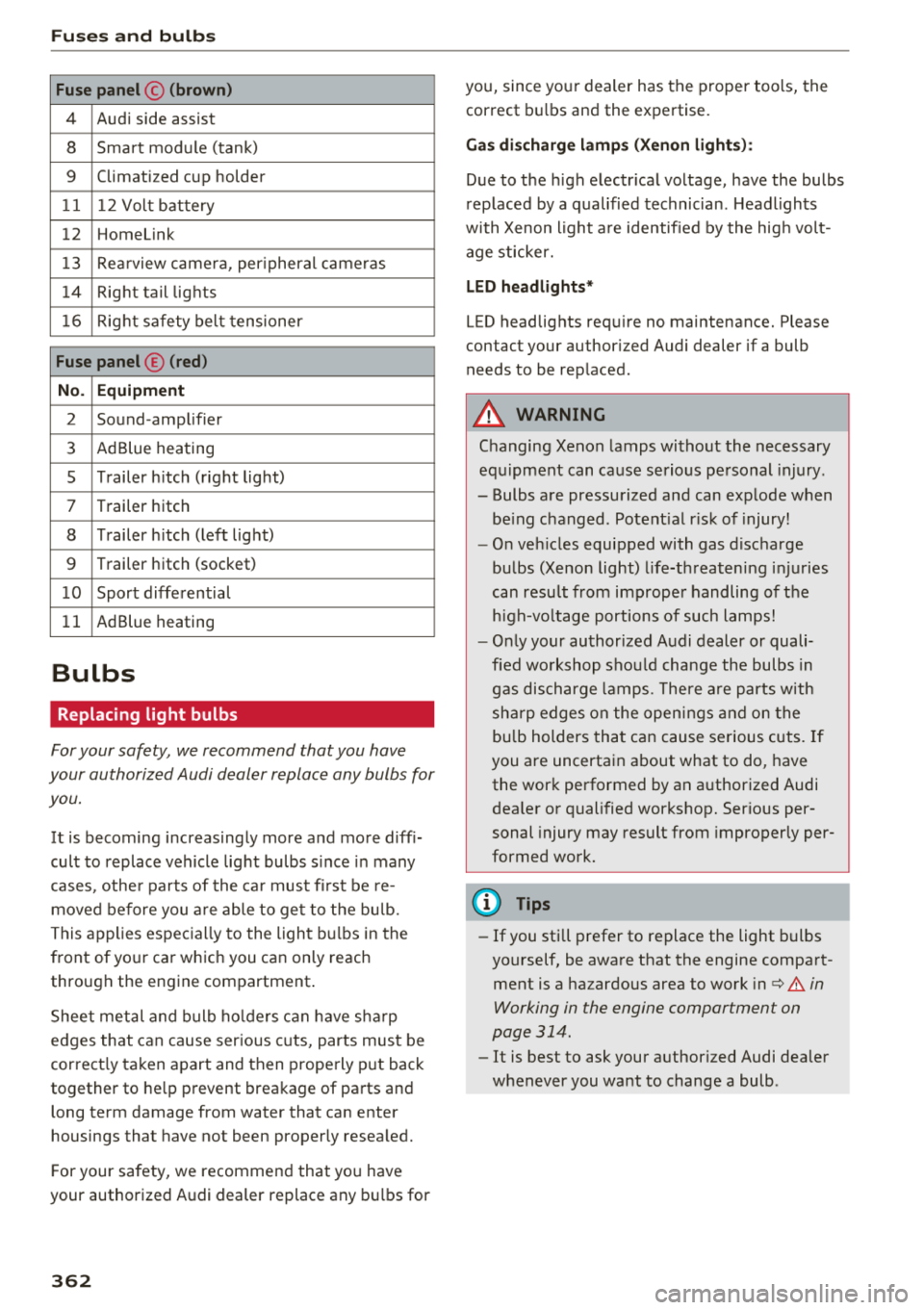
Fuses and bulb s
Fuse panel © (brown )
4 Audi side assist
8 Smart module (tank)
9 Climatized cup holder
11 12 Volt battery
12 Homelink
13 Rea rview camera, per ipheral cameras
14 Right tail lights
16 Right safety belt tensioner
Fu se panel ® (red )
No . Equipm ent
2 Sound-amplifier
3 AdBlue heating
s Trailer h itch (right light)
7 Trailer hitch
8 Trailer h itch (left lig ht)
9 Trailer hitch (socket)
1 0 Sport differential
11 AdBlue heating
Bulbs
Replacing light bulbs
For your safety, we recommend that you have
your authorized Audi dealer replace any bulbs for
you.
It is becoming increasingly more and more diff i
cult to replace vehicle light bulbs s ince in many
cases, other parts of the ca r must fi rst be re
moved before you a re able to get to the bu lb.
This applies espec ially to the light bu lbs in the
front of your car which you can only reach
through the engine compartment .
Sheet metal and bulb ho lde rs can have sha rp
edges that can cause ser ious cuts, parts must be
correct ly taken apart and then properly put back
together to he lp prevent breakage of parts and
long term damage from water that can enter
housings that have not been properly resea led.
F or your safety, we recommend that you have
your authorized Audi dealer replace any bu lbs for
3 6 2
you, since your dealer has the proper tools, the
correct bu lbs and the expertise.
Ga s di sc harg e lamp s (Xeno n ligh ts):
Due to the high electr ical voltage, have the bulbs
rep laced by a qualified technician . Headlights
with Xenon light a re identified by the hig h volt
age sticker.
L ED he adligh ts*
LED headlights requ ire no maintenance. Please
contact your author ized Audi dealer if a bulb
needs to be replaced .
A WARNING
Changing Xenon lamps without the necessary
equ ipment can cause serious personal injury.
-Bulbs are pressurized and can explode when
be ing changed. Potent ial r isk of injury!
-O n veh icles equipped with gas discharge
bulbs (Xenon light) l ife-threaten ing injuries
can resu lt from improper handling of the
h igh-vo ltage portions of such lamps!
-O nly your author ized Audi dealer or quali
fied wo rkshop shou ld change the bulbs in
gas discharge lamps. The re a re parts w ith
sha rp edges on the open ings and on the
bu lb holders that can cause serious cuts. If
you are uncertain about what to do, have the work performed by an authorized Audi
dea ler or qualified workshop. Serious per
sonal injury may result from improperly per
formed work.
(D Tips
-If you still prefer to replace the light bulbs
yourself, be aware that the engine compart ment is a hazardous area to work
i n c:> .&. in
Working in the engine compartment on
page 314.
-It is best to ask your authorized Audi dealer
whenever you want to change a bulb .