2018 AUDI Q5 page 4
[x] Cancel search: page 4Page 199 of 392

u co ..... N r--N ..... 0 <( 0 00
Audi connect vehicle control
Introduction
Applies to vehicles with Audi connect vehicle control
With the Audi connect vehicle control services l) ,
you can access various information or use individ
ual functions in the
Audi MMI connect app or in
myAudi .
Audi connect vehicle control includes the follow
ing services:
- Remote locking and unlocking ¢
page 198.
-Vehicle status report¢ page 198.
-Parking location ¢ page 198 .
-Geofencing Alert ¢ page 199.
-Speed Alert ¢ page 199.
-Valet Alert ¢ page 199.
- Stolen Vehicle Locator ¢ page 199.
-Online Audi service request ¢page 199.
(D Tips
-Accessing specific data or controlling func
tions remote ly depends on the charge leve l
of the vehicle battery. Therefore, these
functions only have limited availability after
switching off the ignit ion.
- The services are provided through a SIM
card installed in the vehicle. The cost of the
call and data connections is included in the
price for the services. Services are provided
assuming that the cell phone network re
quired for the installed S IM card is function
in g and ready to operate. The available serv
ic es set by Audi AG are only available within
the cell phone network coverage area for
the cell phone service provider selected by
Audi AG .
- You can also find more information on Audi
connect on line at www.audiusa.com.
l) In pre parat io n at t he time of p rinting. T he a vailab ilit y o f
the services o ffered depends o n the co untry and may
c hang e over tim e.
Audi connect vehicle control
Setup
Applies to vehicles with Audi connect vehicle control
To use Audi connect vehicle control services 1>,
please note the fo llowing :
Creating and verifying a user account
"'Create an account at www.aud iusa.com/myaudi
and verify it.
Setting a key user in the vehicle
Requirements: the ignition must be switched on .
Another key user must not be set in the veh icle .
If necessary, reset the key
user ¢ page 198.
.. Select in the Infotainment system: I MENU ! but
ton
> Audi connect > if necessary, Display
available functions >
right control button >
Audi connect user management > Key user >
Set key user .
"' Enter the user name for your ve rified account
and enter the IO-digit vehicle code. You can rub
the key tag for your remote control key to re
veal the vehicle code
¢ page 31.
.. Select and confirm Log in.
You can now use the vehicle control services
through the
Audi MMI connect app or through
www .audiusa.com/myaudi.
Using vehicle control services in the Audi
MMI connect app
Requirement: your mobile devices must be com
patible.
.. Install and start the Audi MMI connect app on
your mobi le device .
.. Log in to the Audi MMI connect app using your
user name and password and se lect your vehi
cle.
(D Tips
- Store the vehicle code in a secure place . It
may be necessary to re-enter the vehicle
code.
197
Page 203 of 392

u co ..... N r-N .....
~ 0 co
Emergency call
Introduction
Applies to: vehicles with emergency call fu nction
Depending on the country and the vehicle equip
ment, the following functions may be available.
W ith the
emergency call, you can call for he lp in
dangerous situat ions as quickly as possible. Use
this function when emergency he lp is needed
~ page 201.
W ith online roadside assistance, you can request
assistance if there is a breakdown or a minor acci
dent
q page 202.
(D Tips
- The services are provided through a SIM
card installed in the vehicle. The cost of the
ca ll and data connections is included in the
price for the services. Services are provided
assuming that the cell phone network re
quired for the installed SIM card is function
ing and ready to operate . The available serv
ices set by Audi AG are only available within
the cell phone network coverage area for
the cell phone service provider selected by
Audi AG.
- You can find what data will be transferred
at www.audiusa.com.
- These serv ices cannot be deactivated using
the settings in the Infotainment system.
Emergency call
Description
Applies to: vehicles with emergency call function
An emergency call is a combination of data trans
mission and a phone call. The data transmission
from your vehicle forwards important informa
tion, such as the vehicle and position data, to the
emergency call center .
Emergency call
Making an emergency call
Applies to: vehicles with emergency call function
The emergency call can be made two different
ways.
Fig. 183 Front headli ner : cover for the emergency call but
ton
Requirement: the L ED @ must be green.
Manual emergency call
Requirement: the ignition must be switched on.
.,. Tap the cover(!) to open it.
.,. Press and hold the emergency call button until
the LED @blinks green. The emergency call is
made.
.,. If the emergency call button is pressed by mis
take, then press it again immediately until the
LED stays green. The emergency call is can
celed .
Automatic emergency call
The vehicle electrical system initiates an auto
matic emergency call under certain circumstan
ces, for example if an airbag deploys. The LED in
the emergency call button @blinks green . The
emergency call is made . This cannot be canceled.
Note the following LED conditions :
-Green -the emergency call function is availa
ble.
- Red -there is an e rror in the emergency call
function. Contact an authorized Audi dealer or authorized Audi Service Facility. No emergency
call can be made.
-Off-the emergency call function is not availa-
ble, perhaps because no network is available.
.,..
201
Page 205 of 392

Navigation
Opening navigation
Applies to: vehicles with navigation system
The navigation system directs you to your desti
nation, around traffic incidents and on alterna
tive routes, if desired .
Fig. 185 Diagram: Ente r dest ination menu
.. Press the I NAV/MAPI button.
The
Ente r des tinatio n menu is displayed after
opening navigation. The following information
can be displayed in the Infotainment system dis
play:
(D I nput field for free text search 204
@ Home address . . . . . . . . . . . . . . . . 205
@ Last dest inatio ns . . . . . . . . . . . . . . 204
@ Stored favorites . . . . . . . . . . . . . . . 205
As soon as yo u select an entry from the list (de
pending on the ve hicle equipment), the corre
spond ing destination displays as a map preview*
@ r:::>fig .185.
If you have connec ted a cell phone to the MM I,
your di rectory contacts will also be listed if they
have navigation data assigned to them.
The
Fav orites @r::> fig. 185 menu item as we ll as
the directory/contacts are only shown in the
En
t e r d estination
menu if you have entered one or
more characters using the input field.
Swi tching betw een d estination entr y and th e
map :
-Press the I NAV/MAPI button repeated ly until
the map is d isplayed .
Or: select the left contro l
~ button > Swi tch to map . ..... N r-N .....
~ 0 co
Naviga tion
A WARNING
-The demands of traffic require your full at
tention. Always read the chapter
r:::> page 147, Traffic safety information.
- Obey all traff ic laws when driving.
- The route calculated by the navigation sys-
tem is a recommendation for reaching your
destination. Obey traffic lights, stopp ing re
strictions, one-way streets, lane change re
strictions, etc.
(D Note
- If the driving directions conflict with traffic
laws, obey the traffic laws .
- To reduce the risk of an accident, adjust the
volume of the nav igation system so that sig
nals from outs ide the veh icle, such as police
and f ire s irens, can be heard easily at all
times.
Ci) Tips
- Snow and obstruct ions on the GPS antenna
or interference caused by t rees and large
buildings can impair satell ite recept ion and
affect the system's ability to dete rm ine the
veh icle pos it ion. Several deactivated or mal
functioning satell ites can also interrupt G PS
recept ion and affect the system's ability to
determine the vehicle position.
- Because street names sometimes change, the names stored in the MMI may in rare
cases d iffer from the actual street name.
203
Page 206 of 392

Navigat ion
Entering a destination
Free text search for destinations
App lies to: ve hicles w ith navigat ion system
With the free text search, you can enter the navi
gation destination data all at once in any order using the MMI touch control pad* or the letter/
number speller (for example, 20 Main St., Los
Angeles). Likewise, you can search for points of interest, contacts, previous destinations or fa
vorites to navigate to the desired address.
Press the ! NAV/MAP ! button repeatedly u ntil the
Enter de stina tion menu is d isplayed ~ page 203,
fig. 185 .
"'Push the cont rol knob up . The input field is d is
played
(D ~ page 203, fig. 185.
-Enter one or more search terms into the input
field .
-If available, confirm the input suggestion* to
complete the entry or a word suggestion* . See
~ page 155, Letter/number speller .
-Turn the control knob to the rig ht to change
the results list .
-Select and confirm a destination from the re-
sults l ist .
-Select and confirm Start rou te guidance .
The route displays as an overview in the map .
Route guidance is a lready active.
N ar rowing th e search area
All countr ies/s tates are se lected at the fac to ry
for the free text search .
-Select: the r ight control button >
-Cou ntry/state se lection- in the input field 1
~page 203, fig. 185.
-Se lect t he country o r state(.) that shou ld be
searched for i n the free text searc h in orde r to
nar row the numbe r of res ults and increase the
search speed. The se lected entry in the coun
try/state se lection is stored .
Or: select All
countries / state s.
(D Tips
-The MMI input suggestions depend on the
l ast navigated destinations.
204
-Up to SO entries can be stored in the last
destinations list.
-Additiona l information on free tex t sea rches
can be fo und
u nder~ page 157.
Loading previous destinations
App lies to: vehicles wi th navigat ion syste m
Your last destinations are automatically stored
and can be loaded directly as a destination .
Requirement: a dest inat io n was a lready navigat
ed to .
"' Press the I NAV/MAP! button repeatedly until
the
Enter d estination menu is displayed
~ page 203, fig. 185.
Your last dest ination is listed d irectly in the Enter
destination
menu unde r th e home address and
i dentified w ith the
symbo l@ ~ page 203,
fig. 185 .
-Select and confirm one of the last destinations
from t he list.
-Select and confirm S tart route guid ance.
Deletin g pre vious destinat ion s
-Select one of the last destinations from the list .
-Select: right con trol b utton> Delete de stina-
tion
> Delete this last de stination or Delete all
last de stin ations.
The sele cte d dest inat ion or all las t dest inat ions
i s/are de leted and no longer d isp layed in the
En
ter dest ination
menu .
Entering an address
Applies to: vehicles wit h navigat ion syste m
As an alternative to free text search, you can al
so enter an address in stages.
"' Press the I NAV/MAP! butt on repeatedly u nti l
the
En ter de stination me nu i s displayed
~page 203, fig . 185.
"' Select: left control button > Enter add ress.
-Entering a de stin ation u sing a country /state :
select and confi rm Count ry/state . Select and
confirm a country/state direct ly from the list .
..,_
Page 207 of 392

u co ..... N r--N ..... 0 <( 0 00
Or: search for a country/state using the input
field.
- Ent ering a d estination u sin g th e Ci ty/ ZIP
c o de :
select and confirm Cit y/ZIP code . Enter a
city or a ZIP code .
Or: select and confirm a city
from the list.
- Se lect and confirm additional detai ls about the
destination such as
Street , House number or
Dow nto wn.
- Destination ent ry using a st reet inter se ction* :
Requirement: you must enter a street. Se lect
and confirm
Inte rsection . Select and confirm a
street d irectly from the list.
Or : search for a
street using the input field .
- Se lect and confirm
Start ro ut e guidance .
Selecting a destination on the map
A pp lies to: ve hicles with navigation system and MMI touch
A point on the map can be used as the destina
tion.
- Adju sting th e scale : turn the contro l knob to
the left or rig ht.
- Acti vating c rosshairs : press the control knob.
T he crosshairs are shown on the map .
-Mov ing the c rosshairs: move the crosshairs to
the destination using the MM I touch contro l
pad*
¢ page 152.
- Setting as desti nation : press the control knob
when the crosshairs are s hown. If necessary,
select and confirm
Add as stopo ve r and then
Start route guidance .
- Hiding the cro sshai rs:
press the I BACK I button.
Additional information about th e loc ation of
the cro sshai rs:
when you select map con tent us
ing the crosshairs, a display of avai lable informa
tion appears (such as street name , address or
points of
interest) @c>page 213, fig. 193.
Na vigation
Setting a home address/favorite as the
destination
App lies to : vehicles wi th navigat io n syste m
You can quickly and easily start route guidance
to your home address using the home address
function. Favorites allow easier ac cess to fre
quently used destinations.
"' Press the INAV/MAPI button repeatedly u nti l
t he
En ter d estination men u is displayed
c>
page 203, fig . 185 .
Setting a home address as the destination
Requirement: a home address must be stored
c>page 210.
Your Home address is shown directly in the Ente r
d estination
menu @c>page 203 , fig . 185 .
-Select: Home address > Sta rt route g uidance .
Setting a favorit e as the destination
Requirement: a favo rite must be s tored as a des
tination
c> page211.
- Enter at least the fi rst three letters of the de
sired favo rite in the free text sea rch inpu t field.
The favo rites fo und a re shown in the Infotain
ment system
disp lay @ ¢ page 203, fig. 185 .
-Select and co nfirm the des ired entry.
- Select and confirm
St art route guidance.
(D Tips
- Add itiona l settings for the home address
can be fo und
under ¢page210 .
-Add itiona l setti ngs for the favorites can be
found unde r
¢page 211 .
205
Page 208 of 392

Navigat ion
Transferring a destination from the
directory
A pp lies to: ve hicles w ith naviga tion system
You can navigat e directly to d estinations in th e
directory.
Option•, • ~.,how co11t.Ht dl't.1il•,
0
, ;== Jo;i hn Smith
~ :-Audi Beverly Hills
~ ,. Hawthorn Ave, Los Angeles, CA
&=9t<;'l, Wilshire B lvd, Beverly Hills, CA
t
9, ~
Fig . 186 Possible directory/contacts
(,
~
~
Requirement: an address with navigat ion data o r
a nav igat io n destination must a lready be as
signed to a conta ct
¢ page 211 .
i. Press the I NAV/MAPI button repeatedly until
t h e
Enter de stination menu is displayed
¢ page 203, fig . 185.
i. Se lect: left con trol button > Director y > a con-
tact.
The d irectory/contacts a re shown in alphabetical
order and are marked w it h symbo ls to ind ic a te
the storage location:
(D Business address
@ Private address
@ Business dest ination
© Pr ivate dest inat io n
-Select and confirm a n address or a destination.
When you have se lected a dest inat ion, the
r oute g uidance can be started d irect ly.
-Check the address input aga in whe n select ing
an address.
-The n select and confirm Start rout e guid ance .
Addit iona l directory functions in the navigation
system can be found
under¢ page 211.
(D Tips
-Addresses that have been imported from
your cell phone into the MMI can a lso be
used as a dest ination.
206
-If a contact is g rayed out in the directory,
this contact has neither a destination nor an address assigned to them.
Point of interest search
App lies to : vehicles wit h navigat ion syste m
i. Press the I NAV/MAPI button repeatedly until
the
Enter des tinat ion me nu is displayed
¢page 203, fig . 185 .
.. Select: left control button > Points of intere st.
-Changing the search area : select and confirm
Search area > a search area from the list .
The following search categor ies are available:
Nearby : poin ts of in teres t can be se lec ted from
diffe rent categories. The points of interest are
li sted starting from the immediate vicinity of the
vehicle up to a radius of approximately 124
miles (200 km).
Along the route : points o f interest a long the
route can only be se lected during active route
guidance. The points of interest are located di
rectly a long or in the immediate vicin ity of the
ca lculated route. The points of interest can like
wise be selected from various categories . For ex
ample, you can searc h for a hotel or parking lot
at the dest inat ion .
Near destination /Near stopo ver : points of inter
est near a destination or a stopover can only be
selected dur ing act ive route guidance. The po ints
of i nterest can likewise be selected from var ious
catego ries. Fo r example, you can sea rch fo r a ho
te l o r par king lo t a t the dest inat io n .
In a new city: select a co untry/state or sea rch in
a new c ity. Enter the name of the des ired c ity .
Po ints o f inte rest ca n be selected from va rio us
c a tego ries. This funct ion a llows yo u to se arch fo r
po ints of in terest in any city rega rd less of the a c
tive ro ute guidance or the vehicle position.
-Search for a point of intere st name in the se
l ec ted search ar ea :
ente r the name of the poin t
o f in terest.
-Searching for a point of interest in a specific
c ategory :
select Sel ect category . Select and
confirm a category such as
Re staurant s. .,.
Page 209 of 392

u co ..... N r--N ..... 0 <( 0 00
(D Tips
-Distances to points of interest are displayed
as a straight -line distance from your current
l ocation. The actua l distance from your cur
rent location to the point of interest is up
dated automat ica lly . The list of found
po ints of interest is not resorted when th is
happens .
- There may be entries in the list that cannot be displayed completely due to the ir length .
Se lect the co rresponding e ntry from the
li st . Se lect : righ t co ntro l butto n
> Show des
t in ati on detai ls . Det ailed informat ion for
t h e selec ted en try in t he list is then dis
p layed.
Online point of interest search (online
search)
Applies to: vehicles with a navigation system and Audi con
nect (Infotainment)
You con sear ch for points of interest on the In
tern et.
Req uirement: the requirements fo r Audi co nnect
(Info tainment) m ust be met
r=> poge 187.
.,. Press the I NAV/MAPI button repeatedly until
the
Ent er destination menu is displayed
r=> poge 203, fig . 185.
.,. Se lect : left cont rol b utton > Online search . The
search area last set is d isplayed in the inp ut
field.
- Changing the search ar ea : select: right control
bu tton
> Sel ect search area .
- Sear ching for online de stination s in the se
lec ted search are a:
enter a new city/state if
necessary. Ente r the sea rch term, such as ho tel.
Press the control knob . Select and confirm an
on line destination from th e list.
- Sear ching fo r online destination s in a specific
categor y:
select and confirm Select category .
Select and confirm a category such as Restau
rants .
Find which search areas a re available under
¢ page 206, Point of interest search.
You can sea rch fo r onl ine dest inat io n s using the
voice recognition system ¢
table on page 170.
Navigation
(D Tips
Always read the chapter r=> page 194, Audi
connect (Infotainment) general information.
Accessing destinations from myAudi
account
Applies to: vehicles with a navigation system and Audi con nect (Infotainment)
Import individual destinations from your myAudi
account into the
MMI.
Requirement:
T he requirements for Audi connect (Infota in
ment) must be met
¢ page 187 .
You must have a reg istered myAud i account a t
www .audiusa .com/myaudi . You must have ave
hicle assigned to your myAud i account and you
must have stored one or more destinations .
.. Press the INAV/MAPI button repeatedly until
the
Enter dest ination menu is displayed
r=> page 203, fig . 185 .
.. Select: left control button > myAudi contac ts.
.,. If necessa ry, enter yo ur myA ud i use r data or
your myA udi PI N
¢page 187. The con tacts
stored in myAud i a re displayed .
- Select and confirm a contact.
- Select and confirm a p rivate or business dest i-
nation .
- Select and confirm
Start route guidance.
(D Tips
- You on ly need to enter the myAudi user data
one time .
- You can rece ive your myAudi PIN if yo u have
set up a myAud i account.
- For add itiona l information, v is it
www.aud iusa.com.
Entering a destination using geo
coordinates
Applies to: vehicles with navigation system
.,. Press the INAV/MAPI button repeatedly unti l
the
En ter des tination men u is disp layed
¢ page 203, fig. 185 .
207
Page 210 of 392
Navigation
.,. Select: left control button > Geographical coor
dinates .
-Select Latitude /Longitude.
- Press the control knob to set t he in dividua l val-
u es.
- T urn the cont rol knob to the left/r ight to
c h ange the selected value .
- Select and confirm
Start route guidance .
Adding a stopover
Applies to: vehicles with navigation system
You can enter an additional destination when
route guidance is active .
_________ N_a_ v_ ,_g _a _t _,o _n_ . _F _n _t _e _, _ d _e_ ,_1 _, n_ a _
t, _o _n ________ ~~
jl1 Bear Va lley Rd 79 9 m;
' HC'spcria. CA, 92345 1:22 AM
J Cancel route g~1dance ::0 -·-·-·
.JI' Elias Thomas Snack Bar
' 111 N Hill St, Los Angeles, CA
Delete stopover ====~ lfJ
250yd
6:05 AM
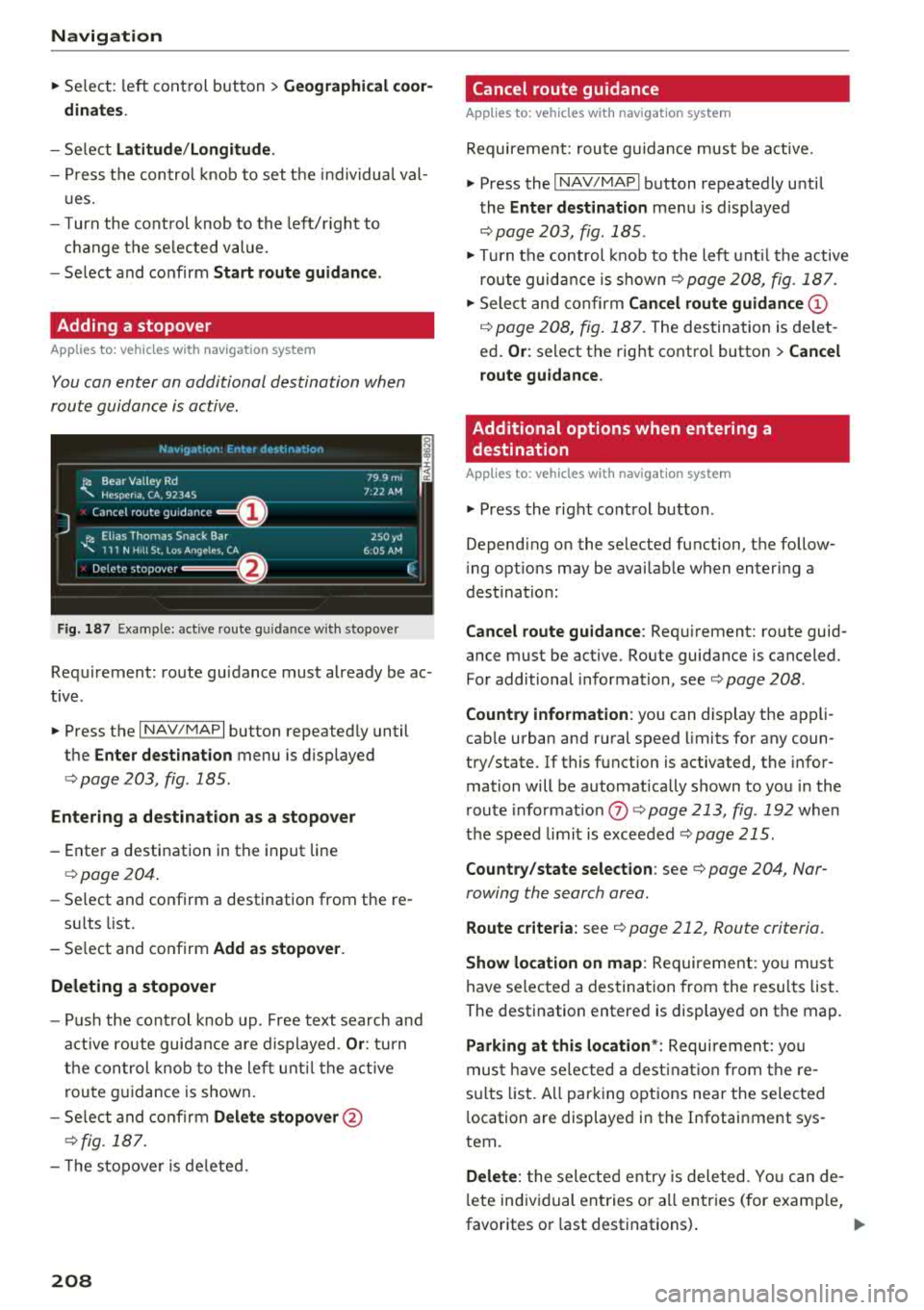
Fig . 187 Example: active route g uida nce w ith stopover
Requirement: route guidance must already be ac
tive .
.,. Press the I NAV/MAPI button repeatedly until
the
Enter destination menu is displayed
¢ page 203, fig . 185 .
Entering a destination as a stopover
-Enter a destination in the input line
¢page 204.
-Se lect and confirm a destination from the re -
s ul ts list .
- Select and confirm
Add as stopover.
Deleting a stopover
- Push the cont rol knob up . Free text search and
active route guidance are displayed.
Or: turn
the control knob to the left until the active
route guidance is shown.
- Select and confirm
Delete stopover @
¢fig. 187.
- T he stopove r is deleted.
208
Cancel route guidance
Applies to: vehicles with navigation system
Requirement: route guidance must be active.
.,. Press the I NAV/MAPI button repeatedly until
the
Enter destination menu is displayed
¢ page 203, fig. 185 .
.,. Turn the control knob to the left until the active
route guidance is
shown¢ page 208, fig. 187 .
.,. Select and confirm Cancel route guidance (D
¢ page 208, fig. 187. The destination is de let
ed.
Or : select the right contro l button > Cancel
route guidance .
Additional options when entering a
destination
Applies to: vehicles with navigation system
.,. Press the right control button .
Depend ing on the selected function, the follow
i ng opt ions may be avai lable when entering a
dest ination:
Cancel route guidance: Requirement: route guid
ance must be active. Route guidance is canceled.
For additional information, see ¢ page 208 .
Country information : you can display the app li
cab le urban and rural speed limits for any coun
try/state. If this function is activated, the infor
mation will be automatically shown to you in the
route informat ion
(J) ¢ page 213 , fig . 192 when
the speed limit is exceeded
¢page 215.
Country/state selection: see¢ page 204, Nar
rowing the search area .
Route criteria: see¢ page 212, Route criteria .
Show location on map: Requirement: you m ust
have selected a destination from the results list.
The destination entered is displayed on the map .
Parking at this location*: Requirement: you
must have se lected a destination from the re
su lts list . A ll parking options near the selected
l ocation are displayed in the Infotainment sys
tem.
Delete: t he selected entry is deleted. You can de
l ete individual entries or a ll entries (for examp le,
favorites or last destinations) .
...