2018 AUDI Q3 light
[x] Cancel search: lightPage 92 of 230
Intelligent Technology
-Press the accelerator pedal carefully when
accelerating on even, slippery surfaces such
as ice and snow. The drive wheels can spin
even when these control systems are instal
led and this can affect driving stability and
increase the risk of a collision.
{D) Tips
-The ABS and ASR only function correctly
when all four wheels have a similar wear
Switching on/off
condition. Different tire sizes can lead to a
reduction in engine power.
- You may hear noises when the systems de
scribed are working .
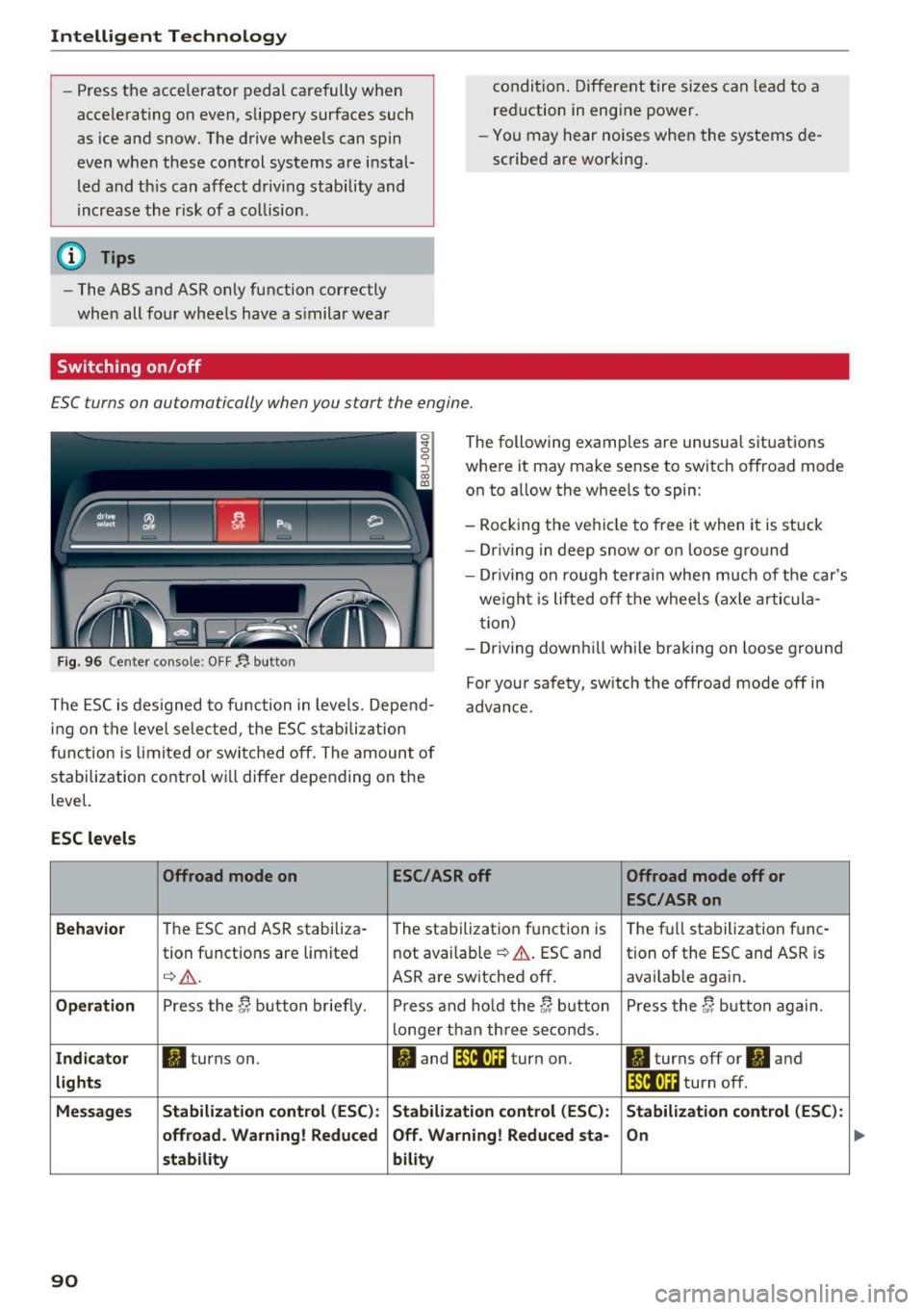
£SC turns on automatically when you start the engine .
Fig. 96 Center console : OFF~ button
The following examples are unusual situations
where it may make sense to switch offroad mode
on to allow the wheels to spin:
- Rocking the vehicle to free it when it is stuck
- Driving in deep snow or on loose ground
- Driv ing on rough terrain when much of the car's
we ight is lifted off the wheels (axle artic ula
tion)
- Dr iv ing downh ill wh ile braking on loose g round
The ESC is designed to function in levels. Depend
ing on the level selected, the ESC stabilization
function is limited or switched off . The amount of
stabilization control wi ll differ depending on the
level. For your safety, sw
itch the offroad mode off in
advance.
ESC levels
Offroad mode on ESC/ASR off
Offroad mode off or
ESC/ASR on
Behavior
The ESC and ASR stabiliza-
The stabilization function is The
full stabilization func-
tion functions are limited not
available
¢ .&.. ESC and tion of the ESC and ASR is
¢ .&. . ASR are switched off. availab le again.
Operation Press the C; button briefly. Press and hold the C; button Press the C; button again.
longer than three seconds.
Indicator II turns on. II and lfil•U~ turn on. II turns off or II and
lights lfil•l~i turn off.
Messages Stabilization control (ESC):
Stabilization control (ESC): Stabilization control (ESC):
offroad. Warning! Reduced Off
. Warning! Reduced sta-
On
stability bility
90
...
Page 93 of 230
A WARNING
You should only switch offroad mode on or
switch ESC/ ASR off if your driving abilities
and the traffic conditions perm it. There is a
risk of s lid ing .
- The stabilization function is limited when
offroad mode is switched on . The driving
wheels could spin and the vehicle could
swerve, especially on slick or s lippery road
surfaces.
- There is no vehicle stabilization when ESC/
ASR are switched off.
Hill descent assist
Appl ies to: vehicles with hill hold assist
Hill descent assist makes it possible to drive
down a hill at a constant speed.
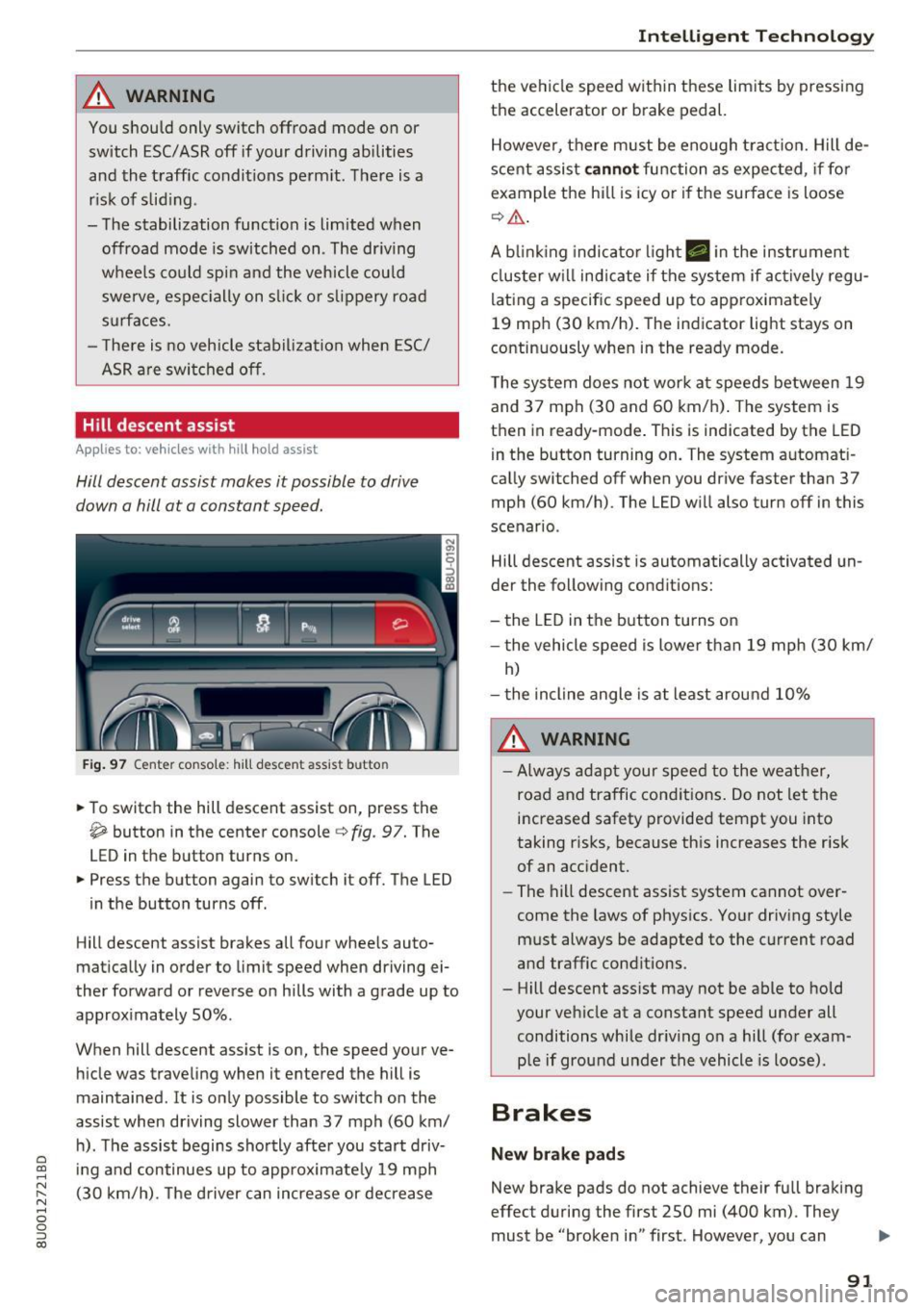
Fig. 97 Center console : hill descent assist butto n
• To switch the hill descent assist on, press the
~ button in the center console c} fig. 97. The
LED in the button turns on.
• Press the button again to switch it off. The LED
in the button turns off .
Hill descent assist brakes all four whee ls auto
matically in order to limit speed when driving ei
ther forward or reverse on hills with a grade up to
approximately 50% .
When hill descent assist is on, the speed your ve hicle was traveling when it entered the hill is
maintained . It is only possible to switch on the
assist when driving slower than 37 mph (60 km/
h). The assist begins shortly after you start driv-
e '.:: ing and continues up to approximate ly 19 mph
N r--. (30 km/h) . T he driver can increase or decrease N .... 0 0 ::, (X)
Intelligent Technology
the vehicle speed within these limits by pressing
the accelerator or brake pedal.
However, there must be enough tract ion. Hill de
scent assist
cannot function as expected, if for
example the hill is icy or if the surface is loose
¢,&. .
A blinking indicato r light. in the instrument
cluster will indicate if the system if actively regu
lating a specific speed up to approximately
19 mph (30 km/h). The indicator light stays on
continuously when in the ready mode.
The system does not work at speeds between 19
and 37 mph (30 and 60 km/h) . The system is
then in ready-mode . This is indicated by the LED
in the button turning on. The system automat i
cally switched off when you drive faster than 37
mph (60 km/h) . The LED will also turn off in this
scenario .
Hill descent assist is automatically activated un
der the following conditions:
- the LED in the button turns on
- the vehicle speed is lowe r than 19 mph (30 km/
h)
- the incline angle is at least around 10%
A WARNING
-
-Always adapt your speed to the weather,
road and traffic conditions. Do not let the
increased safety provided tempt you into
taking risks, because this increases the risk
of an accident.
- The hill descent assist system cannot over
come the laws of physics. Your driving style
must always be adapted to the current road
and traffic conditions .
- Hill descent ass ist may not be able to hold
your vehicle at a constant speed under all
conditions while dr iving on a hill (for exam
p le if ground under the vehicle is loose).
Brakes
New brake pads
New brake pads do not achieve their full braking
effect during the first 250 mi (400 km) . They
must be "broken in" first . However, you can
IJ,,
91
Page 94 of 230
Intelligent Technology
compensate for the slightly reduced brak ing
force by pressing firmly on the brake peda l. Avoid
heavy b raking during the break -in per iod .
Wear
Brake pad wear depends largely on the way the
veh icle is driven and on operat ing cond it ions.
This is especially t rue if you are driving frequently
in the city and on c urves or with a sporty driving
style.
Operating noise
Noises may occur when br aking depend ing on the
speed, b raking force and outs ide cond itions such
as temperature and humidity.
Effect of water or road salt
I n ce rtain s ituations, fo r example after driving
through water, in heavy ra in, afte r ove rnig ht con
densat ion or after washing your car, the braking
effe ct can be red uced by moisture or ice on the
b rake rotors and brake pads. The brakes must be
"dr ied" first with a few careful brake applica
tions.
At highe r speeds and with the windshie ld wipers
turned on, the brake pads press against the brake rotors for a short amount of time . This action,
which is not felt by the driver, happens at regular
intervals and ensures a better reaction time for
the brakes in wet weather.
The braking effect can also be reduced if you are
driving on salted roads and you do not apply the brakes for long periods of time. The laye r of salt
on the brake rotors and brake pads must be worn
off first when t he brakes a re applied ¢ ,& .
Corros ion
L eaving the vehicle par ked for long periods of
time, low mi leage and avo id ing heavy brak ing
can contribute to corrosion on the brake rotors
and to d irty b rake pads .
If you usually avoid heavy b raking or if there is
corros ion present, occasional heavy braking at
h igh speeds is recommended to clean the brake
rotors and pads¢,&.
92
Brake system malfunction
if you no tic e th at the b rake peda l t ravel has sud
denly gotten larger, then a brake ci rc u it may have
failed ¢.&. .
Low brake fluid level
When the b rake fluid level is low, malfunctions in
t h e b rake system may occur. The b rake fl uid leve l
i s e lec tron ically moni to red.
Brake booster
The brake booster amplifies the pressure you ap
ply to the brake pedal. It only works when the en
gine is runni ng ¢ ,& .
.8, WARNING
-On ly app ly the bra kes for the p urpose o f
cleaning the brake sys tem w hen road and
t raffic conditions permi t. You mus t not en
danger other roa d users . This increases the
risk of an accident.
-
- Never let the ve hicl e roll whi le the engine is
stopped because t his increases the risk of an
accident .
(D Note
- Never let the brakes "rub'' by pressing the
peda l lightly when braking is not actually
necessary . This causes t he b rakes to over
heat and increases braking distance and
causes wear.
- Be fore driving downhill a long d istance on a
steep hill, decrease your speed and select a lower gear. This makes use of the engine
brak ing effect and relieves the brakes . If
you need to bra ke add itiona lly, bra ke in in
te rvals and not cont inuous ly.
(D Tips
- If the brake booster is not working, you
must press the b rake peda l with much more
forc e than normal.
- If you retrofit your veh icle with a front spo il
er , wheel covers or sim ila r i tems, make su re
t h at the air flow to the fro nt wheels is not
inter rup ted. O therwise t he b rake system
c an be come too hot.
Page 95 of 230

0 co ......
"' ,....
"' ...... 0 0 :::,
00
Electromechanical
steering
The ele ctromechanical steering supports th e
driver's steering movements.
Power steering adapts electronically based on
the veh icle speed .
Indicat or lights and me ssages
• Steering fault! Do not dr ive vehi cle!
If th is ind icator lig ht tu rns on and stays o n and
this message appears, the power steer ing may
have failed.
Do
not c ont in u e d riving. See an authorized Aud i
dea ler o r autho rized Aud i Serv ice Facility fo r as
sis tance.
If the indicator light turns on, the steering wheel may be more diff icult to move or more sensitive
than usual. The steering wheel may also be at an
angle when dr iving straight .
Drive s low ly to an author ized Audi dealer or au
thor ized Audi Se rvice Fac ility to have the mal
function co rrected.
kr-ij Steering lock: System fault ! Please contact
dealer.
There is a malfunction in the electronic steering
l ock.
Drive to an authorized Aud i dea ler o r aut horized
Audi Service Facility immediately to have the
malfunction corrected.
A WARNING
-
Have the system malfunction corrected as
soon as possible by an author ized Audi dealer
or authorized Aud i Service Fac ility, as this in
creases the risk of a n accident .
(D Tips
If the . or i1:.ij indicator light only stays on
for a short time, you may continue dr iv ing.
Intellig ent Technology
All wheel drive (quattro)
Applies to: vehicles with all wheel drive
In all wheel drive, all four wheels are powered.
General information
In all whee l drive, the dr iving power is div ided be
tween all fou r wheels . This happens automatical
ly depending on yo ur driving behavior as we ll as
the cur rent road conditions . A lso see ¢
page 89 .
The all whee l dr ive concept is des igned for high
engine power. Yo ur vehicle is except iona lly pow
erfu l and has excellent driving characteristics
both under normal driving conditions and on
snow and ice. Always read and follow safety pre cautions
q .&, .
Winter ti res
By using all whee l drive, your veh icle has good
forward motion w ith standard tires in winter con
ditions . However, using winter or all season tires
on
all four wheels in the winter is recommended,
because th is w ill improve the
braking effect.
Snow chains
If there a re snow chain laws, snow cha ins m ust
also be used on ve hicles with all wheel drive
¢ page 181, Snow chains .
Replacing tires
For vehicle s wi th a ll wheel d rive, o nly wheels wi th
the same roll ing ci rcumfe rence sho uld be used.
Avoid using tires with di fferen t tread depths
¢ page 173, New tires or wheels.
A WARNING
- Also, in vehicles with all whee l drive, adapt
your driving style to the current road and traffic cond itions. Do not let the increased
safety prov ided tempt you into taking r isks,
because this increases the risk of an acc i
dent.
- The braking ab ility of your vehicle is limited
to the trac tion of the wheels. I n this way, it
is not different from a two w heel d rive vehi
cle. Do no t be tempte d to accelerate to a
h igh speed when the ro ad is s lippery, be -
cause t his increases t he risk of an acci den t. ...,
93
Page 96 of 230

Intelligent Technology
- Note that on wet streets, the front wheels
can "hyd roplane" if d riving at speeds that
are too high. Unlike front whee l drive
vehicles, the eng ine does not rev highe r sud
denly when the vehicle begins hyd roplaning.
Fo r this reason, adap t your speed to the
road co nditio ns to reduce t he risk of an acc i
dent.
Energy management
The starting ability is optimized
The energy management system manages the
electrical energy distribution and optimizes the
availability of electrical energy for starting the
engine.
When a ve hicle w ith a conventional e nergy sys
tem is not driven for a long time, the vehicle bat
tery is dra ined by equipment (for example, the
immobilizer) . In certain circumstances, there
could may not be enough energy to start the en
gine .
Your veh icle is equipped with a n intelligent ene r
gy management system for d istr ibut ing electric i
ty . This s ignificantly improves the sta rting ability
a nd increases t he ve hicle battery life .
The energy management system Is made up of
battery diagnosis , idling current management ,
and dynamic energy management .
Battery diagnosis
The batte ry diagnos is determines the ve hicle bat
tery charge level. The sensors dete rm ine the bat
tery voltage, the battery cur rent, and the battery
temperature. The c urrent charge level and the
pe rformance of the veh icle battery are deter
m ined based on th is .
Idling current management
The idling cu rrent management dec reases the
e n ergy used wh ile parked . With the eng ine
sw itched off, it manages the energy distribution
to the differe nt elect rical components. Data from
t he batte ry diagnos is is taken into account fo r
this.
94
De pend ing on the vehicle batte ry c harge level,
e lectrica l eq uip ment is switched off one item af
te r the other to p revent t he vehicle battery from
dra ining and to ma inta in the starting ab ility.
Dynamic energy management
W hile driv ing , d ynam ic ene rgy man ageme nt di s
tribu tes the ap propr iate amo unt of energy to t he
electrica l eq uip ment . It contro ls t he battery
c h arge level so that the amount o f energy is not
greater than the amount being generated in or
der to maintain an opt imal vehicle battery charge
l evel.
(D Tips
- Energy management cannot overcome the
laws of physics. Not e that the charge level
and length of the veh icl e bat tery life a re
limited .
- Wh en the sta rting ability is endangered, the
(•) indicator light t urns o n
c::> page 13.
What you should know
Maintaining the starting ability is the highest
priority .
A lot of st ress is placed on the veh icle battery
whe n driving short distances, d uring city d riving,
and at cold times of t he year. A lot of ene rgy is
u sed but li tt le is generated .
It is also critical
whe n the engi ne is no t ru nning but electrical
equipmen t is sw it c hed on . In t his ca se, energy is
u sed but none i s generate d.
In si tuati ons like t his, energy management w ill
ac tiv el y regulate the d is tr ibution of energy .
Long periods without use
If you do not drive yo ur vehicle for severa l days o r
wee ks, electrica l equ ipment is g radua lly sca led
bac k or sw itched off . Th is reduces energy use and
ensures the vehicle will be ab le to s tart a fter long
p er iods o f time . Some conven ience f unct ions,
s uch as in terior lig htin g, m ay not be available un
d er cert ain circu m sta nces. These c onve nien ce
f unct ions w ill be avail able ag ain once yo u sw itch
t h e ignit io n on and sta rt the eng ine. .,.
Page 97 of 230

0 co ......
"' ,....
"' ...... 0 0 :::,
00
With th e engin e switched off
The vehicle battery will d rain if yo u use I nfota in
ment f unctions such as listening to the radio
while the engine is switched off .
The vehicle 's ability to start may be impaired by
the energy use, a message will appear in the In
fotainment system disp lay .
The message ind icates that the system will
switch off au tomati cally soon. If you wou ld like
to continue using the funct ions, you must s tart
the engine.
With the engine running
Although electrical energy is gene rated whi le
d riving, the vehicle battery can drain. This can
h appen if l ittle energy is gene rated but much is
used, and the charge leve l of the veh icle ba ttery
is not optima l.
To restore the ba lance of energy, components
that requ ire large amo unts of energy are tempo
r ar ily scaled bac k or switched off. Heating sys
tems in part icular requi re a g reat deal of energy.
If
yo u notice, for example, that the seat heating*
or rear window defogger is not working, then it
has been temporarily reduced or switched off.
These systems are available again as soon as the
e nergy supply has been restored.
In addition, you may notice that the idle speed
has slightly increased. That is norma l and no
cause for concern. By increasing the idling speed,
the add itional required energy will be generated
and the vehicle battery will be cha rged.
Notice about data
recorded by the Event
Data Recorder and
vehicle control modules
Event Data Recorder
This vehicle is equipped with an Event Data Re
corder (EDR). The main purpose of an EDR is to
record, in certain crash or near crash-like situa
tions, such as an a irbag deployment or hitting a
road obstacle, data that will assist in understand
in g how a veh icle's systems performed. The EDR
Intellig ent Technology
is des igned to record data related to vehicle dy
namics and safety systems for a short period of
t ime, typ ica lly 30 seconds or less. The EDR in this
vehicle is designed to record such data as:
- How various systems in your vehicle were oper
ating;
- W het her o r not the drive r and passenge r safety
be lts were buckled/fastened;
- How far (if at all) the driver was depressing the
accelerator and/or brake pedal; and,
- How fast the vehicle was traveling.
These data can help provide a better understand
i ng of the circumstances in wh ich crashes and in
j u ries occur. NOT E: EDR da ta a re recorded by your
vehicle on ly if a non-trivial crash s ituation occurs;
no data are re co rded by the E DR under normal
driving conditions and no persona l data (e .g .,
name, gender, age, and crash location) are re
corded. However, other parties, such as law en
forcement, could comb ine the EDR data with the
type of personally identifying data rout inely ac
quired during a crash investigation .
To read data recorded by an EDR, special equ ip
ment is required, and access to the vehicle or the
EDR is needed. In addition to the ve hicle manu
fact urer, other pa rt ies, such as law e nforcement,
that have the special eq uipment, can read the in
fo rmat ion if they have access to the vehicle or the
ED R.
Some state laws restrict the retrieval o r down
load ing of data sto red by ED Rs installed in a ve hi
cle for the exp ress purpose of retriev ing data af
te r an a ccident or cras h event without the ow n
er's consent .
Audi will not access the EDR and/or sim ila r data
o r give it to others -
- unless the ve hicle owner (or lessee if the vehi
cle has been leased) agrees; or
- upon the official request by the police; or
- upon the order of a court of law or a govern-
ment agency; or
- for the defense of a lawsuit thro ugh t he judicia l
discovery process.
- Audi may a lso use the data for research abo ut
veh icle operation and safety performance or .,,.
95
Page 99 of 230
0 co ......
"' ,....
"' ...... 0 0 :::,
00
Driving safety
Basics
Safe driving habits
Please remember -safety first!
The individual safety features of your vehicle can
work together as a system to help protect you
and your passengers in a wide range of accidents.
T hese features cannot work as a system if they
are not always correctly adjusted and correctly
used.
This chapter contains important information,
tips, instructions and warnings that you need to
read and observe for your own safety, the safety
of your passengers and others . We have summar
ized here what you need to know about safety
belts, airbags, child restraints as well as child
safety. Your safety is for us
priority number 1. Al
ways observe the information and warnings in
this section -for your own safety as well as that
of your passengers.
The information in this section applies to all
model versions of your vehicle. Some of the fea
tures descr ibed in this sections may be standard
equipment on some models, or may be optional
equipment on others. If you are not sure, ask
your authorized Audi dealer.
A WARNING
- Always make sure that you follow the in
structions and heed the WARNINGS in this
Manual. It is in your interest and in the in
terest of your passengers .
-
-Always keep the complete Owner's Litera
ture in your Audi when you lend or sell your
vehicle so that this important information
will always be available to the driver and
passengers.
- Always keep the Owner's literature handy so
that you can find it easily if you have ques
tions.
Driving safety
Important things to do before driving
Safety is everybody's job! Vehicle and occupant
safety always depends on the informed and care
ful driver .
For your safety and the safety of your passen
gers,
before driving always:
.. Make sure that all lights and signals are operat
ing correctly.
.. Make sure that the tire pressure is correct .
.. Make sure that all windows are clean and afford
good visibility to the outside .
.,. Secure all luggage and other items carefully
¢ page 102, ¢page 45.
.,. Make sure that nothing can interfere with the
pedals.
.. Adjust front seat, head restraint and mirrors
correctly for your height.
.. Instruct passengers to adjust the head re
straints according to their height.
.. Make sure to use the right child restraint cor
rectly to protect children
¢ page 134, Child
safety.
.,. Sit properly in your seat and make sure that
your passengers do the same¢
page 42, Front
seats.
.. Fasten your safety belt and wear it properly. Al
so instruct your passengers to fasten their safe
ty belts properly ¢
page 106 .
What impairs driving safety?
Safe driving is directly related to the condition of
the vehicle , the driver as well as the driver's abili
ty to concentrate on the road without being dis
tracted.
The driver is responsible for the safety of the ve
hicle and all of its occupants. If your ability to
drive is impaired, safety risks for everybody in the
vehicle increase and you also become a hazard to
everyone else on the road
¢ _&. . Therefore:
.. Do not let yourself be distracted by passengers
or by using a cellular telephone .
.. NEVER drive when your driving ability is im
paired (by med ications, alcohol, drugs, etc .) .
.. Observe all traffic laws, rules of the road and
speed limits and plain common sense . .,.
97
Page 100 of 230

Driving sa fety
• ALWAYS adjust your speed to road, traffic and
weather conditions.
• Take frequent breaks on long trips. Do not drive
for more than two hours at a stretch.
• Do NOT drive when you are tired, under pres
sure or whe n you are stressed .
A WARNING
Impaired driv ing safety inc reases t he risk of
ser ious persona l inju ry and death whenever a
vehicle is being used.
Correct passenger
seating positions
Proper seating position for the driver
The proper driver seating position is important
for safe, relaxed driving .
Fig. 9 8 Correct seating pos it io n
For your own safety and to reduce the risk of in
jury in the event of an accident, we recommend
that you adjust the driver 's seat to the following
position :
• Adjus t the dr iver's seat so tha t you can easily
push the pedals all the way to the floor whi le
keeping your knee(s) s light ly bent ~
,A.
• Adjust the angle of the seatback so that it is in
an upright position so that your back comes in
full contact with it when you drive.
• Adjust the steering wheel so that there is a dis
tance of at least 10 inches (25 cm) between the
stee ring wheel and your breast bone~
fig. 98 .
If no t possib le, see you r authorized Aud i dea le r
about adapt ive eq uipment.
98
• Ad just the steering wheel so that the steer ing
wheel and airbag cover points at your chest and
not at yo ur face .
• Grasp the top of the steering wheel with your
elbow(s) slightly bent.
• Adjust the head restraint so the uppe r edge is
as even as possib le w ith the top of your head .
If
that is not possib le, try to adjust the head re
strai nt so that it is as close to this pos it io n as
possible.
• Fasten and wear sa fe ty belts correctly
r=>page 109.
• Always keep both feet in the footwell so that
you are in contro l of the veh icle at all t imes .
Fo r de tailed informa tion on how to ad just the
dr ive r's seat,
see r=!) page 42 .
A WARNING
Drivers who are unbelted, out of position or
too close to the airbag can be seriously in
jured by an airbag as it unfo lds. To help
re
duce the risk of serious personal injury:
- Always ad just the driver 's seat and the
steering whee l so that there are at least
10 inches (25 cm) between yo ur breastbone
and the steering wheel.
- Always hold the steering wheel on the out
side of the steering wheel r im with yo ur
hands at t he 9 o'clock and 3 o'clock posi
tions to help reduce the risk of personal i n
jury if the driver's airbag in flates.
- Never hold the stee ring wheel at the
1 2 o'cl ock position o r wi th you r hands at
o ther posi tion s in side the steer ing whee l
rim o r on the steeri ng wheel hub. Holding
the steering wheel the wrong way can cause serious inju ries to the hands, arms and head
if the drive r's airbag dep loys.
- Pointing the steering wheel towa rd your
face decreases the ability of the supplemen
tal d river 's airbag to protect you in a coll i
sion.
- Always sit in an upright pos ition and never
lean aga inst or place any part of your body
too close to the area where the airbags are
located.
-