2018 AUDI Q3 instrument cluster
[x] Cancel search: instrument clusterPage 83 of 230

a
co
...... N r---. N .-< 0 0 ::, co
Auto and Dynamic, using the r:l.l'e'i button in the
center console or by using the Infotainment sys
tem . This allows you to switch between a sporty
and a comfortable driving mode, for examp le.
Description
Applies to: vehicles with Audi drive select
The following systems, among other things, are
influenced by drive select:
Engine and automatic transmission
Depending on the mode, the engine and auto
matic transmission respond more quickly or in a
more balanced manner to accelerator pedal
movements. In the sporty dynamic mode, the
transmission shifts at higher speed ranges .
Suspension control*
The suspension control uses sensors to record in
formation regarding steering movements, brak ing and accelerat ion operations by the driver, as
well as information about the road surface, dr iv
ing speed, and load. With dr ive select, you can
adjust the suspension control to sporty (dynam ic), comfortable (comfort) or balanced (a uto).
Steering
The steering adapts in terms of steering assis
tance . Indirect steering that moves easily as in
comfort mode is especially su ited to long dr ives
on a highway. In contrast, dynamic mode pro
vides sporty, direct steering.
Cornering light*
The cornering light adapts to driving on curves.
The pivot ing action and the lighting also adapt to
the mode.
(D Tips
The S selector lever position automatically en
gages if the dynamic mode is selected.
Assistance systems
Selecting the driving mode
Applies to: vehicles with Audi drive select
Fig. 84 Center console : dr ive select button
.,. To set the mode, press the ~:1;:e'i button repeat
edly until the desired mode is d isplayed in the
instrument cluster. Or
.,. Select in the Infotainment system: ICARlfunc-
tion button
> Comfort , Auto or Dynamic .
You can change the driving mode when the vehi
cle is stationary or while driving . If traff ic per
mits, after changing modes, briefly take your
foot off the accelerator pedal so that the recently
selected mode is also activated for the engine.
Comfort -provides a comfort-or iented vehicle
setup and is suited fo r long drives on h ighways.
Automatic -provides an overall comfortable yet
dynamic driving feel and is suited for everyday
u se.
Dynam ic -gives the driver a sporty driving fee l
and is suited to a sporty driving style.
A WARNING
Pay attention to traffic when operating the
drive select to reduce the ris k of an accident.
81
Page 93 of 230
A WARNING
You should only switch offroad mode on or
switch ESC/ ASR off if your driving abilities
and the traffic conditions perm it. There is a
risk of s lid ing .
- The stabilization function is limited when
offroad mode is switched on . The driving
wheels could spin and the vehicle could
swerve, especially on slick or s lippery road
surfaces.
- There is no vehicle stabilization when ESC/
ASR are switched off.
Hill descent assist
Appl ies to: vehicles with hill hold assist
Hill descent assist makes it possible to drive
down a hill at a constant speed.
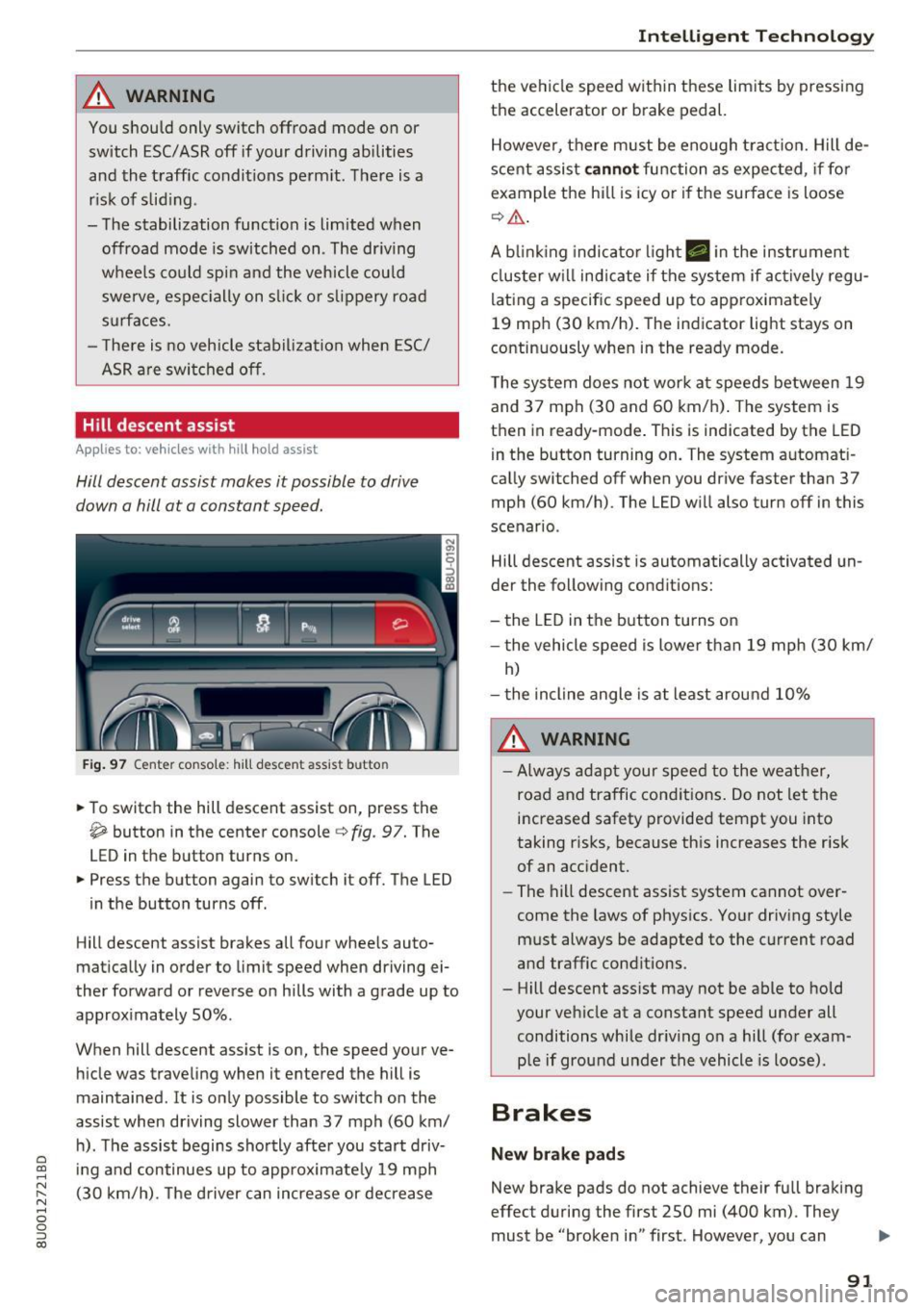
Fig. 97 Center console : hill descent assist butto n
• To switch the hill descent assist on, press the
~ button in the center console c} fig. 97. The
LED in the button turns on.
• Press the button again to switch it off. The LED
in the button turns off .
Hill descent assist brakes all four whee ls auto
matically in order to limit speed when driving ei
ther forward or reverse on hills with a grade up to
approximately 50% .
When hill descent assist is on, the speed your ve hicle was traveling when it entered the hill is
maintained . It is only possible to switch on the
assist when driving slower than 37 mph (60 km/
h). The assist begins shortly after you start driv-
e '.:: ing and continues up to approximate ly 19 mph
N r--. (30 km/h) . T he driver can increase or decrease N .... 0 0 ::, (X)
Intelligent Technology
the vehicle speed within these limits by pressing
the accelerator or brake pedal.
However, there must be enough tract ion. Hill de
scent assist
cannot function as expected, if for
example the hill is icy or if the surface is loose
¢,&. .
A blinking indicato r light. in the instrument
cluster will indicate if the system if actively regu
lating a specific speed up to approximately
19 mph (30 km/h). The indicator light stays on
continuously when in the ready mode.
The system does not work at speeds between 19
and 37 mph (30 and 60 km/h) . The system is
then in ready-mode . This is indicated by the LED
in the button turning on. The system automat i
cally switched off when you drive faster than 37
mph (60 km/h) . The LED will also turn off in this
scenario .
Hill descent assist is automatically activated un
der the following conditions:
- the LED in the button turns on
- the vehicle speed is lowe r than 19 mph (30 km/
h)
- the incline angle is at least around 10%
A WARNING
-
-Always adapt your speed to the weather,
road and traffic conditions. Do not let the
increased safety provided tempt you into
taking risks, because this increases the risk
of an accident.
- The hill descent assist system cannot over
come the laws of physics. Your driving style
must always be adapted to the current road
and traffic conditions .
- Hill descent ass ist may not be able to hold
your vehicle at a constant speed under all
conditions while dr iving on a hill (for exam
p le if ground under the vehicle is loose).
Brakes
New brake pads
New brake pads do not achieve their full braking
effect during the first 250 mi (400 km) . They
must be "broken in" first . However, you can
IJ,,
91
Page 123 of 230

more. The function of the system in the front
passenger seat is checked by the electronic con
trol unit when the ignition is on . The control unit
monitors the Advanced Airbag System and turns
the airbag indicator light on when a malfunct ion
i n the system components is detected . The func
tion of the airbag indicator light is descr ibed in
greater detail below . Because the front passen
ge r seat contains important parts of the Ad
vanced A irbag System, you m ust take care to p re
vent it from being damage d. Damage to the seat
may prevent the Advanced Airbag for the front
passenger seat from doing its job in a crash.
The front Advanced Airbag System consists
of the following :
-Crash sensors in the front of the vehicle t hat
measure vehicle acceleration/deceleration to
provide information to the Advanced Airbag
System a bout the severity of the crash.
- An electronic control un it, with integrated
crash sensors for front and side impacts. The
contro l unit "decides" whether to fire the front
airbags based on the information received from
the crash sensors. The control unit a lso "de
c ides " whether the safety be lt pretens ione rs
sho uld be activated .
- An Advanced Airbag with gas generator and
contro l valve for the d river ins ide the s teer ing
whee l hub.
- An Advanced Airbag with gas generator and
contro l valve inside the instrument pa ne l for
the fron t passenger.
- A weig ht-sensing mat unde r the upho lstery
padding of the front passenge r seat c ushion
that meas ures the to tal weight on the sea t. The
informa tion registered is sen t continuously to
the e lectronic cont ro l unit to reg ulate dep loy
ment of the front Adv a need Ai rbag on the pas
senger side.
- An airbag monitoring system and indicator
light in the instrument cluster
¢ page 124.
-A sensor in each front seat reg isters the dis
tance between the respective seat and the
steering wheel or instrument pane l. The infor
o co mation reg istered is sent continuously to the ......
~ electronic control unit to regulate deployment N
8 of the fro nt Advanced A irbags . 0
:::,
00
Airb ag sys tem
-The PASSENGER AIR BAG OFF light comes on
and stays on in the center of the instrument
pane l¢
page 125, fig . 115 and te lls yo u when
the front Advanced Airbag on the passenger side has been turned off.
- A sensor below the safety be lt latch for the
front seat passenger to measure the tension on the safety belt. The tension on the safety belt
and the we igh t registered by the weight -sens
ing mat help the contro l unit "decide" whethe r
the front airbag fo r th e fron t passe nger seat
should be tu rned off o r not ¢
page 115, Child
restrain ts on the front seat -some impor tant
things to know.
- A sensor in the s afety be lt latch for the drive r
an d for the front seat passenger that senses
whether tha t safety be lt is la tched o r not and
transmits this information to the e lectronic
control un it.
A WARNING ,-
Damage to the front passenge r seat can pre-
vent the front airbag from working properly.
- Improper repair or disassembly of the front
passenger and driver seat will prevent the
Advanced Airbag System from f unct ion ing
properly .
- Repairs to the front passenger seat must be
performed by qualified and p roper ly trained
wo rkshop personne l.
- Never remove the front passenger or d river
seat from the vehicle.
- Never remove the upholstery from the front
passenger seat.
- Never d isassemble or remove parts from the
seat or disconnect w ires from it.
- Never carry sharp objects in your pockets or
p lace them on the seat . If the weight-sens
ing mat in the passenger seat is punctu red
it cannot work p roper ly .
- Never carry things on your lap or carry ob
jects on the passenge r seat . S uch items can
increase the weight reg istered by the
weight-sensing mat and s end the wrong in
formation to the a irbag control unit.
- Never store i tems unde r the front passenger
seat. Parts of the Advanced Airbag System
un der t he passenger se at could be
~
121
Page 161 of 230

0 co ......
"' ,....
"' ...... 0 0 :::,
00
Using the prope r engine oil is important for the
functionality and s ervice life of the engine. Your
engine was factory-filled with a high -quality oil
which can usually be used throughout the entire
year .
Note
Your Limited New Vehicle Warranty does not
cover damage or malfunctions due to failure
to follow recommended maintenance and use
requirements as set forth in the Audi Owner's Manual and Warranty & Maintenance booklet .
- Use only a high quality engine oil that ex-
pressly complies with the Aud i oil quality
standard specified for your vehicle's engine.
Using any o ther oil can cause serious engine
damage.
- Do not mix any lubricants o r other additives
into the engine oil. Doing so can cause en
gine damage.
@ Tips
If you need to add oil and there is none availa
ble that meets the Audi o il quality standard
your eng ine requ ires, you may add a total of
no more than 0 .5 quart/li ter of a h igh-quality
"synthet ic"oil that meets the following speci
fications.
- ACEA A3 or API SM with a v iscosity grade o f
SAE OW-30, SAE SW -30 or SAE SW-40.
- Fo r more information abou t engine o il t ha t
has been approved for your vehicle, please
contact either your authorized Audi dea ler
or Audi Custome r Relat ions at
1 (800) 822-2834 or visit our web site at
www .audiusa.com or www .aud icanada .ca.
Engine oil consumption
T he engine in your vehicle depends on an ade
qua te amoun t of oil to lubricate and cool all of
i t s moving par ts.
In order to provide effective lub rication and coo l
ing of in te rnal engine components, a ll internal
combustion engines consume a cer tain amount
of oil. Oil consumption varies from engine to en
g ine and may change sign ificantly over the life of
the eng ine . Typically, eng ines with a spec ified
Ch eck ing and Filling
break-in period (see ¢ page 57) consume more
oi l during th e break-in period than they consume
after oil consumption has stabilized.
Under normal cond itions, the rate of oil con
sumption depends on the q uality and viscos ity o f
the oil , the RPM (revolutions per minut e) at
which the engine is operated, the amb ient tem
perature and road condit ions. Further factors are
the amount of oil dilution from w ater condensa
tion or fuel resid ue and the oxidation level of the
o il. As any engine is subject to wear as mileage
builds up, the oi l consumption may increase ove r
t ime unt il repla cement of worn components may
become necessary.
With al l these variables coming into play, no
standard rate of o il consumption can be estab
l ished or spec ified . T he re is no alte rnative to reg
u la r and fre quent chec king of the o il level , see
Note .
If the yellow engine oil level warning symbo l II
in the instrument cluster lights up , you sho uld
check the o il level as soon as possible
¢ page 160. Top off the o il at your earliest con
venience.
A WARNING
Before you check anything in the engine com
partment, always read and heed all WARN
INGS¢ .&.
in Working in the engine compart
ment on page 155.
(D Note
D riving wit h an insufficient oil level is likely to
cause severe damage to the engine .
(D Tips
- The oil pressure warn ing display. i s not
an indicato r of the o il le vel. Do not rely on
it . Instead, check the oil level in your en
gine at regular intervals , pre fe rabl y each
time you refuel, and alw ays befo re go ing
on a long trip .
-If you have the impression your engine con
sumes excessive amounts of oi l, we recom
mend that you consult an author ized Audi
dea ler to have the cause of your concern
159
Page 167 of 230

0 co ......
"' ,....
"' ...... 0 0 :::,
00
@ Tips
- Only charge the vehicle battery through the
connections in the engine compartment.
- Read all of the manufacturer's instructions
for the charger before charging the vehicle
battery.
Windshield washer system
Fig. 143 Engine compartment: windshield washer fluid
reservoir
Observe the safety precautions q page 155,
Working in the engine compartment.
M N ~ N
"' a) ID
The windshield washer fluid reservoir W contains
the cleaning solution for the windshield and the rear w indow
q page 158, fig . 137,. The reservoir
capacity can be found in
qpage 210.
To reduce the risk of lime scale deposits on the
spray nozzles, use clean water with low amounts
of calc ium . Always add window cleaner to the wa
ter. When the outside temperatures a re cold, an
anti-freezing agent should be added to the water
so that it does not freeze.
- The concent ration of anti-freezing agent
must be adjusted to the vehicle operating
conditions in the respective climate. A con
cent ration that is too high can lead to vehi
cle damage.
- Never add radiator anti-freeze or other addi
tives to the washer fluid.
- Do not use a glass cleaner that contains
paint solvents, because this could damage
the paint .
Checking and Filling
Service interval display
The service interval display detects when your ve
hicle is due for service .
The service interval display works in two stages:
-Inspection or oil change reminder : after a cer-
tain distance is driven, a message appears in
t he instrument cluster display every time the
ignition is switched on. The remaining distance
or time is displayed br iefly.
- Inspection or oil change due: if your vehicle
has reached an inspection or oil change interval
or both intervals at the same time, the mes
sage
Inspection due! or Oil change due! or Oil
change and inspection due!
appears briefly af
ter sw itching the ignition on.
Checking service intervals
You can check the remaining distance or time un
ti l the next oi l change or next inspection .
- Select: the
I CARI function button > (Car) Sys
tems*
control button > Servicing & checks >
Service intervals .
Resetting the indicator
An autho rized Aud i dea ler or a uthorized Audi
Service Facility will reset the service in terva l dis
play after performing service .
If you have changed the o il yourself, you must re
set the oil change interval.
Perform the follow ing to reset the d isplay:
- Select: the
I CAR I function button > (Car) Sys
tems *
control button > Servicing & checks >
Service intervals . Turn the control knob down
ward to
Reset oil change interval and press the
control knob .
~ Note
-Only reset the oil change ind icator if the oil
was changed.
- Following the service intervals is crit ica l to
ma intaining the service life and value of
your vehicle, especially the engine . Even if
the mileage on the vehicle is low, do not ex
ceed the time for the next service.
165
Page 191 of 230

0 co ......
"' ,....
"' ...... 0 0 :::,
00
avoid scratches, move the scraper only in
one direction and not back and forth.
- Never remove snow or ice from door win
dows and mirrors using warm or hot water
because this could cause cracks to form.
- To avoid damage to the rear window de fogger, do not apply any stickers on the
heating wires on the inside of the window.
- Decorative part .s/trim
- Never use chrome care or cleaning prod-
ucts .
- Paint
- To reduce the risk of scratches, the vehicle
must be free of dirt and dust before pol
ishing or waxing.
- To prevent paint damage, do not polish or
wax the vehicle in direct sunlight .
- To reduce the risk of paint damage, do not
polish away rust spots .
- Remove cosmetics and sunscreen immedi
ately- these could damage the paint.
- Displays/instrument cluster
- The displays/instrument cluster and the
trim surrounding them must not be
cleaned with dry cleaning methods be
cause they could be scratched.
- Make sure that the instrument cluster is
switched off and has cooled off before
cleaning it.
- Make sure no fluids enter the spaces be
tween the instrument cluster and the
trim, because that could cause damage.
- Controls
- Make sure that no fluids enter the con-
trols, because this could cause damage.
- Safety belts
- Do not remove the safety belts to clean
them.
- Never clean safety belts or their compo
nents chemically or with corrosive fluids
or solvents and never allow sharp objects
to come into contact with the safety belts.
This could cause damage to the belt web bing.
- If there is damage to the webbing, the
connections, the retractors or the buckles,
Care and cleaning
have them replaced by an authorized Audi
dealer or authorized Audi Service Facility.
- Textiles/artificial leather/ Alcantara
- Never treat artificial leather/Alcantara
with leather care products, solvents, floor
polish, shoe polish, spot remove or similar
products.
- Have a specialist remove stubborn stains
to prevent damage.
- Never use steam cleaners, brushes, hard
sponges, etc . when cleaning.
- Do not turn on the seat heating* to dry the
seat .
- Objects with sharp edges, such as zippers
or rivets on clothing or belts, can cause
damage to the surface.
- Open hook and loop fasteners, for exam
ple on clothing, can damage seat covers .
Make sure hook and loop fasteners are
closed .
- Natural leather
- Never treat leather with solvents, floor
polish, shoe polish, spot remover or simi
lar products.
- Objects with sharp edges, such as zippers
or rivets on clothing or belts, can cause
damage to the surface.
- Never use steam cleaners, brushes, hard
sponges, etc. when cleaning.
- Do not turn on the seat heating* to dry the
seat.
- To help prevent the leather from fading,
do not leave the vehicle in direct sunlight
for long periods of time. If leaving the ve
hicle parked for long periods of time, you
should cover the leather to protect it from
direct sunlight.
(D Tips
- Insects are easier to remove from paint that
has been freshly waxed.
- Regular waxing can prevent rust spots from
forming.
189
Page 202 of 230

Fuses and bulbs
(D Tips
-The following table does not list fuse loca
tions that are not used.
- Some of the equipment listed in the follow
ing tables applies only to certain model ver
sions or certain optional equipment.
Fuse assignment, cockpit
The fuse number is stamped into the plastic be
low or above each fuse.
No. Equipment
1 LED headlight (left)
2 LED headlight (
right)
5 LED headlight (left)
6 LED headlight (right)
7 Steering lock
8 Convenience access contro
l module
9 Airbag control module, AIRBAG OFF
indi-
cator light
12
Transmission control module, selector
mechanism
Air quality sensor for cl imate control sys-
tern, heated w indow washer nozzles,~
button, reverse light,(®) button, oil level
13 sensor, climate contro
l system, seat occu-
pant detection system, seat heating, but-
tons in the center console, automatic dim-
ming mirror
Engine control module , quattro control
modu le, transmission control module,
14 brake lights, electromechanica
l steering,
Gateway control module, trai ler hitch con-
trol module, ESC control module, light
switch, damping control module
Headlight range control module, instru-
ment illumination, headlights (left, right),
15 diagnostic connector, crankcase housing
heater, a
ir flow sensor, socket relay, DC/
DC converter
16 Parking aid
17 Parking system rearview camera
18 TV tuner
19 Engine starter control, DC/DC converter
200
No
. Equipment
20 E
SC contro l module, climate/heating con-
trol, special functions interface
21 Selector mechanism power supply
22 Interior monitoring
(®) button, front interior lighting buttons,
23 diagnostic connector, light
switch, light/
rain sensor, humidity sensor, emergency
call system
25 Headlight power supply
26 Rear window wiper
27 Starter system
28 Infotainment system
29 Supply for
the park ing system rearview
camera and TV tuner
30 Infotainment system
31 Infotainment system
32 Instrument cluster
33 Automatic dimming rearview mirror
36 Cigarette lighter, cockpit/luggage com
-
partment socket
37 Cockpit/rear socket 38 Transmission contro l module
40 Trailer hitch control module 41 Trailer hitch control module
42 Trai ler hitch control module
44 Rear window defogge r
4S Electromechanical parking brake control
module
46 Trailer hitch control module
47 quattro control module
48 Automatic luggage compartment lid con-
tro
l modu le
so Blowe r
51 Electromechanical parking brake control
module
52 BCM
53 Front seat heating
54 Panorama gla ss roof
55 Sunshade on the panorama glass roof
56 Contro l modu le for suspension control
Page 222 of 230

Index
Current consumption . . . . . . . . . . . . . . . . . . 19
Fuel gauge . . . . . . . . . . . . . . . . . . . . . . . . . 8, 9
Fuel tank capacity ................... 210
Gasoline . . . . . . . . . . . . . . . . . . . . . . . . . . . 152
Gasoline additives . . . . . . . . . . . . . . . . . . . 153
Saving fuel . . . . . . . . . . . . . . . . . . . . . . . 57, 81
Fuel economy messages (efficiency program) .21
Fueling Fuel filler door emergency release . . . . . . 155
F uel gauge . . . . . . . . . . . . . . . . . . . . . . . . . . . 9
F uel tank capacity . . . . . . . . . . . . . . . . . . . 210
Opening the fuel filler door . . . . . . . . . . . . 153
Fuses . . . . . . . . . . . . . . . . . . . . . . . . . . . . . . . 199
G
Garment hooks . . . . . . . . . . . . . . . . . . . . . . . . 46
Gas discharge lamps . . . . . . . . . . . . . . . . . . . 201
Gasoline . . . . . . . . . . . . . . . . . . . . . . . . . . . . 152
Octane rating . . . . . . . . . . . . . . . . . . . . . . . 152
Recommendation . . . . . . . . . . . . . . . . . . . . 152
Generator (indicator light) . . . . . . . . . . . . . . . 13
Glossary of tire and loading terminology . . 169
Glove compartment . . . . . . . . . . . . . . . . . . . . 45
Gross Vehicle Weight Rating (GVWR) . . . . . 209
Ground clearance . . . . . . . . . . . . . . . . . . . . . . 66
H
Headlight range control . . . . . . . . . . . . . . . . . 33
Headlights Cleaning . . . . . . . . . . . . . . . . . . . . . . . . . . . 186
H eadlight range control . . . . . . . . . . . . . . . 33
Head restraints . . . . . . . . . . . . . . . . . . . . . . . 100
Adjusting .. .. ................ 43, 44, 100
Removing and installing . . . . . . . . . . . . . . . 44
Heated Exterior mirrors . . . . . . . . . . . . . . . . . . . . . . 36
Rear window (automatic climate control sys-
tem) . . . . . . . . . . . . . . . . . . . . . . . . . . . . . . . 55
Rear window (manual climate control sys -
tem) . . . . . . . . . . . . . . . . . . . . . . . . . . . . . . . 53
Seats (automatic climate control system) . 55
Washer nozzles . . . . . . . . . . . . . . . . . . . . . . 38
Heavy clothing and safety belts . . . . . . . . . . 108
High beams . . . . . . . . . . . . . . . . . . . . . . . . . . . 34
Hill descent assist ... . .. .. ...... .. .. .. .. 91
Hill descent control . . . . . . . . . . . . . . . . . . . . 70
220
Hill hold assist . . . . . . . . . . . . . . . . . . . . . . . . 65
also refer to Hill hold assist . . . . . . . . . . . . 65
Hold ass ist (hill) . . . . . . . . . . . . . . . . . . . . . . . 65
Horn . . . . . . . . . . . . . . . . . . . . . . . . . . . . . . . . . 6
How are child restraint system anchors relat-
ed to child safety . . . . . . . . . . . . . . . . . . . . . 147
How many a irbags does my vehicle have? . . 120
How safety belt pretensioners work 112
I
Ignition
Switching on and off (convenience key) . . . 61
Switching on and off (ignition lock) . . . . . . 60
Imbalance (wheels) . . . . . . . . . . . . . . . . . . . 175
Immobilizer . . . . . . . . . . . . . . . . . . . . . . . . . . 23
Important things to do before driving . . . . . 97
Improperly worn safety belts . . . . . . . . . . . 112
Indicator lights . . . . . . . . . . . . . . . . . . . . . . . . 10
Airbag system . . . . . . . . . . . . . . . . . . 124, 125
PASSENGER AIR BAG OFF . . . . . . . . . . . . . 125
Infant seats . . . . . . . . . . . . . . . . . . . . . . . . . 140
Inspection interval . . . . . . . . . . . . . . . . . . . . 165
Installing child safety seats Safety belts . . . . . . . . . . . . . . . . . . . . . . . . 144
Installing the upper tether strap on the an
chorage . . . . . . . . . . . . . . . . . . . . . . . . . . . . . 150
Instrument cluster . . . . . . . . . . . . . . . . . . . . . . 8
Cleaning . . . . . . . . . . . . . . . . . . . . . . . . . . . 187
Instruments . . . . . . . . . . . . . . . . . . . . . . . . . . . 8
Adjusting the lighting . . . . . . . . . . . . . . . . . 35
Interior lighting . . . . . . . . . . . . . . . . . . . . . . . 35
Interior lighting . . . . . . . . . . . . . . . . . . . . . . 35
Interval mode (windshield wipers) . . . . . . . . 38
J
Jack . . . . . . . . . . . . . . . . . . . . . . . . . . . . . . . . 194
Jump-starting . . . . . . . . . . . . . . . . . . . . . . . . 203
Jumper cables . . . . . . . . . . . . . . . . . . . . . . . . 204
K
Key........ .. .. .. .. .. ... .......... ... 23
Key not recognized . . . . . . . . . . . . . . . . . . . 63
Key recognition . . . . . . . . . . . . . . . . . . . . . . 51
Key replacement . . . . . . . . . . . . . . . . . . . . . 23
Replacing the battery . . . . . . . . . . . . . . . . . 23