2018 AUDI Q3 instrument cluster
[x] Cancel search: instrument clusterPage 36 of 230
Lights and Vision
-If you turn off the ignition whi le the exter ior
lights are on and open the door, a warning
tone sounds.
- In cool o r damp weather, the inside of the
headlights, turn s ignals and tail lights can
fog over due to the temperature d if f erence
between the inside and outside. They will
clear short ly after switch ing them on. This
does not affect the serv ice life of the light
i ng .
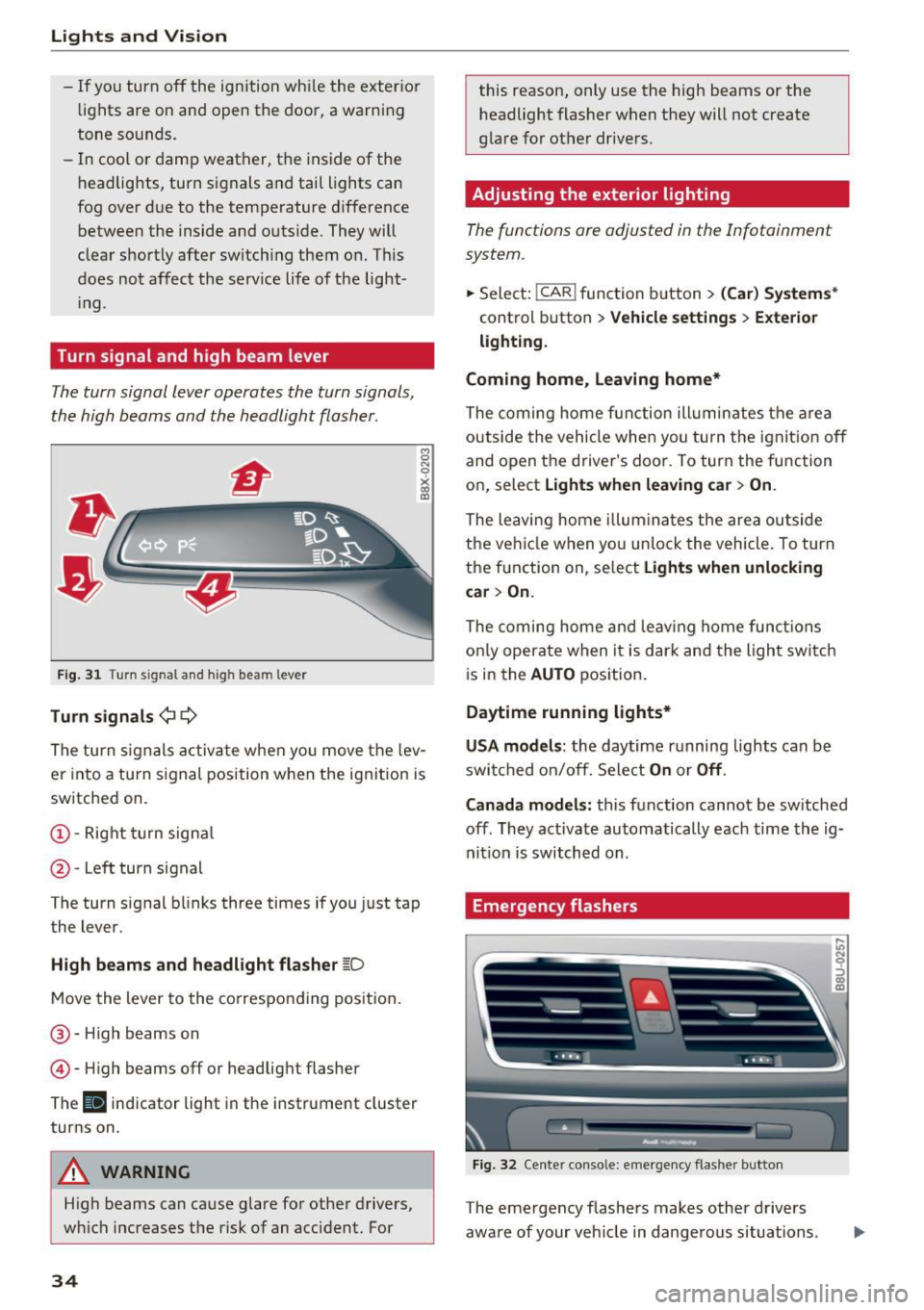
Turn signal and high beam lever
The turn signal lever operates the turn signals,
the high beams and the headlight flasher .
Fig. 31 Turn signal and high beam lever
Tu rn signals ¢ 9
The turn s ignals activate when you move the lev
er into a turn s ignal position w hen the ign ition is
sw itched on.
@ -Right turn signa l
@-Left turn signal
The turn signal blinks three times if you just tap
the lever.
High b eams and headl ight flasher ~D
Move the lever to the co rrespo nd ing pos it ion .
@ -High beams on
© -High beams off or headlig ht flasher
The
II indicator light in the instrument cluster
turns on .
A WARNING
High beams can cause glare fo r other drivers,
w hi ch increases the risk of an accident. For
34
this reason, only use the high beams or the
headlight flasher when they will not create
glare for other dr ivers.
Adjusting the exterior lighting
The functions are adjusted in the Infotainment
system .
.,.. Sele ct: !CAR ! function b utton> (Car ) Systems *
control button > Vehicle settings > Exte rior
lighti ng.
Coming home, Leaving home*
The coming home fun ction ill umin ates the a rea
outside the vehicle when you tu rn the ignit io n off
and open the driver's doo r. To turn the func tion
on, select
Light s when leaving car > On .
The leaving home illum ina tes the area ou tside
the ve hicle when yo u un lo ck the vehicle . To turn
the function on, se lect
Lights when unlocking
car > On.
The coming home and leav ing home func tions
on ly opera te when it is dar k and the l ight switc h
i s in the
AUTO position.
Daytime running lights*
USA models :
the daytime running lights can be
swit ched on/off. Sele ct
On or Off .
Canada models:
this function cannot be sw itched
off . They activate automatically each time the ig
nit ion is switched on .
Emergency flashers
Fig. 32 Center conso le: emerge ncy flasher button
The emergency flashers makes other drivers
aware of your veh icle in dange rous situations.
In N 0
~ Cl) m
Page 37 of 230

a
co
...... N r-N .... 0 0 ::, co
"' Press the &I. button to switch the emergency
flashers on or off.
You can indicate a lane change or a turn when the
emergency flashers are switched on by using the
turn signal lever . The eme rgency flashers stop
temporarily .
The emergency flashers also work when the igni
tion is turned off.
(D Tips
You shou ld sw itch the emergency flashers on
if:
- you are the last car in a t raff ic jam so that
all othe r vehicles approach ing from beh ind
ca n see you, or if
- you r vehicle has bro ken down or you are
having an emergency, or if
- you r vehicle is being towed or if you a re tow
i ng anot her vehicle
Interior Lighting
Front interior lighting
Fig . 33 Headliner: front inter ior lighting (example)
Press the app licab le button :
-M- -Inter ior light ing on/off
0
~
"' a,
~ - Door contact switch on/off . The interior light
ing is controlled automatically.
~ - Reading lights* on/off
Lights and V ision
Rear interior lighting
Applies to: vehicles with rear reading lights
Fig. 3 4 Headliner: rear reading l ights (example)
"' To turn a read ing light on/off, press the button
Interior lighting
Applies to: vehicles with interior lighting
The Interior lighting can be adjusted in the Info
tainment system.
"' In the Infotainment system*, select: ICARI
function button > (Car) Sy stems * control but
ton
> Vehicle setting s > Interior lighting .
Instrument illumination
You can adjust the background brightness of the
instruments and display illumination*.
F ig. 35 Instrument illuminat ion
"' To red uce or increase the b rightness, tu rn the
thumbwhee l down or up.
(D Tips
The need les and gauges i n the inst rument
cluster illumi nate when the headlights a re off
Iii>
35
Page 66 of 230

Driving
Your vehicle is equipped with an electromechani
cal parking brake @
c> fig. 71. The parking brake
is designed to prevent the vehicle from rolling
un intent ionally and replaces the hand brake .
Setting/manuall y releasing the pa rking
brake
... Pull the(®) switch to set the parking brake . The
LED in the sw itch turns on. The -(USA mod
els) . (Canada models) indicator light also
turns on in the instrument cluster display .
.,. To release the parking brake manually, press
the b rake o r accelerato r pedal whi le the igni
tion is switched on and p ress t he
C®) switch a t
the same time. The L ED in t he b utton and t he
i ndica tor light in the display turn off .
Releasing the parking brake automatically
Requirement: the dr iver's door must be closed,
the dr iver's safety be lt must be latched and the
pa rking brake must be set.
... To start driving and re lease the park ing brake
automat ica lly, press the accele rato r pedal as
us ua l.
In addi tion to releasing the park ing brake auto
mat ically, other convenience and safety funct ions
are available whe n you start driving
c> page 65,
Starting from a stop .
Preventing the automatic parking brake
release
The vehicle could begin rolling unintentionally ,
dependi ng on the h ill or if towing a trailer .
... To preve nt the parking brake from releasing au
tomat ica lly, pull and hold the®) sw itch and
press the accelerator pedal. The park ing b rake
remains set and prevents the veh icle from ro ll
in g backward.
.,. Yo u can re le ase the(®) switch aga in once you
are sure that you are g iv ing eno ugh dr iv ing
force to the wheels by pressing the accele rator
pedal.
Emergency braking function
You can use the emergency bra king f unct ion in an
emergen cy situ ation , or if the stand ard bra ke op
era tion mal func tions or is disabled.
64
... Pull and ho ld the C®) swi tc h.
... As soon as you re lease the
C®> switch or acceler-
ate, the braking stops.
P ulli ng and ho ld ing t he
C®) switch wh ile driving
the veh icle activates the eme rgency braking func
tion . The ve hicle is bra ked at a ll four wheels by
activating the hydraulic b rake system . The bra k
i ng effect is sim ilar to heavy brak ing
c> ,&. .
To reduce the risk of act ivat ing t he emergency
bra kin g by mista ke, a warning tone (buzzer)
sounds when the
C®) sw itch is p ulled . Eme rgency
braking stops as soon as the© switch is released
or the accelerator pedal is pressed.
Park ing
... Press the brake peda l to stop the ve hicle.
... Pull the
C®> switch to set the par king brake .
... Place the selecto r lever in the P position .
... Turn the engine off
c> ,&. .
... Turn the steering w heel when parking on in
clines so that the w heels w ill roll into the curb
if the vehicle starts moving.
8,,. WARNING
- Do not press the a ccele ra to r peda l inadve r
tently if a ge ar i s selected whe n the vehicle
is st ationary an d th e engine is running . Oth
erwise, the vehicle will s tart to move imme
diate ly and this could result i n an accident.
- Eme rgency brak ing s hou ld only be used i n
an emergency, when the norma l bra ke pe dal
has failed or the bra ke peda l is obstructed .
During eme rgency brak ing, your vehicle will
brake s imilar to heavy braking. ESC and the
associated components (ABS, ASR, EDL)
cannot ove rcome the laws of physics .
Around curves a nd whe n road or wea ther
conditions a re bad, a full brake applicat io n
can ca use the veh icle to skid or the rear end
to swerve, w hich incr eases the ris k of an ac
cident.
- I f th e power s upply fail s, you cannot set the
parking br ake if it is released. In this case,
pa rk the vehicle on leve l ground and secure
it by p lacing the selector leve r in the P posi
tion. See an authorized A udi dealer or au -
thorized A udi Service Fac ility for assistance.
IIJ.
Page 69 of 230

a
co
...... N r--. N .-< 0 0 ::, co
When a moderate driving s tyle is used, the
transmission selects the most economical driving
mode. The transm iss ion upsh ifts at a lower RPM
and downshifts at a higher RPM to improve fuel
efficiency .
The transmission switches to a sporty mode after a kick-down or when the driver uses a
spo rt y
dri ving st yle
character iz ed by quick accelerator
pedal movements, heavy acceleration, frequent
changes in speed and traveling at the maximum
speed .
If desired , the driver can also select the gears
manually (tip tronic mode ) ¢ page 70, Manual
shifting (tiptronic mode) .
Power is transferred using a torque converter.
Selector lever positions
Fig. 72 Inst rument cluste r: selector leve r pos it ions
F ig. 7 3 Selec tor lever
The selected selector lever position is shown next
to the selector lever ¢
fig. 73 and in the instru
ment cluster display
¢ fig . 72. The current gear
will also be d isp layed in the instrument cluster.
.. Switch the ign ition on.
.. In the P/N position, you must release the selec
tor lever lock ¢
page 67.
Drivi ng
.. Move the selector lever into t he des ired posi
tion. The engaged se lector lever position is
shown in the shift gate .
Selector lever lock
The selec tor leve r lock p revents yo u from select
i ng a gear accidentally, causing the vehicle to
roll.
T he selector leve r is lo cked in the P and N posi
ti ons when the ig nit ion is switched on. You mus t
press the brake peda l to sele ct another position.
You must also press the interlock button if you are moving from the P and N position.
T he selec tor leve r lock o nly functions when the
vehicle is stat ionary or at speeds be low approxi
mately 1 mph (2 km/h) . At higher speeds, the
lock is automatically deactivated in the N posi
tion.
T he selec tor leve r is not locked whe n shifting
quick ly through N, for example from R to 0/S.
This makes it possib le to free the vehicle when it
is stuck by "rocking" it. The selector lever lock en
gages if the lever stays in the N pos ition longer
than approximately 2 seconds when the brake peda l is not pressed .
If the selector lever does not engage, there is a
malfunction . The engine is disabled to prevent
the vehicle from driv ing off un intent ionally. Press
the brake pedal to have the se lector lever lock
engage again . Place the selector lever in the P or
N position and then engage a dr iv ing gear.
Ignition key safety interlock*
Applies to: vehicles with ignition lock
You can only remove the key from the ignition af
ter switching the ignition off if the selector lever
is in the P position . The selector leve r will be
locked in the P position as long as the key is not
in the ignit ion.
Interlock button
The interlock button in the selector lever handle
prevents you from movi ng the selector lever in
advertently wh ile in some selector lever posi
tio ns. The positions that requ ire the interlock
button to be pressed a re marked in color in the il-
l u strat io n ¢
fig. 73. .,.
67
Page 70 of 230

Driving
P - Park
This selector lever position prevents the vehicle
from rolling. You can only shift into Park when
the vehicl e is
stationary ¢&. .
To shift in and out of the P selector lever posi
tion, press the interlock button in the selector
lever
while pressing the brake pedal.
R- Reverse
Only shift into reverse gear when the vehicle is
stationary and the engine is running at idle
speed ¢&, .
To select the R selector lever position, press the
interlock button
while pressing the brake pedal.
N - Neutral
The transmission is in idle in this position.
To engage the N selector lever position, press the
button on the selector lever and shift into the N
position.
To
move from selector lever position out of N,
you must press the brake pedal and the vehicle
must be traveling less than 1 mph (2 km/h) or be
stationary.
DIS -Normal position for driving forward
In the D/S selector lever position, the transmis
sion can be operated either in the normal D mode
or in the S sport mode. To select the S sport
mode, pull the selector lever back briefly. Pulling
the lever back again will select the normal D
mode. The instrument cluster display shows the
selected driving mode .
In the
normal mode D, the transmission auto
matically selects the suitable gear ratio. It de
pends on engine load, vehicle speed and driving
style.
The engine's power reserves are used fully in the
Sport mode S. Shifting may become noticeable
when accelerating.
To
move from selector lever position N to D, you
must press the brake pedal and the vehicle must
be traveling less than 1 mph (2 km/h) o r be sta
t ionary ¢&, .
68
A WARNING
-
Read and follow all WARNINGS.
-The vehicle can roll
even if the ignition is
switched off.
- Never select R or P while driving, because
this increases the risk of an accident.
- Power is still transmitted to the wheels
when the engine is running at idle. To pre
vent the vehicle from "creeping", you must keep your foot on the brake in all selector
lever positions (except P) when the engine is
running .
- Do not inadvertently press the accelerator
pedal when the vehicle is stopped if a gear is
engaged . Otherwise, the vehicle will imme
diately start to
move -sometimes even if
the parking brake is firmly applied. This in
creases the risk of an accident.
- To reduce the risk of an accident, do not
press the accelerator pedal when changing
the selector lever position while the vehicle
is stationary and the engine is running.
- Never leave your vehicle with the engine
running while in gear. If you must leave
your vehicle when the engine is running, set
the parking brake and move the selector lev
er to the P position.
- Before you or other persons open the hood
and work on a running engine, the selector
lever must be in the P position and the park ing brake must be applied to reduce the risk
of an accident . Always read and follow the
applicable warnings ¢
page 155, Working
in the engine compartment.
- Read and following all WARNINGS¢&. in
Driving tips on page 69 .
(D Note
Never let the vehicle roll downhill with engine
off and the selector lever in the N position,
because this could damage the automatic
transmission and catalytic converter.
(D Tips
- If you accidentally select N while driving,
take your foot off the accelerator pedal and .,.
Page 72 of 230

Driving
reduces braking performance, increases
braking distance or causes complete failure
of the brake system.
- If you must stop on an incline, always hold
the vehicle in place with the foot brake or
parking brake to prevent it from rolling
back.
- Never hold the vehicle on an incline with a
slipping clutch. The clutch opens automati
cally when it becomes too hot from the
overload . The . indicator light turns on
and a message appears~
page 71 when
the clutch is overloaded.
- Read and following all WARNINGS
9 &, .
(D Note
-When stopping on an incline, do not try to
hold the vehicle in place by pressing the ac
celerator pedal while a driving gear is se lected . This can cause the automatic trans
mission to overheat and can damage it. Set
the parking brake or press the brake pedal
to prevent the vehicle from rolling.
- Allowing the vehicle to roll when the engine
is stopped while the selector lever is in the
N position will damage the automatic trans
mission, because it is not lubricated under
those circumstances ~
page 205, Towing
with a tow truck.
- The transmission can overheat and be dam
aged under certain driving and traffic condi
tions su ch as frequent starts, creeping for a
long time, or stop-and-go traffic. If the.
indicator light turns on, stop the vehicle at
the next opportunity and let the transmis
sion cool down
~ page 71.
H ill descent contr ol
The hill descent control system assists the driver
when driving down hills .
Hill descent contro l is activated when the selec
tor lever is in the Dor S position and you press
the brake pedal. The transmission automatically
selects a gear that is suitable for the hill. Hill de
scent control tries to maintain the speed ach
ieve d at the time of braking, within physical and
70
technical limitations. If may still be necessary to
adjust the speed with the brake pedal.
Hill descent control switches off once the hill lev
els out or you press the accelerator pedal.
&_ WARNING
Hill descent control cannot overcome physical
limitations, so it may not be able to maintain
a constant speed under all conditions. Always
be ready to apply the brakes .
Manual shifting (tiptronic mode }
The tiptronic mode allows the driver to shi~ the
gears manually .
Fig. 7 4 Center console: sh ift ing manually w ith the selector
l ever
Fig. 75 Steering whee l: sh ift ing ma nuall y wi th th e s hift
paddles*
Shifting with the selector lever
You can shift into tiptronic mode while stationary
and while driving .
.. To shift into tiptronic mode, push the selector
lever from the 0/S setting to the right in the
tiptronic shift gate. Once the transmission has
switched modes, the selector lever position
M
is shown in the instrument cluster display .,..
Page 73 of 230

0 co ......
"' ,....
"' ...... 0 0 :::,
00
¢ page 67, fig. 72. For example, M4 means the
fourth gear is engaged.
~ To shift up a gear, tap the selector lever for
ward
0 ¢ fig. 74.
~ To shift down a gear, tap the selector lever to
back Q.
Shifting with the shift paddles*
You can operate the shift paddles in the D/S or M
(tiptronic shift gate) selector lever positions.
~ To shift up one gear, tap the shift paddle 0
¢fig. 75.
~ To shift down one gear, tap the shift paddle Q.
If the shift paddles are tapped while in the D/S
selector lever position, automatic mode switches
off briefly. To switch from manually shifting back
to automatic shifting immediately, tap the shift paddle
0 c:> fig. 75 for 1 second.
To keep shifting using the shift paddles, move
the selector lever to the right out of the D/S posi
tion into the tiptronic shift gate.
Description
The transmission automatically shifts up or down before critical engine speed is reached.
The transmission only allows manual shifting
when the engine speed is within the permitted
range.
Kick-down
Kick-down enables maximum acceleration .
When you press the accelerator pedal down be
yond the resistance point (called kick-down), the
automatic transmission downshifts into a lower
gear, depending on vehicle speed and engine
RPM.
It shifts up into the next higher gear once
the maximum specified engine RPM is reached .
A WARNING ,~
Please note that the wheels could spin on
slick or slippery roads when kick-down is ac
tive.
-
Driving
Emergency mode
Applies to: vehicles with automatic transmissions
In the event of a system malfunction, there is an
emergency program .
If all of the selector lever positions are highlight
ed with a light background in the instrument
cluster display, there is a system malfunction and
the S tronic transmission is running in the emer
gency program . The vehicle can still be driven in
emergency mode, but only with reduced speed
and not in all gears . In some cases, the vehicle
cannot drive in reverse.
([) Note
If the transmission runs in emergency mode,
drive to an authorized Audi dealer or author
ized Audi Service Facility immediately to have
the malfunction corrected.
Transmission malfunction
Applies to: vehicles with automatic transmissions
• Transmission overheating! Please stop vehi
cle!
The transmission is too hot and can become dam
aged. Stop and let the transmission cool with the
engine running (at idle) in the P selector lever po
sition. Then the indicator light and the message
turn off, drive to an authorized Audi dealer or au
thorized Audi Service Facility immediately to have
the malfunction corrected .
If the indicator light
and the driver message do not turn off, do not
continue driving. See an authorized Audi dealer
or authorized Audi Service Facility for assistance.
71
Page 78 of 230

Ass is tance sy stems
Assistance systems
Speed warning system
Description
Applies to: veh icles with speed warning system
The speed warning system helps you to stay be
low a specified maximum speed that can be set,
changed or deleted in the Infotainment system.
The speed warning system warns you if you are exceeding the maximum speed that you have set .
A warning tone will sound as soon as your speed
exceeds the stored value slightly. The
lGJ (USA
models)
I l•j (Canada mode ls) indicator light
and a message appear in the instrument cluster
d isp lay at the same time . ThP
lGl{t] indicator
light and the message turn off if the speed falls
back below the stored maximum speed .
Sett ing a threshold is recommended if you would
like to be reminded when yo u reach a certa in
maximum speed. Situations where you may want
to do so include driving in a country w ith a gener
al speed limit or if there is a specified maximum
speed for winter tires.
Se tt ing the warning thresho ld
Select:
! CAR I function button> (Car) Sys tem s*
control button > Drive r assis t > Speed w arning .
@ Tips
Regardless of the speed warning system, you
should always monitor your speed using the
speedometer and make sure you are following
the legal speed limit.
76
Cruise control system
Switching on
Applies to: vehicles with cruise control system
The cruise control system makes it possible to
drive a constant speed that is 30 km/h or higher .
0
f
®l
0
Fig. 78 Operat ing lever : cru ise co ntrol syste m
5:
"' 0 ±
sition
(D ~ fig. 78.
.. Drive at the speed to be maintained.
.. To store the speed, press the button @.
The
(ij;\1)~1~ (USA mode ls)/ B (Canada models)
indicator light turns on in the instrument cluster .
8_ WARNING
-Always pay attention to the traffic around
you when the cruise contro l system is in op
erat ion. You are always respons ible for your
speed and the distance between your veh i
cle and other vehicles.
- For safety reasons, cruise control should not
be used in the city, in stop -and -go traff ic, on
w inding roads and when road conditions a re
poor (such as ice, fog, gravel, heavy rai n and
hyd roplaning), because this inc reases the
r is k of an accident.
- Switch the cruise control off temporarily
when dr iv ing in turning lanes, highway exits
or in constru ction zones.
- P lease note that "rest ing" your foot on the
accelerator pedal un intent iona lly can result
in ac celeration that overrides the c ruise con-
-
trol system . .,.