2018 AUDI Q3 center console
[x] Cancel search: center consolePage 27 of 230

a
co
...... N r-,. N
"" 0 0 ::, co
.. To open the luggage compartment lid, press
the grip p iece in the luggage compartment lid
¢page 27.
Locking the vehicle
.. Place the selector lever in the P position, or else
the vehicle will not be able to lock .
.. To lock the vehicle, close the door and touch
the sensor on the door handle
once¢ fig. 16,
¢ ,&.. Do not hold the door handle while doing
this.
Unlocking and locking the vehicle can only be
done at the front doors. The remote control key
cannot be more than approximately 4 ft (1.5 m)
away from the door handle . It makes no differ
ence whether the remote control key is in your
jacket pocket, purse or briefcase .
The door cannot be opened for a brief period di rectly after locking it. Th is way you have the op
portunity to check if the doors locked correctly .
You can set in the Infotainment system if
only
the driver's door or the entire vehicle should un lock when unlocking ¢
page 26.
A WARNING
Read and following all warnings¢.& in De
scription on page 22.
(D} Tips
If your vehicle is left standing for a long peri
od of time, note the following:
- The proximity sensor switches off after a
few days to save energy. You then have to
pull once on the door handle to unlock the
vehicle and a second time to open it .
- The energy management system gradually
turns off unnecessary convenience functions
to prevent the vehicle battery from draining
and to maintain the vehicle's ability to start
for as long as possible. You then may no
longer be able to unlock your vehicle with
this convenience function.
Opening and closing
Central locking switch
Fig. 17 Driver 's doo r: centr al locking switc h
Fig. 18 Rear center co nsole: ce ntra l locking sw itch
• To lock the vehicle, press the ff! button ¢ ,A.
• To unlock the vehicle, press the al button .
You can
lock and unlock your vehicle using the
central locking switch in the driver's or front pas
senger's door¢
fig. 17 . You can only lock your
vehicle using the central locking switch on the
center console
¢ fig . 18 .
When locking the vehicle with the central locking
switch, the following applies:
- Opening the door and the luggage compart
ment lid from the
outside is not possible (for
security reasons, such as when stopped at a light) .
- The L ED in the central locking switch turns on
when all doors are closed and locked.
- Front doors : you can open the doors individual
ly from the inside by pulling the door handle .
- Rear doors: to unlock the doors, pull on the door handle
one time. To open the doors, pull
on the door handle
again.
- In the event of a crash with airbag deployment, the doors unlock automatically to allow access
to the vehicle .
IJII>
25
Page 46 of 230
Sea ts and stor age
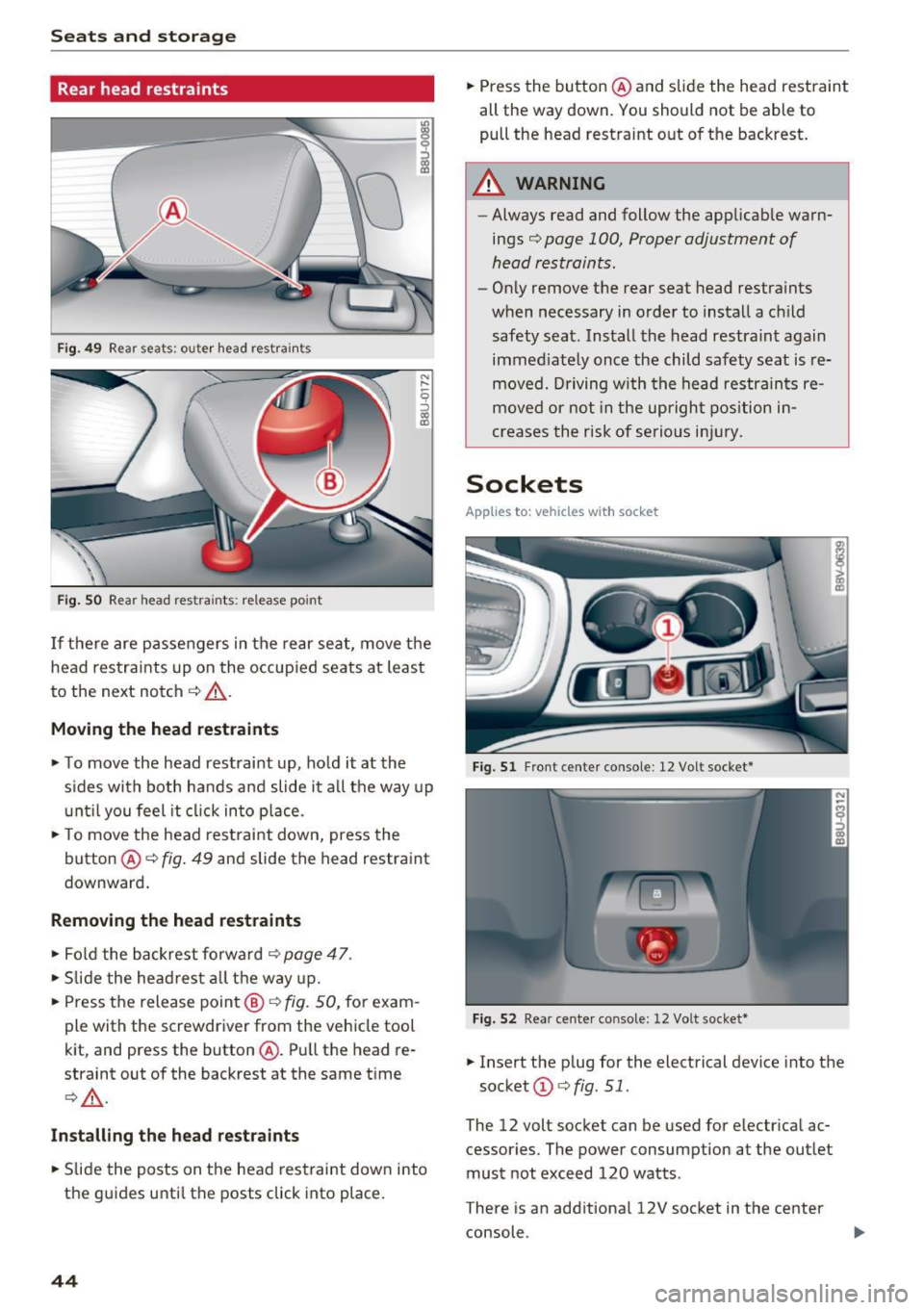
Rear head restraints
Fig . 4 9 Rear seat s: oute r head restra ints
Fig . SO Rear head res tra ints: re lease po int
I f the re are passengers in the rear seat, move t he
head restrai nts up on the occup ied seats at least
to the next notch
c::> _&. .
Moving th e head restraints
• To move the head rest raint up, ho ld it at the
s ides with both hands and slide it a ll the way up
u nt il you feel it cl ick in to p lace .
• To move the head restraint down, press the
button @
c::> fig. 49 and slide the head restraint
downward .
Removing th e head restraints
• Fol d the backrest forwa rd c::> page 47 .
• Slide the head res t all the way up.
• Press the release point @
c::> fig. SO, for exam
ple with the screwdriver from the vehicle tool
kit, and press the button @. Pull the head re
straint out of the backrest at the same t ime
¢ _&. .
Install ing the h ead rest ra ints
• Slide the posts on the head restraint down into
the guides unti l th e posts click into place.
44
• Press the button @ and slide the head restraint
all the way down. You should not be abl e to
pull the head restraint o ut of the backrest.
A WARNING
- Always read and follow the applicab le warn
ings
c> page 100, Proper adjustment of
head restraints.
- On ly remove the rear seat head restra ints
when necessary in order to install a ch ild
safety sea t. Install the head restraint again
immed iate ly once the child safety seat is re
moved. Driving w ith the head restrain ts re
moved or not in the upright pos ition i n
creases the risk of serious inj ury.
Sockets
App lies to : vehicles wit h socket
Fig. 51 Front cente r co nso le : 12 Volt socket*
Fi g. 5 2 Rea r cen te r co nsole: 12 Vol t socket*
• Insert the p lug for the electrical device into the
socket @
c> fig. 51.
The 12 volt socket can be used for electr ica l ac
cessories. The power consumption at the outlet
must not exceed 120 watts .
T here is an additiona l 12V socket in the center
console .
Page 47 of 230

a
co
...... N r--. N .-< 0 0 ::, co
A WARNING
The sockets and the electrical accessories connected to them only funct ion when the igni
tion is switched on . Incorrect usage can lead
to ser ious injuries or b urns . To reduce the risk
of injur ies, neve r leave child ren unat tended i n
t he vehicle with the veh icle key .
CD Note
-To reduce the risk of damage to the vehicle
electrical system, never attempt to charge
the veh icle bat tery by connect ing accesso
ries that prov ide power, such as solar pa ne ls
or battery chargers, to the 12 Volt sockets.
- To reduce the risk of damage to the sockets,
on ly use plugs that fit cor rect ly.
@ Tips
The vehicle battery d rains when accessories
are turned on b ut the engine is off .
Storage
Cup holders
Fig. 53 Rea r ce nter a rmrest: rea r cup holders•
Your vehicle has cup holders in the front center
console, in the door pockets and in the rear cen
ter armrest *.
Rear cup holder s*
.. Til t the rear center armrest all the way down .
.. To open the cup holder, tap on the
'i symbo l@
c:::> fig. 53.
.. To adjust the cup ho lder to fit the beverage
container, push the corresponding arm @ in
the direction of the arrow .
Seats and storage
.. Place your beverage in the holder and release
the arm. The arm swings back by itself and se
cures the beverage.
.. To close the cup holders , press the center piece
between both arms and push the cup holders
all the way back into the slot .
A WARNING
--
-Do not put any hot beverages in the cup
holder while the vehicle is moving. Hot bev
erages could spill, which increases the risk
of injury.
- Do not use any b reakab le beve rage contain
e rs (for example, made out of g lass or por
celain). Yo u could be injured by them in the
event of an accident .
CD Note
Beverage containers in the cup holders should
a lways have a lid.
If not, beverages could spill
and cause damage to veh icle equipment, such
electron ics or seat covers .
Glove compartment
The glove compartment can lock*, illuminate*
and refrigerate* .
Fig. 54 G love co mpart m en t: sw itching cooling mode * on /
off
.. To open the glove compa rtment, pull the han
d le in the lid and tilt the lid downward .
.. To switch the cooling* on, turn the knob@·
co unter -clockwise . T he symbols on the knob
must appear as they do in c:::>
fig. 54.
.. To switch the cooling* off, turn the knob @
clockw ise .
.. To close the glove compartment, swing the lid
upward until it clicks in to p lace . ..,.
45
Page 48 of 230

Sea ts and stor age
_&. WARNING
Always keep the glove compartment l id
closed while driv ing to reduce the risk of in
jury.
Additional compartment s
You will find a variety of storage compartments
and holde rs at var ious locations in the veh icle.
- In the door trim panels .
- In the center console .
- On the side of the front seats*. The sliding com-
partment can hold a maximum of 3.3 lbs (1.5
kg) and the folding compartment can hold 2.2
lbs (1 kg).
- Nets* on the backrests of the front seats
- Garment hooks next to and above the rear
doors.
- Bag/securing hooks in luggage compartment.
_&. WARNING
- No heavy or hard objects may be placed on
the storage compartment behind the rear
seat backrest. There is a risk of injur ing the
vehicle passengers when brak ing suddenly .
- Make sure that the view to the rear is not
obstructed by hanging garments .
- Hang only lightweight clothing and be sure that there are no heavy or sharp-edged ob
jects in the pockets .
- Do not use coat hangers to hang garments,
because th is could reduce the effectiveness
of the side curtain airbags* .
- Only use the storage compartments in the
door trim panels to store small objects that
will not st ick o ut of the compartment and
impa ir the range of the side a irbags .
(D Note
Objects on the rear shelf that rub against the
rear window can damage the rear window
heating wires .
46
Luggage compartment
General information
_&. WARNING
Read and follow the important safety precau
tions in ¢page
102.
Luggage compartment cover
Applies to: vehicles with luggage compartment cover
Fig . 55 Lug gage co mpar tmen t: c over attac hed
Fig . 56 Right fron t sec tio n of the luggage co m partment:
remov ing the luggage co mpartm ent cove r
Attaching
-
.. Pull the cover out and attach it in the mounting
eyelets in the side trim panel ¢
fig. 55.
Removing
.. Pull both levers all the way in the direction of
the arrow ¢
fig. 56 .
.. Pull the cover upward to remove .
Installing
.. Place both sides of the cover into the mounts
on the side trim .
.. Push the cover downward until both sides click
into p lace .
Page 72 of 230

Driving
reduces braking performance, increases
braking distance or causes complete failure
of the brake system.
- If you must stop on an incline, always hold
the vehicle in place with the foot brake or
parking brake to prevent it from rolling
back.
- Never hold the vehicle on an incline with a
slipping clutch. The clutch opens automati
cally when it becomes too hot from the
overload . The . indicator light turns on
and a message appears~
page 71 when
the clutch is overloaded.
- Read and following all WARNINGS
9 &, .
(D Note
-When stopping on an incline, do not try to
hold the vehicle in place by pressing the ac
celerator pedal while a driving gear is se lected . This can cause the automatic trans
mission to overheat and can damage it. Set
the parking brake or press the brake pedal
to prevent the vehicle from rolling.
- Allowing the vehicle to roll when the engine
is stopped while the selector lever is in the
N position will damage the automatic trans
mission, because it is not lubricated under
those circumstances ~
page 205, Towing
with a tow truck.
- The transmission can overheat and be dam
aged under certain driving and traffic condi
tions su ch as frequent starts, creeping for a
long time, or stop-and-go traffic. If the.
indicator light turns on, stop the vehicle at
the next opportunity and let the transmis
sion cool down
~ page 71.
H ill descent contr ol
The hill descent control system assists the driver
when driving down hills .
Hill descent contro l is activated when the selec
tor lever is in the Dor S position and you press
the brake pedal. The transmission automatically
selects a gear that is suitable for the hill. Hill de
scent control tries to maintain the speed ach
ieve d at the time of braking, within physical and
70
technical limitations. If may still be necessary to
adjust the speed with the brake pedal.
Hill descent control switches off once the hill lev
els out or you press the accelerator pedal.
&_ WARNING
Hill descent control cannot overcome physical
limitations, so it may not be able to maintain
a constant speed under all conditions. Always
be ready to apply the brakes .
Manual shifting (tiptronic mode }
The tiptronic mode allows the driver to shi~ the
gears manually .
Fig. 7 4 Center console: sh ift ing manually w ith the selector
l ever
Fig. 75 Steering whee l: sh ift ing ma nuall y wi th th e s hift
paddles*
Shifting with the selector lever
You can shift into tiptronic mode while stationary
and while driving .
.. To shift into tiptronic mode, push the selector
lever from the 0/S setting to the right in the
tiptronic shift gate. Once the transmission has
switched modes, the selector lever position
M
is shown in the instrument cluster display .,..
Page 83 of 230

a
co
...... N r---. N .-< 0 0 ::, co
Auto and Dynamic, using the r:l.l'e'i button in the
center console or by using the Infotainment sys
tem . This allows you to switch between a sporty
and a comfortable driving mode, for examp le.
Description
Applies to: vehicles with Audi drive select
The following systems, among other things, are
influenced by drive select:
Engine and automatic transmission
Depending on the mode, the engine and auto
matic transmission respond more quickly or in a
more balanced manner to accelerator pedal
movements. In the sporty dynamic mode, the
transmission shifts at higher speed ranges .
Suspension control*
The suspension control uses sensors to record in
formation regarding steering movements, brak ing and accelerat ion operations by the driver, as
well as information about the road surface, dr iv
ing speed, and load. With dr ive select, you can
adjust the suspension control to sporty (dynam ic), comfortable (comfort) or balanced (a uto).
Steering
The steering adapts in terms of steering assis
tance . Indirect steering that moves easily as in
comfort mode is especially su ited to long dr ives
on a highway. In contrast, dynamic mode pro
vides sporty, direct steering.
Cornering light*
The cornering light adapts to driving on curves.
The pivot ing action and the lighting also adapt to
the mode.
(D Tips
The S selector lever position automatically en
gages if the dynamic mode is selected.
Assistance systems
Selecting the driving mode
Applies to: vehicles with Audi drive select
Fig. 84 Center console : dr ive select button
.,. To set the mode, press the ~:1;:e'i button repeat
edly until the desired mode is d isplayed in the
instrument cluster. Or
.,. Select in the Infotainment system: ICARlfunc-
tion button
> Comfort , Auto or Dynamic .
You can change the driving mode when the vehi
cle is stationary or while driving . If traff ic per
mits, after changing modes, briefly take your
foot off the accelerator pedal so that the recently
selected mode is also activated for the engine.
Comfort -provides a comfort-or iented vehicle
setup and is suited fo r long drives on h ighways.
Automatic -provides an overall comfortable yet
dynamic driving feel and is suited for everyday
u se.
Dynam ic -gives the driver a sporty driving fee l
and is suited to a sporty driving style.
A WARNING
Pay attention to traffic when operating the
drive select to reduce the ris k of an accident.
81
Page 86 of 230

Parking systems
Switching on/off
Applies to: ve hicles w ith park ing system p lus
F ig. 86 Center console: park ing aid button
Fig. 87 Infota inmen t system: visua l dista nce dis play
Switching on
.. Shift into reverse, or
.. Press the
P"'A button in the center console
c> fig. 86. A short confirmat ion tone sounds and
the LED in the button turns on.
Switching off
.. Drive faster than 6 mph (10 km/h), or
.. Press the
p,,.,A button, or
.. Switch the ignition off.
Segments in the visual display
The red segments in front of and behind the vehi
cle
9 fig. 87 help you to determine the distance
between you and a detected obstacle. As your ve
hicle comes closer to the obstacle, the segments
move closer to the vehicle. The collision area has been reached when the next to last segment is
displayed . Do not continue driving forward or in
reverse
q .&. in General information on page 82,
q (J) in General information on page 82!
84
Rearview camera
Introduction
App lies to: vehicles with parking system plus w ith rearview
came ra
Fig. 88 Illu strat ion: cross parking
Fig. 89 Illust rat ion: para llel park ing
In addition to parking system plus r=>page 83,
this parking system a lso has a rearview camera.
You can use cross parking for example, to park in
a parking space or in a garage
q fig. 88. You can
use parallel parking if you would like to park on
the side of the road
q fig. 89 .
Page 87 of 230

a
co
...... N r-,. N
'"' 0 0 ::, co
General information
Applies to: vehicles with parking system plus with rearv iew
camera
F ig. 90 A rea covered (D an d ar ea not cov ered @ by t he
r ea rvi ew ca mera.
Fig. 91 L u ggage compartment l id : loc ation of the rear ·
vi ew ca mera
,.._ 0
0
::'> co OJ
"' ~ 0
::'> co OJ
The rearview camera is located above the r ear li
c e nse plat e bracket. Mak e sure that the lens for
the park ing system
c> fig. 91 is not covered by de
posi ts or any other obstructions because this can
affect the function of the parking system . For in
formation on clean ing, see
c> page 185 .
Area (D represents the rearview camera coverage
area
c> fig . 90 . Only this area is shown in the Info
tainment display. Objects that are in area@,
which is not covered, are not d isplayed .
A WARNING
-Always read and follow the applicable warn
ings
c> .&. in General information on
page 82.
- If the position and the installat ion ang le of
the rearview came ra was changed, for ex
amp le after a collis ion, do not contin ue to
use the system for safety reasons. Have it
checked by a n author ized Audi dealer or au
thorized Audi Service Facility.
Parking systems
-On ly use the rearv iew camera to ass ist you if
it shows a good, clear picture. For example,
the image may be affected by the sun shin·
ing i nto the lens, by dirt on the lens, or if
there is a malfunction .
- Use the rearv iew camera on ly if the luggage
compa rtment lid is comp letely closed . Make
sure any objects you may have mounted on
the l uggage compar tment lid do not b lock
the rea rview camera.
- The camera lens enlarges and d istorts the
f ield of vision . The object appears both a l
t ered and inac curate on the s creen.
- I n ce rtain s itu ations, people or objects in
the display appea r closer or fa rther away:
- For objects that do not touc h the grou nd,
such as the bumper of a parked vehicle, a
trailer hitch or the rear of a truck . Do not
use the orie ntation lines in this case .
- If driven from a level s urface onto an in
cline, or a downward slope .
- If driven toward protruding objects.
- If the vehicle is carrying too much load in
the rear.
(D Note
-Alw ays read and fo llow the applicable w arn
ings
c> (D in General information on
page 82.
- T he orange-co lored orientation lines in the
Infotainment display show the vehicle path
based on the steering wheel ang le . The
front o f the vehicle swings out more than
the rear of the vehicle. Maintain plenty of distance so that a n exterior m irror or a cor
ner of the vehicle does not coll ide with any
obstacles.
Switching on/off
Applies to: vehicles with parking system plus with rearview
camera
Switching on
... Shift into reverse, or
... Press the Pw.A. but ton in the center console
c> page 84, fig . 86 . A short confirmation tone
sounds and the LED in the butto n tur ns on.
Ill>-
85