2018 AUDI A6 attention
[x] Cancel search: attentionPage 36 of 266
Opening and clo sin g
particularly when children remain in the vehi
cle. Otherw ise children could start the eng ine
or operate electrical equipment (such as pow
er windows), wh ich increases the risk of an ac
cident .
Power windows
Controls
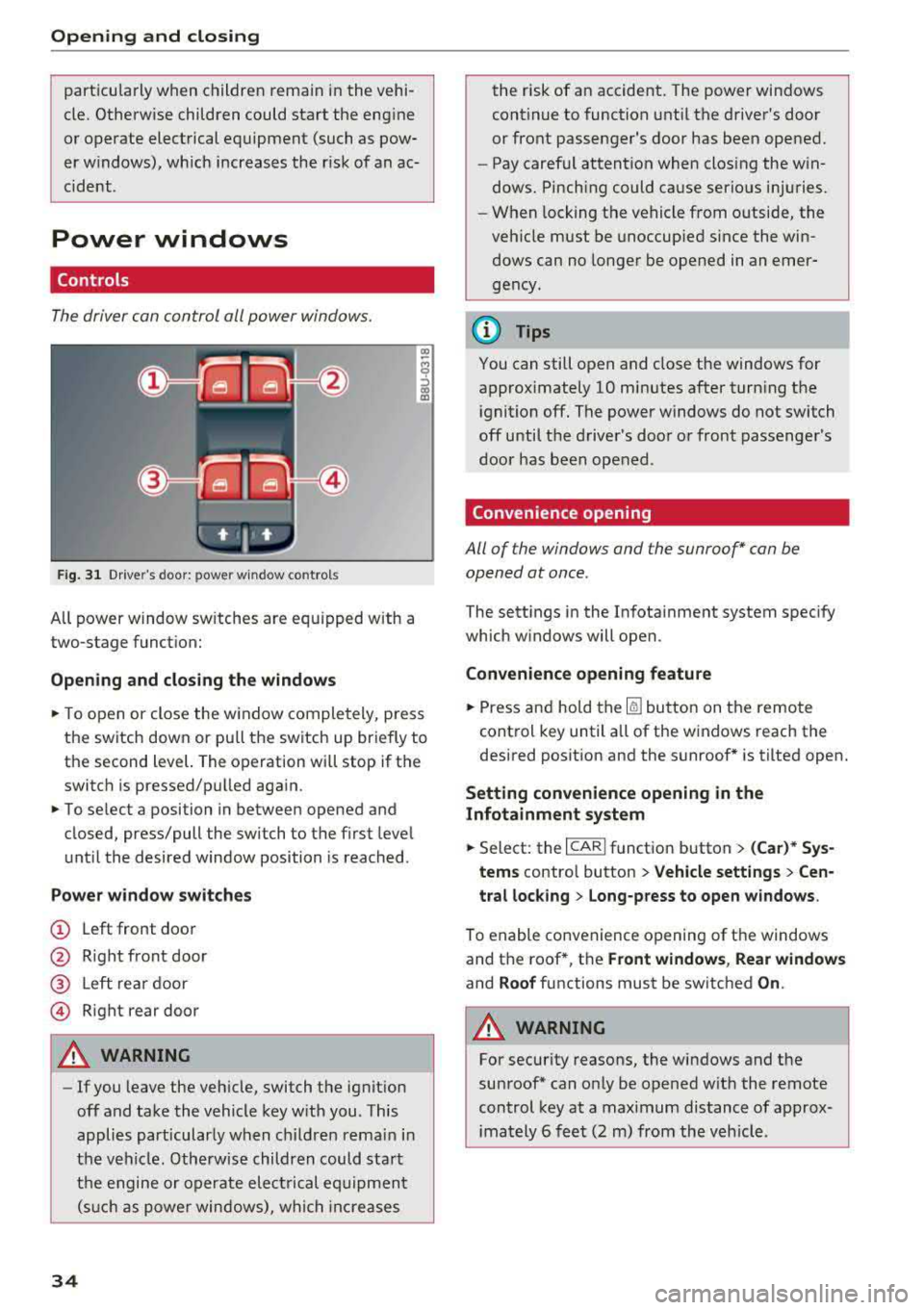
The driver can control all power windows.
Fig . 31 Dr ive r's door : power w indow co ntro ls
All power window sw itches are equ ipped with a
two-stage function:
Op en ing and closing the window s
.. To open or close the w indow completely, p ress
the switch down or pu ll the switch up briefly to
th e second level. The operation will stop if the
switch is p ressed/pu lled again.
.. To se lect a position in between opened and
closed, press/pull the switch to the first level
until the desired window position is reached .
Power wind ow switch es
@ Left front door
@ R ight front door
@ L eft rear door
© Right rear door
A WARNING
- If you leave the veh icle, switch the ignition
off and take the vehicle key with you . This
applies particularly when children remain in
the vehicle . Otherwise children could start
the engine or operate electrical equipment (suc h as power windows), wh ich increases
34
the risk of an accident. The power windows
continue to function until the driver's door
or front passenger's door has been opened.
- Pay careful attention when closing the win
dows. Pinching could cause serious injuries .
- When locking the vehicle from outside, the
vehicle must be unoccup ied since the win
dows can no longer be opened in an emer
gency.
(D Tips
You can still open and close the windows for
approximately 10 minutes after turn ing the
ignition off. The power windows do not switch
off until the driver's door or front passenger's
door has been opened .
Convenience opening
All of the window s and the sunroof* can be
opened at once.
The sett ings in the Infota inment system spec ify
which w indows will open.
Convenience opening feature
.. Press and hold the Iii button on the remote
control key until a ll of the windows reach the
desired posit ion and the sunroof* is tilted open.
Setting convenience opening in the
Infotainment system
.. Select: the I CAR I function button > (Car )* Sys
tem s contro l button > Vehicle settings > Cen
tral loc king > Long-p ress to open wi ndows .
To enable convenience opening of the windows
and the roof *, the
Front window s, Rear windo ws
and Roof functions must be switched On .
A WARNING
-
For security reasons, the windows and the
sunroof* can on ly be opened w it h the remote
control key at a maximum distance of approx
imately 6 feet (2 m) from the veh icle .
Page 45 of 266

a co ,...,
N
" N ,...,
0 0 <..:l '
.,. Press the button @¢ fig. 43. T he ind icator
light @ turns on. Interior and exterior mirrors *
will dim when there is incoming light (such as headlights from the rear) .
A WARNING
If the glass on an automatic dimming mirror
breaks, electrolyte can leak out. This liquid
can irritate the skin, eyes and respiratory sys
tem . If there is contact with the flu id, flush
immediately with plenty of wate r. Consult a
physician if necessary.
- Repeated or long-term exposure to electro
lyte fluid can lead to irritation of the air
ways, especially in people with asthma or
other respiratory conditions. Take deep
breaths immediate ly after leaving the veh i
cle or, if this is not possible, open all of the
doors and windows as wide as possible.
- If electrolyte fluid enters the eyes, flush
them thoroughly with a large amount of
clean water for at least 15 minutes and then
seek medical attention.
- If electrolyte f luid comes into contact with
the skin, flush the affected area with clean
water for at least 15 minutes and then clean
with soap and water and seek med ical at
tent ion . Clean affected cloth ing and shoes
thoroughly before wear ing again .
- If the fluid was swallowed and the person is
conscious, fl ush the mouth with water for at
least 15 minutes. Do not induce vomiting
unless this is recommended by medical pro
fessionals. Seek medical attention immedi
ately .
(D Note
If the glass on an automatic dimming mirror
breaks, e lectrolyte can leak out . This liquid
damages plastic surfaces and paint. Clean
this liquid as quickly as possible, for example
with a wet sponge.
Lights and Vision
(D Tips
-If the light reaching the rearview mirror is
obstructed, the automatic dimming mirror
will not function correctly,
- The automatic dimming mirrors do not dim
when the interior lighting is turned on or
the reverse gear is se lected.
Sun visors
[ }
Fi g. 44 Fr ont pass eng er's s id e: sun vis or
T he sun visors for the driver and front passeng er
can be released from their mounts and tu rned to
ward the
doors @.
The mirror light switches on when the cover over
the vanity m irror @opens.
Sunshades on the rear doors
Applies to: vehicles with sunshades on the rear doors
Fig. 45 Raised sunshade on a rear door
... Pull the sunshade ou t and secure it in the hooks
on the upper door frame
¢ fig. 45.
43
Page 57 of 266

a co ,...,
N
" N ,...,
0 0 \,;J '
compartment
Applies to: vehicles with folding backrests
The rear seat backrests can be folded forward ei
ther separately or together.
F ig . 65 Backrest: re lease lever, secur ing knob and lock•
Relea se handle on the back re st
~ Pull the release lever @¢ fig. 65 in the direc-
tion of the arrow to fo ld the backrest forward.
Folding the ba ckrest back into the upright
po sition
~ Fold the backrest back up again until it latches
and the red marking @ is no longer visible
¢& .
You can lock the backrest when it is latched in
place using the mechanical key ©¢
fig. 65 . This
prevents any access to the luggage compartment
from the vehicle interior.
A WARNING
- Be careful when folding the backrests for
ward! Not paying attention and not check ing when fo ld ing the backrests can lead to
pinching i njuries.
- The backrest must be latched securely to
ensure that the safety be lt is protecting the
cen ter seating posit ion.
- The backrest must be securely latched so
objects cannot slide forward out of the l ug
gage compartment during sudden bra king.
(D Note
- If you move the front seat back when t he
r ear seat backrest is folded forward, you
S eats and storag e
could damage the head restraints on the
rear seat .
- To red uce the risk of damage, move the rear
head restraints down before folding the
rear backrests forward¢
page 49.
- When fold ing the backrest forward, make
sure the outer safety be lts are in the belt
guide recess so that they do not get pinched
in the backrest lock and damaged. Other ob
jects should be removed from the rear
bench seat to protect the backrest from
damage.
Tie-downs
Applies to: vehicles with tie-downs
F ig. 66 Luggage compartment: location of the tie-downs
~ To secure objects, for examp le using the lug
gage compartment net, fold the t ie-down re
tainer upward.
Luggage compartment net
Applies to: vehicles with luggage compartment net
The cargo net prevents small objects from slid
ing.
F ig . 67 Luggage compartment: cargo net stretched o ut
~ Atta ch the hooks for the l uggage compa rtment
net in the tie-downs .
..,..
55
Page 89 of 266

a co .... N
" N .... 0 0 \,;J '
A WARNING
Always pay attention to traffic when adaptive
cruise control is switched on and braking
guard is active . As the driver, you are still re
sponsible for starting and for maintaining
speed and distance to other objects. Braking
guard is used to assist you . The driver must
always take action to avoid a collision. The
driver is always responsible for braking at the
correct time.
- For safety reasons, do not use adaptive
cruise control when driving on roads with
many curves, when the road surface is in
poor condition and/or in bad weather (such
as ice, fog, gravel, heavy rain and hydroplan
ing). Using the system under these condi
tions increases the risk of an accident.
- Switch adaptive cruise control off tempora
rily when driving in turning lanes, on ex
pressway exits or in construction zones. This
prevents the vehicle from accelerating to
the stored speed when in these situations .
- The adaptive cruise control system will not
brake by itself if you put your foot on the ac
celerator pedal. Doing so can override the
speed and distance regulation.
- When approaching stationary objects such
as stopped traffic, adaptive cruise control
will not respond and braking guard will have limited function.
- The adaptive cruise control system and
braking guard do not react to people, ani
mals, objects crossing the road or oncoming
objects.
- The function of the radar sensors can be af
fected by reflective objects such as guard
rails, the entrance to a tunnel, heavy rain or
ice.
A WARNING
- Improper use of adaptive cruise control can
cause collisions, other accidents and serious
personal injury.
- Never let the comfort and convenience that
adaptive cruise control and braking guard
Assistance systems
offer distract you from the need to be alert
to traffic conditions and the need to remain
in full control of your vehicle at all times,
- Always remember that the adaptive cruise
control and braking guard have limits -they
will not slow the vehicle down or maintain
the set distance when you drive towards an
obstacle or something on or near the road
that is not moving, such as vehicles stopped
in a traffic jam, a stalled or disabled vehicle.
If registered by the radar sensors, vehicles
or obstacles that are not moving can trigger
a collision warning and if confirmed by the
video camera, an acute collision warning.
- Never follow a vehicle so closely that you
cannot stop your vehicle safely. The adap
tive cruise control cannot slow or brake the
vehicle safely when you follow another vehi cle too closely. Always remember that the
automatic braking function cannot bring the
vehicle to a sudden or emergency stop un
der these conditions .
- To prevent unintended operation, always
switch ACC off when it is not being used .
@ Note
The sensors can be displaced by impacts or
damage to the bumper, wheel housing and underbody . That could affect the adaptive
cruise control system and braking guard .
Have an authorized Audi dealer or authorized
Audi Service Facility check their function.
(D Tips
For an explanation on conformity with the
FCC regulations in the United States and the
Industry Canada regulations, see
¢page 250.
87
Page 94 of 266

Ass is tanc e system s
What can the braking guard do?
When detected in t ime, the system can assess
dangerous situations where an object ahead
brakes suddenly or if your own vehicle is traveling
at a high speed and approaching an object that is moving more slowly. The braking guard does not
react if it cannot detect the s ituation.
The system advises you of various dangerous sit uations :
- T he
dista nce warning occurs if you d rive too
closely to the object ahead for a long period of
time. If the object ahead brakes strongly, you
would not be able to avoid a collision .
The.
indicator light appears as an indication for this.
- The
app ro ach warning occurs when an object
ahead is traveling more slow ly or brakes
strongly. When th is warning occurs, it may only
be possible to avoid a co llision by swerv ing or
braking strongly . The danger is indicated by the
• ind icator light ¢ fig . 98 . An aud io signal w ill
also sound .
If you do not react early enough or at all to a dan
ge rous situation, the braking guard suppo rts you
with a brak ing intervention .
- If a collision is imminent, the system will f irst
provide an
a cut e warn ing by braking sharply.
- If you do not react to the acute warning, the braking guard can increase the braking force
within the limits of the system
ll . Th is reduces
the vehicle speed in the event of a collision .
- The system can init iate comp lete deceleration
shortly before a collision
ll _ Full deceleration at
high speeds occurs only in vehicles with adap
tive cru ise control and s ide ass ist (pre sense
pl us).
- If the braking gua rd determines that you are
not brak ing strongly enough whe n there is an
im pending co llision, it can increase the bra king
force .
- T he pre sense functions also engage whe n
t h ere is an impend ing collision ¢
page 94.
l) Th is is not ava ilab le in some co untri es .
92
Which fun ction s can be controlled?
Yo u can swi tch the braking guard and the d is
tance/approach warning on or
off in the Infotain
ment system ¢
page 93, Settings in the Info
tainment system .
A WARNING
Lack of attention can cause collisions, other
accidents and ser ious personal injuries . The
braking guard is an assist system and cannot
prevent a collis ion by itself . The dr iver must
a lways intervene. The d river is always respon
sib le for braking at the co rrect t ime.
- Always pay close attention to traffic, even
when the b raking guard is sw itched on. Be
ready to intervene and be ready to take
co mplete co ntro l whenever necessa ry . Al
ways keep the sa fe and legal distance be
tween your vehicle and ve hicles up ahead .
- Br aki ng g uard wo rks w ithin limits and w ill
no t respond outside the system limits, for
examp le when approaching a stopped vehi
cle or stationary obstacle (end of a traffic
jam or ve hicle that has broken down in traf
fic).
- Always remember that the radar sensor for
the brak ing guard works only within defined
detection and range limits that may prevent
the proper detection of other vehicles .
- The radar sensor's function and range can
be reduced by rain, snow and heavy spray.
Mov ing veh icles up ahead may not be
promptly detected or may not be detected
at al l.
- Reflective surfaces including crash ba rr iers
or tunne l entra nces may impair the function
of the rada r senso r.
(D Tips
- You can cancel the braking with increas ing
force that is initiated by the system by brak ing yourse lf, by acce le rating not iceably or
by swerv ing.
- Keep in mind that b raking gua rd can b rake
unexpectedly. A lways secure a ny cargo or
Page 101 of 266

a co ,...,
N
" N ,...,
0 0 \,;J '
Applies to: ve hicles with Audi side assist
®
®
©
F ig . 105 D riving situat io ns
~ AUD !
. ---.
Fi g. 10 6 Rear of the vehicle: position of the sensors
Side assis t fun ctions at speeds above app roxi
mate ly 19 mph (30 km/h).
® Vehicles that are approaching
In ce rtain cases, a vehicle will be classified as
cr itica l for a lane change even if it is still some
what far away. The faste r a ve hicle app roaches,
the soo ner the display in the exterio r mirror w ill
turn on.
@ Vehicles traveling with you
Veh icles traveli ng w ith you are ind icated i n the
exte rior m irro r if they are classified as critical for
a lane change. All vehi cles detec ted by side assist
A ssi st a nce systems
are indicated by the time they enter your "blind
spot", at the latest.
© Vehicles you are passing
If
you s low ly pass a vehi cle that s ide assist has
de tected (the difference in speed between t he
vehicle and you r vehicle is less than 9 mph ( 15
km/h)), the display in the exterior mi rror turns
on as soon as the vehicle enters your blind spot.
T he display w ill not turn on if you quickly pass a
vehicle th at s ide ass ist has de te cted (the differ
ence in speed is greater than 9 mph (15 km/ h)) .
Functional limitations
The radar sensors are des igned to detect the left
and right adjacent lanes when the road lanes are
t h e norma l width. In some si tua tions, the display
in the exterior m irror may turn on even though
there is no veh icle located in the area that is criti
ca l for a lane change. For example:
- I f the lanes are na rrow or if you a re dr iving on
the edge o f you r lane . If t his is the case, the
system may have detected a vehicle i n another
lane that is
not adjacent to your current lane.
- If you are driving through a curve . Side assist
may react to a vehicle that is one lane over
from the ad jacent lane .
- If side assist reacts to other objects (such as
high or disp laced guard rai ls).
- In poor weather conditions. The side assist
functions are limited .
D o no t cover the radar senso rs
¢ fig. 106 wit h
stickers, deposits, bicycle wheels or other ob
j ects, because t hey will impair the func tion. Do
not use side assist when towing a trai ler. For in
f ormat ion on cleaning,
see ¢ page 221.
A WARNING
-== -
-Always pay attention to traffic and to the
area around your vehicle. S ide assist cannot
replace a driver's atte ntion. The driver alone
is always respons ible for la ne cha nges and
similar dr iv ing maneuvers .
- In some situations, the system may not function o r its function may be limi ted. For
examp le:
99
Page 104 of 266

Assistance systems
that are between approximately 32 ft (10 m) and
295
ft (90 m) in front of the vehicle and within
the detection zone. Within the limits of the sys
tem
c:> page 102, a pedestrian or wild animal de
tected when the low beams are switched on is
highlighted in yellow
c:> fig. 108. Animal recogni
tion is not active within highly developed areas.
The system only detects large wild animals such
as deer.
(D Tips
If another display such as navigation replaces
the image from the night vision assist
the~--,
symbol appears in a tab c:>fig. 109. You can
access night vision assist using the multifunc
tion steering wheel buttons
c:> page 20.
Pedestrian and wild animal warning
Applies to: vehicles with night vision assist
Fig . 110 Inst rument cluster :® pedestrian warning, ®
wild animal warning
Fig. 111 In strument cl uster: ® pedestrian warning/ @
w ild an imal warning, when the night vision assist image is
n ot selected in the instrument cl uster display
Image in the instrument cluster/head-up
display*
If there are pedestrians or wild animals in an
area in front of your vehicle that is classified as
102
critical, the system will direct your attention to
this :
- Pedestrians or wild animals are highlighted in
red and the corresponding
symbol . or.
turns on c:>fig. 110.
- There is also an audible signal.
The area classified as critical is based on the vehi
cle speed and the steering wheel angle. Pedes
trian and wild animal warning encourages you to pay more attention.
If the night vision assist image is replaced by an
other display (such as the on-board computer),
the
red . or. indicator light c:> fig. 111 will
appear if there is a pedestrian or wild animal
warning.
If the head-up display* is switched on and the
night vision assist content is activated, .
or.
will appear in the head-up display*.
Marking light*
To direct the driver's attention to a pedestrian,
the headlights can flash on the pedestrian three
times in a row when there is a pedestrian warn
ing.
This occurs at speeds above approximately
35 mph (60 km/h) if you are outside of illuminat
ed areas and no detected vehicles are shown. The
high beam assistant* controls the marking light*
c:> page 39, High beam assistant.
The marking light is not used for wild animals .
General information
Applies to: vehicles with night vision assist
Fig. 112 Fro nt of the vehicl e: night vision assist camera
Page 105 of 266
a co ,...,
N
" N ,...,
0 0 <..:l '
of the night vision assist system:
- Poor visibility such as snow, rain, fog or heavy
spray
- Dirty lens on the night vision assist camera
Make sure the night vision assist camera
c::> fig. 112 is not covered by stickers, deposits or
any other obstructions because that can affect
the camera function. For information on clean
ing, see
c::> page 221 .
The pedestrian and wild animal recognition de
pends on the temperature difference between
the person/wild animal and the background. Peo ple/wild animals may not be detected if the dif
ference is too small. The pedestrian/wild animal
marking and the marking light* deactivate at
temperatures above approximately 77 °F (25 °C)
and during daylight.
If the night vision assist im
age is selected in the instrument cluster display,
then the
D symbol appears at the top on the
right side .
_&, WARNING
Pay attention to traffic and the area around
your vehicle when night vision assist is switch
ed on. The driver is always responsible for as
sessing the traffic situation.
- Night vision assist can only warn about peo
ple and wild animals located within the visu
al range of the infrared camera. The visual
range corresponds to the image in the in
strument cluster display.
- Night vision assist may not detect people or
wild animals and mark them if
-they are not in an upright position, for ex
ample if they are sitting or lying down
and/or
-the silhouette in the display appears in
complete or interrupted, for example be
cause the person is partially covered by a
vehicle or the animal is partially covered
by tall grass. This could increase the risk
of an accident.
- Never try to swerve around animals if doing
so will endanger you or other road users, be
cause this increases the risk of an accident.
Assistance systems
(D Tips
-Even though the system evaluates the
shape and heat given off by all detected ob
jects, there are limits to the system . There
may be false warnings.
-For technical reasons, the image pauses in
split second intervals.
Switching on/off
Applies to: vehicles with night vision assist
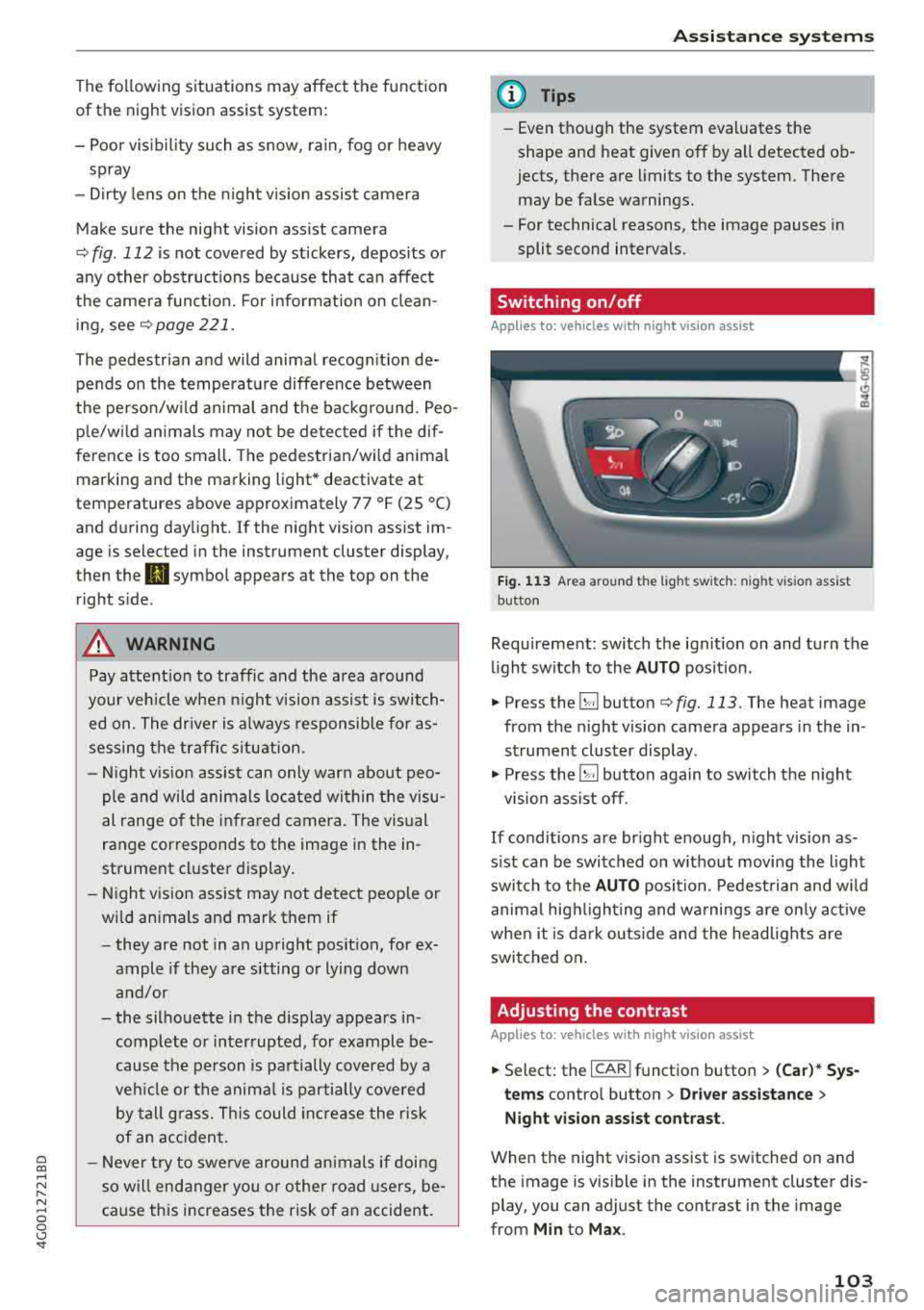
Fig. 113 Area around the light switc h: night vis ion assist
button
Requirement: switch the ignition on and turn the
light switch to the
AUTO position.
.. Press the~ button c::> fig. 113. The heat image
from the night vision camera appears in the in
strument cluster display .
., Press the~ button again to switch the night
vision assist off.
If conditions are bright enough, night vision as
sist can be switched on without moving the light
switch to the
AUTO position. Pedestrian and wild
animal highlighting and warnings are only active
when it is dark outside and the headlights are
switched on.
Adjusting the contrast
Applies to: vehicles with night vision assist
.. Select: the I CAR! function button > (Car)* Sys
tems
contro l button > Driver assistance >
Night vision assist contrast .
When the night vision assist is switched on and
the image is visible in the instrument cluster dis
play, you can adjust the contrast in the image
from
Min to Max .
103