2018 AUDI A3 SEDAN tab area
[x] Cancel search: tab areaPage 179 of 404

u. 00 .-< N l' N .-< 0 N > 00
Telephone Introduction
Applies to: vehicles with telephone
To make phone coils in your vehicle using the
MMI, connect your cell phone to the MMI via
Bluetooth.
Handsfree
After you have connected your ce ll phone to the
MMI via Bluetooth, you can use the handsfree
system and operate telephone functions through
your MMI. You can make calls using the antenna
on your cell phone.
A WARNING
-Medical experts warn that cell phones can
interfere w ith the funct ion of pacemakers .
Always ma inta in a m inimum distance of
about 8 inches (20 cm) between the cell
phone antenna and the pacemake r.
-Do not carry the cell phone in a pocket di
rectly over the pacemaker when the phone
is switched on.
-Sw itch the cell phone off immediately if
you suspect it may be interfering w ith the
pacemaker.
-Do not use the voice recognition system*
¢ page 170 in emergencies because your
voice may change in stressful situations. It
may take longer to dial the number or the
system may not be able to dial it at all. Dial
the emergency number manually.
-Switch your cell phone off in areas where
there is a risk of an exp losion. These loca
t ions are not always clearly marked. This
may include gas stations, fuel and chemical
storage facilities or transport vehicles, or lo
cations where fue l vapors (such as propane
or gasoline vapor in vehicles or bui ldings),
chem icals or large quantities of dust parti
cles (such as flour, sawdust or metal) may
be present in the air. Th is also applies to all
ot her locations where you would normally
turn your vehicle engine off.
-The demands of traffic require your full at
tention. Always read the chapter
¢ page 154, Traffic safety information.
-
Telephone
@ Note
Always fo llow the information found in Q@ in
Wi -Fi hotspot on page 195.
(D Tips
-The Bluetooth connection range is limited
to inside the vehicle . It can a lso be affected
by loca l conditions and interference with
other devices.
-T o learn which Bluetooth connections and
which of the functions in your cell phone are
supported, check with your cell phone serv
ice provider or the database for mobile devi
ces at www .aud iusa .com/bluetooth.
Setup
Connecting a cell phone using Bluetooth
Applies to: vehicles with telephone
Fig. 173 Display in g t he PIN for enter ing in t he cell p hone
Requirement
T he vehicle must be stationary and the ignition
must be switched on.
T he Bl uetoo th settings must be open on your cell
phone during the connection setup .
T he Bluetooth funct io n and v is ibilit y of the MMI
Q page 246 and cell phone must be switched on.
The cell phone to be connected must not be con
nected to any other Bluetooth device.
The MMI must not be connected to a cell phone.
Connecting a cell phone
.,. Select: IMENU I button> Telephone> Connect
mobile device > Find new devices > Next.
The
avai lab le Bluetooth devices are shown in the In-
fotainment system display.
Or select: I MENU I II>-
177
Page 195 of 404

u. 00 .-< N l' N .-< 0 N > 00
The following categories can be selected in the
Twitter menu:
-My tw eets: News Feed and the Tweets you have
posted are listed.
- Home: the Tweets for everyone you follow are
displayed.
- Trends : topics on Twitte r that are cur rently
popular w ithin a country .
D ifferent functions are available depending on
the Twitter category you have selected:
- New tweet : you can post a new tweet using
pre-made templates or using myAudi tem
plates that you have created yourself .
-Refresh : the selected Tw itter function is re
freshed .
-Favorite : mark a Tweet as favorite to show you
liked it .
-Retweet: you can quote a Tweet to share it with
others.
(D Tips
- Other settings such as account, language,
Tweet security and location settings
cannot
be changed in the MMI. These changes must
be made on the Twitter webs ite.
- You can only connect
one Twitter account
with your myAudi account.
- Audi connect (Infotainment) makes it possi ble to access Tw itter. Permanent ava ilability
cannot be guaranteed, because that de pends on Twitter.
Travel (travel guide)
Applies to: ve hicles with Trave l (travel guide)
You can use the Audi MMI connect opp to store
points of interest on your mobile device (such as a smartphone) and then use them for route
guidance in the
MMI.
Requirement:
The
Audi MMI connect app must be insta lled and
open on your mobile device.
Audi connect (Infotainment)
You must be logged into your myAudi account in
the
Audi MMI connect app and you must have se
l ected your vehicle.
T he Wi-Fi function on your mobile device and on
the MMI must be switched on.
T he M MI must be connected to the network.
.. Press: !MENU ! button> Audi connect> left con-
trol button >
Information category> Travel.
After opening the trave l guide, trave l tips in your
area w ill be displayed including current ratings as
well as the corresponding category .
.. Press the left control button to change the cat
egory (such as bars nearby).
,&. WARNING
- It is only safe to use tablets, laptops, mo
bile devices and other similar devices when
the vehicle is sta tionary because, like all
loose objects, they co uld be thrown around
the inside of the ve hicle in a crash and cause
serious inj uries. Store these types of devices
securely while driving.
- Do not use any wireless devices on the front
seats within range of the airbags while dr iv
ing. Also read the warnings in the chapter
¢ page 2 73, Front airbags .
(D Tips
-Units of measurement, language settings
and time are shown in the Infotainment sys
tem display based on how they were set in
the MMI system sett ings
¢ page 243.
Audi connect (Infotainment) in navigation
App lies to : vehicles wit h a navigat ion syste m and Audi co n
nect (Infota inment)
.. Select: IMENU! button> Audi connect> left
control button>
Navigation.
-
T he following Audi connect Infotainment services
are currently available:
..,.
193
Page 206 of 404

Navigat ion
-If a contact is grayed out in the directory,
this contact has neither a destination nor an
address assigned to them.
Point of interest search
Applies to: ve hicles w ith navigation system
.. Press the I NAV /MAPI bu tton repeatedly until
t he
E nte r d estination menu is displayed
¢page 201 , fig . 1 82 .
.. Select : left cont rol button > Point s of intere st.
-C hanging the search area : select and confirm
Sear ch ar ea > a search area from the list .
The following search categories are avai lab le:
Nearb y: points o f interes t can be sele cted from
different categories . The points o f interest are
list ed starting from the immediate vicinity of the
vehicle up to a radi us of approximate ly 124
miles (200 km).
Along the route: points of inte rest a long the
route can on ly be select ed during active rout e
gu idance. The points of interest are located d i
rect ly along or in the immediate vicinity of the
calcul ated route. The points of interest can like
wise be selected from various categor ies . For ex
ample, you can search for a hotel or park ing lot
at the destination .
Near destin ation /Near stopo ver : po ints of inter
est near a destination or a stopover can only be
selected dur ing active route guidance . T he poi nts
of interest can likewise be se lected from va rious
ca tegor ies. For examp le, you ca n search fo r a ho
tel or parking lot a t the destination.
In new city : select a country/state or searc h in a
new c ity . Ente r the name of the des ired c ity .
P oints of i nte rest can be selected from var ious
ca tegor ies. Th is f unction allows you to searc h for
points of interes t in any ci ty regardless of the ac
tive route guidance or the vehicle position.
-Sea rch for a p oint of inter est name in these
lec ted search are a:
en ter the name of the po int
of inte rest .
-Sear ching f or a poin t of inter est in a specifi c
ca tegory :
select Select cat egory . Select and
confirm a ca tegory such as
Restaurant s.
204
(D Tips
-Distances to points of interest are displayed
as a stra ight -line d istance from your current
location. The actual d istance from your cur
rent location to the point of interest is up
dated automatically. The list of found
points of interest is not resorted when this
happens.
-T here may be entr ies in the l ist that cannot
be displayed comp letely due to t heir length .
Select the cor respond ing ent ry from the
list. Select: r ight cont rol b utton> Show des
ti na tion det ails. De tailed informa tion fo r
the se lected entry in the list is then dis
played .
Online point of interest search (online
search)
App lies to: vehicles wit h a navigation system and Audi co n
nect (Infota inment)
You can search for points of interest on the In
t e rnet .
Requirement: the requirements for Aud i connect
(Infotai nment) must be met
¢ page 190 .
.. Press the I NAV/MAPI button repeatedly until
the
Enter des tination me nu is displayed
~ page 201, fig. 182 .
.. Select: left control button > Online sear ch . Th e
searc h area last set is displayed in the inpu t
fie ld .
-C hanging the search area : select: right cont rol
bu tton >
S elect sear ch are a.
-Searching for onlin e destinations in thes e
l ec ted search ar ea :
ente r a new c ity/state if
necessary. En ter the search term, such as hotel.
Press the contro l knob. Se lect and confirm an
online destination from the list.
-Sea rching for online de stinations in a specific
categor y:
se lect and confirm Sele ct category.
Select and confirm a category such as Re stau
rants .
Find w hich search areas are avai lab le under
¢ page 204 , Point of interest search .
You can search for online destinations using the
vo ice recog nitio n
sys tem ¢ table on page 173. .,..
Page 219 of 404

LL co ..... N
" N ..... 0 N > co
e-tron navigation
functions
Electric range
Applies to: vehicles with plug- in hybrid drive
The electric range shows the maximum distance
that con be driven using electric power. Informa tion such as the type of rood, speeds, and alti
tude will be token into account.
Fig. 195 Example: e lectric range display
• Press the I NAV/MAPI button repeated ly un til
the map is displayed ¢
page 210, fig. 190 .
• Select: right contro l button > Map set tings >
Map display > Elect ric range .
• Press the I BACK I button to return to the map
view.
You can read the electric range of your vehicle
based on the border
(D ¢ fig. 195.
The map scale will automatically adjust to the
range .
Troubleshooting
Applies to: vehicles with navigation system
Problem Solution Na
viga tion
Finding the nearest charging station
Applies to: vehicles with plug -in hybrid drive
You can display charg ing stations at any time us
i ng t he po int of interest search
¢page 204.
You can also display the charging stations along
the cur rent route.
Requirement: route guidance must be active and
the map must be d isplayed .
If avai lab le, all charging stations in the selected
search area are displayed with the fo llow ing addi
tiona l information:
(D Connec to r types
@ Symbol for charging stations that are always
open.
@ Available destination deta ils
The hours of operation for the charging stations
are displayed in the destination details .
Displa ying destination detail s: se lect th e right
contro l button
> S how destination details .
Apply charging station a s the destinat ion:
p ress
the control knob. Select and confirm
Sta rt route
guidance .
You can find add it iona l information about charg
ing yo ur vehicle in
~ page 104, Charging.
Free te xt sear ch : the desired des- The destination might not be entered in the navigation database .
t i nation cannot be found .
Or: check the spelling of the term that was searched. Check if the
des ired country/state was selected for the free text search using
the
Count ry /s tate select ion ¢ page 202 or the option All coun-
tries /state s.
217
Page 253 of 404

u. 00 .-< N l' N .-< 0 N > 00
-Pointing the steering wheel toward your
face decreases the ability of the supplemen
tal driver's airbag to protect you in a colli sion.
- Always sit in an upright position and never
lean against or place any part of your body
too close to the area where the airbags are
located.
- Before driving, always adjust the front seats
properly and make sure that all passengers
are properly restrained.
- For adjustable head restraints : before driv
ing, always also adjust the head restraints
properly.
- Never adjust the seats while the vehicle is moving . Your seat may move unexpectedly
and you could lose control of the vehicle.
- Never drive with the backrest reclined or
tilted far back! The farther the backrests are
tilted back, the greater the risk of injury due
to incorrect positioning of the safety belt
and improper seating position.
- Children must always ride in child seats
~ page 294. Special precautions apply
when installing a child seat on the front
passenger seat
i::> page 269 .
Proper seating position for the front
passenger
The proper front passenger seating position is
important for safe, relaxed driving.
For your own safety and to reduce the risk of in
jury in the event of an accident, we recommend that you adjust the seat for the front passenger
to the following position:
.. Adjust the angle of the seatback so that it is in
an upright position and your back comes in full
contact with it whenever the vehicle is moving.
.. For adjustable head restraints: adjust the head
restraint so the upper edge is as even as possi
ble with the top of your head. If that is not pos
sible, try to adjust the head restraint so that it
is as close to this position as possible
~ page 61. Move the head restraint so that it is
as close to the back of the head as possible.
Driving safety
.. Keep both feet flat on the floor in front of the
front passenger seat.
.. Fasten and wear safety belts correctly
<=:>page 264.
For detailed information on how to adjust the
front passenger's seat, see
<=:>page 59.
A WARNING
= -
Front seat passengers who are unbelted, out
of position or too close to the airbag can be
seriously injured or killed by the airbag as it
unfolds . To help reduce the risk of serious
personal injury:
- Passengers must always sit in an upright po
sition and never lean against or place any part of their body too close to the area
where the airbags are located.
- Passengers who are unbelted, out of posi
tion or too close to the airbag can be seri
ously injured by an airbag as it unfolds with
g reat force in the blink of an eye.
- Always make sure that there are at least
10 inches (25 cm) between the front pas
senger's breastbone and the instrument panel.
- Always make sure that there are at least
4 inches (10 cm) between the front passen
ger's knees and the lower part of the instru
ment panel.
- Each passenger must always sit on a seat of
their own and properly fasten and wear the
safety belt belonging to that seat.
- Before driving, always adjust the front pas
senger seat properly.
- For adjustable head restraints: before driv
ing, always also adjust the head restraints
properly .
- Always keep your feet on the floor in front
of the seat. Never rest them on the seat, in
strument panel, out of the window, etc. The
airbag system and safety belt will not be
able to protect you properly and can even in
crease the risk of injury in a crash .
- Never drive with the backrest reclined or
tilted far back! The farther the backrests are
tilted back, the greater the risk of injury due
~
251
Page 255 of 404

u. 00 .-< N l' N .-< 0 N > 00
-Every person in the vehicle must have a
properly adjusted hea d restra int.
- Always make sure each person in the vehicle
properly adjusts their head res traint. Adjus t
t h e head restra int so the upper edge is as
even as possib le with the top of your head.
If that is not possib le, try to adjust the h ead
restra int so that it is as close to th is position
as possib le.
- Applies to: forward/back adjustable head
restra ints: Move the head restra int so that it
is as close to the back of the head as possi
ble.
- Never attempt to adjust head restra int
wh ile driving. If you have dr iven off and
must adjust the dr iver head rest for any rea
son, first s top the veh icle sa fely before at
tempting to ad just the head restraint .
- C hildren mus t always be p roperly res trained
in a ch ild restraint that is appropriate for
their age and size
i::> page 294.
Examples of improper seating positions
The occupant restraint system con only reduce
the risk of injury if vehicle occupants ore properly
seated.
I mp roper seating posi tions can cause se rious in
ju ry o r death. Safety bel ts can only work when
they are p roperly positioned on the body. Im
proper seating positions reduce the effectiveness
of safety belts and w ill even increase the r is k of
in ju ry and death by moving the safety belt to crit
ical areas of t he body. Improper seating posit ions
also increase the risk of ser ious injury and death
when an airbag deploys a nd strikes an occupant
who is not i n the prope r seat ing pos ition . A d rive r
i s respons ib le for the safety of all vehicle occu
pants and especia lly fo r children. Therefo re:
"" Never allow anyone to assume an incorrect
seat ing pos it ion when t he ve hicle is being used
i::, & -
The follow ing bulletins list only some sample po
sitions that will increase the risk of serious in jury
a nd death. O ur hope is that these examp les w ill
make you more aw are of sea ting pos it io ns tha t
ar e dange ro us.
Dri ving saf ety
Th erefore , whenever the vehicle is moving :
-neve r st an d up i n the vehicle
- neve r stand on the seats
- neve r kneel on the seats
- never ride wit h the seatback recl ined
- neve r lie down on the seats
- never lean up against the instrument panel
- never sit on t he edge of the seat
- neve r sit sideways
- neve r lean out t he window
- neve r put your feet out the wi ndow
- never put your feet on the instrument panel
- neve r rest your feet on the seat cushion or back
of the seat
- never ride in the footwell
- never ride in the cargo area
A WARNING
--
Improper seating positions inc rease the risk
of ser ious personal in ju ry and death whenever
a veh icle is being used.
- Always make sure that all veh icle occupants
stay in a proper seating posit ion and are
proper ly restrained whenever the vehicle is
be ing used.
Driver's and front
passenger's footwell
Important safety instructions
Applies to : vehicles wit h knee airbags
A WARNING
Always ma ke su re t hat the knee airbag can i n
fl ate w ithout interfe rence. Objects between
yourself and the airbag can in cre ase the risk
of inju ry in an accident by interfering with the
way the ai rbag dep loys o r by being pushed in
to you as the ai rbag dep loys.
- No persons (ch ildren) or animals should ride
in the footwell in front of the passenger
seat . If the airbag deploys, this can res ult in
serio us or fatal injur ies.
- No objects of any kind should be carried in
the footwell area in front of the dr iver's or
passenger's seat. Bu lky objects (shopping
bags, for examp le) can hamper or prevent
~
253
Page 256 of 404
Drivin g saf ety
proper deployment of the airbag. Small ob
jects can be thrown through the vehicle if the a irbag deploys and injure you or your
passengers .
Pedal area
Pedals
The pedals must always be free to move and
must never be interfered with by a floor mat or
any other object.
Make sure that all pedals move freely without in
terference and that not hing prevents them from
retu rni ng to the ir origi na l positions.
Only use floor mats that leave the pedal area free
and can be secured with floor mat fasteners .
If a brake c ircuit fa ils, increased brake peda l trav
el is required to br ing the veh icle to a full stop .
A WARNING
Pedals that cannot move freely can cause loss
of vehicle control and inc rease the risk of ser i
ous
in Jur y.
-Never place any objects in t he driver's foot
we ll. An object cou ld get into the peda l area
and interfere w it h pedal fu nction. In case of
s u dden brak ing o r an accident, yo u wo uld
not be ab le to brake or accelerate!
- Always make sure that noth ing ca n fa ll o r
move in to the dr iver's foo twell .
Floor mats on the driver side
Always use floor mats that can be securely at
tached to the floor mat fasteners and do not in
terfere with the free movement of the pedals .
.,. Make sure that the floor mats are properly se
cu red and cannot move and inte rfe re with the
peda ls ~ & -
Use o nly floo r mats that leave the pedal a rea un
obstructed and that are firmly secured so that
they cannot slip out of pos it ion. Yo u ca n ob tain
sui table floo r ma ts from yo ur autho riz ed Aud i
Dea le r.
254
Floor mat fasteners are installed in your Audi .
Floor mats used in you r vehicle must be attached
to these fasteners . Properly secur ing the floor
mats will p revent them from slid ing into pos i
tions that could interfere with the pedals or im
pair safe operation of your vehicle in other ways.
A WARNING
Pedals that cannot move freely can res ult in a
l oss of vehicle contro l and increase the r isk of
serious personal injury.
- Always make sure that floor mats are prop erly secured.
- Never p lace or install floor mats o r other
floor coverings in the vehicle that cannot be properly secured in place to prevent them
from s lipping and interfer ing with the ped
als or the ab ility to control the vehicle .
- Never p lace or install floor mats or other
floor coverings on top of already installed
floor mats . Additional floor mats and other
cover ings will reduce the si ze of t he pedal
a rea and interfe re w ith the pedals.
- Always properly re insta ll and sec ure floo r
mats that have been ta ke n out for clea ning.
- Always make sure that objects cannot fall
into t he d river footwe ll whi le the vehicle is
mov ing. Objects can become t rapped under
t he br ake pedal and accelerator pedal c aus
ing a loss o f vehicle con trol.
Page 257 of 404
LL co .... N
" N .... 0 N > co
Storing cargo correctly
Loading the luggage compartment
All luggage and other objects must be properly
stowed and secured in the luggage compart
ment.
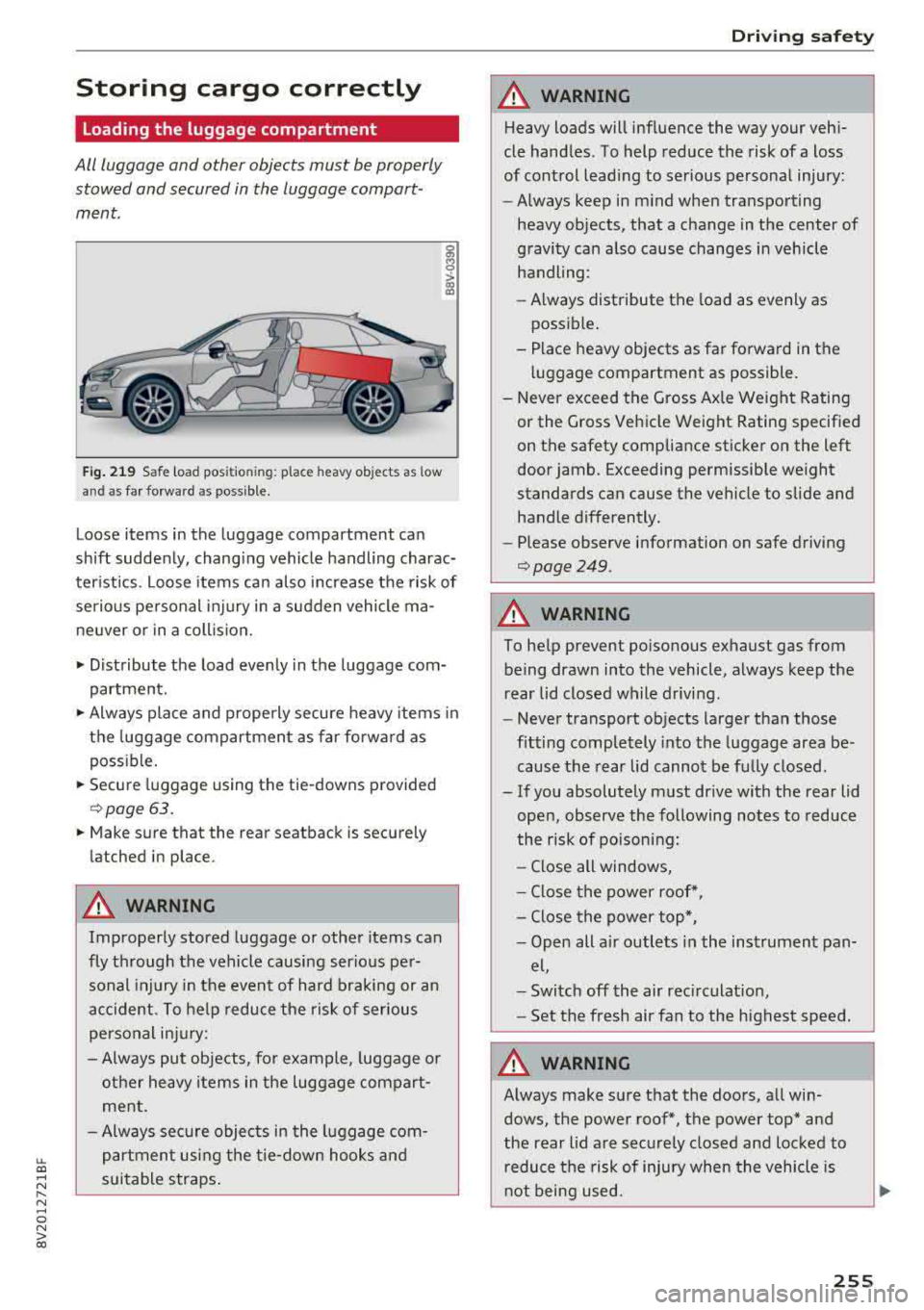
Fig . 219 Safe load pos itio ning : place heavy objects as low
an d as far forward as poss ible.
g M 0
> a, a,
Loose items in the luggage compartment can
shift suddenly, chang ing vehicle handling charac
ter istics . Loose items can also increase the risk of
serio us personal inj ury in a sudden vehicle ma
ne uver or in a coll ision.
• Distribute the load evenly in the luggage com
partment.
• Always place and properly secure heavy items in
the luggage compartment as far forward as
poss ible.
• Secure luggage using the tie-downs provided
¢ page 63.
• Make sure that the rear seatback is securely
latched in place .
A WARNING
Improperly stored luggage or other items can
fly through the vehicle causing serio us per
sonal injury in the event of hard braking or an
accident . To help reduce the risk of serious
personal injury:
- Always put objects, fo r example, luggage o r
other heavy items in the luggage compart ment.
- Always sec ure objects in the luggage com
partment using the tie-down hooks and
s u itable straps .
Driving safety
A WARNING
Heavy loads will influence the way your vehi
cle handles. To help reduce the risk of a loss
of control lead ing to serious personal injury:
- Always keep in m ind when transport ing
heavy objects, that a change in the center of
gravity can a lso cause changes in vehicle
handling :
- Always distribute the load as evenly as
possible .
- Place heavy objects as far forward in the luggage compartment as possible.
- Never exceed the Gross Ax le Weight Rating
or the G ross Vehicle Weight Rating specified
on the safety compliance sticker on the left
door jamb. Exceeding permissible we ight
standards can cause the vehicle to slide and handle differently.
- Please observe information on safe driving
¢page 249 .
A WARNING
-
To help prevent poisonous exhaust gas from
being drawn into the vehicle, always keep the
rear lid closed while driving.
- Never transport objects larger than those
fitting completely into the luggage area be
cause the rear lid cannot be fu lly closed.
- If you absolutely must dr ive with the rear lid
open, observe the following notes to reduce
the risk of poisoning:
- Close all windows,
- Close the power roof*,
- Close the power top*,
- Open alt a ir outlets i n the instrument pan-
el,
- Switch off the air rec irculat ion ,
- Set the fresh air fan to the highest speed.
A WARNING
--
Always make sure that the doors , all win
dows, the power roof*, the power top* and
the rear lid are securely closed and locked to
r educe the risk of injury when the vehicle is
n ot being used.
255