2017 VOLVO V90 service
[x] Cancel search: servicePage 361 of 594

DRIVER SUPPORT
359
SymbolMessage Specification
Driver support system Reduced functionality Service requiredThe system does not function as it should. A workshop should be contacted - an authorised Volvo workshop is recommended.
Windscreen sensor Sensor blocked, see Owner's manualThe ability of the camera to scan the roadway in front of the car is reduced.
Lane Keeping Aid Apply steeringThe LKA steering assistance does not function if the driver does not hold the wheel. Follow the instruction and steer the car.
Lane Keeping Aid Standby until steering appliedLKA is set in standby mode until the driver starts to steer the car again.
Related information
•Lane Keeping Aid (p. 354)
• Activate/deactivate Lane Keeping Aid (p. 356)
Page 364 of 594

DRIVER SUPPORT
362
Symbols and messages for Run-off Mitigation A number of symbols and messages regarding the Run-off Mitigation Run-off Mitigation can beshown in the driver display.The following table shows some examples.
SymbolMessage Specification
Automatic intervention City SafetyWhen Run-off Mitigation is activated, a message is shown to the driver informing that the system has been activated.
Driver support system Reduced functionality Service requiredThe system does not function as it should. A workshop should be contacted - an authorised Volvo workshop is recommended.
Windscreen sensor Sensor blocked, see Owner's manualThe ability of the camera to scan the roadway in front of the car is reduced.
Related information
•Run-off Mitigation (p. 360)
Page 369 of 594

DRIVER SUPPORT
* Option/accessory.367
Messages for Park Assist *
A number of messages regarding Park Assist can be shown in the driver display.The following table shows some examples.
Message Specification
Park Assist System Unavailable Service requiredThe system does not function as it should. A workshop should be contacted - an authorised Volvo workshop is recommended.
Park Assist System Sensors blocked, cleaning neededOne or more of the system's sensors are blocked - check and correct as soon as possible.
Related information
•Park Assist
* (p. 363)
• Activating/deactivating Parking assistance
*
(p. 365)
• Limitations of Parking assistance
* (p. 365)
Page 383 of 594
DRIVER SUPPORT
* Option/accessory.381
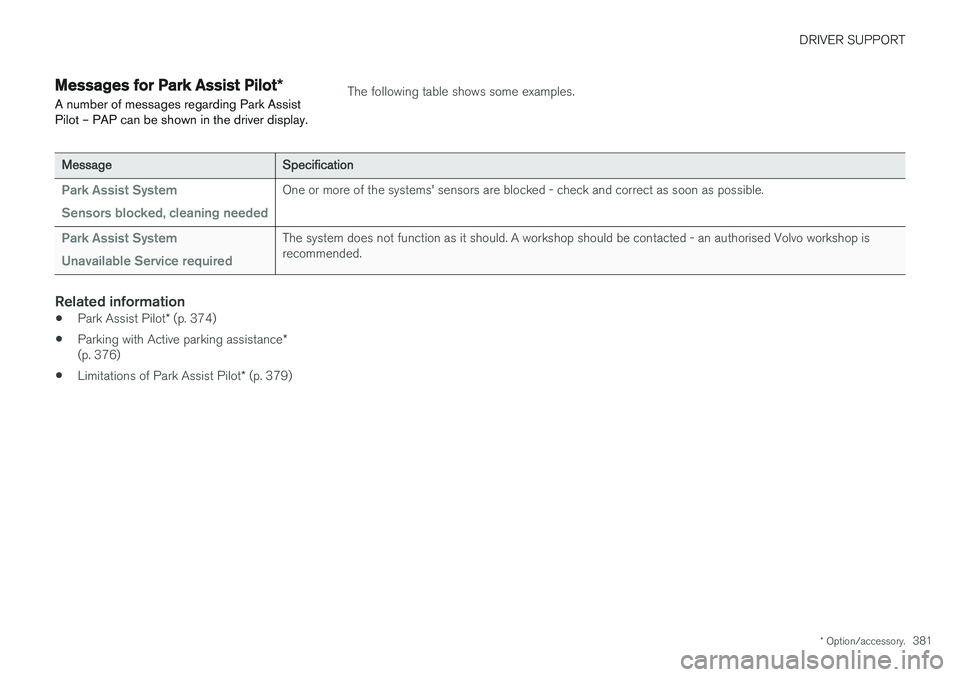
Messages for Park Assist Pilot *
A number of messages regarding Park Assist Pilot – PAP can be shown in the driver display.The following table shows some examples.
Message Specification
Park Assist System Sensors blocked, cleaning neededOne or more of the systems' sensors are blocked - check and correct as soon as possible.
Park Assist System Unavailable Service requiredThe system does not function as it should. A workshop should be contacted - an authorised Volvo workshop is recommended.
Related information
•Park Assist Pilot
* (p. 374)
• Parking with Active parking assistance
*
(p. 376)
• Limitations of Park Assist Pilot
* (p. 379)
Page 386 of 594

STARTING AND DRIVING
* Option/accessory.
384
Alcohol lock *
The function of the alcohol lock is to prevent the car from being driven by individuals under theinfluence of alcohol. Before the engine can bestarted the driver must take a breath test thatverifies that he/she is not under the influence ofalcohol. Alcohol lock calibration takes place inaccordance with each market's limit value inforce for driving legally.
The car has an interface for the electrical con- nection of the different makes and models ofalcohol lock recommended by Volvo. The inter-face facilitates alcohol lock connection, and givesthe option of an integrated function includingmessages related to the alcohol lock in the car'smain display. For information about a specificalcohol lock, please refer to its owner's manual.
WARNING
The alcohol lock is an aid and does not exempt the driver from responsibility. It isalways the responsibility of the driver to besober and to drive the car safely.
Bypass of the alcohol lock *
In the event of an emergency situation or the alcohol lock is out of order, it is possible tobypass the alcohol lock in order to drive the car.
For deactivation via the alcohol lock, see the sep- arate instructions for that specific lock. Activating the bypass function (Bypass)
NOTE
All bypass activation is logged and saved in the memory in the alcohol lock's control unit.It is not possible to undo a bypass.
The message, Blow into alcolock Bypass
instead?, is shown in the screen:
–Select Bypass by pressing once on the O
button on the steering wheel's right-hand keypad.
> The alcohol lock is now bypassed and the car can be started.
The number of bypasses possible before service is required is selected during alcohol lock instal-lation.
Related information
• Before starting the engine with the alcohollock (p. 384)
• Starting the car (p. 386)
Before starting the engine with the alcohol lock
The alcohol lock is activated automatically and is then ready for use when the car is opened.
To bear in mindIn order to obtain correct function and as accu- rate a measurement result as possible: • Avoid eating or drinking approx. 5 minutes before the breath test.
• Avoid excess windscreen washing - the alco-hol in the washer fluid may result in an incor-rect measurement result.
NOTE
After a completed period of driving, the engine can be restarted within 30 minuteswithout a new breath test.
Related information
•
Bypass of the alcohol lock
* (p. 384)
• Starting the car (p. 386)
Page 409 of 594

STARTING AND DRIVING
407
•
Brake now and again to remove any layer of salt. Make sure that other road users are notput at risk by the braking.
• Gently depress the brake pedal after finish-ing driving and before starting your next trip.
MaintenanceTo keep the car as safe and reliable as possible,follow the Volvo service intervals as specified inthe Service and Warranty Booklet. New and replaced brake linings and brake discs do not provide optimal braking effect until theyhave been "worn in" a few hundred kilometres.Compensate for the reduced braking effect bydepressing the brake pedal harder. Volvo recom-mends only fitting brake linings that are approvedfor your Volvo.
IMPORTANT
The wear on the brake system's components must be checked regularly. Contact a workshop for information about the procedure or engage a workshop to carry outthe inspection - an authorised Volvo work-shop is recommended.
Symbols in the driver display
Symbol
Specification
Check the brake fluid level. If the level is low, fill with brake fluid andcheck for the cause of the brakefluid loss.
Constant glow for 2 seconds when the engine is started: Automaticfunction check. Constant glow for more than 2 seconds: Fault in the ABS system.The car's normal brake system isstill working, but without the ABSfunction.
WARNING
If both the warning lamps for brake fault and ABS fault illuminate at the same time, a faulthas occurred in the brake system.
• If the level in the brake fluid reservoir is normal at this stage, drive carefully to thenearest workshop and have the brakesystem checked - an authorised Volvoworkshop is recommended.
• If the brake fluid is below the
MIN level in
the brake fluid reservoir, do not drive fur-ther before topping up the brake fluid.The reason for the loss of brake fluidmust be investigated.
Related information
• Brake functions (p. 406)
• Brake assistance (p. 408)
• Brake lights (p. 143)
• Emergency brake lights (p. 408)
Page 414 of 594

||
STARTING AND DRIVING
412
Symbols in the driver display
SymbolSpecification
If the symbol flashes, it indicates a fault has occurred. See the mes-sage in the driver display.
Fault in brake system. See the message in the driver display.
Information message in driver dis- play.
Message examples:
•
Parking brake Service required
•Parking brake System overheated
•Parking brake Temporarily unavailable
Related information
• Brake functions (p. 406)
• Using the parking brake (p. 410)
• Parking brake (p. 409)
• Using jump starting with another battery (p. 388)
Hill start assist
Hill start assist, Hill Start Assist (HSA), prevents the car from rolling backwards when starting onan uphill gradient. When reversing uphill, it pre-vents the car from rolling forwards.
The function means that the pedal pressure in the brake system remains for several secondswhile the driver's foot is moved from brake pedalto accelerator pedal. The temporary braking effect releases after sev- eral seconds or when the driver accelerates. Hill start assist is available even if the function for automatic braking when stationary (Auto hold) isdeactivated.
Related information
• Brake functions (p. 406)
• Automatic braking when stationary (p. 412)
Automatic braking when stationary
Automatic braking when stationary (Auto Hold) means that the driver can release the brakepedal while maintaining braking effect when thecar has stopped at traffic lights or a junction.
FunctionWhen the car has stopped, the brakes are acti- vated automatically. The function can use eitherfoot brake or parking brake to hold the car sta-tionary and it works on all gradients. When theaccelerator pedal is depressed again, the brakesare released. When braking to a stop on a downhill or uphill gradient - depress the brake pedal a bit harderbefore releasing to ensure that the car does notroll at all. If the driver switches off the engine when the car is stationary, the parking brake is applied.
Automatic deactivation
The function is deactivated automatically: • when the driver's door is open and the driv- er's seatbelt is unfastened.
• in gear position
N13
.
13 Applies to automatic gearbox.
Page 416 of 594

||
STARTING AND DRIVING
414
IMPORTANT
Engine damage can occur if water enters the air filter. In depths greater than 25 cm, water could enter the transmission. This reduces the lubri-cating ability of the oils and shortens theservice life of these systems. Damage to any component, engine, transmis- sion, turbocharger, differential or its internalcomponents caused by flooding, hydrostaticlocking or oil shortage, is not covered by thewarranty. In the event of the engine stalling in water, do not try restart - tow the car from the water toa workshop - an authorised Volvo workshop isrecommended. Risk of engine breakdown.
Related information
•Towing (p. 431)
• Recovering the car (p. 432)
Overheating in the engine and drive system
Under special conditions, for example hard driv- ing in hilly terrain and hot climate, there is a riskthat the engine and drive system may overheat -in particular with a heavy load.
• In the event of overheating, the engine's power may be limited temporarily.
• Remove any auxiliary lamps from in front ofthe grille when driving in hot climates.
• If the temperature in the engine's coolingsystem becomes too high then a warningsymbol is illuminated and the driver display shows the message
Engine temperature
High temperature Stop safely. Stop the
car in a safe way and allow the engine to run at idling speed for several minutes and cooldown.
• If the message
Engine temperature High
temperature Turn off engine or Engine
coolant Level low, turn off engine is
shown, stop the car and switch off the engine.
• In the event of overheating in the gearbox, analternative gear shift program will beselected. In addition, a built-in protectionfunction is activated that, amongst otherthings, illuminates a warning symbol and thedriver display shows the message
Transmission warm Reduce speed to
lower temperature or Transmission hot Stop safely, wait for cooling
. Follow the
recommendation given, reduce speed or stop the car in a safe way and allow the engine torun at idling speed for several minutes toenable the gearbox to cool down.
• If the car overheats, the air conditioning maybe switched off temporarily.
• Do not turn the engine off immediately youstop after a hard drive.
NOTE
It is normal for the engine's cooling fan to operate for a time after the engine has beenswitched off.
Symbols in the driver display
Symbol
Specification
High engine temperature. Follow the recommendation given.
Low level, coolant. Follow the rec- ommendation given.
Gearbox hot/overheated/cooled. Follow the recommendation given.