2017 VOLVO V90 steering
[x] Cancel search: steeringPage 390 of 594

STARTING AND DRIVING
388
Steering lock
The steering lock makes steering difficult if the car is e.g. taken unlawfully. A mechanical noisecan be perceived when the steering lock locksor unlocks.
Activating the steering lockThe steering lock is activated when the car is locked from the outside and the engine isswitched off. If the car is left unlocked then thesteering lock will lock automatically after a while.
Deactivating the steering lockThe steering lock is deactivated when the car isunlocked from outside. If the car is not locked, itis sufficient that the remote control key is insidethe passenger compartment and the engine is started by turning the start knob towards START
in order to unlock the steering lock.
Related information
• Starting the car (p. 386)
• Switching off the car (p. 387)
• Steering wheel (p. 131)
Using jump starting with another battery
If the starter battery is discharged then the car can be started with current from another battery.
When jump starting the car, the following steps are recommended to avoid short circuits or otherdamage:
1. Set the car's electrical system in ignition position 0.
2. Check that the donor battery has a voltage of 12 V.
3. If the donor battery is installed in another car - switch off the donor car's engine and make sure that the two cars do not touch eachother. 4. Connect one of the red jump lead's clamps
to the donor battery's positive terminal (1).
IMPORTANT
Connect the start cable carefully to avoid short circuits with other components in theengine compartment.
5. Open the positive jump-starting point's cover(2).
6. Connect the red jump lead's other clamp onto the car's positive jump-starting point (2).
7. Connect one of the black jump lead's clamps to the donor battery's negative terminal (3).
8. Connect the black jump lead's other clamp onto the car's negative jump-starting point(4).
9. Check that the jump lead clamps are affixed securely so that there are no sparks duringthe starting attempt.
10. Start the engine of the "donor car" and allow it to run a few minutes at a speed slightlyhigher than idle approx. 1500 rpm.
Page 393 of 594
STARTING AND DRIVING
* Option/accessory.391
Drive position - D
D is the normal driving position. Shifting up and
down takes place automatically based on the level of acceleration and speed. The car must be stationary when changing gear from R position to
D position.
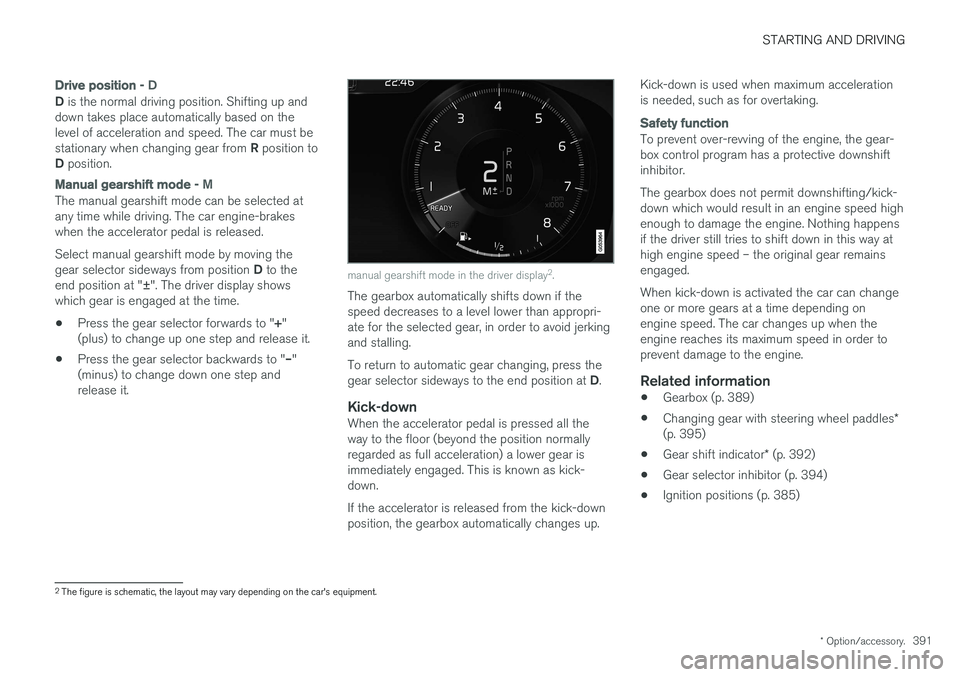
Manual gearshift mode - M
The manual gearshift mode can be selected at any time while driving. The car engine-brakeswhen the accelerator pedal is released. Select manual gearshift mode by moving the gear selector sideways from position D to the
end position at " ±". The driver display shows
which gear is engaged at the time.
• Press the gear selector forwards to "
+"
(plus) to change up one step and release it.
• Press the gear selector backwards to "
–"
(minus) to change down one step and release it.
manual gearshift mode in the driver display 2
.
The gearbox automatically shifts down if the speed decreases to a level lower than appropri-ate for the selected gear, in order to avoid jerkingand stalling. To return to automatic gear changing, press the gear selector sideways to the end position at D.
Kick-downWhen the accelerator pedal is pressed all the way to the floor (beyond the position normallyregarded as full acceleration) a lower gear isimmediately engaged. This is known as kick-down. If the accelerator is released from the kick-down position, the gearbox automatically changes up. Kick-down is used when maximum accelerationis needed, such as for overtaking.
Safety function
To prevent over-revving of the engine, the gear- box control program has a protective downshiftinhibitor. The gearbox does not permit downshifting/kick- down which would result in an engine speed highenough to damage the engine. Nothing happensif the driver still tries to shift down in this way athigh engine speed – the original gear remainsengaged. When kick-down is activated the car can change one or more gears at a time depending onengine speed. The car changes up when theengine reaches its maximum speed in order toprevent damage to the engine.
Related information
•
Gearbox (p. 389)
• Changing gear with steering wheel paddles
*
(p. 395)
• Gear shift indicator
* (p. 392)
• Gear selector inhibitor (p. 394)
• Ignition positions (p. 385)
2
The figure is schematic, the layout may vary depending on the car's equipment.
Page 397 of 594

STARTING AND DRIVING
}}
* Option/accessory.395
Changing gear with steering wheel paddles*
The steering wheel paddles are a complement to the gear selector and make it possible tochange gear manually without releasing handsfrom the steering wheel.
Activating the steering wheel paddlesTo be able to change gear with the steering wheel paddles they must first be activated:
–Pull one of the paddles toward the steering wheel.
> A figure in the driver display indicates cur- rent gear.
Driver display when changing gear with steering wheel paddles.
Manual gearshift mode
In gear position M the steering wheel paddles are
automatically activated.
Driver display when changing gear with steering wheel paddles in manual gearshift mode.
Changing gearTo change gear one step:
–Pull one of the paddles backwards - towards the steering wheel - and release.
" -": Selects the next lower gear.
" + ": Selects the next higher gear.
A gear change occurs at each pull of the paddle provided that the engine speed does not leavethe permitted range. After each gear change the figure in the driver display changes to show the current gear.
Deactivating the function
Manual deactivation in gear position D.
–Deactivate the steering wheel paddles by pulling the right-hand paddle ( +) toward the
steering wheel and holding in place until the figure in the driver display for the currentgear extinguishes.
Page 398 of 594

||
STARTING AND DRIVING
* Option/accessory.
396
Automatic deactivation
In gear position D the steering wheel paddles are
deactivated after a short time if they are not used. This is indicated by means of the figure for thecurrent gear extinguishing. The exception is during engine braking - then the paddles are activated for as long as engine brak-ing is in progress. In gear position M there is no automatic deactiva-
tion.
Related information
• Gear positions for automatic gearbox (p. 390)
• Gear shift indicator
* (p. 392)
Start/Stop
With the Start/Stop function, the engine switches off temporarily when the car has stop-ped e.g. at traffic lights or in a traffic queue, andthen starts again automatically when the journeyis resumed.
Start/Stop is one of several energy-saving func- tions intended to reduce fuel consumption, whichin turn helps to reduce exhaust emissions. The system makes it possible to adopt an envi- ronmentally-conscious driving style by allowingthe car to engine auto-stop when possible.
Related information
• Using the Start/Stop function (p. 396)
• Conditions for the Start/Stop function(p. 398)
Using the Start/Stop function The Start/Stop function temporarily switches off the engine when stationary and then restarts itautomatically when the journey is resumed.
The Start/Stop function is available when the engine is started and can be activated if certainconditions have been met. The driver display indi-cates whether the function is available, active orunavailable, see heading "Symbols in driver dis-play" below. All of the car's normal systems such as lighting, radio, etc. work normally, even when the engine isauto-stopped. However, some equipment mayhave its output temporarily reduced, e.g. the cli-mate control system's fan speed or extremelyhigh volume on the audio system.
Auto-stopThe following is required for the engine to auto-stop:
Page 399 of 594

STARTING AND DRIVING
}}
397
With automatic gearbox
• Stop the car with the foot brake and then keep your foot on the brake pedal - theengine stops automatically.
With manual gearbox
• Declutch, set the gear lever in neutral posi-tion and release the clutch pedal - theengine stops automatically.
In drive mode
Eco or Comfort3 , the engine may
auto-stop before the car is completely stationary. With the
Adaptive cruise or Pilot Assist func-
tion activated, the engine will autostop after approximately three seconds. See the section "Conditions for Start/Stop func- tion".
AutostartThe following is required for the engine to auto-start: With automatic gearbox
• Release the brake pedal - the engine will autostart and you can continue driving. On anuphill gradient hill start assist (HSA) engages, which prevents the car from rollingbackwards.
• When the
Auto hold function is activated,
auto-start is delayed until the accelerator pedal is depressed.
• When the
Adaptive cruise or Pilot Assistfunction are activated, the engine will autos- tart when the accelerator pedal is depressed, or by pressing the
button on the left
keypad of the steering wheel.
• Maintain foot pressure on the brake pedal and depress the accelerator pedal - theengine auto-starts.
• On a downhill gradient: Release pressure onthe brake pedal slightly so that the carbegins to roll - the engine will auto-start aftera slight speed increase.
With manual gearbox
• With the gear lever in neutral position:Depress the clutch pedal or depress theaccelerator pedal - the engine starts.
• On a downhill gradient: Release pressure onthe brake pedal slightly so that the carbegins to roll - the engine will auto-start aftera slight speed increase.
Symbols in the driver display
With 12-inch driver display
•
The text READY is shown in the tachometer
when the function is available.
• A pointer in the tachometer points to
READY when the function is active and the
engine is auto-stopped.
• The text
READY is greyed out when the
function is not available.
• No text is shown when the function is deacti- vated.
The function is active and the engine is auto-stopped.
3
Normal start mode.
Page 401 of 594

STARTING AND DRIVING
}}
399
•
The driver makes sweeping steering wheel movements.
• The road is very steep.
• The bonnet is opened.
• When driving at high altitudes when theengine has not reached operating tempera-ture.
• The ABS system has been activated.
• In the event of heavy braking (even withoutthe ABS system having been activated).
• Many starts during a short period of timehave activated the starter motor's thermalprotection.
• The exhaust system's particulate filter is full 4
.
• A trailer is connected electrically to the car
Page 402 of 594

||
STARTING AND DRIVING
* Option/accessory.
400
Related information
• Start/Stop (p. 396)
• Using the Start/Stop function (p. 396)
• Support battery (p. 533)
Drive modes
*
Selection of drive mode affects the car's driving characteristics in order to enhance the drivingexperience and facilitate driving in special situa-tions.
Using the drive modes it is possible to quickly have access to the car's numerous functions andsettings for different driving needs. The followingsystems are adapted to obtain the best possibledriving characteristics in each respective drivemode: • Steering
• Engine/gearbox 5
/all-wheel drive *
• Brakes
• Shock absorption
• Driver display
• Start/Stop function
• Climate settings
Select the drive mode that best suits the current driving conditions. Remember that not all drivemodes can be selected in all situations.
Selecting drive mode
1. Press the drive mode control DRIVE MODE.
> A pop-up menu is opened in the centre display.
2. Roll the wheel upward or downward until the desired drive mode is highlighted.
3. Press the drive mode control or tap directly on the touch screen to confirm the selection.
> The selected drive mode is indicated inthe driver display.
A message is shown when a drive mode is unse- lectable, for example:
•
Cannot be selected because gear is in manual
•Cannot be selected due to low battery
5 Applies to automatic gearbox.
Page 403 of 594

STARTING AND DRIVING
}}
401
•
Cannot be selected due to low temperature
•Cannot be selected due to limitations
•Cannot be selected because speed is too high.
Selectable drive modes
COMFORT
•
This is the car's normal mode.
When the car starts, it is in
Comfort mode and
the Start/Stop function is activated. These set- tings mean that the car feels comfortable, thesteering is light, the shock absorption is soft andbody's movement is smooth. This drive mode is the certification mode for car- bon dioxide emissions.
ECO
• Adapt the car for more energy-efficient and environmentally-conscious driving with the
Eco mode.
The drive mode means, for example, that the Start/Stop function is activated and the output ofcertain climate settings is reduced. The driver display has an ECO gauge that facili- tates fuel-efficient driving. More information on this drive mode is found in the section "Drive mode ECO".
DYNAMIC
•Dynamic mode means that the car has
sportier characteristics and faster response to accelerating.
The gear changes become faster and more dis-tinct, and the gearbox prioritises a gear withgreater traction. Steering response is faster and shock absorption is harder 6
which means that the body follows the
roadway in order to reduce roll during cornering. Start/Stop function is deactivated.
INDIVIDUAL
• Adapting a drive mode according to individ- ual preferences.
Select a drive mode to start from, and then adjustthe settings according to the desired driving cha-racteristics. These settings are saved in an indi-vidual driver profile. An individual drive mode is only available if it is first activated in the centre display.
Settings view 7
for individual drive mode.
1. Press Settings in the top view.
2. Press
My CarIndividual Drive Mode and
select Individual Drive Mode.
6 Applies to Four-C.
7 The figure is schematic, the layout may vary depending on car model or updated software.