Page 243 of 672
SIENNA_OM_OM08007U_(U)
2434-3. Operating the lights and wipers
4
Driving
*1: Vehicles without a daytime running light system
*2: Vehicles with a daytime running light system
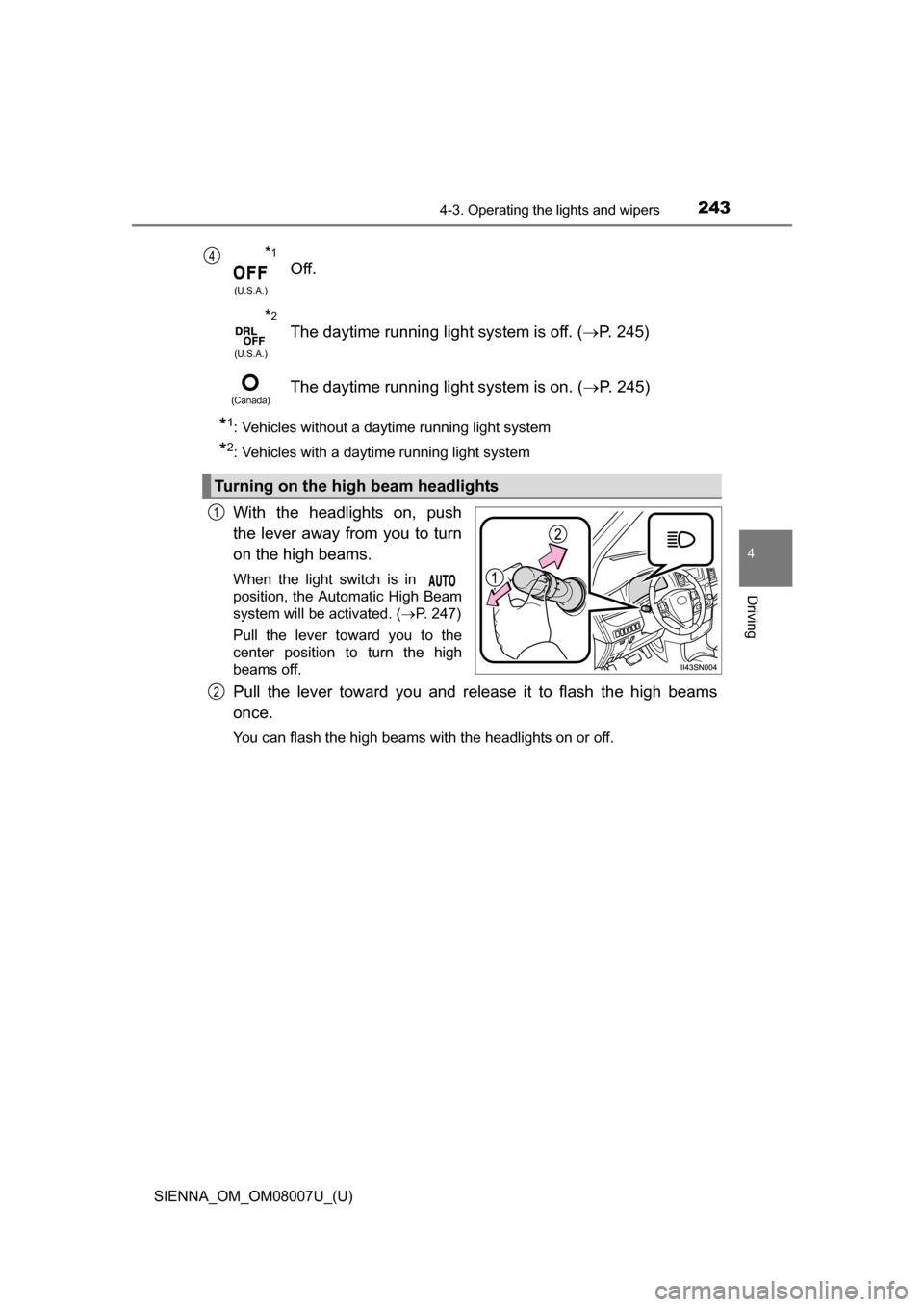
With the headlights on, push
the lever away from you to turn
on the high beams.
When the light switch is in
position, the Automatic High Beam
system will be activated. (P. 247)
Pull the lever toward you to the
center position to turn the high
beams off.
Pull the lever toward you and release it to flash the high beams
once.
You can flash the high beams with the headlights on or off.
*1
(U.S.A.)
Off.
*2
(U.S.A.)
The daytime running light system is off. ( P. 245)
(Canada)The daytime running light system is on. ( P. 245)
Turning on the high beam headlights
4
1
2
Page 250 of 672

250
SIENNA_OM_OM08007U_(U)
4-3. Operating the lights and wipers
●In the situations below, the system may not be able to correctly detect the
surrounding brightness levels, and may flash or expose nearby pedestrians
to the high beam. Therefore, you should consider turning the high beam on
or off manually rather than relying on the Automatic High Beam system.
• In bad weather (rain, snow, fog, sandstorms etc.)
• The windshield is obscured by fog, mist, ice, dirt etc.
• The windshield is cracked or damaged.
• The camera sensor is deformed or dirty.
• Surrounding brightness levels are equal to those of headlights, tail lights
or fog lights.
• Vehicles ahead have headlights that are either switched off, dirty, are changing color, or are not aimed properly.
• When driving through an area of in termittently changing brightness and
darkness
• When frequently and repeatedly driving ascending/descending roads, or roads with rough, bumpy or uneven surfaces (such as stone-paved
roads, gravel tracks etc.)
• When frequently and repeatedly taking curves or driving on a winding road
• There is a highly reflective object ahead of the vehicle, such as a sign or a mirror.
• The vehicle’s headlights are damaged or dirty.
• The vehicle is lifting or tilting, due to a flat tire, a trailer being towed etc.
• The high beam and low beam are repeatedly being switched between in an abnormal manner.
• The driver believes that the high beam may be causing problems or dis- tress to other drivers or pedestrians nearby.
■ When the warning message is shown on the multi-information display
P. 562
■ Temporary lowering sensor sensitivity
The sensitivity of the sensor can be temporarily lowered.
To lower the sensitivity, push and hold on the inside rear view mirror for
15 to 20 seconds, and release. The indicator light on the inside rear view mir-
ror will flash to indicate that the sensitivity has been lowered.
When the engine switch is turned to the “LOCK” position (vehicles without a
smart key system) or turned off (vehicles with a smart key system), the sensi-
tivity will be returned to its normal level.
■ Customization
The Automatic High Beam can be turned off.
(Customizable features: P. 631)
Page 263 of 672
SIENNA_OM_OM08007U_(U)
2634-5. Using the driving support systems
4
Driving
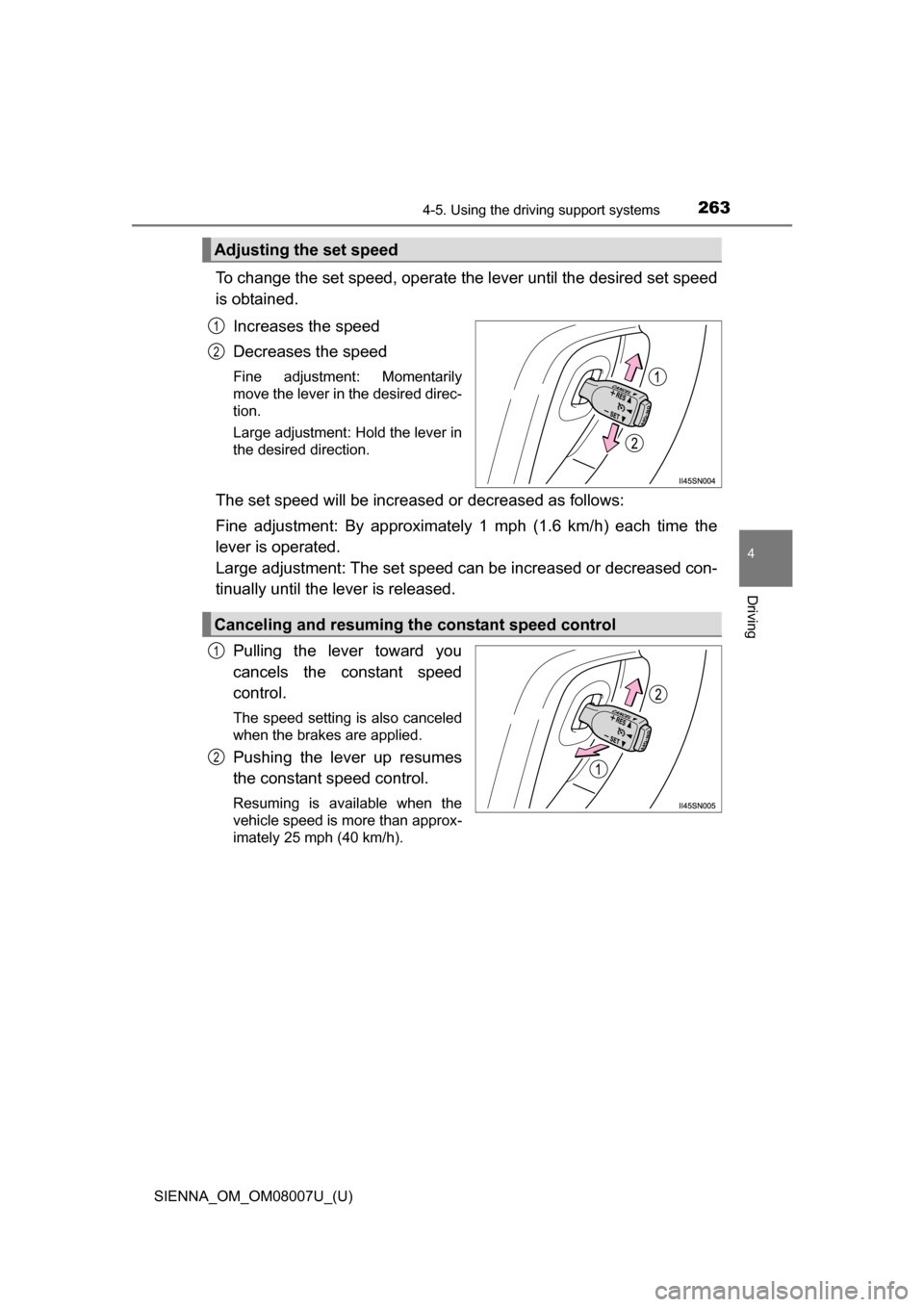
To change the set speed, operate the lever until the desired set speed
is obtained.
Increases the speed
Decreases the speed
Fine adjustment: Momentarily
move the lever in the desired direc-
tion.
Large adjustment: Hold the lever in
the desired direction.
The set speed will be increase d or decreased as follows:
Fine adjustment: By approximately 1 mph (1.6 km/h) each time the
lever is operated.
Large adjustment: The set speed can be increased or decreased con-
tinually until the lever is released.
Pulling the lever toward you
cancels the constant speed
control.
The speed setting is also canceled
when the brakes are applied.
Pushing the lever up resumes
the constant speed control.
Resuming is available when the
vehicle speed is more than approx-
imately 25 mph (40 km/h).
Adjusting the set speed
1
2
Canceling and resuming the constant speed control
1
2
Page 265 of 672
SIENNA_OM_OM08007U_(U)
2654-5. Using the driving support systems
4
Driving
WARNING
■To avoid operating the cruise control by mistake
Switch the cruise control off using the “ON-OFF” button when not in use.
■ Situations unsuitable for cruise control
Do not use cruise control in any of the following situations.
Doing so may result in loss of control and could cause an accident resulting
in death or serious injury.
●In heavy traffic
● On roads with sharp bends
● On winding roads
● On slippery roads, such as those covered with rain, ice or snow
● On steep hills
Vehicle speed may exceed the set speed when driving down a steep hill.
● When your vehicle is towing a trailer
Page 270 of 672

270
SIENNA_OM_OM08007U_(U)
4-5. Using the driving support systems
Pulling the lever toward you
cancels the cruise control.
The speed setting is also canceled
when the brakes are applied.
Pushing the lever up resumes
the cruise control and returns
vehicle speed to the set speed.
Resuming is available when the vehicle speed is more than approximately
25 mph (40 km/h).
This mode employs a radar sensor to detect the presence of vehicles
up to approximately 400 ft. (120 m) ahead, determines the current
vehicle-to-vehicle following distance, and operates to maintain a suit-
able following distance fr om the vehicle ahead.
Note that vehicle-to-vehicle distance will close in when traveling on long
downhill slopes.
Example of constant speed cruising
When there are no vehicles ahead
The vehicle travels at the speed set by the driver. The desired vehicle-to-
vehicle distance can also be set by operating the vehicle-to-vehicle dis-
tance control.
Canceling and resuming the speed control
1
2
Driving in vehicle-to-vehicl e distance control mode
1
Page 276 of 672

276
SIENNA_OM_OM08007U_(U)
4-5. Using the driving support systems
WARNING
■Situations unsuitable for dynamic radar cruise control
Do not use dynamic radar cruise control in any of the following situations.
Doing so may result in inappropriate speed control and could cause an acci-
dent resulting in death or serious injury.
●Roads where there are pedestrians, cyclers, etc.
● In heavy traffic
● On roads with sharp bends
● On winding roads
● On slippery roads, such as those covered with rain, ice or snow
● On steep downhills, or where there are sudden changes between sharp up
and down gradients
Vehicle speed may exceed the set speed when driving down a steep hill.
● At entrances to expressways
● When weather conditions are bad enough that they may prevent the sen-
sors from functioning correctly (fog, snow, sandstorm, heavy rain, etc.)
● When there is rain, snow, etc. on the front surface of the radar sensor or
camera sensor
● In traffic conditions that require frequent repeated acceleration and decel-
eration
● When an approach warning buzzer is heard often
● When your vehicle is towing a trailer
Page 305 of 672

SIENNA_OM_OM08007U_(U)
3054-5. Using the driving support systems
4
Driving
■Conditions that may trigger the system even if there is no possibility of a
collision
In any of the following situations where the frontal area of the radar sensor is
interrupted, the radar sensor may detect possibility of a frontal collision and
the system may be activated.
●When passing by an oncoming vehicle in a curve or a turn to the right or the
left.
● When rapidly approaching an obstacle ahead (e.g. preceding vehicle, toll
gate barrier, etc.)
● When there is a structural object (billboard, low ceiling, fluorescent light,
etc.) above the uphill road ahead
● When driving on a narrow road or through under a low overhead structure
(bridge, tunnel, fly-under, etc.)
● When driving on an uneven road surface
● When there is a metal object, bump, or protrusion on the road surface
● When vehicle’s front part is raised or lowered depending on loading condi-
tions
● When the direction of radar sensor is misaligned by strong impact applied
on an area around the radar sensor, etc.
● When there is an obstacle (guard rail, etc.) by the roadside at the entrance
to a curve
● When the front of your vehicle is pointing upwards (caused by towing a
trailer, during emergency towing or putting a heavy load in the luggage com-
partment etc.)
When the system is activated in the situations described above, there is also
a possibility that the seat belts will retract quickly and the brakes may be
applied with a force greater than normal. When the seat belt is locked in the
retracted position, stop the vehicle in a safe place, release the seat belt and
refasten it.
■ Obstacles not detected
The sensor cannot detect plastic obstacles such as traffic cones. There may
also be occasions when the radar sens or cannot detect pedestrians, animals,
bicycles, motorcycles, trees, or snowdrifts.
■ Situations in which the pre-collis ion system does not function properly
The system may not function effectively in situations such as the following:
● On roads with sharp bends or uneven surfaces
● If a vehicle suddenly moves in front of your vehicle, such as at an intersec-
tion
● If a vehicle suddenly cuts in front of your vehicle, such as when overtaking
● In inclement weather such as heavy rain, fog, snow or sand storms
● When your vehicle is skidding with the VSC system off
● When the axis of the radar is out of adjustment
● When an extreme change in vehicle height occurs
Page 309 of 672

309
SIENNA_OM_OM08007U_(U)
4-5. Using the driving support systems
4
Driving
BSM (Blind Spot Monitor)
The Blind Spot Monitor is a system that has 2 functions:
● The Blind Spot Monitor function
Assists the driver in making the decision when changing lanes
● The Rear Cross Traffic Alert function
Assists the driver when backing up
These functions use same sensors.
BSM main switch
Pressing the switch turns the system on or off. When the switch is set to
on, the switch’s indicator illuminates. Common switch for Blind Spot Moni-
tor function and Rear Cross Traffic Alert function.
Outside rear view mirror indicators
Blind Spot Monitor function:
When a vehicle is detected in a blind s pot of the outside rear view mirrors
or approaching rapidly from behind into a blind spot, the outside rear view
mirror indicator on the detected side will illuminate. If the turn signal lever
is operated toward the detected side, the outside rear view mirror indicator
will flash.
Rear Cross Traffic Alert function:
When a vehicle approaching from the right or left rear of the vehicle is
detected, the outside rear view mirror indicators flash.
: If equipped
Summary of the Blind Spot Monitor
1
2