Page 299 of 672
SIENNA_OM_OM08007U_(U)
2994-5. Using the driving support systems
4
Driving
■Turning off both TRAC and VSC systems
To turn the TRAC and VSC systems off, press and hold for more than 3
seconds while the vehicle is stopped.
The VSC OFF indicator light will come on and the “Traction Control OFF”/
“TRAC OFF” will be shown on the multi-information display.
Press again to turn the systems back on.
■ When the message is displayed on th e multi-information display show-
ing that TRAC has been disable d even if has not been pressed
TRAC and hill-start assist control (if equipped) cannot be operated. Contact
your Toyota dealer.
■ Sounds and vibrations caused by ABS, brake assist, TRAC, VSC and
hill-start assist contro l (if equipped) systems
● A sound may be heard from the engine compartment when the brake pedal
is depressed repeatedly, when the engine is started or just after the vehicle
begins to move. This sound does not indicate that a malfunction has
occurred in any of these systems.
● Any of the following conditions may occur when the above systems are
operating. None of these indicates that a malfunction has occurred.
• Vibrations may be felt through the vehicle body and steering.
• A motor sound may be heard after the vehicle comes to a stop.
• The brake pedal may pulsate slightly after ABS is activated.
• The brake pedal may move down slightly after ABS is activated.
■ EPS operation sound
When the steering wheel is operated, a motor sound (whirring sound) may be
heard. This does not indicate a malfunction.
■ Automatic reactivation of TRAC and VSC systems
After turning the TRAC and VSC systems off, the systems will be automati-
cally re-enabled in the following situations:
● When the engine switch is turned to the “LOCK” position (vehicles without a
smart key system) or off (vehicles with a smart key system).
● If only the TRAC system is turned off, the TRAC will turn on when vehicle
speed increases
If both the TRAC and VSC systems are turned off, automatic re-enabling will
not occur when vehicle speed increases.
Page 331 of 672
331
SIENNA_OM_OM08007U_(U)
5-2. Setup
5
Audio system
General settings
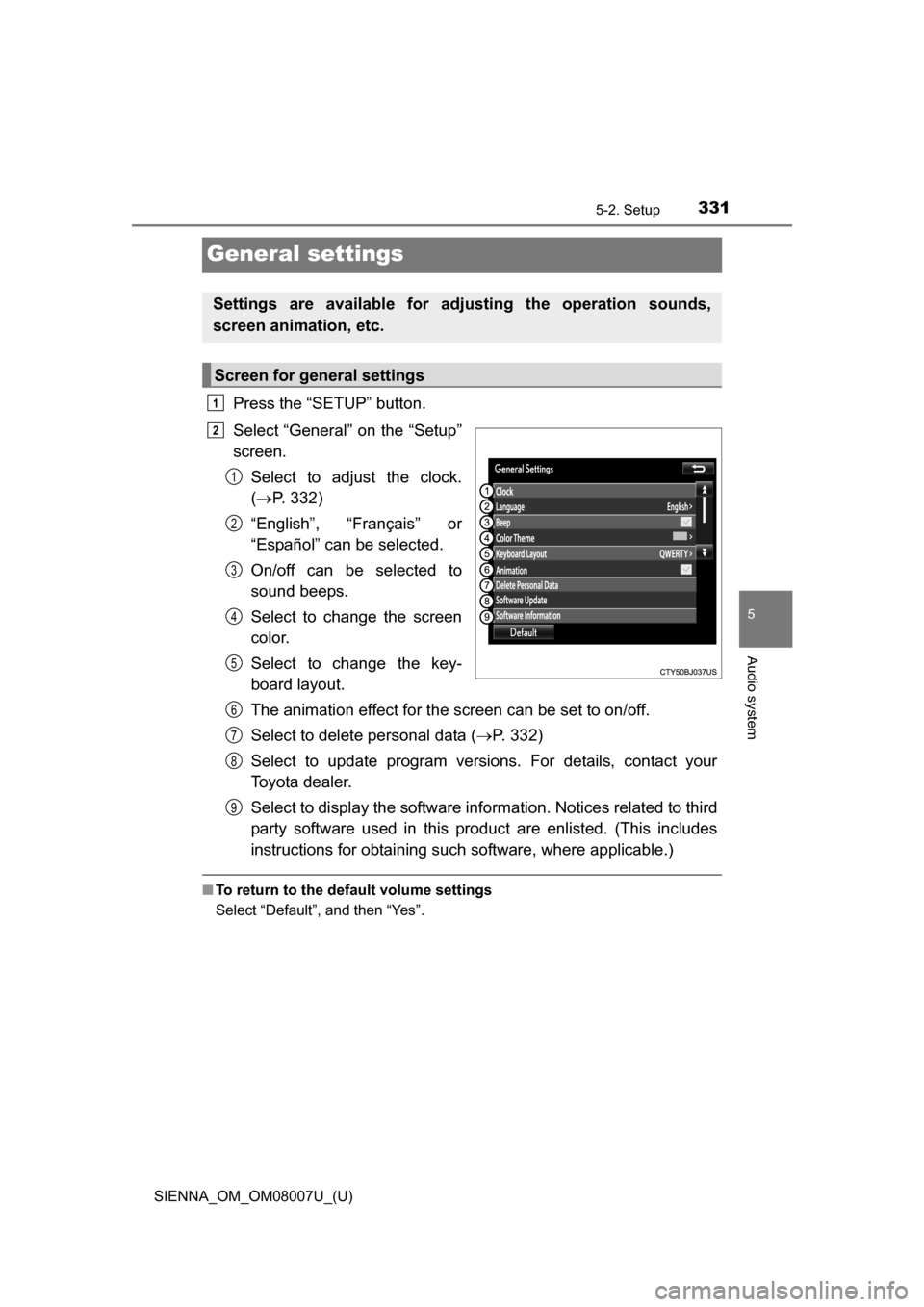
Press the “SETUP” button.
Select “General” on the “Setup”
screen.Select to adjust the clock.
( P. 332)
“English”, “Français” or
“Español” can be selected.
On/off can be selected to
sound beeps.
Select to change the screen
color.
Select to change the key-
board layout.
The animation effect for the screen can be set to on/off.
Select to delete personal data ( P. 332)
Select to update program versions. For details, contact your
Toyota dealer.
Select to display the software info rmation. Notices related to third
party software used in this pr oduct are enlisted. (This includes
instructions for obtaining such software, where applicable.)
■ To return to the default volume settings
Select “Default”, and then “Yes”.
Settings are available for adjusting the operation sounds,
screen animation, etc.
Screen for general settings
1
2
1
2
3
4
5
6
7
8
9
Page 365 of 672
365
SIENNA_OM_OM08007U_(U)
5-7. Connecting Bluetooth®
5
Audio system
Connecting a Bluetooth® device
Press the “SETUP” button.
Select “Bluetooth
*”.
*: Bluetooth is a registered trademark of Bluetooth SIG, Inc.
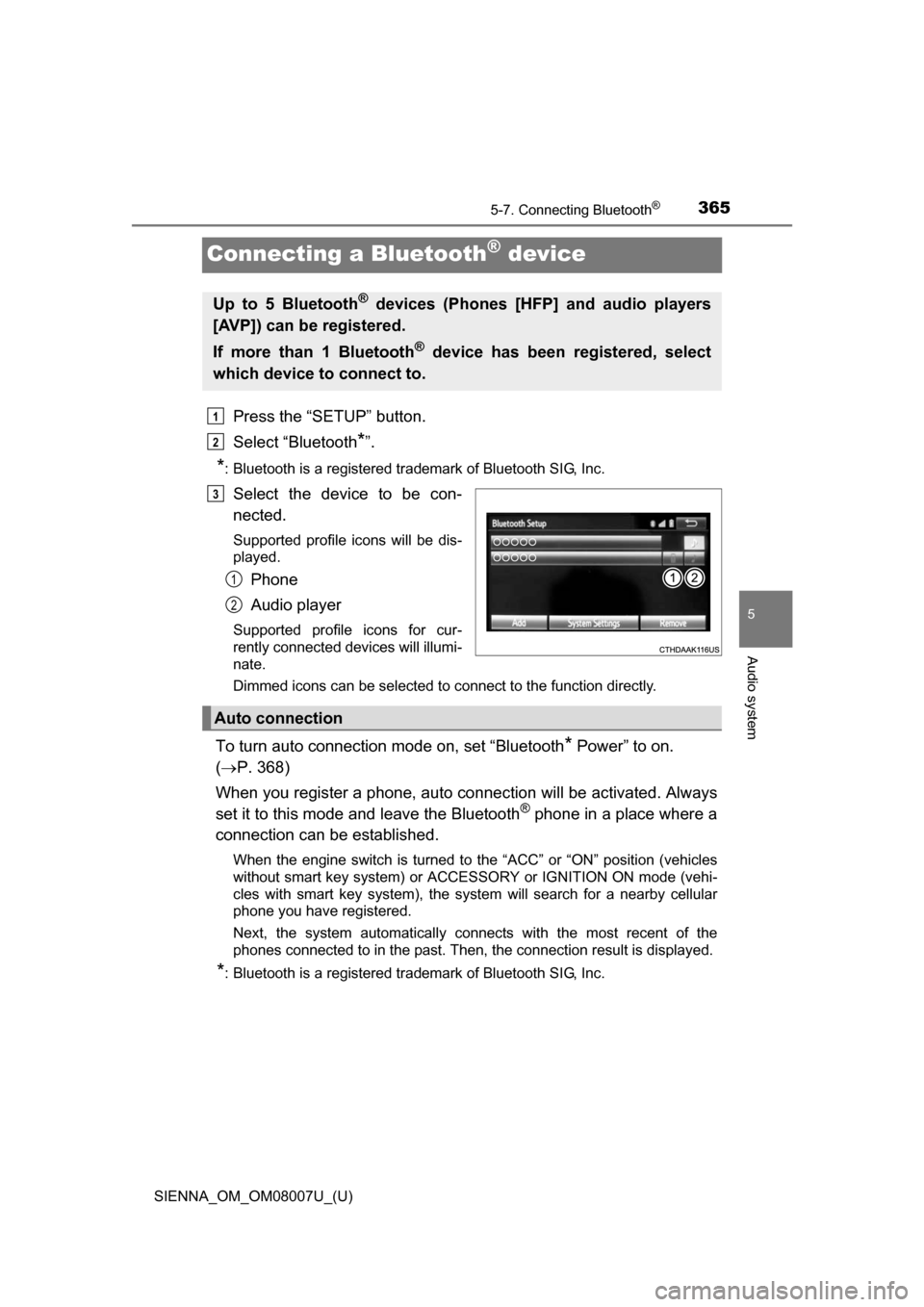
Select the device to be con-
nected.
Supported profile icons will be dis-
played.
Phone
Audio player
Supported profile icons for cur-
rently connected devices will illumi-
nate.
Dimmed icons can be selected to connect to the function directly.
To turn auto connection mode on, set “Bluetooth* Power” to on.
( P. 368)
When you register a phone, auto co nnection will be activated. Always
set it to this mode and leave the Bluetooth
® phone in a place where a
connection can be established.
When the engine switch is turned to the “ACC” or “ON” position (vehicles
without smart key system) or ACCESSORY or IGNITION ON mode (vehi-
cles with smart key system), the system will search for a nearby cellular
phone you have registered.
Next, the system automatically connects with the most recent of the
phones connected to in the past. Then, the connection result is displayed.
*: Bluetooth is a registered trademark of Bluetooth SIG, Inc.
Up to 5 Bluetooth® devices (Phones [HFP] and audio players
[AVP]) can be registered.
If more than 1 Bluetooth
® device has been registered, select
which device to connect to.
1
2
3
1
2
Auto connection
Page 366 of 672
3665-7. Connecting Bluetooth®
SIENNA_OM_OM08007U_(U)
When auto connection has failed or “Bluetooth* Power” is turned off,
you must connec t the Bluetooth® device manually.
*: Bluetooth is a registered trademark of Bluetooth SIG, Inc.
Follow the steps in “Connecting a Bluetooth® device” from step .
( P. 365)
Registering an additional device
Select “Select Device” on the Bluetooth
® audio control screen.
For more information: P. 3 6 3
Selecting a registered device
Select “Select Device” on the Bluetooth
® audio control screen.
For more information: P. 3 6 5
■Reconnecting a Bluetooth® phone
If the system cannot connect due to poor signal strength with the engine
switch in the “ACC” or “ON” position (vehicles without smart key system) or
ACCESSORY or IGNITION ON mode (vehicles with smart key system), the
system will automatically attempt to reconnect.
If the system is attempting to connect to a Bluetooth
® phone and the
Bluetooth® phone is turned off and then back on, the system will attempt to
reconnect.
Manual connection
Connecting a Bluetooth® audio player
11
1
2
1
2
Page 418 of 672
4186-1. Using the air conditioning system and defogger
SIENNA_OM_OM08007U_(U)
■Using automatic mode
Fan speed is adjusted automatically according to the temperature setting and
the ambient conditions.
Therefore, the fan may stop for a while until warm or cool air is ready to flow
immediately after the “AUTO” button is pressed.
■ When the outside temperature exceeds 75°F (24°C) and the air condition-
ing system is on
●In order to reduce the air conditioning power consumption, the air condition-
ing system may switch to recirculated air mode automatically.
This may also reduce fuel consumption.
● Recirculated air mode is selected as a default mode when the engine switch
is turned to the “ON” position (vehicles without a smart key system) or
IGNITION ON mode (vehicles with a smart key system).
● It is possible to switch to outside air mode at any time by pressing .
■ Fogging up of the windows
●The windows will easily fog up when the humidity in the vehicle is high.
Pressing “A/C” button on will dehumidify the air from the outlets and defog
the windshield effectively.
● If you turn “A/C” off, the windows may fog up more easily.
● The windows may fog up if the recirculated air mode is used.
■ Outside/recirculated air mode
●When driving on dusty roads such as tunnels or in heavy traffic, set
to the recirculated air mode. This is effective in preventing outside air from
entering the vehicle interior. During cooling operation, setting the recircu-
lated air mode will also cool the vehicle interior effectively.
● Outside/recirculated air mode may automatically switch depending on the
temperature setting or the inside temperature.
Page 426 of 672
4266-1. Using the air conditioning system and defogger
SIENNA_OM_OM08007U_(U)
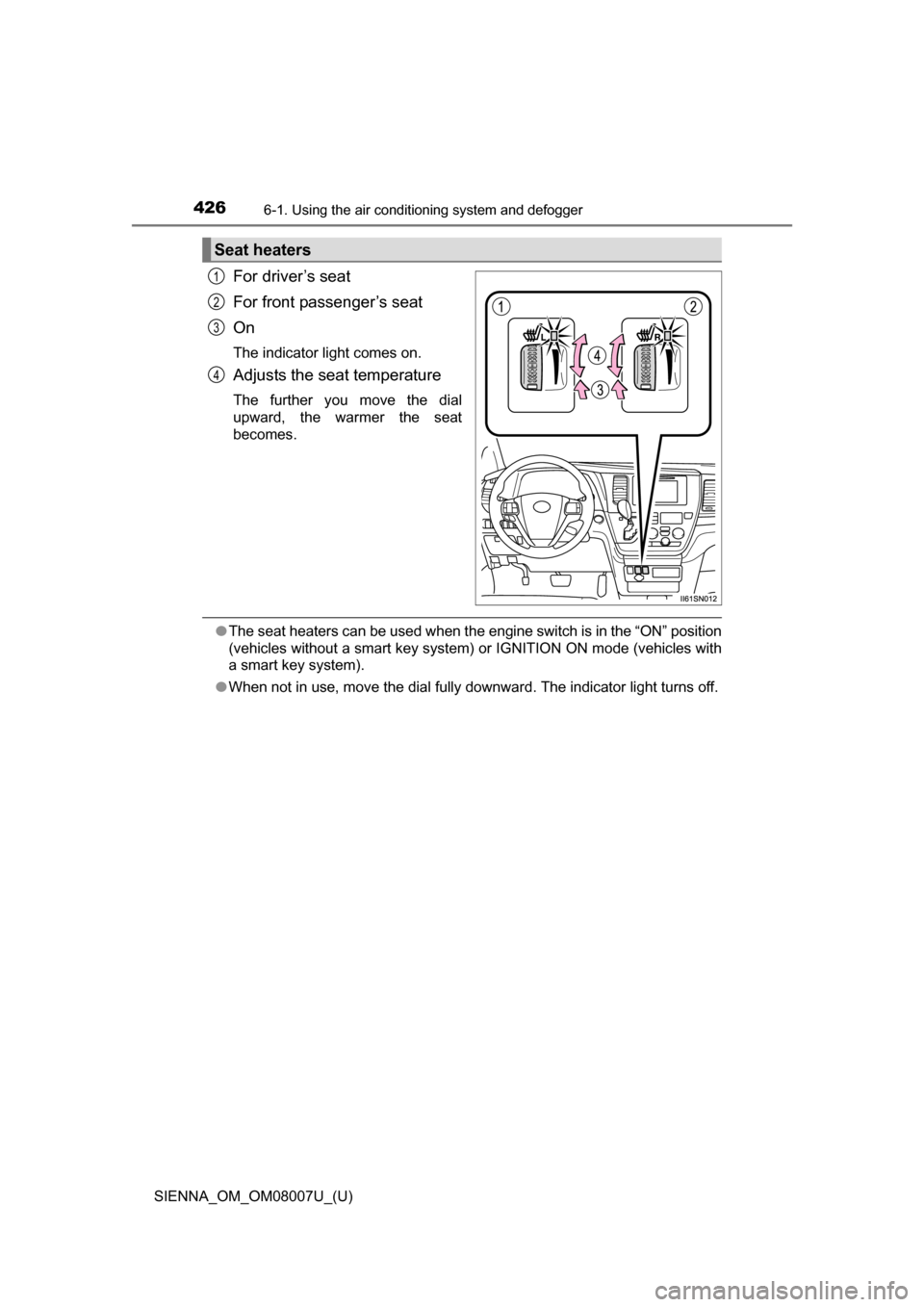
For driver’s seat
For front passenger’s seat
On
The indicator light comes on.
Adjusts the seat temperature
The further you move the dial
upward, the warmer the seat
becomes.
●The seat heaters can be used when the engine switch is in the “ON” position
(vehicles without a smart key system ) or IGNITION ON mode (vehicles with
a smart key system).
● When not in use, move the dial fully downward. The indicator light turns off.
Seat heaters
1
2
3
4
Page 429 of 672
SIENNA_OM_OM08007U_(U)
4296-2. Using the interior lights
6
Interior features
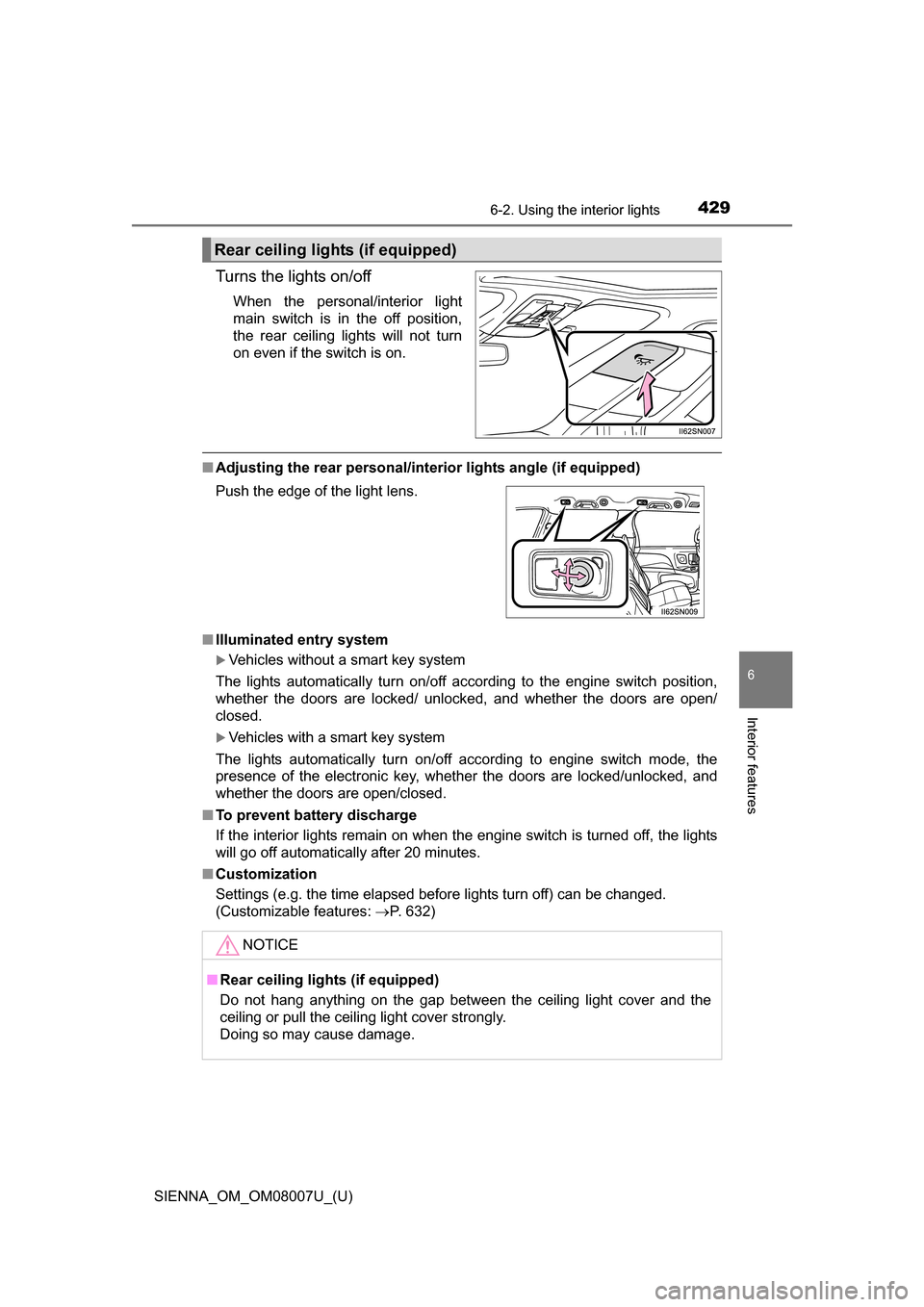
Turns the lights on/off
When the personal/interior light
main switch is in the off position,
the rear ceiling lights will not turn
on even if the switch is on.
■Adjusting the rear personal/interior lights angle (if equipped)
■ Illuminated entry system
Vehicles without a smart key system
The lights automatically turn on/off according to the engine switch position,
whether the doors are locked/ unlocked, and whether the doors are open/
closed.
Vehicles with a smart key system
The lights automatically turn on/off according to engine switch mode, the
presence of the electronic key, whether the doors are locked/unlocked, and
whether the doors are open/closed.
■ To prevent battery discharge
If the interior lights remain on when the engine switch is turned off, the lights
will go off automatically after 20 minutes.
■ Customization
Settings (e.g. the time elapsed before lights turn off) can be changed.
(Customizable features: P. 632)
Rear ceiling lights (if equipped)
Push the edge of the light lens.
NOTICE
■Rear ceiling lights (if equipped)
Do not hang anything on the gap between the ceiling light cover and the
ceiling or pull the ceiling light cover strongly.
Doing so may cause damage.
Page 431 of 672
SIENNA_OM_OM08007U_(U)
4316-3. Using the storage features
6
Interior features
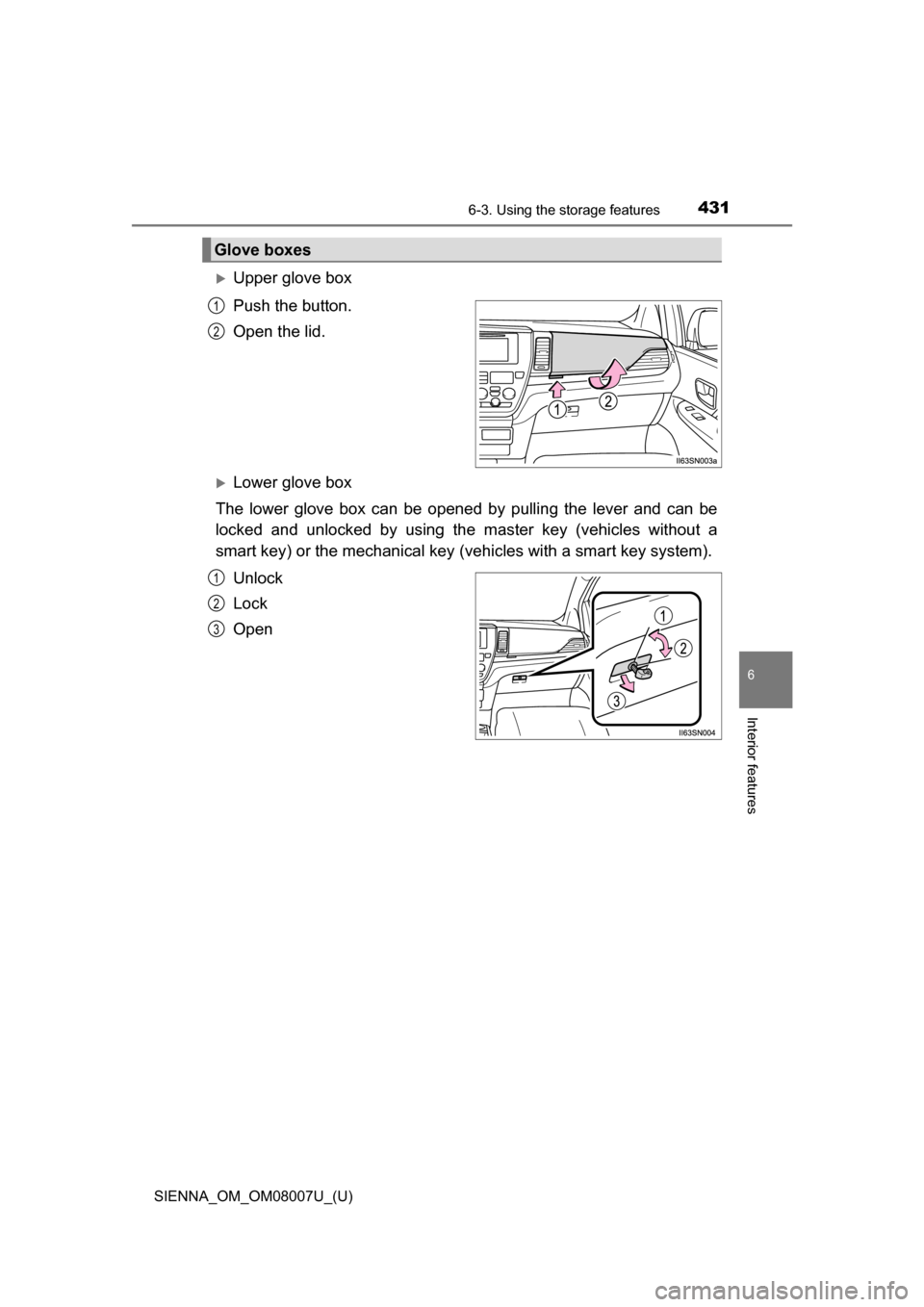
Upper glove box
Push the button.
Open the lid.
Lower glove box
The lower glove box can be opened by pulling the lever and can be
locked and unlocked by using th e master key (vehicles without a
smart key) or the mechanical key (vehicles with a smart key system).
Unlock
Lock
Open
Glove boxes
1
2
1
2
3