Page 307 of 741

307
RAV4_OM_OM0R005U_(U)
4-5. Using the driving support systems
4
Driving
Driving assist systems
◆ABS (Anti-lock Brake System)
Helps to prevent wheel lock when the brakes are applied suddenly, or if the
brakes are applied while driving on a slippery road surface
◆Brake assist
Generates an increased level of braking force after the brake pedal is
depressed when the system detects a panic stop situation
◆VSC (Vehicle Stability Control)
Helps the driver to control skidding when swerving suddenly or turning on
slippery road surfaces
◆TRAC (Traction Control)
Helps to maintain drive power and prevent the drive wheels from spinning
when starting the vehicle or accelerating on slippery roads
◆AUTO LSD function (2WD models)
The AUTO LSD function is activated when the system is in TRAC off
mode. It operates when one of the drive wheels is spinning, such as when
the wheel is spinning freely on ice or mud. The system applies the brakes
to the spinning wheel and transfers some of the torque to the other wheel
to secure drive power.
◆Hill-start assist control
Helps to reduce the vehicle from rolling backward when starting on an
incline
To help enhance driving safety and performance, the following
systems operate automatically in response to various driving
situations. Be aware, however, that these systems are supple-
mentary and should not be relied upon too heavily when operat-
ing the vehicle.
Page 310 of 741

310
RAV4_OM_OM0R005U_(U)
4-5. Using the driving support systems
■Turning off the TRAC/VSC/Trailer Sway Control systems
To turn the TRAC/VSC/Trailer Sway Control systems off, press and hold
for more than 3 seconds while the vehicle is stopped.
“Traction Control Turned Off” will be shown and the VSC OFF indicator light
will come on.
*
Press again to turn the systems back on.
*: On vehicles with pre-collision system, pre-collision brake assist and pre-
collision braking will also be disabled. The PCS warning light will come on
and the message will be shown on the multi-information display. ( →P. 239)
■ When the “AUTO LSD” indicator light flashes even if the VSC OFF
switch has not been pressed (2WD models)
TRAC, AUTO LSD and hill-start assist control cannot be operated. Contact
your Toyota dealer.
■ When the message is displayed on th e multi-information display show-
ing that TRAC has been disabled even if the VSC OFF switch has not
been pressed (AWD models)
TRAC and hill-start assist control cannot be operated. Contact your Toyota
dealer.
■ Sounds and vibrations caused by the ABS, brake assist, VSC/Trailer
Sway Control, TRAC and hill-start assist control systems
● A sound may be heard from the engine compartment when the brake pedal
is depressed repeatedly, when the engine is started or just after the vehicle
begins to move. This sound does not indicate that a malfunction has
occurred in any of these systems.
● Any of the following conditions may occur when the above systems are
operating. None of these indicates that a malfunction has occurred.
• Vibrations may be felt through the vehicle body and steering.
• A motor sound may be heard after the vehicle comes to a stop.
• The brake pedal may pulsate slightly after the ABS is activated.
• The brake pedal may move down slightly after the ABS is activated.
■ EPS operation sound
When the steering wheel is operated, a motor sound (whirring sound) may be
heard. This does not indicate a malfunction.
■ Automatic reactivation of TRAC an d VSC/Trailer Sway Control systems
After turning the TRAC and VSC/Trailer Sway Control systems off, the sys-
tems will be automatically re-enabled in the following situations:
● When the engine switch is turned to the “LOCK” position (vehicles without
smart key system) or off (vehicles with smart key system).
● If only the TRAC system is turned off, the TRAC will turn on when vehicle
speed increases.
If both the TRAC and VSC/Trailer Sway Control systems are turned off,
automatic re-enabling will not occur when vehicle speed increases.
Page 316 of 741
RAV4_OM_OM0R005U_(U)
3154-6. Driving tips
4
Driving
Accelerate the vehicle slowly, keep a safe distance between you and
the vehicle ahead, and drive at a reduced speed suitable to road con-
ditions.
●Park the vehicle and move the shift lever to P without setting the
parking brake. The parking brake may freeze up, preventing it from
being released. If the vehicle is parked without setting the parking
brake, make sure to block the wheels.
Failure to do so may be dangerous because it may cause the vehi-
cle to move unexpectedly, pos sibly leading to an accident.
● If the vehicle is parked without se tting the parking brake, confirm
that the shift lever ca nnot be moved out of P
*.
*: The shift lever will be locked if it is attempted to be shifted from P to any
other position without depressing the brake pedal. If the shift lever can be
shifted from P, there may be a problem with the shift lock system. Have the
vehicle inspected by your Toyota dealer immediately.
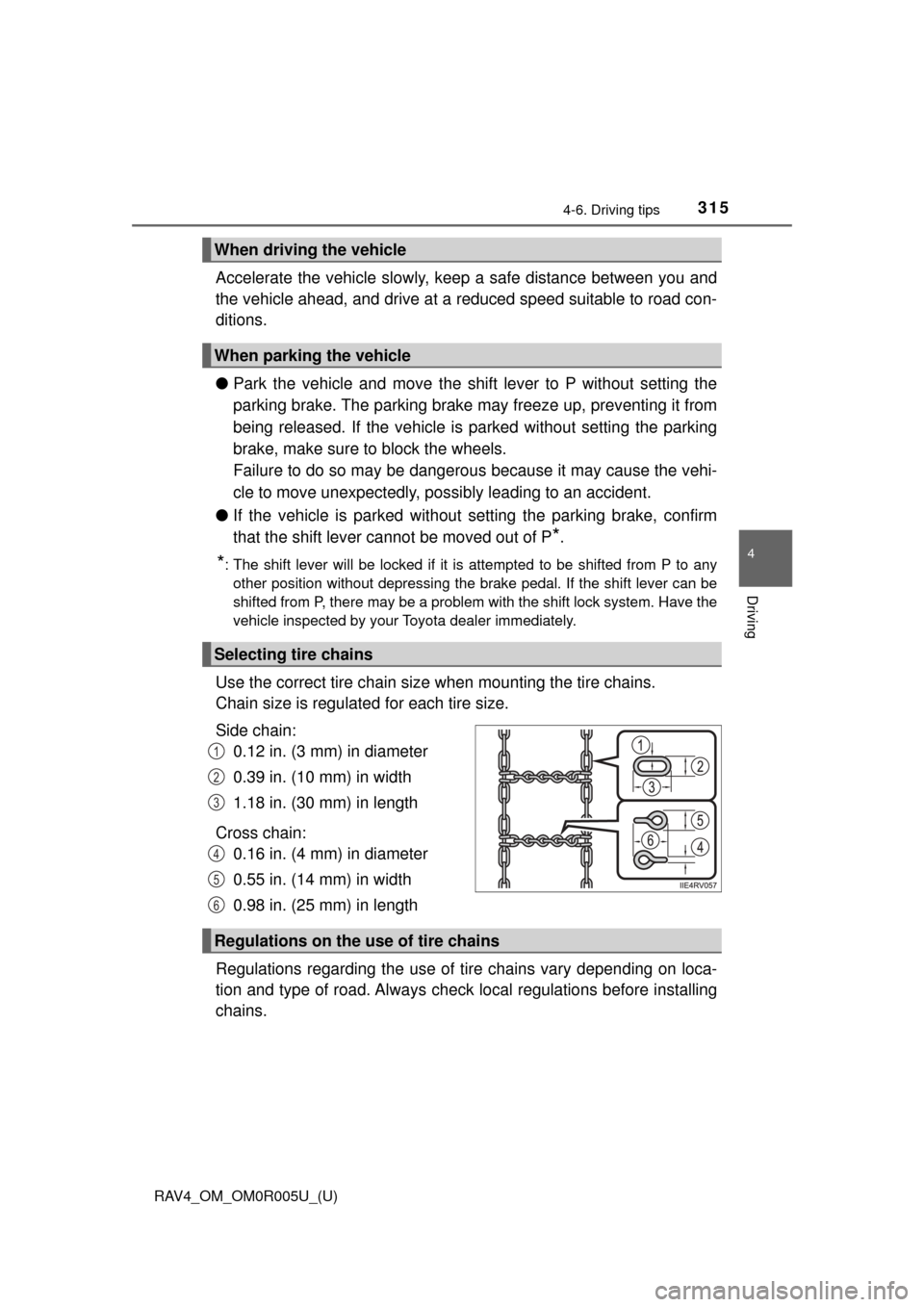
Use the correct tire chain size when mounting the tire chains.
Chain size is regulated for each tire size.
Side chain: 0.12 in. (3 mm) in diameter
0.39 in. (10 mm) in width
1.18 in. (30 mm) in length
Cross chain: 0.16 in. (4 mm) in diameter
0.55 in. (14 mm) in width
0.98 in. (25 mm) in length
Regulations regarding the use of tire chains vary depending on loca-
tion and type of road. Al ways check local regulations before installing
chains.
When driving the vehicle
When parking the vehicle
Selecting tire chains
1
2
3
4
5
6
Regulations on the use of tire chains
Page 322 of 741
RAV4_OM_OM0R005U_(U)
3214-6. Driving tips
4
Driving
NOTICE
■To prevent the water damage
Take all necessary safety measures to ensure that water damage to the
engine or other components does not occur.
● Water entering the engine air intake will cause severe engine damage.
● Water entering the automatic transmission will cause deterioration in shift
quality, locking up of your transmission accompanied by vibration, and ulti-
mately damage.
● Water can wash the grease from wheel bearings, causing rusting and pre-
mature failure, and may also enter the differentials, transmission and
transfer case (AWD models), reducing the gear oil’s lubricating qualities.
■ When you drive through water
If driving through water, such as when crossing shallow streams, first check
the depth of the water and the bottom of the riverbed for firmness. Drive
slowly and avoid deep water.
■ Inspection after off-road driving
● Sand and mud that has accumulated around brake drums and around
brake discs may affect braking efficiency and may damage brake system
components.
● Always perform a maintenance inspection after each day of off-road driv-
ing that has taken you through rough terrain, sand, mud, or water. For
scheduled maintenance information, refer to the “Scheduled Maintenance
Guide” or “Owner’s Manual Supplement”.
Page 348 of 741

RAV4_OM_OM0R005U_(U)
3475-5. Using an external device
5
Audio system
Press (BROWSE) to select iPod menu mode.
Turning the “TUNE•SCROLL” knob clockwise changes the play
mode in the following order:
“Playlists” → “Artists” → “Albums” → “Songs” → “Podcasts” →
“Genres” → “Composers” → “Audiobooks”
Press the knob to select the desired play mode.
■Play mode list
■Selecting a list Turn the “TUNE•SCROLL” knob to display the first selection list.
Press the knob to select the des ired item and display the second
selection list.
Repeat the same procedure to select the desired item.
To return to the previous selection list, press (BACK).
Press (PLAY) to play the desired selection.
Selecting a play mode
1
2
3
Play modeFirst
selectionSecond
selectionThird
selectionFourth
selection
“Playlists”Playlists
selectSongs select--
“Artists”Artists selectAlbums
selectSongs select-
“Albums”Albums
selectSongs select--
“Songs”Songs select---
“Podcasts”Podcasts
selectEpisodes
select--
“Genres”Genre selectArtists selectAlbums
selectSongs select
“Composers”Composers
selectAlbums
selectSongs select-
“Audiobooks”Audiobooks
selectChapter
select--
1
2
3
Page 375 of 741

374
RAV4_OM_OM0R005U_(U)
5-7. “SETUP” menu
Select “Delete contacts” using the “TUNE•SCROLL” knob.
Select the desired phone number using the knob and press
(YES).
To delete all the registered phone numbers, press (ALL) and then
press (YES).
Press (A-Z) to display the regi stered names in alphabetical order
of the initial.
Select “Delete other PB” using the “TUNE•SCROLL” knob.
Select the desired phonebook using the knob and press (YES).
Select “Auto transfer” usi ng the “TUNE•SCROLL” knob.
Select “ON” or “OFF” using the knob.
Select “Call volume” using the “TUNE•SCROLL” knob.
Change the call volume.
To decrease the volume: Turn the knob counterclockwise.
To increase the volume: Turn the knob clockwise.
To set the volume, press (SAVE).
Select “Ringtone volume” using the “TUNE•SCROLL” knob.
Change the ring tone volume.
To decrease the volume: Turn the knob counterclockwise.
To increase the volume: Turn the knob clockwise.
To set the volume, press (SAVE).
Deleting a registered phone number
Deleting another cellular phone’s phonebook
Setting automatic transferring of the phonebook on or off
Setting call volume
Setting ring tone volume
1
2
1
2
1
2
1
2
1
2
Page 382 of 741
381
RAV4_OM_OM0R005U_(U)
5-9. Bluetooth® Phone
5
Audio system
When receiving a phone call
Press the off-hook switch.
Press the on-hook switch.
Press the off-hook switch.
Pressing the off-hook switch again returns you to the previous call.
To decrease the volume: Turn the “PWR•VOL” knob counterclock-
wise.
To increase the volume: Turn the “PWR•VOL” knob clockwise.
Answering the phone
Refusing the call
Receiving a call when on another call
Adjusting the ring tone volume when receiving a call
Page 383 of 741
382
RAV4_OM_OM0R005U_(U)
5-9. Bluetooth® Phone
Speaking on the phone
A call can be transferred between the cellular phone and system while
dialing, receiving a call, or during a call. Use one of the following
methods:
a. Operate the cellular phone.
Refer to the manual that comes with the cellular phone for the operation
of the phone.
b. Press the (HNDSET).*
*
: This operation can be performed only when transferring a call from the cellular phone to the system during a call.
Press (MUTE).
Press (0-9) and use the “TUNE •SCROLL” knob to input the
desired digits. • To send the input digits press (SEND).
• When finished, press (EXIT) to return to the previous screen.
To decrease the volume: Turn the “PWR•VOL” knob counterclock-
wise.
To increase the volume: Turn the “PWR•VOL” knob clockwise.
Transferring a call
Muting your voice
Inputting digits
Setting call volume

