Page 535 of 784

PRIUS PRIME_OM_OM47A88U_(U)
5356-4. Using the other interior features
6
Interior features
■The wireless charger can be operated when
The power switch is in ACCESSORY or ON mode.
■ Usable portable devices
Qi standard wireless charge standard can be used on compatible devices.
However, not all Qi standard devices and compatibility are guaranteed.
Starting with mobile phones and smart phones , it is aimed for low power elec-
trically supplied portable devices of no more than 5W.
■ When covers and accessories are attached to portable devices
Do not charge in situations where cover and accessories not able to handle
Qi are attached to the portable device. Depending on the type of cover and
accessory, it may not be possible to charge. When charging is not performed
even with the portable device placed on the charge area, remove the cover
and accessories.
■ While charging, noise enters the AM radio
Turn off the wireless charger and confirm that the noise has decreased. If the
noise decreases, continuously pushing the power supply switch of the wire-
less charger for 2 seconds, the frequency of the charger can be changed and
the noise can be reduced.
Also, on that occasion, the operation indicator light will flash orange 2 times.
■ Important points of the wireless charger
●If the electronic key cannot be detected within the vehicle interior, charging
cannot be done. When the door is opened and closed, charging may be
temporarily suspended.
● When charging, the wireless charging device and portable device will get
warmer, however this is not a malfunction.
When a portable device gets warm while charging, charging may stop due
to the protection function on the portable device side. In this case, when the
temperature of the portable device drops significantly, charge again.
■ Operation sounds
When the power supply is turned on, while searching for the portable device a
sound will be produced, however this is not a malfunction.
Page 539 of 784

PRIUS PRIME_OM_OM47A88U_(U)
5396-4. Using the other interior features
6
Interior features
WARNING
■Conditions in which the function may not operate correctly
In the following conditions, it may not operate correctly
● The portable device is fully charged
● There is foreign matter between the charge area and portable device
● The temperature of the portable device gets higher from charging
● The charging surface of the portable device is facing up
● The placement of the portable device is out of alignment with the charge
area
● Near a TV tower, electric power plant, gas station, radio station, large dis-
play, airport or other facility that generates strong radio waves or electri\
cal
noise
● When the electronic key is in contact with, or is covered by the following
metallic objects
• Cards to which aluminum foil is attached
• Cigarette boxes that have aluminum foil inside
• Metallic wallets or bags
• Coins
• Hand warmers made of metal
• Media such as CDs and DVDs
● When other wireless keys (that emit radio waves) are being used nearby
In addition, excluding the above-mentioned, when the charger does not per-
form normally or the operation display lamp is flashing continuously, it is
considered that the wireless charger is malfunctioning. Contact your Toyota
dealer.
■ To prevent failure or damage to data
● Do not bring magnetic cards, such as credit cards, or magnetic recording
media, etc., close to the charger while charging, otherwise, data may dis-
appear under the influence of magnetism. Also, do not bring precision
instruments such as wrist watches, etc., close to the charger, as such
objects may break.
● Do not leave portable devices in the cabin. The temperature inside the
cabin may become high, when under the sun, and cause damage to the
device.
■ To prevent 12-volt battery discharge
When the hybrid system is stopped, do not use the wireless charger for a
long time.
Page 555 of 784

555
PRIUS PRIME_OM_OM47A88U_(U)
7Maintenance and care
7-1. Maintenance and careCleaning and protecting the vehicle exterior .......... 556
Cleaning and protecting the vehicle interior ........... 561
7-2. Maintenance Maintenance requirements ................... 567
General maintenance........ 570
Emission inspection and maintenance (I/M)
programs......................... 573
7-3. Do-it-yourself maintenance Do-it-yourself service precautions ..................... 574
Hood ................................. 577
Positioning a floor jack ...... 579
Engine compartment ......... 580
Tires .................................. 594
Tire inflation pressure ....... 603
Wheels .............................. 606
Replacing the tire .............. 609
Air conditioning filter.......... 620
Wiper rubber replacement .................... 624
Electronic key battery........ 627
Checking and replacing fuses ............................... 630
Headlight aim .................... 633
Light bulbs......................... 635
Page 557 of 784

5577-1. Maintenance and care
7
Maintenance and care
■Note for a smart key system
If the door handle becomes wet while the electronic key is within the ef\
fective
range,")
PRIUS PRIME_OM_OM47A88U_(U)
5577-1. Maintenance and care
7
Maintenance and care
■Note for a smart key system
If the door handle becomes wet while the electronic key is within the ef\
fective
range, the door may lock and unlock repeatedly. In that case, follow the fol-
lowing correction procedures to wash the vehicle:
●Place the key in a position 6 ft. (2 m) or more separate from the vehicle
while the vehicle is being washed. (Take care to ensure that the key is not
stolen.)
● Set the electronic key to battery-saving mode to disable the smart key sys-
tem. ( →P. 280)
■ Aluminum wheels
●Remove any dirt immediately by using a neutral detergent. Do not use hard
brushes or abrasive cleaners. Do not use strong or harsh chemical clean-
ers.
Use the same mild detergent and wax as used on the paint.
● Do not use detergent on the wheels when they are hot, for example after
driving for long distance in the hot weather.
● Wash detergent from the wheels immediately after use.
■ Bumpers
Do not scrub with abrasive cleaners.
■ Front side windows water-repellent coating
The following precautions can extend the effectiveness of the water-repellent
coating.
●Remove any dirt, etc. from the front side windows regularly.
● Do not allow dirt and dust to accumulate on the windows for a long period.
Clean the windows with a soft, damp cloth as soon as possible.
● Do not use wax or glass cleaners that contain abrasives when cleaning the
windows.
● Do not use any metallic objects to remove condensation build up.
Page 588 of 784

588
PRIUS PRIME_OM_OM47A88U_(U)
7-3. Do-it-yourself maintenance
■After recharging/reconnect ing the 12-volt battery
● Unlocking the doors using the smart key system may not be possible imme-
diately after reconnecting the 12-volt battery. If this happens, use the wire-
less remote control or the mechanical key to lock/unlock the doors.
● Start the hybrid system with the power switch in ACCESSORY mode. The
hybrid system may not start with the power switch turned off. However, the
hybrid system will operate normally from the second attempt.
● The power switch mode is recorded by the vehicle. If the 12-volt battery is
reconnected, the vehicle will return the power switch mode to the status it
was in before the 12-volt battery was disconnected. Make sure to turn off
the power before disconnect the 12-volt battery. Take extra care when con-
necting the 12-volt battery if the power switch mode prior to discharge is
unknown.
If the system will not start even after multiple attempts at all methods above,
contact your Toyota dealer.
WARNING
■ Chemicals in the 12-volt battery
The 12-volt battery contains poisonous and corrosive sulfuric acid and may
produce hydrogen gas which is flammable and explosive. To reduce the risk
of death or serious injury, take the following precautions while working on or
near the 12-volt battery:
● Do not cause sparks by touching the 12-volt battery terminals with tools.
● Do not smoke or light a match near the 12-volt battery.
● Avoid contact with eyes, skin and clothes.
● Never inhale or swallow electrolyte.
● Wear protective safety glasses when working near the 12-volt battery.
● Keep children away from the 12-volt battery.
■ Where to safely charge the 12-volt battery
Always charge the 12-volt battery in an open area. Do not charge the
12-volt battery in a garage or closed room where there is insufficient ventila-
tion.
■ How to recharge th e 12-volt battery
Only perform a slow charge (5 A or less). The 12-volt battery may explode if
charged at a quicker rate.
Page 627 of 784
627
PRIUS PRIME_OM_OM47A88U_(U)
7-3. Do-it-yourself maintenance
7
Maintenance and care
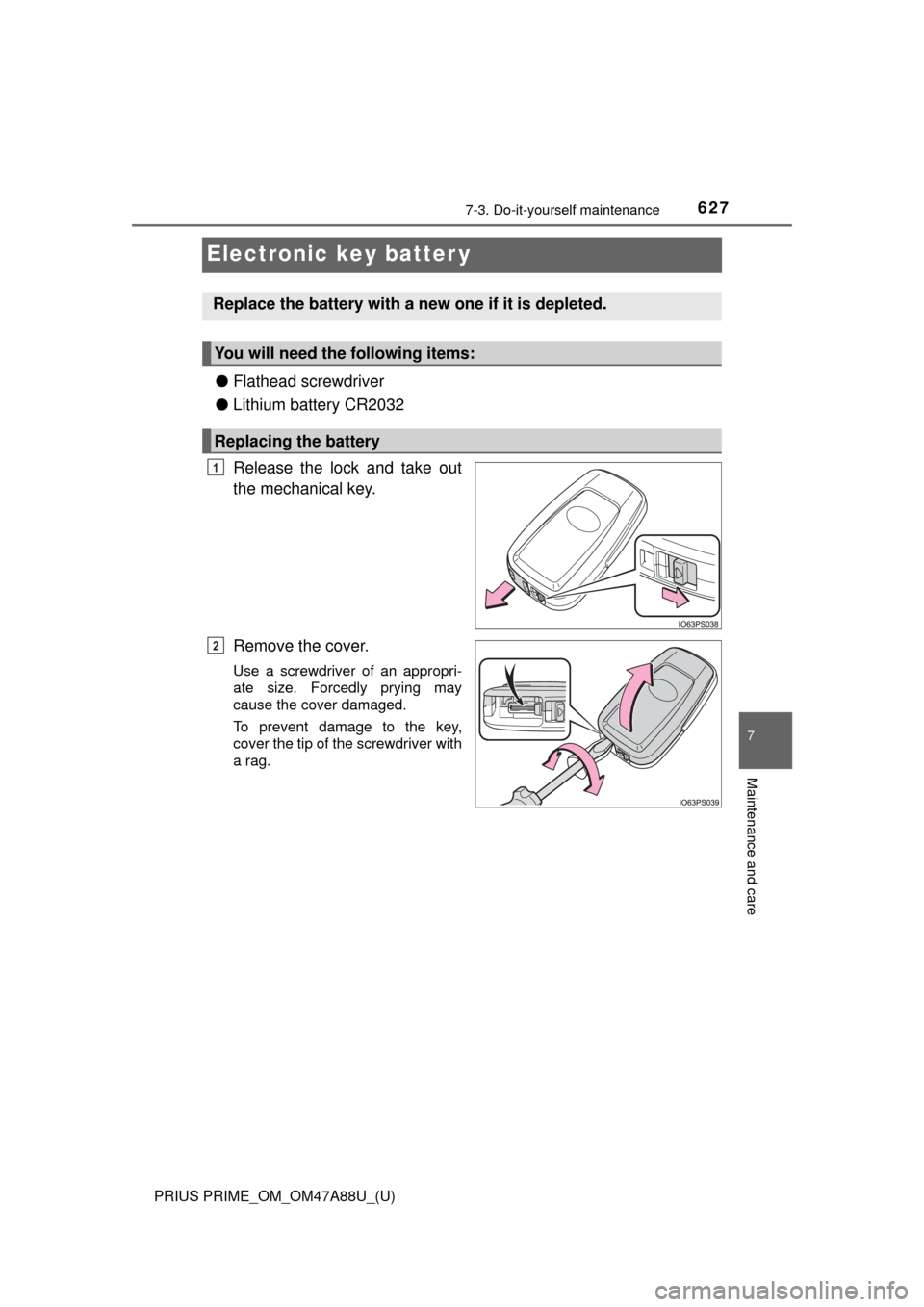
Electronic key batter y
●Flathead screwdriver
● Lithium battery CR2032
Release the lock and take out
the mechanical key.
Remove the cover.
Use a screwdriver of an appropri-
ate size. Forcedly prying may
cause the cover damaged.
To prevent damage to the key,
cover the tip of the screwdriver with
a rag.
Replace the battery with a new one if it is depleted.
You will need the following items:
Replacing the battery
1
2
Page 628 of 784
628
PRIUS PRIME_OM_OM47A88U_(U)
7-3. Do-it-yourself maintenance
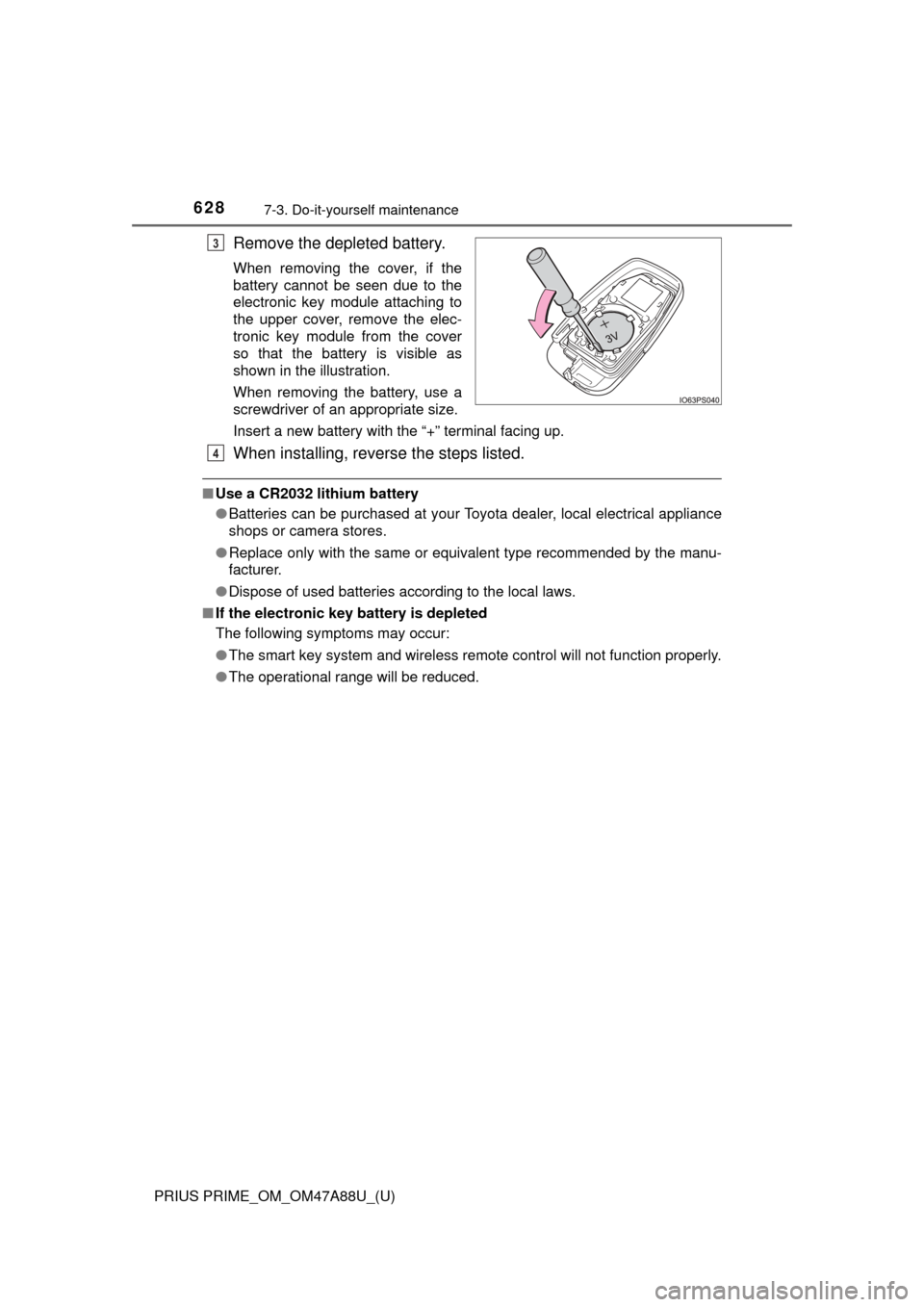
Remove the depleted battery.
When removing the cover, if the
battery cannot be seen due to the
electronic key module attaching to
the upper cover, remove the elec-
tronic key module from the cover
so that the battery is visible as
shown in the illustration.
When removing the battery, use a
screwdriver of an appropriate size.
Insert a new battery with the “+” terminal facing up.
When installing, reverse the steps listed.
■Use a CR2032 lithium battery
●Batteries can be purchased at your Toyota dealer, local electrical appliance
shops or camera stores.
● Replace only with the same or equivalent type recommended by the manu-
facturer.
● Dispose of used batteries according to the local laws.
■ If the electronic key battery is depleted
The following symptoms may occur:
●The smart key system and wireless remote control will not function properly.
● The operational range will be reduced.
3
4
Page 643 of 784
643
PRIUS PRIME_OM_OM47A88U_(U)
8When trouble arises
8-1. Essential informationEmergency flashers .......... 644
If your vehicle has to be stopped in an
emergency ...................... 645
8-2. Steps to take in an emergency
If your vehicle needs to be towed ..................... 646
If you think something is wrong .............................. 652
If a warning light turns on or a warning buzzer
sounds ............................ 653
If a warning message is displayed......................... 663
If you have a flat tire.......... 671
If the hybrid system will not start ........................... 688
If the electronic key does not operate properly........ 690
If the 12-volt battery is discharged ...................... 694
If your vehicle overheats ... 700
If the vehicle becomes stuck ............................... 705