Page 735 of 784
PRIUS PRIME_OM_OM47A88U_(U)
7359-2. Customization
9
Vehicle specifications
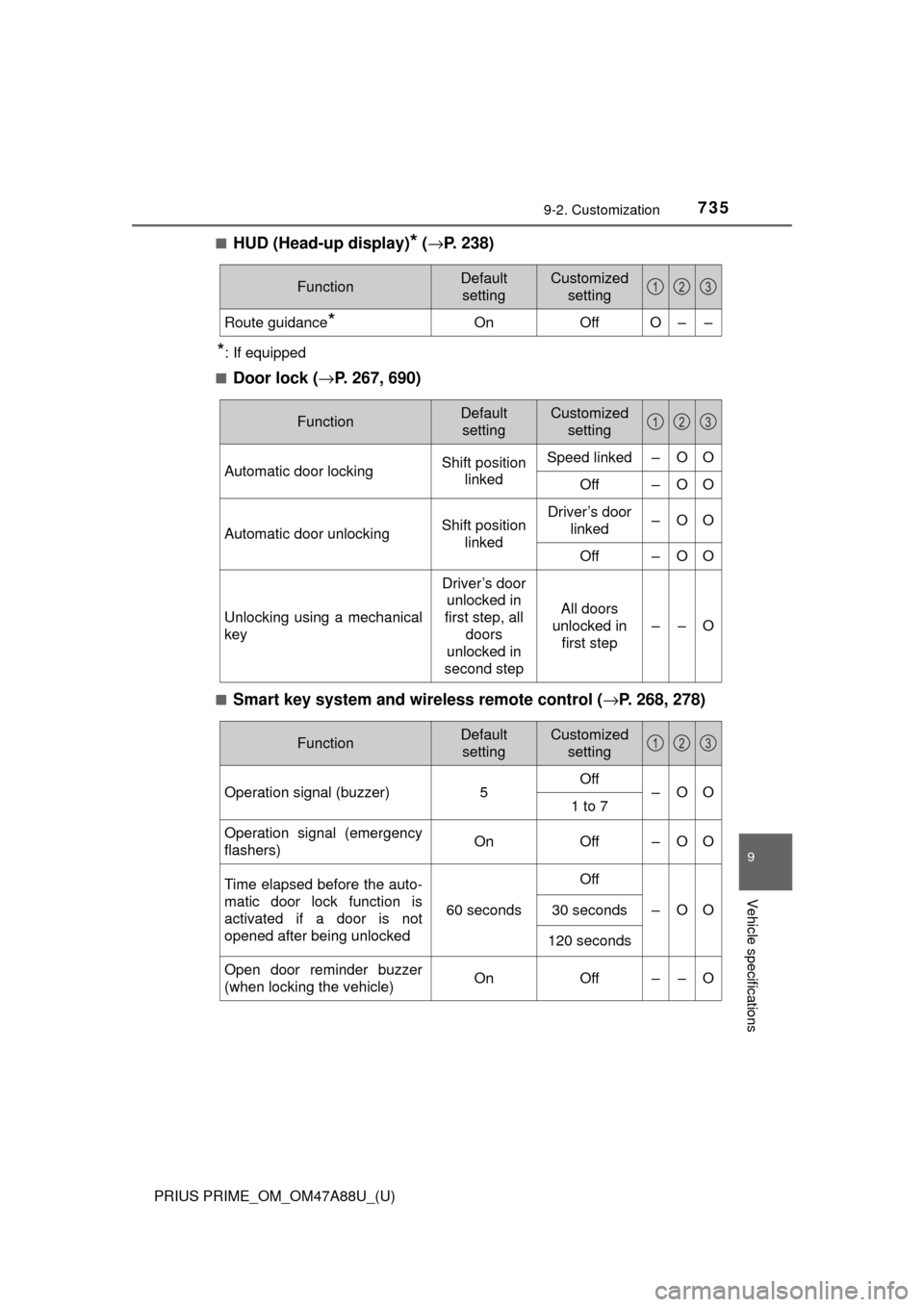
■HUD (Head-up display)* (→ P. 238)
*: If equipped
■
Door lock ( →P. 267, 690)
■Smart key system and wireless remote control ( →P. 268, 278)
FunctionDefault
settingCustomized setting
Route guidance*OnOffO––
123
FunctionDefault settingCustomized setting
Automatic door lockingShift position linkedSpeed linked–OO
Off–OO
Automatic door unlockingShift position linkedDriver’s door linked–OO
Off–OO
Unlocking using a mechanical
key
Driver’s door unlocked in
first step, all
doors
unlocked in
second step
All doors
unlocked in first step
––O
123
FunctionDefault settingCustomized setting
Operation signal (buzzer) 5Off
–OO
1 to 7
Operation signal (emergency
flashers) On
Off – O O
Time elapsed before the auto-
matic door lock function is
activated if a door is not
opened after being unlocked
60 seconds
Off
–OO30 seconds
120 seconds
Open door reminder buzzer
(when locking the vehicle)OnOff––O
123
Page 736 of 784
736
PRIUS PRIME_OM_OM47A88U_(U)
9-2. Customization
■Smart key system (→P. 278)
*: This function can also be changed using the wireless remote control.
(→P. 271)
■
Wireless remote control ( →P. 268)
FunctionDefault
settingCustomized setting
Smart door unlocking*Driver’s doorAll the doors–OO
Smart key systemOnOff––O
Time elapsed before unlock-
ing all the door when gripping
and holding the driver’s door
handle
2 seconds
Off
––O1.5 seconds
2.5 seconds
Number of consecutive door
lock operations2 timesAs many as
desired––O
123
FunctionDefault settingCustomized setting
Unlocking operation
Driver’s door unlocked in
first step, all
doors
unlocked in
second step
All doors
unlocked in first step
–OO
Wireless remote control On Off – – O
Locking operation when door
opened On Off – – O
123
Page 737 of 784
PRIUS PRIME_OM_OM47A88U_(U)
7379-2. Customization
9
Vehicle specifications
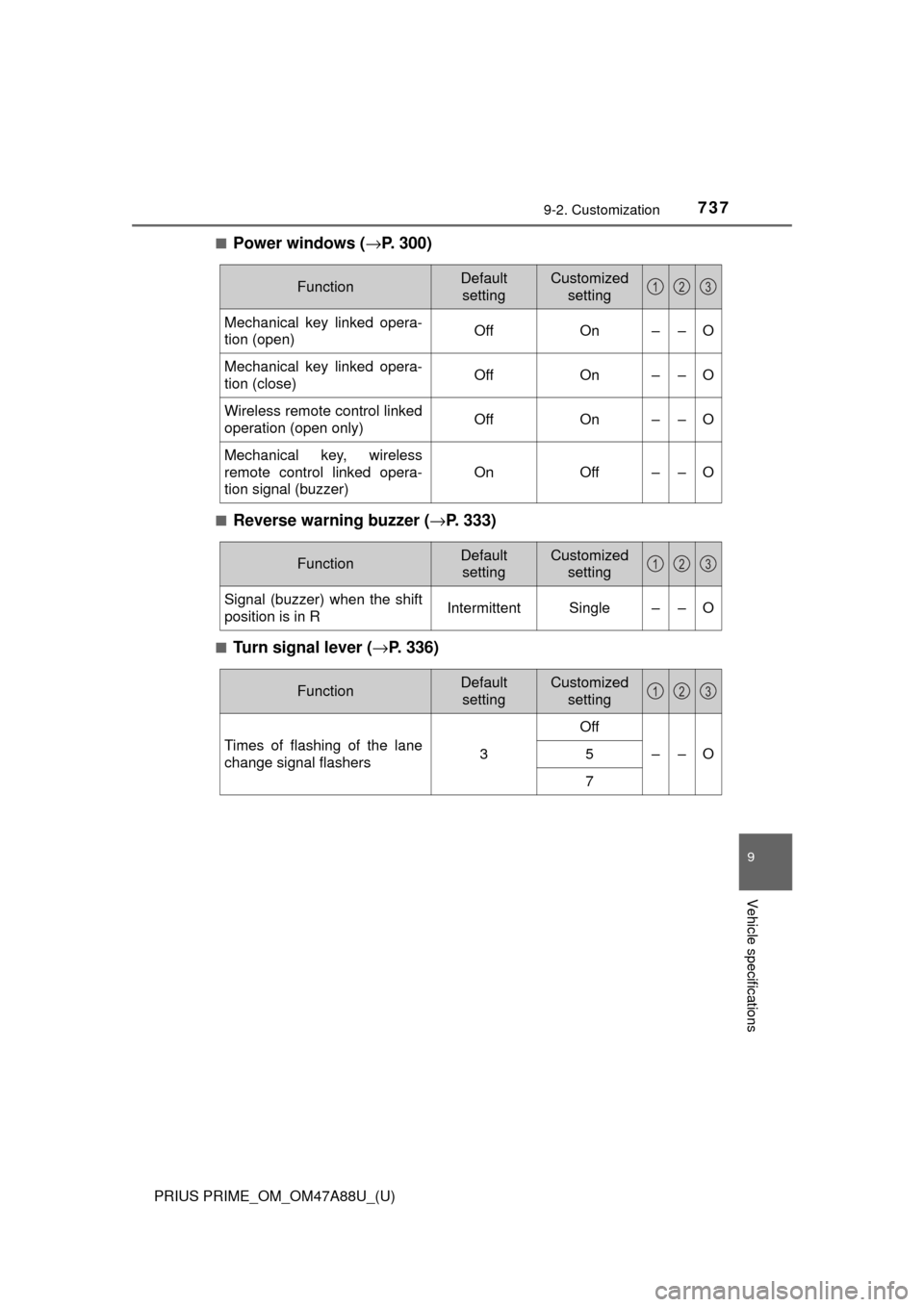
■Power windows (→P. 300)
■Reverse warning buzzer (→ P. 333)
■Turn signal lever (→P. 336)
FunctionDefault
settingCustomized setting
Mechanical key linked opera-
tion (open)OffOn––O
Mechanical key linked opera-
tion (close)OffOn––O
Wireless remote control linked
operation (open only)OffOn––O
Mechanical key, wireless
remote control linked opera-
tion signal (buzzer)
OnOff––O
123
FunctionDefault settingCustomized setting
Signal (buzzer) when the shift
position is in RIntermittentSingle––O
123
FunctionDefault settingCustomized setting
Times of flashing of the lane
change signal flashers3
Off
––O5
7
123
Page 740 of 784
740
PRIUS PRIME_OM_OM47A88U_(U)
9-2. Customization
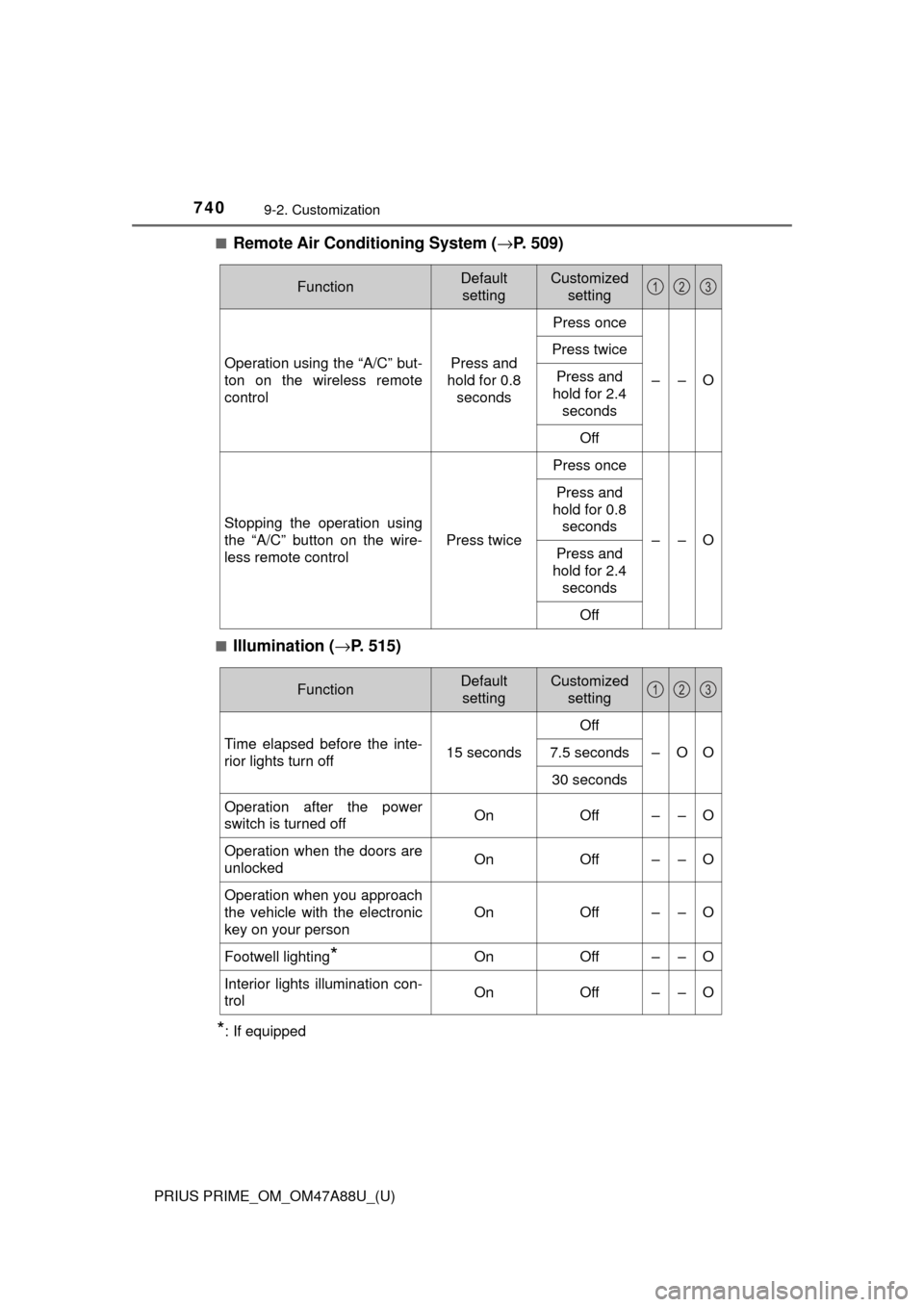
■Remote Air Conditioning System (→P. 509)
■Illumination ( →P. 515)
*: If equipped
FunctionDefault
settingCustomized setting
Operation using the “A/C” but-
ton on the wireless remote
controlPress and
hold for 0.8 seconds
Press once
––O
Press twice
Press and
hold for 2.4
seconds
Off
Stopping the operation using
the “A/C” button on the wire-
less remote control
Press twice
Press once
––O
Press and
hold for 0.8 seconds
Press and
hold for 2.4
seconds
Off
123
FunctionDefault settingCustomized setting
Time elapsed before the inte-
rior lights turn off 15 secondsOff
–OO
7.5 seconds
30 seconds
Operation after the power
switch is turned offOnOff––O
Operation when the doors are
unlockedOnOff––O
Operation when you approach
the vehicle with the electronic
key on your person
OnOff––O
Footwell lighting*OnOff––O
Interior lights illumination con-
trolOnOff––O
123
Page 741 of 784
PRIUS PRIME_OM_OM47A88U_(U)
7419-2. Customization
9
Vehicle specifications
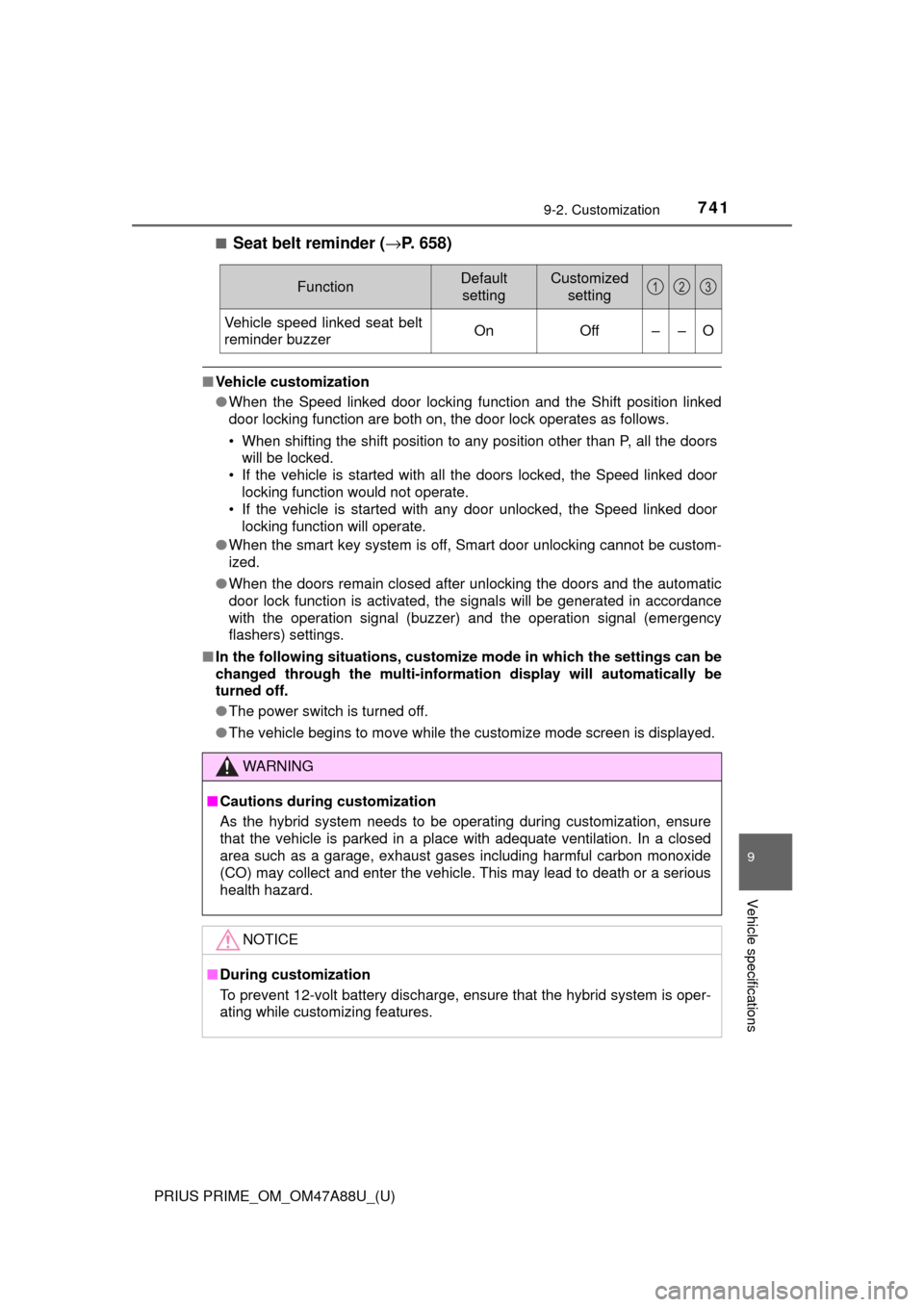
■Seat belt reminder (→P. 658)
■Vehicle customization
●When the Speed linked door locking function and the Shift position linked
door locking function are both on, the door lock operates as follows.
• When shifting the shift position to any position other than P, all the doors
will be locked.
• If the vehicle is started with all the doors locked, the Speed linked door locking function would not operate.
• If the vehicle is started with any door unlocked, the Speed linked door
locking function will operate.
● When the smart key system is off, Smart door unlocking cannot be custom-
ized.
● When the doors remain closed after unlocking the doors and the automatic
door lock function is activated, the signals will be generated in accordance
with the operation signal (buzzer) and the operation signal (emergency
flashers) settings.
■ In the following situati ons, customize mode in which the settings can be
changed through the mu lti-information display will automatically be
turned off.
● The power switch is turned off.
● The vehicle begins to move while the customize mode screen is displayed.
FunctionDefault
settingCustomized setting
Vehicle speed linked seat belt
reminder buzzerOnOff––O
WARNING
■Cautions during customization
As the hybrid system needs to be oper ating during customization, ensure
that the vehicle is parked in a place with adequate ventilation. In a closed
area such as a garage, exhaust gases including harmful carbon monoxide
(CO) may collect and enter the vehicle. This may lead to death or a serious
health hazard.
NOTICE
■ During customization
To prevent 12-volt battery discharge, ensure that the hybrid system is oper-
ating while customizing features.
123
Page 762 of 784
762What to do if... (Troubleshooting)
PRIUS PRIME_OM_OM47A88U_(U)
What to do if... (Troubleshooting)
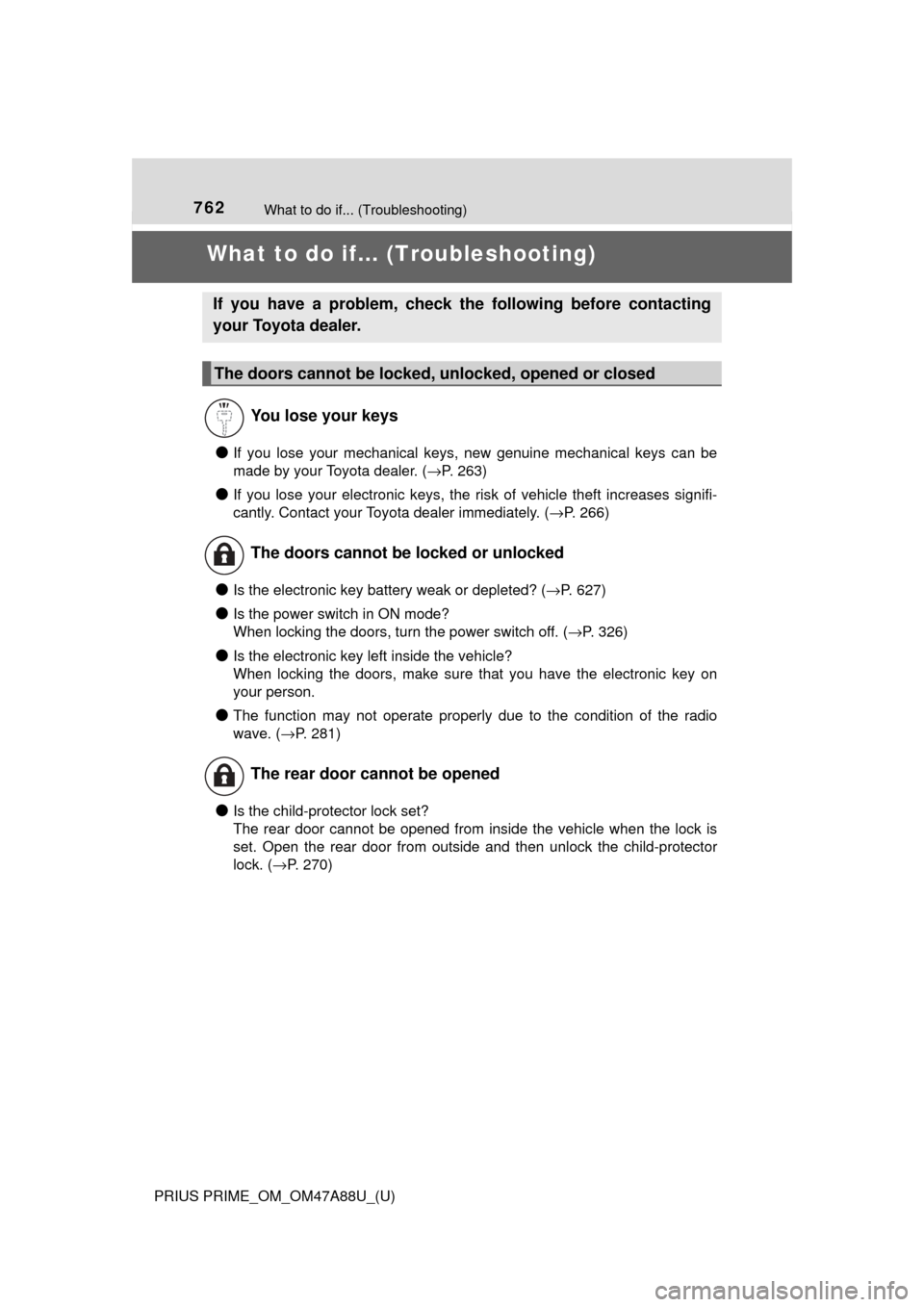
●If you lose your mechanical keys, new genuine mechanical keys can be
made by your Toyota dealer. ( →P. 263)
●If you lose your electronic keys, the risk of vehicle theft increases signifi-
cantly. Contact your Toyota dealer immediately. ( →P. 266)
●Is the electronic key battery weak or depleted? (→P. 627)
●Is the power switch in ON mode?
When locking the doors, turn the power switch off. ( →P. 326)
●Is the electronic key left inside the vehicle?
When locking the doors, make sure that you have the electronic key on
your person.
●The function may not operate properly due to the condition of the radio
wave. (→P. 281)
●Is the child-protector lock set?
The rear door cannot be opened from inside the vehicle when the lock is
set. Open the rear door from outside and then unlock the child-protector
lock. (→P. 270)
If you have a problem, check the following before contacting
your Toyota dealer.
The doors cannot be locked, unlocked, opened or closed
You lose your keys
The doors cannot be locked or unlocked
The rear door cannot be opened
Page 763 of 784
763What to do if... (Troubleshooting)
PRIUS PRIME_OM_OM47A88U_(U)
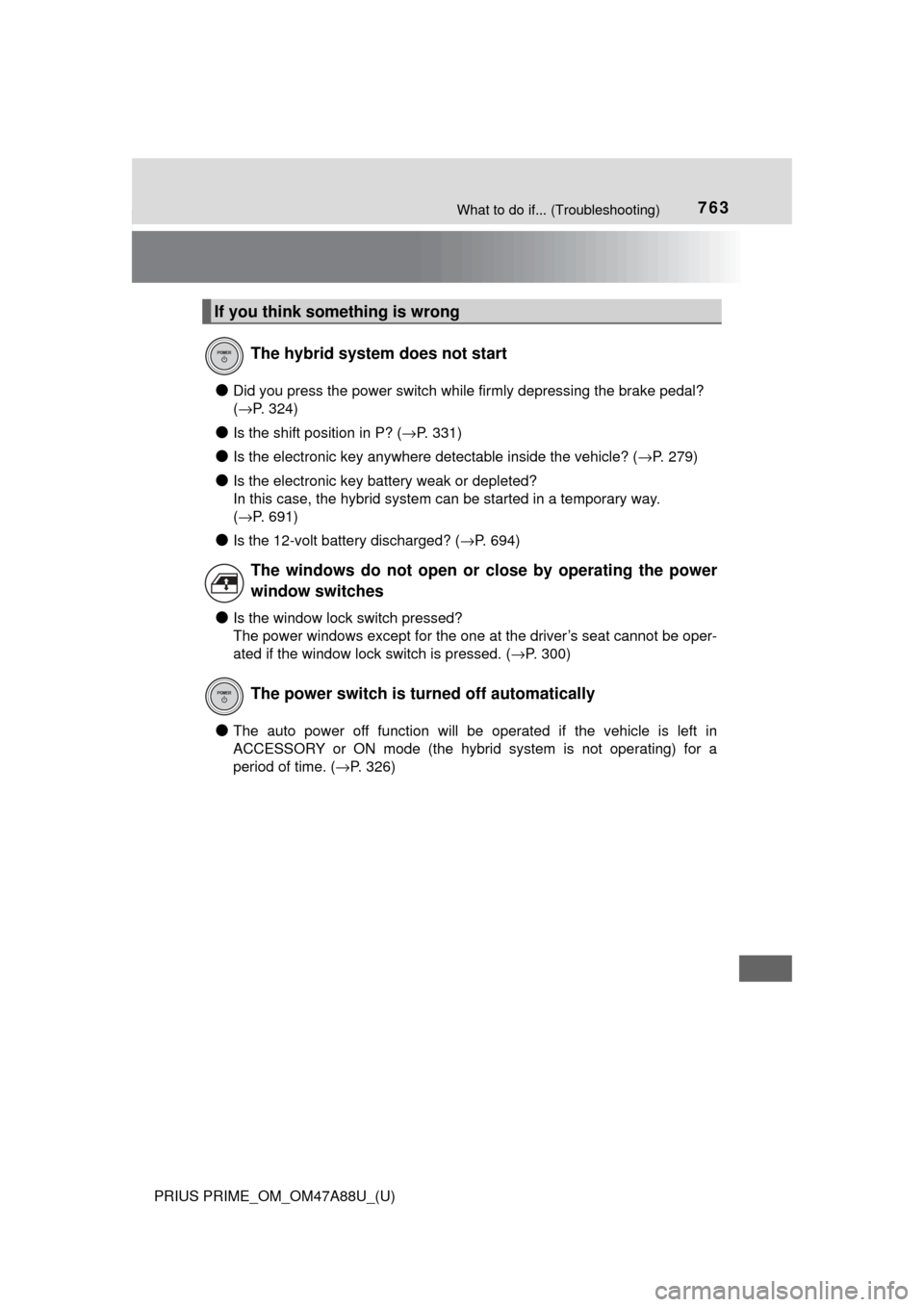
●Did you press the power switch while firmly depressing the brake pedal?
(→P. 324)
●Is the shift position in P? ( →P. 331)
●Is the electronic key anywhere detectable inside the vehicle? ( →P. 279)
●Is the electronic key battery weak or depleted?
In this case, the hybrid system can be started in a temporary way.
(→P. 691)
●Is the 12-volt battery discharged? ( →P. 694)
●Is the window lock switch pressed?
The power windows except for the one at the driver’s seat cannot be oper-
ated if the window lock switch is pressed. ( →P. 300)
●The auto power off function will be operated if the vehicle is left in
ACCESSORY or ON mode (the hybrid system is not operating) for a
period of time. ( →P. 326)
If you think something is wrong
The hybrid system does not start
The windows do not open or close by operating the power
window switches
The power switch is turned off automatically
Page 764 of 784
764What to do if... (Troubleshooting)
PRIUS PRIME_OM_OM47A88U_(U)
●The seat belt reminder light is flashing
Are the driver and all the passengers wearing the seat belts? (→P. 658)
●The parking brake indicator is on
Is the parking brake released? ( →P. 337)
Depending on the situation, other types of warning buzzer may also sound.
( →P. 653, 663)
●Is the electronic key left inside the vehicle?
Check the message on the multi-information display. ( →P. 663)
●When a warning light turns on or a warning message is displayed, refer to \
P. 653, 663.
A warning buzzer sounds during driving
A warning buzzer sounds when leaving the vehicle
A warning light turns on or a warning message is displayed