Page 138 of 784
138
PRIUS PRIME_OM_OM47A88U_(U)
2-2. Charging
Confirm that the charging indi-
cator is illuminated.
Charging will not start if the
charging indicator does not illumi-
nate when the charging connector
is inserted. (→P. 171)
If the charging indicator is flashing,
the charge schedule is registered.
( →P. 139)
If the error warning indicator on th e CCID (Charging Circuit Interrupting
Device) flashes during charging, check P. 110 and follow the correction
procedure.
Vehicles with smart lid & con-
nector locking system:
When you wish to lock the
charging connector, carry an
electronic key and press the
charging connector lock switch.
The charging connector will be
locked by the smart lid & connector
locking system. After the charging
connector is locked, even if some-
one not carrying an electronic key
presses the charging connector
lock switch, they cannot unlock the
charging connector.
The charging indicator will turn off when charging is completed.
7
8
Page 140 of 784
140
PRIUS PRIME_OM_OM47A88U_(U)
2-2. Charging
Vehicles with smart lid & con-
nector locking system:
When the charging connector is
locked, carry an electronic key
and press the charging connec-
tor lock switch.
The charging connector is
unlocked by the smart lid & con-
nector locking system.
Carrying an electronic key and moving near the charging inlet will cause
the charging inlet light to illuminate.
Pull the charging connector
towards you while pressing the
latch release button.
If the charging connector is discon-
nected during charging (while the
charging indicator is on), charging
will be interrupted.
Attach the charging connector
cap.
Attach the charging inlet cap
and close the charging port lid.
After charging
1
2
3
4
Page 142 of 784
142
PRIUS PRIME_OM_OM47A88U_(U)
2-2. Charging
■When removing the charging connector
■ Push lifter (vehicles with smar t lid & connector locking system)
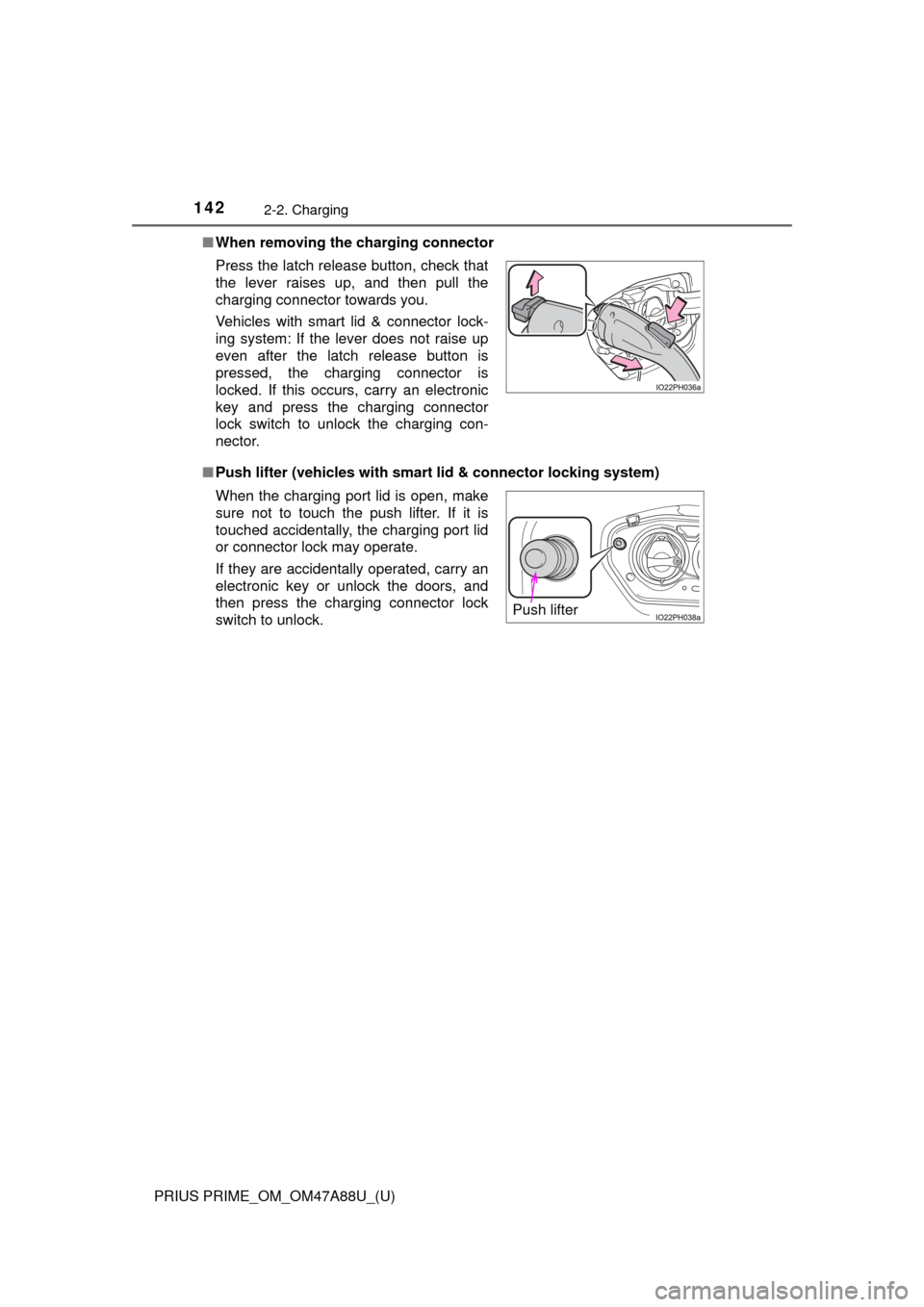
Press the latch release button, check that
the lever raises up, and then pull the
charging connector towards you.
Vehicles with smart lid & connector lock-
ing system: If the lever does not raise up
even after the latch release button is
pressed, the charging connector is
locked. If this occurs, carry an electronic
key and press the charging connector
lock switch to unlock the charging con-
nector.
When the charging port lid is open, make
sure not to touch the push lifter. If it is
touched accidentally, the charging port lid
or connector lock may operate.
If they are accidentally operated, carry an
electronic key or unlock the doors, and
then press the charging connector lock
switch to unlock.
Push lifter
Page 194 of 784
194
PRIUS PRIME_OM_OM47A88U_(U)
3. Instrument cluster
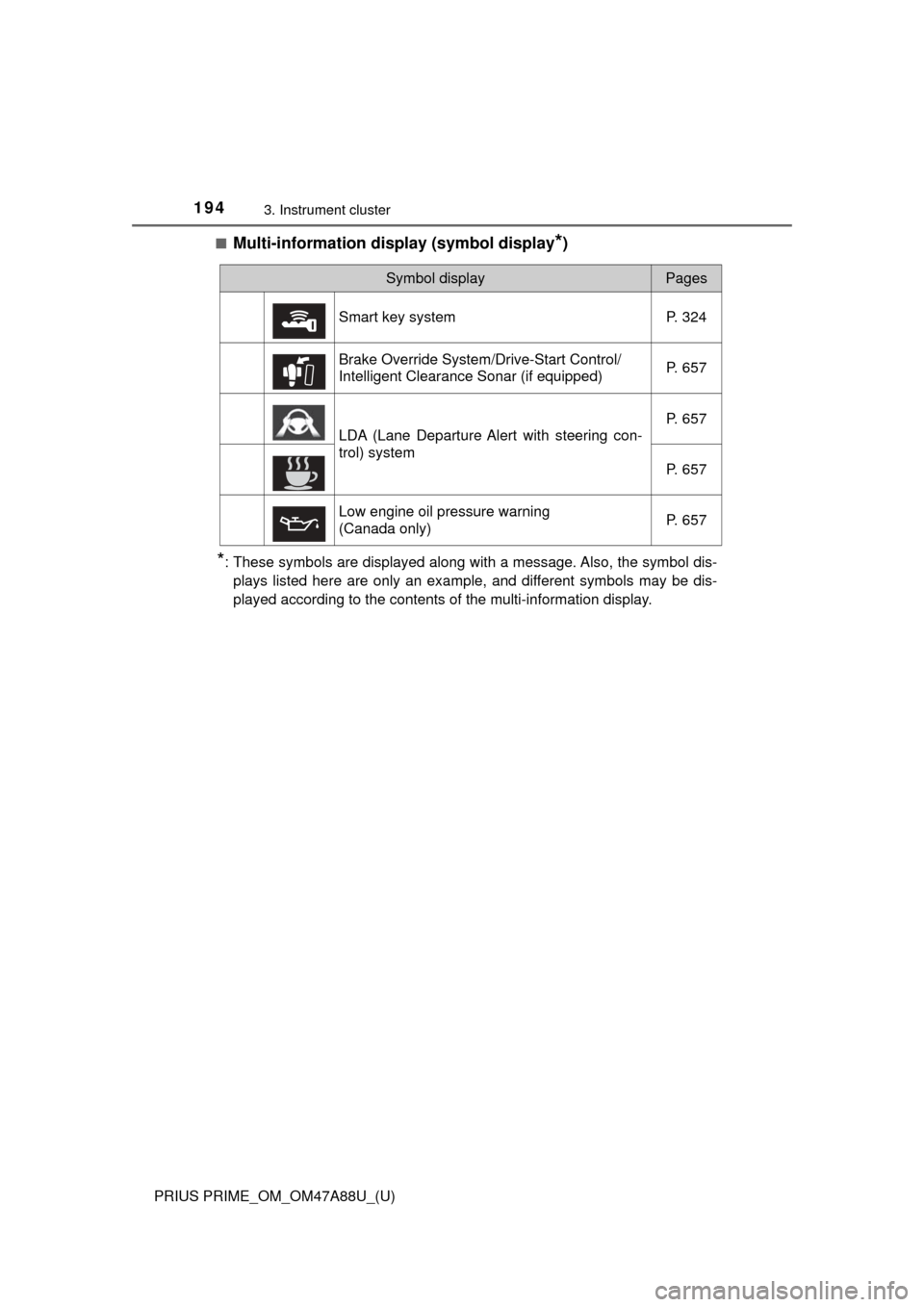
■Multi-information display (symbol display*)
*: These symbols are displayed along with a message. Also, the symbol dis-plays listed here are only an example, and different symbols may be dis-
played according to the contents of the multi-information display.
Symbol displayPages
Smart key system P. 324
Brake Override System/Drive-Start Control/
Intelligent Clearance Sonar (if equipped) P. 657
LDA (Lane Departure Alert with steering con-
trol) systemP. 657
P. 657
Low engine oil pressure warning
(Canada only) P. 657
Page 261 of 784
261
PRIUS PRIME_OM_OM47A88U_(U)
4
Operation of
each component
4-1. Key information
Keys .................................. 262
4-2. Opening, closing and locking the doors
Side doors ......................... 267
Back door .......................... 273
Smart key system ............. 278
4-3. Adjusting the seats Front seats ........................ 287
Rear seats......................... 289
Head restraints.................. 291
4-4. Adjusting the steering wheel and mirrors
Steering wheel .................. 294
Inside rear view mirror ...... 296
Outside rear view mirrors ............................. 298
4-5. Opening and closing the windows
Power windows ................. 300
Page 262 of 784
262
PRIUS PRIME_OM_OM47A88U_(U)
4-1. Key information
Keys
The following keys are provided with the vehicle.Electronic keys
• Operating the smart key system (→P. 278)
• Operating the wireless remote control function
• Operating the Remote Air Con- ditioning System ( →P. 509)
Mechanical keys
Key number plate
Locks all the doors ( →P. 268)
Unlocks all the doors ( →P. 268)
Opens the side windows
*
( → P. 268)
Operates Remote Air Condi-
tioning System ( →P. 509)
Sounds the alarm ( →P. 263)
*: This setting must be customized at your Toyota dealer.
The keys
1
2
3
Wireless remote control
1
2
3
4
5
Page 263 of 784

PRIUS PRIME_OM_OM47A88U_(U)
2634-1. Key information
4
Operation of each component
To take out the mechanical key,
slide the release lever and take
the key out.
The mechanical key can only be
inserted in one direction, as the
key only has grooves on one side.
If the key cannot be inserted in a
lock cylinder, turn it over and re-
attempt to insert it.
After using the mechanical key, store it in the electronic key. Carry the
mechanical key together with the electronic key. If the electronic key bat-
tery is depleted or the entry function does not operate properly, you will
need the mechanical key. (→P. 690)
■Panic mode
■ If you lose your mechanical keys
New genuine mechanical keys can be made by your Toyota dealer using
another mechanical key and the key number stamped on your key number
plate. Keep the plate in a safe place such as your wallet, not in the vehicle.
■ When riding in an aircraft
When bringing an electronic key onto an aircraft, make sure you do not press
any buttons on the electronic key while inside the aircraft cabin. If you are
carrying an electronic key in your bag etc., ensure that the buttons are not
likely to be pressed accidentally. Pressing a button may cause the electronic
key to emit radio waves that could interfere with the operation of the aircraft.
Using the mechanical key
Release
lever
When is pressed for longer than
about one second, an alarm will sound
intermittently and the vehicle lights will
flash to deter any person from trying to
break into or damage your vehicle.
To stop the alarm, press any button on the
electronic key.
IO41PH003
Page 264 of 784

264
PRIUS PRIME_OM_OM47A88U_(U)
4-1. Key information
■Electronic key battery depletion
●The standard battery life is 1 to 2 years.
● If the battery becomes low, an alarm will sound in the cabin and a message
will be displayed on the multi-information display when the hybrid system
stops.
● As the electronic key always receives radio waves, the battery will become
depleted even if the electronic key is not used. The following symptoms indi-
cate that the electronic key battery may be depleted. Replace the battery
when necessary. ( →P. 627)
• The smart key system or the wireless remote control does not operate.
• The detection area becomes smaller.
• The LED indicator on the key surface does not turn on.
You can replace the battery by yourself ( →P. 627). However, as there is a
danger that the electronic key may be damaged, it is recommended that
replacement is carried out by your Toyota dealer.
● To avoid serious deterioration, do not leave the electronic key within 3 ft.
(1 m) of the following electrical appliances that produce a magnetic field:
•TVs
• Personal computers
• Cellular phones, cordless phones and battery chargers
• Table lamps
• Induction cookers