2017 TOYOTA MIRAI change time
[x] Cancel search: change timePage 174 of 464
1745-2. Driving procedures
MIRAI_OM_USA_OM62023U
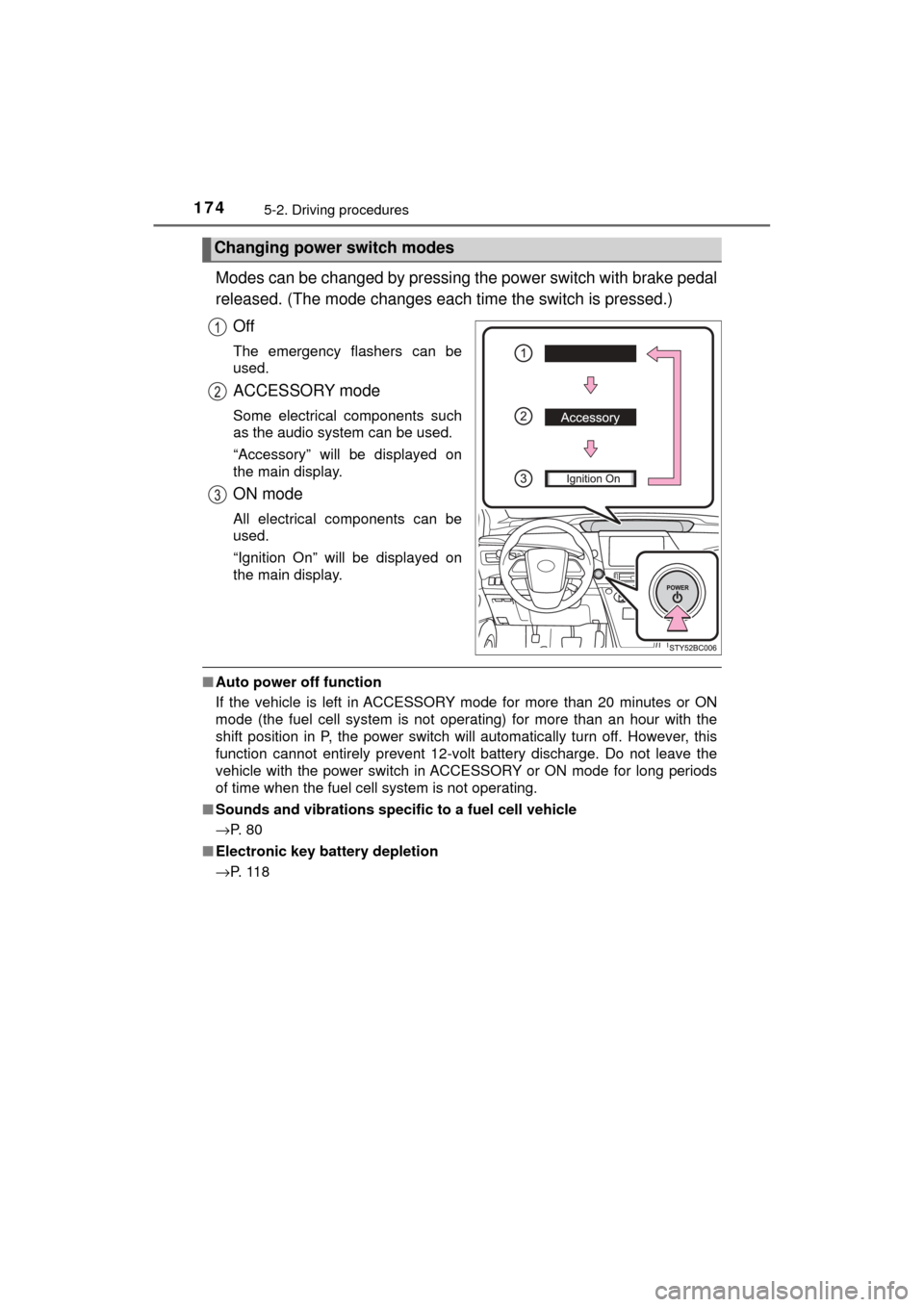
Modes can be changed by pressing the power switch with brake pedal
released. (The mode c hanges each time the switch is pressed.)
Off
The emergency flashers can be
used.
ACCESSORY mode
Some electrical components such
as the audio system can be used.
“Accessory” will be displayed on
the main display.
ON mode
All electrical components can be
used.
“Ignition On” will be displayed on
the main display.
■ Auto power off function
If the vehicle is left in ACCESSORY mode for more than 20 minutes or ON
mode (the fuel cell system is not operating) for more than an hour with the
shift position in P, the power switch will automatically turn off. However, this
function cannot entirely prevent 12-volt battery discharge. Do not leave\
the
vehicle with the power switch in ACCESSORY or ON mode for long periods
of time when the fuel cell system is not operating.
■ Sounds and vibrations specific to a fuel cell vehicle
→P. 8 0
■ Electronic key battery depletion
→P. 1 1 8
Changing power switch modes
Page 177 of 464
1775-2. Driving procedures
5
Driving
MIRAI_OM_USA_OM62023U■
If the electronic key battery is depleted
→P. 353
■ Operation of the power switch
When operating the power switch, one short, firm press is enough. If the
switch is pressed improperly, the fuel cell system may not start or the power
switch mode may not change. It is not necessary to press and hold the
switch.
■ Automatic P position selection function
●When the shift position is other than P, pressing the power switch with the
vehicle stopped completely will cause the shift position to change to P auto-
matically, and then the power switch will turn off.
● When turning the power switch off with the shift position other than P, firmly
depress the brake pedal and confirm that the shift position* has changed to
P before slowly releasing the brake pedal.
*: Even after the instrument panel display has been turned off, the shift
position indicator will continue to be displayed for several seconds.
■ If the shift control system malfunctions
The power switch will not be able to be turned off. In this occurs, the switch
can be turned off by applying the parking brake.
If the system malfunctions, have your vehicle serviced by your Toyota dealer
immediately.
■ If the smart key system has been d eactivated in a customized setting
→P. 436
WARNING
■ When starting the fuel cell system
Always start the fuel cell system while sitting in the driver’s seat. Do not
depress the accelerator pedal while starting the fuel cell system under any
circumstances.
Doing so may cause an accident resulting in death or serious injury.
■ Stopping the fuel cell system in an emergency
If you want to stop the fuel cell system in an emergency while driving the
vehicle, press and hold the power switch for more than 2 seconds, or press
it briefly 3 times or more in succession. ( →P. 361)
However, do not touch the power switch while driving except in an emer-
gency. Turning the fuel cell system off while driving will not cause loss of
steering or braking control, however, power assist to the steering will be
lost. This will make it more difficult to steer smoothly, so you should pull over
and stop the vehicle as soon as it is safe to do so.
Page 185 of 464
1855-2. Driving procedures
5
Driving
MIRAI_OM_USA_OM62023U
Turn signal lever
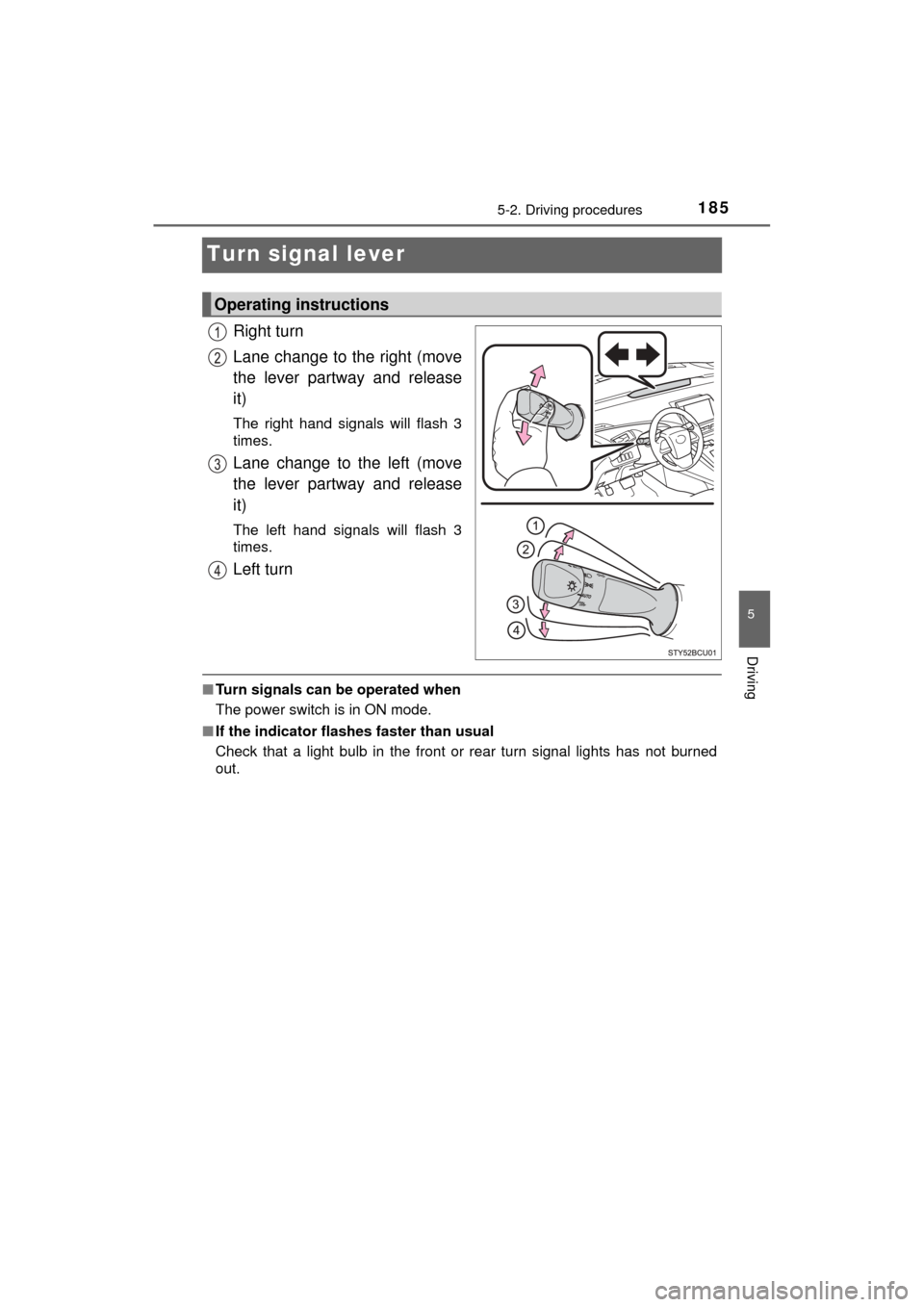
Right turn
Lane change to the right (move
the lever partway and release
it)
The right hand signals will flash 3
times.
Lane change to the left (move
the lever partway and release
it)
The left hand signals will flash 3
times.
Left turn
■Turn signals can be operated when
The power switch is in ON mode.
■ If the indicator flashes faster than usual
Check that a light bulb in the front or rear turn signal lights has not burned
out.
Operating instructions
Page 206 of 464
2065-5. Using the driving support systems
MIRAI_OM_USA_OM62023U
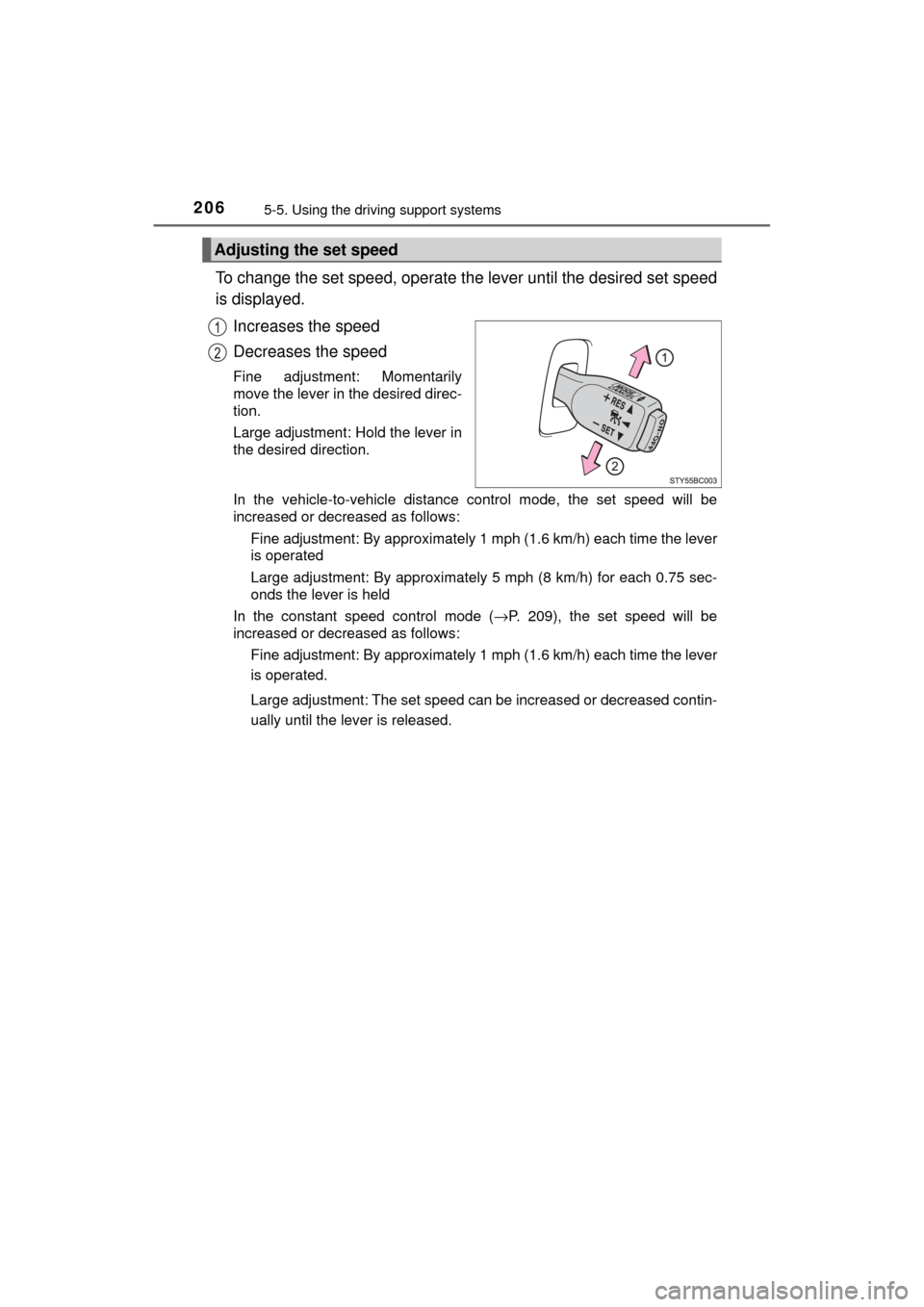
To change the set speed, operate the lever until the desired set speed
is displayed.
Increases the speed
Decreases the speed
Fine adjustment: Momentarily
move the lever in the desired direc-
tion.
Large adjustment: Hold the lever in
the desired direction.
In the vehicle-to-vehicle distance control mode, the set speed will be
increased or decreased as follows: Fine adjustment: By approximately 1 mph (1.6 km/h) each time the lever
is operated
Large adjustment: By approximately 5 mph (8 km/h) for each 0.75 sec-
onds the lever is held
In the constant speed control mode ( →P. 209), the set speed will be
increased or decreased as follows:
Fine adjustment: By approximately 1 mph (1.6 km/h) each time the lever
is operated.
Large adjustment: The set speed can be increased or decreased contin-
ually until the lever is released.
Adjusting the set speed
Page 220 of 464

2205-5. Using the driving support systems
MIRAI_OM_USA_OM62023U■
Conditions in which the function may not operate correctly
In the following situations, the camera sensor may be unable to recognize
lane markers causing the lane departure warning function to operate incor-
rectly. However, this does not indicate a malfunction.
●When there are shadows on the road running parallel with lane markers, or
if a shadow covers the lane markers
● When driving through an area with no lane markers, such as a toll booth, a
crossing or before a ticket checkpoint
● When the lane markers are broken, Botts’ dots (raised pavement markers)
or stones
● When lane markers are obscured or partially obscured by sand, dirt, etc.
● When driving on a road surface that is wet due to rain, previous rainfall,
standing water, etc.
● When the lane markers are yellow (These may be more difficult for the sys-
tem to recognize compared to white markers.)
● When the lane markers are on a curb, etc.
● When driving on a particularly bright road surface, such as concrete
● When driving on a road surface that is bright due to reflected light
● When driving in a location where the light level changes rapidly, such as the
entrance to or exit from a tunnel
● When sunlight or the headlights of oncoming vehicles are shining directly
into the camera lens
● When driving on roads that are branching or merging
● When driving on winding roads or roads that are uneven
● When driving on rough or unpaved roads
● When driving on a sharp curve
● When lane markers are extremely narrow or extremely wide
● When the vehicle leans to one side an unusual amount due to a heavy load
or improper tire inflation pressure
● When the following distance between your vehicle and the vehicle ahead is
extremely short
● When the vehicle experiences strong up-and-down motion such as when
driving on an extremely rough road or on a seam in the pavement
● When headlight brightness at nighttime is reduced due to dirt on the lenses,
or when the headlights are misaligned
■ When changing the tires
Depending on the tires used, sufficient performance may not be maintainable.
Page 222 of 464
2225-5. Using the driving support systems
MIRAI_OM_USA_OM62023U
NOTICE
■To prevent damage to or incorr ect operation of the LDA system
Observe the following to ensure that the LDA system functions correctly.
● Do not modify the headlights or attach stickers to the surface of the lights.
● Do not modify the suspension.
If any suspension parts need to be replaced, contact your Toyota dealer.
● Do not install or place anything on the hood or the grille. Also, do not install
a grille guard (bull bars, kangaroo bar, etc.).
● If your windshield needs repairs, contact your Toyota dealer.
■ Camera sensor
Observe the following to ensure that the LDA system functions correctly.
● Keep the windshield clean at all times.
Performance could be affected if the windshield is dirty, or if raindrops,
condensation or ice are adhering to the windshield.
● Do not spill liquid onto the camera sensor.
● Do not attach window tinting to the windshield.
● Do not install an antenna in front of the camera lens.
● If the windshield area in front of the camera sensor is fogged up, use the
windshield defogger to remove the fog from that area. ( →P. 261)
When it is cold, using the heater with air blowing to the feet may allow the
upper part of the windshield to fog up. This will have a negative effect on
the images.
● Do not scratch the camera lens, or let it get dirty.
When cleaning the inside of the windshield, be careful not to get any glass
cleaner, etc., on the lens. Also, do not touch the lens.
For lens repair, contact your Toyota dealer.
● Do not change the installation position or direction of the camera sensor or
remove it.
The direction of the camera sensor is precisely adjusted.
● Do not subject the camera sensor to strong impact or force, and do not
disassemble the camera sensor.
● If the windshield needs to be replaced, contact your Toyota dealer.
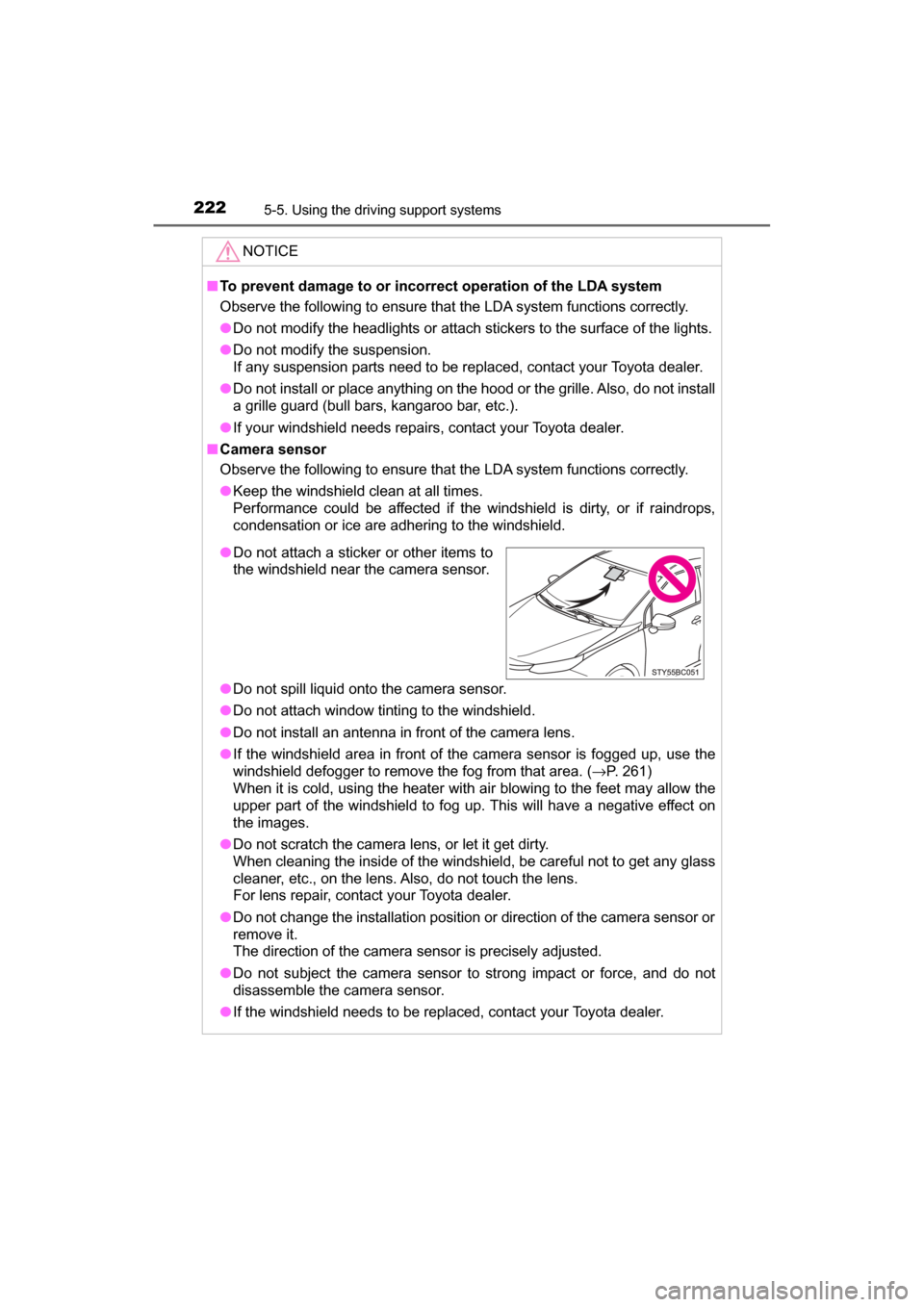
●Do not attach a sticker or other items to
the windshield near the camera sensor.
Page 230 of 464

2305-5. Using the driving support systems
MIRAI_OM_USA_OM62023U●
The following situations may occur during use.
• Depending on the shape of the obstacle and other factors, the detection
distance may shorten, or detection may be impossible.
• Obstacles may not be detected if they are too close to the sensor.
• There will be a short delay between obstacle detection and display. Even at slow speeds, there is a possibility that the obstacle will come within the
sensor’s detection areas before the display is shown and the buzzer
sounds.
• Thin posts or objects lower than the sensor may not be detected when approached, even if they have been detected once.
• It might be difficult to hear beeps due to the volume of audio system or air flow noise of the air conditioning system.
■ If “Clean Parking Assist Sensor” is displayed on the multi-information
display
A sensor may be dirty or covered with snow or ice. In such cases, if it is
removed from the sensor, the system should return to normal.
Also, due to the sensor being frozen at low temperatures, a malfunction dis-
play may appear or an obstacle may not be detected. If the sensor thaws out,
the system should return to normal.
■ If “Parking Assist Malfunction” is displayed on the multi-information dis-
play
Depending on the malfunction of the sensor, the device may not be working
normally.
Have the vehicle inspected by your Toyota dealer.
■ Certification for the intuitive parking assist
This device complies with Part 15 of the FCC Rules. Operation is subject to
the following two conditions: (1) This device may not cause harmful interfer-
ence, and (2) This device must accept any interference received, including
interference that may cause undesired operation.
■ Customization
Settings (e.g. buzzer sounds volume) can be changed.
(Customizable features: →P. 228, 440)
WARNING
■When using the intuitive parking assist
Observe the following precautions.
Failing to do so may result in the vehicle being unable to be driven safely
and possibly cause an accident.
● Do not use the sensor at speeds in excess of 6 mph (10 km/h).
● The sensors’ detection areas and reaction times are limited. When moving
forward or reversing, check the areas surrounding the vehicle (especially
the sides of the vehicle) for safety, and drive slowly, using the brake to
control the vehicle’s speed.
● Do not install accessories within the sensors’ detection areas.
Page 239 of 464
2395-5. Using the driving support systems
5
Driving
MIRAI_OM_USA_OM62023U■
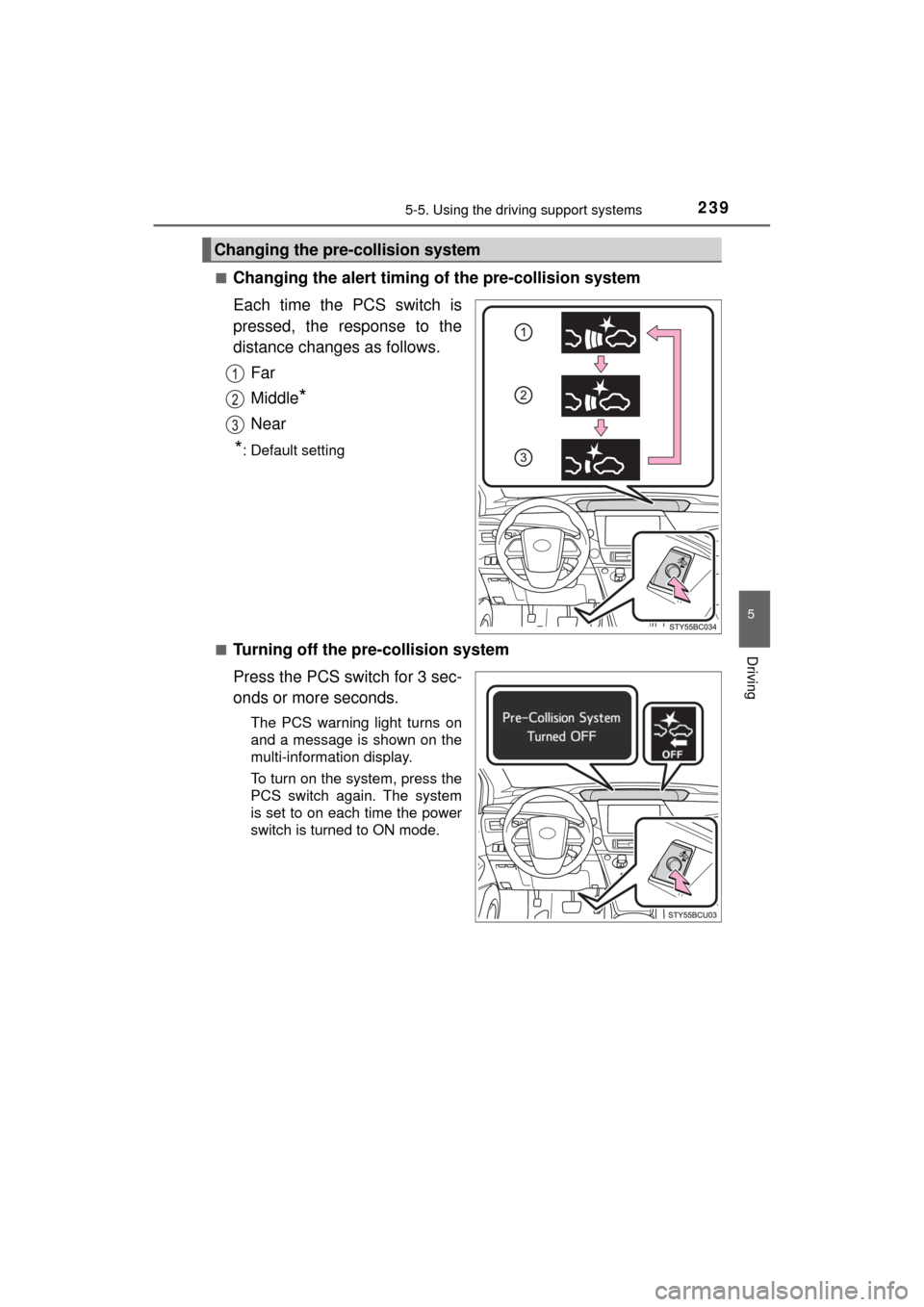
Changing the alert timing of the pre-collision system
Each time the PCS switch is
pressed, the response to the
distance changes as follows.
Far
Middle
*
Near
*: Default setting
■
Turning off the pre-collision system
Press the PCS switch for 3 sec-
onds or more seconds.
The PCS warning light turns on
and a message is shown on the
multi-information display.
To turn on the system, press the
PCS switch again. The system
is set to on each time the power
switch is turned to ON mode.
Changing the pre-collision system